

Call of Duty: Modern Warfare 3 Update 1.057 Released for COD HQ UI Change

Not only is the Black Ops 6 pre-load starting today, but Activision has also pushed out Call of Duty: Modern Warfare 3 update 1.057, which brings in the major UI changes to Call of Duty HQ! This is a huge download, though its goal is make the game file of each Call of Duty game more manageable.
Call of Duty: Modern Warfare 3 Update 1.057 Patch Notes:
Download Size: 52GB (PS5)
Update: Activision has just released patch notes for Multiplayer and Warzone for the October 21 title update.
Global
Stability & Performance
- Addressed niche causes of server-side stability and performance degradation.
Customization
- Corrected the colors of the WZ Season 6 Gold, Platinum, and Diamond Camos.
- Corrected the assets displayed for the Light Your Outer Fire Emblem and The Tinker Calling Card.
- Corrected the icon for the Flit and Float Camo in the Gunsmith.
- Fixed an issue causing the Revolution Rising Calling Card to be incorrectly animated.
- Fixed a placeholder image for the American Gothic Blueprint in the Store.
Multiplayer
Playlists
As the Call of Duty: Modern Warfare III live season ends, the following Featured Playlists are now available permanently.
- Small Map Mosh Pit (+ Hardcore)
- All the Shipments! 24/7 (+ Hardcore)
- Party Modes
- Team Gun Game
- Domination
- Hardpoint
- Team Deathmatch
- Kill Confirmed
- Capture the Flag
- One in the Chamber
- Havoc
- Minefield
- G3T_H1GH3R
- Mosh Pit
- Call of Duty: Modern Warfare 2 (2009) Maps only.
- 10v10 Mosh Pit
- War Mode
- Cutthroat
- Blueprint Gunfight
- Ground War & Invasion
In addition to the day-one Modes available in Quick Play, you can add the following permanent Playlists to your filters.
- Capture the Flag
- Demolition
- Cyber Attack (+ Hardcore)
- Escort
- Defuse or Destroy
- Gun Game
- Infected
- Vortex Mosh Pit
UIX
- Bug Fixes
- Added a preview model for the Enhanced Vision Goggles to the Loadout editor.
- Fixed an issue allowing locked Loading Screens to be set as Favorites.
- Fixed an issue causing the Tectonic Herald Light Barrel name to be incorrect in Killcams.
Gameplay
- Reduced the likelihood of spawning near teammates in Kill Confirmed to align with the spawn weights of Team Deathmatch.
- Fixed an issue allowing Equipment to be thrown while being executed.
- Fixed an issue causing loss of control after picking up a Guardian-SC or Remote Turret.
Maps
- Subbase
- Fixed an exploit allowing players to exit the playable area near the North Dock.
Weapons & Attachments
Shotguns
- Reclaimer 18
- Decreased shot termination distance from 30.5m to 26.7m (-13%).
- Decreased shot termination distance in water from 7.6m to 5.1m (-33%).
- Increased aim down sight spread by 40%.
- Decreased far-medium damage from 35 to 25 (-29%).
Handguns
- .50 GS (MWII)
- Increased minimum damage from 55 to 68 (+24%).
Killstreaks
- Juggernaut Recon
- Fixed an exploit causing Kills to award 2 Score in Free-for-All mode.
- Missile Drone
- Adjusted drone flight path on Invasion to avoid colliding with buildings.
- Gunship
- Fixed an issue causing the visual overlay to persist after destruction by Stormender.
Warzone
CUSTOMIZATION
- Corrected the colors of the WZ Season 6 Gold, Platinum, and Diamond Camos.
- Corrected the assets displayed for the Light Your Outer Fire Emblem and The Tinker Calling Card.
- Corrected the icon for the Flit and Float Camo in the Gunsmith.
- Fixed an issue causing the Revolution Rising Calling Card to be incorrectly animated.
- Fixed a placeholder image for the American Gothic Blueprint in the Store.
WEAPONS
Shotguns
RECLAIMER 18
- Akimbo
- Max Damage Range decreased to 2.54 meters, down from 3.81.
- Max Damage decreased to 35, down from 45.
- Near-Mid Damage decreased to 15, down from 20.
COD: Modern Warfare 3 Update 1.057 COD HQ APP Changes
Greater File Control: Keep the titles and individual modes that you’re currently playing and uninstall the rest to free up storage space.
With Black Ops 6 on the way, Call of Duty will take up more space on your device if you choose to keep all of your previous content installed since a new game is being added on top of your existing files.
Prepare for the Black Ops 6 download and future Call of Duty updates by actively managing what you have installed. To free up additional space, you can remove content that you’re no longer playing, including full titles and individual modes (e.g. uninstalling single player once you’ve finished the Campaign).
Players can uninstall content within the Call of Duty user interface or via their platform’s install manager. After content is removed, you can reinstall it at any point if you wish to return to those games or modes in the future.
Players will be able to take a tour of the new Call of Duty on October 21 after downloading the pre-launch update.
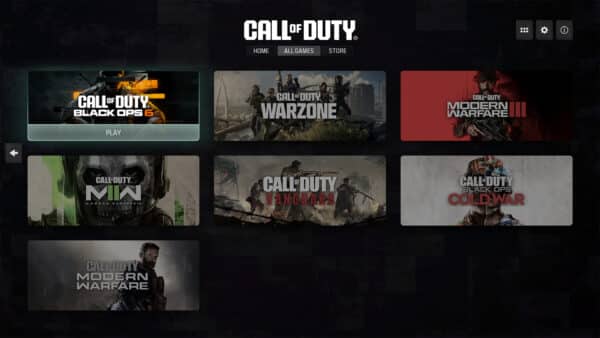
Meet the New UI: Access featured titles and modes on your Home page, previous titles under All Games, and the latest purchasable content under Store.
At launch, the new interface will include three main hubs: Home, All Games, and Store. Each hub displays all of its content on one page, eliminating the need to scroll. Here’s a rundown of what you’ll find in each section.
Home
The new UI features a landing page that brings together a variety of Call of Duty content. The Home tab showcases various tiles which each serve different purposes:
- Game Tiles – Unlike the previous Call of Duty UI, players will now be able to directly access games, which have their own self-contained user interfaces. The newest annual title – Black Ops 6 starting on October 25 – and Call of Duty: Warzone will be shown on the Home tab. Other games are accessible via the All Games tab.
- Featured Tile – This tile can showcase a variety of top content such as modes, maps, and Battle Passes depending on what is new and most relevant at the time.
- What’s Hot Row – Similar to today’s What’s Hot row, these tiles highlight new playlists, bundles, etc. and give players easy access to that content.
- Last Played Tile – This tile gives players quick access to what they played most recently. When you first log in to the new interface, this tile will be a fourth What’s Hot option until you’ve played a game within the UI
Depending on your preference, you can access game content through both the Game Tiles and any modes or playlists that are elevated to the Featured Tile or What’s Hot Row.
All Games
Cycle to the All Games tab to view your full library of Call of Duty titles dating back to Call of Duty: Modern Warfare® (2019). Cross-launch into owned titles, purchase unowned titles, and manage your installations from here.
Store
This tab will give players a path to access the Call of Duty in-game stores and showcase any other top purchasable content. The full Call of Duty in-game stores will be accessible at the game-level of the UI within Black Ops 6, Call of Duty: Warzone, etc. This tab sends players to those full stores.
New COD UI Phases
Phase 1: Pre-Black Ops 6 Launch (October 21 – October 24)
Initially, there will be a transition period from October 21 through 24 when the new UI goes live before Black Ops 6 launches.
During these few days, Call of Duty: Modern Warfare III and Call of Duty: Warzone will be the primary Game Tiles on the Home tab and players will cross-launch into those games. Modern Warfare III will retain its legacy UI. Call of Duty: Warzone will retain its legacy UI until the Season 01 update.
The Store tab will direct players into the full Modern Warfare III and Call of Duty: Warzone in-game stores via cross-launch.
Phase 2: Post-Black Ops 6 Launch (October 25 – )
When Black Ops 6 launches, it will replace Modern Warfare III, making Black Ops 6 and Call of Duty: Warzone the primary Game Tiles on the Home tab. Players will be able to instantly access Black Ops 6 and cross-launch into Call of Duty: Warzone.
Players who wish to continue playing Modern Warfare III can access it via cross-launch on the All Games tab or the Last Played Tile if that’s the content you’ve played most recently.
For players who have purchased Black Ops 6, the Store tab will now direct you to the full Black Ops 6 in-game store.
Black Ops 6 will have its own individual user interface designed to easily get players into the modes and content they want to play. Players can access Campaign, Multiplayer, and Zombies from the Black Ops 6 game UI. Look out for new updates to the gunsmith, playlist selection, and social showcase within Black Ops 6!
Phase 3: Season 01
When Season 01 begins, the UI will enter its fully realized state. Black Ops 6 and Call of Duty: Warzone will continue to be the primary Game Tiles on the Home tab and players will be able to instantly access both Black Ops 6 and Call of Duty: Warzone for a faster, more direct path to gameplay.
The Store tab will now direct all players to the full Black Ops 6 and Call of Duty: Warzone in-game stores based on what you have installed.
A Battle Pass tab will be introduced in Season 01 with similar functionality as the Store tab, directing players to the full Battle Pass within Black Ops 6 or Call of Duty: Warzone.
With the Season 01 update, Call of Duty: Warzone will also have its own individual user interface with improvements similar to the Black Ops 6 UI.
Changes to Features and Settings Management
Players will be able to manage some global settings at the top Call of Duty level of the UI that apply to all games. Settings in this bucket will be automatically imported from your previous title.
Other settings that are more game-specific can be managed at the individual title levels of the UI (e.g. gameplay settings related to new mechanics like Omnimovement). Settings at this level will not be automatically imported from prior games.
Once the official patch notes are out, we’ll update the article to reflect it.
More Call of Duty Reading:
- Report: Black Ops 6 Kuwait Ban Reason Mentions Saddam Hussein Portrayed in a “Heroic Image” and More
- Call of Duty: Black Ops 6 Intel on Perks – Here’s What the Perks, Specialties and Wildcards Can Do
- Black Ops 6 Won’t Feature Weekly Challenges, Zombies to Have “More Support for In-Game Events”
[Source: Call of Duty, (1, 2)]
This website contains affiliate links. If you click a link and make a purchase, we may earn a commission at no additional cost to you. This helps support our work. Learn more on our affiliate page.

I cant find MW3 zombies anymore after the update today. It just keeps showing me Blackops 6. Can you help me find the zombies game mode?
Got to download bo6 multiplayer
Same