

SCUF Envision Pro Review – Supreme Customization Options on PC

[summaraize]
If you’re in the market for a pro-level video game controller, but mostly or only game on PC, your best bet was typically to piggyback off of something made with consoles in mind first. But Corsair, courtesy of their SCUF company, has produced the Envision Pro, a PC-centered pro-level controller that they aim to cater to the competitive gamer who wants the ease of use that comes with controllers, mixed with the customization and options you can really only get by using PCs. Our Envision Pro review put the controller through its paces to let you know if this one is worth the asking price.

Pro for Just a Few Dollars More
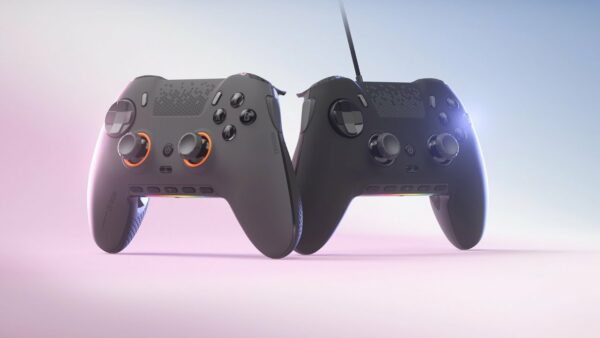
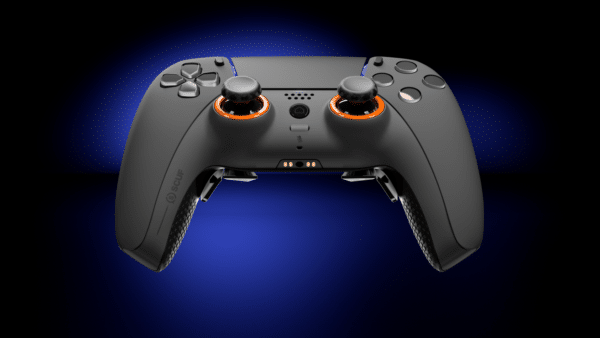
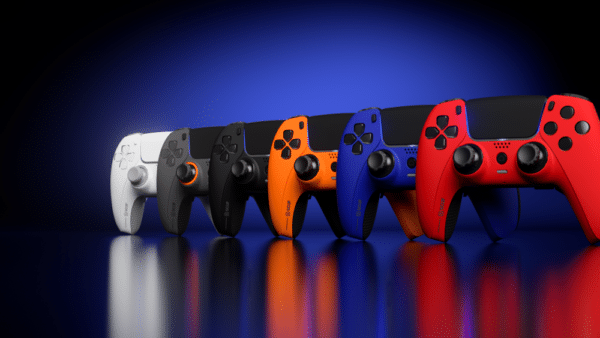
The Envision is actually available in two flavors: one simply named the Envision, and the unit we received, the Envision Pro. While both controllers sport Omron switches, interchangeable thumb sticks, swappable face plates, four rear paddles, two side buttons, a row of G keys along with an RGB LED strip, the Pro model has a couple of additions. First, a switch on the back can toggle between wired and wireless via an included proprietary USB-A dongle; only the Pro model has wireless functionality. Additionally, only the Pro version has adjustable shoulder triggers, as well as textured grips along the bottom. The inclusion of wireless functionality alone might be worth the upgrade to the Envision Pro, and thankfully the price difference between the two is a mere $20.
The Envision Pro weighs 289 grams, which is lighter than either Sony’s DualSense Edge (325g), or Microsoft’s Elite Series controller (345g give or take 15g depending on attached accessories). While we’re splitting hairs on this metric, theoretically the slightly lighter heft means you can play for longer sessions without fatigue of your wrists or arms. Then again, if you’re playing a game so long that the weight of the controller factors in, perhaps a break wouldn’t be such a bad thing!

Buttons Galore, Spare Parts Too
The Envision Pro we received has a Call of Duty: Black Ops 6 faceplate. Otherwise, it is the standard Envision Pro model. This means Omron mechanical switches can be found on the face buttons, d-pad, side action paddles (SCUF refers to these as SAX), and two of the four rear paddles. Both shoulder triggers feature a switch that toggles between a full analog range of motion, good for use in driving games for example, and mouse-like clicking action which would help in games that require a quicker press of the trigger, such as shooting games. While this option is expected in any pro-level controller, the simple switch mechanism doesn’t allow for multiple levels of adjustment, which at the very least both Sony and Microsoft’s pro-level controllers offer.
In the box is everything you need to get started. There’s a 2m/6ft-long, braided USB-A to USB-C cable, which feels quite premium, along with a USB-C to USB-A adapter for those who may not have a free USB-A port, like anyone on a laptop made within the past couple of years. The aforementioned USB-A wireless transceiver dongle is included, alongside two extra thumbsticks of varying height, two sets of blank paddles should you choose to not use some, and an inner paddle removal tool. Finally, of course, the controller is here, which has a USB-C port for charging/data if using the wired mode, as well as a 3.5mm audio output jack for those of you who want analog audio.

Hefty, Balanced, Premium
The Envision Pro has a great feel to it, and out of the box the thumbsticks feel extremely smooth. The extra thumbsticks feature one that is shorter and concave, for performing quick moves even faster, and a taller, domed thumbstick for a wider range of motion and thus, more accuracy. Each thumbstick makes a slight click-like sound when moved from the zeroed-out spot, which can help to indicate when the stick has actually been moved audibly. Other pro controllers do this as well. However, these are also not Hall Effect thumbsticks – regular potentiometers are used instead. I’m sure they are high quality potentiometers that won’t wear out too quickly, but still, stick drift will be a very real risk after a long time. It is inevitable with this kind of tech. So far, for the month or so we’ve had our controller, there is no evidence of that, but then again this is the kind of problem that doesn’t surface for years in typical usage scenarios.
As for the paddles, there are four on the backside of the Envision Pro, along with the SAX buttons mentioned earlier. The layout of the four rear paddles is such that, for average-sized hands, your index and middle fingers rest on the shoulder buttons and triggers, while your ring/third fingers have access to two paddles apiece – moving those fingers towards yourself will depress P1 and P4, while moving them away from you will depress P2 and P3. P2 and P3 feel much like the Omron switches, and they can be activated from multiple angles. Meanwhile, the SAX buttons are probably the ones that get the most used to. With your hands naturally resting on the controller, you simply shift the lower portion of your index fingers to trigger these, which also have a mouse-like switch. While they are easy to trigger, during more hectic moments of some games involving the shoulder buttons might cause accidental presses. It shouldn’t take long for you to adapt, however, and it’s easy to find a use case that you might be able to utilize, like mapping more mundane actions such as toggling an in-game flashlight until you get used to how it feels to trigger the SAX buttons.

Update Firmware, Customize, and More With iCUE
The iCUE software is required to do any sort of mapping or customization to the Envision Pro other than the hardware mods that can be done. Since this is the hub for all Corsair products, it almost feels like overkill needing something like this for just a controller, however the application is good at only downloading the modules you need for the products you have connected. This keeps the installation pretty lightweight. From here, you can update firmware on the USB dongle and the controller itself. You can adjust the lighting effects, button mappings, thumbstick deadzones, trigger deadzones, and vibration intensity. You can also turn on device memory mode if plugged in via USB, which lets you save one profile which can be used on another PC that does not have iCUE software installed. This can be handy if you have multiple computers you play on, and don’t want to be bothered to setup your same settings or be bothered with importing those settings and then worrying about having the latest version of your settings.
Remapping the G keys and/or paddles is a straightforward process. You can have basically any button on the Envision Pro stand in for any other button, or customize them to perform other tasks such as control media playback, launch applications, disable the button(s) entirely, switch controller profiles, and of course macros, which can come in handy for games that require several steps to perform certain actions which can be easily repeated. This functionality can be very handy in many games.

Verdict
The SCUF Envision Pro is a great value for $199.99, but even more so when it’s on sale, which happens quite frequently at this time of year – as of publication, it’s currently discounted to $149.99 in some configurations. With a plethora of customization options (even including an RGB strip along the front), swappable face plates, mouse-like button response on many of the controller’s buttons, and the functional and convenient G keys, getting this controller tailored to your play style is straightforward and convenient.
Score: 8/10
Pros:
- Premium-built controller that feels made to last
- Four back paddles and two side-action buttons ensure you rarely need to take your thumbs off the sticks
- Programmable G keys grant access to even more functionality
- RGB light strip is there for those who love adding lights to all the things
- Swappable face plates and thumbsticks for even more customization
Cons:
- Thumbsticks are not Hall Effect – stick drift may be a concern in the far future
- Shoulder triggers only have two hardware customization levels
SCUF Envision Pro review unit was provided by the manufacturer. You can read MP1st’s review and scoring policy right here.
This website contains affiliate links. If you click a link and make a purchase, we may earn a commission at no additional cost to you. This helps support our work. Learn more on our affiliate page.

The best website i’ve come across for modded controllers is Moddedzone.com it’s a legitimate website not a scam and the controllers are a reasonable price.