G’AIM’E Review – Lightgun Fun on the Flatscreen
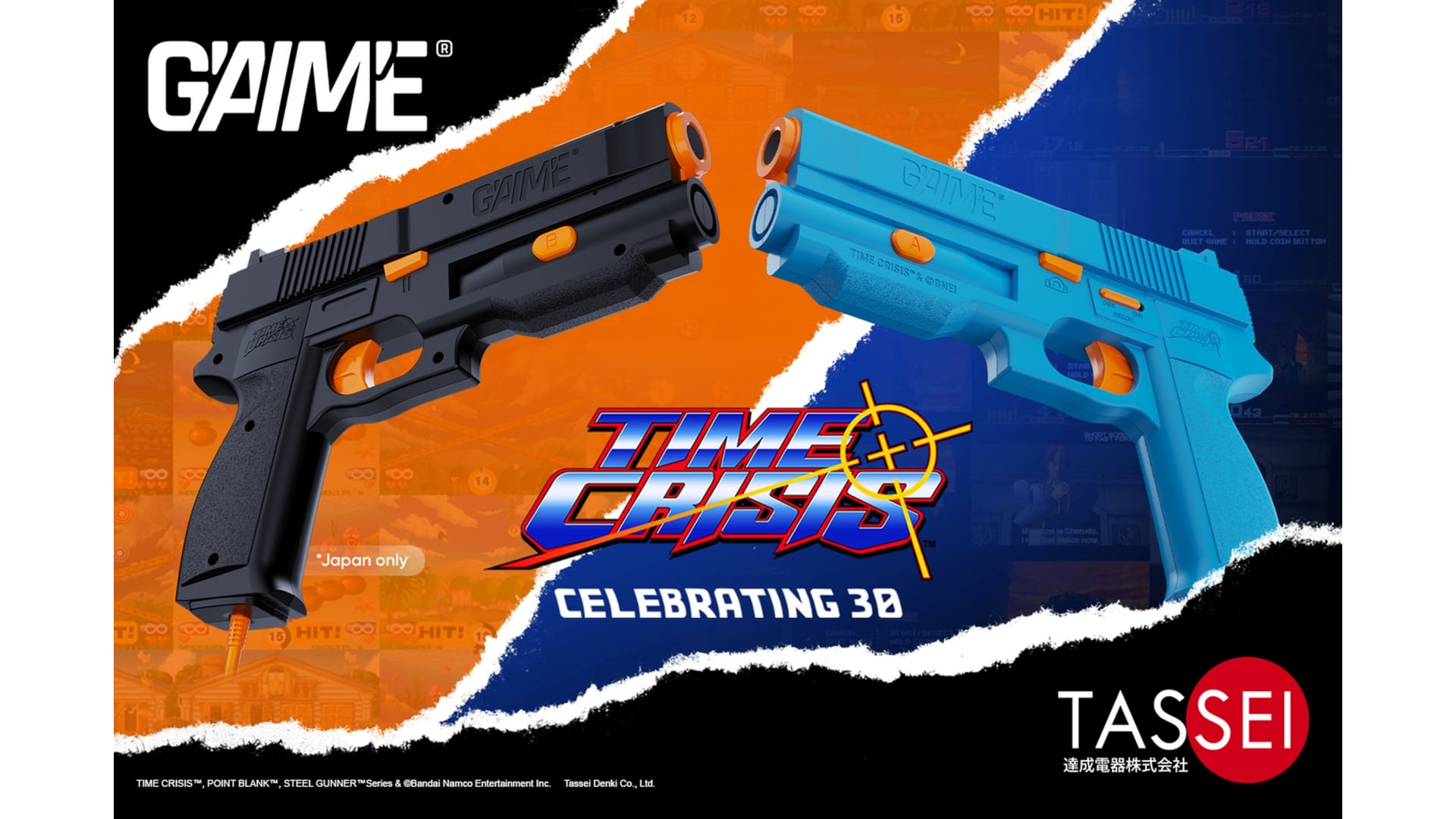
Time Crisis turned 30 this year. Tassei Denki, a manufacturer of licensed gaming equipment, saw fit to release the G’AIM’E (simply pronounced “game”), a dedicated lightgun home console, fully licensed by Bandai Namco Entertainment. It will work on any modern display – from your desktop monitor to your 150” projection screen.
MP1st was sent a unit for review, and after shooting everything that moved on the screen for a while, we have our review locked and loaded. Let’s see if G’AIM’E has brought lightgun gaming back!
Three Versions to Choose From
The G’AIM’E started as a Kickstarter, which hit its funding goal ten minutes after going live. It was available in three packages: Basic (~$100 USD), Premium (~$130 on Kickstarter, now $149.99 direct), and Ultimate (~$193 on Kickstarter, now $199.99 direct). The Premium and Ultimate versions include all four games: Time Crisis, Steel Gunner 1 & 2, and Point Blank. The Basic version only contains Time Crisis. Unfortunately, none of the units can officially have any other software installed, and there is no online connectivity in the unit to download or update anything. It is in that regard a lot like consoles and games from the era – what was shipped is the final product. In today’s world, where things are constantly released early and need updates all the damn time, this is somewhat refreshing to see.
We were shipped the Ultimate edition. Included in the box was two blue GAIME lightguns (the Japanese region units received black guns instead), the console, a pedal for Time Crisis, a 1-meter power cable, an AC adapter (the other two versions do not include this and expect you to simply use a spare USB-C charger you have lying around the house), a 1-meter HDMI cable, a pin badge, a diorama with a number of acrylic pieces to pop in to make a nice desk decoration, a Kickstarter-exclusive keychain with an etched gun design, and the instruction manual. The guns are made of plastic, but they have a great build quality to them. The textured grip on the pistols should hold up well over time. No doubt Tassei Denki used their manufacturing prowess to achieve a high-quality look and feel. Everything was tightly packed in a box that I am unlikely to ever be able to pack everything back up into correctly. The overall size of all the hardware isn’t too large, and I was able to pack it into a PS5 travel case without issue, so the portability of such a small console isn’t really a concern.

Dead-Simple Setup
Setup is pretty simple: you plug power and HDMI into the back, and at least one gun and/or pedal into the front. A press of the power button illuminates a blue LED, and the console turns on and immediately begins playing an instructional video, which shows you how to set the console up, as well as things to know about the calibration process. You can press a button on the gun to skip this, which begins the calibration. Calibration is simple, if perhaps a tad tedious. Each gun needs to be calibrated separately by aiming and shooting at eight targets, three times each, spaced at key locations on the screen. This calibration must be performed each time the console is turned on – unfortunately, the system does not seem capable of saving calibration data. This is annoying, to be sure, but it can usually be done in a minute or less. Once that’s done, the main menu loads. The feature set here is pretty bare-bones – you can shoot a game to load it into, recalibrate, or hold the B button to enter the settings screen. In settings, you can choose the difficulty level of each of the four games, as well as decide whether or not the crosshair will be shown on the screen. Oddly, while the difficulty level choices persist between reboots, the crosshair option does not.
If you’ve calibrated things correctly, then the games play exactly as you might remember them. Time Crisis is the standout title that everyone knows, though Point Blank (Gun Bullet in Japan) is sure to be fun in a group setting, as it is a mini-game shooter. Steel Battalion 1 & 2 have never had home releases before, and they support co-op play as well. Each game played without any slowdown or hiccups, indicating that the hardware inside the console is more than powerful enough to play these games. Considering the “newest” included game, Time Crisis, is 30 years old, it seems any basic hardware would have no problems playing any of these.

Fun! But No Modern Conveniences
Here is where one of my few issues with G’AIM’E shows up. While it’s great to see all four games in their original glory, there are no modern conveniences that you sort of expect to see in anything retro these days. There are no save states, no rewinds, nothing to let you play around with the game in ways that could never be done in the arcade setting the games were ripped from. You can at least pause the game, and of course, you can add as many credits as you want via the coin button. But even a single save state would be helpful, because the target audience for a product like this likely includes Millennials and Gen Xers – working professionals, people with kids, and other priorities and responsibilities. We won’t always have enough time to play through an entire campaign in one go. But, at least the console doesn’t use very much power at only 15W – so, if you need a break and want to come back to it later, you can pause the game and turn off your TV. Still, the lack of any real modern emulation capabilities is a shame.
Another issue that may affect some users is the physical space required for proper calibration. The lightguns use a camera at the end of the “barrel,” which feeds into some sort of “AI” program to determine where you are aiming at on the screen. The bigger your screen, the farther back you have to be to calibrate properly. A 20-inch screen needs at least 1.5 – 2 meters of space between you and the gun, while a 50-inch set will need you to stand back 2 – 3 meters, and anything at or above 65 inches will need you to stand back 3.5 – 4 or more meters. Considering the cables on the guns are only 3 meters long, it may require some creative wiring to achieve a good setup on larger displays. We can also confirm that standing too close to a screen causes aiming to fail. For example, in our house, we have a 55-inch OLED TV in a smallish “gaming room,” about the size of a regular bedroom. It proved to be too small of a space to fire accurately. Meanwhile, our 65-inch OLED in the much larger living room had more than enough space to fire accurately. So, just like with VR room-scale games, you’re going to want to ensure you have the space to play this.
Barebones features aside, the only thing that really matters is whether or not G’AIM’E successfully captures the fun that lightgun games offered in their heyday. To that end, the G’AIM’E is a massive success. The games play faithfully, the guns fire accurately, the pedal stays mostly in place. The recoil feature is great, as well – a nice rumble that lets you know you pulled the trigger far back enough, while not being so strong that it affects your aim. It’s a blast from the past that millions of people are familiar with, and one that everyone can quickly understand how to play. While it’s not exercise, you do have to stand while you play for the best results, something which can at least get you on your feet and moving a bit.

Intriguing Possibilities…
As an aside, seeing that the peripherals all use a standard USB-C connector got me curious, so I hooked up a lightgun to my computer. Windows 11 identified the gun as “GAIME v1,” with an icon of a webcam. But then I noticed something – my mouse cursor disappeared. When I moved the gun, the cursor moved as well. Extremely erratically, but it moved in the general direction that I moved the gun. I opened up a fresh Word document while typing this review out, and pressed each button on the gun. The A button entered a space character; the B button entered the letter ‘b.’ The coin button entered the letter ‘c,’ while the start button entered the letter ‘q.’ The Recoil switch naturally resulted in no input, because it is a literal switch that only the gun checks the state of. Finally, pulling the trigger sent a mouse-click signal, held down for as long as I did – Windows saw it as a touch pointer when I moved it while the trigger was held.
Does this mean lightgun games might be in the future on PC? Officially, that’s tough to say, but I think once these things get in the hands of the general public, it won’t be too long before they are reverse-engineered and other games are modified to be able to use them. I tried to use it in Dying Light: The Beast, and while the aiming was all over the place, it technically worked. It wasn’t playable at all, because the gun was calibrated for a 65” television which was now being played on the much smaller 17” screen of my ASUS gaming laptop, and calibration can only be performed on the console. Hooking the laptop back up to the TV made the aiming slightly less erratic, but it was still altogether unusable. Even if it were accurate, it’s not like I could move without access to my keyboard, mouse, or controller. Still, as a proof of concept, it worked with Windows out of the box. The pedal, on the other hand, was not detected by my computer at all.
Verdict
G’AIM’E is a fascinating product, serving as both a look into the past as well as the future. When calibrated properly, the guns work exactly as you remember them, if not better than before. It’s unfortunate that the console is so locked down, however, because the system does seem to have enough power to play other lightgun games. Despite the lack of modern emulation features, the four games on offer are challenging, play smoothly, and most importantly, are a blast to play! If you know someone who wishes they could play lightgun games again, G’AIM’E might make for a perfect gift this holiday season.
Pros
- Very portable
- Great build quality
- Simple setup
- Games play smoothly
- When properly calibrated, plays at least as well as in the arcades

Cons
- Calibration must be performed every boot
- No extra games can be added, software cannot be updated
- Needs a lot of space for larger screens
G’AIM’E review unit provided by the manufacturer. You can read MP1st’s review and scoring policy right here.
This website contains affiliate links. If you click a link and make a purchase, we may earn a commission at no additional cost to you. This helps support our work. Learn more on our affiliate page.