MSI MAG B850 TOMAHAWK MAX WiFi Review – A Solid AM5 Contender
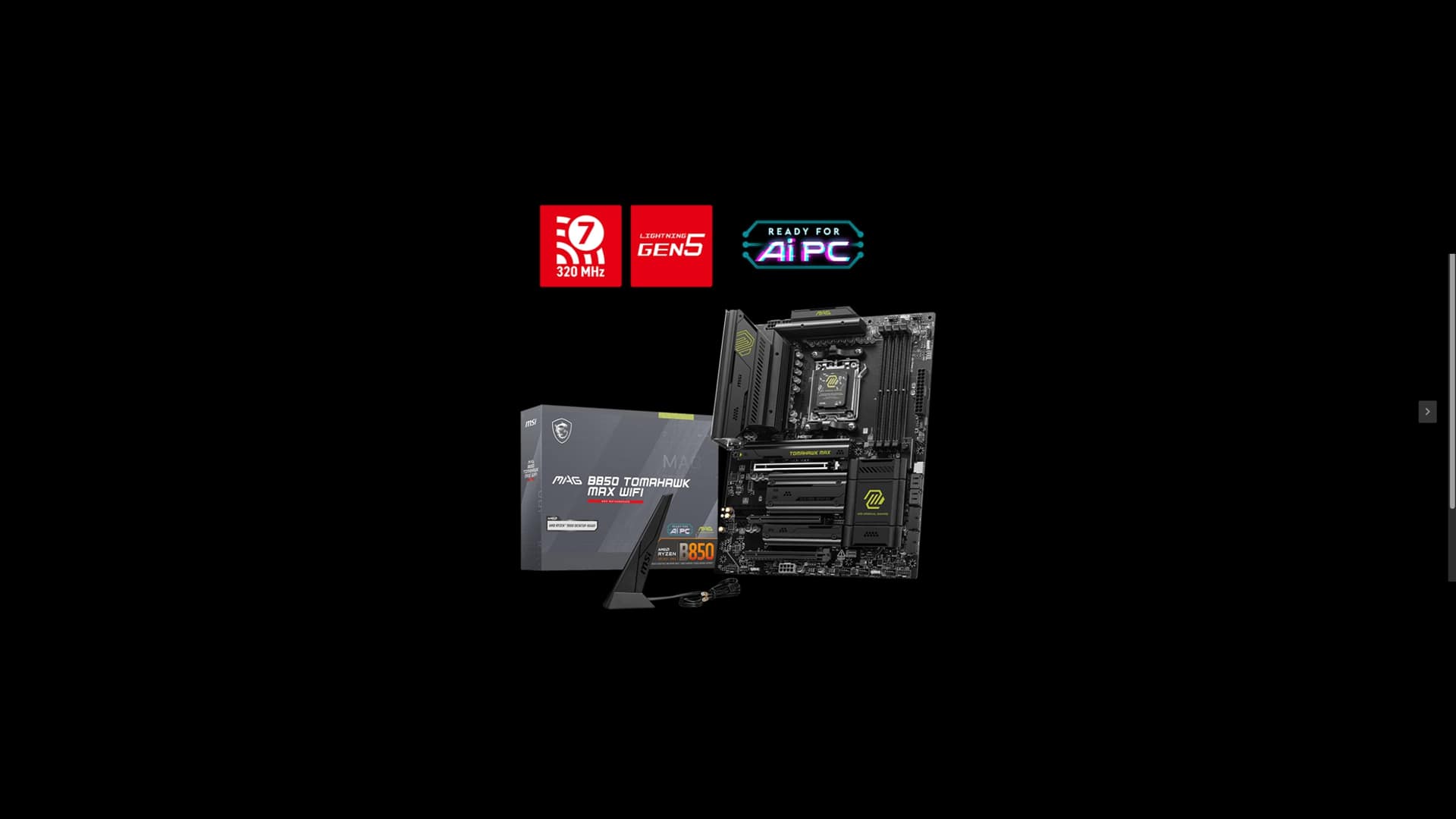
Looking to upgrade your old system or planning a fresh PC build, but not sure which motherboards deserve your attention? MSI has long been a steady presence in the enthusiast market, and its MAG B850 Tomahawk Max WiFi has become a pretty popular choice among PC gamers, as it’s aimed squarely at gamers and builders who want stability, strong power delivery, and modern features without breaking the bank.
After testing the board firsthand with an AMD Ryzen 7 9700X CPU and using only the integrated graphics (no dedicated GPU was installed), I can understand why it’s a popular choice. After running a series of benchmarks, evaluating how easy it was to set up, and living with it as my daily driver for a bit, I came away impressed with what MSI has put together here. It’s not flawless, but it’s a solid step up from my previous ASUS Prime B650M-A AX6, even if comparing the two is like comparing apples to oranges.
Thanks to MSI for sending MP1st this board to review. Let’s dive into what makes the MAG B850 Tomahawk Max WiFi worth considering as an upgrade, and where it still leaves room for improvement.
Stealthy Black Form Factor
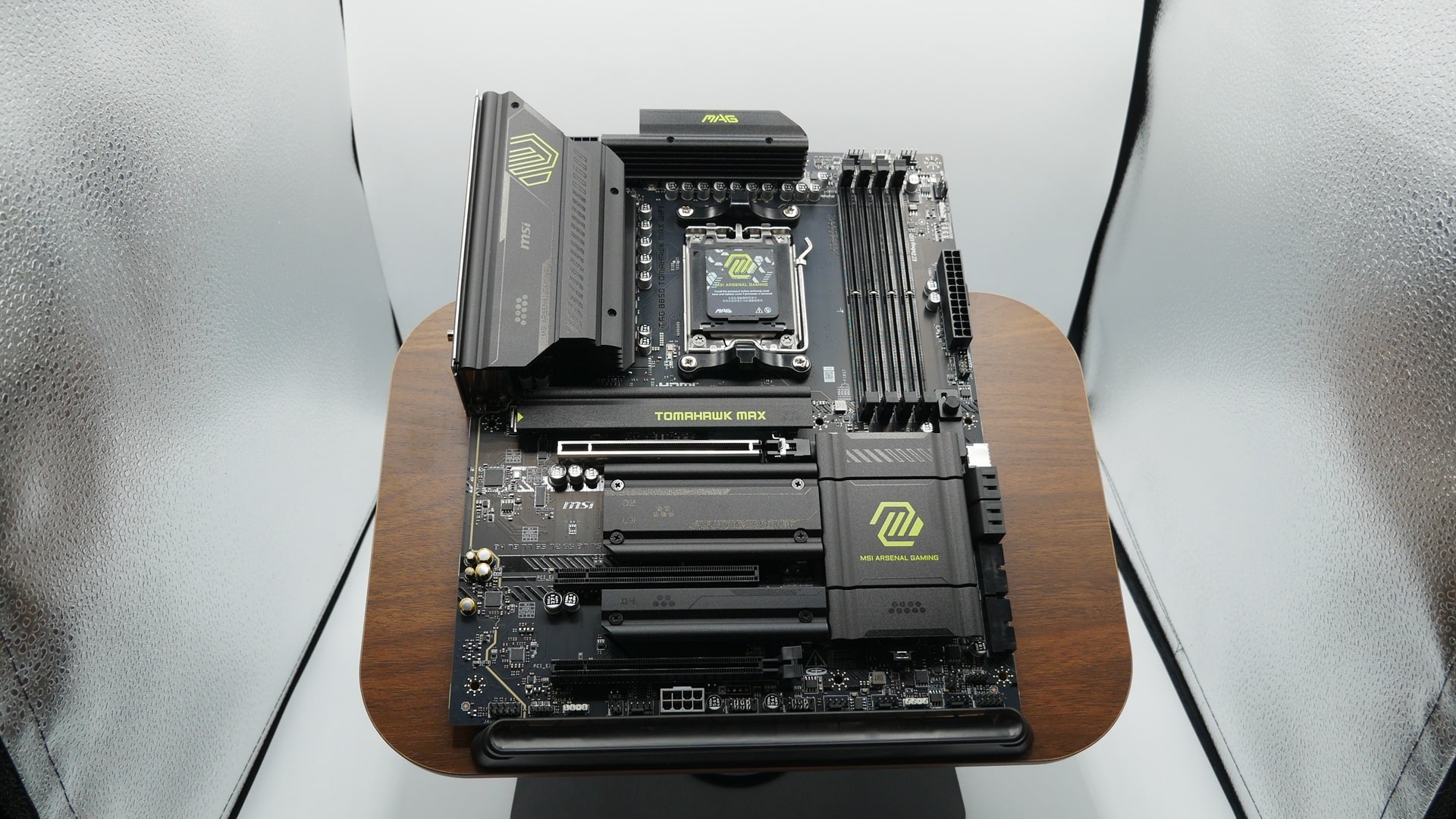
The first thing you notice when unboxing the MAG B850 Tomahawk Max WiFi is how clean and practical the design is. MSI isn’t showing off flashy RGB here; instead, it goes for a gunmetal aesthetic with solid heatsinks and smart component placement. This is a board designed for stability and airflow, without being overly flashy, which I really dig in a board. The quality is top-notch, especially considering its price point, and its design complements almost any ATX build theme.
In terms of layout, MSI has kept things practical. Headers and slots are accessible without wrestling with your case, and the inclusion of debug LEDs is a small but highly useful touch. When something goes wrong during setup, which often happens when building a fresh system, quickly identifying the cause of the issue can save a lot of frustration.
Another nice addition is the inclusion of a Clear CMOS and Flash BIOS button on the edge of the motherboard. This is a genuine game-changer for some builders. Whether you’ve pushed an unstable overclock or simply need to reset the BIOS, having an external button makes it painless. That, and being able to perform a firmware update beforehand, comes in handy, where some other boards may actually require an older CPU slotted in first to update the BIOS and use a newer CPU (trust me, it’s not fun finding that out after, and thankfully that’s not an issue with the B850 Tomahawk). The only caution here is its placement on the outside of the case: you or someone else could accidentally press it. A nitpick, if I’m being honest, since most builders have the backside of their PC facing away from anything. But it’s something to be aware of.
One of the standout features is the Duet Rail Power System (DRPS), which features 80A Smart Power Stages (SPS). For those unfamiliar, this is MSI’s approach to power delivery. In short, the VRM (Voltage Regulator Module) splits into multiple rails to better manage the flow of power to the CPU. Each phase is rated for up to 80 amps, ensuring consistent and stable performance even under heavy workloads. If you’re considering running a Ryzen 9 chip (the 9800X3D being the most popular at the moment), this VRM design is more than capable of maintaining stability.
The EZ M.2 CLIP II is genuinely convenient and time-saving, as it allows for the installation of an M.2 NVMe drive without fiddling with tiny screws or trying to find any to use. The board features four M.2 slots, equipped with reinforced heatsinks (MSI exclusive EZ M.2 Shield Frozr II) to maintain optimal cooling for NVMe drives, and ample SATA ports for additional storage.
Connectivity is where MSI didn’t cut corners. On the rear I/O, you’ll find USB-A & USB-C 10G ports, capable of transfer speeds up to 10 Gbps. This is particularly useful for anyone using external SSDs or moving large files, where high-speed data throughput makes a big difference. It also has USB-A & USB-C 5G ports and four USB-A 2.0 ports. I understand the need to support older devices that don’t support 3.0 and the circuitry space it takes on the motherboard. However, I wouldn’t mind trading three 2.0 ports for one 3.0 port, in my opinion. Add in 5G LAN (fiber customers on XGS-PONS will love this), Wi-Fi 7, and you’ve got a well-rounded selection that covers most use cases.
Full Specifications:
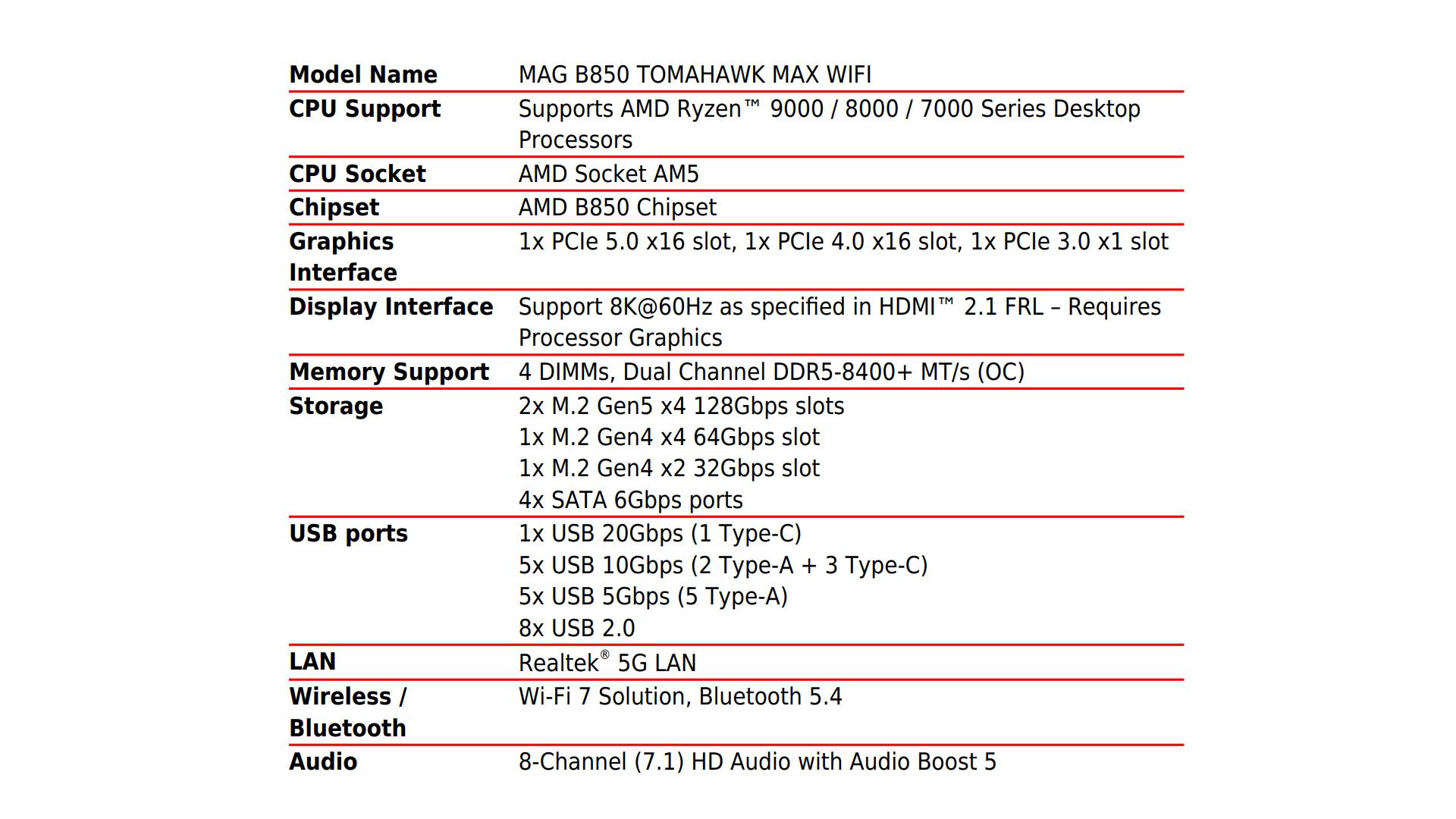
Because I’m using the integrated graphics here instead of a dedicated GPU (the one I have is entirely out of date, and wouldn’t benefit from the newer gen slots), I can’t comment much on the PCIe graphics slots beyond that this is PCIe 5.0 ready, with an additional PCIe 4.0 and PCIe 3.0.
If you do have some concerns over the potential of the Gen5 M.2_1 and M.2_2 slots taking away from the GPU’s PCIe 5.0, like in some boards, you don’t have to worry here, as you can get the full lanes out of the M.2 and GPU slot from this board. That’s not quite true when you move down to the other PCIe slots and drives, where lane sharing can become a problem. The M.2_3 and M.2_4, for example, will run at PCIe4 x2 (since it shares lanes with one of the other PCIe slots), so you’d be getting half the speed of that drive if you occupy both. That might be a problem for some, but if you’re already using Gen5 drives, it’s likely that anything else will be utilized for additional storage or slower tasks.
Putting It to the Test
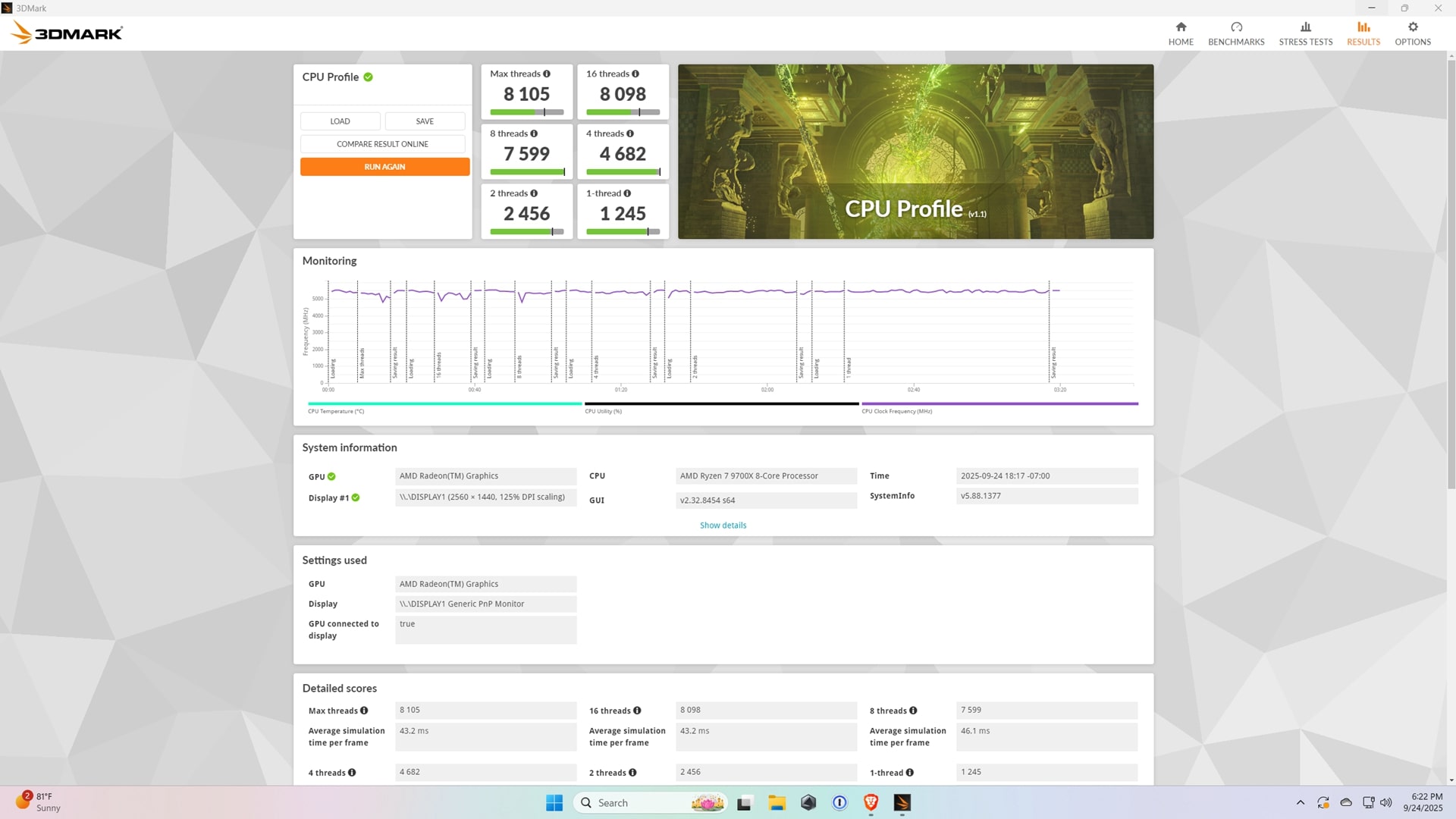
Of course, specs only tell part of the story. To see how the MAG B850 Tomahawk Max WiFi actually performs, I ran several tests using 3DMark CPU Profile with my Ryzen 7 9700X. Remember, this was all done without a discrete GPU, running purely on integrated graphics (See the image above).
The average simulation time per frame aligned well with expectations, and more importantly, the board maintained steady power delivery and clock speeds across the runs. Monitoring also showed CPU temps staying within a reasonable range under sustained load.
Thermals also remained in check. While load pushed temps between the mid-70s and mid-80s Celsius range, there was no evidence of thermal throttling. For anyone planning to run this board with a dedicated GPU and a strong cooling setup, the headroom is clearly there.
You can see from the graph that the CPU maintained a decent high clock rate without sudden dips or throttling. That’s a testament to the VRM design and the cooling MSI has built around it. Even running without a GPU, which often places more stress (higher frames and increased CPU-bound tasks) on the CPU, the system remained smooth and predictable.
These numbers are from my test bench, which means they won’t necessarily match what you see on your own setup. Different CPUs, GPUs, cooling solutions, and BIOS versions all affect performance. Take this with a grain of salt regarding how the MAG B850 Tomahawk Max WiFi performs under these specific conditions, rather than as an absolute baseline for every system.
Easy Installation and BIOS Update
One of the most frustrating parts of building a PC can be the motherboard installation process. Fortunately, MSI made things as painless as possible here. Installing the CPU, RAM, and NVMe drives was straightforward, taking me no more than two minutes to get the essentials in place. The tool-less M.2 system deserves another shoutout, as it genuinely makes the process smoother compared to boards that still require tiny screwdrivers. MSI also provides an extra socket screw and a key to adjust the size of different NVMe drives.
The BIOS experience has never been easy, but many companies have put considerable effort into it. From my experience, I can see that MSI has done a great job. Their UEFI BIOS is easy to navigate, with clear options for overclocking, fan tuning, and memory profiles. It’s responsive and doesn’t feel sluggish, which isn’t something you can say about all manufacturers. Even if you’re not an expert, the layout makes it approachable. That said, I still recommend doing some research before making big changes, especially when it comes to overclocking (MSI has a one-click EZ Overclock, so proceed with caution) or simply messing with the settings on there. Setting the wrong RAM timings and voltage, as with any motherboard, can lead to instability and other issues. So always make a note of what’s been changed and their previous values.
RAM support can also reach a staggering 256GB (DDR5) when all four slots are filled. That’s not really recommended to be done by anyone, but it’s nice to know that this board is future-proof, and you can go into the BIOS and play around with all that to find that “sweet” spot. DDR5 memory speeds are supported up to 8400MT/s.
In daily use, the system ran rock-solid. I tested stability across several days of uptime and experienced no random crashes or odd quirks. As always, I recommend visiting MSI’s website and making sure you have the latest BIOS and driver updates when you build your system. It’s an easy step that can save you headaches later. They also have a list of officially approved DDR5 RAM for this board, for those who want to be on the safe side.
Networking also deserves a mention. The onboard Wi-Fi 7 module delivered consistent speeds on my home network, and the 5G LAN port ensures you’re ready for faster wired connections if you have the service to match. It’s nice to see MSI equipping even mid-range boards with these options. As Fiber and the rollout of DOCSIS 4.0 for cable companies gain momentum over the next few years, this board will prepare you for the arrival of those faster internet speeds.
Just in Case It Mattered to You?
For builds using this motherboard, I would highly recommend a full tower desktop case. Before you ask, yes, most mid-tower cases can support this; however, why deal with all the hassle of making sure all your new hardware will fit in the case? I’m currently using the HYTE Y70, and this gives me plenty of room to work without having to awkwardly maneuver around tight spaces. Trust me, I’m thankful there was plenty of room for me to connect all the components without worrying I might slip my hand and break a connector or damage any capacitor on the motherboard. If you’re looking to shop for a spacious case, the newly released HYTE Y70 in collaboration with Honkai Star Rail is worth checking out, but really, any full tower will do the job well.
Nowadays, the latest graphics are roughly the size of a brick, and because it is heavy, you should consider getting a support bracket or a vertical mount. So a large case will have enough room without trying to squeeze everything in.
MSI includes an EZ PCIe Release button just below the DDR memory slots, which is hard to miss. This handy addition makes life easier when troubleshooting or swapping out your GPU. It’s simple: press to unlock, remove your graphics card, then press again to lock it back in once reinstalled. It’s a great design, allowing you to “eject” your GPU from the slot without it feeling like a tug-of-war, with the board winning, and causing fear of potentially ripping the slot out.
Verdict
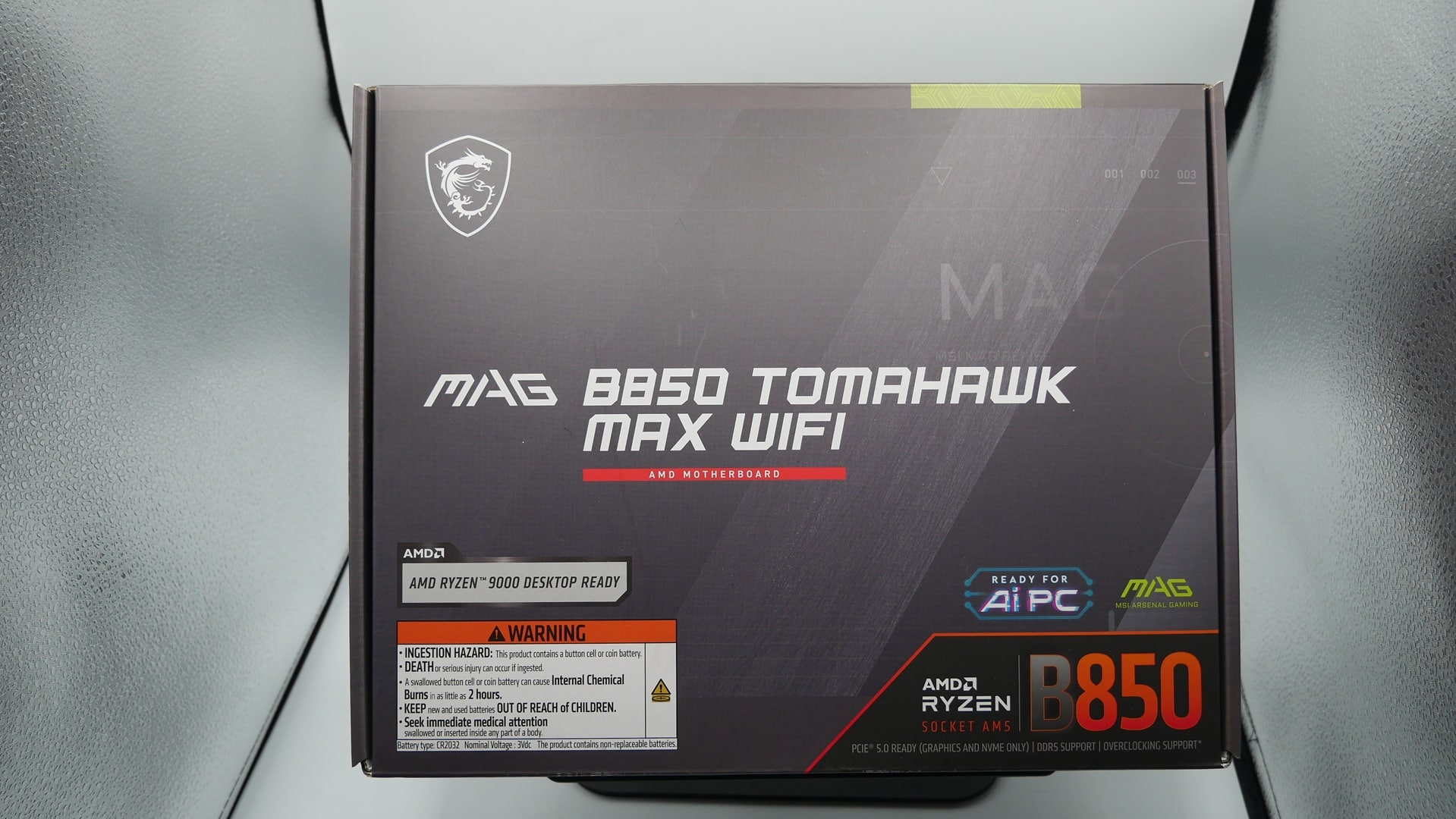
The MSI MAG B850 Tomahawk Max WiFi delivers exactly what it promises: a well-balanced AM5 motherboard that nails the fundamentals. It may not be the flashiest board on the market, but it’s a reliable workhorse built with gamers and performance-focused users in mind.
The power delivery design is robust enough to handle high-end CPUs, the connectivity is modern and forward-looking, and the installation experience is one of the smoothest I’ve had. For most gamers and builders out there, this will be the perfect board with everything you need.
Compared to my older ASUS Prime B650M-A AX6, the Tomahawk feels like a more mature and capable option. It’s the kind of board you can drop into a build today and feel confident it’ll support upgrades for years to come.
If you’re building an AM5 system and want something reliable without stepping all the way up to a pricier X870 board, the MAG B850 Tomahawk Max WiFi is an easy recommendation. MSI has built a board that delivers where it matters most.
Score: 9.5/10
Pros
- Supports AMD Ryzen™ 9000 / 8000 / 7000 Series Desktop Processors
- Clean layout with practical features like debug LEDs and tool-less M.2 slots
- USB 10G, 5G LAN, and Wi-Fi 7 provide future-proof connectivity
- Stable and responsive BIOS
- Excellent balance of features for the price
Cons
- Placement of Clear CMOS/Flash BIOS buttons could be prone to accidental presses
MAG B850 TOMAHAWK MAX WIFI hardware was provided by the manufacturer. You can read MP1st’s review and scoring policy right here.
This website contains affiliate links. If you click a link and make a purchase, we may earn a commission at no additional cost to you. This helps support our work. Learn more on our affiliate page.