MSI Versa 300 Elite Wireless Review – Ready for Any Game, Any Time

Gaming mice have come a long way from the days of bulky shells and cable drag. Today, it’s all about speed, comfort, freedom, and MSI’s Versa 300 Elite Wireless clearly wants a piece of that ultralight, performance-driven pie. For its price, it might just pull it off.
Coming in at just around 64.6 grams (with the dongle stored inside the mouse), the Versa 300 Elite sets its sights on the ultralight category of gaming mice while adding its own flair through tri-mode connectivity, long-lasting battery life, and solid build quality. MSI isn’t new to gaming peripherals, but this feels like one of its more focused attempts to blend esports-grade precision with daily practicality.
Over the last weeks, we’ve put the Versa 300 Elite through its paces to see if it truly lives up to the company’s performance claims. After spending hours using it across multiple titles, such as League of Legends and Doom Eternal, to extended editing sessions and everyday browsing, I can confidently say MSI has made a well-rounded performer that doesn’t rely solely on raw specs to impress. But is it good enough to earn a spot on your desk?

Lightweight and Comfortable
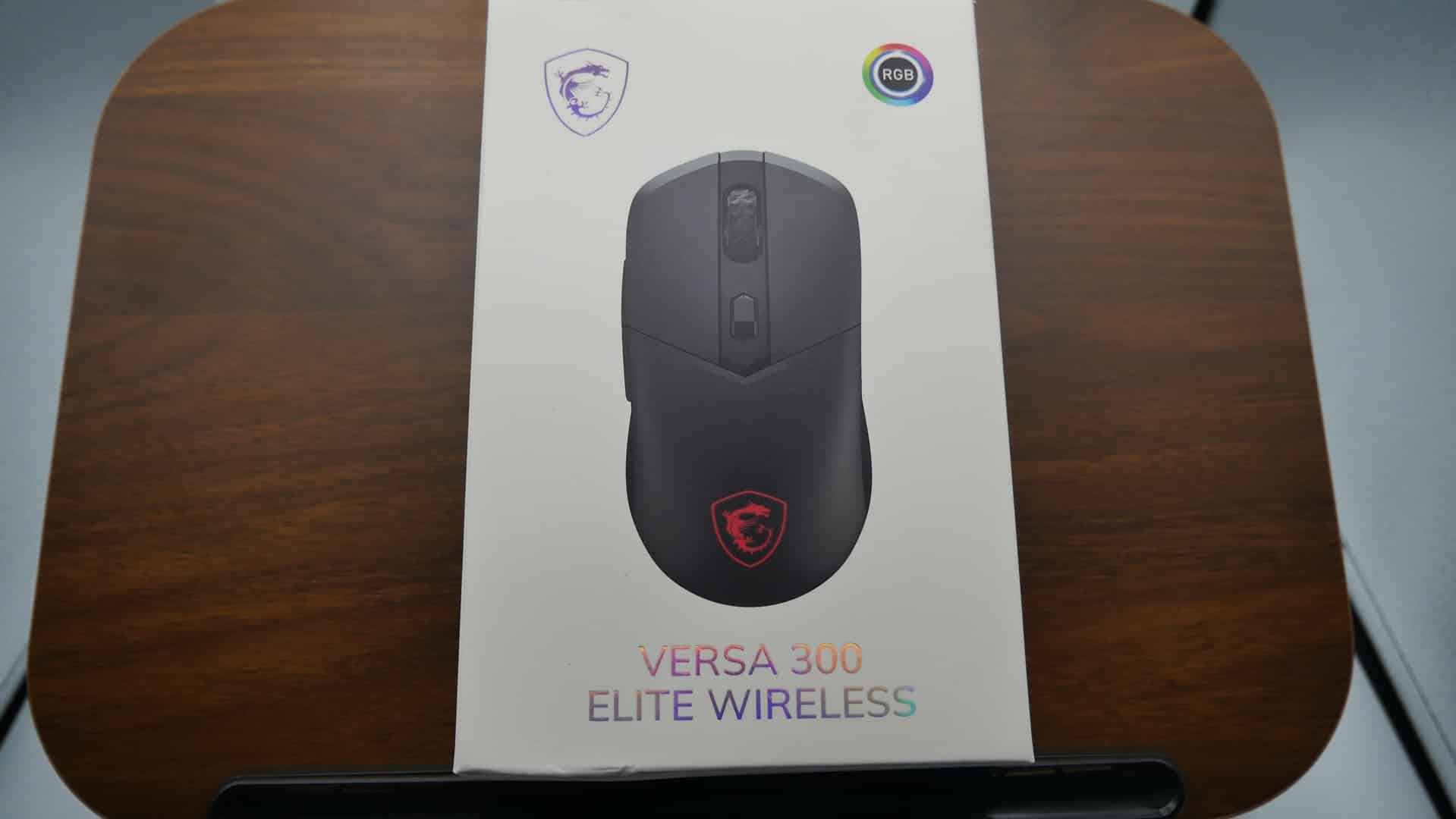
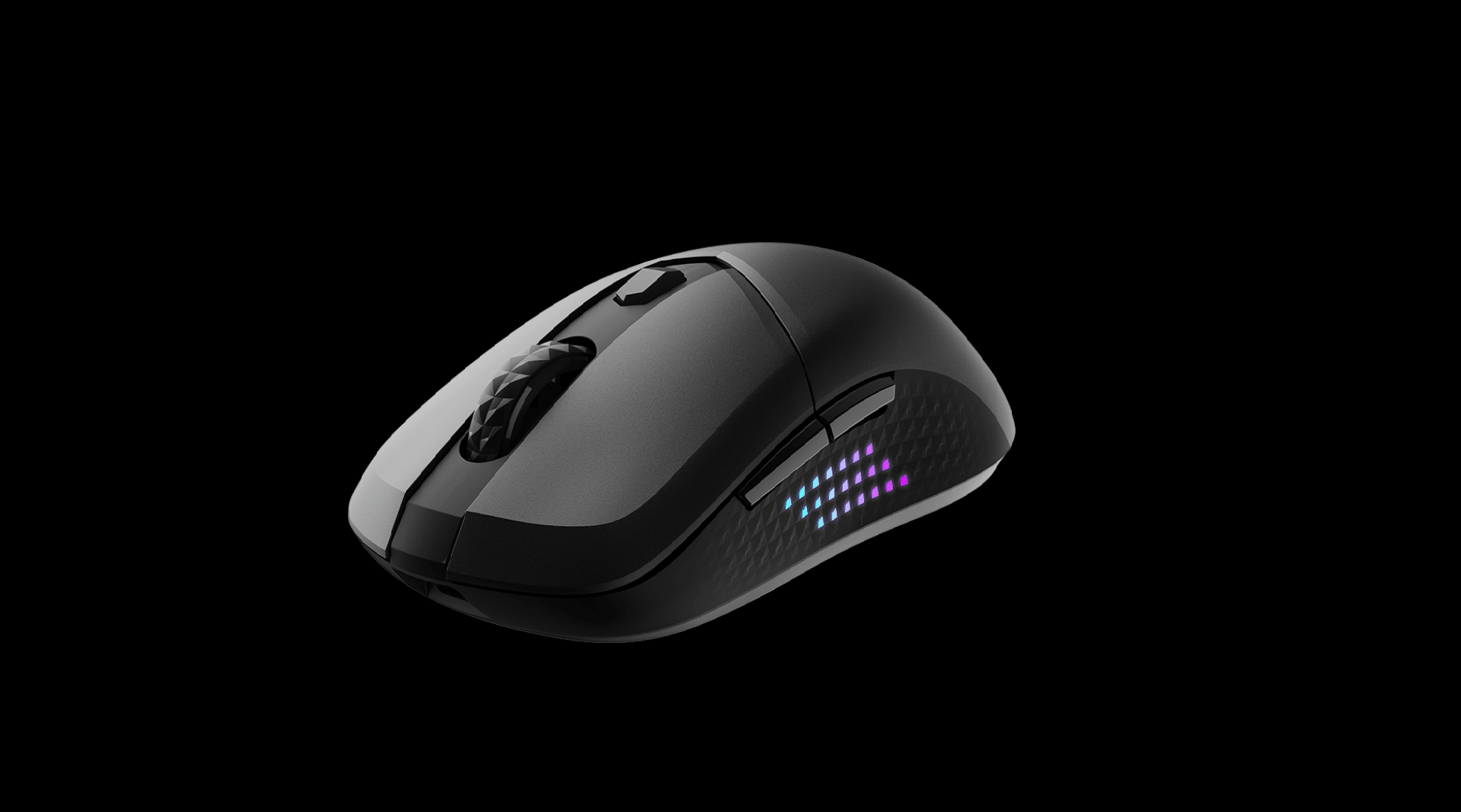
The Versa 300 Elite immediately impresses with its featherlight feel. At roughly 65 grams, it’s in the same class as many top-tier ultralight mice, yet it never feels cheap or hollow. The balance is excellent, with no noticeable front or rear heaviness, and its symmetrical design makes it an easy choice for both right and left-handed users.
As someone who primarily uses my right hand, I found it surprisingly comfortable to switch hands during testing with no strain or awkward finger positioning. The shape accommodates palm and fingertip grips equally well, giving it a versatility that’s uncommon in this price bracket.
MSI’s Diamond Lightgrips are another strong design choice. The textured sides provide a secure grip without feeling abrasive or sticky, even during long gaming sessions. They also double as a subtle lighting accent when RGB is enabled, more on that later.
The build quality is rock solid: no creaking, no rattle, and no flex when applying pressure to the shell. The main clicks have just the right amount of travel and resistance, thanks to Omron switches rated for 60 million clicks, ensuring long-term durability.
The only design element that stumbles slightly is the scroll wheel. While it’s tactile and precise, the ridges are a bit too pointed initially, especially during extended use or rapid scrolling. Over time, your fingers adjust, but the texture could have been smoother, something like a “flat speed bump” profile rather than hard notches.
An infinite scroll option would have been a great addition for users switching between productivity and gaming tasks. That omission likely came down to pricing, and to be fair, it’s a minor issue in an otherwise comfortable and well-built package.
A single RGB Mystic Light zone sits beneath the MSI dragon logo, offering a tasteful touch of illumination without turning the mouse into a light show. Though I haven’t been able to customize the RGB in the application, it’s not a big deal for me, at least.
Stress Test Performance
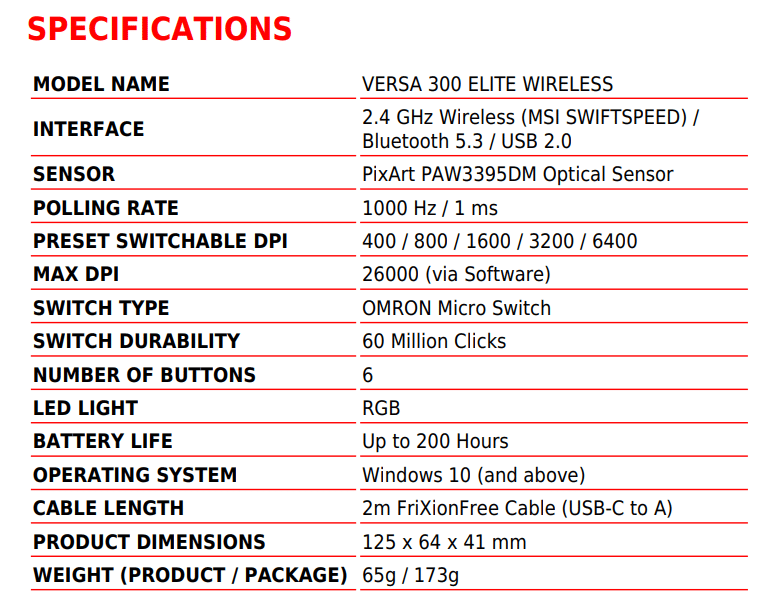
Performance is where the Versa 300 Elite truly earns its stripes. It’s powered by the PixArt PAW3395DM optical sensor, capable of up to 26,000 DPI when unlocked via MSI Center. Out of the box, the mouse includes five preset DPI levels: 400, 800, 1600, 3200, and 6400, which hit the sweet spot for most gamers.
For those who prefer a plug-and-play setup, these presets are more than sufficient. In my testing, I played several matches of Daimon Blades and played a small part of Doom Eternal’s campaign at 3200 DPI. The sensor tracked flawlessly, smoothly, and precisely, without any jitter or acceleration. If you prefer finer control, you’ll need to download the application to adjust the DPI to its maximum of 26,000 or fine-tune the sensitivity settings.
Speaking of software, you’ll also need MSI Center to handle firmware updates for both the mouse and the dongle, something I recommend doing right out of the box.
The polling rate is another area where MSI deserves credit. The company advertises a true 1,000Hz (1ms) rate, and that claim holds up in testing. Whether in wired or 2.4GHz RF wireless mode, response times are immediate and stable. Over hours of gameplay, I couldn’t detect any perceivable lag. The wireless connection feels as responsive as a wired one, which is precisely what you want from a performance-oriented mouse.

Still, if you’re the type of player who refuses to risk even a hint of input lag, wired mode will always be the best option. Thankfully, MSI includes a braided FrixionFree USB-C cable, which is flexible, lightweight, and doesn’t drag across your desk like cheaper cables often do.
The PixArt sensor itself is incredibly consistent. Tracking remains pixel-perfect during quick flicks or micro-adjustments, and I experienced no spin-outs or skipping even when testing at higher DPI ranges. The lift-off distance is well-calibrated, so lifting and repositioning the mouse mid-combat never causes erratic cursor behavior.
When it comes to connectivity, the Versa 300 Elite shines with its tri-mode design:
- Wired (USB-C) for the most stable, lowest-latency performance.
- 2.4GHz Wireless (MSI SWIFTSPEED) for competitive gaming with virtually no delay.
- Bluetooth 5.3 for general use, multi-device setups, or laptops on the go.
Battery life is another major selling point. MSI rates the Versa 300 Elite at up to 200 hours per charge, and while I didn’t fully deplete the battery during my testing, it comfortably lasted several days of heavy use without needing a recharge. When you do need to top up, the USB-C connection supports quick charging, and a few minutes plugged in gets you hours of use.
The Omron switches continue to impress throughout testing. Each click feels crisp, clean, and consistent, with no mushiness or accidental double clicks. They’re tactile enough for shooters yet light enough for general work tasks like editing or browsing.
Gaming and Day-to-Day Usage
A great gaming mouse should disappear in your hand, and it should feel like a natural extension of your movement. The Versa 300 Elite gets remarkably close to that ideal.
In Apex Legends, its lightweight frame made it effortless to flick, track, and reposition. The PTFE feet glide smoothly across both hard and cloth surfaces, providing near-frictionless motion without feeling too slippery.
Switching from wired to wireless introduced no noticeable change in responsiveness, which speaks volumes about MSI’s low-latency wireless technology. Whether I was grinding competitive matches or relaxing with single-player shooters, the performance remained consistently excellent.
For productivity, the mouse transitions smoothly into daily tasks. Bluetooth mode enables quick and reliable pairing with a laptop or secondary device, while the long battery life eliminates the need to constantly worry about charging. The mode switch underneath the mouse makes it easy to swap between dongle and Bluetooth on the fly, ideal if you work and game on different machines.
The scroll wheel, however, remains the lone weak spot. It’s usable and accurate, but the occasional hard tactile bumps can distract from an otherwise flawless experience. After a few days of use, the discomfort mostly fades, but it’s the one element that feels a little out of sync with the rest of the mouse’s refinement. If MSI were to revise this design with a smoother wheel or free-spin option, it would significantly enhance the overall experience.
On the software side, MSI Center is capable, but I feel it’s a bit lacking. It covers all the essentials: DPI adjustment, polling rate, lighting, and profile management. However, it’s not the most intuitive suite out there. Still, once you’ve configured your settings, you can largely forget about it. If you prefer a minimal setup, the mouse works perfectly without needing the software.
At $70 MSRP, the Versa 300 Elite sits in competitive territory, but regular discounts dropping it to around $50, which can be found on Amazon, make it an outstanding value. For that price, you’re getting high-end sensor performance, robust connectivity options, and exceptional comfort, which is hard to find in this range.
For the average gamer, it’s easily worth the investment. It delivers consistent accuracy, excellent comfort, and battery life that rivals mice costing twice as much.
Verdict
The MSI Versa 300 Elite Wireless is proof that you don’t need to spend a fortune to get a high-performance gaming mouse. It’s lightweight, comfortable, accurate, and flexible, which matters most and is really all you need.
For competitive players, it’s a reliable performer that won’t hold you back. For casual gamers or anyone who wants a single mouse that handles both work and play, its tri-mode connectivity and long battery life make it an even stronger choice.
It’s not flawless, the scroll wheel could use refinement, and needing software for full DPI access feels a bit unnecessary, but those are small nitpicks against what’s otherwise an exceptional package.
At its current street price of around $50, the Versa 300 Elite stands out as one of the best all-around wireless gaming mice available right now. MSI got the essentials right, and that’s what matters most.
Score: 8.5/10
Pros:
- Extremely lightweight
- True 1,000Hz polling rate across all modes
- Excellent PixArt PAW3395DM sensor performance
- Three connectivity options: wired, 2.4GHz, and Bluetooth
- Long battery life (up to 200 hours per charge)
- Comfortable symmetrical shape for all grip styles
- Durable Omron switches rated for 60M+ clicks
- Strong value for its pricing currently
Cons:
- The scroll wheel texture can be uncomfortable initially
- No infinite scroll option
- Full DPI range and a few other customizations require the MSI Center software
MSI Versa 300 Elite Wireless hardware was provided by the manufacturer. You can read MP1st’s review and scoring policy right here.

This website contains affiliate links. If you click a link and make a purchase, we may earn a commission at no additional cost to you. This helps support our work. Learn more on our affiliate page.