Turtle Beach Vulcan II TKL Pro Review – Hall Effect Precision Analog Gaming Capabilities

Turtle Beach offered us the chance to review a whole batch of their latest and greatest hardware, including three different headphones, the Burst II Air mouse, and the keyboard we are discussing currently, the recently released Vulcan TKL Pro. We’ve spent some time writing those reviews with the keyboard in question, and have our review ready below.
Smaller and Mightier
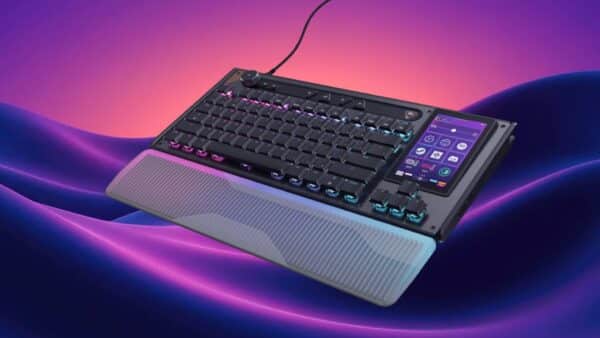
The Vulcan II TKL Pro is, as the name suggests, a “tenkeyless” keyboard. Tenkeyless means the number pad is missing, by design. This allows for a more portable keyboard, one which otherwise has all the keys you’d expect, including arrow keys, cursor navigation (Home, End, Page Up/Down, etc), Esc, F1-F12, and even a volume wheel in the upper-right, which has push-to-mute functionality. It comes in either white or black – we received the white model. The color is applied to the chiclet-style keycaps, foam wrist guard, braided USB cable, and plastic backing. Both models include an anodized aluminum plate below the keys, which Turtle Beach says helps to reinforce the structural integrity and protects the keyboard against wear and tear. All I know is it adds up to one sleek-looking piece of technology.
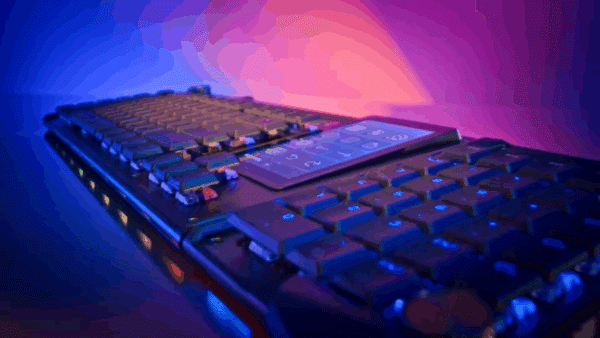
The chiclet-style keys can be easily popped off with any keyboard kit you might have at home, and because the plastic on those doesn’t wrap around a whole lot, the per-key RGB lighting easily shines through, and brightly to boot. I’m not sure that I’ll ever try using a third-party keycap on this unit, because I do really enjoy the stock look, but it’s nice to know the option is there. These keys are relatively quiet for a mechanical keyboard, and have linear-like action. There’s no heavy clanking as key travel is smooth for the entire length of travel, since no physical mechanism is used to detect keypresses.
Analog keyboard switches are wild. They are a nascent technology, at least in the gaming keyboard space. Wooting was first to market in 2017 with their One model, and the designs have iterated and improved ever since. The Vulcan II TKL feels like a sleek, compact version of this design. It’s got everything you need, though its smaller size means there are no dedicated macro buttons to be found. The Swarm II software makes up for this, by allowing you to map macros on certain switches when used with the function button (more on that in a bit).

Magnets Provide the Magic
As with most technology, there are a couple of different ways to go about implementing analog switches. Whereas some brands use optical hardware, Turtle Beach (née ROCCAT which was acquired in 2019, and retired this year) opted to use magnets. The Hall Effect refers to the production of a potential difference across an electrical conductor when a perpendicular magnetic field is applied in a particular way. First reported in 1879, I doubt Edwin Hall, the physicist who discovered it, could’ve ever imagined it would be used like this. In essence, every switch has a magnet and a sensor, which reports to the keyboard just how far it has been pressed.
The result of a switch made in this manner is an incredibly precise detection mechanism – the keyboard can detect presses as small as 0.1mm (0.0039 inches!) and as large as 4.0mm (.15 inches) on any switch. I tested it at this insanely sensitive level, and, well, it was just typos galore. Simply resting your finger on a key can be enough to trigger it. Safe to say you only want to allow such a small actuation point for hair-trigger actions, such as perhaps shooting, or maybe engaging a throttle. I found a more practical actuation point at around the 2.0mm mark because I tend to rest my fingers a bit heavily, but the greatest thing about analog switches is the fact that you can set the actuation point via software, something you cannot do with traditional mechanical switches. Hall Effect switches are also the most durable type available today, since no physical contact points need to be hit with each keystroke. Each switch is rated to last for 150 million keypresses, a number which is so high you’re likely talking decades of constant use before the switches start to wear out.
Now, at my day job, I’m a programmer. I also broke my wrist back in 2022 while snowboarding on my birthday, and ever since then have been very interested in keyboard ergonomics, because thanks to the plate and screws put over my bone (and the requisite surgery to implant them), my wrist lets me know if something’s not comfortable. During my time with this keyboard, my wrist has not complained. There are two feet in the back of the Vulcan II TKL Pro, which can be set at two different height levels. Combined with the included foam wrist guard, you’ll get a standard ergonomic experience out of this keyboard. While it won’t replace my daily driver, the hyper-specialized ZSA Moonlander MK1 (plus Platform set to a 40° tenting angle), I will certainly continue to use the Vulcan II TKL Pro for gaming, solely because the analog feature works so well.

Software Settings
The Swarm II software lets you configure a lot of different options. Most settings can be done on a per-key basis, but an intuitive paint-like interface lets you quickly apply settings to groups of keys. The game mode is dedicated to setting up the keyboard as if it were a gaming controller. Since the hall effect switches are able to detect minute changes in switch actuation, it’s easy to mimic an analog controller. So, setting WASD to simulate the left analog stick, and the arrow keys to the right stick is both easy and incredibly useful. Finally, stealthily walking in a third-person game such as Elden Ring, or lightly applying pressure to the brakes in Forza is not only possible, but downright enjoyable using an analog keyboard. What took me a little bit of time to wrap my head around was using the keyboard with the mouse, because games often change input prompts based on if you’re playing with a keyboard and mouse as opposed to a controller, which means any time you move your view with the mouse, the prompts become keyboard switches, but then the second you move with WASD everything changes back to button prompts. Still, the precision with which you can now move is unmatched here.
My only real gripe with the Swarm II software is that it seems to be unoptimized for lower-spec hardware. I’m using a Microsoft Surface Pro 7, which released in 2020. While not new, it’s also not all that old as I use it to get through most of my workdays with ease. I have noticed slowdown whenever I have that app running in the background, most of the time after waking the computer back up. As with most PC troubleshooting, this may be a side effect of Windows 11, a quirk of the fanless i5 processor Microsoft opted to use, or some other hardware. Thankfully, you can save the majority of your favorite settings to one of five onboard profiles on the keyboard’s built-in memory, which means you can stop the program and maintain most settings – lighting seems to be tied to the software, however.
Verdict
Turtle Beach has produced a luxurious analog gaming mechanical keyboard, one which carries the Vulcan name of ROCCAT legacy well. The Hall Effect switches add even more durability to an already durable design, and this will likely be the last part of any system you’ll need to replace. While the Swarm II software feels a little unoptimized, at least on lower-spec computers, it gets the job done, and will hopefully improve over time. At $149.99, this keyboard is priced competitively and should please gamers looking for an edge with their input devices. The Vulcan II TKL Pro is a superb keyboard all around.
Score: 9/10
Pros:
- Ultra-sensitive keys
- Hall Effect sensors should hold up well over the long-term
- Modern, sleek design
- Per-key lighting effects
- Per-key sensitivity settings
- Game controller emulation is great for gaming
Cons:
- Swarm II software can feel sluggish
- Standard egonomics, not all settings can be stored on keyboard
Turtle Beach Vulcan II TKL Pro review unit was provided by the manufacturer. You can read MP1st’s review and scoring policy right here.
This website contains affiliate links. If you click a link and make a purchase, we may earn a commission at no additional cost to you. This helps support our work. Learn more on our affiliate page.