Add-Ons and Script Engine
- Added “canUseBlockAsIcon” bool to the “minecraft:block_placer” item component network data to fix bug where clients did not render the block item correctly.

Mojang has updated the Minecraft Preview and Beta branch today. Those on consoles will see this as Minecraft Preview update 1.42 (current-gen 1.027), and this is tagged as developer version 1.21.50.20. Players can expect a host of new additions and fixes outlined in the complete patch notes.
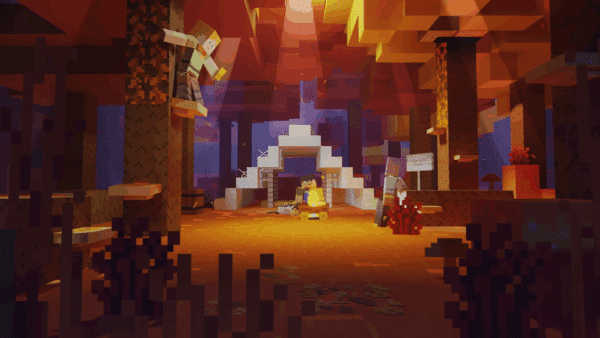
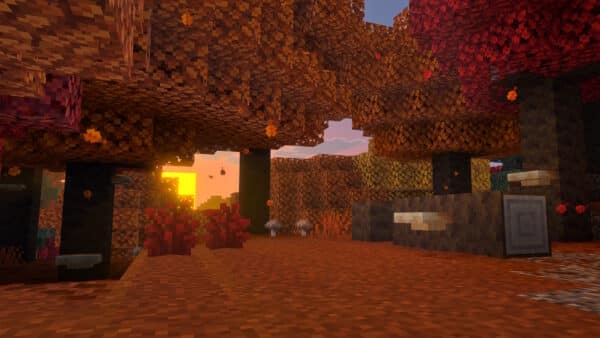
Get ready for a particularly eerie preview this week – because foxes can now pick up bundles! No wait, that’s not right. I mean – because the pale garden is coming to Bedrock preview! The pale garden is a new biome that might feel serene during the day, but just wait until night falls. Dense with pale oak trees (which bring a new pale oak woodset), and covered in pale moss and pale hanging moss – it might feel like you’re all alone, but are you? Peer a little closer in the darkness and you might find a creaking peering back! There’s a secret to defeating this new hostile mob though – and you’ll have to find a creaking heart block to discover it. As always, we’re keen to get your feedback on these new features at aka.ms/mcgamedropfeedback, and you can report any bugs at bugs.mojang.com
Creaking Heart
A Creaking Heart is a “living” block generating in Pale Oak trees, covered on all sides by Pale Oak wood logs. It can spawn a Creaking mob when it is night time, and it is placed between two correctly aligned Pale Oak log blocks.
Creaking Mob
The Creaking mob spawns at night in the Pale Garden biome if there is a Creaking Heart block that has been generated in a Pale Oak tree. Gameplay features:
New system for Pale Garden ambient sounds
Ambient sounds in the Pale Garden biome do not come from the biome settings but are generated by blocks found in the biome
Pale Garden
Pale Garden is a biome variation of Dark Forest. Unique features:
Pale Hanging Moss
Pale Hanging Moss generates naturally in the Pale Garden biome under the foliage of Pale Oaks
Pale Moss Block
Pale Moss block generates naturally in the Pale Garden biome
Pale Moss Carpet
Pale Moss block generates naturally in the Pale Garden biome. Unique features:
Pale Oak Tree
User Interface
Fixed a bug where duplicate gamepad input hints would be shown in certain scenarios on the death screen when using multiple input methods
Migrated JSON UI Trial Mode modal that was shown in Create New World and Edit World to Ore UI
Add-Ons
Audio
Sponges and Wet Sponges now play fall, hit, jump, land, break, hit and place sounds (MCPE-174345)
Sponges now play a sound when absorbing water (MCPE-173582)
Blocks & Items
Swords can now cut Bamboo Saplings instantly, as they do Bamboo
Axes no longer mine Bamboo Saplings and Moss Carpets faster
Pickaxes and Shovels no longer mine Bamboo as quickly as Axes
Maces no longer mine Cobwebs faster than other non-Sword tools
Heavy Core is now faster to mine with any improper tool
A Note Block placed above Heavy Core now plays the proper sound
Crafter now can be mined quickly with any Pickaxe
If you somehow manage to mine a Dragon Egg, which is almost impossible, it no longer requires a Pickaxe to drop and is equally quick to mine with any tool
Copper Trapdoors and Copper Bulbs now require a Stone Pickaxe or better for drops and quick mining
Swords no longer mine all blocks faster than bare hands, instead doing that only for some plant-type blocks that aren’t already insta-minable, such as Leaves, Pumpkins, Big Dripleaf, Chorus Flower, Chorus Plant, Cocoa, Glow Lichen, Melon Block, Moss Carpet, and Vines (MCPE-93323)
Stone Button and Polished Blackstone Button no longer require a Pickaxe to drop, and are now faster to mine with any improper tool (MCPE-162158)
Commands
Added a new option to toggle between Server Authoritative Movement and Client Authoritative Movement. Use /set_movement_authority server to enable Server Authoritative Movement. Use /set_movement_authority client to enable Client Authoritative Movement. This command is currently preview-only and may not be active in some vanilla world.
The “mine” overload was added to the /loot command under the Upcoming Creator Features experiments
Added delay overload to the Schedule command, which allows you to queue a function to be executed after a certain amount of time. Time can be specified with no postfix, postfix ‘t’ to indicate ticks, postfix ‘s’ to indicate seconds, or with the postfix ‘d’ to indicate days. You can also give the argument ‘append’ to add your request to the queue no matter what, or ‘replace’ (which is also the default) to replace all current matching requests with the new one.
/schedule delay add <function> <delay (ticks)> [append|replace]/schedule delay clear <function>EDU Toggle
Gameplay
There is now a warning message when you are prevented from entering an unloaded chunk )
Now the respiration enchantment reduces the chance of taking drowning damage (MCPE-46922)
Players can no longer earn achievements or trophies after dying and respawning as a spectator in hardcore mode
Mace damage now scales with distance fallen when it is used by mobs
Players will keep their inventory after dying on Easy and Peaceful as we’re testing ways to adapt our difficulty levels. Your feedback is greatly appreciated on this page.
General
Mobs
Wither
The spawn and death animations smoothly transition it between a white color overlay and its normal textures (MCPE-64537)
The Wither will no longer move during its spawning animation (MCPE-48265)
The Wither’s heads now look at their target more consistently (MCPE-32826)
Realms
Stability and Performance
Fixed a crash that could sometimes occur after uploading and joining a Realm
Fixed an issue where the game would occasionally hang when loading resources
User Interface
Change the order of tabs in the Settings screen
Fixed a bug where players on the manage members screen are not updated when returning from ‘Find friends’
Improved feedback to user when Realm uploads fail due to naming
When enabling experiments in world settings (OreUI) we no longer faulty state that it would “Automatically turn on Cheats”. (MCPE-181435)
The item currently selected inside a Bundle is now correctly displayed as part of the Bundle’s icon when the Bundle is placed in the inventory or Crafting Table’s crafting grid
The sounds of moving items in or out of a Bundle now originate from the player’s location instead of the corner of the block the player is standing on (MCPE-186619)
Fixed a bug where the world name text would sometimes show up wrong on the pause menu (MCPE-179702)
Fixed a visual glitch which could occur when navigating between the death screen and game menu.
Fixed a bug where the chat button on the experimental bed screen could be focused when not being visible in certain scenarios. (Preview only)
Fixed a bug where the chat button would be incorrectly shown on the new bed screen when the “playerssleepingpercentage” game rule was set to above 100 in certain scenarios. (Preview only)
Fixed a bug with inventory touch controls where items could not be distributed across existing item stacks of the same item (MCPE-164543)
Added UI controls for enabling/disabling beds working and the percentage of players sleeping needed to pass the night
The items “short_grass”, “fern”, “seagrass” and “vine” are now brighter in the inventory, they used to be incorrectly multiplied by a shade a green (MCPE-53775)
Hid Create from template button and Import world button when in Trial mode.
Vanilla Parity
Items
Chiseled Stone Brick can now be crafted in the Stonecutter using Stone Brick (MCPE-50057)
Added two more recipes each for Sandstone Stairs and Red Sandstone Stairs (MCPE-135605)
Purpur Slabs can now be crafted using Purpur Pillars (MCPE-135606)
Mobs
General
Add-Ons and Script Engine
Blocks
Updated minecraft:destructible_by_mining component, new field item_specific_speeds no longer experimental.
Removed the following vanilla block tags from experimental
Renamed vanilla block tag “minecraft:is_hatchet_item_destructible” to “minecraft:is_axe_item_destructible”.
Removed the following vanilla block tags.
Editor
Selection now has a freehand select that uses brushes to paint
Updated general brush functionality:
Added addToggleGroup function to IPropertyPane API to create toggle groups with selectable icon buttons
Added support for Brush Shape Offsets
Added a new settings screen in View > View Settings to configure certain view related settings (like invisible block visibility and chunk boundaries)
Added mouse button event data to the widget state change event so that server scripts can track mouse button events (press, release, drag) and the state of modifier keys (shift, ctrl)
Added an optional infoTooltip: TooltipInteractiveContent property to IRootPropertyPane API, displayed as an icon in the drawer header. Interactive tooltips remain active on hover and support links and paragraphs.
Added serialize(obj) and deserialize(string) functions. These act like JSON.stringify/JSON.parse but will use custom serializers/deserializers registered with registerSerializationForType
CompoundBlockVolume and BlockVolume are able to be serialized and deserialized with these functionsAdded registerSerializationForType<T>(constructor, name, serializer, deserializer) which registers any type with custom serialization/deserialization for serialize and deserialize
Updated Block Masks to work when empty (always match)
Added ‘cancel’ property to endPainting()
Added control buttons next to the hotbar to switch the active palette and manage other palettes
Updated Selection Volume and Cursor colors to default to the colors of those keys in the currrently-selected theme. Changed Client Widget X, Y, and Z arrows to always be the colors of those keys in the currently-selected theme. Changed deleted fillColor and outlineColor in CursorProperties so that causes the Cursor colors to return back to the colors of those keys in the currently-selected theme.
Fixed issues with selection being cleared on tool focus change
Entity Components
Added new component ‘minecraft:can_attack_ghast’. When added to an entity, it enables that entity to target and attack Ghasts.
‘behavior.summon_entity’ now lets creators specify an event to be invoked on the summoned entity immediately after summon (MCPE-44454)
Entity Event Responses
Added the “play_sound” entity event response, which allows the owner entity to emit sounds
General
Network Protocol
Realms
Add-Ons and Script Engine
@minecraft/debug-utilities module, exposing script runtime memory usage.PlayerInputPermissions script class to read and write the new input permissions/inputpermissions command to use the new input permissionshaspermission selector to use the new input permissionsFluidContainer from beta to 1.16.0BlockFluidContainerComponent from beta to 1.16.0FluidContainer from beta to 1.16.0initialRotation optional member to SpawnEntityOptions for specifying the initial rotation of the spawned entity in degrees.Graphical
Fixed rendering of Wardens in the Deferred Technical Preview. (MCPE-180140)
Fixed TextureSets for multi-textured mobs, such as llamas in the Deferred Technical Preview.
Fixed the orientation of normal maps for mobs on Android in the Deferred Technical Preview.
End Portals now cast shadows in the Deferred Technical Preview.
Improved the visibility of reflective surfaces when underground in the Deferred Technical Preview.
Slightly reduced the intensity of the wrapping effect of sub surface scattering in the Deferred Technical Preview.
Molang
query.last_input_mode_is_any. It takes one or more arguments (‘keyboard_and_mouse’, ‘touch’, ‘gamepad’, or ‘motion_controller’). If the last input used is any of the specified string values, returns 1.0. Otherwise returns 0.0. Available on the Client (Resource Packs) only. Added query.touch_only_affects_hotbar. It returns 1.0 if the touch input only affects the touchbar, otherwise returns 0.0. Available on the Client (Resource Packs) only.Scripting
InputMode. export enum InputMode { Gamepad = ‘Gamepad’, KeyboardAndMouse = ‘KeyboardAndMouse’, MotionController = ‘MotionController’, Touch = ‘Touch’, Undetermined = ‘Undetermined’, }InputInfo.
touchOnlyAffectsHotbar. Whether the player touch input only affects the touchbar or not.lastInputModeUsed. The last input mode used by the player.inputInfo.PlayerInputModeChangeAfterEvent.
newInputModeUsed, the new input mode used by the player.player, the player that had the input mode change.previousInputModeUsed, the previous input mode used by the player.PlayerInputModeChangeAfterEventSignal.User Interface
Camera
For our complete Minecraft coverage, head on over here.
[Source: Minecraft]
This website contains affiliate links. If you click a link and make a purchase, we may earn a commission at no additional cost to you. This helps support our work. Learn more on our affiliate page.