MSI VERSA PRO Wireless Review – Premium Lower-Cost Gaming Mouse

Gaming mice are a dime a dozen these days. They come in all shapes and sizes, colors and styles. MSI is no stranger to this category, and over the last couple of weeks, we’ve been testing out their VERSA PRO WIRELESS gaming mouse for review consideration. We’ve spent a couple of weeks putting this mid-range mouse through its paces, and have our review ready now.

In the Box

In the box are just a few things: the mouse, a 2-meter FriXionFreeCable USB-C to A charging cord, and an instruction manual. This particular model appears to only come in black, which makes sense at this price level. With an MSRP of $69.99 USD, it’s not quite at the impulse level, but it also won’t drain your wallet like so many other high-end gaming mice. The feature set fits the price, indeed. Not all the bells and whistles, but some premium features where it counts.
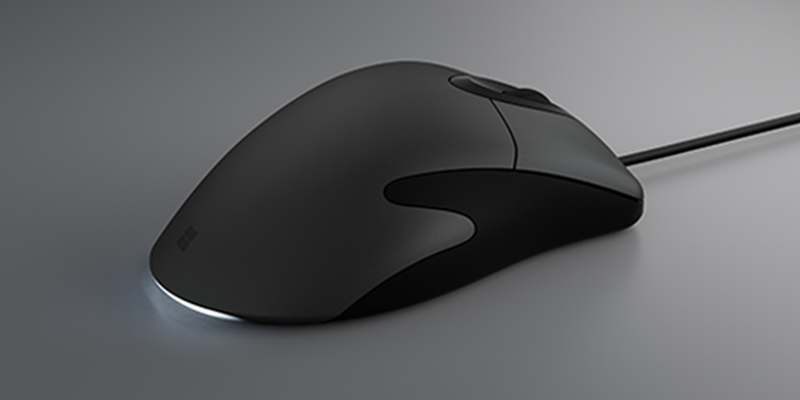
The VERSA PRO WIRELESS weighs 97 grams, or a hair over 3.42 ounces. It’s incredibly light, yet hefty enough not to feel cheap. It’s right-handed, with an obvious resting area for your thumb on one side. The side grips are textured, featuring what MSI calls Diamond Lightgrips—a grippy texture with semi-translucent plastic that allows two lighted zones along each side. These zones, combined with the scroll wheel and MSI logo on top, provide four zones of RGB lighting.
On the underside, you’ll find five skates, which glide smoothly across most mousing surfaces, as well as the DPI switch button. A rounded access door can be popped off by pushing in one side, which disengages a magnet that otherwise holds it in place. This reveals a compartment containing the gold USB transceiver. This is for use with MSI’s proprietary SWIFTSPEED 2.4 GHz protocol. The VERSA PRO WIRELESS also sports Bluetooth 5.3 and USB 2.0 as alternative connectivity options, which means you can keep the transceiver in one computer all the time, while still having options to connect to another via Bluetooth (or you can also still use the mouse while it is charging via USB-C to A cable. There is also a dock connector, because MSI sells a docking station for this model, a surprise to see at this price point. Although we didn’t receive the model that included it, product shots suggest it could be a decorative piece, making it a nice inclusion if aesthetics are important to you. While this is a nice-to-have, it is far from required and the mouse functions fully without it.

Plenty of Buttons
The VERSA PRO WIRELESS sports 15 buttons, including the regular left and right buttons, which are powered by OMRON optical micro switches that are rated at 70 million clicks before failure might start to kick in. Obviously, we cannot test for such claims, but as optical switches have fewer moving parts, there is ample reason to believe this spec. The clicks are very quiet, and each main button requires a decent amount of force in order to actuate. For instance, a HyperX mouse I have used prior to obtaining the VERSA PRO WIRELESS is constantly the victim of accidental clicks, in part because the main buttons are too easy to press accidentally.
Besides the main left and right buttons, the mouse wheel can not only be clicked, but a switch below it acts as a toggle: the mouse wheel can either ratchet as it scrolls for precision (ideal for switching weapons in an FPS), or a free-spinning mode for much quicker scrolling, which is perfect for browsing websites. This feels like a higher-end function, and is something I have missed when I switched from a business-oriented mouse over to my HyperX. The mouse wheel also supports four-way scrolling: up, down, left, and right are all included, which also feels rarer at this price point.
The rest of the buttons (13 out of the 15 total) can be reprogrammed using the MSI Center application. While you are required to at a minimum assign a left click function, anything is fair game. One button in particular, situated at the front left of the mouse, is quite hard to press. It is assigned as a mute button by default, but perhaps using it as a macro would be more helpful; thankfully, the MSI Center application allows for recording of actions for this common feature. Near that is a sniper key, which causes the mouse to decrease its DPI, which can be handy when attempting to make long-range shots in shooting games, or for a temporary precision increase in other applications.


A High DPI Count
A PixArt PAW-3395 optical sensor drives cursor tracking. It uses an infrared LED, which you can easily verify by pointing it at your smartphone camera. It’s capable of a DPI as high as 26,000, which is overkill for almost anything you might possibly need fast cursor speed for. At that level (and, honestly, even half that), the cursor appears to basically teleport across the screen with even slight movement of the mouse. This higher DPI level can only be achieved with the MSI Center application, which isn’t uncommon for computer peripherals. If you choose not to download their software, you will have to live with the five built-in preset DPI settings. These settings start at 400 and double at each press of the DPI switch button on the mouse’s underside, reaching 6400 DPI. Even this default high setting should be enough for most gamers, but if you’re used to something higher, you’ll want to download MSI Center.
MSI Center is quite similar to many other hardware manufacturers’ customization software. It detects any MSI-branded hardware connected to your system and offers to download features that help you customize it. In the case of the Versa Pro Wireless, this means using their Gaming Gear module at a minimum, alongside the optional Mystic Light module. The Gaming Gear section lays out all compatible peripherals you have installed. For the Versa Pro Wireless, here is where you can modify the three different profiles and settings across four tabs. The “Buttons” tab lets you customize what each button on the mouse does. Performance tab enables you to set up the five DPI levels as well as the Polling Rate (which goes up to 1000 Hz), Lift-off distance, angle snapping, and motion sync. MSI Speedshift, which displays a tachometer that reacts to three “gear” settings – the lower the gear, the longer the battery life, at the expense of some accuracy. Most people will be just fine with this set to Gear I, because the battery life tradeoff is likely not worth it. I’ve had the Versa Pro Wireless for a little over a week, and with it in Gear III the entire time, the battery is already down to 51% as of this writing. If Gear I and II extend the battery life by an appreciable amount, that would immediately shoot up the longevity to months instead of weeks.

Software Needs Some Work
One issue we encountered during our testing of the VERSA PRO WIRELESS is that the MSI Center application did not seem to properly save profile settings to the mouse. While the settings would persist when the application was running, even simply putting the computer to sleep would cause the settings to be lost. DPI settings would revert to factory settings, and even custom macros would cease to exist. We’re not sure what the issue is yet: we’re on an ASUS TUF F17 gaming laptop from 2024, running Windows 11 Home 24H2 (so, not a preview/beta build). Should this situation change, we will update our review accordingly. But this does put a damper on any customization we might want to do, because without a guarantee that the settings will stick around, it feels pointless to mess with them for very long right now.
Verdict
The MSI VERSA PRO WIRELESS is a versatile right-handed gaming mouse that has basically all of the features you would expect in its category at this price range. It doesn’t break the bank, yet feels premium in the hand. The weight is right, battery life is solid, lighting is nice, and switching between a clicky or smooth scroll wheel is great. Some application issues may put a halt to any customization options, however, so hopefully that will be rectified sooner rather than later. Despite this, we would recommend this mouse to anyone looking for premium features at a price that doesn’t cause your wallet to catch fire. It may not have the highest polling rate, but for any average PC gamer, the high DPI settings available should suffice anyway.
Score: 8/10
Pros:
- Premium look and feel
- Very lightweight, yet still hefty enough
- Excellent RGB lighting zones
- Versatile mouse wheel
- Lots of buttons to customize
- Good battery life, extendable via settings
Cons:
- MSI Center application currently has saving issues
- Dongle storage is a little awkward
MSI VERSA PRO WIRELESS review unit was provided by the manufacturer. You can read MP1st’s review and scoring policy right here.
This website contains affiliate links. If you click a link and make a purchase, we may earn a commission at no additional cost to you. This helps support our work. Learn more on our affiliate page.