Home > Title Updates and Patches

EA Sports FC 25 Update 1.000.020 Features CONMEBOL Content for Patch 13

[summaraize]

EA Sports FC 25 update 1.000.020 has landed on all platforms, and this game features content from the CONMEBOL competition. Players can expect to see kits, banners, flags and more.

Read on for the full patch notes for update 13 of EA Sports FC 25.

EA Sports FC 25 Update 1.000.020 Welcomes the CONMEBOL Competition

EA Sports FC 25 screen

Ultimate Team

Addressed the following issue:

  • A PlayStyle or PlayStyle+ did not trigger in-game for a Player Item with greater than 12 PlayStyles.

General, Audio, and Visual

Made the following changes:

  • Updated several aspects of CONMEBOL competitions, such as competition seeds, kits, teams, crests, banners, flags, scarfs, balls and ad boards.

Addressed the following issue:

  • Addressed some stability issues that could have occurred.

Make sure to visit MP1st again for more news about EA Sports FC 25 in the near future.

Damien Seeto

Home > Title Updates and Patches

Palworld Update 1.069.489 Targets to Fix PS5 Save Issues Once More in Patch v.0.5.4

[summaraize]

If you’re still experiencing save issues in the PS5 version of Palworld, Pocketpair Inc. has issued another patch for it today that aims to fix that. This will show up as Palworld update 1.069.489 for PS5 players, which is tagged as v.0.5.4 by the developer.

By my count, this is the third patch released that aims to fix the autosave issues plaguing PS5 gamers since the start of this month.

Palworld PS5 Save Issues Targeted by Patch 1.069.489

Palworld Update 1.000.012

Per Pocketpair, here’s what got changed today:

Bug Fixes

  • Implemented a fix for the PS5 autosave bug
  • Fixed minor bugs

That’s about it. The last two patches for the game also aim to resolve the autosave issue on PS5, though we hope this one does the trick. If not, expect another update to be released that touches on this once again.

The Palworld autosave issue on PS5 seems to have surfaced as a bug when the crossplay patch was released last month. If you’re still plagued by the issue even after installing this patch, leave a comment below and let us know. Hopefully, the next patch we get will be much more tangible, and we can finally mark this issue as fixed.

Avatar photo

Alex Co

Father, gamer, games media vet, writer of words, killer of noobs.

Home > Title Updates and Patches

Monster Hunter Wilds Latest Update 1.010.030 Addresses Technical Issues Affecting Crashes, Items and More

[summaraize]

Capcom has a new Monster Hunter Wilds patch ready to address bugs on all platforms. While this doesn’t fix all of the game’s issues, it does target a few key annoying bugs that caused the game to crash after Title Update 1 was released earlier this month.

Players can download this as Monster Hunter Wilds update 1.010.030, which the developers call version 1.010.01.00. Alongside the changes, we also have a list of known issues that still need to be resolved with this patch.

Crashing Issues, Trading and Item Bugs Resolved in Monster Hunter Wilds New Update Version 1.010.030

Here are the issues resolved by today’s patch per Capcom:

Bug Fixes and Balance Adjustments

  • Fixed an issue where selecting “Sekka” from Nata’s Village Intermediary item trade window could cause the game to crash.
  • – Fixed an issue where playing an arena quest with a Powercharm or Armorcharm in your item pouch could create duplicates of the item. (Note: Having duplicates of these items does not cause other bugs. Additionally, only one of each item can be put into your item pouch, so the effects cannot be stacked.)

Xbox Series X|S
– Fixed an issue where the voice pitch settings for the player character and Palico would not function correctly in certain scenes.

  • – Fixed an issue that caused crashes during Zoh Shia quests.
  • – Fixed an issue that allowed players to bring their own equipment into Arena Quests and Challenge Quests.
  • – Fixed an issue that allowed players to keep the effects of Palico support moves (Sporenet: Song o’ Power and Sporenet: Song o’ Purrtection) into Arena Quests and Challenge Quests.
  • – Fixed an issue that allowed players to bring certain skill effects into the Training Area, Arena Quests, and Challenge Quests.
  • – Fixed an issue that caused some Arena Quest and Challenge Quest completion times to register incorrectly in the rankings.
  • – Fixed an issue that would prevent the game from progressing in certain points if you had a Palico Bed set up at a camp.
  • – Fixed an issue that could cause the game to crash if you opened up a Hunter Profile while equipped with an insect glaive.
  • – Fixed an issue that would cause the game to crash when entering a lobby.
  • – Fixed an issue where using a meal voucher in the Grand Hub of a private lobby would unintentionally give free meal permissions to other members.

PlayStation®5
– Fixed an issue where purchasing Value Packs could cause products not to appear in the Add-ons menu of the Support Desk.

  • – Fixed an issue that could cause the game to crash when booting the game while your character is wearing certain equipment.
  • – Fixed an issue where player movement would become erratic during certain gestures.
  • – Fixed an issue where the Mizutsune Assignment could not be reaccepted.
  • – Fixed other miscellaneous issues.
Here are the known issues that have not been resolved with today’s patch, though these should be sorted out in a future update.

  • An issue where players are unable to search for SOS Flare quests of a certain difficulty (★).
  • Certain SOS Flare quests are shown as “?????,” preventing players from joining the quest.
  • A cutscene is not added to the gallery even when players have proceeded through the story enough to unlock it.
  • The text for the Cosmetic DLC Pass is not displayed correctly in the Claim Content menu at the Support Desk. (PS5 only)
  • Some display issues may occur when clearing widgets from the Hunter Profile.
    *This issue will resolve by closing and going back into the “Edit Top Page Widgets” screen.

We expect another update to be released before the May content patch drops, and once we know more about it, we’ll let our readers know.

Avatar photo

Alex Co

Father, gamer, games media vet, writer of words, killer of noobs.

Home > Title Updates and Patches

Blue Prince Update 1.003 Drops for First Post-Release Patch Version 1.01

[summaraize]

Dogubomb has released the first-ever post-release patch for the critically acclaimed puzzle game Blue Prince! Called patch 1.01 by the developers, those on consoles will see this as Blue Prince update 1.003 (complete version 1.003.000), and it should be avaiable for download now.

Bear in mind, there are a few spoilers in the patch notes, so proceed with caution.

Blue Prince Patch 1 Brings It to Version 1.003/1.01

Here’s what’s new for Blue Prince’s first patch per Dogubomb:

  • Fixed the bug occasionally causing new game files to overwrite previous save files after a force quit.
  • Temporarily disabled options to Backup, Restore, or Duplicate Save Files while we investigate reported issues.
  • Fixed system issue causing some players to be unable to unlock a safe in SPOILER: SHELTER
  • Fixed bug causing BATTERY PACK to spawn less frequently than intended.
  • Tweaked odds of certain rare OUTER ROOMS being drawn while drafting.

If you haven’t played the game yet, you’re missing out since it’s “just” a puzzle game. This is the highest-reviewed game of 2025, and our review speaks very highly of it, stating, “My time with Blue Prince gave me every indication that this is one puzzle game that most gamers will enjoy. It struck me as being very well-polished, thought out, unique, and refreshing.”

Avatar photo

Alex Co

Father, gamer, games media vet, writer of words, killer of noobs.

Home > News

Embark Sees The Finals As “Still Being Here” in 3-5 Years

[summaraize]

It’s been more than a year since The Finals was released on consoles and PC. While the gaming space is not lacking when it comes to free-to-play games and shooters, Embark Studios’ latest title seems to have planted its foot firmly enough that it has its own following.

If you’re wondering how the future looks for The Finals, we are too, and this is something we asked Embark when we got the chance to speak to the studio.

Embark Sees a Bright Future for The Finals

the finals map

Speaking exclusively to MP1st, we asked Embark where they see the game in the next few years.

MP1st: Would you say the first year is the biggest challenge to get through for a live service? And now that we are past it, where do you see the game in the next 3-5 years?

An Embark spokesperson provided the answer, stating,  “I think every year likely comes with its own unique challenges. The first year had some for sure, transitioning the team from working on a game “behind closed doors” to one where our work is constantly being validated week by week by our greatest critics (and fans) is very different! At the same time, it’s also the most rewarding part of what we do. In the next 3-5 years I see us still being here, many seasons deep, with more players than ever and a version of THE FINALS that just gets better and better.”

Given how consistent the dev team has been in pumping out content, if the player base sticks, there’s no reason The Finals can’t reach the longevity of other live-service games. That’s especially true when you consider the studio’s ambitious eSports plans, something they’ve already begun laying the groundwork for with Season 6.

It’s not just The Finals Embark is busy with these days, as the studio’s next game, ARC Raiders, will be conducting a tech test on consoles and PC in May.

Stay tuned to our full interview with Embark on The Finals hitting the site soon.

Avatar photo

Alex Co

Father, gamer, games media vet, writer of words, killer of noobs.

Home > Title Updates and Patches

Pacific Drive’s Latest Update Version 1.009.002 Drops a Load of Fixes

[summaraize]

Ironwood Studios has released the latest patch for Pacific Drive today, which plugs many holes in the game. There are a bunch of technical issues that surfaced from the previous update and this sorts it all out.

PS5 players will see it appear as Pacific Drive update 1.009.002, and the studio calls it the version 1.9.2 hotfix.

Crashes, Doors and More Have Been Fixed in Pacific Drive’s Newest Patch

Here’s what’s new per Ironwood Studios. The developers also shared some of the known issues that are set to be fixed in an upcoming update.

Version 1.9.2 – Highlights

  • Potential fix for a crash linked to current analytics system
  • Fixes regarding Dead End junctions and Route Planner warnings
  • Doors at Oppys Garage will no longer lock themselves on re-load
  • Anomalies can no longer visit Oppy’s Garage, stability has been restored

Bugs and UX Fixes

  • Potential fix for crash that can rarely happen after accepting analytics collection details
  • Fix for Route Modifiers applying to the garage (Asteroids, Tourists, Possessed Car)
  • Added option to rebind “Throw” from RMB or LT to any key or mappable button
  • Fixed an issue where unrestricted parts would only bypass embark requirements for Expeditions in the trunk – now able to bypass restrictions in side and roof storage
  • Fixed controllers and gamepads not having a selection highlight while holding a container and viewing the inventory
  • Fix controllers and gamepads cursor appearance in inventories and across containers
  • On controllers and gamepads, the ‘purchase’ button for Ida’s Exchange will now be highlighted
  • Fixed an issue where the warning notification for Dead End nodes were not appearing in the Route Planner
  • Fixed an edge case where it was possible to burglarize Ida’s Exchange
  • Extra checks for determining a valid route in the Route Planner
  • Expedition Offers can no longer be selected before they are fully displayed in the Route Planner
  • Fix for closed doors in the garage re-locking upon Oppy’s Garage map reload, doors can no longer lock themselves
  • Fixed issue where garage inventories would spit items out if manually placed inside
    • Fixes Part Lockers, the Detailing Station, and the Wall Mounts
  • Fixed the peculiar status effect on fuel tanks re-applying its capacity increase each time the game loads
    • *Current* fuel values will not change, only the *cap* will be reset to normal. Your tank that holds 15 million gallons will continue to do so until it breaks, but it won’t get any bigger.
  • Fixed an audio spatialization issue with the garage jukebox in 5.1 surround sound
  • Fixed Friendly Dumpster interaction audio – happy gurgles are back
  • Fixed the backpack inventory displaying incorrectly when upgraded via the outfitting station
  • Fixed missing localization for Ida’s logbook entry
  • Fix for Expedition quest objectives appearing while on campaign/supply runs
  • Fixed non-exit junctions displaying a gateway cost in the features tab of the Route Planner
  • Fixed Grid Inventory can no longer become “sticky” and will drag and drop certain items properly
  • Fixed an issue where quest junctions would connect themselves to a route before they should be able to
    • Most commonly shows up as being unable to travel to the Mid Wall Crossing junction, despite it being connected to the active route
  • Credits Updated
    • Ida of Ida’s Exchange – Callyn Dorval
  • Temporarily removal of “Prologue” from Streamer Safe list

Gameplay Balance and Scripting

Expeditions Changes

The overall goal of these changes is to ease players into Expeditions. Things will still scale up to the same difficulties but the initial tiers should be easier now to help folks ramp up.

Additionally, it should now be a bit easier to come across Unrestricted Items to bring on further trips and bypass those pesky ZETI Restrictions.

  • Initial battery cost of Anchor Locks lowered on earlier Expedition difficulty tiers
  • Initial Trunk and Part restrictions lowered on earlier Expedition difficulty tiers
  • Items spat out by Ida will now stay put a little more
  • Pufferfish has increased odds of dropping Unrestricted Items
  • Zone Trader will now offer more Unrestricted Items
  • Zone Trader prices slightly lower
  • Higher chance of finding tools in car trunks while on Expeditions
  • Higher chance of finding tools in Government Crates while on Expeditions
  • Higher chance of finding First Aid Kits out of backpacks while on Expeditions

Ironwood is investigating quite a number of issues, though there’s no timetable when we can expect a patch to resolve these bugs.

Known Issues

  • “The Visions” Mission markers not appearing
  • Sometimes Expeditions rewards are not provided after successfully completing an Expedition
  • Lamp outside garage is losing grip on building, atmospheric escape possible
  • When reloading from a suspended run, the car might experience an incredible amount of upward movement depending on how closely to the car the game was suspended
  • Some Campaign Mission details might appear on Expeditions
    • Details may appear in route planner information if junction is repurposed from a Campaign Mission
  • The Paint Shelf objective is registering paints and decal kits in locked Goldshells
  • Trip Report may not properly count trip time displayed when loading from a suspended run
  • Some AMD Cards + Drivers are soft-locking while attempting to load into gameplay
    • Recommended troubleshooting – update all drivers and verify game files via Steam or Epic
  • Occasionally Tool Instruction UI will scale smaller via HUD
    • Temporary solution: Using the tool will make the text scale properly
  • Tesla Towers don’t target Conductive Goldshells
  • Status effect indicators on bumpers are not rotating properly in inventory when storing part
  • Player can stand on rear left door when exiting car if rear left door is open, will also cause door to break and fall off
  • Occasionally, Players are able to highlight containers through walls
  • Saving and quitting in the Garage causes the sink and toilet to stop working.
  • Remnant ghost disappears when the player suspends on the same junction as it
If another patch drops, we’ll let our readers know.
Avatar photo

Alex Co

Father, gamer, games media vet, writer of words, killer of noobs.

Home > News

ARC Raiders Next Tech Test Dates Announced; Will Also Be on Consoles

[summaraize]

Embark Studios, the developers behind The Finals, have just announced that they will be hosting a second playtest for their upcoming extraction shooter, ARC Raiders.

Additionally, the test will now expand beyond PC, allowing console players on PS5, Xbox Series X|S to try out the game for the first time.

ARC Raiders Tech Test 2 Is Starting This Month

As announced by Embark Studios, ARC Raiders tech test 2 will begin on April 30 and run until May 4. Players can register via the official ARC Raiders website, and for platform choices, Steam, Epic Games Store, PS5, and Xbox Series X|S are available.

For those who partook in the previous play test, Embark has noted that this play test has been expanded based on the feedback, with more weapons, gear, and gadgets, much deeper player progression and crafting systems, and a preview of ARC Raiders’ upcoming Battle Pass included in this tech test.

“Over the past six months, we’ve worked hard to expand the core experience, based on community feedback,” said Aleksander Grøndal, Executive Producer of ARC Raiders. “This is our chance to see how those changes perform at scale. We’re especially eager to gather feedback on progression, the combat experience, cross-platform performance, and how the experience feels now that it’s more expansive and layered.”

For those unaware, ARC Raiders is an upcoming extraction PvPvE shooter developed by the same studio that did The Finals. It has no release date other than a 2025 window and will be a premium ($40) title as confirmed by Embark.

Danny Robijn

Home > News

Bungie, the Best Solution to Tackle Proximity Chat Toxicity in Marathon Already Exists – The Mute Button

Bungie has confirmed that Marathon won’t have proximity chat, which many feel is essential for an extraction shooter title like Marathon. Why? To create a safe place for players, as it could lead to players saying terrible things about each other. While understandable, anyone playing a multiplayer game over the last 20 years is probably well-versed enough to know this is entirely unavoidable.

Only, it isn’t, as most games, even those released decades ago, already have several options to combat this. 

Guys, It’s Called the Mute for a Reason. USE IT

As confirmed earlier this week, proximity chat won’t be featured in Marathon. Game director Joe Ziegler said, “I don’t think anyone really has a good solution to that just yet. Because we’re so dedicated to making sure that we’re creating a safe space where we don’t have players just flaming each other or doing terrible things to one another, I think we’re not ready to invest in prox chat until we have a solution.”

I don’t know about you guys, but that “solution” has existed since the dawn of online multiplayer games. 

A lesson I learned while playing Call of Duty when Modern Warfare 2007 came out was that I hated listening to some of my teammates. While the game didn’t have proximity chat to hear what the enemy was saying until we all got thrown back into the lobby, it did have team chat, and if I weren’t hanging around with a whole group of players I knew, well, things would often get real ugly. Be that someone blasting music as high as their volume can go or slinging slurs at other teammates and enemies and calling everyone trash when the reality was more of them being trash.

Toxic player behaviour was something I learned very early on, though it wasn’t really from Call of Duty but rather Bungie’s own Halo 2, which at the time did feature proximity chat. A feature that allowed you to communicate with the enemy team once you got close enough to them. This presented some opportunities to trash talk one another, though much like Call of Duty, it could easily turn into something much crueler, with players saying things that they probably would never say to another person if they were face to face. There’s more than a handful of videos out there showing stuff like that, and it’s pretty shocking to hear some of the things coming out of some players’ mouths. But hey, that was how things were in gaming back then, and knowing full well the game I was playing was rated M for mature, it became an expectation eventually. 

Now, I can’t remember if the original Halo 2 had a mute option. I played a lot of LAN setups back in those days, so the discussion was more respectful, with trash talk being playful rather than deliberately hurtful cause we were all mostly friends at the time. But Modern Warfare, on the other hand, did feature a mute button, and that’s something used constantly on the fly. Mind you, this was on players on the same team as mine, highlighting that toxic behavior doesn’t always come from the opposing team. We assume Marathon at least features team chat, and the only way to combat would be to assumely mute the other player. 

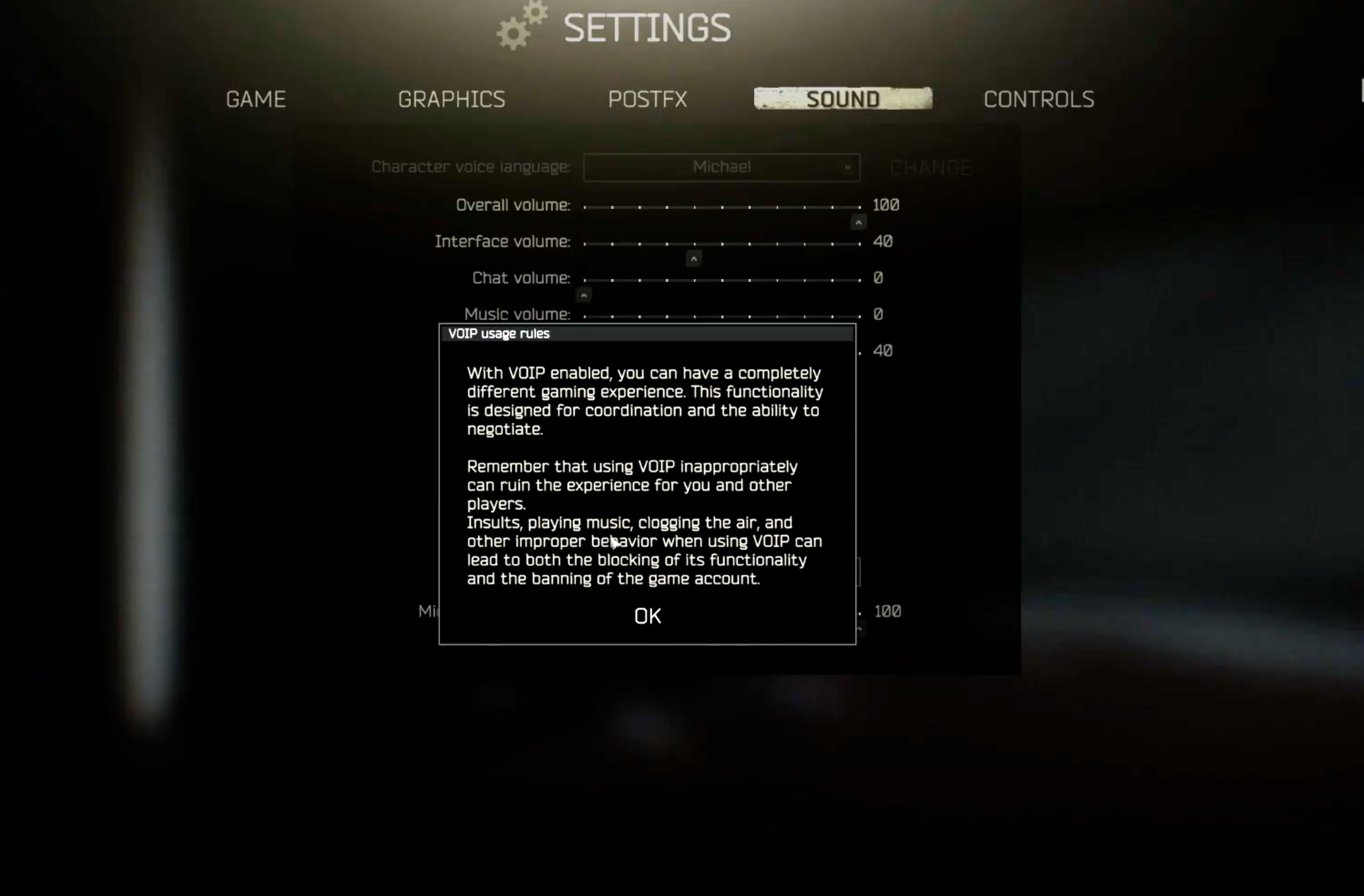
That begs the question: What exact solution is Bungie looking for to resolve this? Nearly all games today feature the ability to mute other players. Heck, many games allow you to turn in-game voice chat off completely, meaning you don’t need to go over a player’s name and hit that button. You can turn the option off and never hear another voice in-game again in some games. Escape From Tarkov, perhaps the biggest extraction shooter right now, has the option to turn in-game Voip off and even warns what you can expect when you enable it.

Let the Players Decide How They Want to Experience the Game

I don’t know, from a consumer perspective, as someone who uses those options to mute players and turn voice chat off. Toxic voice chat hasn’t been a problem I’ve ever had to encounter in a very long time. In almost every online game I play, the voice chat options are amongst the first I go to. Now, of course, not everyone likes playing like that, but that’s the point—it’s an option, one that players should decide for themselves. 

Now, Tarkov removes voice communications entirely when you turn it off, but seriously, it’s 2025, and there are so many other forms of communication. Both PlayStation and Xbox allow for private chat parties and now support Discord for chatting with friends across platforms freely. You don’t have to rely on in-game voice chat, which, more often than not, is horrendous compared to using the built-in system features or another app. 

It’s not like Bungie can’t just add an option to keep communication only with squads, either. There are so many roads that Bungie can take, but to say that a good solution hasn’t been found just doesn’t seem like a good reason when those solutions already exist. Heck, if the studio really wanted to, they could just feature it but keep it turned off by default and let players choose if they want it. Or maybe have it as part of the onboarding process, a big splash screen that explains what it is, inform the players, and then let them decide.

As someone who no longer uses voice chat in-game, I completely understand why many want it. Some of the most memorable moments in gaming have come from it, and there are probably cases of friendships and such coming from it. Now, the same is also true for the opposite effect, but that’s just the nature of it. You’ll never solve that other than employ better reporting tools and moderation. 

At the end of the day, proximity chat isn’t inherently the problem—it’s how we choose to manage it. The tools to foster a safer, more respectful environment already exist, and many of them have been in place for well over a decade. What players are asking for isn’t chaos—it’s choice. Give us the ability to opt in or out, mute, report, and control our own experiences.

Bungie helped define social multiplayer experiences with Halo, and it seems strange that now, they’re choosing to step back from something so integral to the experience, especially in an extraction shooter. If the concern is protecting players, fine—protect them. But don’t do it by limiting the very systems that make these types of games so unpredictable, thrilling, and memorable.

If they want to hear someone screaming on their mics nonstop and being the most annoying thing in the world, well, who am I to say no? Let players decide how they want to engage. That’s always been the better solution. 

Marathon releases September 23 on PS5, Xbox Series X|S and PC.

Avatar photo

James Lara

A gamer at heart, James has been working for MP1st for the last decade to do exactly what he loves, writing about video games and having fun doing it. Growing up in the 90's gaming has been in his DNA since the days of NES. One day he hopes to develop his own game.

Home > Title Updates and Patches

Minecraft Preview Update 1.66 for Version 1.21.80.28 Released

[summaraize]

Mojang has updated the Beta and Preview branch of Minecraft today on all platforms, and this brings a new slate of fixes. Players will see this as Minecraft Preview update 1.66 on last-gen platforms and version 1.049 on PS5 and Xbox Series.

The patch notes are significantly shorter than your usual Beta and Preview update, though we’re not really complaining.

Minecraft Preview and Beta Branch Gets New Set of Adjustments via Patch 1.66 / 1.049

Minecraft Beta & Preview Update 1.60

Features and Bug Fixes

Blocks

  • Dried Ghast blocks no longer generate with the “Drop 2 2025” experiment turned off (MCPE-199218)

Bundles

  • Empty open Bundle icon now renders correctly when Bundles are tapped with Touch Controls

Stability and Performance

  • Fixed bugs causing marketplace addon content to sometimes not load in a world

Realms

  • Realms Server Hosting Region Preference Selection:
    • Added a new “Advanced” tab to the Realms settings screen
    • In the advanced tab, Realm owners can select which datacenter region they would like to host their Realm in
    • Options include a list of regions, or allowing the Realms service to automatically select the best region for the Realm owner or the first player to join the Realm in a given session
    • Note that this selection is a preference only and due to server capacity, your Realm may be hosted in a different region than selected
    • In that case, the next closest region to your preference will be selected
    • Added a message during joining a Realm to indicate which server region your Realm is assigned to for that session
    • More information will be shared about Realms server hosting with the next full release
    • Known issue: The “set region help” help article has not been published yet, so that button will link to the Minecraft help site home page

Technical Updates

Stability and Performance

  • Fixed a crash caused by buffer overrun in the data driven renderer when multiple values wrote to overlay color
  • Fixed null pointer de-referencing crash in chunk rendering

Structures

  • Data-driven Jigsaw Structures have been put back behind the experimental toggle

Experimental Technical Features

Graphical

  • Updated the format of “lighting/global.json” to include support for controlling the new End light flash in Vibrant Visuals. The “directional_lights” section now has two groups: “orbital”, which contains the lighting information around the sun and moon, and “flash”, which contains information about the End light flash. The “flash” section supports an “illuminance” field which controls the max illuminance of the End light flash, and a “color” field, which controls the color of the flash. Example JSON with this new format follows:


{
  "format_version": "1.21.80",
  "minecraft:lighting_settings": {
    "description": {
      "identifier": "minecraft:default_lighting"
    },
    "directional_lights": {
      "orbital": {
        "sun": {
          "illuminance": {
            "0.0": 1.0,
          },
          "color": {
            "0.0": [ 255, 255, 0 ]
          }
        },
        "moon": {
          "illuminance": {
            "0.0": 1.0,
          },
          "color": {
            "0.0": [ 0, 0, 255 ]
          }
        },
        "orbital_offset_degrees": 5.0
      },
      "flash": {
        "illuminance": 1.0,
        "color": [ 255, 0, 255 ]
      }
    },
    "emissive": {
      "desaturation": 0.2
    },
    "ambient": {
      "color": "#FFFFFF",
      "illuminance": 0.4
    },
    "sky": {
      "intensity": 0.8
    }
  }
}

The retail version hasn’t gotten an update yet, but if Mojang releases anything, we’ll let our readers know.

Avatar photo

Alex Co

Father, gamer, games media vet, writer of words, killer of noobs.

Home > News

Lost Records: Bloom & Rage Update 2.000.001 Slides in Tape 2

For those who own Lost Records: Bloom & Rage, you should be prompted to download update 2.000.001 now, and this brings Tape 2! This is the second chapter of the game that’s included in the base price, though it’s only seeing release today.

Check out the trailer for it and read on for what it’s about.

Lost Records: Bloom & Rage Tape 2 Now Available as Patch 2.000.001

What Is Tape 2 About?

Tape 2 – “Rage” – follows the girls after Tape 1’s dramatic conclusion, featuring darker themes such as adversity, mystery, and the supernatural. In 2022, Swann and the others must conjure and confront the memories that have somehow – and for some reason – eluded them for the past 27 years.

Alongside Tape 2, the game’s complete OST (original soundtrack) is now available on streaming platforms. It can be purchased separately or bundled with the game, which offers a steeper discount.

The physical OST from Kid Katana is available for pre-order here. Shipping of the vinyl will commence in June 2025.

Avatar photo

Alex Co

Father, gamer, games media vet, writer of words, killer of noobs.

Home > Title Updates and Patches

Kingdom Come Deliverance 2 New Update 1.024 Adds Hardcore Mode in Patch 1.2.4

[summaraize]

While we just got the big barbershop update last month in Kingdom Come Deliverance 2, the devs have another treat in store for players today, as they have added Hardcore mode in the action-RPG. Called tPatch 1.2.4, console gamers will see this as Kingdom Come Deliverance 2 new update 1.024 (complete version 1.024.000).

Aside from Hardcore mode, this patch also fixes to skills, platform-specific issues, quests and more.

Kingdom Come Deliverance 2 Hardcore Mode Added as Part of Update 1.024:

kingdom come deliverance 2 gameplay

New

Hardcore Mode

Some of the things players can expect from KCD2’s Hardcore Mode:

  • Disabled map position
  • Compass removed
  • Added option to ask different NPCs about your location in the world.

Features

Balance

  • Rebalanced shop prices for herbs, so that they never sell for a higher price than their buying price.

Barber

  • Added the bald hairstyle option for Henry.
  • Fixed shadow flickering under certain weather conditions.

Dice

  • Fixed a crash caused by getting hit while choosing dice.

Items

  • Fixed the broken wreath model.

Mods

  • Fixed issues with saving when having too many mods installed.

Skills & Perks

  • Fixed Sagittarius, On the Road, Salva, and Wildrider perks not working properly when taken while playing on 1.1.X and after loading on 1.2.X.

Stability

  • Fixed several most frequent crashes.

Platform-Specific Fixes – Xbox

  • Fixed some saves not being available to load due to Gold edition / Season pass licensing issues.

Quests

Judgment Day

  • Fixed incorrect NPC behavior after completing the final quest.
  • Fixed the victory overlay sometimes not displaying correctly.

The Jaunt

  • Fixed Lord Semine sometimes getting stuck after the practice fight on the way from Semine.

The “Gallant Huntsman Kit” which was originally exclusive to the Gold Edition of the game, can now be bought as DLC too.

What does the Gallant Huntsman’s Kit include?

  • St. Hubert hat: Hunting cap based on a legend about St. Hubert
  • Master huntsman’s hood: Adorned with pearls to protect from the elements
  • Nimrod coat: Hunting coat based on the famous hunter Nimrod
  • “Master huntsman’s hose: Trousers for a proper hunter
  • Master huntsman’s gloves: Hunting gloves crafted from leather for manipulating weapons and downing game
  • Master huntsman’s boots: Hunting boots well-made from leather for stable movement through dense forest
  • Artemis’ crossbow: A new type of ranged weapon perfect for hunting Hunting bolt: 30 bolts to use with the crossbow

Expect more patches from Warhorse in the coming weeks and months. Once another one is available, it’ll be up here on MP1st.

Avatar photo

Alex Co

Father, gamer, games media vet, writer of words, killer of noobs.

Home > Title Updates and Patches

Baldur’s Gate 3 Last Update 1.800.300 Drops for Patch 8 – Brings Crossplay, New Subclasses and Photo Mode

[summaraize]

You know what they say: everything must come to an end, and this also applies to Larian Studio’s excellent support of Baldur’s Gate 3. Today, the studio’s last update for the game is live, which the studio calls Patch 8.

Console players will see this as Baldur’s Gate 3 update 1.800.300, and this brings new subclasses, crossplay, Photo Mode and more! There’s a ton to take in, so grab a drink and prepare to dive into the last patch’s new features.

Baldur’s Gate 3 Update 1.800.300 Ushers in Last Content and Feature Support by Larian

BG3 Patch 8 Highlights:

  • Crossplay: Introducing crossplay between PC, PlayStation 5, Xbox Series X|S, and Mac, so players can party up with friends no matter what platform they play on.
  • Photo Mode: Adventurers can snap photos of their escapades during cutscenes, dialogue, and combat, and edit them to their hearts’ content with a slew of post-processing effects (and stickers…)
  • 12 New Subclasses: Brand-new subclasses; new abilities, VFX, animations, summons, and Oathbreaker Knight voiced dialogue; each class has a new way to play.
  • Modding Toolkit Update: Patch 8 brings partial level editing and quality-of-life updates to BG3’s official Modding Toolkit.

The full list of new subclasses and their corresponding class are:

  • Bard – College of Glamour
  • Barbarian – Path of Giants
  • Cleric – Death Domain
  • Druid – Circle of Stars
  • Fighter – Arcane Archer
  • Monk – Way of The Drunken Master
  • Paladin – Oath of the Crown
  • Ranger – Swarmkeeper
  • Rogue – Swashbuckler
  • Sorcerer – Shadow Magic
  • Warlock – Hexblade
  • Wizard  – Bladesinging

If you want to read the more extensive details regarding the new features, just scroll down.

Steam Trading Cards

Baldur’s Gate 3 now supports Steam Trading Cards! And you thought you’d never get them.

Collect the unique trading cards to craft badges, and unlock exclusive profile backgrounds and emoticons to use anywhere on Steam! Speaking of Steam, Baldur’s Gate 3 is now on sale with 20% off until April 21st:

https://store.steampowered.com/app/1086940/Baldurs_Gate_3/

Cross-Play

Players on PC, Mac, Xbox, and PlayStation 5 will now all be able to enjoy Baldur’s Gate 3 multiplayer, with full cross-platform progression and cross-play.

Using the Larian Network, you can now join and create cross-play lobbies to take on your adventures together.

Cross-Play & Mods

You’ll be able to continue to enjoy creating chaos with mods in cross-play, but it’s important to note that all players joining the lobby must have the same version of mods installed. When joining a host’s game, you’ll be prompted with the Mod Verification window to enable, upgrade, downgrade, or install any missing mods.

If you are a PC player creating a cross-play lobby, keep in mind you can use the “Available on Console & Mac” tag to browse mods that will be compatible with consoles and Mac, and that the mod limit on consoles is 100. Third-party mods cannot be used on consoles.

Using Cross-Play

How to join another player in multiplayer via cross-play:

  1. On the main menu, select “Multiplayer”.
  2. Select the “Cross-Play” tab.
  3. Join the other player’s lobby.
  4. If you or the host are using mods and there are any discrepancies, the Mod Verification window will open to inform you of which mods need installing, uninstalling, or updating.

How to create a cross-play multiplayer lobby:

  1. Access multiplayer.
  2. Select “Cross-Play”.
  3. Select “Create”.
  4. Customise your options and select “Launch”.

Photo Mode

Position and pose your party, play around with camera settings, and whack a few stickers on there. Photo Mode is now yours to explore with Patch 8!

Getting Started

To test out Photo Mode, toggle it on or off by pressing down on both analog sticks if on console, or by pressing F9 if on PC. You can also enable Photo Mode by clicking on the Photo Mode icon on the HUD minimap.

Exploring Camera Settings

When you’re adventuring with your party, you’ll be able to alter their positioning and try different facial expressions and poses, while making the most of the camera, lens, and scene settings, even during combat encounters.

While you won’t be able to change the position of your party or camera angle during dialogues and cinematic scenes, you will still be able to enjoy a range of post-processing effects, including colour-grading settings, frames, and stickers.

Photo Mode & Modding

Speaking of stickers, Photo Mode already includes more than 300 stickers, but keen modders out there will be able to create and upload their own via the BG3 Toolkit!

New Subclasses

One new subclass for each playable class is now available, featuring new abilities, animations, VFX, unique summons, powerful cantrips, and voiced dialogue for the Oathbreaker Knight for those playing as the Oath of the Crown Paladin subclass!

Packed with new ways for you to play, whether you want to roleplay the God of Thunder by using Elemental Cleaver, imbuing your Path of the Giant Barbarian’s hammer with shocking damage and flinging it out for it to come back to you, or as a drunken monk, with truly homebrewed abilities that will enhance your next playthrough, there’s surely a subclass for you!

  • Path of the Giant Barbarian
  • College of Glamour Bard
  • Death Domain Cleric
  • Circle of Stars Druid
  • Arcane Archer Fighter
  • Way of the Drunken Master Monk
  • Oath of the Crown Paladin
  • Swarmkeeper Ranger
  • Swashbuckler Rogue
  • Shadow Magic Sorcerer
  • Hexblade Warlock
  • Bladesinging Wizard

Unlocking The New Subclasses

Each new subclass can be selected once you have reached the level required to unlock it. This varies depending on your chosen class. Check out the table below to see when subclass selection becomes available for each class!

Level Class
Level 1 Cleric, Sorcerer, Paladin, Warlock
Level 2 Druid, Wizard
Level 3 Barbarian, Bard, Fighter, Monk, Ranger, Rogue

Bard, Barbarian, Cleric, Druid Overview:

Fighter, Monk, Paladin, Ranger Overview:

Rogue, Sorcerer, Warlock, Wizard” Overview:

Baldur’s Gate 3 Modding

Baldur’s Gate 3 Toolkit

As well as Patch 8, the Baldur’s Gate 3 Modding Toolkit is receiving an update, which means mod authors will now be able to explore partial level editing! Whether you fancy creating your own NPC, dropping a metric ton of carrots across every existing level just for the sake of it, pledging your undying love to Shadowheart by turning all wolves into bunny rabbits or by moving them to the House of Hope, you’ll now be able to use the Toolkit to add or override certain template types in existing levels.

Partial level editing means that what you won’t be able to do with the official Baldur’s Gate 3 Toolkit is add dialogues or change the static parts of the world like buildings, scenery or terrain. You can, however, create your own interactive objects like a chest that teleports away every time you get close to it – no one will touch your belongings ever again! Including you. Or you could make a salami statue that you can put in your pocket. The world truly is yours.

Modding Guidelines Update

To support the new realm of possibilities with the latest Toolkit update, we have now updated the modding guidelines with new information, and will continue curating mods for console. As part of this update, we have reviewed technical requirements, and unfortunately, mods that introduce new playable races are unable to be curated for console. If you’re a mod author, we suggest giving the guidelines a read by clicking here.

UI Functionality Improvements

We have been continuing to work closely with mod authors to ensure there are fewer conflicts between game mods and new patches, particularly for those that have ImpUI as a dependency. While the ImpUI mod isn’t currently being maintained, to help keep things running smoothly and to support the creative passion of those in the modding community, we’ve introduced minor changes to how some functionalities are handled in the Toolkit. Now, mod authors will be able to make changes directly for mods that rely on UI tweaks during Character Creation.

The changes now supported natively in the Toolkit include:

  • Action Resources
  • Racial spells at LevelUp
  • Race passives
  • UI scrolling for Heads, Passives, Equipment, Class, Subclass, and Origin selection
  • Feat passives
  • Radial customisation and descriptions

Thank you to Djmr for their incredible work on this mod and for keeping in contact with us while we resolved the conflicts and introduced this functionality, as well as Caites, both who have been particularly helpful, and whose names now lie firmly in the Baldur’s Gate 3 game credits, along with the mod authors who have been helping us test Toolkit functionality!

Mods In Patch 8

As Patch 8 begins to roll out, please remain patient and respectful of those in the community who put work into creating their mods. Some things might not work immediately after a new update and it might take a little while before a mod can be updated. If you can’t wait to dive in but are worried about your mod list, we recommend starting a new playthrough to enjoy the new subclasses and to try out photo mode.

As much info as there is now, this is just the tip of the iceberg. The complete patch notes detailing every gameplay fix and adjustment made are available here.

Even if this is Larian’s last update, don’t be surprised to see follow-up patches to fix any issues that may arise from today’s content drop.

Avatar photo

Alex Co

Father, gamer, games media vet, writer of words, killer of noobs.

Home > Title Updates and Patches

Fortnite New Update 4.64 Delivers Hotfix

[summaraize]

Fortnite’s new update version 4.64 is now out on all platforms, and this is considered a hotfix by Epic Games. While it doesn’t bring in any new content, expect many issues to be resolved.

Fortnite’s New Hotfix Released as Version 4.64 on April 15

Update: Unfortunately, the only tangible aspect of today’s patch that Epic mentioned is Scorpion’s Spear. “We’ve made some adjustments with today’s game update to improve accuracy with Scorpion’s Kombat Kit,” the developers said today.

Original Story:

Aside from announcing that a hotfix is on the way, Epic has remained mum about today’s patch. Thankfully, we can refer to the game’s official Trello Board for more info.

GENERAL TOP ISSUES

In-Developement

  • Nintendo Switch players encountering storage space issues
  • Splitscreen Issue when player 2 logs out.

Investigating

  • Unable to change the style of Outfits with customizable elements.
  • Built-In Emotes do not play in Creative / UEFN Experiences.

Fixed in Future Update

  • The Technician Naya Outfit may have display issues in Performance Mode.

BATTLE ROYALE/RELOAD/OG TOP ISSUES

In-Developement

  • Can’t edit structures while a DBNO (knocked) player is nearby.

Investigating

  • Players may float briefly after using Typhoon Blade’s Cyclone Slash upon exiting a vehicle.
  • Some Outfits may change their rarity when scrolling in the Locker.
  • Changing to another item right after using the Fishing Rod breaks the animation.
  • Can’t reboot a teammate if the ‘Reboot’ key is the same as the ‘Buy Reboot Cards’ key.

Fixed in Future Update

  • When readying up for Duo, Trio or Squad, the mode switches to Solo

BALLISTIC TOP ISSUES

In-Developement

  • Battle Royale Building UI may appear in Spectate Mode.
  • Can’t edit structures while a DBNO (knocked) player is nearby.
  • Some Outfits may change their rarity when scrolling in the Locker.
  • Players may float briefly after using Typhoon Blade’s Cyclone Slash upon exiting a vehicle.
  • Changing to another item right after using the Fishing Rod breaks the animation.
  • Can’t reboot a teammate if the ‘Reboot’ key is the same as the ‘Buy Reboot Cards’ key.

LEGO FORTNITE TOP ISSUES

In-Developement

  • Players may get stuck in a cannon if its damaged or falls into water while operating it.
  • Consumable buff timers can be overwritten when eating another consumable with a buff
  • There is no indication of which direction some furniture is being placed
  • The Swag Shot emote is not correctly translating on the Chalk Board

Investigating

  • Lag/hitching issues in the Storm King fight
  • ‘F’ key conflict: unable to interact with objects.
  • Vacant Apartment and Housing Lot Icons are sometimes not displayed on Map.
  • A prompt to flip a vehicle no longer appears when a vehicle is flipped.
  • Isabelle won’t talk to players while interacting with the blackboard.
  • Can’t move placed decorations in Edit Mode if the Decor Inventory is full.
  • The Wasp 8000 Motorcycle may float after hopping off while in motion.
  • The scrollbar overlaps the Home Shop options in the ‘Homes’ app tab.
  • Storm King’s Weak Points and Rift Spawners are immune to damage when an enemy is around.
  • Invisible collision in Phase 1 after being eliminated in Phase 2 of the Storm King fight.
  • Enemies’ health bars may not appear at times.
  • Stuck when exiting the Crusher.
  • Villagers exploring with players may destroy structures while trying to harvest.
  • Bottom of HUD can disappear after using macrobinoculars.

Fixed in Future Update

  • Opening and closing the Text Chat or Build menu with an equipped Offhand/Hold/Toggle item may cause unexpected behavior.

ROCKET RACING TOP ISSUES

In-Developement

  • [Switch] Non Party Leaders may experience matchmaking errors when attempting to queue for Casual mode while in a party.
  • Locker’s Vehicles – SUV/Truck and Sports Cars sections changes to a different background color when navigating through the cosmetics options

Investigating

  • Players may observe extremely bright lights.
  • Vehicle handling may be unresponsive after passing through a Teleporter Checkpoint in a Community track.

Fixed in Future Update

  • All Foliage Trail Ranked reward previews incorrectly displayed in the Forest Green Style.

FORTNITE FESTIVAL TOP ISSUES

In-Developement

  • Jam Stage Mixers – Players need to equip Jam Tracks before hopping into the Jam Stage to access songs and start making music.

Investigating

  • Audio Stuttering On Switch After Extended Play
  • [Local Multiplayer] Incorrect HUD loading in Main Stage.

SAVE THE WORLD TOP ISSUES

In-Developement

  • Players might get stuck if they use Jam Loops just before completing a Mission.
  • Global Daily Bonus Goal completion does not count towards Quest Pack progress.

Investigating

  • Flutter’s Wisp eliminations do not trigger ‘On Elimination’ effects or contribute to Combat Score.

If Epic Games releases a proper changelog, we’ll have it added to the article.

Avatar photo

Alex Co

Father, gamer, games media vet, writer of words, killer of noobs.

Home > Title Updates and Patches

Rainbow Six Siege Y10S1.3 Update for Version 2.99 Fixes Affecting Ace Up the Sleeve Badge and More

[summaraize]

Rainbow Six Siege’s Y10S1.3 patch is now live on consoles and PC, and this brings a small list of important fixes to the shooter. Those on PS4, Xbox One consoles, this will pop up as Rainbow Six Siege update version 2.99, while those on PS5, Xbox Series will see this as R6 Siege update 1.000.104.

The actual changelog isn’t long, but it does mention some important fixes related to the Ace Up the Sleeve badge bugging out, as well as other technical issues.

Rainbow Six Siege Y10S1.3 Now Available as Patch Download 2.99/1.000.014

Rainbow Six siege update 2.80

BUG FIXES

GAMEPLAY

  • FIXED – Ace Up the Sleeve badge doesn’t count during an Ace round when enemy players reconnect to the match.

USER EXPERIENCE

  • FIXED – Players are unable to connect on PC with error 0x00000140.
  • FIXED – Players get stuck on the deployment phase and can’t progress the match.
  • FIXED – Equipped reputation card backgrounds don’t update when a player has a change in their reputation.
  • FIXED – Operator unlock videos don’t play when unlocking Operators, and can’t be viewed in the Operators section after being unlocked.

That’s all this patch contains per Ubisoft. Don’t forget, the game is gearing up for the big X update hitting in June wherein the game will go free-to-play.

Avatar photo

Alex Co

Father, gamer, games media vet, writer of words, killer of noobs.

Home > Title Updates and Patches

MLB The Show 25 Update 1.008 Hits the Field for Patch 8

[summaraize]

San Diego Studio has added a new uniform to MLB The Show 25 as part of Patch 8, which is available now on all platforms. Those on PS5, expect to see this appear as MLB The Show update 1.008 (complete version 1.008.000), and version 1.0.42 on Xbox.

Aside from the new unis, there are also fixes to Road to the Show and other issues.

MLB The Show Patch 8 Now Out and Delivers Bug Fixes via Update 1.008

Here’s everything new via today’s update according to San Diego Studio:

  • PS5: 1.08
  • Xbox Series X|S: 1.0.42
  • Nintendo Switch: 1.08

General: 

  • 2025 Colorado Rockies City Connect uniforms have been added. 

Road to the Show: 

  • Fixed an issue where the score bug could be empty when a catcher is at-bat. 

Franchise and March to October:

  • Fixed an issue with amateur draft prospect rankings where organization rankings could diverge from MLB rankings even if no scouting had occurred. 

Miscellaneous: 

  • Fixed a bug where captions could disappear before Bob Kendrick is finished talking in Storylines. 
  • Updated Seattle Mariners uniforms with current on-field sleeve patch. 

That’s about it for this patch. Given the studio’s history, the patches for the game are usually for bug fixes, and rarely does it add anything super-big in terms of content.

Avatar photo

Alex Co

Father, gamer, games media vet, writer of words, killer of noobs.

Home > News

The Elder Scrolls 4: Oblivion Remastered First Screenshots and Comparison Images Leak

[summaraize]

Remember our report on The Elder Scrolls 4: Oblivion remake from three months ago? If that wasn’t confirmation enough that this unannounced game is the real deal, then perhaps the first screenshots will convince you.

First off, this is not a remake but a remaster, and the game’s full title is The Elder Scrolls 4: Oblivion Remastered based on the leaked screenshots. There are also comparison screens where we see the improvements made from the 2006 original release.

The Elder Scrolls 4: Oblivion Remastered First Unofficial Screenshots Leak Basically Confirming the Game

The images have surfaced via Virtuous’ website, which is the developer we named months ago as the studio tapped in developing Oblivion for modern consoles.

It shows a comparison image, images of the a few levels and a lot more. Check out the galleries below to see the screenshots:

Oblivion

Oblivion

It also confirms the game will be released on PS5, Xbox Series X|S and PC thanks to the game’s box cover. No mention of a Nintend Switch 2 version though. For early gameplay details we’ve unearthed previously, I suggest reading our complete report on it.

Given the massive leaks we’ve gotten today, don’t be surprised to see Microsoft or Bethesda formally announce it before the week is out. Chances are, we haven’t heard the last of the game today, and we’ll have more info as it develops.

Avatar photo

Alex Co

Father, gamer, games media vet, writer of words, killer of noobs.

Home > Title Updates and Patches

Warhammer 40K: Space Marine 2 Major Update 1.007 for Patch 7.0 “Trygon” Now Live

[summaraize]

The Warhammer 40K: Space Marine 2 Patch 7.0 “Trygon Update” is now live on all platforms! This brings a new PvE Operation, Prestige Ranks in PvE and more. Console players will see this as Space Marine 2 update 1.007, and this is a hefty download, which is understandable given what it brings to the war table.

For the complete patch notes and recap, check out what’s available below.

Warhammer 40K: Space Marine 2 Trygon Update 1.007 Brings New Content and Gameplay Balancing Change

Highlights:

New Features:

  • New PvE Operation: Exfiltration
  • Prestige Ranks in PvE
  • Private PvP Lobbies
  • New Secondary Weapon in PvE and PvP: Inferno Pistol
  • New customisation options: 2 new colours, Bulwark cloth colouring, hands colouring

New Season Pass content:

  • Space Wolves Chapter Pack
  • Imperial Fists Champion Pack

Gameplay & Balancing:

  • Extended weapon arsenal in PvE
  • Weapon perks updated in PvE
  • Improved Matchmaking in PvE and PvP
  • Various changes, bugfixes and improvements

PATCH NOTES

New Features

New Operation — Exfiltration

Exfiltration takes place on Avarax at the outskirts of an Imperial Hive City ravaged by the Tyranids. Your mission is to reach a Mechanicus facility, extract a rogue Tech-Priest and fight a Trygon; a giant, burrowing Tyranid that creates underground passageways for other Tyranid organisms.

Private Lobbies in PvP

A custom lobby to invite your fellow Space Marines. You can choose the mode and map, and also change the gameplay settings, like score or time limit or even damage modifiers to create your own fun game modes.

Prestige Ranks in PvE

The Prestige system allows you to continue empowering your Class even after reaching the maximum level. Once you have reached level 25, go to the Armouring Hall and follow the activation procedure in the Skill Tree screen. There, you can reset the Class’ progress to the first level to unlock one Prestige Perk. After this, you can raise the Class level to 25 again. Thus, a Class can get up to 4 active Prestige Perks simultaneously. Each prestige rank increases XP gain by 10%.

Progressing your Prestige ranks will also grant you unique cosmetic rewards for each rank you unlock.

PvE Extended List of Available Weapons

Heavy: Heavy Bolt Rifle | Heavy Bolt Pistol

Tactical: Combat Knife | Plasma Pistol | Heavy Bolt Pistol

Assault: Power Sword | Plasma Pistol

Bulwark: Heavy Bolt Pistol

Sniper: Heavy Bolt Pistol | Instigator Bolt Carbine

Vanguard: Heavy Bolt Pistol | Bolt Carbine

Originally the classes were not balanced around having these weapons. Some of those changes are only meant to bring more variety, fun and lore accuracy to the game.

Not every change here will make every weapon competitive with the rest of class loadouts. 

This isn’t the last pass on this, we will continue to monitor the game and make necessary changes. We still have some more ideas how we can expand loadouts more, without breaking the lore and while keeping class identity, but those changes will take a while to implement.

New Secondary Weapon: Inferno Pistol

Available for Sniper, Heavy, Assault and Vanguard classes.

Class-based matchmaking in Operations mode

This is a first iteration of the system that is designed to reduce frequency of matchmaking with other people with the same classes. It is not going to prevent this 100%, there will always be some edge cases. We will be tweaking and improving the system on our backend as we go.

Experimental skill-based matchmaking and team balancing in Eternal War mode

This system should make matchmaking in PvP more fair. This is an experimental feature, we will be turning it on and off on the backend and monitoring the results. It will take a while for it to shape up.

Public Test Server (PTS)

We are really happy with the PTS experiment that we had. We got a lot of feedback from the community that allowed us to implement changes ahead of actual live release. While having PTS is an additional stress for our team and will cause some delays to live patches we are going to keep doing that for all major content updates moving forward.

The PTS will be closed for now, but we’ll reopen it once we’ll be looking for your feedback on upcoming features.

New Season Pass Content

Space Wolves Chapter Pack:

  • Space Wolves Chapter Champion (Vanguard).
  • Space Wolves Chapter Weapon Skins (Bolt Carbine, Thunder Hammer, Chainsword).
  • Space Wolves Chapter Customisation (Helmet, Chest, Pauldron, Greave, Heraldry markings).

Imperial Fists Champion Pack:

  • Imperial Fists Champion (Tactical).
  • Imperial Fists Signature Weapon Skin (Plasma Incinerator).

Customisation

New Colours: New default colours Volupus Pink and Thousand Sons Blue.

Bulwark Cloth Recolouring: New feature to recolour the cloth for Bulwark tabard has been added as an option for the chest armour piece for customisation.

Hands Recolouring: New feature to recolour the gauntlet armour piece is added. Now the primary colour is used to colour a fist and the secondary one colours a wrist and a shoulder part of the hand. (This one is for you, Iron Hands and Crimson Fists fans!)

Lots of minor fixes for customisation of armour parts and emblems.

Space Marine 2 New PvP Content

​Gameplay & Balancing tweaks

Progression Rewards

  • Rebalance Rewards in the Eternal War Mode 

Match rewards are increased by 50%.

  • Base EXP for PvE is increased

Base XP for all difficulties in Operation Mode is increased by 10%.

PvE Weapon Perks Update

With this update we are rolling out a massive rebalancing and rework of weapon perks. As a result all weapons received buffs one way or another.

Some notes regarding our future plans in terms of balancing: I want to say that I’m not a big fan of changing too many things at the same time. It is hard to predict the outcome, it’s a risk of introducing bugs and not every change is a simple number change. Past 2 patches changelogs were several pages long. I’m more in favor of gradual improvements of the game rather than chaotic changes back and forth. This means that we do see your feedback on some of the class perks and weapons etc, even looking at the current weapon perks rework I feel like we could have done a better job with plasma weapons and power sword perks.

There will be a second pass on class, weapon and prestige perks. Probably around Patch 8. I do think that those systems are in much much better shape than they were before patches and on release, the scope of the second pass will be smaller.

  • Heavy Bolt Rifle

“Perpetual Precision” (Master-Crafted tier): The perk has been replaced with “Cleaving Fire” (Shots will penetrate enemy Block Stances dealing 25% of the usual Damage)

“Able Precision” (Artificer tier): The perk has been reworked, the new version is “Remote Threat” (Enemies at a distance of more than 25 metres take 20% more Damage)

“Fast Regeneration 1” (Artificer tier): Replaced with “Head Hunter” (Headshots deal 10% more Damage)

“Fast Regeneration 2” (Artificer tier): Completely reworked, the new perk is “Recoupment”Killing a Majoris-level or higher enemy with a headshot with this weapon restores 1 Armour Segment. Cooldown is 15 seconds.

“Head Hunter 2” (Artificer tier): Completely reworked, the new perk is “Tactical Precision”Headshots deal 20% more Damage. Non-Headshot Damage decreases by 10%.

“Rapid Health” (Relic tier): Health restoration increased from 5% to 10%. No longer has a cooldown.

“Rampage” (Relic tier): duration effect increased from 5 to 10 seconds. Cooldown decreased from 30 to 15 seconds.

“Honed Precision” (Relic tier): Maximum Spread decreased by 25% to 50%.

“Chaos Eliminator” (Relic tier): Replaced with “Divine Might” (Damage increases by 10%).

“Tyranid Eliminator” (Relic tier): Replaced with “Remote Threat” (Enemies at a distance of more than 25 metres take 20% more Damage)

  • Bolt Rifle

“Able Precision” (Artificer tier): duration effect increased from 5 to 10 seconds.

“Fast Regeneration 1” (Artificer tier): Replaced with “Adamantine Grip” (Recoil is reduced by 25%).

“Fast Regeneration 2” (Artificer tier): Completely reworked, the new perk is “Recoupment”Killing a Majoris-level or higher enemy with a headshot with this weapon restores 1 Armour Segment. Cooldown is 15 seconds.

“Head Hunter 2” (Artificer tier): Completely reworked, the new perk is “Tactical Precision”Headshots deal 20% more Damage. Non-Headshot Damage decreases by 10%.

“Rapid Health” (Relic tier): Health restoration increased from 5% to 10%. No longer has a cooldown.

“Honed Precision” (Relic tier): Maximum Spread decreased by 25% to 50%.

“Chaos Eliminator” (Relic tier): Replaced with “Perpetual Penetration” (Each shot penetrates 1 additional target).

“Tyranid Eliminator” (Relic tier): Replaced with “Divine Might” (Damage increases by 10%).

  • Auto Bolt Rifle

“Honed Precision” (Standard tier): Maximum Spread decreased by 25% to 50%.

“Fast Reload” (Artificer tier): Replaced with “Head Hunter” (Headshots deal 10% more Damage)

“Fast Regeneration 1” (Artificer tier): Replaced with “Elite Hunter” (After killing a Majoris-level or higher enemy with a Melee Weapon, Headshots deal 25% more Damage for 10 seconds).

“Rapid Health” (Relic tier): Health restoration increased from 5% to 10%. No longer has a cooldown.

“Perpetual Precision” (Relic tier): Completely reworked, the new perk is “Recoupment”Killing a Majoris-level or higher enemy with a headshot with this weapon restores 1 Armour Segment. Cooldown is 15 seconds.

  • Plasma Incinerator

“Rapid Cooling” (Master-Crafted tier): Duration effect increased from 5 to 10 seconds. Cooldown decreased from 30 to 15 seconds.

“Rampage” (Master-Crafted tier) : Duration effect increased from 5 to 10 seconds. Cooldown decreased from 30 to 15 seconds.

“Common Cooling” (Artificer tier): Completely reworked, the new perk is “Common Efficiency”Common Shots generate 20% less Heat. Shots charge 20% slower.

“Blast Radius 1” (Artificer tier): Damage radius increased from 5% to 10%

“Blast Radius 2” (Artificer tier): Damage radius increased from 5% to 10%

“Fast Venting” (Artificer tier): Completely reworked, the new perk is “Balanced Cooling”Weapon cools 20% faster. Charged Shots generate 10% more Heat.

“Retaliation” (Relic tier): Duration effect increased from 5 to 10 seconds.

“Perfect Radius” (Relic tier): Duration effect increased from 5 to 10 seconds.

  • Stalker Bolt Rifle

“Fast Reload” (Standard tier): Completely reworked, the new perk is “Unwavering Resolve”After reloading while having Low Ammo, damage increases by 25% for 5 seconds.

“Long Shot” (Standard tier): Replaced with “Divine Might” (Damage increases by 10%).

“Adamant Reload” (Master-Crafted tier): Replaced with “Adamant Hunter” (When your Health is below 30%. Headshots deal 25% more Damage).

“Fast Regeneration 1” (Master-Crafted tier): Replaced with “Head Hunter” (Headshots deal 10% more Damage)

“Head Hunter 1” (Artificer tier): Replaced with “Cleaving Fire” (Shots will penetrate enemy Block Stances dealing 25% of the usual Damage).

“Agile Hunter” (Relic tier): Duration effect increased from 5 to 10 seconds.

“Tyranid Eliminator” (Relic Tier): Completely reworked, the new perk is “Recoupment”Killing a Majoris-level or higher enemy with a headshot with this weapon restores 1 Armour Segment. Cooldown is 15 seconds.

“Chaos Eliminator” (Relic Tier): Completely reworked, the new perk is “Remote Threat”: Enemies at a distance of more than 25 metres take 20% more Damage.

  • Bolt Carbine

“Perpetual Precision” (Standard tier): Replaced with “Head Hunter” (Headshots deal 10% more Damage)

“Elusive Precision” (Master-Crafter tier): Replaced with “Rapid Health” (When your Health is below 30%, killing 10 enemies in rapid succession restores Health by 10%).

“Retaliation” (Master-Crafted tier): Duration effect increased from 5 to 10 seconds.

“Fast Regeneration 1” (Master-Crafter tier): Replaced with “Honed Precision” (Equipped Weapon’s Maximum Spread decreases by 50% when firing without aiming)

“Steel Grip” (Artificer tier): Completely reworked, the new perk is “Unwavering Resolve”After reloading while having Low Ammo, damage increases by 25% for 5 seconds.

“Rapid Health” (Artificer tier): Replaced with “Divine Might” (Damage increases by 10%).

“Head Hunter” (Artificer tier): Replaced with “Cleaving Fire” (Shots will penetrate enemy Block Stances dealing 25% of the usual Damage).

“Honed Precision” (Artificer tier): Replaced with “Head Hunter” (Headshots deal 10% more Damage).

“Fast Regeneration 2” (Relic tier): Replaced with “Perpetual Precision” (Maximum spread decreases by 10%).

“Perpetual Precision” (Relic tier): Completely reworked, the new perk is “Recoupment”Killing a Majoris-level or higher enemy with a headshot with this weapon restores 1 Armour Segment. Cooldown is 15 seconds.

  • Melta Rifle

“Fast Reload” (Standard tier): Completely reworked, the new perk is “Decisive Reload”Finisher Majoris-level or higher enemy Melta restores Ammo by 1.

“Adamant Reload” (Master-Crafted tier): Replaced with “Rapid Health” (When your Health is below 30%, killing 10 enemies in rapid succession restores Health by 10%).

“Fast Regeneration 1” (Master-Crafted tier): Completely reworked, the new perk is “Trick Shot”: Killing 5 enemies with one shot restores 1 Armour Segment. Cooldown is 30 seconds.

“Fast Regeneration 2” (Artificer tier): Replaced with “Fast Reload” (The weapon reloads 10% faster).

“Elusive Range” (Relic tier): Replaced with “Elusive Fire” (After a perfectly timed Dodge, Fire Rate increases by 25% for 10 seconds).

“Elusive Fire” (Relic tier): Replaced with “Retaliation” (After a perfectly timed Dodge, you deal 25% more Damage for 10 seconds).

  • Instigator Bolt Carbine

“Adamantine Grip” (Master-Crafted tier): The perk has been replaced with “Divine Might” (Damage increases by 10%).

“Honed Precision” (Artificer tier): Switched position in the tree with “Increased Capacity”.

“Increased Capacity” (Artificer tier): Switched position in the tree with “Honed Precision”.

“Fast Regeneration 1” (Artificer tier): Completely reworked, the new perk is “Recoupment”Killing a Majoris-level or higher enemy with a headshot with this weapon restores 1 Armour Segment. Cooldown is 15 seconds.

“Fast Regeneration 2” (Artificer tier): Replaced with “Head Hunter” (Headshots deal 10% more Damage).

“Head Hunter 2” (Artificer tier): Completely reworked, the new perk is “Tactical Precision”Headshots deal 20% more Damage. Non-Headshot Damage decreases by 10%.

“Rapid Health” (Relic tier): Health restoration increased from 5% to 10%. No longer has a cooldown.

“Fast Reload” (Relic tier): Completely reworked, the new perk is “Inspired Aim”After killing a Majoris-level or higher enemy with a Melee Weapon, headshots deal 20% more damage for 10 seconds

“Rampage” (Relic tier): Duration effect increased from 5 to 10 seconds. Cooldown decreased from 30 to 15 seconds.

“Adamantine Grip” (Relic tier): Replaced with “Death Strike” (After killing a Majoris-level or higher enemy with a Melee Weapon, you deal 25% more Damage for 10 seconds)

  • Bolt Sniper Rifle

“Long Shot” (Standard tier): Renamed into “Remote Threat”. Enemies at a distance of more than 25 metres take 20% more damage.

“Fast Reload” (Standard tier): Replaced with “Extended Magazine” (Magazine Size increases by 15% of the maximum).

“Finisher Reload” (Master-Crafted tier): Replaced with “Divine Might” (Damage increases by 10%).

“Fast Regeneration 1” (Master-Crafted tier): Replaced with “Finisher Reload” (After a Finisher, the equipped Weapon instantly reloads).

“Head Hunter 1” (Artificer tier): Completely reworked, the new perk is “Unwavering Resolve”After reloading while having Low Ammo, damage increases by 25% for 5 seconds.

“Honed Precision 1” (Artificer tier): Maximum Spread decreased from 25% to 50%.

“Agile Hunter” (Relic tier): Completely reworked, the new perk is “Strong Start”First round in a magazine deals 25% more damage.

“Honed Precision 2” (Relic tier): Replaced with “Cleaving Fire” (Shots will penetrate Block Stances, dealing 25% of the usual Damage).

“Reloaded Restoration” (Relic tier): Completely reworked, the new perk is “Strong Finish”: Last round in a magazine deals 50% more damage.

“Great Might” (Relic tier): Replaced with “Reloaded Restoration” (After reloading, your Ammo Reserve is restored by 50% of the number of enemies hit. Cannot exceed maximum Ammo capacity.)

“Tyranid Eliminator” (Relic tier): Completely reworked, the new perk is “Recoupment”Killing a Majoris-level or higher enemy with a headshot with this weapon restores 1 Armour Segment. Cooldown is 15 seconds.

“Chaos Eliminator” (Relic tier): Replaced with “Great Might” (Damage increases by 10% against Terminus-level enemies)

  • Las Fusil

“Head Hunter” (Standard tier): Replaced with “Perpetual Velocity” (Shots charge 15% faster)

“Amplification 1” (Master-Crafted tier): Radius of Beam Weapons increased from 10% to 15%.

“Amplification 2” (Artificer tier): Radius of Beam Weapons increased from 10% to 15%.

“Amplification 3” (Artificer tier): Replaced with “Divine Might” (Damage increases by 10%).

“Fast Regeneration 1” (Artificer tier): Replaced with “Charging Immunity” (While Charging a shot, you do not lose control from Heavy Hits).

“Perpetual Velocity” (Relic tier): Replaced with “Head Hunter” (Headshots deal 10% more Damage).

“Charging Immunity” (Relic tier): Completely reworked, the new perk is “Recoupment”Killing a Majoris-level or higher enemy with a headshot with this weapon restores 1 Armour Segment. Cooldown is 15 seconds.

“Honed Precision” (Relic tier): Replaced with  “Increased Capacity” (The maximum Ammo Reserve of this Weapon increases by 20%).

  • Heavy Bolter

“Heavy Precision” (Artificer tier): Replaced with “Honed Precision” (Equipped Weapon’s Maximum Spread decreases by 50% when firing without aiming).

“Honed Precision” (Relic tier): Replaced with “Divine Might” (Damage increases by 10%).

“Weapon Strike” (Relic tier): Melee Damage increased from 15% to 50%.

  • Heavy Plasma Incinerator

“Rapid Cooling” (Master-Crafted tier): effect increased from 5 to 10 seconds. Cooldown decreased from 30 to 15.

“Heavy Velocity 1” (Master-Crafted tier): Shots Charge rate increased from 10% to 15%.

“Heavy Velocity 2” (Master-Crafted tier): Replaced with “Supercharged Shot” (Damage from a Charged Shot increases by 10%)

“Supercharged Shot 2” (Artificer tier): Switched position in the tree with “Heavy Immunity” (Relic).

“Retaliation” (Relic tier): Duration effect increased from 5 to 10 seconds.

“Elusive Fire” (Relic tier): Duration effect increased from 5 to 10 seconds.

“Plasma Speed” (Relic tier): Replaced with “Plasma Collection” (Energy reserve of Plasma Weapons increases by 20%).

“Heavy Immunity” (Relic tier): Switched position in the tree with “Supercharged Shot 2” (Artificer).

  • Multi-Melta

“Weapon Strike” (Standard tier): effect increased from 15% to 50%.

“Contingency Plan” (Master-Crafted tier): Completely reworked, the new perk is “Decisive Reload”: Performing a Finisher on a Majoris-level or higher enemy with this weapon restores Ammo by 1.

“Fast Regeneration 1” (Artificer tier): Completely reworked, the new perk is “Trick Shot”Killing 5 enemies with one shot restores 1 Armour Segment. Cooldown is 30 seconds.

“Fast Regeneration 2” (Artificer tier): Replaced with “Divine Might” (Damage increases by 10%).

“Elite Health” (Relic tier): Effect increased from 5% to 10%.

“Weapon Strike” (Relic tier): Replaced with “Discipline” (When you have Low Ammo, you deal 25% more Damage)

“Tyranid Eliminator” (Relic tier): Replaced with “Divine Might” (Damage increases by 10%).

“Chaos Eliminator” (Relic tier): Completely reworked, the new perk is “Expedient Barrage”: Fire rate increases by 33% when firing without aiming.

  • Bolt Pistol

“Elusive Precision” (Master-Crafted tier): Replaced with “Head Hunter” (Headshots deal 10% more damage).

“Retaliation” (Master-Crafted tier): Effect duration increased from 5 to 10 seconds.

“Iron Grip” (Master-Crafted tier): Effect duration increased from 5 to 10 seconds.

“Perpetual Precision 2” (Artificer tier): Replaced with “Increased Capacity” (The maximum Ammo Reserve of this Weapon increases by 20%).

“Elite Hunter” (Relic tier): Effect duration increased from 5 to 10 seconds.

“Rapid Health” (Relic tier): Health restoration increased from 5% to 10%. No longer has a cooldown.

“Honed Precision 1” (Relic tier): Maximum Spread decreased from 25% to 50%.

  • Plasma Pistol

“Common Cooling” (Standard tier): Replaced with “Plasma Collection” (Energy reserve of Plasma Weapons increases by 20%).

“Rapid Cooling” (Master-Crafted tier): Effect duration increased 5 to 10 seconds. Cooldown decreased from 30 to 15 seconds.

“Rampage” (Master-Crafted tier): Effect duration increased from 5 to 10 seconds. Cooldown decreased from 30 to 15 seconds.

“Blast Radius 1” (Master-Crafted tier): Replaced with “Plasma Collection” (Energy reserve of Plasma Weapons increases by 20%).

“Supercharged Shot” (Master-Crafted tier): Replaced with “Divine Might” (Damage increases by 10%).

“Blast Radius” (Artificer tier): Damage radius increase changed from 5% to 10%.

“Perpetual Velocity 2” (Artificer tier) : Replaced with “Blast Radius” (Damage radius of a Charged Shot increases by 10%).

“Perfect Radius” (Relic tier): Replaced with “Perfect Cooling” (After a perfectly timed Dodge, the equipped Weapon is completely cooled).

“Retaliation” (Relic tier): Effect duration increased from 5 to 10 seconds.

“Fast Venting” (Relic tier): Replaced with “Divine Might” (Damage increases by 10%).

  • Heavy Bolt Pistol

“Perpetual Precision” (Standard tier): Replaced with “Head Hunter” (Headshots deal 10% more damage).

“Elite Precision” (Master-Crafted tier): Replaced with “Adamantine Grip”(Recoil is reduced by 25%).

“Perpetual Precision” (Master-Crafted tier): Replaced with “Rapid Health” (When your Health is below 30%, killing 10 enemies in rapid succession restores Health by 10%).

“Perpetual Penetration” (Master-Crafted tier): Completely reworked, the new perk is “Remote Threat”Enemies at a distance of more than 25 metres take 20% more Damage.

“Gun Strike Reload” (Artificer tier): Replaced with “Perpetual Precision” (Maximum spread reduced by 10%).

“Head Hunter 1” (Artificer tier): Replaced with “Discipline” (When you have Low Ammo, you deal 25% more Damage).

“Head Hunter 2” (Artificer tier): Completely reworked, the new perk is “Strong Finish”Last round in a magazine deals 50% more damage.

“Honed Precision” (Relic tier): Replaced with “Gun Strike Reload” (After a Gun Strike, this Weapon instantly reloads).

“Tyranid Eliminator” (Relic tier): Replaced with: “Head Hunter” (Headshots deal 10% more damage).

“Great Might” (Standard tier): Replaced with “Divine Might” (Damage increases by 10%).

“Death Strike” (Master-Crafted tier): Replaced with “Perpetual Penetration” (Each shot penetrates 1 additional target).

“Close Combat” (Master-Crafted tier): Replaced with “Increased Capacity” (The maximum Ammo Reserve of this weapon increases by 20%).

“Adamantine Grip” (Master-Crafted tier): Replaced with “Extended Magazine” (Magazine size increases by 15% of the maximum).

“Iron Grip” (Artificer tier): Replaced with “Death Strike” (After killing a Majoris-level or higher enemy in melee combat, you deal 25% more Damage for 10 seconds).

“Extended Magazine 1” (Artificer tier): Replaced with “Great Might” (Damage increases by 10% against Terminus-level enemies).

“Extended Magazine 2” (Artificer tier): Completely reworked, the new perk is “Strong Start”: First round in a magazine deals 50% more damage.

“Adamant Hunter” (Relic tier): Replaced with “Head Hunter” (Headshots deal 10% more damage).

“Rapid Health” (Relic tier): Completely reworked, the new perk is “Able Damage”After using a Class Ability, Damage increases by 20% for 10 seconds.

“Divine Might” (Relic tier): Replaced with “Honed Precision” (Equipped Weapon’s Maximum Spread decreases by 50% when firing without aiming).

“Chaos Eliminator” (Relic tier): Replaced with “Divine Might” (Damage increases by 10%).

  • Neo-Volkite Pistol

“Distributed Deflagration” (Relic tier): Fixed heat distribution to surrounding enemies.

  • Chainsword

“Armoured Strength” (Standard tier): Reworked, the new version is: If you have Armour remaining, Melee Damage increases by 10%.

“Chaos Slayer” (Artificer tier): Completely reworked, the new perk is “Combined Onslaught”Light Combo Attacks with this Weapon deal 10% more Melee Damage.

“Tyranid Slayer” (Artificer tier): Completely reworked, the new perk is “Heavy Onslaught”Heavy Attacks with this Weapon deal 15% more Melee Damage.

“Full Throttle” (Relic tier): Moved to Artificer tier.

“Trampling Stride” (Relic tier): Moved to Artificer tier.

  • Thunder Hammer

“Armoured Strength 1” (Standard tier): Reworked, the new version is: If you have Armour remaining, Melee Damage increases by 10%.

“Chaos Slayer” (Artificer tier): Completely reworked, the new perk is “Braced Preparation”While preparing Aftershock, you do not lose control upon taking Heavy Hits and you cannot be knocked back.

“Tyranid Slayer” (Artificer tier): Completely reworked, the new perk is “After Aftershock”After hitting an enemy with Aftershock, you deal 10% more Melee Damage for 10 seconds.

“Armoured Strength 2” (Artificer tier): Completely reworked, the new perk is “Offense Initiated”If your Armour is fully depleted, this Weapon deals 10% more Melee Damage.

  • Power Fist

“Armoured Strength 1” (Standard tier): Reworked, the new version is: If you have Armour remaining, Melee Damage increases by 10%.

“Chaos Slayer” (Artificer tier): Completely reworked, the new perk is “Following Blow”Backfist and Backfist 2 can be performed instantly after a charged Thrust Jab or Hammer Hook.

“Tyranid Slayer” (Artificer tier): Completely reworked, the new perk is “Strength of Will”:  While performing a Heavy Attack, you take 20% less Ranged Damage.

“Tide of Battle” (Relic tier): Moved to Artificer tier.

“Ground Shake” (Relic tier): Moved to Artificer tier.

  • Combat Knife

“Armoured Strength” (Standard tier): Reworked, the new version is: If you have Armour remaining, Melee Damage increases by 10%.

“Chaos Slayer” (Artificer tier): Completely reworked, the new perk is “Combined Onslaught”Light Combo Attacks with this Weapon deal 10% more Melee Damage.

“Tyranid Slayer” (Artificer tier): Completely reworked, the new perk is “Heavy Onslaught”Heavy Attacks with this Weapon deal 15% more Melee Damage.

“Tide of Battle” (Relic tier): Moved to Artificer tier.

“Reeling Blow” (Relic tier): Moved to Artificer tier.

  • Power Sword

“Armoured Strength” (Standard tier): Reworked, the new version is: If you have Armour remaining, Melee Damage increases by 10%.

“Chaos Slayer” (Artificer tier): Completely reworked, the new perk is “Skilled Restoration”When your Health is below 30%, a Power Whirl hit restores 1 Armour Segment. Cooldown is 10 seconds.

“Tyranid Slayer” (Artificer tier): Completely reworked, the new perk is “Melee Onslaught”This Weapon deals 10% more Melee Damage.

Warhammer 40K: Space Marine 2 Gameplay Overview

Class Perks Update

  • Tactical

Radiating Impact: Fixed incorrect bonus stack with Auspex Scan.

  • Sniper

Fixed incorrect stacking values of Sniper’s Renewal and Squad Renewal perks. This resulted in following changes:

Squad Renewal: Fixed incorrect ability charge restoring (15% instead of planned 10%).

Renewal: Fixed typo in the description (5% ability charge restored instead of actual 15%).

  • Heavy

Enhanced Force: Fixed bonus to melee hold attacks that was mistakenly working in addition to bonus to all melee attacks.

General Balancing

  • Assault (PvE only)

Jump Pack Ability: recharge speed increased by 10%.

Contested Heals Restoring by Ground Pound was changed: Ground Pound restores 30% of max contested health, regardless of the type of enemy and their number. When hitting with Ground Pound, 30% of max contested health is restored.

This is a major buff to Assault survivability, because previously its contested health restore depended on too many factors. Now it is significantly increased and will be consistent.

  • Added a maximum cap to restore fade HP per action; and a max target to restore health per action to the following weapons:
    • Multi-Melta
    • Melta Rifle
    • Heavy Plasma Incinerator
    • Plasma Incinerator

This change may sound drastic on paper, but in reality the limit isn’t that strict. It only prevents situations where a single shot from Melta could restore the entire health bar when hitting only 3-4 enemies at the same time. Plus, the contested health restore will be more consistent now.

Firearms (PvE only)

We are continuing to polish up weapon balance and I think we are in a good spot right now where all weapons are viable on Absolute difficulty.

Sure, some of them are still worse than others and we will continue to tweak them. Our next big objective is to take a closer look at weapon versions balance within the same archetype. Especially melee weapons.

  • Occulus Bolt Carbine 

The Master-Crafted – Alpha (Accuracy) version of the Occulus Bolt Carbine has -15% spread now instead of the +15% spread.

  • Multi-Melta

Fixed the bug where the rate-of-fire versions of the Multi-Melta did not have an increased rate of fire. Now, the Master-Crafted version has a 15% increase in RoF, the Artificer version has a 25% increase, and the Relic version has a 35% increase.

  • Bolt Rifle (all versions)

Base damage increased by 5%.

  • Auto Bolt Rifle

Base damage increased by 5%. Headshot damage increased by 15%.

  • Instigator Bolt Carbine

Base damage increased by 5%.

  • Bolt Carbine (ONLY Marksman Bolt Carbine versions)

Max ammo increased by one magazine.

  • Bolt Pistol

Max ammo increased by two magazines. Base damage increased by 5%. Headshot damage increased by 15%.

  • Heavy Bolt Rifle

Reworked versions of the weapon:

Artificer / Salvation of Bakka – Alpha:

  • Magazine Capacity: Increased from 45 to 50
  • Ammo Reserve: Increased from 180 to 200

Artificer / Drogos Reclamation – Beta:

  • Accuracy: Lowered from 4.5 to 4
  • Range: Increased from 6 to 8
  • Magazine Capacity: Decreased from 50 to 45
  • Ammo Reserve: Lowered from 200 to 180
  • Added a scope

Relic / Gathalamor Crusade – Alpha:

  • Magazine Capacity: Increased from 45 to 55
  • Ammo reserve: Increased from 180 to 220

Relic / Ophelian Liberation – Beta:

  • Accuracy: Lowered from 5.5 to 4
  • Range: Increased from 6 to 8
  • Magazine Capacity: Decreased from 50 to 45
  • Ammo Reserve: Lowered from 200 to 180
  • Added a scope

In addition to that:

  • Max ammo is increased by 1 magazine.
  • Headshot damage increased by 15%.

Other Changes

PvP

– Large amount of small fixes in level geometry collision.

AI

– Carnifex and Helbrute Perfect Parry: Fixed an issue causing Perfect Parry against Carnifex and Helbrute not enabling Gun Strike mark.

– Lots of minor animation fixes for various enemies.

Operations

  • Inferno

– Now, if a player reaches the Thunderhawk extraction zone at the final stage of the level, the other players will be forcefully teleported there after some time (they will receive a notification about the teleportation after 1:30 and will be teleported 15 seconds later).

– Large amounts of small fixes in level geometry collision and Terminus enemies getting stuck in some areas.

  • Obelisk:

– Added a few new voiceovers to make the objectives in the final gameplay sequence clearer.

– Fixed camera clipping on some checkpoints.

General Fixes

  • – Fixed several issues with Gun Strike misfiring in rare cases.
  • – Fixed Jump Pack ability changing targets in some rare cases.
  • – Fixed several issues with Ordeals not counting correctly.
  • – Fixed a lot of minor issues with perks providing smaller gameplay bonuses than listed in the descriptions.
  • – Fixed a lot of minor issues with perks not triggering correctly.
  • – Fixed a lot of issues with perks not actually providing any benefits to contested health restoring in some cases.
  • – Lots of minor animation fixes for players.
  • – Minor UI, sound and VFX fixes and improvements.
  • – Localisation fixes.

Tech

  • – Crash fixes and general stability improvements.
  • – General connectivity improvements.
  • – Major memory optimisation (Mostly for PvE and PvP).
  • – Slightly improved performance.

Given the scope of the content, expect a follow-up patch to be released soon by Saber to fix any bugs that surface from this update.

In other Space Marine news, the third game in the franchise is currently in development but don’t expect it anytime soon, as it’s years away from release.


Avatar photo

Alex Co

Father, gamer, games media vet, writer of words, killer of noobs.

Home > Title Updates and Patches

Fortnite Update 1.000.175 Released This April 15 for a Hotfix

[summaraize]

Epic Games has released Fortnite update 1.000.175 today for a hotfix. Downtime should commence while this update is being installed.

Read on to see more details for Fortnite update 4.64.

Fortnite Update 1.000.175 for April 15

Fortnite Update

Update: Unfortunately, the only tangible aspect of today’s patch that Epic mentioned is Scorpion’s Spear. “We’ve made some adjustments with today’s game update to improve accuracy with Scorpion’s Kombat Kit,” the developers said today.

Original Story:

Epic Games has not released full patch notes for this update just yet, but our readers can check out the current known issues from the official Fortnite Trello Board.

General Top Issues

  • Nintendo Switch players encountering storage space issues
  • Unable to change the style of Outfits with customizable elements.
  • Players cannot close the emote wheel without selecting an emote
  • Built-In Emotes do not play in Creative / UEFN Experiences.
  • Splitscreen Issue when player 2 logs out.
  • The Technician Naya Outfit may have display issues in Performance Mode.

Battle Royale/Reload/OG Top Issues

  • When readying up for Duo, Trio or Squad, the mode switches to Solo
  • Can’t edit structures while a DBNO (knocked) player is nearby.
  • Some Outfits may change their rarity when scrolling in the Locker.
  • Players may float briefly after using Typhoon Blade’s Cyclone Slash upon exiting a vehicle.
  • Changing to another item right after using the Fishing Rod breaks the animation.
  • Can’t reboot a teammate if the ‘Reboot’ key is the same as the ‘Buy Reboot Cards’ key.

Ballistic Top Issues

  • Battle Royale Building UI may appear in Spectate Mode.
  • UI may disappear from the top of the screen after spamming the “Inventory” and “Buy” buttons on keyboard.
  • Combat Report might be inaccurate.
  • Player’s character may drop the items and disappear from the post-match screen after exiting the game.

LEGO Fortnite Top Issues

  • Lag/hitching issues in the Storm King fight
  • Opening and closing the Text Chat or Build menu with an equipped Offhand/Hold/Toggle item may cause unexpected behavior.
  • ‘F’ key conflict: unable to interact with objects.
  • Vacant Apartment and Housing Lot Icons are sometimes not displayed on Map.
  • A prompt to flip a vehicle no longer appears when a vehicle is flipped.
  • Isabelle won’t talk to players while interacting with the blackboard.
  • Can’t move placed decorations in Edit Mode if the Decor Inventory is full.
  • The Wasp 8000 Motorcycle may float after hopping off while in motion.
  • The scrollbar overlaps the Home Shop options in the ‘Homes’ app tab.
  • Storm King’s Weak Points and Rift Spawners are immune to damage when an enemy is around.
  • Enemies’ health bars may not appear at times.
  • Stuck when exiting the Crusher.
  • Players may get stuck in a cannon if its damaged or falls into water while operating it.
  • Consumable buff timers can be overwritten when eating another consumable with a buff
  • Villagers exploring with players may destroy structures while trying to harvest.
  • Bottom of HUD can disappear after using macrobinoculars.
  • There is no indication of which direction some furniture is being placed
  • The Swag Shot emote is not correctly translating on the Chalk Board

fortnite tower

Rocket Racing Top Issues

  • [Switch] Non Party Leaders may experience matchmaking errors when attempting to queue for Casual mode while in a party.
  • Locker’s Vehicles – SUV/Truck and Sports Cars sections changes to a different background color when navigating through the cosmetics options
  • Players may observe extremely bright lights.
  • All Foliage Trail Ranked reward previews incorrectly displayed in the Forest Green Style.
  • Vehicle handling may be unresponsive after passing through a Teleporter Checkpoint in a Community track.

Fortnite Festival Top Issues

  • Audio Stuttering On Switch After Extended Play
  • Jam Stage Mixers – Players need to equip Jam Tracks before hopping into the Jam Stage to access songs and start making music.
  • [Local Multiplayer] Incorrect HUD loading in Main Stage.

Save the World Top Issues

  • Players might get stuck if they use Jam Loops just before completing a Mission.
  • Flutter’s Wisp eliminations do not trigger ‘On Elimination’ effects or contribute to Combat Score.
  • Global Daily Bonus Goal completion does not count towards Quest Pack progress.

Fortnite Mobile Top Issues

  • ADS remains active when switching between Combat and Build mode.
  • When held, the ‘Shoot’ button may be unresponsive after editing a Build.
  • Unable to send Game Channel messages in Battle Royale Solos.
  • Scope reticle may not appear, or appears in low resolution on Low quality settings.

MP1st will let our readers know when more Fortnite news is revealed. We will also update this post if full and official patch notes are revealed.

Damien Seeto

Home > Title Updates and Patches

Avatar: Frontiers of Pandora Update 1.014 Improves Hunter’s Guide

[summaraize]

The latest Avatar: Frontiers of Pandora patch, version 1.14, is now live on April 15. This patch ushers in improvements and bug fixes. Players will be able to download the patch now.

If you’re on console, you’ll see this as Avatar: Frontiers of Pandora update 1.014 (complete 1.014.000), with the full patch notes and file sizes for each platform available below.

Expect Bug Fixes and Quality-of-Life Improvements in Avatar: Frontiers of Pandora’s New Update

File Sizes

  • PS5 – 5 GB
  • Xbox Series X/S – 4.82 GB
  • PC – 6.79 GB

Notable Changes:

  • Hunter’s Guide has been updated! You can now mark entries as favorites and filter through them. Additionally, we also include an “Undiscovered Entries” filter, clearly displaying the entries you’re missing. Keep an eye out for missing entries while you’re playing.

  • We’ve added a new tab to Photo Mode – “Style” – where you can find the “Comic Book” toggle, allowing you to capture hyper-stylized shots of your game. Share your shots using #AvatarFrontiers – can’t wait to see what you come up with!
  • The “Gameplay” menu category has some new options:
    • “Gathering Controls Tutorial” – which enables you to more specifically choose how the on-screen gathering tutorials appear during gameplay.
    • “Quest Marker” allows you to choose how the Quest Marker is displayed in the world. You can select between having the marker be permanently visible, or make it appear only when using Na’vi Senses.
  • The map has been updated to improve the visibility of icons and markers;
  • Pinned ingredients will now appear highlighted when nearby, making them easier to spot!
  • In the Settings menu, you can find a new setting in the User Interface category called “HUD Contrast”. This setting can help improve the readability of the HUD.

Notable Fixes:

  • Arrows will no longer exclusively hit center mass when using a Shortbow, Longbow or Heavy Bow with the Reflex Shot perk;
  • Various UI improvements;
  • Various back-end stability improvements;
  • Several quest-related fixes;
  • Fixes to the left-handed input presets;
  • Fixes to localization in several instances.

Other additions:

  • Surprise! With this update, players will receive two new ikran patterns in their inventory: First Light & Dreamer’s Run! We’ll make sure to keep an eye out for your awesome Photo Mode shots

Don’t expect another patch from Ubisoft anytime soon unless it’s one to fix the issues brought about by this title update.

Avatar photo

Alex Co

Father, gamer, games media vet, writer of words, killer of noobs.

Home > Title Updates and Patches

Skull and Bones Update 1.000.029 Enters Year 2 With Patch Y2S1

[summaraize]

Ubisoft has released a new update for Skull and Bones today which will be entering its second huge year. This is update 1.000.029 and this allows players to use Item Acsension, contains a new ship, and loads of gameplay updates.

Check out the rest of the patch notes down below.

Skull and Bones Update 1.000.029 Enters its Second Year

Highlights

Season Reset

  • Note – Pieces of Eight will be removed from chests/caches that have been obtained prior to Y2S1 in all players’ inventory.
  • At Blackwood, players may choose to convert Seasonal Currency into Sovereigns at the rate of 100 Seasonal Currency (only applicable to current season’s Kupfer Bars) to 50 Sovereigns.
  • Silver will not be reset.

What’s New

Item Ascension

The Indian Ocean is set ablaze by the war between the Megacorporations, with each side looking to gain an advantage over the other by using increasingly powerful weapons. The origins of these ascended weapons remain a mystery, but what is known is that acquiring them may be vital to surviving the coming onslaught.

  • Pre-requisites: Players will need to be at least Infamy Tier 9 when a mail will be sent to the mailbox. Read the mail to start the quest “Ascension and Modification” and then make your way to the Blacksmith to unlock the Item Ascension feature.
  • The Blacksmiths can now Ascend your weapons, with powerful modifications.
  • There are three modification grades:
    • Basic – General improvements
    • Advanced – Noteworthy improvements
    • Special – Powerful improvements with unique properties
  • Modification Slots are assigned based on the weapon rarity:
    • Common – 2 Basic, 1 Advanced, 1 Special
    • Uncommon – 1 Basic, 1 Advanced, 1 Special
    • Rare – 2 Basic, 1 Special
    • Epic – 1 Basic, 1 Advanced
  • Equipment rarity will determine the number and grade of Ascension Slots

Cost to unlock (Ascension Pieces)

Equipment Rarity Slot 1 Slot 2 Slot 3 Slot 4
Common 2 3 5 5
Uncommon 3 4 8 N/A
Rare 3 5 7 N/A
Epic 4 5 6 N/A

How to Ascend Weapons:

  • Using Ascension Modules, materials (Refined Materials, Specialized Material, Helm Materials, among others), Silver and Pieces of Eight, unlock modification slots for your weapons. Upon unlocking a modification slot, a random modification is automatically granted.
  • Ascension Modules can be obtained from:
    • Mythic-difficulty Chance to obtain from final stand Seasonal Sea Lord chests in World Tier 1: Shallow Waters.
    • Guaranteed to obtain from Final Stand Seasonal Sea Lord chest and Faction Elite Warship (i.e. Vanderkill, Rode Maangodin) in World Tier 2: Cutthroat Seas.
    • Purchasable from Blackwood and Yanita (limited stocks, weekly refresh).
  • Reforging: Using Upgrade Parts and some Silver, replace existing modifications with a random new modification. Try different combinations of modifications for your ascended weapons to fit your unique playstyle!
  • To unlock modification in the final slot of each equipment, an additional toolkit is required: Masterwork Kit.
  • Obtain Masterwork Kits from:
    • Successfully plundering Grand Fort and Oosten Fort in World Tier 2.
    • Chance to obtain from Seasonal Sea Lord Strongboxes in World Tier 2.
    • Chance to obtain from Ah Pak’s cargo.
  • Different weapon types will have different modifications pools to reforge from.
  • Rockets, Demi-cannons have a lesser variant of the mod with lower proc chances to compensate. Likewise certain modifications will only be allowed on certain weapons. This list is available when you open the weapon ascension service at the blacksmith.

[SnB] Y2S1 Patch Notes - ItemAscension ModificationsExamples 2

  • The sequence in which you reforge modifications will have some impact on your future mods. This can influence your odds of getting certain mods.
    • For example, reforging Incendiary on your Common Culverins will add Fire damage as a percentage of weapon damage. As a result, the weapon will henceforth be able to reforge Amplified Burning.
  • Care is to be taken in such a situation, if you reforge Incendiary away then Amplified Burning would remain on your weapon and the benefits would be limited.
  • It is possible to reforge the same modifications on the specific unique weapon.
    • Each weapon will have a limit on Reforge Attempts.
    • Each unique weapon starts off at 60 points on the Reforge Attempt. Once the Reforge attempt is used up, modifications can no longer be changed for the unique weapon.
    • Each reforge will use up 1 attempt.
    • Adding a modification onto an empty slot does not cost a Reforge Attempt (only occurs when you unlock a new slot on the Ascended Weapon).
  • Ascended equipment may be dropped as loot by enemies from World Tier 2. In addition, enemies that are of SR18+ may drop Ascended equipment boasting modifications with high potential that are stronger than the baseline modifications forged from using the Blacksmith’s service.
    • Existing modification on looted Ascended equipment can be replaced by using the Blacksmith’s service.
  • Ascended equipment, whether obtained through loot or by using the Blacksmith’s service, will be bound to the player. Bound Ascended equipment cannot be:
    • Traded with another player
    • Jettisoned
    • Obtained from another player via PvP
  • Bound Ascended equipment can be:
    • Salvaged to recover materials – recover Upgrade Parts and a chance to recover Ascension Modules.
    • Sold for Silver
    • Destroyed
  • Dev Note: Weapon Ascension is a feature created for you to push the limits of your weapons and create synergies around your build. One of our observations in Year 1 was that builds between players didn’t have the level of variance or creativity that could bring about fun. Weapons would often have a single trick, and you had to play it in a particular way.
  • With Weapon ascension, a simple Carronade can now serve different playstyles and help you to make your build special. At the same time, it gives you to have a wider selection of weapons when it comes to exploring builds.
  • Likewise, a common Culverin V could be ascended to greatness and become a supplement for you to be creative with your weaponry.
  • All modifications are made to be useful. But some will be highly coveted. It will take both the skill to identify what is synergistic and some luck to assemble the perfect weapons for your build, and separate good ascensions from truly great ascended weapons.
  • There was also the consideration of randomness. Having the power to choose specific modifications meant that everyone would have access to the great ascended weapons. We want these great ascensions to be rare – this makes the great ascensions special and something to work towards. However, a fully random system was tedious and meant bloating the item drops. To achieve this, we have opted for the combination of reforge limits and given the ability to target modifications and reforge the less desirable mods. This is a balancing point between full randomness and choice.
  • We are not truly done with Ascension yet. We expect players to push this system into the unknown and find builds that might require further tuning.  In our future updates, we are exploring modifications that would make build-making special, ways to trade ascended items, exploring methods for you manipulate the level of randomness and ways to extend the reforge limit, perhaps even modify modification slots – at a cost. The community feedback in this area will help us steer this forward.

World Tiers

The Schaduw’s treasure may be lost to the depths, but rumours around the fabled artefact persist. It is said that its influence has weakened the boundaries between realms, opening the path to the domains of more powerful enemies, and in turn, the opportunity for greater rewards.

Challenge yourself in a new World Tier boasting content with higher difficulty all around. The pre-existing world is now considered World Tier 1. Upon reaching the Kingpin Infamy Tier, players will receive the “World Ascension” Infamy Quest. Complete this quest to gain access to this World Tier 2: Cutthroat Seas.

  • In World Tier 2, there are more Loot and Resources to match with increased difficulty. For example, drops from world events, plunder, ships and towers are increased.
    • Increased rewards from Helm Empires Opportunities are specific to Raider Chest/Cache.
    • Weapons dropped from Chests obtained in World Tier 2 will have a chance of being Ascended.
    • World Tier 2 High Ship Rank World Events have a chance to drop ascended items with better values. (If you fight Kingpin World Event you can get exclusive modifications that cannot be obtained from Blacksmith).

Ascension Mastery

The fleets of the Sea Lords have cemented their dominance in different regions of the Indian Ocean, controlling the major trade routes and its flow of Ascension Modules. The lieutenants of the fleet and elite warships have bolstered their firepower and now are ripe for acquiring Masterwork Kits.

Upon entering World Tier 2: Cutthroat Seas, players will receive the “Ascension Mastery” Infamy Quest. Complete this quest to work towards ascending your weapon or ship to its highest tier.

[SnB] Y2S1 Patch Notes - World Tiers

  • Battles in World Tier 2: Cutthroat Seas are more dangerous and tend to escalate quicker.
  • Enemy types like Ships, World Event Bosses, Forts, and Towers have been adjusted.
  • Spyglassing a ship or tower now reveals the secondary damage types as well as the secondary damage resistances.
  • The time to kill and damage dealt should be like what was in Year 1 Season 4.
  • Ship Rank 11+ enemies have been adjusted for World Tier 2 and Weapon Ascension.
  • These enemies will apply almost similar damage as before but now a greater proportion of which comes from secondary types.
  • Have slightly more health and armour rating to account for Weapon Ascension. With Weapon Ascension, time-to-kill will feel familiar and slightly faster in most circumstances.
  • Have more secondary damage resistances.
  • Spawns start at Ship Rank 12. Overall, they do more secondary damage and have significant resistances to secondary damage.
  • Increased hostility, faction hostility now builds up 100% faster.
  • Enemy Ships that can fire flares to summon reinforcements will start at 80% hull health up from 33%. Are more likely to summon reinforcements when they feel threatened.
    • The cooldown after interrupting a flare is now 15 seconds down from 60 seconds.
  • Enemies in World Tier 2 will gain an affix. These affixes will grant an Enemy combat advantages. This will be based on their faction and enemy classification (for e.g. Ship/Sea Monster/Tower).
  • Major Affixes will grant significant combat advantages to these enemies. Paying attention to these major affixes can influence the outcome of your success.

[SnB] Y2S1 Patch Notes - Major Affixes table

  • Minor Affixes offer lesser combat advantages to these enemies. These are less threatening challenges that can generally be overcome.

[SnB] Y2S1 Patch Notes - Minor Affixes Table

  • Check out the type affixes you can encounter in an area using the world map by hovering over the region name.
  • Spyglassing will display the target’s affixes.

Accessing World Tier 2

  • Players can enter World Tier 2 (WT2) from:
    • Main menu > Change World Tiers > “Cutthroat Seas
    • In-game > From the den: either Telok Penjarah (Palka Buta) or Sainte-Anne (Le Pont Muet) > “Change World Tier” entity > Select ‘Cutthroat Seas’
  • Group Rules:
    • Only the Leader can change World Tiers.
      • A vote will be triggered when the Group Leader selects a different World Tier.
      • All group members must accept in order for the entire group to enter the new World Tier server.
      • The group vote automatically fails if any of the group members do not accept within 10 seconds.
      • When in WT2, the group leader may also invite players who have not unlocked WT2 to the server. When you are grouped up with a leader that has unlocked WT2, you will have the option to enter WT2.
  • Update to Mythic Vikram Rajan world event: “The Great Shadow” has been moved to WT2: Cutthroat Seas. The Ship Rank of Vikram Rajan in this world event is now 20.
  • Dev Note: With the arrival of Weapon Ascension, we wanted to inject a new tier of challenge for players to push their ship builds. World Tier 2 brings the challenge to a baseline and in addition brings affixes for the enemies. Mythic Vikram Rajan has been moved from World Tier 1 to World Tier 2 and will represent the epitome of challenge in Y2S1. It is recommended to attempt Mythic Vikram Rajan with a Ship Rank 15 and to bring an appropriate loadout.

New Ship: Schooner

  • Available after 45 Tiers unlocked in the Smuggler Pass
  • Medium sized, DPS-Explosive
  • A DPS focus ship that excels with dealing damage with its broadsides and is especially efficient with Explosive weapons.
  • Perk: Fury
    • Weapon hits have a 30% chance to trigger Fury on yourself. Fury will last for 15 seconds.
    • Once Fury is active, increase broadside weapon damage by 25% and broadside hits will trigger an explosion on target which deal 1000 damage within 100m blast radius (An explosion can be triggered every 3 secs).
    • Increase damage to structure by 50% and hitting a structure will cause it to take 30% more weak point damage for 10 seconds.
  • Upgrade the Schooner to unlock Secondary Perk: Volatile
    • Available at Ship Upgrade Rank 6.
    • All weapons equipped the broadsides on this ship will deal bonus 20% explosive damage and decreases Explosive weapon reload time by 10%.

New Status Effect: Shell-Shocked

  • Shell-shocked is applied to targets when using explosive weapons.
  • Upon activation, it disarms the target for a brief period which lasts for 5 seconds. The attack also deals AOE damage.

Smuggler Pass Highlights

  • Epic Explosive Long Gun, Lange Kartouwe
    • Impending Boom: Hits have a 15% chance to inflict a delayed explosion that deals 7500 damage in a 65m radius after 4 seconds. Chance increases to 100%. when hitting a weakpoint. May only inflict one delayed attack per target.
    • Siege: Increases damage to structures by 50%.
    • Explosive II: Adds 20% of damage as Explosive Damage in a 35m Blast Radius.
    • Piercing I: Adds 10% of damage as Piercing Damage. Increases damage to weakpoints by 50%.
  • Epic Major Furniture, Wyrm’s Breath Churner
    • Triggering Shell-shocked on the target increases the Reload Time of their weapons by 25% for 20s.
    • Increases Secondary Damage of Explosive Weapons by 25%.
    • Increases weapon damage of Explosive Weapons by 5%.
  • Epic Major Furniture, Emergency Locker
    • Reduces duration of all damaging status effects applied to your ship by 50% but increases damage dealt by these effects by 15%.
    • Reduces incoming Secondary Damage by 10%.
    • Increases Max Hull Health by 6%.
  • Epic Armour, Silver Sentinel
    • Timed Block: During the first 2s of Bracing, any damage taken is reduced by 3000.
    • Blast Proof: Reduced damage taken from Explosive weapons by 15%.
    • General stat: Damage reduction of 200 while bracing outside of Timed Block.
    • Increases Crew Stamina consumption while Bracing to 200%.
  • Rare Armour, Titan’s Cuirass
    • Shelter: Reduces damage received from Shell Shocked by 25% and its duration by 50%.
  • Teuling’s Favours: Seasonal Spoils and Rising Heat
  • Ascension Modules and Upgrade Parts

New Teuling’s Favours

  • Seasonal Spoils: Gain bonus event currency when sinking event ships.
    • Lasts 3 hours upon use
  • Rising Heat: Reduce time taken to refine objects at the refinery
    • Lasts 8 hours upon use.
    • The effect does not apply on refinery items that were already in progress upon the booster’s activation.

New Pet: Tiger Cub

  • Introducing the rambunctious pet Tiger cub!
  • Tejas will be available from the Smuggler Pass after unlocking 70 Tiers.

Seasonal Currency: Kupfer Bars

  • Spend Kupfer Bars at Blackwood to obtain new equipment, vanity and more!

New Equipment at Blackwood

  • Seasonal items Weekly quantity refresh of items
  • Time limited item will be rotated and refreshed weekly
  • Epic Ballista, Alecto
    • Triple Threat: Fires 3 shots at once. Deals additional 400 fire damage (per shot) if all 3 shots hit the same target.
    • Draw: This weapon can be charged for increased damage and range. At maximum charge, damage increases to 300% and range to 900m.
    • Burning II: Adds 20% damage as Burning Damage.
    • Piercing I: Adds 10% of damage as Piercing Damage. Increases damage to weakpoints by 50%.
  • Epic Demi-Cannon, Urban’s Great Gun
    • Unison: Allows all weapons in the same quadrant to fire simultaneously
    • Tearing III: Increases damage by 75% when hitting sails.
  • Epic Armour, Nocturne Heart
    • Euphoria: Increases Weapon Damage by 15% while Hull Health is above 75%.
  • Epic Armour, Heyden’s Guard
    • Cindershield: While bracing, the effects of being afflicted with Ablaze are negated.
    • Ember Ward: Reduces damage from Burning weapons by 25% and by an additional 25% while bracing.
  • Epic Major Furniture, Bilgefire Barrels
    • Weapon hits against a target with a damaging status effect have a 5% chance to fully recharge those status effects. This effect has a 30s cooldown.
    • Increases Secondary Damage of Broadside weapons by 10%.
    • Increase Broadside weapons damage by 5%.
  • Epic Major Furniture, Mark of the Wolf
    • Triggering Ablaze on the target also increases Shell-shocked charge rate by 100% for 10s.
    • Increases Fire Rate of Explosive weapons by 20%.
    • Increases damage to structures by 5%.
  • Epic Minor Furniture, Breechlock Furnace
    • Increases Secondary damage dealt by up to 30% the closer the target is, reduced by 3% per 50m to the target.
    • Increases Charge Rate of the Shell-Shocked effect on the enemy ships by 7%.
    • Increases damage dealt by the Shell-Shocked status effect on a target by 5%.
  • Epic Minor Furniture, Dynamic Ballast Control
    • Reduces incoming Secondary Damage for every 100m to attacker, capped at 40% at 600m and beyond.
    • Reduces incoming Piercing Charge from enemy ships by 8%.
    • Increases Armour Rating of equipped armour by 3%.
  • Rare Minor Furniture, Ramrod Workshop
    • Decreases Reload time of Broadside weapons by 15%.
    • Increases Secondary Damage deal by Broadside weapons by 10%.

Skull and Bones 2

Time-Limited Event: The Honorless

Available from 6th May to 10th June

  • Pirates are turning on each other for exotic hallucinogens, whose supply is tightly controlled by the megacorporations looking to exploit locals for their own ends. Dubbed the Honorless, these scoundrels can be found heading to receive their coveted supplies – a prime opportunity for an ambush. Defeat them to earn lucrative rewards, available at the event vendor:
  • Epic Bombard, Divine Wind
    • After-Shock: Summons a Lightning strike after 2 seconds at the location a shot lands, dealing 2000 Electric Damage.
    • Explosive II: Adds 20% damage as Explosive Damage in a 35m Blast Radius.
    • Electric I: Adds 10% damage as Electric Damage.
  • Epic Demi-Cannon, Kleine Kartouwe
    • Imminent Bang: Hits have a 3% chance to inflict delayed explosion that deals 7500 damage in a 65m radius after 4 seconds. May only inflict one delayed attack per target.
    • Combustion III: Adds 30% of damage as Explosive Damage.
  • Rare Minor Furniture, Fuse-Fusing Station
    • Decreases Reload Time of Front Weapons and Rear Weapons by 12%.
    • Increases Secondary Damage dealt by Front and Rear weapons by 15%.

Lightning Storms

  • Keep an eye out and avoid being struck by lightning while sailing!
  • Lightning now strikes while in stormy weather.
  • You will see the water surface crackle with energy before the lightning eventually strikes.

Hide Armour

  • You can now hide your armour from the Hide Armor function in the Ship Cosmetics menu. This disables the armour visuals on your own ship while maintaining the gameplay effects.
  • For gameplay purposes, you can choose to disable “Display Armor Skins of other players” from the game settings menu under gameplay, this will override hide armour or armour skins on other ships.

Gameplay Updates

Ship Gear Score Re-Balancing, Ship Upgrades, Ship Rank, & Base Ship Rank Requirements Progression Updates

  • The maximum ship rank has been raised from Ship Rank 13 to Ship Rank 15.

Updates to Ship Upgrade

  • Ship Upgrade level 7 is now available. The Masterwork Kit is required, among the other upgrade requirements, to reach Ship Upgrade level 7.
  • Ship Upgrade 7 focuses on defences with more ship rank points, hull health, brace strength and different base resistances depending on the ship.
  • The cost of Ship Upgrade 1 to 3 has been reduced significantly to make Ship upgrades more accessible.
  • The overall cost of upgrading ships has been reduced.
  • Ship Upgrade feature is now available for captains at Infamy Tier 6.

Shifting weightage on how Gear score influences SR

  • Gear score coming from ships and ship upgrades have been significantly increased.
  • Gear score coming from weapons and armour have been significantly reduced.

Base Ship Rank Requirements on Items

  • From Year 2 Season 1, weapons, armour and furniture will have a required base ship rank.
  • You can only equip an item if it the targeted ship has a based ship rank is higher than that of the item’s required ship rank.
  • The requirement on each item will vary but will cap out at Ship Rank 4.
    • Note – If you had equipped an item before Year 2 Season 1, it will remain equipped and fully functional. However, if you were to un-equip that item, it cannot be re-equipped until the base ship rank requirement has been met.
  • Dev Note: Throughout Year 1 with the content we’ve added, we noticed there were some situations having an increasing impact:
  • Firstly, most of the Gear Score composition previously came from equipped Weapons and Armour. For low Ship Ranks, equipping a single armour can disproportionately increase the Ship Rank. Gear Score on auxiliary weapons was notably lower – coming from a pre-ship upgrade era where only very few ships had auxiliary slots. This has created a perception that they are less valuable, when they are just as powerful as quadrant weapons. While Ship Upgrades in Season 2 helped mitigate this, it hasn’t quite been enough.
  • Second, the state of the Indian Ocean today (now called World Tier 1), is tailored for players looking for entry level challenge. While it is great for onboarding, it makes most adversaries at endgame too easy once players have progressed. It has also led to players naturally skipping Ship Upgrades as these do not have the intended impact when facing higher difficulty challenges.
  • Third, the ability to obtain more powerful weapons, whether through trading or other players dropping equipment, means all players regardless of their progression can significantly increase their Ship Rank very quickly. This access to more powerful weapons, including Epic Weapons, as early as before the onboarding is having an impact on the pace of progression, your sense of challenge, and impact on rewards obtained as you progress.
  • Rewards from the Smuggler Pass and World Events are meant to have a high impact. To allow players rapid developments in their loadouts, these rewards are given out quite early in the endgame. However, equipping epic items also meant rapid Ship Rank growth very early on followed by a long progression towards Ship Rank 13.
  • Fourth, for most players’ their Helm Empire fleet tend to be equipped with a blend of spare items to reach the intended ship rank for the assigned Manufactory. This takes away from the experience of assembling a deadly pirate fleet. The ability to put together these builds to reach the required Ship Rank has taken away the need to upgrade ships and created a situation where these ships are rarely swapped.
  • These issues are relatively harmless individually but together created an environment of inconsistencies in progression, challenge and variations in skill level. Challenges amounted to increasing the number of ships at a world event and more damage output. Which consequently meant that players could quickly eliminate ships and take on onslaughts of similarly ranked content at once but then also get sunk equally fast.
  • With Y2S1, we have an opportunity to address some of these concerns. The adversaries of World Tier 2 will start to deal more damage and in more unique ways. As such we put emphasis on Ship Upgrades by shifting the weight of gear score toward ships and ship upgrades. This change is intended to make ship upgrades more meaningful as a gradual form of progression while also highlighting the importance of the base ship defences against the challenge of World Tier 2. For some players it will also encourage them to try different ships.
  • This is a big change which will have wide reaching effects on multiple areas of the game. We considered smaller changes over a longer period, but since Ship Rank is a system widely integrated into progression and endgame it means some areas feel awkward in terms of balance. Hence, we decided to make a few big changes at once instead to ensure a smoother transition.
  • These changes would undoubtedly impact the progression of multiple loadouts. In some cases, your Ship Rank would drop if you had not upgraded before. In other cases, your Ship Rank would go up, assuming you had upgraded but not equipped rare and epic items.
  • Since the case where Ship Rank drops is of greater impact. We wanted to expound on two key areas.
    • The first key area is where player’s Active Ship Loadout is used as the main combat ship. At this point it’s important we make something very clear: losing Ship Ranks does NOT mean a decrease in damage or defensive stats. These adjustments simply ensure that Ship Rank more accurately reflects combat potential.
    • The second key area is ships assigned in your Helm Empire. Most ships used in the Helm Empire have a greater proportion of being un-upgraded.
  • We want to share some of the steps taken to reduce the effects of this change.
  • The biggest one is that Ship upgrade costs have been overall lowered and more drastically for the first 3 ship upgrades.
  • To ease this transition, we will be compensating players with Ship Upgrade Chests, which will contain currencies and high-end materials needed to upgrade your ships. Players will receive one Upgrade Chest for each ship class, containing enough resources to upgrade one ship of that class from level 0 to level 3. Take note, this chest does not contain the materials for crafting the base ship. Combined with the reduced upgrade costs, this will help ensure that your ships are combat-ready.  Note to be eligible for this, you’ll need to have played Skull and Bones anytime during Seasons 2, 3, and/or 4.
  • For the Helm Empire, we have adjusted the risk level of assigning ships, lower tiered Manufactories have now lower risks. High tiered manufactories will maintain their levels of risk, to reward players dedicated to upgrading their fleet.
  • Finally, Manufactories will be able to produce crafting materials, as covered in our Helm Empire – Year 2 Changes & Improvements DevBlog. With strategic planning, Manufactories can serve as a passive source of crafting materials to upgrade your ships.
  • Ship Rank is a fundamental system in Skull and Bones, we believe that by taking these steps it will create a better state of balance that should feel more consistent across the various systems as you explore the endgame challenge

Want to know more? Check out our Deep Dive into the Global Progression Rebalance.

Ship Upgrade Changes

  • All ships can now be upgraded up till Lv.7.
    • The Masterwork Kit is part of the materials required to upgrade ships from Lv.6 to Lv.7.
  • Increased Brace Strength Recovery by 12.5% for Ship Upgrade 6 for all ships except the Snow.
  • Increased Brace Strength Recovery by 25% for Ship Upgrade 7 for all ships except the Snow.
  • The following changes have been applied to the Snow:
    • Ship Upgrade 6:
      • Hull Health increased to 66,000
      • Brace Strength increased to 33,000
    • Ship Upgrade 7:
      • Hull Health increased to 79,200
      • Brace Strength increased to 39,600
  • Base ramming damage of all ships will increase by 20% when they are upgraded to Lv.7.

Dev Note: Ramming as a mechanic hasn’t had significant updates throughout Year 1 short of a few furniture additions. As of now, there are very limited ways to improve ramming and have it grow with your progression. A lack of ramming specific weapons and weapon ascensions to make it uninteresting as a playstyle as of now. These changes for ramming are just small changes to make ramming a little more viable in World Tier 2 as we explore more updates in the future.

Manufactory Production Diversification

New developments and intel stolen from the megacorporations have proved a boon for the Indian Ocean’s rogues, unlocking various improvements in the way you manage your smuggling empire.

  • In addition to producing contraband, Manufactories will now start producing other materials like Refined, Specialised, Exotic materials, etc

[SnB] Y2S1 Patch Notes - Manufactory Diversification 960x540

Helm Empire Upgrade Tree

  • Unlock Helm Empire upgrades and combine different specialization to adapt to your playstyle.

[SnB] Y2S1 Patch Notes - Helm Empire Upgrade Tree 960x540

[SnB] Y2S1 Patch Notes - Helm Empire Upgrade Tree Locked 960x540

Leaderboard Revamp

  • Leaderboard rankings will now be based on your Infamy earned per season.
  • At the end of the week and season, the leaderboard rankings will be reset. Players will maintain their existing Infamy Tiers outside of the leaderboard.
  • Instead of rewarding Sovereigns for weekly and seasonal leaderboard achievements, Seasonal Currency will be awarded in place.
  • Dev Note: In Year 1, your Helm Empire was solely focused on producing Pieces of Eight, competing against other players to climb the leaderboard, which limited rewarding diverse playstyles and required multitasking to obtain all rewards.
  • To streamline gameplay and with the transition to a persistent Helm Empire, we’ve shifted the focus to players’ achievements in world activities. Infamy, as a common factor between Contracts, World Events, and ship combat, is the most suitable as the new metric for the leaderboard.

Smuggler Pass

  • Once 90 Smuggler’s Marks is obtained in a Season, a Smuggler’s Chest will be awarded for every 1000 Smuggler Points earned thereafter.

Contracts and Quests

  • As the Indian Ocean becomes an ever more deadly place, engage in Infamy Quests to prove your mettle before taking on newfound challenges.
  • Through Infamy Quests, you will learn more about new features, vendors, mechanics and more awaiting you in your pirate journey.
  • Contracts are now quests, quest = 1 time. Contracts are repeatable.

Rebalance of Enhanced Repair Kits

Repair Kit Name Repair Amount Cooldown (s) Y1S4 -> Y2S1
Repair Kit I 6000 30 Cooldown increased from 20s
Repair Kit II 16000 60 Repair amount decreased from 18000
Repair Kit III 27000 90 Unchanged
Enhanced Repair Kit I 20% 30 Repair amount lowered from 50%, cooldown decreased from 40s
Enhanced Repair Kit II 50% 60 Repair amount lowered from 70%, cooldown decreased from 80s
Enhanced Repair Kit III 80% 90 Repair amount lowered from 90%, cooldown decreased from 120s

Combat and Equipment Rebalancing

  • Punctured status effect rebalanced. The status effect now applies a 30% armour reduction rate to the target (a 50% armour reduction was previously applied).
  • All (AI) enemy ships take 50% increased damage from Ramming.

Weapons

  • Long Guns:
    • The DPS for all Long Guns in the game has been reduced by ~15%.
  • Torpedoes:
    • The Max Range of all Torpedoes has increased to 675m, except for Endless Requiem, which have increased to 540m.

Armour

  • Immortal Vessel:
    • The window of immunity has been reduced from 10s to 5s
  • Wrathful Ward:
    • When your ship gets hit while Bracing, a noxious cloud is released around your ship that deals 4500. Poison damage and depletes Crew Stamina. Has a cooldown of 10 seconds.
    • Radius increased to 140m
    • Crew Stamina drained from targets by 45
  • Leviathan:
    • Every knot of Sailing Speed increases Armor by 1.3%. Reduces Weakpoint Damage by 25%
  • Pishacha:
    • Ramming a target repairs your ship’s Hull Health by 138% of damage inflicted

Furniture

  • Gunner’s Quadrant:
    • Decreases Reload Time by 15% for the same weapon used to hit (changed from destroy) a weakpoint from at least 160m range. The effect after hitting a weakpoint lasts for 10 seconds and the effect applies only to the first shot.
  • Dummy Springloader:
    • Reduces duration of incoming Torn Sails effect by 25%. Reduces incoming Flooding Charge by 20%.
  • Freeman’s Embrace:
    • Reduces incoming damage from damaging status effects on self by 30%.
  • Chained Links:
    • While trimming sails, reduces incoming Weakpoint Damage by 60% at the cost of 10 Crew Stamina per hit. Reduces incoming damage to weakpoints by 20%.
  • Chains Locker:
    • Increases duration of the Torn Sails effect on enemy ships by 20%.
  • Debris Locker:
    • Increases the Charge Rate of the Flooded status effect on enemy targets already affected by the Torn Sails status effect by 50%. Increases Charge Rate of the Torn Sails status effect on a target by 16%.
  • Cannonball-Charging Station:
    • Increases the Charge Rate of the Stormstruck status effect on enemy targets already affected by the Punctured status effect by 50%. Increases Charge Rate of the Punctured status effect on a target by 16%.
  • Riffled Barrel Workshop:
    • Increases the Charge Rate of the Punctured status effect on enemy targets already affected by the Flooded status effect by 50%. Increases Charge Rate of the Flooded status effect on a target by 16%.
  • Machinist Table (Mines):
    • Increases Minefield Buoy Damage by 20%. Increases Area-of-Operation Radius of Minefield Buoys by 20%.

Ships

  • Garuda:
    • Deadeye (Perk) updated: Weapon damage is increased based on how far you are from the target, capped at 80%. When your Hull Health is 40% or lower, increases armour by 500 and trimming no longer cost stamina for 10 seconds. This effect has a cooldown of 40 seconds.
    • Removed from Deadeye Perk: Piercing weapons deal 20% more damage.
    • Revolver (Perk) updated: Increase Piercing weapon damage by 20%. Increase to 30% when hitting a target with Punctured. The Long Gun is no longer a top-deck-only weapon when equipped at the bow. Long guns equipped at the bow will deal 40% less weapon damage and have 60% longer reload time.
  • Sambuk:
    • Scorched (Perk) updated: Deal 5000 burning damage when you apply the Ablaze effect to an enemy ship. Ablaze will be applied to enemies in a radius of 150m. Increase damage to ships with Ablaze effect by 30%.
    • Firebug (Perk) updated: Ablaze deals 100% more damage but lasts 50% of the duration. Decrease Fire Weapons Reload time by 12%.
  • Padewakang:
    • Siege (Perk) updated: At half sails or anchored, increases weapon damage by 35% and decreases Reload Time by 15% for Explosive Weapons.
  • Sloop:
    • Ruin (Perk) updated: Explosive Damage hits decrease enemy’s weapon damage by 20%

New Rare and Uncommon Weapons

  • The following Rare weapons have been added:
    • Farscourge I to III
      • Perks: Raider I, Flooding I, Piercing I
    • Brickbreaker I to III
      • Perks: Siege, Explosive II
  • The following Uncommon weapons have been added:
    • Flooding Bombard I-III
      • Perks: Flooding II, Explosive I
    • Piercing Demi-Cannon I-III
      • Perk: Piercing II
    • Tearing Long Gun I-III
      • Perks: Tearing II, Piercing I
    • Burning Culverin I-III
      • Perk: Burning II
    • Explosive Demi-cannon I-III
      • Perk: Combustion II

Refined World Event Participation Rules

  • Players who did not contribute to a world event will now be removed from the event after a time window passes. The default time window is 80 seconds, but this may vary for certain World Events:
    • Convoys: 140 seconds
    • Shadowbeasts & Lestaris: 120 seconds
    • Ghost ships: 140s
  • A warning will show up and remain on screen for 30 seconds before the player is disqualified from earning rewards. Contributing to the fight again will dismiss the warning.
  • When a player is disqualified, World Event difficulty will also scale accordingly, making the fight easier.
  • World Events will now drop loot for players regardless of the players’ state.
  • Dev Note: We have observed that in Year 1 World Events, many players would land a single hit to qualify for loot and then stop meaningfully contributing to a fight. This caused the boss to scale, get tougher for those actively participating effectively punishing them. We have addressed this with the contribution timeout. Additionally, we have adjusted and removed some rules so that loot drops are consistent. So, whether you are alive, dead, on a loading screen, at a Pirate Den – you will get loot. Just make sure you pick it up before the loot sinks to the depths.

Enemy Archetype Changes

  • The following Enemy Ship Archetypes have been added to improve the readability of a faction and archetype
  • A Generalist archetype has been created. These represent mixed weapon users.
    • Privateers
    • Tides of Terror
  • Existing Enemy Archetype with new Visuals
    • Rammers now have a new ram weakpoint, to differentiate them from Skirmishers.
    • Defender now have a new shield weakpoint.
      • The Defender archetype now braces when it is close to its target.
    • Lancers is a new archetype with 2 crate weakpoints.
      • The lancers use javelin or rocket type weapons, damaging the hull and hitting the sails.
      • Sea People Lancer, replacing javelin using Skirmishers
      • Fara Lancer, replaces javelin using Broadsider
      • Rempah Lancer, replaces rocket using Skirmishers
    • Snipers now have an additional weakpoint in the crow nest this is to make them more visible from afar.
    • Bombardier replaces bombard using Broadsiders, to differentiate them from the cannon using broadsiders within the same faction.
      • Compagnie Bombardier
      • Shadow Legion Bombardier
      • Dragon Claw Bombardier
    • Torpedoer, replaces torpedo using Broadsiders, to differentiate them from the cannon using broadsiders within the same faction.
      • Chorus Fleet Torpedoer
      • Pirate Affair’s Torpedoer
  • Fara faction
    • The Fara faction now has been replaced with the Bedar and Garuda to make their differentiation from the Rempahnese ships more noticeable.
  • Ungwana faction
    • The Ungwana faction now has small burners.

Activity Changes

  • Objectives have been reclassified into two distinct categories to better help players identify which objectives are important to progress in the story or activity
    • Quests have been introduced to guide players along scenario-based objectives
    • Contracts now represent repeatable objectives
  • A new quest category, Infamy Quests, has been added to better introduce new game activities, features, and services
    • Players can identify new Infamy Quests with the Infamy Quest icon.
  • A new quest category, Seasonal Quests, has been added to help players better identify seasonal objectives.
    • These objectives are limited to the season and will expire when the season is over.
    • Players can identify the Seasonal Quests with the Seasonal Quest icon.

skull and bones closed beta

UI/UX Updates

  • HUD revamp to the Player Status, Weapon Carousel and Action buttons.
  • Addition of mini map on the top right corner for ease of navigation.
  • Updates to Map and Journal display:
    • The logbook stylistics have been replaced with full map visuals.
    • Map visuals and UI have been updated.
    • Activity icons have been standardized for better readability.
  • Journal categorization changes:
    • Revamped Journal categories.
    • The “All” tab no longer lists world events (world events can still be viewed in the Events tab).
    • Objectives in the All tab are no longer grouped by region.
    • A new tab has been added for Infamy Quests.
    • The “Side Quests” tab now includes “Investigations” which were previously found in the “Miscellaneous” tab.
    • Contracts now have a dedicated tab.
    • The dedicated Helm tab has been removed and added as activities and objectives in the other Journal tabs.
    • The “Events” tab now includes Helm Empire takeover opportunity events under the Helm subcategory.
    • The “Miscellaneous” tab is now called “Discoveries” to better reflect the content in this tab.
  • General visual improvements to Journal, Input buttons, Tooltips, Menus, Social widget and Navigation Reticle.

Improvements & Bug Fixes

Contract

  • Fixed an issue where the “Chorus of Havoc” bounty could not be submitted at Telok Penjarah.
  • Fixed an issue where multiple bridging contracts like “Cleansing Fire“, “Deafening Verses” and “Talons of Wealth” were not removed or reappeared in the journal after moving to the next contract.
  • Fixed an issue where multiple Roving Supply Orders could not be accepted at the Helm Supply Network.

Equipment

  • Fixed an issue where the stamina draining effect of the furniture, Drowned One’s Toll, persisted upon sustaining severe damage.

World Events

  • Fixed an issue where players did not receive loot after dying during world events.
  • Fixed an issue where Megafort Oosten’s weapon stations and towers did not fire after the first breach was destroyed.
  • Reduced Megafort Oosten’s reinforcement spawn rate from infinite spawning down to a limited number wave of reinforcement spawning.
  • Fixed an issue where the ambushers from the “Flames of Turmoil” contract would spawn outside of the contract area if the player was sunk.
  • Fixed an issue where Vikram’s barrier would occasionally not shield damage dealt by players.
  • Fixed an issue where ramming did not deal damage to Vikram after several successful ram attacks.
  • Fixed an issue where players were being hit by projectiles that were not visible while plundering Megafort Oosten.
  • Fixed an issue where reduced damage was observed when hitting the center of the Nian’s hull.

Buffs

  • Fixed an issue where food buff for reducing stamina consumption while trimming stopped working after Fast Travel or Docking.
  • Fixed an issue where the buff obtained from lighting a bonfire applied to enemy ships.

Navigation

  • Fixed an issue where players may be briefly obstructed when sailing near the Moyenne Crique outpost.

Graphics & Animation

  • Fixed an issue where the healing animation from the healing buoy persisted until the ship was docked.
  • Fixed several instances where the wheel vanity was not attached to the Brig.
  • Fixed an issue where there were duplicate Armand and Bertrand hair cosmetics available.
  • Fixed an issue where there were missing structures from the island north of Oubliette.
  • Fixed an issue where the assets did not load in the Helm Office.
  • Fixed an issue where the structure at the bow of the Battle Junk changed appearance after Fast-Travelling.
  • Fixed an issue where the Cage and Chain ornament texture and effects disappeared when zoomed in.
  • Fixed an issue where the Battle Junk’s deck beams change colours while sailing.
  • Fixed an issue where the colours displayed in icon of “Clash and Burn” sail colour vanity did not match with the colours displayed in the preview.
  • Fixed an issue where the beam visual effect on dropped loot was clipped.

Vanity Atelier

  • Fixed an issue where certain cosmetic pieces displayed an error message “Item not sold by vendor” when previewed in the Vanity Atelier.

Localization

  • Fixed a localization issue where the contract “A Beast Among Us” incorrectly mentioned Azurite Lodestone instead of the Idol of the Beast.
  • Fixed an issue with perk and blueprint descriptions for Medicine Cabinet which incorrectly omitted the word “Toxic” and/or “Toxic attacks” in German.
  • Fixed several instances of text spacing errors in the Smuggler’s Pass tabs in the German and English localization.
  • Fixed an issue with the Decoy Deck furniture’s description in German.
  • Fixed an issue where the text ‘Flooding Demi-cannon III’ overlapped with the weapon type text in Russian language.

UI/UX

  • Fixed an issue where interactions with Duister manufactory were blocked when the player had any faction hostile toward them.
  • Fixed an issue where the weapon stats are displayed based on the active ship instead of the selected ship for preview.
  • Fixed an issue where two separate damage values were shown when player damages any sea monster while using the weapon La Piqûre.
  • Fixed an issue where the description of the furniture Freeman’s Embrace displays placeholder text.
  • Fixed an issue where the background of the profile namecard was not displayed when the ‘Unbroken Fiend‘ nameplate was previewed.
  • Fixed an issue where the Drowned Sorrows merchant convoy map tooltip incorrectly displays a DMC chest, instead of Shadow Legion chest as possible loot.
  • Fixed several instances in the Codex where the hints to obtain were inaccurate.
  • Fixed an issue where the quantity values displayed in the Codex while tracking an item did not reflect the quantity of what the player owns.
  • Fixed an issue where the new item marker persisted at Vanity Atelier.
  • Fixed an issue where Gin was not visible through the spyglass on Merchant ship that was on trade routes.
  • Fixed an issue where the event count down timer shows an inflated value.
  • Fixed an issue where the World Event timers displayed looping time.
  • Fixed an issue where the reinforcements countdown timer was stuck on 0:00 for the contract “Curtain Call” after being disconnected.
  • Fixed an issue where the Gilded Rooster Ornaments were missing the ’emissive’ tag.
  • Fixed an issue where the crow’s nest vanity, Hikmah, was missing the ’emissive’ tag.
  • Fixed an issue where the event currency was displayed as insufficient despite having enough to purchase.
  • Fixed an issue where the UI for plunder was misaligned when playing on the 21:9 screen ratio.
  • Fixed an issue where the faction icons for Fort Granbie and Grand Fort were mislabelled in the Helm Supply Network map.
  • Fixed an issue where the trade route descriptions contained incorrect names of the Start and End points.

Optimization

  • Fixed an issue where the game was frozen after selecting Quit to Desktop on PC.

Make sure to visit MP1st again for more news about Skull and Bones.

Damien Seeto