

Battlefield 6 Open Beta Guide for Enabling Secure Boot on PC

For all you PC gamers planning to play the Battlefield 6 Open Beta this weekend, note that the game requires secure boot to be enabled. As disappointing as that is to hear for many, the reasoning is mostly due to combating security exploits that can lead to cheating, among other things.
Still, despite how easy (that’s an overstatement) enabling secure boot on a PC should be, many are having trouble figuring it out. Although not the answer for everyone, EA has provided a short guide to help you determine if you have it enabled, and we try to walk you through how to enable it.

Battlefield 6 Requires Secure Boot, But Be Cautious, as Not Everyone is Having a Smooth Experience After Enabling It

In case you didn’t know, Battlefield 6 will require secure boot for all PC players. This was revealed with the launch of the preload for the open beta, where many PC players were greeted with a message upon booting the game that they require secure boot to launch.
For those unfamiliar with secure boot, it’s a security measure that protects your PC during startup from potential malware and other unauthorized harm. With Windows 11 now being pushed hard by Microsoft, as Windows 10 will soon be losing support, secure boot enabling has started to become more and more common in upcoming releases, especially multiplayer games.
The unfortunate part of all this is that, for many, even new PCs and custom builds, this isn’t enabled by default. With so many PC gamers buying their builds pre-made, or simply sticking to the basics of installing the components and barely touching the BIOS, enabling secure boot has become quite a hassle for some.
Although I experienced zero issues enabling it on my systems, I only found out that it was still disabled after having this build for almost three years now. That, and I know plenty of other PC owners out there who have been having a nightmare enabling secure boot, so for those planning on doing so, just be prepared for the worst.
To get started, you’ll first want to figure out if Secure Boot is even enabled on your PC. The easiest way if probably just trying to launch Battlefield 6 Open Beta and seeing if that secure boot message pops up. If it doesn’t and you boot right into the game menus, then you are good to go. You might need to update your graphics card drivers, in which case you should refer to whatever tool you normally use to update your drivers.

Here’s how you check if Secure Boot is enabled on Windows 10 and Windows 11 (via EA):
- Select the Windows Key + R. This will open the Run Window.
- Type msinfo32 and select the Enter Key or OK.
- From the System Information window that opens, select System Summary.
- Scroll down to find these values:
-
BIOS Mode value should be UEFI
-
Secure Boot State value should be On.
-
If Secure Boot State is Off, we’ll need to check the BIOS Mode and then enable it.
-
If Secure Boot State is Unsupported, check with your motherboard manufacturer’s specification sheet or manual to see if Secure Boot is supported.
-
If BIOS Mode is UEFI, then you can move on to how to enable Secure Boot.
-
If BIOS Mode is Legacy, you’ll need to check if your Windows disk is MBR or GPT.
-
Now comes the tricky part: enabling Secure Boot on a PC.
Due to the numerous motherboard manufacturers, there is no single answer that suits everyone, as each has a different BIOS layout. The easiest place to start is to find out what motherboard your PC has. If you can’t think of it off the top of your head, all you have to do is open up the Windows search bar and type “system information.” You should see a pop-up for this option, click it, and you will see information about your PC.
This is what mine looks like.
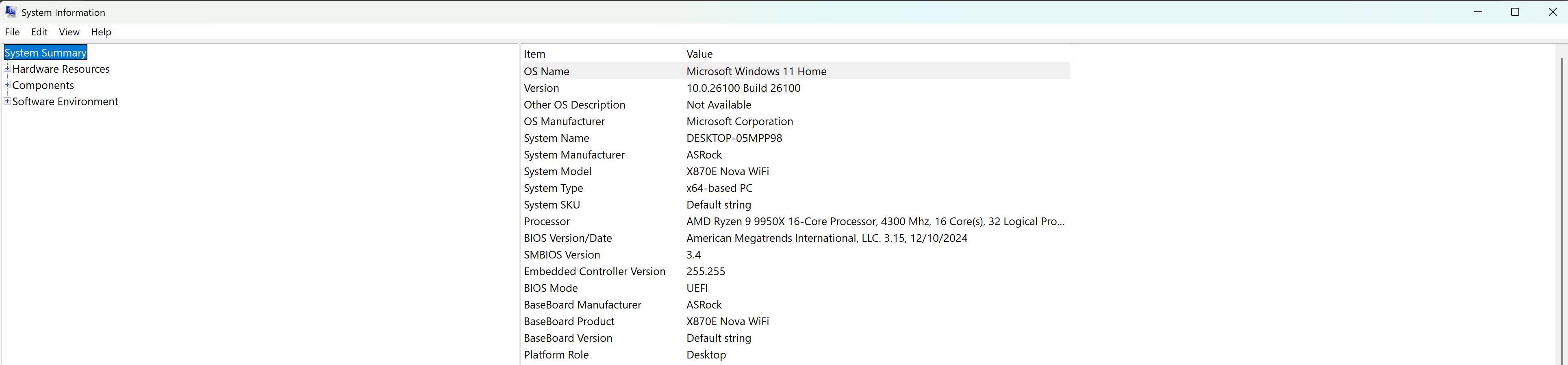
Write this down somewhere to use later.
Now, it might not be a bad idea to conduct a quick Google search for updates for your motherboard and BIOS. Again, everyone is different, and you are going to want to do some online research on what may be a stable build for your motherboard. Take into account your CPU, too, because not all BIOS updates are stable with certain CPUs. This is where I believe the root of most issues lies when some users report that their PC no longer boots or they no longer have a display.
I also suggest updating your BIOS ahead of time because many users have reported not seeing the Secure Boot option in their settings. An update at one point might have added the option when it was not originally there. Again, do a lot of research first, and make sure the update you are switching to is stable with your CPU. As you can see in my image, the last update I made was in December 2024. You don’t have to be on the latest version of your BIOS, and I would even recommend against it, since it often introduces more issues due to its newness. Again, research.

Alright, the next step you are going to want to do is grab your phone, or use another PC, and search YouTube or Google, “How to enable secure boot on [insert your motherboard info].” For me, it was “How to enable secure boot on Rog strix B650E-F Gaming Wifi.”
You’re going to get a lot of results, but before you click any, let’s get your PC into the BIOS menu. This should be the same for everyone. Shut down your PC, boot it up, and you should see your boot-up screen with some text at the bottom, instructing you to press either F2 or DEL to enter the BIOS. For the sake of this guide, I am using my current PC build listed above. AGAIN, THIS WILL NOT BE FOR EVERYONE, but if you have the same board, it will be.

Once in the BIOS, navigate to the Advanced settings and select “Boot” from the top menu. You’ll then see “Secure Boot” listed in the menus.
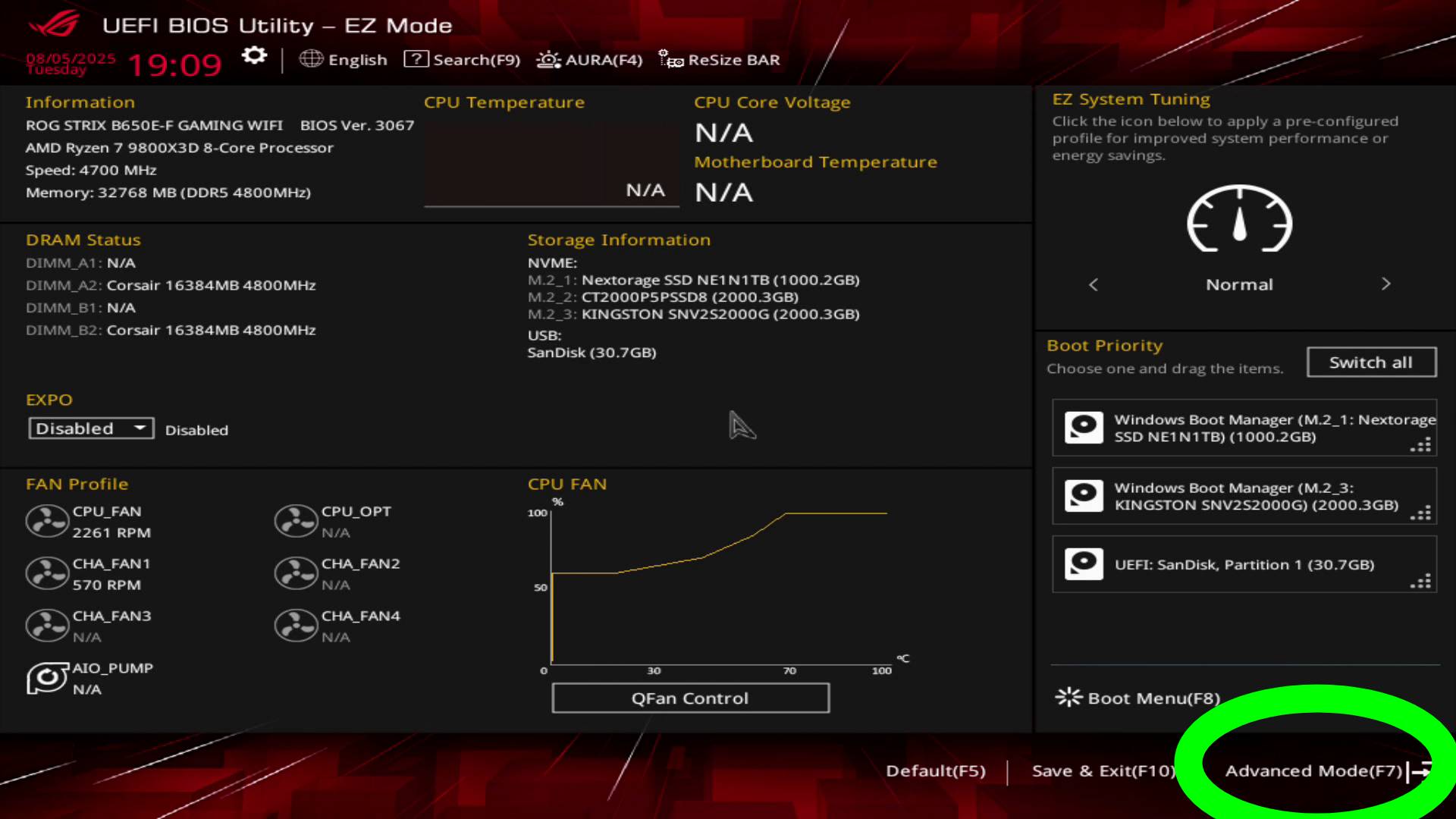
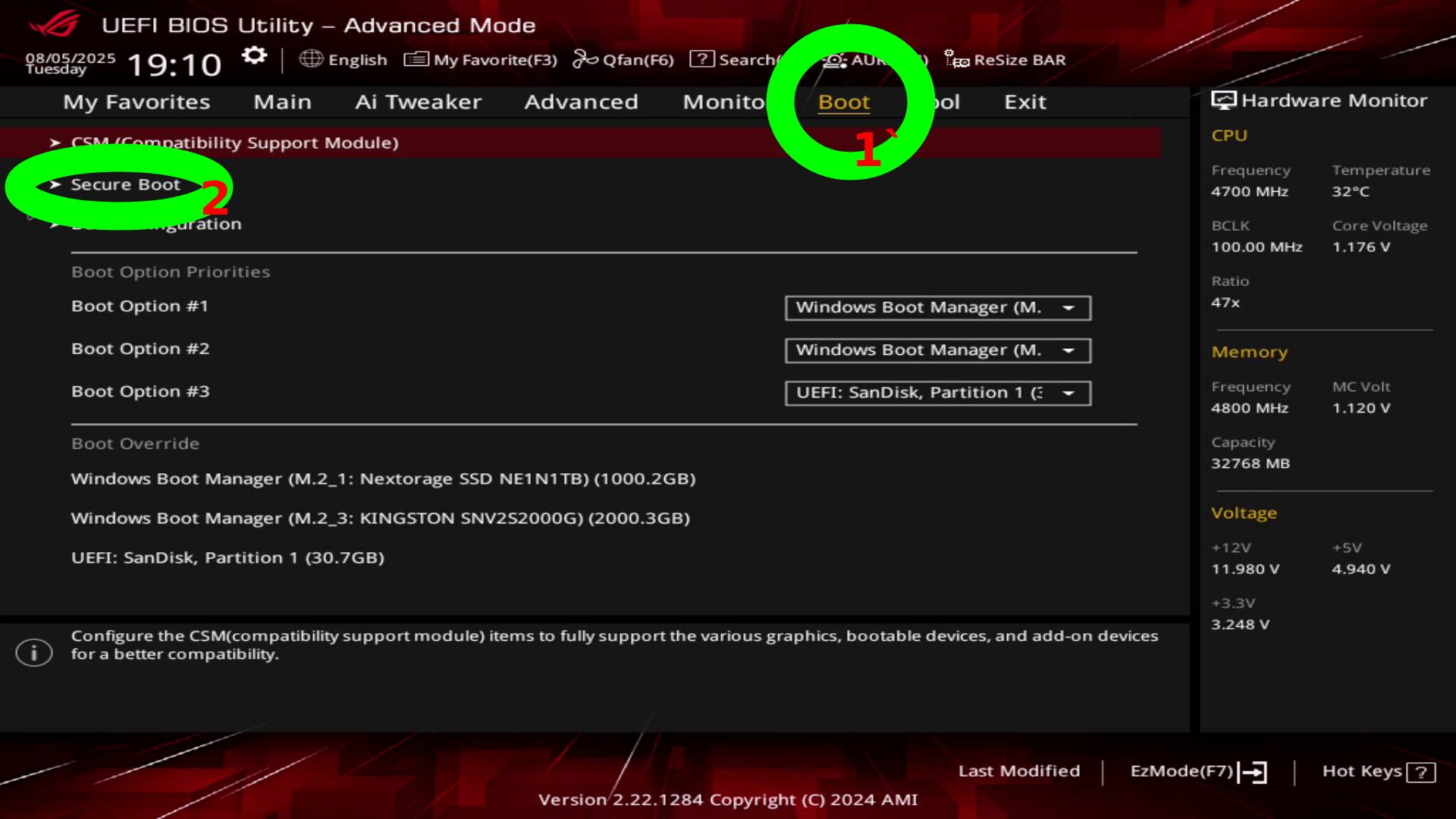
This is what my Secure Boot settings look like. Set it to that, exit, save, and pray your PC boots.
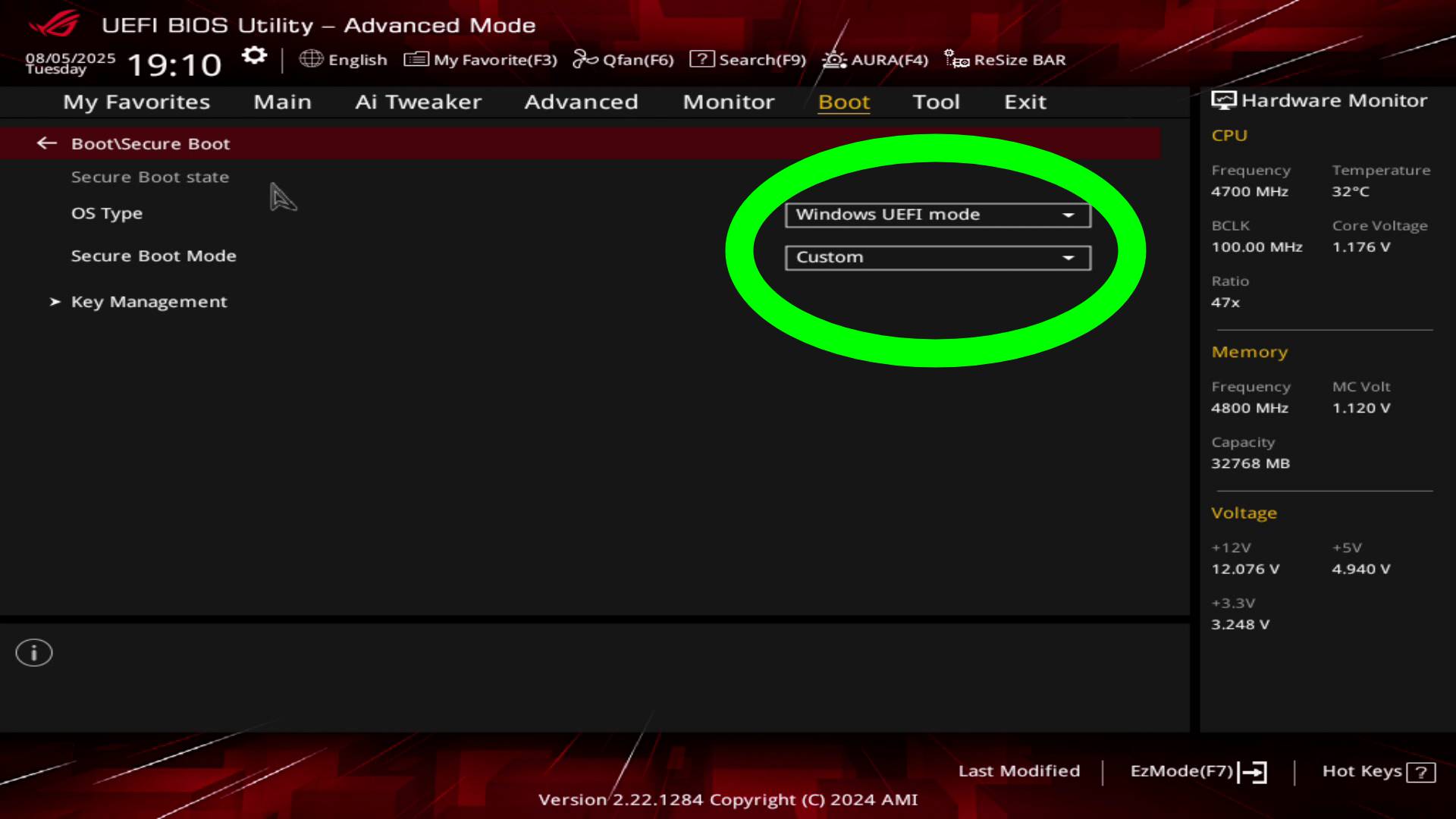
That’s how you enable Secure Boot, at least on an Rog strix B650E-F Gaming Wifi. I’ll point out that a majority of my settings are stock. I even have EXPO disabled since it was causing me unrelated issues a few months back.
And once again, I want to emphasize that my instructions may not suit everyone, so please conduct some online research to ensure you have all the necessary information to enable it on your board. Additionally, the Battlefield Reddit community has a megathread where users help one another try to figure this out, so it might be worth visiting if you encounter any issues.
The reality is, it shouldn’t be this complicated. I mean, it’s not when everything actually works the way it’s supposed to work, as if that is the case, you should be able to enable it in a matter of minutes. Sadly, though, many have reported issues enabling secure boot, with some even unable to use their PC due to a black screen and crashes. Those are much more complicated to troubleshoot, so you’ll have to do your own research on that if it does happen to you. Hopefully not, but be prepared for the worst if you do plan on proceeding with enabling Secure Boot.
For those hoping EA and DICE will backtrack on the requirement, it’s doubtful, given that Windows 10 will reach the end of its life on October 14, 2025, just four days after the launch of Battlefield 6. On top of that, the game’s anti-cheat system is also built around Secure Boot, so chances of it ever being dropped anytime soon are slim.
Battlefield 6 Open Beta begins this weekend on PC and Consoles, with the game releasing on October 10, 2025. If you’re hoping to get early access privileges, EA is giving some away, though you have to be quick about it.

This website contains affiliate links. If you click a link and make a purchase, we may earn a commission at no additional cost to you. This helps support our work. Learn more on our affiliate page.





Secure boot, yeesh, but seems like thats going to be the thing going foward when Win 10 is killed
Good thing that cheat publishers can create a digital signature and provide guides to install that signature into the Secureboot Table! Thus, circumventing this anti-cheat measure.