Home > News

Demeter Review – Platforming Evolved

Novalab’s newest title, Demeter, will have you platforming from a whole new perspective as they blend virtual reality with your own living space for one incredibly fun mixed reality adventure. 

A Story Unfolding In Own Living Room

Imagine, for a second, sitting in your living room, enjoying doing whatever you do, and suddenly, you hear a distress signal. It’s a plea for help as a mysterious individual seemingly veers off course to their homeworld, landing in a land of the unknown. Her name is Atlanta, and she’s on a mission to save her world.

It is a story that many of us are most likely familiar with, but it’s not just her story, as the unknown world she landed in just so happens to be yours, literally. 

This is where the tale of Demeter truly begins, as it’s up to you, as in your physical self, to help Atlanta navigate through treacherous environments that have suddenly sprung up in your living room so that she may find her way back home. Her fate and her world rests on your shoulders.  

As a Quest exclusive, Demeter does feel like a title that fully utilizes the hardware in a unique and fun way. While available on the Quest 2, the Quest 3 comes with a long list of improvements, the biggest being mixed reality. That’s not to say you can’t enjoy Demeter on the Quest 2 in VR, but for a game entirely built with mixed reality in mind, it does shine with the hardware of the Meta Quest 3. 

It’s not some crazy Iron-Man-like experience, mind you, but given the story and how it revolves around how the character ended up in your room and saving her world, it’s fun seeing these interactions play out in your own living space. Atlanta herself will even make gestures and such right at you.  

Platformers aren’t the genre that most expect to play in a VR space, let alone mixed reality, but many titles, such as The Book of Moss, Astro Bots, and a few others, have proven that there’s a place for platformers in VR. With Demeter, it takes things up a notch by not so much bringing you into a virtual space but by bringing the virtual space to you. It’s a unique way of gaming in VR, and Demeter plays well with the idea. 

Being able to control a character while moving (as in myself) around and gaining new perspectives on a level is such a cool idea. As I climbed what would be considered tree vines, I moved around a corner to see what potential dangers awaited me or what secrets may be lying around. It’s such an added depth of gameplay that only VR could provide.

Now, couple that with playing in your own living space, with the environment and character reacting to your surroundings, including you. It’s insanely awesome, with some gameplay mechanics letting you scale the level the character plays on. 

That lets you get all kinds of creative with how you play, such as blowing up the level so you can almost wander around it yourselves (a feature called Inception Portal lets you view levels from Atlanta’s perspective, but not move around) or scaling it down tiny enough to fit a small table. 

That, to me, is mind-blowing, giving me a new way to play, almost like an over-the-top view like it’s some board game. All on my coffee table! 

It’s a relatively new idea, platformers, VR, and Mixed Reality, but one that Novelab manages to nail down. It works fantastic. I was impressed by how some of the levels would scale down to fit perfectly on some of the furniture I had. The scaling technology and matching to the environment are incredibly good, with little to no clipping into my furniture. That takes work to perfect. 

As a platformer, Demeter is also fun and charming. Mind you, it’s not some grand adventure with roughly 4-6 hours of story, but the price tag reflects that enough to know you should expect a smaller experience. Still, it does have a good feel to it and can be pretty challenging with some of the procedurally generated levels that are based on your environment.

You’ll get to control Atlanta yourself, moving around, jumping, climbing, and even some combat that is very in line with classic platformers. Then there’s you. I’ve already mentioned how you can move around and gain different perspectives of levels, but you’ll also have other tools to get you a little more involved with Atlanta’s journey.

These range from moving platforms to using powers to reveal new pathways. It’s not the most complex form of gameplay, but considering everything else that goes on during mixed reality, sometimes simplicity is the best way to keep things. That becomes more true later in the game when levels ramp up the challenge, putting you to the test in not just navigating Atlanta but also changing perspectives. 

You May Want to Make Room

The one thing you’ll want to know about Demeter is that the game works best when you have a large and clear space to walk around. Demeter does a good job mostly when it comes to scaling to your environment, but I’ve also run into many instances where the level spawned far away from my reach and over some furniture that I wasn’t going to climb on. This is even with boundaries set on Quest 3, as Demeter sometimes spawns levels further than I’d like.

Luckily, you can grab, move, and scale any of the levels to be closer, though there were some instances I found where the grab mechanics were as responsive as I’d like.  That should help those with smaller play spaces, but I’d still recommend you clear the area up, as it’ll make the experience all the better. This is a title that makes heavy use of mixed reality, so the more room you have, the better. 

A Mixed Reality Like No Other

Mixed reality was something that I always thought was a gimmick. It’s cool to look at, and great for educational and social applications. But for gaming? Not so much, at least until now, as Novalab proves that the technology works in a way that can enhance the gaming experience.  

Demeter is fantastic as a platformer, but its use of technology is truly where it shines, giving us a taste of what mixed reality can be about. It’s challenging when it wants to be, and in those moments, it gives players a new way to solve puzzles, allowing them to view a world from a whole new perspective. I highly recommend Demeter to anyone with a Quest 3, as while it’s short, its unique approach to mixed reality makes for a memorable experience.

Demeter is now available for purchase, exclusively for the Quest.

Score: 8/10

Pros:

  • Perfect use of mixed reality. Proves that games, especially platformers, can benefit hugely from the technology. 
  • Accessibility mode gives you control of the in-game environment. 
  • Platforming can be fun and challenging but don’t expect it to be super deep. 
  • Visually pleasing. 

Cons:

  • Light on story
  • Not a coach-friendly game.
  • Distance scaling can be annoying, especially when a level spawns over things you’d need to climb. Accessibility mode fixes that, but still can be annoying.

Demeter review code provided by the publisher. You can read MP1st’s review and scoring policy right here.

Avatar photo

James Lara

A gamer at heart, James has been working for MP1st for the last decade to do exactly what he loves, writing about video games and having fun doing it. Growing up in the 90's gaming has been in his DNA since the days of NES. One day he hopes to develop his own game.

Home > News

Apex Legends Update 1.000.058 Shoots Out This Jan. 25 on All Platforms (Update)

Apex Legends update 1.000.058 has been released on PC and consoles. While this is an unannounced update, expect a slew of fixes to be part of the title update, as Respawn has acknowledged some issues with the game. Read on for the Apex Legends new update patch notes for Jan. 25.

Apex Legends Update 1.000.058 Patch Notes | Apex Legends New Update Patch Notes for Jan. 25:

Update: Respawn has confirmed fixes for some of the game’s issues.


While Respawn hasn’t released the official patch notes just yet, we do know some of the issues the studio is looking into. We’ve listed some of the known issues via the official Apex Legends Trello board.

INVESTIGATING:

  • Hot Drops are currently unavailable
  • [Loba] Prestige Finisher “Enraged Claws” currently unavailable
  • [PS5] Crash when using Common or Rare skins with Ash
  • [FFVII] Badge Reward screen does not display badge rewards
  • Crashes referencing FS_CheckAsyncRequest when loading into a map
  • Playing at 165+ FPS may cause stuttering during some gameplay scenarios
  • Button prompts may not appear on summary/death screen, including report button – but buttons still work!
  • Legends may rotate when exiting a Trident

IN-PROGRESS:

  • Gifting currently unavailable
  • [Octane] Unable to kick in doors with heirloom equipped
  • Match summary no longer shows match placement
  • [Havoc] Weapon moves for a second when entering ADS while moving
  • [Buster Sword] Unable to activate Limit Break in Firing Range after dying with it activated
  • [Buster Sword] Using Slam OOB makes abilities unusable

Over on Twitter/X, Respawn confirmed that fixes are incoming for the Hot Drops tab on the store, and Loba’s finisher exploit.

Once the official patch notes are out, we’ll update the article to reflect it.

Avatar photo

Alex Co

Father, gamer, games media vet, writer of words, killer of noobs.

Home > News

Apex Legends Update 2.44 Deployed for Fixes This Jan. 25 (Update)

Apex Legends update 2.44 has just been released on last-gen and current-gen platforms this January 25, and this is to usher in fixes to the game. Read on for what got changed in the new Apex Legends patch notes for today.

Apex Legends Update 2.44 Patch Notes } Apex Legends January 25 Patch Notes:

Update: Respawn has confirmed fixes for some of the game’s issues.


While Respawn hasn’t released the official patch notes just yet, we do know some of the issues the studio is looking into. We’ve listed some of the known issues via the official Apex Legends Trello board.

INVESTIGATING:

  • Hot Drops are currently unavailable
  • [Loba] Prestige Finisher “Enraged Claws” currently unavailable
  • [PS5] Crash when using Common or Rare skins with Ash
  • [FFVII] Badge Reward screen does not display badge rewards
  • Crashes referencing FS_CheckAsyncRequest when loading into a map
  • Playing at 165+ FPS may cause stuttering during some gameplay scenarios
  • Button prompts may not appear on summary/death screen, including report button – but buttons still work!
  • Legends may rotate when exiting a Trident

IN-PROGRESS:

  • Gifting currently unavailable
  • [Octane] Unable to kick in doors with heirloom equipped
  • Match summary no longer shows match placement
  • [Havoc] Weapon moves for a second when entering ADS while moving
  • [Buster Sword] Unable to activate Limit Break in Firing Range after dying with it activated
  • [Buster Sword] Using Slam OOB makes abilities unusable

Over on Twitter/X, Respawn confirmed that fixes are incoming for the Hot Drops tab on the store, and Loba’s finisher exploit.

Once the official patch notes are out, we’ll update the article to reflect it.

Avatar photo

Alex Co

Father, gamer, games media vet, writer of words, killer of noobs.

Home > News

Suicide Squad: Kill the Justice League Launch Times Revealed for Early Access; Deluxe Edition Suits Shown Off

Suicide Squad: Kill the Justice League launch times for early access have been revealed, along with a new trailer showing off the Deluxe Edition exclusive costumes. 

When Can I Start Playing Early Access for Suicide Squad: Kill the Justice League?

There is good news and bad news for those who plan on playing Suicide Squad: Kill the Justice League when early access drops next week. The good news? All platforms will be able to play on January 30! The bad news? Not every platform gets to play it at the same time. While console players can play as soon as the clock hits midnight locally, PC players on Steam will unfortunately have to wait 10 hours before being able to play. Here’s a breakdown of when you can start playing on each platform,

  • Consoles (PS5, Xbox Series X|S) –  12:00AM Local Time
  • PC (Steam) – 10:00AM Pacific Time

That means that instead of 72 hours of early access, PC players will only get 62 hours of early access when compared to other platforms. No reason why it was launching later in the day for PC owners was given, though if we were to guess, it might have to do with preventing early spoilers and data mining. Not that this will prevent it entirely, but the first 10 hours will be safe, at least for players to play themselves. 

Task Force X Suits Up With Justice League-Inspired Costumes

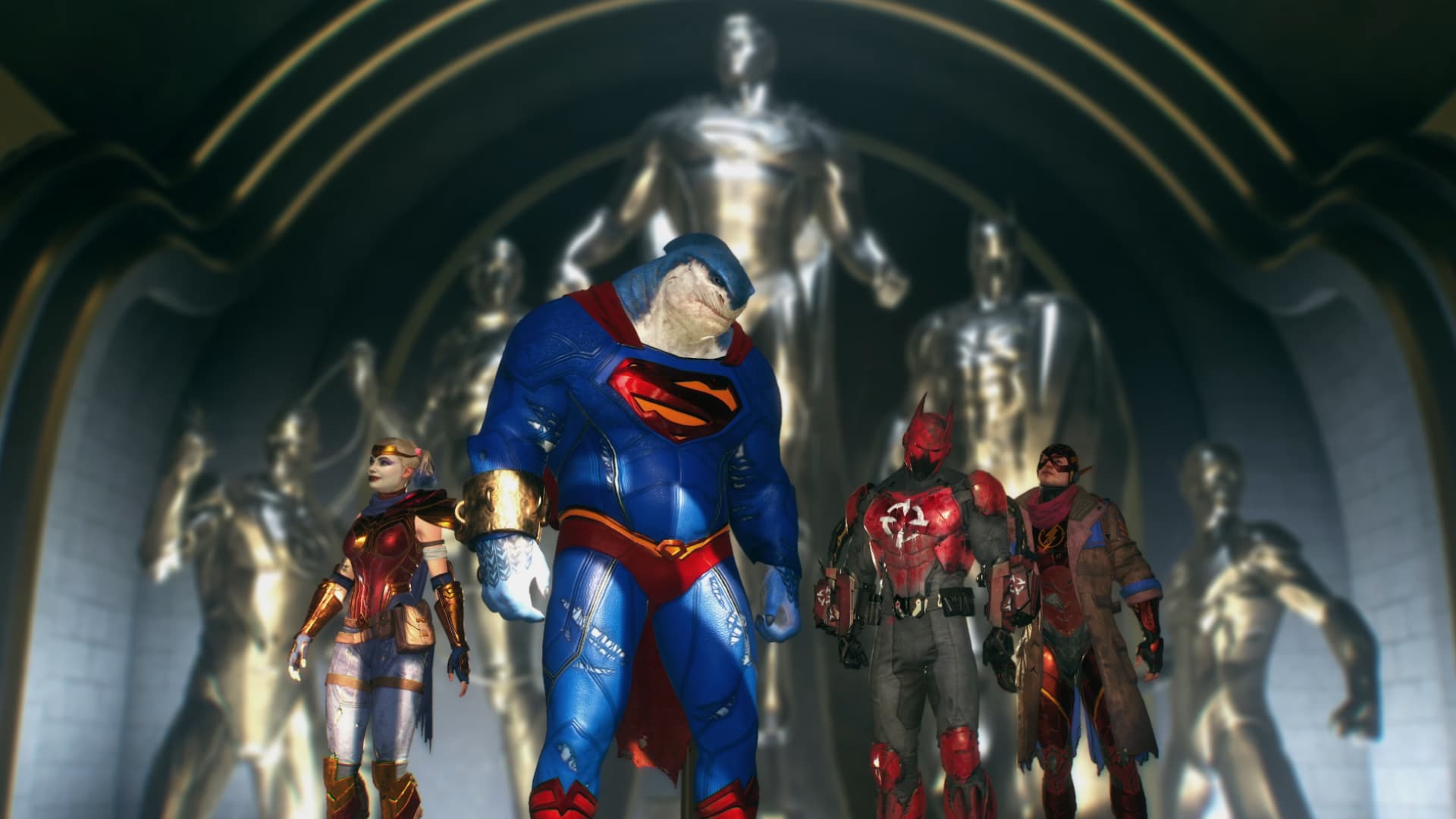
In more related Suicide Squad: Kill the Justice League, a new trailer is now available, showing off all the extra content you get for buying the Deluxe Editon. This includes the Justice League skins that give members of the Suicide Squad their own Justice League outfit. They look pretty awesome too!

Here’s what you get in the Deluxe Edition:

Suicide Squad: Kill the Justice League Deluxe Edition ($99.99 SRP)

  • PlayStation 5 and Xbox Series X|S versions available for pre-order physically and digitally; PC version available digitally (Steam and Epic Game Store)
  • All Standard Edition content and pre-order bonuses
  • Four Justice League Outfits, one for each Squad member
  • Three Black Mask themed notorious weapons (pistol, sniper rifle, and heavy weapon)
  • Four Squad Golds themed weapon dolls, one for each Squad member
  • One premium battle pass token
  • Four No Shade Outfit color swatches, one variant for each Squad member (digital versions only)
  • Up to 72-hour early access to the game, prior to the main launch on February 2 (pre-order bonus)

Suicide Squad: Kill the Justice League launches on January 30 for early-access players, and it will be available worldwide on February 2. 

Related Reading:

Avatar photo

James Lara

A gamer at heart, James has been working for MP1st for the last decade to do exactly what he loves, writing about video games and having fun doing it. Growing up in the 90's gaming has been in his DNA since the days of NES. One day he hopes to develop his own game.

Home > News

Report: Until Dawn Pulled From Certain PSN Regions Amid Rumors of a PS5/PC Version Re-Release (Update)

Just the other day, a rumor has surfaced stating that Sony is set to re-release Supermassive Games’ Until Dawn to the PS5 and PC. While nothing has been announced so far by Sony, it seems the latest development on the PlayStation Store adds fuel to the fire.

In some PSN Store regions (Australia, Germany, UK), the game is no longer available for purchase. Players will still see the game’s product page, but it will have a “Not available for purchase” marking on it.

For now, the game is available on the US PSN Store, though we’re not sure how long it’ll be up. If Sony is indeed pulling it from digital storefronts, this might very well be for an impending announcement.

For those unaware, Until Dawn was released back in 2015, and was an interactive horror game made by Supermassive Games and was published by Sony. It scored well critically and was a commercial success too, which also lead to Supermassive’s The Dark Pictures Anthology series that’s still on-going now.

Until Dawn Coming to PS5 and PC? Rumors Seem to Suggest

While Sony hasn’t alluded to or announced anything, the rumor does come from a very reliable leaker, which leads us to believe an announcement is incoming very, very soon. Add in this latest development, and this seems like Sony pulling the game, so it can re-release it in a newer packaging and price.

What’s odd though that the PS4 version is being pulled, a version that should sitll exist even after the PS5 and PC version is released. Our guess is they may be repackaging it as a new edition for the PS4, almost like a greatest hit type of release, even though that exists already. Or perhaps it’s to make way for a bundle of sort

Thanks, Wario!

Update: It seems that Until Dawn being unavailable in some regions isn’t new. This was relayed by the person who mentioned that the game is getting PS5 and PC versions, billbil_kun,

To cut a long story short, the PS4 version isn’t being pulled, and in some regions, it can only be bought on the console itself.

Avatar photo

Alex Co

Father, gamer, games media vet, writer of words, killer of noobs.

Home > News

The Callisto Protocol Developer Striking Distance’s New Game Confirmed via Job Listing

The Callisto Protocol developer Striking Distance’s next game has just been confirmed by a job opening posted by the company itself. The description included within a posting for a Lead Gameplay Animator role confirms that Striking Distance Studios are hard at work on another title and looking for help.

The job posting in question contains a section called “What we are looking for,” and it reads as follows:

Striking Distance Studios is looking for a Lead Gameplay Animator to help us create the most dynamic and engaging player and enemy experiences for a brand new, unannounced UE5 title. The Lead Gameplay Animator’s main responsibilities are to plan, organize, supervise and inspire the work of his/her team.

The part to pay attention to here is that they’re looking for assistance on a “brand new, unannounced Unreal Engine 5 (UE5) title.” It’s not much to go on, but it confirms that the team is getting to work on their next project. It’s unclear whether or not production on the game has begun.

Striking Distance Studios’ last game, The Callisto Protocol, received very middling reviews upon its release. While many were impressed by the game’s graphical fidelity, its gameplay and story ultimately fell short of expectations. Our own reviewer gave the game a 7/10 and said that lackluster combat and an absence of true horror kept the game from being great. That being said, the team at Striking Distance had some unique ideas, and we’re looking forward to seeing what they’ll make with the lessons they’ve learned from their last project.

Will Striking Distance’s New Game Be a Sequel to The Callisto Protocol?

It’s currently unclear if the team’s next title will have any connection to The Callisto Protocol or its universe. Former Studio Head Glen Schofield expressed interest in exploring more of that game’s setting when we interviewed him in June of last year, but he has since left the company. Current CEO Steve Papoutsis might not be so keen on diving deeper into Jupiter and its moons.

We currently have no window on when an official announcement might happen. To make sure you see it when it pops, stay tuned in to us here at MP1st.

Source: Greenhouse

More MP1st Reading

Jack Breitenbach

Game the night away!

Home > News

NBA 2K24 Down With Connection Issues This Jan. 25, 2K Investigating (Update)

For those trying to score some points in a virtual game of hoops in NBA 2K24, you might be experiencing connectivity issues, and you’re not alone. 2K Games has acknowledged the NBA 2K24 down reports this January 25,

NBA 2K24 Down With Connection Issues Status This Jan. 25:

Update: After over seven hours, 2K has finally resolved the issue per their latest announcement..

“We have resolved the connection issues affecting some players in NBA 2K24. Thank you for your patience and see you back on the courts.”

Original Story:

Reports have started flowing in, and the NBA 2K downdetector site has seen an uptick just now:

Screenshot

Here’s the announcement from 2K via the game’s Discord:

We are aware of the connection issues affecting some players in NBA 2K24 and are currently working to ensure everyone can play. We will provide updates as we have them. Thank you for your patience!

What’s Inaccessible While NBA 2K24 Servers Are Down?

While the servers are down, players won’t have access to multiplayer modes, such as Unlimited, Clutch Time (multiplayer version), and Salary Cap. Of course, progression on the NBA 2K24 Pro and Hall of Fame Pass are also halted until the online services come back.

If you’re jumping in just now this year, check out the Season 4 rewards, patch notes and more right here.

Once we have a status update on the game’s servers, we’ll be sure to update the article, If you can play the game, leave a comment below stating your platform and where you’re connecting from.

Avatar photo

Alex Co

Father, gamer, games media vet, writer of words, killer of noobs.

Home > News

Mortal Kombat 1 Update 1.002.004 Slides Out for Desync Fixes This January 25

NetherRealm Studios has dispatched Mortal Kombat 1 update 1.002.004 this January 25, and this is a small download (and is tagged as patch version 0 .182) that’s been released to fix the desync issues! Read on for what’s new in the MK1 new update patch notes for January 25.

Mortal Kombat 1 Update 1.002.004 Patch Notes | MK1 Update 0.182 Patch Notes:

Size: 547MB (PS5)

General Fixes & Adjustments

  • Addressed a desync that occurs during Kombat League Sets.
  • Lowered the requirements of Invasions Season 3 Klue, Sai-O-Nara, from 9 to 4 connected Sai Toss.
  • Fixed progression loss for first time users in Invasions.

What Is Desync and How Does It Affect Multiplayer in Mortal Kombat 1?

Players will see this pop up from time to time in their online matches (image via: PNDKetchup);

Image

For those unaware, players have reported issues while playing online matches in Mortal Kombat 1, where an error message would appear saying the game session has desynchronized. No one knows exactly what is causing this issue, but at leats with today’s update, the issue should now be fixed. Assuming we don’t get a repeat of last update where it was supposed to be fixd there.

Once a new patch for MK1 is released, we’ll be sure to let our readers know. Don’t forget, story DLC is in the cards, and the game will be supported longer than MK11 according to NetherRealm.

Source: Mortal Kombat

Avatar photo

Alex Co

Father, gamer, games media vet, writer of words, killer of noobs.

Home > News

Lords of the Fallen Update 1.028 Released for Patch 1.1.457 This January 25

Lords of the Fallen update 1.028 is now out on all platforms, and this brings more improvements to multiplayer and stability! Players on PC will see this as LOTF update version 1.1.457. While this is a relatively small download, there’s quite a number of fixes included, which you can read about in the official LOTF patch notes for Jan. 25.

Lords of the Fallen Update 1.028 Patch Notes | LOTF Update 1.1.457 Patch Notes:

Size: 837MB (PS5)

Greetings Lampbearers,

This week we’ve focused on bringing further improvements to the game’s multiplayer experience, both in terms of optimisation and stability, resulting in a fluid experience and less rubberbanding in cooperative and invasion matchups. This is alongside our ongoing commitment to ensure Mournstead feels as smooth as ever, with an additional 35+ tweaks and enhancements included in today’s update.

Multiplayer

  • Fixed an issue that failed to show the new area prompt to both players in a co-op session at the same time.
  • Fixed an issue that prevented both host and co-op partner from upgrading Sanguinarix on a new save without quitting the game.
  • Fixed an issue that could cause players to gain invulnerability when attempting to revive a co-op partner while being hit by an enemy.
  • Fixed an issue that could cause the co-op partner to become stuck in a teleportation loop if player host is underneath the water whilst in Umbral.
  • Fixed an issue in multiplayer that would cause item selection UI to automatically move to the top when a co-op partner would purchase or sell an item in a shop.
  • Fixed an issue in multiplayer that prevented a co-op partner’s crossbow to not reload automatically after rolling, whilst having the Inner Serpent Pendant equipped.
  • Fixed an issue in multiplayer where the host didn’t receive any Vigor for defeating the invader in a Crimson Ritual.
  • Fixed an issue in multiplayer that caused an invading player to not receive Vigor if the host player died from a status effect.
  • Fixed an issue where co-op partner was unable to assist the host when killing enemies to progress Illuminator Aubrey’s quest in the Trial of the Three Spirits.
  • Improved the multiplayer experience across all platforms for coop or invasion matchups. The overall experience now has less rubberbanding and should result in smoother gameplay overall.
  • Fixed an issue that caused a fog wall to appear for co-op partner during the introductory cutscene for the Hollow Crow.

Collision

  • Fixed a collision issue that allowed players to skip a part of Lower Calrath by accessing unintended areas near the droppable ladder in the Alehouse.
  • Fixed a collision issue that could cause players to get stuck in an inaccessible area prior to the first Umbral puzzle in Lower Calrath.
  • Fixed a collision issue that allowed players to skip a major part of Lower Calrath by jumping over a fence using Umbral environment next to the first Umbral puzzle
  • Fixed an issue that could cause players to become stuck in Umbral environment after death in Axiom near the first Umbral puzzle in Lower Calrath.
  • Fixed a collision issue that could allow players to gain entry to an unintended area while in Umbral in the cathedral in The Empyrean.
  • Fixed a collision issue near the that could allow players to traverse out of bounds, and fall through the world near the kitchen in Manse of the Hallowed Brothers.
  • Fixed a collision issue that allowed players to skip the Ruiner’s arena in Lower Calrath.
  • Fixed a collision issue where players could get stuck behind a fallen statue near Leprosarium.
  • Fixed a collision issue that could cause players to get stuck in the elevator room while the elevator descended in Pilgrim’s Perch.
  • Fixed a collision issue where soulflayable Umbral effigies attached to Umbral platforms would have collision while in Axiom.
  • Fixed a collision issue that could allow players to jump down a stone wall and fall out of the game world in Revelation Depths.

Enemies

  • Fixed an issue where the Bringer of Stillness could get stuck in the environment in Upper Calrath.
  • Fixed an issue where the Ruiner could get stuck in a falling animation in Upper Calrath.
  • Fixed an issue where a Raw Mangler could get stuck in a falling animation in Pilgrim’s Perch.
  • Fixed a rare issue that could cause the Lightreaper to become invulnerable to damage during combat.
  • Fixed an issue that could cause Corrupted Penitent to get stuck in a falling animation near a wooden scaffolding in Depths
  • Fixed an issue that prevented “A Shadow Dispelled” achievement to unlock if the Scarlet Shadow had been defeated with an effect.

Visuals

  • Fixed an issue where textures present on the ground in Penitent Path were missing.
  • Fixed an issue where Umbral assets could be seen loading in above the exit of the boss arena of The Congregator of Flesh on lower graphic settings.
  • Fixed an issue that caused the visual effects of Boss Weapons to not appear if players entered ranged mode beforehand.

UI

  • Fixed an issue where players were unable to close the Bucketlord dialogue whilst having an insufficient amount of buckets under special circumstances.
  • Fixed an issue that caused special edition’s content prompt to appear after closing the 3D Photomode.
  • Fixed an issue where the “Controller Disconnect” prompt was shown permanently while having 2 controllers connected and disconnecting 1 of them.

Other

  • Fixed a camera collision issue that allowed players to see out of the game world in Revelation Depths.
  • Fixed an issue where the camera input could break when interacting with Winterperry while triggering a falling animation with nearby rocks in Depths.
  • Fixed an issue where the mini event in front of the Sanctuary of Baptism wouldn’t play properly, resulting in the enemy AI missing to knock down the targeted penitent.

When Will the Next Lords of the Fallen Update Be Released?

While there is no date yet, HexWorks has confirmed via today’s update that players will be getting a highly requested community feature next week, which we’re assuming will be available via a client download. You can check out the Lords of the Fallen roadmap to know more about what’s incoming.

Source: Reddit

Avatar photo

Alex Co

Father, gamer, games media vet, writer of words, killer of noobs.

Home > News

Hi-Fi Rush Update 7 for Jan. 25 Skates Out, Here Are the Patch Notes

Tango Gameworks has released Hi-Fi Rush update 7 this January 25, and this expands controller support for PC alongside other bug fixes. There’s also free stuff for players to mark the game’s anniversary! Read on for what’s new in the official patch notes.

Hi-Fi Rush Update 7 Patch Notes for January 25:

Available today, Hi-Fi RUSH Patch 7 includes the Anniversary T-Shirt Bundle containing a batch of cosmetics to shake up Chai’s wardrobe. Enjoy four new shirts PLUS a bonus exclusive shirt based on the platform on which you own Hi-Fi RUSH, (Xbox, Steam and/or Epic Games Store.)

  • Expanded controller support with additional icons for PC.
  • Fixed a very important texture in a cutscene before Track 03.
  • Fixed issue with “No Door Unturned Lvl. 3” and “Challenge S-Ranker Lvl. 3” on the Wall of Fame not being unlocked.
  • Fixed issue with Directional Parry triggering during rhythm parries in the Rhythm Tower.
  • Fixed issue when loading auto-save data during Korsica battle in Track 07, leading to incorrect “Damage Received” in the final result.
  • Fixed issue that causes the Rhythm Parry in a phase transition of Final Boss in Track 12 to not proceed, even when successfully executed.
  • Fixed issue with screen effects displaying incorrectly during game over in BPM Rush and Power Up! Tower Up! modes.
  • Repaired arcade machine and jukebox to improve synergy and play songs correctly when interacting with each other in the Hideout.
  • Fixed a bunch of completely embarrassing typos, misspellings and grammatical errors in menus, costume names, tutorials and VLOGs that our Director was too incompetent to spot when editing. He has been dealt with accordingly.
  • Fixed issue on PC where some UI button icons are covered by text.

Will Hi-Fi Rush Be Released on PlayStation and Other Consoles?

While nothing has been announced, a new rumor has surfaced this year stating that an “acclaimed” Xbox exclusive is set to go multi-platform this year. Most people (including this guy), thinks this rumor is pointing to Hi-Fi Rush, and we wouldn’t be surprised if it does make its way to PS5 or even the Nintendo Switch.

Source: Steam

Avatar photo

Alex Co

Father, gamer, games media vet, writer of words, killer of noobs.

Home > News

Exoborne New Story and Gameplay Details Revealed; Devs Looking at “Approachability”

Vampire: The Masquerade Bloodhunt developers Sharkmob offer new story and gameplay details for their new extraction shooter, Exoborne.

Issue #394 of Edge magazine has just been released, and it features quite the preview, as the publication recently was shown a behind-closed-door look at Sharkmob’s upcoming extraction shooter, Exoborne. While it sounds like the studio has quite a ways to go before it’s truly ready to be shown off, they did share some new details about the game’s story and some gameplay tidbits in the featured preview. We went ahead and summarized some of the big pieces of details revealed by Edge’s hands-off session.

Exoborne Story and Development Details

  • Rebirth – This is the name given to a European corporation that promises a “better tomorrow.” They promise the world.
  • Rebirth was the original name of Exoborne, but it moved away from it after the team saw the potential legal battle over the name.
  • Set in Colton County, USA.
  • Location lets the team play around with pop culture and movies, with geography being ideal due to its diversity, natural and sociological.
  • Sharkmob also feels comfortable with this location since they grew up on American pop culture.
  • Since the weather is a big thing, you can expect oil rigs and boats and such in locations where they would not have been due to storms picking them up.
  • “The world is not dying, humanity is.” is what the team says about the story.
  • There’s a campaign, but Sharkmob is more interesting in the stories that players create. It’s all about your own journey.
  • Exo-skeletons are known as Exo-rigs, with the wearers being nicknamed “Reborn,” which plays into the title.
  • Exo-rigs will provide all kinds of playstyles, with the team wanting them to provide synergy between teammates.
  • One example was a defensive build that allows players to play aggressively, attacking from the front while shielding teammates.
  • Movement and traversal will be important parts of upgrading Exo-rigs. The grappling hook was one example.
  • An event called the “Collapse” is mentioned as a reason why Rebirth exists. The company was supposed to turn things around and be the answer to the climate crisis.
  • As with all corporations in games, things don’t go as they plan, and it sounds like the corporation became corrupted from within.
  • This unleashed chaos around the world, killing billions. The climate became uncontrollable, with the alpha survivors, the Reborn, surviving it.
  • The climate/weather is described as the worst form of it, compared to The Day After Tomorrow film, where all forms of changes can occur at once.
  • Most of the story is unpacked outside sorties in a home hub with an NPC you can talk to.
  • Cutscenes will be available in this hub.
  • Audio logs, text, footage, photos, and such will be used to help tell the story, but the community will need to piece it together.
  • It sounds like it has a very souls-game approach, with Sharkmob even saying they want the environment to tell a story.
  • Themes revolve around working together and exploring humanity’s destructive side. There’s a fascination with how we, as humans, can invent “cool shit” and somehow find ways to kill each other with said “cool shit.”
  • Many of the rigs are repurposed construction rigs. Perhaps a hint that there may be more than just shooting?
  • Over 300 people are working on Exoborne, which includes the entire Bloodhunt team and new hires.

Exoborne Gameplay Details

  • Extraction-based shooter.
  • Sharkmob has yet to finalize the maximum number of players but says quantity will vary on the size of maps.
  • The game is being built around extreme weather, where the team expects it to make sessions unique and even ruin sessions. They want players to adapt.
  • Confirmed events are storms and hurricanes, but Sharkmob hopes for more.
  • A system governs the aggressive events, but timing and placements will vary.
  • It’s not so much to survive them but to master them. The example provided was two teams fighting it out, one player a sniper and the other using a shotgun. A disadvantage is when there’s a huge gap for the shotgun player, but if an event comes in, the shotgun player can use it to close the gap.
  • Midair fights are possible, with a hurricane picking players up and having them battle it out in the air as a described scenario.
  • The team also wants to put a big focus on verticality.
  • Grappling wire, climbing gear, and parachutes are confirmed gadgets.
  • Tech-wise, the team is aware of the limitation that comes from being a multiplayer game instead of a single-player since added players limit physical calculations.
  • Despite that, Sharkmob sounds determined to go all out with the weather, even if, at times, it doesn’t make sense. That’s because they found those to be fun and noted that instances where players can be thrown across the map can happen. They want to create moments so messed up that you can’t help but laugh at them.
  • User-created characters in the rig are merely human. No leveling. This is an extraction shooter, so gear is king.
  • “You are what you carry.” If you want better gear, you have to find it.
  • Equipment does improve, though.
  • Some rigs are built to harness the effects of storms. No specifics were provided.
  • Crafting parts, schematics, and end-of-mission rewards are confirmed.
  • There’s PvE, but at its core, Exoborne is PvP.
  • High stakes remain essential, but with past work on games such as The Division, the team is looking at approachability.
  • One way they do this is with solo play, so you aren’t running into big battles.
  • Mission types: Solo, team missions, and public events.
  • Another way mentioned is that dying in Exoborne has less punishment than in other extraction games. There’s a roguelike progression for various unlocks.
  • The goal is not to make people cry when playing this game.
  • That’s one of the reasons why they’ve decided to make an extraction shooter in a crowded market because they believe they haven’t become mainstream like other genres, and approachability is one of the reasons why.
  • The narrative also plays heavily into approachability. The team won’t take control away from players or throw up things to block your screen. Mission givers won’t interrupt you during tense moments.
  • “Thrive together, or die alone” is a general game theme that bleeds into the gameplay.
  • Things in common with other extraction shooters – Selecting an effective loadout, scavenging, surviving, potentially risking it all, and hoping you can extract out alive.
  • Sharkmob believes there’s an opportunity to be the best in the genre.

Based on the information, it seems that Sharkmob has a clear vision, and as someone who isn’t too big on the extraction shooter genre for the very reason they mentioned, I’m excited that approachability is a priority for the team to solve.

Exoborne currently has no release date or target window.

Avatar photo

James Lara

A gamer at heart, James has been working for MP1st for the last decade to do exactly what he loves, writing about video games and having fun doing it. Growing up in the 90's gaming has been in his DNA since the days of NES. One day he hopes to develop his own game.

Home > News

Destiny 2 and 1 Down for Maintenance This January 25 (Update)

While Destiny 2’s servers went down earlier this week for maintenance, it seems more work is needed, as Bungie has pulled the Destiny 2 and Destiny 1 servers down for another round of it. Read on for what to expect from this downtime this January 25.

Destiny 2 and 1 Down for Maintenance Schedule This Jan. 25:

Update: Maintenance is now over!

Here’s the announcement from Bungie:

❖ Player Removal: 8:45 AM PST/11:45 AM EST/12:45 AM HKT
❖ Expected log in: 11:00 AM PST/2 PM EST/3 AM HKT
❖ Expected end: 11:00 AM PST/2 PM EST/3 AM HKT

Convert to your timezone here

Should We Expect a Patch to Drop During the Maintenance Period?

Given we just got an update a few days ago, I wouldn’t expect a patch to be released. That said, there is a chance one might drop, since it’s not unheard of for Bungie to release a surprise update. If one is indeed released, we expect it to be more for security and stability than actual gameplay adjusments.

More MP1st Reading:

Avatar photo

Alex Co

Father, gamer, games media vet, writer of words, killer of noobs.

Home > News

Microsoft Layoffs Hit 8% of Workforce, Affecting 1,900 Roles

Microsoft layoffs have struck the gaming sector of the massive tech company this morning. According to an internal memo obtained by IGN, 1,900 jobs have been cut, amounting to roughly 8.6% of the company’s workforce.

The memo was shared by Head of Xbox Phil Spencer, among internal Microsoft channels. Here’s the memo in full:

It’s been a little over three months since the Activision, Blizzard, and King teams joined Microsoft. As we move forward in 2024, the leadership of Microsoft Gaming and Activision Blizzard is committed to aligning on a strategy and an execution plan with a sustainable cost structure that will support the whole of our growing business. Together, we’ve set priorities, identified areas of overlap, and ensured that we’re all aligned on the best opportunities for growth.

As part of this process, we have made the painful decision to reduce the size of our gaming workforce by approximately 1,900 roles out of the 22,000 people on our team. The Gaming Leadership Team and I are committed to navigating this process as thoughtfully as possible. The people who are directly impacted by these reductions have all played an important part in the success of Activision Blizzard, ZeniMax and the Xbox teams, and they should be proud of everything they’ve accomplished here. We are grateful for all of the creativity, passion and dedication they have brought to our games, our players and our colleagues. We will provide our full support to those who are impacted during the transition, including severance benefits informed by local employment laws. Those whose roles will be impacted will be notified, and we ask that you please treat your departing colleagues with the respect and compassion that is consistent with our values.

Looking ahead, we’ll continue to invest in areas that will grow our business and support our strategy of bringing more games to more players around the world. Although this is a difficult moment for our team, I’m as confident as ever in your ability to create and nurture the games, stories and worlds that bring players together.

Phil.

Microsoft has not commented publicly regarding the layoffs as of yet. As Phil stated above, these layoffs directly impact those who were involved in all of Microsoft’s major gaming branches, including Activision Blizzard and Zenimax. It’s likely that this wave of job cuts is a part of the company’s process of rebalancing following their $69 billion acquisition of Activision Blizzard last year.

Some notable figures have confirmed their departure from the company, including Blizzard Entertainment President Mike Ybarra:

We’re not even a month into 2024 and already it’s shaping up to slingshot past 2023’s total for video-game-related layoffs. It makes sense for Xbox to consolidate following a massive deal, but an immense number of lives have been directly affected as a result. Well over 5,500 positions have been affected since January 1 alone, and the number only grows. If developers don’t have job security, what do they have?

As of time of writing, we’re still waiting on Microsoft to release an official statement. We’ll be sure to update the story as we learn more.

Source: IGN

Related MP1st Reading

Jack Breitenbach

Game the night away!

Home > News

GTA Online Weekly Update for January 25 – Discounts, GTA Plus & More

Rockstar Games has just released a new GTA Online weekly update for January 25 with fresh activities plus discounts, GTA Plus benefits and more! Read on below for the full highlights and details in one handy list below.

New GTA Online Weekly Update for January 25 – Discounts, GTA Plus & More:

Drag Races are now available in GTA Online, challenging drivers to perfectly time their gear shifting, nitrous boosts and traffic dodging to cross the finish line in first place.

In addition, Auto Shop owners will earn double GTA$ and RP for completing this week’s Robbery Contracts – and with Auto Shop properties at 30% off, it’s a great week for players to start this side gig.

Full details from this week’s update include:

  • New Drag Races, awarding Double GTA$ and RP through January 31
  • Double GTA$ and RP on Auto Shop Robbery Contracts and Rhino Hunt
  • Premium Deluxe Motorsport Showroom Vehicles: The Pegassi Torero (Sports Classic, 30% off), Canis Kalahari (Off-Road), Karin Futo (Sports), Dinka Jester (Racecar) (Sports), and Imponte Ruiner (Muscle)
  • Luxury Autos Showroom Vehicles: The Vapid Aleutian (SUV) and Declasse Impaler LX (Muscle)
  • Salvage Yard Robbery Targets: The Bravado Buffalo EVX (Muscle), Lampadati Viseris (Sports Classic), and Pegassi Toros (SUV)
  • Prize Ride: Place Top 5 in the LS Car Meet Series for four days in a row to earn the Übermacht Zion Classic (Sports Classic)
  • Test Rides: The Vapid Dominator ASP (Muscle, 30% off), Karin Sultan RS Classic (Sports, 30% off), and Emperor Vectre (Sports)
  • Lucky Wheel Vehicle: The Pfister Growler (Sports)
  • 50% off the LS Car Meet Membership and LS Car Meet Takeover
  • 30% off Auto Shop Properties, all their Upgrades and Modifications, LS Tuners Racing Suits, and HSW Racing Suits
  • Vehicle Discounts: 30% off the Karin Calico GTF (Sports), Annis Euros (Sports), Vapid Dominator ASP (Muscle), Karin Sultan RS Classic (Sports), and Pegassi Torero (Sports Classic)
  • This Week’s Gun Van Discounts: 30% off the Railgun, plus 40% off the Assault SMG for GTA+ Members
  • GTA+ Members: A free Albany Cavalcade XL (SUV), free Clothing, 1.5X GTA$ and RP on Wildlife Photography Rewards, 2X Los Santos Car Meet Reputation, and more

GTA+:

Claim all the latest GTA+ Membership benefits through February 7:

  • Free Albany Cavalcade XL (SUV)
  • Rockstar Atomic Logo Sweater, New Year’s Jacket and Pants, Western MC Jacket, and Western MC Pants
  • 1.5X GTA$ and RP on Wildlife Photography Rewards
  • 2X Los Santos Car Meet Reputation

Plus, a GTA$500,000 bonus delivered upon billing each month, access to download and play a rotating assortment of classic Rockstar Games Titles, and more. Visit the GTA+ website for full details.

Discounts:

  • Auto Shop Properties – 30% off
  • Auto Shop Property Modifications and Upgrades – 30% off
  • Karin Calico GTF (Sports) – 30% off
  • Annis Euros (Sports) – 30% off
  • Vapid Dominator ASP (Muscle) – 30% off
  • Karin Sultan RS Classic (Sports) – 30% off
  • Pegassi Torero (Sports Classic) – 30% off
  • LS Car Meet Membership – 50% off
  • LS Car Meet Takeover – 50% off
  • LS Tuners Racing Suits – 30% off
  • HSW Racing Suits – 30% off

Gun Van Inventory and Discounts:

Knuckle Dusters | Stun Gun | Railgun (30% off) | Unholy Hellbringer | SMG | Pump Shotgun | Assault SMG (40% off for GTA+ Members) | Grenades |Molotovs | Armor

That’s all for this week’s update. Check again next Thursday for the new GTA Online weekly update.

Avatar photo

Salman Haider Zaidi

That's a nice argument, Senator.

Home > guides

Like A Dragon: Infinite Wealth – Best Leveling Up and XP Job Farming Spots and Tips

It’s easy to get overwhelmed in Like A Dragon: Infinite Wealth, especially in the latter portions of the game. Lucky you, we’ve been doing some of that grinding and have found some of the Like a Dragon: Infinite Wealth best leveling and XP farming spots with some helpful tips to get you started.

Like A Dragon: Infinite Wealth – Leveling Up Tips

Before we dive into the best areas to farm for XP to level up, let’s first dive into some things you should do before heading to these spots.

Play The Story

This almost seems like a no-brainer, but Like A Dragon: Infinite Wealth is a massive game, and it’s easy to get sidetracked into many things. But the best advice I can give you to help you level up is to play the story. A lot of the side content is only unlockable by progressing into the story, including the best areas to farm for XP.

That, and the story does level you quite a lot, enough to make a good headway through the story. But like me, you’ll eventually run into parts where enemies are too strong to handle, requiring some grinding.

Don’t Take On Enemies That Are Ten or More Levels Higher Than You

There may not be a game over in Like A Dragon when you lose to an enemy in the open world, but you do lose money, and the higher the level (purple markers on their head) you are, the more you lose. It doesn’t take that many levels for an enemy to easily overpower you either, as I found enemies that typically were ten levels above me to be quite the challenge.

It’s not worth the trouble, so go to an area with enemies equal (red marker on their head) or lower level than you. The time it takes to beat them will more than make for the small XP increase you get from more difficult enemies. You also don’t risk losing money this way, which can become necessary when buying new armor and weapon upgrades. At higher levels, losing a battle could cost you tens and even hundreds of thousands of dollars. Yeah, it gets that high later in the game.

Focus on Upgrading Your Weapon

The biggest thing that is going to help you face off against enemies is better gear. To get better gear, you need resources, most of which can be farmed from random enemies. Focus on upgrading those weapons because it will make the most significant difference outside leveling.

Abuse Smackdown

Smackdown is a new feature in Infinite Wealth that lets you autocomplete a battle if the enemies are low enough level. How low? They need to be 11 levels below yours for the Smackdown option to appear. You’ll know when you can perform a Smackdown, as the enemies will have a blue marker over their head rather than a red or purple one.

The trigger to perform a Smackdown will appear as you transition into battle, allowing you to press L2/LT before the fight begins. This will make the party attack the enemies, winning the battle within seconds. This is an easy and quick way to get XP, which brings us to the next part.

Like A Dragon: Infinite Wealth – XP Farming Spots for Leveling Up

Labyrinths – Early Game

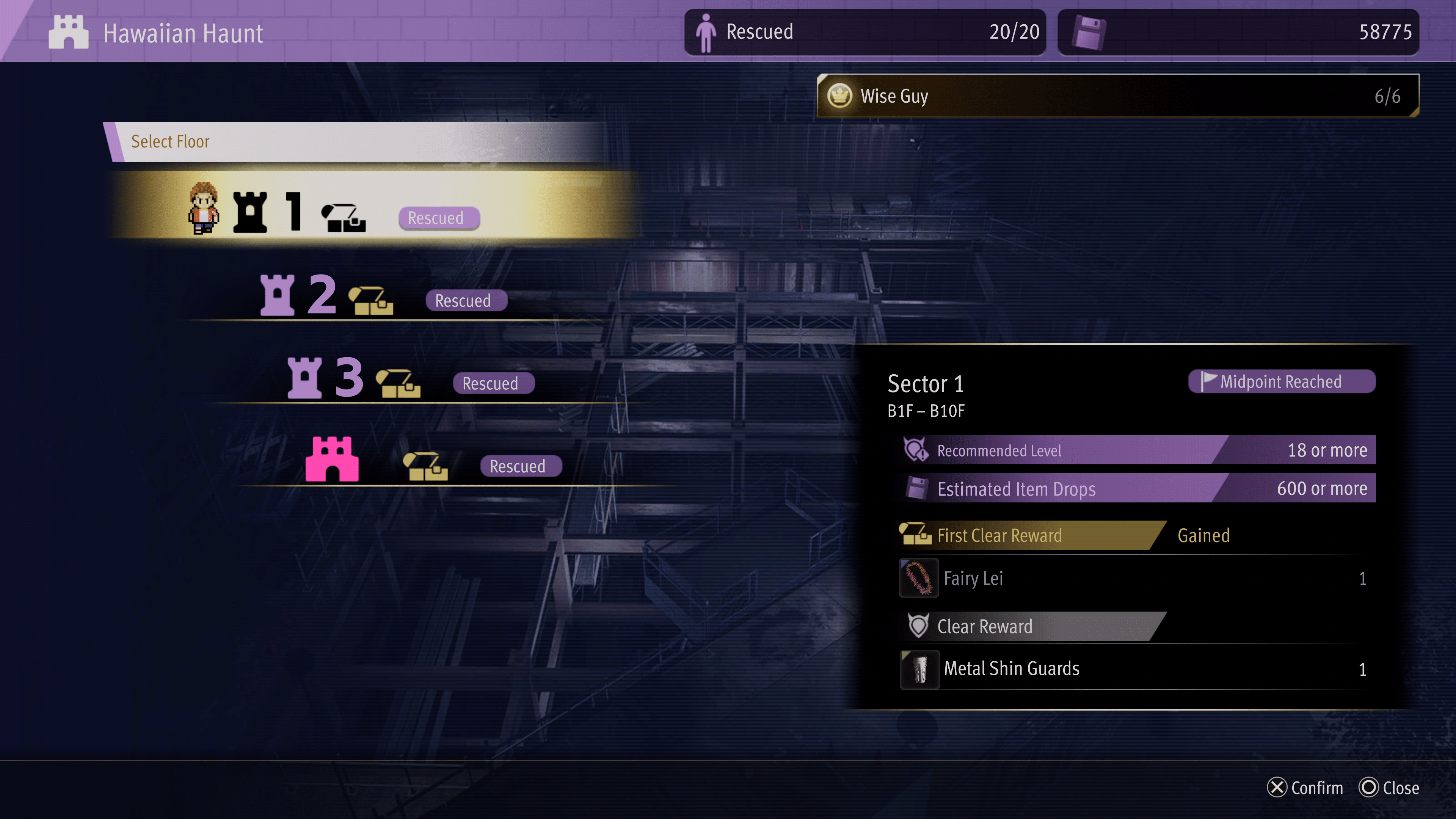
If you’re going to do some XP farming in Like A Dragon: Infinite Wealth, the first thing, as I mentioned, is to play the story first. Little farming is needed early in the game, and the story will get you to a decent level before it starts throwing big-level gap enemies at you. But fairly early, you’ll unlock side activities known as Labyrinths. This is part of the story, so you can’t miss it.

You’ll likely be a little under-leveled, but this is the perfect early farming spot very early on as there are some powerful enemies in these labyrinths, and if you happen to lose, you don’t lose anything. Plus, the number of resources you’ll get can be put to good use towards better weapons.

I used the Labyrinth as my main way of leveling for a good chunk of hours, but eventually, it can become boring, and other methods become quicker and more efficient.

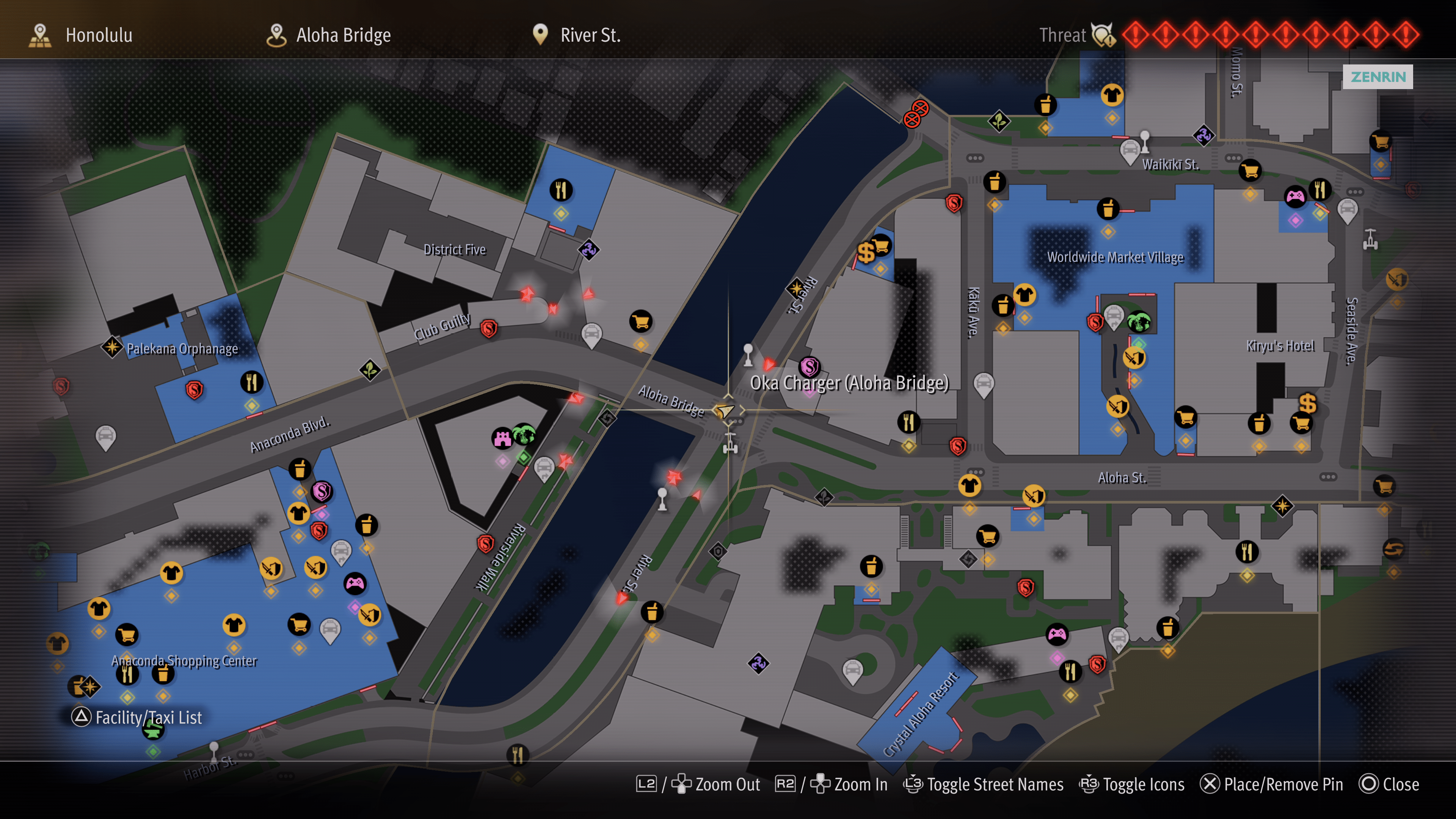
Luckily, the main farming area I used afterward was outside the Labyrinth area. There are tons of high-level enemies roaming outside, and if you power up enough, you can even perform a smackdown on them. They spawn infinitely, but the best enemies to get XP from are the ones driving in cars. Focus on those, and if you have Smackdown available for them, you’ll be leveling up in no time.

Outside the Labyrinth is a set of strong enemies, too. You can keep fighting them and wait for them to spawn back by walking to a new area. The best thing is you don’t have to worry about wasting MP or health items since there is a healing station at the Labyrinth entrance.

Otherwise, Labyrinths are probably your best bet for early-to-late XP farming.

Farming XP for Leveling Jobs Post-Story

When you beat the game, all the enemies in the world will increase their levels, with level 40-50 enemies being common. Labyrinths are still great to do, and by now, you should be close to being able to take on those higher-level ones. I was level 50, but by the time I reached the end, that put me high enough to perform smackdowns on enemies in the 30s.

The higher the level of the enemy is, the better the XP. So use the Smackdown feature well; it will get you XP quickly. This area has level 40 enemies that you should be able to use Smackdown on.

You’ll level up fast, though once you reach level 60, things will become much grindier. But beyond your character level, you’ll also want to focus on job leveling for some added stats and new abilities. The above spot is the perfect section to level up all your jobs. Level 30 for each job will unlock all the skills, and reaching that in that area and using nothing but smackdown will take you less than an hour to get there for each character.

You could use the Smackdown technique in the Labyrinth, but this method is far faster since you don’t have to hunt down enemies. They just keep spawning in the same area over and over.

Use XP Gaining Gear, and Eat Food for XP Bonuses

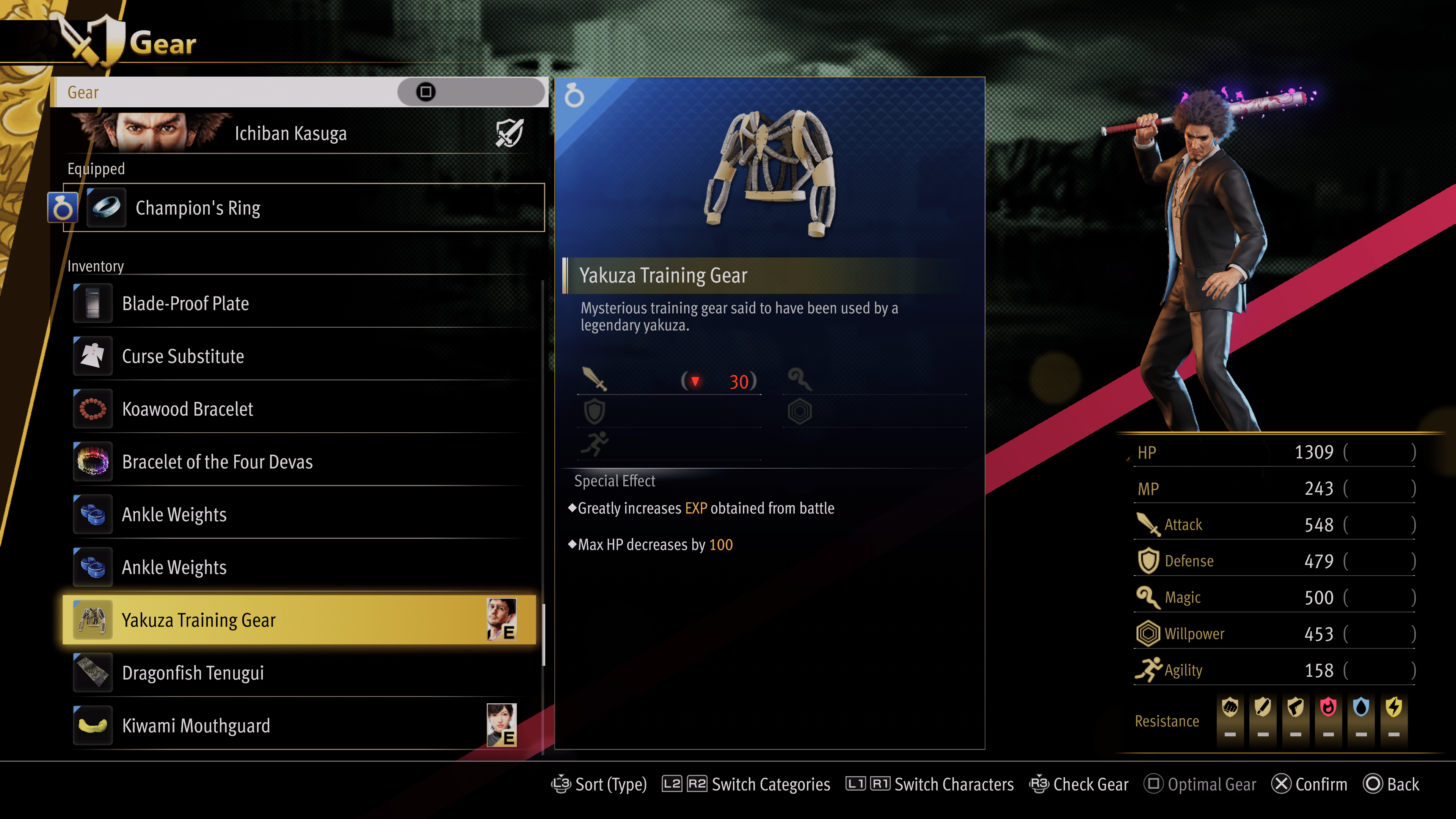
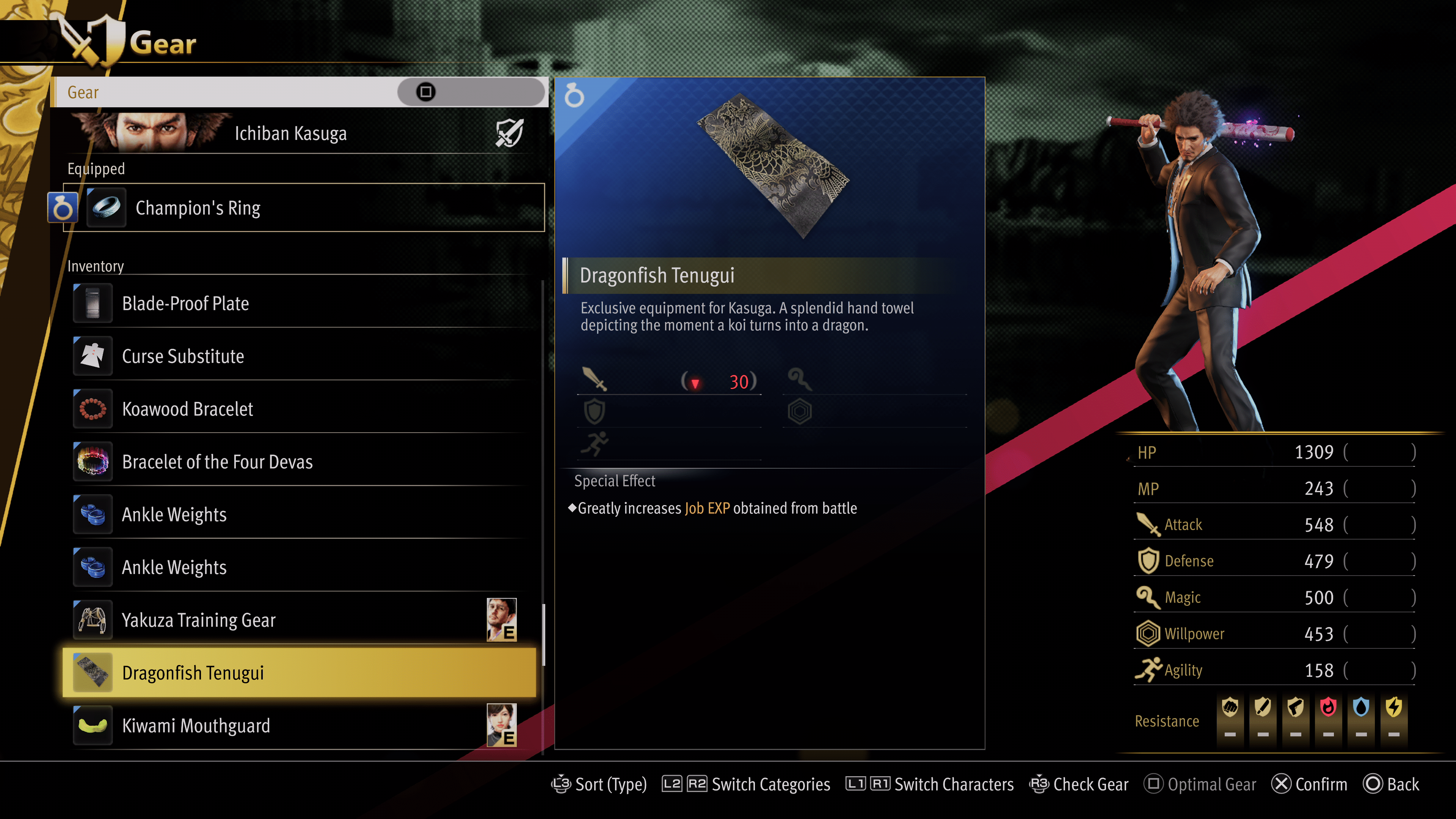
A few items in Infinite Wealth will help you get a little extra regarding character XP and job XP. The items you’ll probably notice first are the gear items. These should be unlocked from playing naturally, at least they were for me, and they provide some XP gain bonuses for characters and jobs.

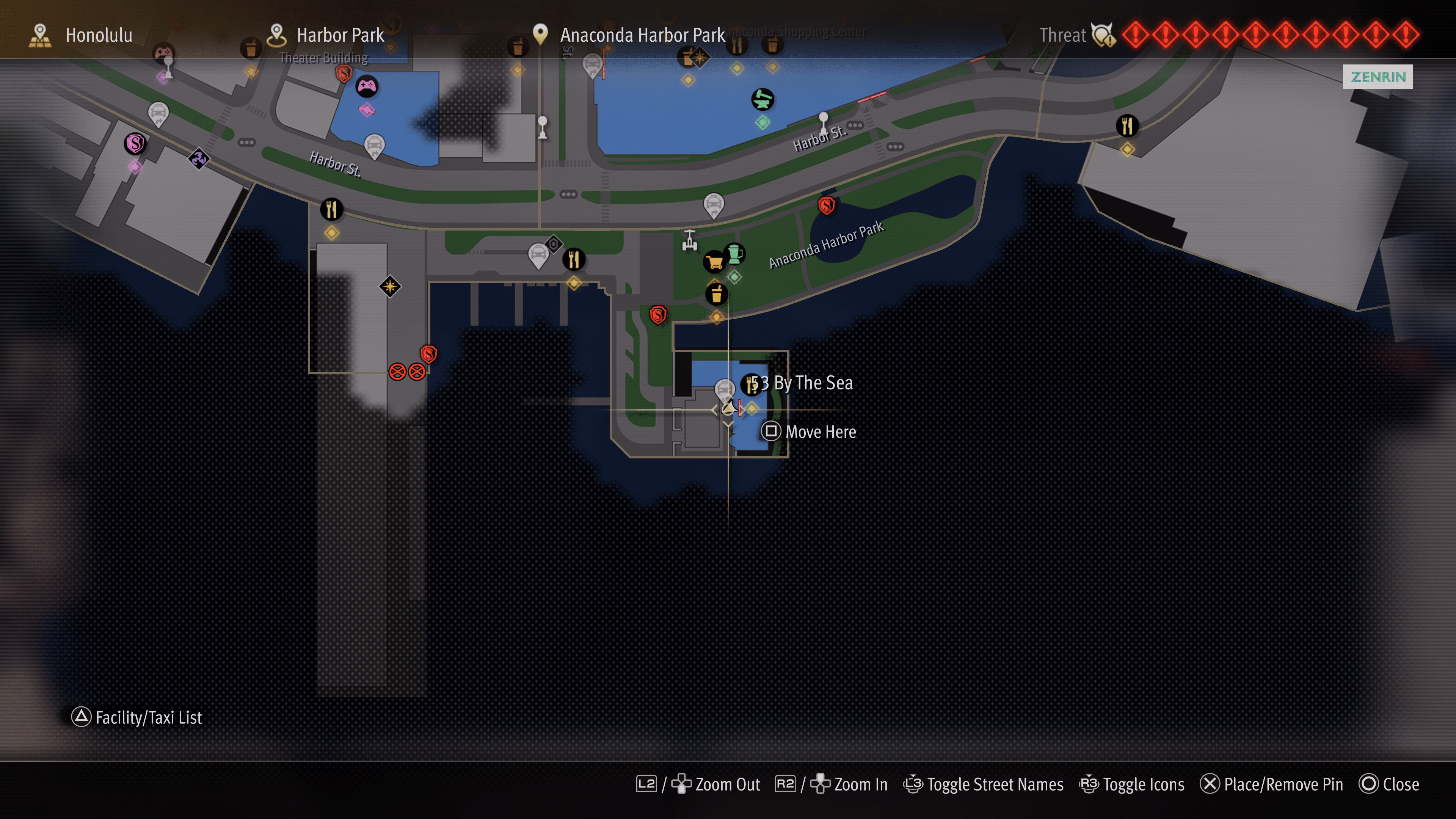
The next one is a temporary boost from eating food/meals. “53 By The Sea” is a high-end restaurant in the southeast portion of the map.

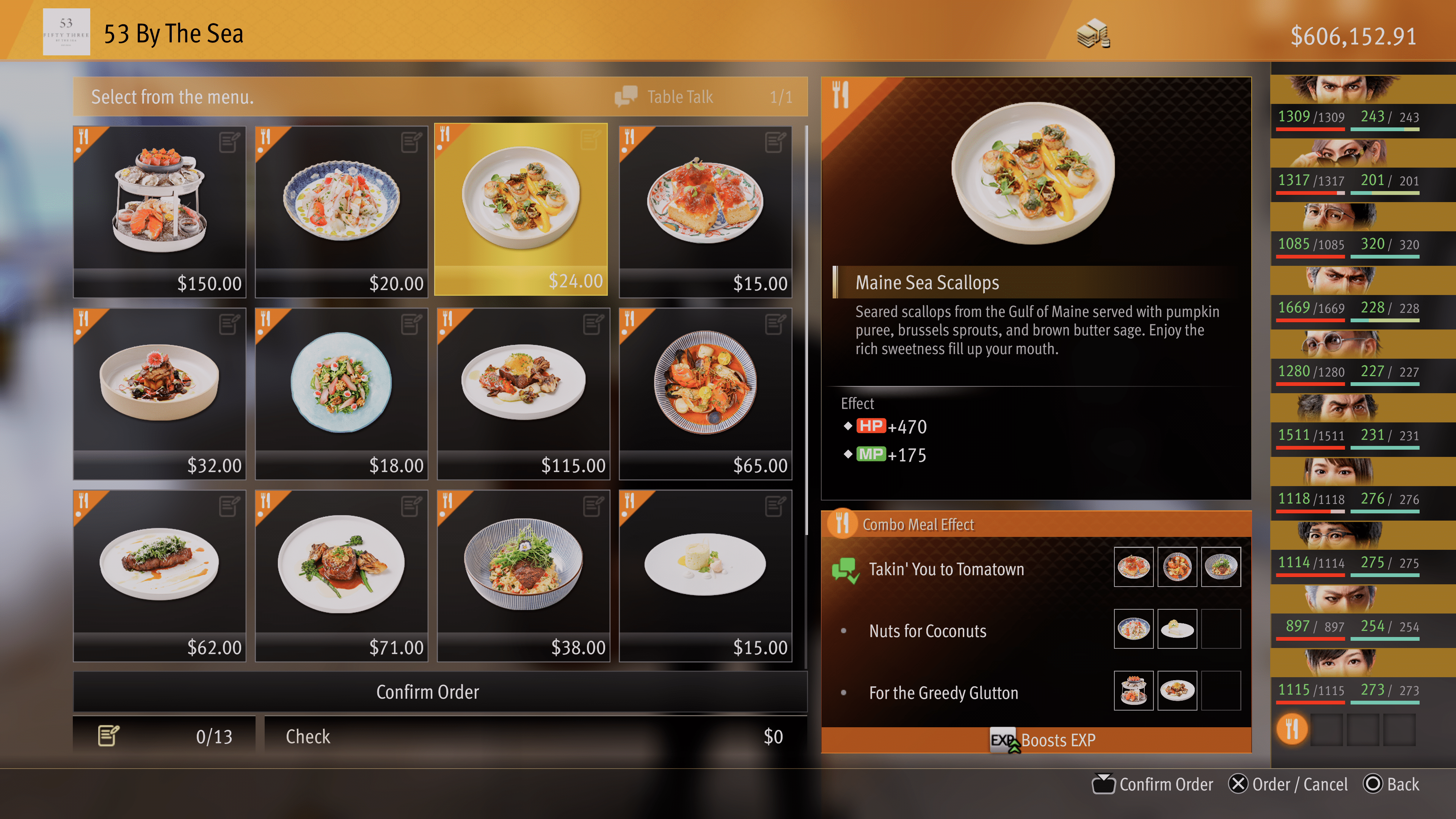
They sell all kinds of food there, and if you group them correctly, they’ll make a combo meal that gives bonuses. All restaurants have this feature, but only this one gives XP bonus.

The nice thing is, there’s a taxi right at the restaurant, so you can easily fast-travel to it to get an XP bonus when it ends. It’s a pricier restaurant than most in Honolulu, so be sure you have plenty of cash on hand.

I’m sure there are other XP farming methods, but these are the ones I used the most throughout the game and at the end. They’re efficient and fast enough to help you get to the level you need, but you’ll still need to invest a lot of time grinding.

Like A Dragon: Infinite Wealth is now available to play. To learn more and read up on our thoughts, check out our Like A Dragon: Infinite Wealth review!

Avatar photo

James Lara

A gamer at heart, James has been working for MP1st for the last decade to do exactly what he loves, writing about video games and having fun doing it. Growing up in the 90's gaming has been in his DNA since the days of NES. One day he hopes to develop his own game.

Home > News

The Long Dark Update 2.27 Drags Fixes for Bugs This Jan. 25

Hinterland has released The Long Dark update 2.27 and this brings fixes to issues that were introduced in the Part Four update. Read on for the complete The Long Dark patch notes for January 25, though there is a slight spoiler warning for players before trudging on.

The Long Dark Update 2.27 Patch Notes | The Long Dark Jan. 25 Patch Notes:

This is a Hotfix to THE LONG DARK and THE LONG DARK: SURVIVAL EDITION and contains fixes for issues introduced with our Part Four release.

Update Details

ADJUSTED REQUIREMENTS TO START ‘BURIED ECHOES’ TALE

Players no longer need to complete SIGNAL VOID in the same run as they intend to attempt BURIED ECHOES. Instead, so long as you’ve completed SIGNAL VOID in another Survival game – and obtained the Badge for completing it – you can begin BURIED ECHOES in any new or existing run.

NEW CUSTOM EXPERIENCE SETTING FOR SCURVY

We’ve added an additional option in the Custom Experience. Players can now choose to play with or without Scurvy, or even set it to a high rate for a more punishing experience with the ‘Scurvy – Vitamin-C Drain Rate’ option.

screen_9c1b42f4-ea8d-48a8-9a57-f8209eeff960.thumb.png.3f694e731f4b7cf94c06183447e27ab2.png

Bug Fixes

This Hotfix includes fixes for the following issues:

CRASHES

  • Fixed an issue where players would encounter a -988 or -998 error code and fail to launch THE LONG DARK on Epic Games.
  • Fixed an issue where attempting to swap from the WINTERMUTE to Survival menu on Mac Epic Games would result in closing the application instead.

GAMEPLAY, UI, CONTROLS

  • Fixed an issue in the Mystery Lake Camp Office where the Survivor could become stuck beneath the stairs.
  • Fixed an issue which caused a notable frame rate drop near the Cannery in Bleak Inlet.
  • Adjusted Chemical Hazard territory to better match the visual representation of their boundaries.
  • Fixed an issue which could cause the player to rotate 90 degrees upon transitioning to a new location while hauling a Travois.
  • Fixed an issue where attempting to Harvest undressed Wildlife with Bare Hands and a lit Torch equipped caused the Survivor to stow the Torch while still lit.
  • Fixed an issue which made it difficult to find a valid location to place a Rock Cache.
  • Fixed an issue which caused Carcasses to cease defrosting when being Harvested near a Campfire.
  • Fixed an issue where the Survivor would teleport to the surface above them when crouching and Harvesting in specific locations.
  • Fixed an issue where players would be unable to equip the Respirator from their Backpack after picking up a fresh Canister.
  • Added a message to better indicate when a Carcass cannot be Harvested with Bare Hands prior to being dressed.
  • Fixed an issue where Coal could spawn in an unreachable location in the transition Cave from Mountain Town to Mystery Lake.
  • Fixed an issue where players were unable to transfer stacks of items to a Container if the stack weighed more than the remaining capacity of the Container.
  • Fixed an issue where the Travois could fall beneath the terrain if left on a steep slope when transitioning to and from an interior or Region.
  • Fixed an issue where the text explaining what a Skill Book will improve was misplaced in the Inspect user interface.
  • Fixed an issue which could cause a ‘Failed to Load Save’ error after using the Respirator.
  • Fixed an issue where items on Benches would be left floating after breaking them down.
  • Fixed an issue where the Langston Mine Keys were not included in Journal > Collections > Mementos.
  • Fixed an issue where debug text could be seen when hovering the transition icon to Zone of Contamination from the Transfer Pass Map.
  • Fixed an issue where the cave transition to Zone of Contamination from Forsaken Airfield was labeled ‘To Transfer Pass’.
  • Fixed an issue where debug text could be seen on the Harvesting interface when interacting with a Poisoned Wolf Carcass that was 50% or more frozen.
  • Fixed an issue where Survivor-held light sources would not deteriorate when Harvesting a Carcass.
  • Fixed an issue where Survivor Condition would not deteriorate when Harvesting a Carcass.
  • Adjusted Harvesting of Rabbits and Ptarmigan to allow for Bare-handed Harvesting at the cost of a small percentage of meat.
  • Fixed an issue where no idle animation would play in the Harvesting user interface when interacting with certain Carcass types.
  • Fixed an issue where some canned beverages could not be reached on the floor of a vehicle interior.
  • Fixed an issue where the Survivor would be placed too far from the ladder when transitioning into the Prepper Cache in Bleak Inlet.
  • Fixed an issue where the Travois would become stuck in a ‘Loaded’ state if the player selected ‘Drop All’ while water was stored in the Travois.
  • Fixed an issue in Zone of Contamination where the Survivor was unable to pick up a Knife sticking out of a tree.
  • Fixed an issue which could result in multiple Vaughn’s Rifles spawning in Carter Hydro Dam.
  • Fixed an issue where certain Books could not be interacted with in the Zone of Contamination.
  • Reduced the damage dealt to Insulated Flasks from Survivor falls.
  • Increased the Condition of Chemical Boots.

ART & ENVIRONMENTS

  • Adjusted the Simple Lure and Fishing Lure to remove some hard edges from the model.
  • Updated the Dress Shirt to address inconsistencies and visual issues between the inventory and in-world models.
  • Fixed multiple locations in the Zone of Contamination where snow piles could be seen fading in and out as the Survivor approached and retreated.
  • Fixed an issue where shadows could pop in and out on door handles in the Concentrator building depending on the Survivor’s position.
  • Fixed an issue where lift cables were missing from the exterior of the Concentrator building.
  • Fixed multiple visual issues where items and terrain could be found floating or intersecting with each other within the Langston Mine.
  • Fixed an issue where a concrete barrier in the Zone of Contamination could shift to a new location as the Survivor approached it.
  • Fixed an issue with Rope spawn orientation that could result in the model oriented stiffly against walls.
  • Fixed a visual issue with the Security Chief’s Remains, allowing players to see through the back of the model from the eye sockets.
  • Fixed an issue where the entrance to the Langston Mine could be seen clearly through inclement weather.
  • Fixed an issue which caused a visual mismatch between what the player would see prior to exiting from the main entrance of the Langston Mine, compared to what they saw once they had exited.
  • Fixed an issue which resulted in some items being offset from trees they should be resting on in Hushed River Valley.
  • Fixed an issue which made it difficult for the Survivor to move onto the platform above the waste pool in Langston Mine.
  • Fixed an issue which caused a jarring visual mismatch between trees seen within the transitional cave to Forsaken Airfield and those after exiting the cave.
  • Adjusted the pit in the cave transition from Airfield to Zone of Contamination to better communicate it shouldn’t be entered.
  • Adjusted the pit beneath the rickety bridge in Langston Mine so Torches and Flares can no longer be seen when they hit the bottom.
  • Fixed an issue in Zone of Contamination where Burdock Bushes intersected with nearby rocks.
  • Fixed an issue which could result in the ‘Security Chief’s Log’ being completely unlit when picked up and read.
  • Fixed an issue where a shadow was incorrectly projected from the door of a Medical Locker in the Concentrator building.
  • Adjusted the lighting effects of Survivor held light sources on both sides of the chute transition in Langston Mine for better consistency.
  • Adjusted the chute in Langston Mine to make movement through this area easier.
  • Fixed an issue where a cardboard box could be seen intersecting a minecart in the Concentrator building.
  • Fixed an issue where a pallet could be seen intersecting a handrail in the Concentrator building.
  • Fixed an issue with terrain in the Forsaken Airfield to Zone of Contamination cave transition which resulted in gaps through which the player could see out of bounds.
  • Fixed multiple locations in Desolation Point where Old Man’s Beard was not correctly connected to trees.
  • Fixed an issue where a clipboard could be found intersecting a console in the Concentrator building.
  • Fixed an issue where Wildlife could spawn or climb into a tree.
  • Fixed an issue in Zone of Contamination where the Trainyard building would change its level of detail too abruptly, making it look like parts of the interior were appearing and disappearing.
  • Fixed an issue in Zone of Contamination where the preplaced beds in Scaffolder’s Hideout intersected with the ground.
  • Fixed an issue in Zone of Contamination where weather effects would not render outside while within the Forgotten Exploration tunnel.
  • Fixed an issue which resulted in a slight light source emanating from the Survivor while inside the Forgotten Exploration tunnel.

ANIMATION

  • Fixed an issue where the Survivor’s thumb could intersect with the Flashlight while held.
  • Fixed an issue where the Survivor’s hand would clip through the Elevator Crank when removing it from an Elevator.
  • Fixed an issue where the Survivor’s hands could intersect with an Interview Transcript clipboard when interacted with.
  • Adjusted the Travois pickup animation to be smoother and reduce player disorientation.
  • Adjusted Wolf Harvesting animations to look more polished.
  • Fixed an issue where a Wolf Carcass could shift slightly when the Survivor bent down to begin Harvesting.
  • Fixed an issue with Rabbit Carcasses that resulted in a lump on the model when held in the Survivor’s hands for Harvesting.
  • Fixed an issue with Doe Carcasses which resulted in the Harvesting animation being offset.
  • Fixed an issue where Moose would not gracefully transition to their death pose after falling to the ground.
  • Fixed an issue where using a Hunting Knife on a Doe would cause a short animation jolt on initiation.

AUDIO

  • Adjusted which audio tracks could play while inside the Langston Mine, preventing calming music from playing in a decidedly unsafe location.
  • Fixed an issue which caused wind ambience in the Main Menu to sound slightly tinny.
  • Fixed an issue which caused too much reverb when near the pit of the Langston Mine in Zone of Contamination.
  • Adjusted sound effects when climbing the rope in the Elevator of Langston Mine to better match the environment.
  • Fixed an issue which caused snow footstep sound effects on the wooden bridge from the Concentrator to the locked Langston Mine gate.
  • Fixed an issue in which voice-overs could be preemptively cut off when interacting with multiple items which would cause a voice-over to begin.
  • Adjusted the Misophonia filter to include footsteps through Chemical Hazard Zones.
  • Fixed an issue which caused Misophonia triggering sounds to play through reverb effects.
  • Fixed an issue which caused snow footstep sound effects on the concrete floor of the Concentrator building entryway.
  • Adjusted the audio of items thrown into bottomless pits so they can no longer be heard.

That’s it for this title update.

Source: Hinterland Forums

Avatar photo

Alex Co

Father, gamer, games media vet, writer of words, killer of noobs.

Home > News

Palworld Update 0.1.1.1 and 0.1.1.2 Released for Xbox This Jan. 25

Palworld update 0.1.1.1 and then 0.1.1.2 has been released today on Xbox platforms, and while this isn’t a major patch, it still brings important bug fixes that help with the game’s stability. Read on for the complete new Palworld update patch notes below.

Update (Jan. 29): For the update released this January 29, head on over here.

Palworld Update 0.1.1.1 and 0.1.1.2 Patch Notes:

[Patch Notice]
・Steam version patch v0.1.3.0
・Xbox version patch v0.1.1.1

Steam version v0.1.3.0 update has been released.
(Xbox version v0.1.1.1 will be released as soon as it is ready)

Changes are as follows:

===

▼Main changes
・Fixed a bug where the loading screen did not end when logging into the world
・Fixed a bug where the world date was not displayed correctly and appeared to reset.
・Corrected various incorrect text
・Countermeasures against various cheats and exploits

===
We will continue to place top priority on fixing major issues.
Thank you for your continued support of Palworld.

Unfortunately, it seems some gamers are experiencing issues connecting to the game after the update.

Source: Palworld Twitter/X page 

More Palworld Reading:

Avatar photo

Alex Co

Father, gamer, games media vet, writer of words, killer of noobs.

Home > News

Palworld Down With Infinite Loading When Connecting to Servers This Jan. 25

Following today’s Palworld update, it seems some players are having issues playing the game. Pocket Pari has acknowledged the Palworld down reports and how players are seeing an infinite loading when trying to connect to the game.

Palworld Down With Infinite Loading When Connecting to Servers This Jan. 25:

Here’s the acknowledgement from Pocket Pair regarding the connecting issues (via Discord):

[Regarding the issue of infinite loading when connecting to official servers]

Following the recent patch, numerous logins are concurrently underway, leading to congested access.
We are sorry for the inconvenience but please wait a moment before trying to connect to the servers.
Single-player, co-op and private servers should be relatively unaffected by this.

We apologize for any inconvenience.
Thank you for your understanding and cooperation.

Once more news regarding the issues are out, we’ll update the article. If you know someone affected, link them to the article to let them know they’re not the only ones seeing this issue.

More Palworld Reading:

Avatar photo

Alex Co

Father, gamer, games media vet, writer of words, killer of noobs.

Home > News

World War Z Update 1.54 Brings Host of Fixes This Jan. 25

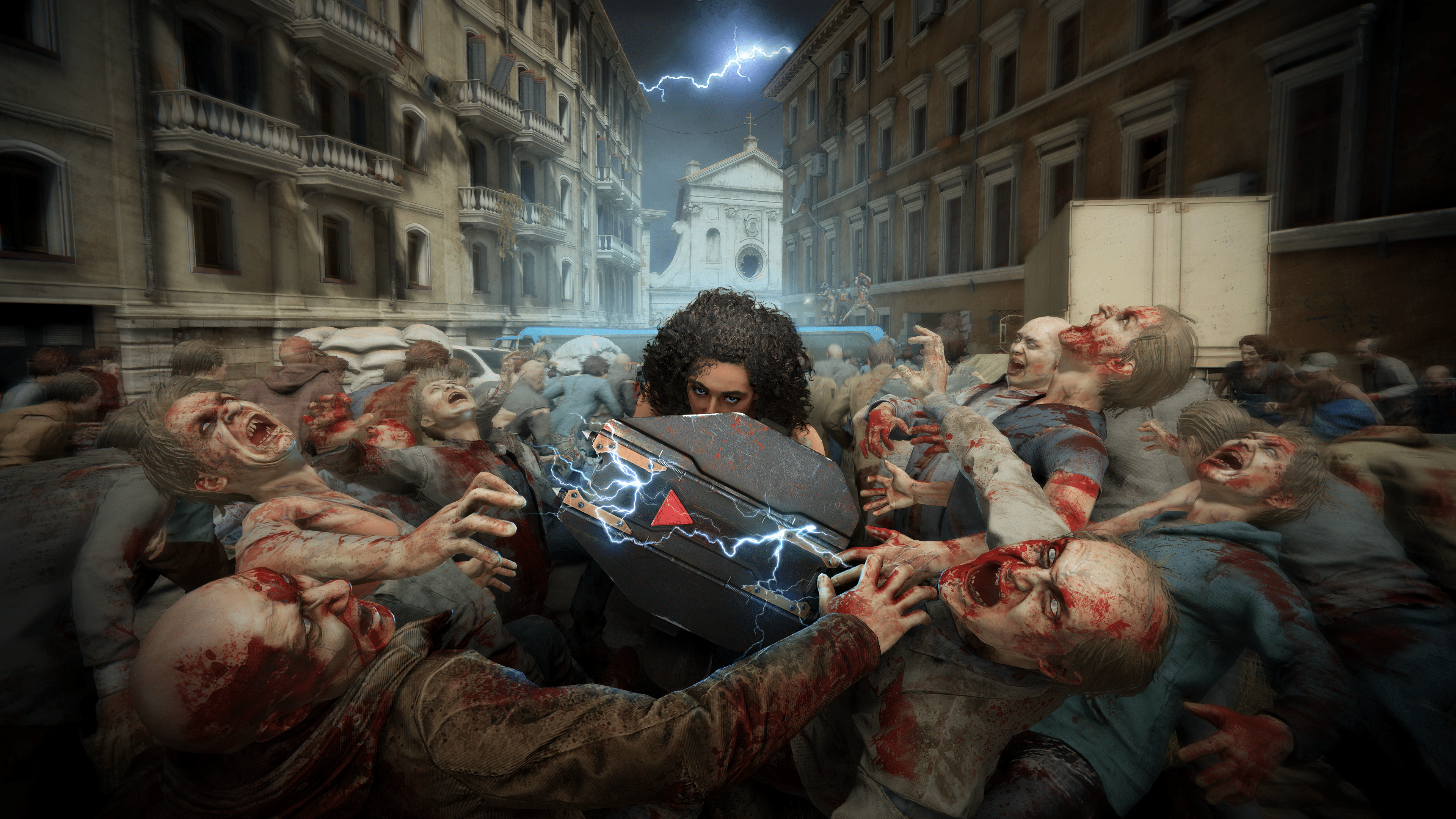
World War Z update 1.54 (PS5 update version 1.017) has been released, and while this doesn’t bring any new content, this does bring a host of gameplay fixes and improvements. Read on for the complete WWZ January 25 patch notes for all platforms.

World War Z Update 1.54 Patch Notes | World War Z Update 1.017 Patch Notes:

General

  • Fixed a bug where players could not stop Bull with Vanguard’s shield.
  • Fixed a bug where players could use Vanguard’s shield even with no equipment charges.
  • Fixed a bug with a missing silencer on a lever-action rifle.
  • Fixed several bugs when players would respawn behind the closed doors in Episode 8: Phoenix maps.
  • Fixed random stutters and freezes during some explosions in Episode 8: Phoenix – Fighting for Home.
  • Tweaked the performance in the outro video in Episode 8: Phoenix – The Low Road.
  • Fixed the ‘Chainsaw Massacre’ mutator bug. Now, bots don’t receive a chainsaw that a player cannot use after an exchange.
  • Fixed the ‘Gun Shortage’ mutator not affecting bots.
  • Fixed a bug in the ‘My Chainsaw and Me’ mutator. The scenario now continues when the player with the chainsaw exits.
  • Fixed a bug in the ‘My Chainsaw and Me’ mutator. Now, the player is resurrected with an infinite chainsaw.
  • Fixed marking voiceovers for Episode 8: Phoenix characters.
  • Fixed voiceovers for planting thermite.
  • Added thermite burning sound.
  • Fixed the ‘Exchange Heavy Weapons’ hint missing in Episode 8: Phoenix.
  • Fixed a bug when mutators were not displayed in Challenges for some players.
  • Fixed a bug when players could get through a closed window in Episode 8: Phoenix – Fighting for Home.
  • Fixed a bug when players could not open the door when playing with other people in Episode 8: Phoenix – Fighting for Home.

No word yet on whether we’re going to get more content expansions for World War Z, but once if we know more, we’ll be sure to let our readers know.

Source: Saber Interactive

Avatar photo

Alex Co

Father, gamer, games media vet, writer of words, killer of noobs.

Home > News

Palworld Update v0.1.3.0 and Xbox v0.1.1.2 Out This Jan. 25

Pocket Pair has released Palworld update v0.1.3.0 on Steam and v0.1.1.2 for those playing the game on Xbox. Many of the changes made today are for important bug fixes. Check out the new Palworld January 25 patch notes down below.

Palworld Update v0.1.3.0 Patch Notes | Palworld Update v0.1.1.2 Patch Notes:

The official patch notes were revealed on the Palworld Twitter/X page. Check out the details posted down below.

[Patch Notice]

・Steam version patch v0.1.3.0
・Xbox version patch v0.1.1.2

Steam version v0.1.3.0 update has been released.
(Xbox version v0.1.1.2 will be released as soon as it is ready)

Changes are as follows:

===

▼Main changes
・Fixed a bug where the loading screen did not end when logging into the world
・Fixed a bug where the world date was not displayed correctly and appeared to reset.
・Corrected various incorrect text
・Countermeasures against various cheats and exploits

===
We will continue to place top priority on fixing major issues.
Thank you for your continued support of Palworld.

That’s all the details that have been revealed for the game today. Be sure to check out more updates in the near future as the game continues to improve during its Early Access phase on both PC and Xbox platforms.

Source: Palworld Twitter/X page 

More Palworld Reading:

Damien Seeto

╳