Home > News

Rainbow Six Siege Servers Down for Maintenance and Y7S4.1 Patch Roll Out This December 13

Ubisoft has taken the Rainbow Six Siege servers down this December 13, and this is for planned maintenance! During this time, patch Y7S4.1 will be released on all platforms as well.

Rainbow Six Siege Servers Down Status and Updates for December 13:

Maintenance Schedule: 9 am EST/6 am PST/10 pm HKT (All Platforms)

The list of changes in today’s title update is included below.

BUG FIXES

GAMEPLAY

FIXED – Electricity VFX is not visible on deployable shields, reinforced walls and hatches.

FIXED – Players are able to see through barricades while picking up a deployable gadget.

LEVEL DESIGN

FIXED – Various gaps on Consulate that were allowing the attackers to see inside the building.

FIXED – Various LOD issues on Nighthaven Labs.

FIXED – Multiple LOD issues on various maps.

OPERATORS

FIXED – Solis’ hands go into an animation loop after cancelling the Megascan.

FIXED – Solis’ SPEC-IO loses functionality when Solis reactivates SPEC-IO after a Megascan at the end of the gauge.

FIXED – Solis’ hands remain frozen when vaulting while SPEC-IO is active.

FIXED – Hibana’s X-Kairos pellets are not destroyed if they are placed on a Kiba barrier and the Kiba barrier gets destroyed.

FIXED – Various operator VFX issues.

USER EXPERIENCE

FIXED – Xbox players cannot invite cross-generation.

FIXED – No notifications are present in the game when the player is presented with the cinematic that plays on first boot.

FIXED – Grim is missing from the U+ accounts.

FIXED – Various UI issues.

FIXED – Various Battlepass V2 issues.

FIXED – Various crossplay issues.

FIXED – Various localization issues.

FIXED – Various shop and customization issues.

FIXED – Can’t reconnect to an online Custom Game after leaving the session and attempting to re-join.

If the maintenance schedule changes, we’ll be sure to update the article accordingly.

Source: Ubisoft

Avatar photo

Alex Co

Father, gamer, games media vet, writer of words, killer of noobs.

Home > News

Rogue Company Update 2.15 Brings Mad Mercenaries Update This Dec. 13

First Watch has released Rogue Company update 2.15 (PS5 version 1.000.050) on all platforms, and this is for the Year 2 Season 5 Mad Mercenaries patch! Read on for everything new in the Rogue Company December 13 patch notes.

Rogue Company Update 2.15 Patch Notes | Rogue Company Mad Mercenaries Patch Notes | Rogue Company December 13 Patch Notes:

YEAR 2 SEASON 5: MAD MERCENARIES UPDATE

It’s time to cause chaos in the Mad Mercenaries update, this warzone comes with a line up of crazed content in the Mad Mercenaries Battle Pass. Additionally, this is a new season reset for ranked and we are introducing additional and new types of contracts so that you Rogues can get out there and get paid!

MAD MERCENARIES BATTLE PASS

In this update our Rogues don a vicious and wild look as Mad Mercenaries set to cause havoc for a price! In the Mad Mercenaries Battle Pass, you’ll find awesome content for rogues like Runway, Glimpse, Anvil and Umbra paired nicely along with the Bonedust Sahara Mythic weapon skin!

BATTLE PASS BASE BUNDLE (1000 ROGUE BUCKS)

  • Foxy Pajamas Glimpse Epic Outfit
  • Playground Antics Rare Wingsuit
  • 1 Hour Account Boost
  • 20% Battle Pass Experience Boost

BATTLE PASS ELITE BUNDLE (2000 ROGUE BUCKS)

  • +15 Battle Pass Levels
  • Foxy Pajamas Glimpse Epic Outfit
  • Playground Antics Rare Wingsuit
  • 1 Hour Account Boost
  • 20% Battle Pass Experience Boost

BATTLE PASS REWARDS

  • General Rewards
    • 3x Reward Supply Drops
    • 3x 30 Minute Account Boosts
    • 3x 45 Minute Account Boosts
    • 4x 1 Hour Account Boosts
    • 1000 Rogue Bucks
  • Cosmetics
    • Street Art Rare Spray
    • Figure Skating Freestyle Rare Emote
    • Collide-A-Scope Epic Melee Wrap
    • Rat Pack Rare Wingsuit
    • Explosive Bunny Rare Avatar
    • Beautiful Death Rare Border
    • Leaf Shower Rare Emote
    • Collide-A-Scope Epic Primary Wrap
    • Mascot of Mayhem Epic Title
    • Baby Face Umbra Rare Outfit
    • Rogue Toons Rare Banner
    • Crazy Ride Rare Wingsuit
    • Water Gun Fight Rare Emote
    • Collide-A-Scope Epic Secondary Wrap
    • Street Artist Epic Animated Avatar
    • Bullet Casings Rare Border
    • Gasoline Graffiti Epic Melee wrap
    • Chaos Clown Epic Title
    • Gasoline Graffiti Epic Secondary Wrap
    • Blast Friends Rare Spray
    • Big Cheese Anvil Rare Outfit
    • Woodland Critters Rare Border
    • Hop and Scotch Epic Banner
    • Gasoline Graffiti Epic Primary Wrap
    • Vivid Vision Epic Wingsuit
    • Kid-At-Heart Legendary Emote
    • Bone Dust Mythic Weapon Wrap
    • Diamond Bite Epic Avatar
    • Fiery Temper Epic Banner
    • Royal Decree Epic Wingsuit Wrap
    • Unborn Nightmare Legendary Avatar
    • The Main Event Legendary Title
    • Rabid Bunny Runway Legendary Outfit

NEW RANKED SEASON

The first new season of the new year begins today, granting last season’s rewards and unlocking new ones to earn!

YEAR 2 SEASON 5 RANKED REWARDS

The following rewards will be given to those who are marked veterans in ranked and to those who have achieved Rogue tier during the active season:

  • Play 30 Ranked Games: Party Animal Epic Avatar
  • Achieve Rogue Tier: Bubble Gum Splatter Epic Weapon Wrap Bundle

NEW! RANKED CONTRACTS!

From this update forward, we are implementing a new set of contracts meant purely for Ranked:

  • Play 15 Ranked Matches – Reward: 300 Reputation
  • Win 10 Ranked Matches – Reward: 300 Reputation
  • Complete Both Ranked Contracts – Reward: 400 Reputation

Much like Weekly Contracts, these Ranked Contracts will become active only on weekends! So come Friday, get out there and compete!

DAILY CONTRACTS EXPANDED

In this update, we’ve done a massive pass to our library of Daily Contracts with the goal in mind of giving our players unique and fun objectives to achieve while they are out there saving the day! Want to get rewarded for mowing down rogues with Cannon’s Minigun or wreak havoc with all of Dima’s explosives? Try them out in the new update and let us know what you think!

FIXED ISSUES

  • Fixed various camera and collision issues across several maps
  • Addressed some Ranked Progression issues
  • Fixed an issue where Cannon’s Minigun would disappear if somehow dodgerolling off of parts of maps.
  • Fixed a MVP pose issue with Saint
  • Fixed an issue where bots would not begin navigating into the map after landing
  • Fixed an issue with the Squad Goals Dima idle animations
  • Fixed some unintended issues with gadgets while they are on cooldown
  • Fixed an issue with Shooting Range where all guns would be locked out
  • Fixed an issue with how Gunsmith and Shredder Rounds interact with your ammo count
  • Fixed various audio issues with the MLC Mixtape Mythic skin
  • Fixed an issue where the in-game shop would be un-interactable if opened while the scoreboard is up

KNOWN ISSUES

  • The Ranked Info screen shows incorrect rewards, please refer to the Ranked entry above to know what the awards are until we address this
  • The VFX of emotes, if you another emote following it, will sometimes retain the VFX of the previous emote
  • Some Wingsuits have the wrong thumbnails
  • Some bots don’t seem to want to purchase primary weapons
  • Some texture issues with the Kid-At-Heart emote
Avatar photo

Alex Co

Father, gamer, games media vet, writer of words, killer of noobs.

Home > News

Battlefield 2042 Weekly Missions, Battle Pass Rewards for Season 3 Week 4 Listed (Dec. 13)

MP1st is here to bring players the Battlefield 2042 weekly missions and store refresh for December 13. Check out the official Battlefield 2042 Season 3 Week 4 weekly missions, Battle Pass rewards, and Featured Experiences!

Battlefield 2042 Weekly Missions, Battle Pass Rewards for Season 3 Week 4:

Week 4 Missions:

  • 5 Kills and Assists (4)
  • 1 (km) Distance Travelled in Air Vehicles (4)
  • 3 Squadmates Revived (4)

Available After 2 Missions Completed:

  • 9 Objectives Captured or Neutralized (5)
  • 20 Teammates Revived (5)
  • 15 Kills With SMGs, Assault Rifles and LMGs (5)

Available After 4 Missions Completed:

  • 50 Teammates Healed or Resupplied (6)
  • 30 Kills With Utility and Secondary Weapons (6)

Available After 5 Missions Completed (Bonus Mission):

  • 6 Objective Ribbons Earned (10)

Featured Experiences:

  • Dec. 13 – Dec. 16:
    • Rush XL
    • Conquest of Ages

New Store Bundles:

Battlefield 2042 Heritage 2 Store Bundle Items

  • Heritage II (1400 BFC, 6 Items)

That’s about it! Tune in next Tuesday for the Season 3 Week 5 new challenges and more.

Thanks, Carpo!

More Battlefield Reading:

Avatar photo

Salman Haider Zaidi

That's a nice argument, Senator.

Home > News

SMITE Update 12.37 Out for 9.12 Odin’s Onslaught This December 13

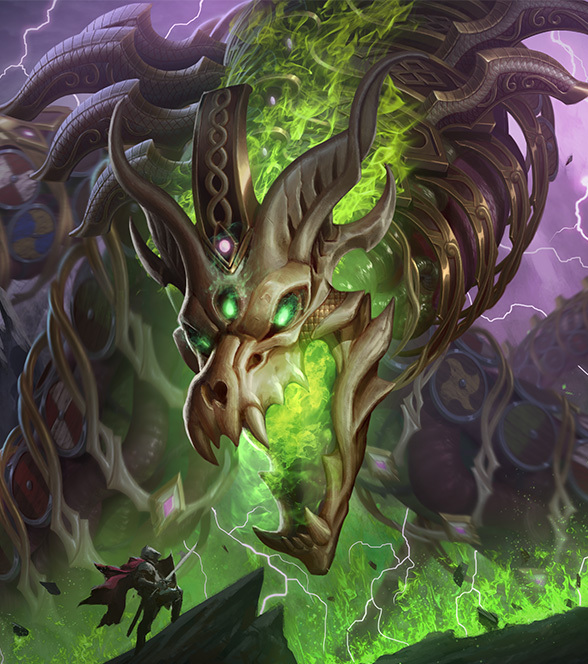
Hi-Rez has deployed SMITE update 12.37 today on all platforms to push out the new 9.12 Odin’s Onslaught patch. This includes some new god skins and lots of other content. Check out the SMITE December 13 patch notes below.

SMITE Update 12.37 Patch Notes | SMITE 9.12 Odin’s Onslaught Patch Notes | SMITE December 13 Patch Notes:

NEW GOD SKINS – LIVE DECEMBER 13

Tokyo Machine Loki

Crossover | Monstercat Chest

Nidhoggr Jormungandr

Exclusive | Nidhoggr Chest

Spell Blaster Charybdis

Unlimited | Yulefest Event

Lunar Lightning Ishtar

Exclusive | Yulefest Event

Infinite Wave Poseidon

Exclusive | Yulefest Event

SWC Challenger Thanatos

Exclusive | SWC Drop

BONUS UPDATE 1 SKINS – LIVE DECEMBER 27

FoxGirl9 Da Ji

Exclusive | Yulefest Event

Hellraider Hercules

Exclusive | Yulefest Event


Gecko Taverner Cabrakan

Exclusive | Team Gecko Chest

BONUS UPDATE 2 SKINS – LIVE JANUARY 10

Cannon Crusader Vulcan

Exclusive | Thruth Hammer Chest

AP-15 Ah Puch

Exclusive | Yulefest Even

Claw of the Deep Khepri

Exclusive | Yulefest Event

UPDATE RELEASE SCHEDULE
  • December 13 – Odin’s Onslaught Update
    • SMITE Adventure – Odin’s Onslaught
    • Yulefest Event
    • Monstercat Chest
  • December 19 – SPL Skins Prime Gaming
    • Get 8 SPL team skins to celebrate your favorite SPL teams!
  • December 27 – Bonus Update 1
    • Yulefest Event Skins
    • Team Gecko Chest
  • January 10 – Bonus Update 2
    • Yulefest Event Skins
    • Truth Hammer Chest
ADVENTURE MODE: ODIN’S ONSLAUGHT

Welcome to our newest SMITE Adventure: Odin’s Onslaught! 

  • Odin has hired five teams of two to defeat the herald of Ragnarok, Níðhöggr (Nee-thogg-r). Face off against each other to reach a bounty threshold of 35,000 gold. Defeat jungle monsters, players, and a roaming boss for bounties. Secure and deliver trophies for even larger gold rewards.


  • There are four unique locales in which players fight
    • The Three Overworld Zones
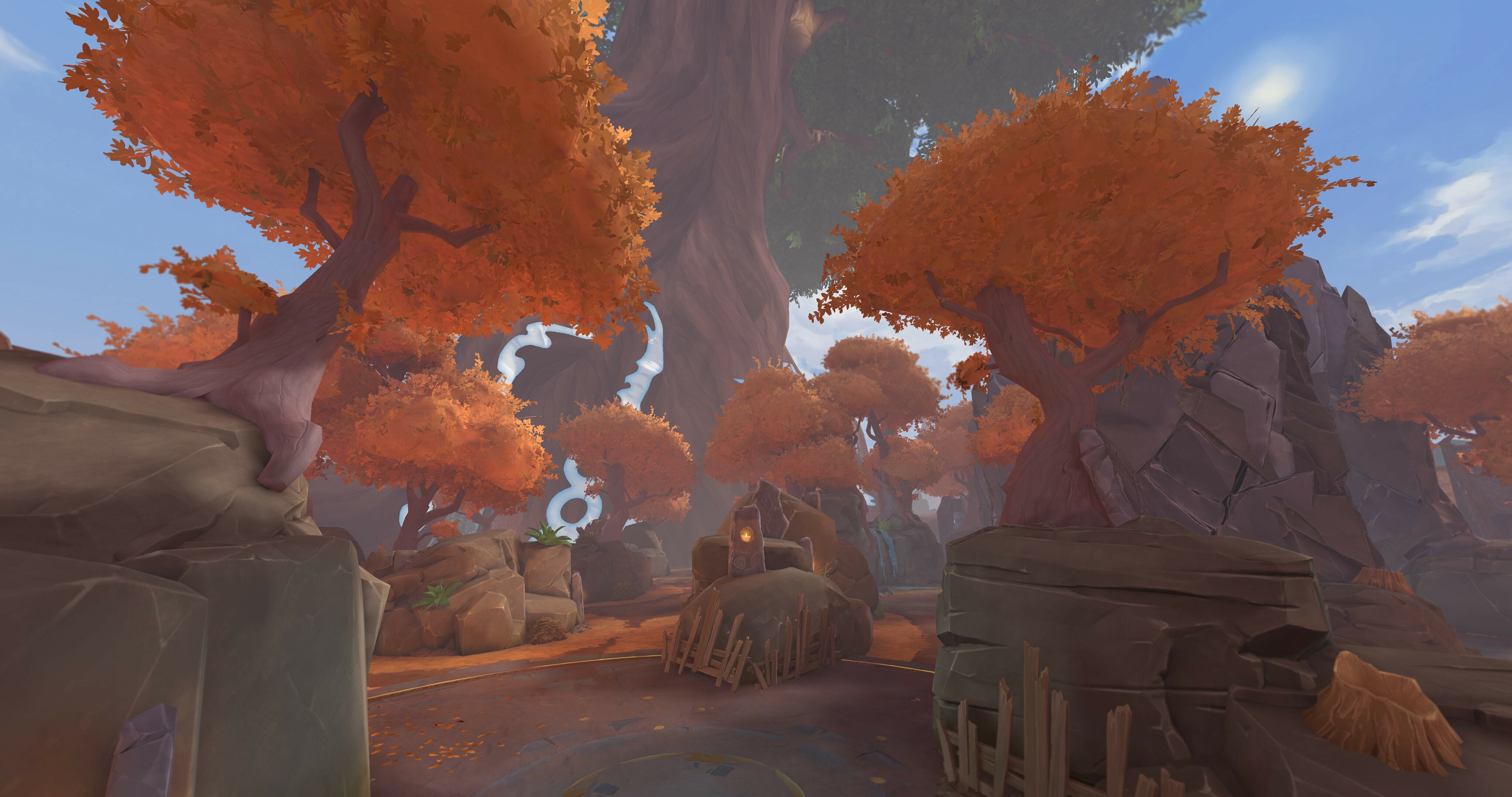
      • Alfheim, the autumnal home of the Alfar (elves)
      • Jotunheim, the wintry home of the Jotun (giants)
      • Midgard, the temperate realm of man
    • The Underworld
      • Naströnd, the bleak shore of corpses in Helheim
  • Mode Info
    • 10 Players
    • 5 Teams of 2 Players each
    • Starting Level: 3
    • Starting Gold: 3000
    • Win Condition: Reach 35,000 gold
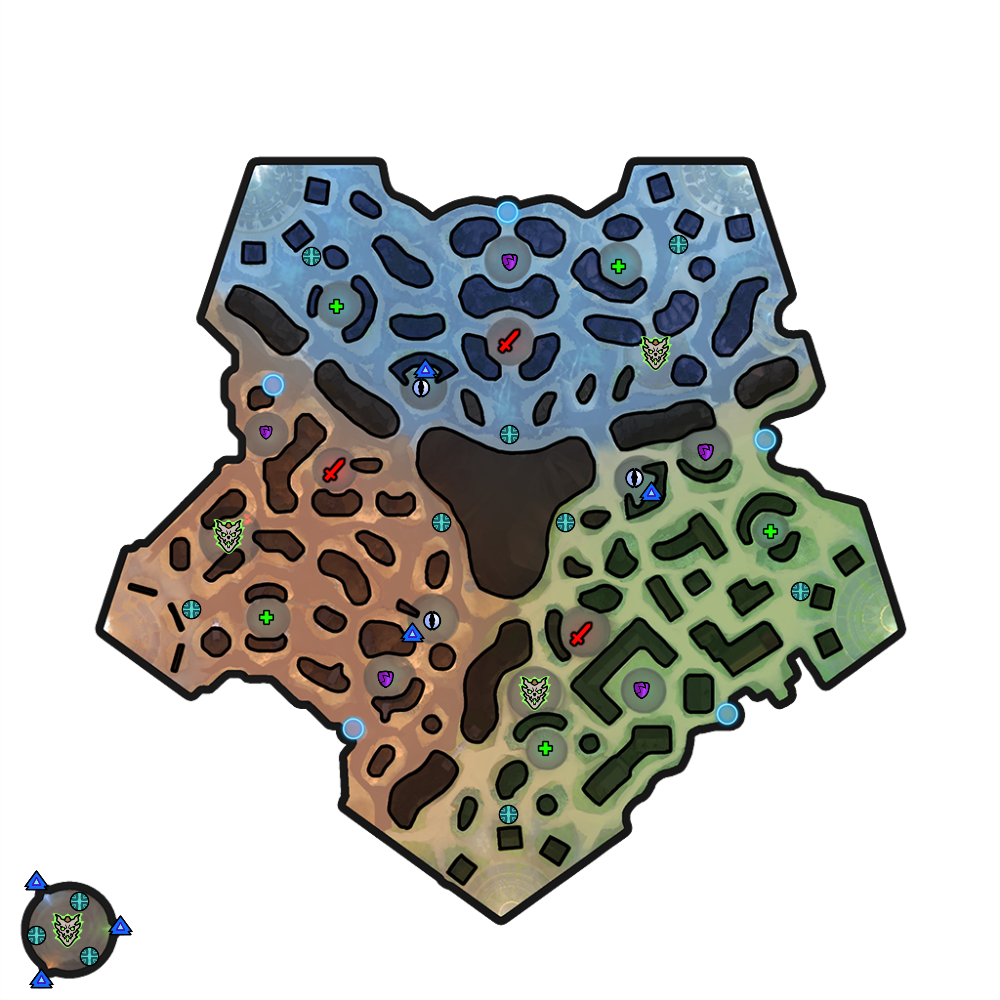
    • Minimap:

  • Game Flow
    • Players will initially spawn in 1 of 5 bases on the map’s outer edges 
    • Defeat Jungle Camps
    • Complete Objectives 3x
      • Norns (All three must be cleared to summon Níðhöggr)
      • Roaming Níðhöggr Encounter
      • Scale Capture (Dropped from Roaming Níðhöggr)
        • Changing capture locations
    • Final Norns (These will respawn) 
    • Final Níðhöggr confrontation
    • Final Skull Capture (Dropped from Final Níðhöggr)
  • Detailed Game Rules
    • Banned Gods (these gods had either technical issues or clear gameplay advantages)
      • Aphrodite
      • Cliodhna
      • Jormungandr
      • Janus
      • Jing Wei
      • Morrigan
      • Heimdallr
      • Persephone
    • Banned Items (these items had either technical issues or clear gameplay advantages)
      • Hand of the Gods
      • Eye of the Jungle
      • Protector of the Jungle
      • Seer of the Jungle
      • Teleport Fragment
      • Greater Teleport Fragment
      • Heroic Teleport
      • Persistent Teleport
    • Jungle Camps
      • All Jungle Buffs Stack with each other 
      • All Jungle camps have a buff holder that drops a single buff, including the Norns 
    • Marked objectives
      • Norns, Bosses, and Capture Points are all marked with a waypoint indicator (Blue Circle Outlined around the camp)
      • These must be slain/completed in order to move to the next round of objectives, although Jungle Camps will consistently respawn and players are free to win the game without completing these objectives if they choose. 
    • Health Orbs
      • These heal you and nearby teammates within a 60 unit radius for 15% on initial burst plus 2% each tick for a duration of 10 seconds
    • Valkyrie Fountains
      • You recover mana and can shop in the Valkyrie Fountains throughout the map. There are 10 in total, marked by a Valkyrie statue and a blue aura. Unlike normal fountains, you do not recover health here.
    • Dynamic Respawns
      • Dynamic respawns grant temporary invulnerability until you leave the Valkyrie Fountain you spawned in or they expire after 10 seconds
      • Any team can spawn at these areas
      • Recalling is disabled
    • Healing Rules 
      • 20% Global Healing Reduction and an additional 10% Lifesteal Reduction on top of that. 
    • Buffs and Buff Camps
      • Attack Speed Camp (Purple)
        • Respawn Timers
          • 60 seconds
        • Buffs Provided
          • 20% increased attack speed 
          • Lasts 120 seconds
      • Support Camp (Green)
        • Respawn Timers
          • 60 seconds
        • Buffs Provided
          • HP5 increased by 50
          • Lasts 120 seconds
      • Damage Camp (Red)
        • Respawn Timers
          • 90 seconds
        • Buffs Provided
          • Increases base physical and magical power by 10
          • 20% increase to physical and magical power
          • Lasts 120 seconds
      • Norn (Yellow Buff Camp/Protections)
        • Respawn Timers
          • N/A – gated by Níðhöggr
        • Buffs Provided
          • Increases magical and physical protection by 30
      • Dragon Scale Buff
        • Provides one stack of protections per delivery, up to 3
        • Each stack grants 15 magical and physical protection
      • Dragon Skull Buff
        • Is granted upon delivering the dragon skull
        • Provides mana and health percent-based healing, 0.8 for mana, and 1.6 for health
        • Provides 50 additional physical power and 70 additional magical power
    • Capture The Trophy
      • Each time Níðhöggr is defeated, he will drop a Trophy, either a Scale or a Skull.
      • Trophies function like the Capture the Flag mechanic from Nike’s Adventure
        • Players’ movement speed is reduced by 30%, additionally, they are Silenced and Crippled while holding the Trophy (flag)
        • Trophy can be dropped by pressing the Relic 1 key or button
        • Dropping a Trophy will place a 3s cooldown on you, preventing you from picking it back up immediately
      • Deliver the Trophy to the outermost Valkyrie Fountains, which will be marked waypoints on the map. Crossing the magical threshold for the fountain will capture the trophy.
      • Each location Níðhöggr appears in will have different bases selected as the drop-off locations, so pay extra attention to the marked waypoints on the minimap
  • Team Gold Bounty Cheat Sheet (Per Player, Base Values)
    • 5x15g – Roaming Ward Patrol
    • 4x25g – Nastrond Draugr 
    • 135g – Support and Attack Speed Camp
    • 170g – Damage Camp
    • 180g – Player Bounty
    • 225g – Norn
    • 600g – Roaming Níðhöggr
    • Scale Capture Values
      • 600g (First Capture)
      • 800g (Second Capture)
      • 1000g (Third Capture)
    • 800g – Final Níðhöggr
    • 1500g – Skull Capture
YULEFEST EVENT
Welcome to the Yulefest event! This event celebrates SMITE’s many friendships during this most joyous and cozy season! This event will have 6 purchasable Exclusive Skins in total with 2 Skins releasing every 2 weeks. Each Skin will have an initial discount for that release only. Purchase all Skins to unlock the Unlimited Spell Blaster Charybdis Skin! Also, everytime you purchase a Yulefest event Skin you will also receive a Gift Token of a certain gift type (Emote, Voice Pack, Tier 2 Skin, or Awesome Gift). Gift Tokens allow you to send a gift to a friend on your friends list, in the gift store, or to maybe make a new friend by giving a gift from the end of match lobby to a stellar teammate! Send your friends gifts this season and spread the joy of friendship!
  • Event Skins
    • Spell Blaster Charybdis (Reward)
    • Lunar Lightning Ishtar
    • Infinite Wave Poseidon
    • FoxGirl9 Da Ji
    • Hellraider Hercules
    • AP-15 Ah Puch
    • Claw of the Deep Khepri
9.12 SMITE NIGHT
  • All 6 weeks of SMITE Night will feature the new Adventure: Odin’s Onslaught
  • There will be no special queue, just play the adventure as usual on a Saturday to earn additional rewards
  • Rewards
    • Week 1:
      • Adventure – Loading Screen
      • 3 day Account Booster
    • Week 2:
      • Pick Your Own God Chest
      • SMITE NIGHT Avatar Chest
    • Week 3:
      • SMITE NIGHT Emote Chest
      • SMITE NIGHT Cosmetic Chest
    • Week 4:
      • Odyssey: Soaring Isles BONUS Chest
      • SMITE NIGHT Voice Pack Chest
    • Week 5:
      • Pick Your Own God Chest
      • SMITE NIGHT Avatar Chest
    • Week 6:
      • SMITE NIGHT Voice Pack Chest
      • 3 day Account Booster
    • Milestones:
      • Nidhoggr Fire! Global Emote
      • SMITE NIGHT Skins Chest
BUG FIXES
  • UI
    • Fixed an issue with PS5 and PS4 Pro lobby models having low quality textures
    • Fixed an issue with the loading screen appearing too small on higher resolution monitors
  • Localization
    • Fixed an issue with Charon’s Coin tooltip description appearing as undefined in the Spanish version
    • Fixed an issue with Amulet of the Stronghold and Amulet of Silence having broken tooltip text descriptions in the Spanish version
  • General Gameplay
    • Fixed an issue with projectiles visually firing FX multiple times
  • Gods
    • Persephone
      • Fixed an issue where she could use Aegis Amulet in her Passive state
    • Maui
      • Fixed an issue where he would cause his collisions to turn off and fall through map geometry
      • Fixed an issue where his Master Fisherman ability could damage two Gods if the first God died on hit
      • Fixed an issue where enemies weren’t getting knocked up by his Ultimate if they were hit on the edge of the ability
      • Fixed an issue where he could knock up enemies onto the Jade Corruption Joust Map geometry
    • Cerberus
      • Fixed an issue with his King Black Dragon skin targeter missing elements for Paralyzing Spit
    • Chang’e
      • Fixed an issue with her passive meter missing on Console
    • Yemoja
      • Updated her Midnight Waters model and card art to stay true to her default appearance
  • Items
    • Gilded Arrow
      • Fixed an issue with this item not properly choosing enemy targets correctly
    • Rangda’s Mask
      • Fixed an issue where Gods would lose mask stacks from gaining temporary passive power increases from abilities, buffs, and potion of power
      • Fixed an issue where the Bracer of Radiance Relic caused Gods to lose mask stacks when walking out of the power increase aura
    • Manticore’s Spikes
      • Fixed an issue that caused unintended damage against reflect damage that could also cause server instance crashes
BALANCE LIVE WITH THE 9.12 UPDATE – DECEMBER 13
Game Modes
  • New Adventure Mode – Odin’s Onslaught 
    • This will be active as its own queue for the entire update!
  • Unlimited Conquest Ranked
    • This will be an experimental mode running for one week Dec 13-20
    • Ranked Joust will be temporarily disabled during this experiment 
    • This queue will be Ranked Conquest but allow for players to play in parties of any size
    • This queue will inherit your Ranked Conquest progress, and reward TP and MMR toward future ranked Conquest matches played in the solo-duo only queue
    • This queue will be on an especially long timer, expected to only fire 3 times per day, so plan accordingly! (roughly at 10AM, 6PM, and 2AM Eastern)
  • SWC Conquest
    • As we prepare for the World Championships we are making some environment art changes to the map
      • SWC Trophy is placed across from the Fire Giant
      • SPL Logos on the ground in the Mid Lane
      • SPL Banners hang in the Order and Chaos Bases
      • Previous SWC Champion Skin Statues are placed around the map

Goals

  • SWC Prep
    • As usual, when we approach the end of the Season we aim to keep it light on balance as a whole. Last update and the subsequent bonus updates made some big changes to SMITE, and their impacts are still playing out across the SPL Playoffs. Out of respect for SPL players’ scrim time and for the goal of preserving the meta across the multiple SWC play-in phases, we aren’t making too many big changes. We will be buffing a series of underperforming gods to further diversify each role’s god pool in the SPL, as well as to reinvigorate casual play with these gods. 
    • Includes:
      • Anhur Buff
      • Ao Kuang Buff
      • Cu Chulainn Buff
      • He Bo Buff
      • Heimdallr Buff
      • Jormungandr Buff
      • Neith Buff
      • Tiamat Buff
      • Tsukuyomi Buff 
  • Warrior Jungle Nerf
    • This change could have a significant impact on the SPL meta, but it was one we felt like was still worth pursuing. It affects only a small subset of gods, but Manikin Scepter has continually been the factor that enables Warriors, often built especially tanky, to become some of the top Junglers. We want to discourage this small pool of gods from taking over the Jungle meta at SWC, and so we are applying a pretty significant nerf to the damage Manikin Scepter deals to enemy gods only. This preserves Jungle clear for those who need it, but makes it a significantly weaker item for taking down enemy gods. 
    • Includes
      • Manikin Scepter Nerf
  • Special Case God Adjustments
    • We have a few other adjustments that could affect SPL, those are Maui and Ymir. They both require some specific adjustments for different reasons. 
    • Maui is new to the roster, and is seeing SPL play, but his performance across other skill levels and game modes has been especially low. He is getting some targeted buffs to Master Fisherman to make the charge-up and firing experience on this ability much smoother. He is also seeing a key shift in his Mystical Ulua ability to nerf the Movement Speed it provides, which is often leveraged for a huge advantage at the pro level
    • Ymir has been at the top of the SPL meta for a while now, so this change is especially pro focused. In discussions with pros we agreed on a shift to multiple variables on Ymir’s Ice Wall. Previously, this ability was intensely powerful to rank up to get the max wall duration and shorter cooldown, which removed a lot of the flexibility of the god and encouraged going all in on wall spam. We have made this ability no longer scale down in cooldown per rank, and the max wall duration is now significantly less. As Ymir generally does not overperform or create balance frustration, we also buffed his rank 1 cooldown and wall duration. 
    • Includes
      • Maui Buff
      • Ymir Shift
      • Ishtar Nerf

Items

(STARTER) MANIKIN SCEPTER
  • Decreased Damage to gods from 16+5% to 8+2.5% over 2s
  • Minion Damage is unchanged at 16+5%

Gods

ANHUR BUFF

DISPERSE
  • Decreased Cooldown from 15s to 15/14.5/14/13.5/13s
AO KUANG BUFF

WILD STORM
  • Decreased Mana Cost from 60/65/70/75/80 to 50/55/60/65/70
  • Decreased Cooldown from 7s to 6s
CU CHULAINN BUFF

BARBED SPEAR (GROUND SLAM)
  • Increased Base Damage (on both forms) from 65/125/185/245/305 to 75/135/195/255/315

SPEAR OF MORTAL PAIN (WAR CRY)
  • Increased Base Damage from 165/235/305/375/445 to 175/250/325/400/475
HE BO BUFF

GENERAL
  • Increase Base Movement Speed from 355 to 360
  • Increased Base HP Per Level from 70 to 75
 
HEIMDALLR BUFF

PIERCING SIGHT
  • Increased Base Damage from 70/130/190/250/310 to 90/145/200/255/310
JORMUNGANDR BUFF

VENOMOUS HAZE
  • Decreased Cooldown from 16/15/14/13/12s to 15/14/13/12/11s

CONSUMING BELLOW
  • Decreased Cooldown from 14s to 13s
ISHTAR NERF

IMBUE ARROWS
  • Increased Cooldown from 9s to 10s 
  • Decreased Damage on Storm Shot from 85% to 80% of Ishtar’s Basic Attack Damage
MAUI BUFF

MASTER FISHERMAN
  • Increased base Damage from 100/165/230/285/360 to 100/170/240/310/380
  • Increased the Range of this ability when at 0 Charge from 4 to 25
  • Decreased the time it takes to reach max range charge from 1.4s to 1s

MYSTICAL ULUA
  • Shifted Movement Speed from 4/8/12/16/20% to 8/10/12/14/16%
  • Protections Buff from 5/10/15/20/25 to 15/20/25/30/35
NEITH BUFF

UNRAVEL
  • Decreased Cooldown from 15s to 14s

BACKFLIP
  • This ability now will pass through all player made walls
TIAMAT BUFF

PRIMORDIAL ONSLAUGHT
  • Increased Base Damage per shot from 80/85/85/90/90 to 80/90/90/100/100
TSUKUYOMI BUFF

KUSARIGAMA
  • Increased Base Damage from the Final hit from 50/105/160/215/270 to 60/115/170/225/280
  • Increased Final Damage Scaling from 70% to 80%
YMIR SHIFT

ICE WALL
  • Shifted Wall Lifetime from 2/3/4/5/6s to 2.5/3/3.5/4/4.5s
  • Shifted Cooldown from 14/13/12/11/10 to 13s at all ranks
NEW SKIN VOICE ACTORS
  • Tokyo Machine Loki – Tokyo Machine
  • Nidhoggr Jormungandr – Mike Smith
  • Spell Blaster Charybdis – Analesa Fisher
  • Lunar Lightning Ishtar – Dawn Bennett
  • Infinite Wave Poseidon – Kamran Nikhad
  • Foxgirl9 Da Ji – Corey Pettit
  • Hellraider Hercules – Kim Strauss
  • Gecko Taverner Cabrakan – Andrew Russel
  • Cannon Crusader Vulcan – Austen Moret
  • AP-15 Ah Puch – Craig Lee
  • Claw of the Deep Khepri – Adin Rudd

Source: Smite Game

Damien Seeto

Home > News

Hunt Showdown Update 1.71 Out for New Hotfix This December 13

Crytek has released Hunt Showdown update 1.71, which is hotfix #1 for patch 1.11. This patch is out now for both PC and consoles. Check out the Hunt Showdown December 13 patch notes down below.

Hunt Showdown Update 1.71 Patch Notes | Hunt Showdown December 13 Patch Notes:

Audio
  • Implemented a subtle cue for other Hunter Footsteps to indicate whether they are above, below, or on the same level as the player.
    • This cue is only audible when the player is in the same building as the other Hunter.
    • It is only audible when the other hunter is moving over a wooden floor.
  • Audio Design improvement pass on door sounds. They should sound more natural and believable now.
Gunplay
  • Flashbang: Optimized Flashbangs to prevent rare situations where a Player might receive a hitmarker for a successful full flash, but the enemy would not actually receive a full flash.
  • Sparks Silencer: Adjusted default ammo and FMJ ammo to have a higher effective range (from 144/152 to 169/184).
  • Vetterli Silencer: Adjusted default ammo and FMJ ammo to have a higher effective range (from 133/147 to 150/176).
    Developer’s Note:

    As we increased the effective range of the Winfield M1873C Silencer in Update 1.10 it overlapped with the Vetterli 71 Karabiner Silencer. As a result, we have also increased the effective range of the Vetterli 71 Karabiner Silencer and the Sparks LRR Silencer.

  • Caldwell Pax and Pax Claw: Increased fire rate and decreased upwards recoil while using Fanning trait.
  • Shotguns: Adjusted basic ammo and Penny Shot ammo damage to allow for a further one shot kill range of Grunts and Hellhounds.
World Changes
Global
  • Made it easier to pick up the desired weapon in cases in which multiple weapons are close together on the ground.
  • Created new holes for Stalker Beetles to enter and maneuver in all maps.
  • It is now possible to jump over dry branches without breaking them.
Stillwater Bayou
  • Darrow Livestock: Adjusted the recently added red window to a wooden wall with a peak hole in the Boss Lair.
  • Davant Ranch: Restricted the line of sight of 2 windows on the East side of the Northeast Boss Lair, making them more focused on the white house in front of them.
  • Adjusted pre-placed Stalker Beetle cocoon positions:
    • Moved one of the cocoons in Alice Farm towards the Southwest.
    • Moved the Lockbay Docks cocoon to the big tree on the West side.
Lawson Delta
  • Ironworks: Hunters can now use one of the chimneys to drop down into the Boss Lair. Try using Kiteskin and Lightfoot when attempting that entrance.
  • Ironworks: Made an easier way to get onto a small roof above one of entrances to peek inside the Boss lair
  • Adjusted pre-placed Stalker Beetle cocoon positions:
    • Moved the cocoon South of Windy Run into the forest between Lawson Station and Goddard Docks.
    • Moved the Salter’s Pork cocoon to the big tree outside Lawson Station towards Arden Parish.
DeSalle
  • Stanley Coal Company: Improved the options of getting into the Boss Lair and the compound in general.

AI
  • Fixed an animation glitch on the Assassin’s ranged attack.
  • Fixed the accuracy of the Assassin’s attacks, which was causing him to miss too frequently.
Audio
  • Slightly decreased the volume of the bonfire in Fort Bolden.
  • Tweaked the Sparks Pistol gunshot sound in first person to sound more powerful.
Gameplay
  • Fixed a bug that caused a delay when resupplying tools and ammo.
  • Fixed a bug that caused the mission timer to not update correctly when both bounties have already extracted from the mission.
  • Fixed a bug for controllers that caused the weapon wheel to become unresponsive when switching between items in the inventory.
  • When entering spectate mode, flashbangs will no longer trigger a second time for the spectating Player.
  • Spectator mode will now immediately be canceled when the targeted Player disconnects from the game.
  • When reconnecting to a game, burnt out oil puddles will now correctly show their burnt out status.
  • Leeches and other AI will no longer prevent a primed explosive (red) barrel from awarding a kill to the Player who originally shot the barrel.
Gunplay
  • Fixed a bug that caused the player to stay too long in the hipfire animation of the Bomblance.
  • Fixed instances of the Stalker Beetle clipping in all maps.
  • Fixed an issue that caused throwing knives/axes, bolts, and arrows to disappear when hitting concertina wires.
  • Fixed an issue that prevented Hunters from interacting with a clue when a world Health Kit on top of it.
  • Improvements made to concertina wires to reduce instances of damaging players through walls.
World
Stillwater Bayou
  • Fixed a table in Port Reeker with the wrong material assigned to it.
  • Fixed a misaligned loot anchor in Slaughterhouse.
  • Fixed some haybales north of Reynard Mill and Lumber to now be climbable.
  • Fixed a small gap in the ladder at Chapel of Madonna Noire that let you see below the terrain.
  • Fixed a tree clipping through the roof of the small barn in the forest between Port Reeker and Alice Farm.
  • Blocked an unintended peek hole in Lockbay Docks towards Blanchett Graves.
  • Fixed some floating loot anchors in Healing Water Church.
  • Blocked an unintended vault in Alice Farm on haybales.
  • Added a ramp to one of the windows in the Alice Farm Southern Boss Lair.
  • Fixed an issue with the AI’s navigation in Pitching Crematorium.
  • Fixed an issue that allowed Meatheads to get into the Western Boss Lair in Davant Ranch
Lawson Delta
  • Closed an unintended gap in Lawson Station Workshop building.
  • Closed a one-way gap in the roof at Iron Works.
  • Changed an AI spawn rule to not allow an Immolator to spawn in water South of Bradley & Craven Brickworks.
  • Fixed a spot where an Immolator could spawn in a place that it would get stuck at Goddard Docks.
  • Adjusted the collision on the logs in the water between C&A Lumber and Hemlock and Hide.
  • Fixed some floating vegetation around Fort Carmick.
  • Fixed a cause of broken movement on the roof of the side building in Iron Works.
  • Fixed a spot where a Player could become stuck between a window and dog cage in Nicholls Prison.
DeSalle
  • Fixed some inaccurate collision on one of the side building’s roofs at Seven Sisters Estate.
  • Fixed a misaligned door in the small village Northwest of Pearl Plantation.
  • Adjusted the AI encounter rates around Moses Poultry.
  • Adjusted some terrain textures around Forked River Fishery.
  • Fixed a clipping loot anchor in Lower DeSalle that was not allowing Players to loot properly.
  • Adjusted some collision on a fallen tree between Weeping Stone Mill and Forked River Fishery.
  • Fixed some floating vegetation South of Moses Poultry.
  • Fixed some misaligned hay in Heritage Pork.
  • Closed a small gap in the terrain North of Reeves Quarry.
  • Fixed a one-way collision spot in Reeves Quarry.
  • Fixed a spot where a Player could become stuck in some haybales at Moses Poultry.
  • Fixed a collision issue with one of the cages north of Heritage Pork.
  • Fixed an injured horse spawning inside a fireplace in Darin Shipyard.
  • Fixed the bank door clipping into its frame in Upper DeSalle.
  • Fixed the entrance doors clipping into their frame in Pearl Plantation.
  • Adjusted some vegetation East of Upper DeSalle to be less obtrusive.
UI
  • Fixed a bug where no Health and Inventory HUD were displayed while spectating after the spectated Player leaves the drone view and when switching from drone user to regular Player.
  • Fixed a bug that caused a quest selection to fail on the 1st and 2nd selections when using a controller.
  • Fixed a visual issue that caused a hunter to sometimes be visible in the arsenal screen when coming from the respec subtab.
  • Fixed an issue that caused an Item link button in the newsfeed to break when filters were active in legendary item store.
  • Fixed a bug that caused the Caldwell New Army custom ammo to be shown in the “new” filter even when it was not new anymore.
  • Fixed several issues of text overlapping UI elements in different languages.
  • Fixed a bug that caused Players to be sent back to the Roster Overview screen when equipping a second custom ammo type on weapons in Roster Equipment screen.
  • Fixed an issue that caused the Weapon Charms button in the equipment screen to still be visible when the filter was empty or no weapon was selected.
  • Clean button is no longer displayed when no weapon is selected.
  • Fixed several filter related issues which would cause weapons or ammo to be displayed incorrectly.
  • Fixed a bug that caused no extraction banner to be displayed when an enemy extracted with tokens, or when you stay on the map while your teammates extract with bounty tokens.
  • Fixed an issue with the Bomblance info box.
  • Fixed several precision issues with the rate of fire statistics on single shot weapons. This is the first step towards more accurate weapon statistics.

  • In some cases, an explosive can damage an enemy through unintended terrain.
  • Players may see tools/consumables floating in the air if another Player switches equipment nearby. This fixes itself when the second Player switches equipment again, and it is only a visual issue.
  • In some cases, the poison effect will incorrectly stay on a player.
  • In some cases, weapons will come out of ADS unintentionally.
  • When a Hunter is revived at the exact moment as the reviver dies, an issue can occur.
  • It is possible for a Hunter to receive the “extraction blocked” warning at an extract where someone else has extracted earlier in the match.
  • Players can occasionally receive “Something Went Wrong” matchmaking failure when queuing for a mission.
  • Sometimes, reconnect does not work as intended and players have to try again.
  • In some cases, the Spider can get stuck in the death animation, unable to be banished.
  • Players on old gen consoles may load into a mission late in some instances.
  • In some cases, crows may react to player noise later than intended. If there is a lot of occlusion between you and the crows, they can also be hard to hear.
  • In some cases when sprint and ADS are bound separately, sprinting input can be incorrectly ignored.
  • In some cases, thrown objects can disappear when they are attached to something that disappears.
  • When placing a bear trap close to another object, it is possible for the action to be canceled incorrectly.
  • In some cases, a Hunter is unable to fire when swapping quickly from iron sight to fanning.
  • A previous death screen can appear if a Hunter dies to burning out from fire.
  • In some cases, damage from the Bomblance will not show correctly on the death screen.
  • In some cases, an arrow will not break a window properly.
  • In Gunslinger, it is possible for the crosshair to be missing after switching weapons.
  • Spectator mode doesn’t always accurately represent the aiming state of the Player.
  • In some cases, queued melee attacks can fail for some items.
  • In Quickplay, it is possible for a Player to be unable to pick up or refill a stack of a tool that they already have (IE Fusees).

Source: Steam

Damien Seeto

Home > News

Grand Theft Auto V Update 1.004 Ushers in Improvements to GTA Online (Update)

Grand Theft Auto V update 1.004 is now out on all platforms, and this is to bring a list of improvements to GTA Online this December 13! Read up on everything new in the Grand Theft Auto V update today patch notes.

Grand Theft Auto V Update 1.004 Patch Notes | Grand Theft Auto V Dec. 13 Patch Notes | GTA Online Update December 13 Patch Notes:

Update: Rockstar has revealed the complete patch notes!

[December 13, 2022] – New Content in Grand Theft Auto Online

  • The Los Santos Drug Wars update adds new Story Missions, Freemode missions, a new business for players to manage as well as a range of experience improvements — including visual, economy, and creator updates.
     
  • The Freakshop:
    • A new social space has been added, allowing players to launch new First Dose Story Missions, store and modify their new Acid Lab Business, purchase and modify Mk II weapons, as well as other social activities
    • Six new 1-4 player Story Missions have been added
    • Five new Fooligan Jobs are available through the new phone contact “Dax” after completing First Dose – Welcome to the Troupe
       
  • Acid Lab:
    • Once players complete the First Dose and steal the necessary lab equipment, they can install it in the rear of the new MTL Brickade 6×6 vehicle and unlock access to a new Acid Lab business
    • Players will be able to request and drive their Acid Lab while in Freemode
    • This Acid Lab will operate in line with existing businesses, launching source missions to gain supplies that will be turned into Acid product for players to sell
    • Acid Labs can be given custom names
    • Includes the Maibatsu Manchez Scout C, which can be requested in Freemode and is used to deliver Acid Product
       
  • Vehicles:
    • Eight new vehicles (including the Mobile Acid Lab) have been added:
      • Överflöd Entity MT (Super) – with HSW Upgrade available on PS5 and Xbox Series X|S only
      • Declasse Tulip M-100 (Muscle)
      • Zirconium Journey II (Van)
      • BF Surfer Custom (Van)
      • Annis 300R (Sports) – with Imani Tech
      • Declasse Tahoma Coupe (Muscle) – Available for all players to claim for free from December 16 through December 18 as part of The Heists Challenge Reward, then available to purchase for the standard price starting on December 19
      • MTL Brickade 6×6 (Acid Lab)
      • Manchez Scout C (Motorcycle)
         
  • Cosmetics:
    • Hundreds of pieces of male and female clothing and accessories have been added to clothing stores
    • A new female hair style has been added
    • 39 Unisex tattoos have been added

Experience Improvements

  • Contacts can now be hidden from the phone through a new Phone Contact Favorites option in the Interaction Menu
  • All Agatha Baker Casino Story Missions at The Diamond Casino & Resort can now be launched with one player
  • Bicycles can now be requested from the Mechanic
  • Reduced the time taken for newly purchased vehicles to be delivered
  • The ‘hide all’ option in each Map Blip Options category has been reintroduced
  • Players no longer need to complete Hao’s Intro Race to access the HSW Upgrade Service and mods (PS5 and Xbox Series X|S only)

Visual Updates

  • Ray-traced reflections have been added to Fidelity Mode for both PS5 and Xbox Series X|S, adding detail and contrast to the game world. This allows for vehicles, characters, and more details to be shown on reflective and glossy surfaces

Economy Updates

  • GTA$ and RP rewards for Smuggler’s Run Sell Missions have been tripled
    • Participation rewards for these missions have also been increased
  • The High-Demand Bonus has been applied to Vehicle Cargo Sell Missions

GTA+ Updates (PS5 / Xbox Series X|S only)

  • GTA+ bonuses and Gameplay Accelerators– Match and Heist bonuses available to GTA+ Members will now be displayed on Landing Page tiles
     
  • Improved visibility of Bonus Payouts – GTA+ members will now see the bonuses they are receiving as a result of being a Member at the end of activities

Creator Updates

HSW Creator (PS5 / Xbox Series X|S only)

Players now have the option to create HSW Races, a race type limited to HSW vehicles

  • Existing Races can also be converted to HSW Races
  • HSW vehicles are available in all Races that have the HSW capable vehicles selected, with an option to disable HSW mods in the lobby before the race
  • In HSW Races, the stock vehicles that are available will have HSW mods applied to them, rather than applying them yourself in Freemode

Race Creator

  • The RC Bandito is now available as a special vehicle type in the Race Creator
  • Wrench health pickups are now able to be correctly collected when the vehicle appears to be damaged
  • PS5 / Xbox Series X|S Only: Players can now place up to 300 props in the Race Creator

Deathmatch Creator

The Deathmatch Creator is receiving updates to Play Area, Eligibility, Spawning, Scoring, and other general updates

Play Area

  • Active play areas will now display visually when they are shrinking
  • Shrink Time
    • The time to control shrinking play areas is now set to minutes and seconds, this was previously set to seconds
    • An option has been added to shrink the play area over the duration of a Deathmatch.
  • Shrink Conditions
    • A new option has been added to swap between time remaining and time elapsed to delay the start of the play area shrinking
    • Team Score and Players Remaining have been added as new conditions to start shrinking the play area
  • When setting the size that the play area will shrink to, a visual representation of the final size is now displayed in the Creator
  • A new option has been added to each play area that makes out-of-bounds spawn points invalid for player spawning. This keeps players spawning within their active play area throughout the Deathmatch, rather than respawning and being out of bounds again
  • A new cylindrical shape has been added for play areas. Players can set the height and radius for this as they wish, and spherical bounds are also still available for use

Modifier Set Eligibility

  • Eligibility will see the addition of new conditions to check and the ability to become scalable with lobby options through the percentage check
  • Conditions
    • New condition – Lives
      • A Modifier Set can be applied to players based on the number of lives they have remaining
    • New condition – Killstreak
      • Kills earned within a single life can be used to trigger a Modifier Set change. The Modifier Set is lost on death and players change back to their most relevant modifier
  • A new Comparison Type option has been added, allowing players to check a percentage or a specific value for the Condition set. Available for Score, Time, and Lives Conditions
    • This also allows the use of the lobby settings to change these values and the condition check to scale with them
    • This was previously only specific values

Spawning

  • Limit Spawn Protection Time – A new option has been added to Combat Settings to control the amount of time players are invulnerable after respawning
  • Modifier Restrictions – A new menu has been added to Spawn Point placement to allow you to restrict players from spawning at that spawn point if they have a specific Modifier Set active
  • When respawning, players will now have the last weapon they were using equipped if it is still in their inventory
  • When making a Deathmatch that only has one life available, the number of spawn points required only needs to match the number of players that can join the Deathmatch

Modifier Set – Scoring

  • Death Score – Players can now set score to receive on death within a Modifier Set
    • +/- score when dying
    • As well as +/- score when dying to melee or a set weapon group as a bonus
      • For example, you can leave Death Score at 0 but set Melee Death Bonus to -1. In this case players with that Modifier Set active will lose 1 point when being killed with a melee weapon

Creator

  • The Maximum number of Modifier Sets is now 25 (up from 11), allowing players to add even more customization to their Deathmatches
  • Team/Free for All only options are now greyed out when locked to a specific type of Deathmatch. This is to help reduce the number of potentially available options. So, if a player locks their Deathmatch to Free for All, Team-related options will become greyed out and unable to be used
  • Added an option to clear settings from the Default Modifier Set in the Manage Modifier Set menu
  • Modifier Sets can now have a name given to them, from a selection of 58 preset descriptive names
    • This is done in the Manage Modifier Set menu, press X/Square/Del on the Modifier Set in the Modifier Sets menu
  • Option to select a Modifier Set to test in Test Mode
    • Selecting this will stop your Modifier Set from changing during the test
  • Forced Test Modifier Set – A new option has been added to the test menu that allows players to select a specific Modifier Set to be used when entering test mode. When using this option, players are locked to using that Modifier Set for the entire test. Modifier Sets will not change when using this option
  • Disable Friendly AI – A new option has been added to the test menu that allows players to enter a team deathmatch test on their own. This will allow players to test their Modifier Set transitions without friendly AI also contributing to things like score that may cause a Modifier Set change.
  • A HUD element has been added to test mode that shows the players’ current Modifier Set, so they can easily tell which Modifier Set they are currently playing with while testing
  • The damage modifier option for Throwables within a Modifier Set has been removed

Ambient Settings

  • Lock Shops – A new option has been added to prevent players from entering shops when playing Deathmatches

Game Stability and Performance

  • Fixed multiple crashes that occurred in GTAV

Matchmaking & Networking

  • Fixed issues that affected network stability in GTA Online

Content

  • Fixed an issue that resulted in CEOs not receiving money when completing Security Contract – Asset Protection
  • Fixed an issue that resulted in the GPS route not appearing during The Contract – High Society Leak
  • Fixed an issue that allowed players to modify bicycles inside the Avenger
  • Fixed an issue that resulted in players being unable to mod their Thruster vehicle inside the Facility
  • Fixed text issues that appeared during Biker – Customer Bike Delivery
  • Fixed a texture issue present on Nightclub Troublemakers
  • Fixed an issue preventing players from progressing after destroying the final signal jammer during ULP – Asset Seizure
  • Fixed an issue that resulted in players being able to enter a survival lobby when attempting to launch a ULP mission
  • Fixed an issue that resulted in players being unable to leave the High Stakes Roulette table
  • Fixed an issue that resulted in players being unable to enter their garage after purchasing a new vehicle
  • Fixed an issue that resulted in Franklin appearing twice after completing Security Contract – Recover Valuables
  • Fixed an issue that resulted in enemies not pursuing the player during Security Contract – Vehicle Recovery
  • Fixed an issue that allowed griefing during Security Contract – Vehicle Recovery
  • Fixed an issue that resulted in players not progressing after killing all of the hitmen during Security Contract – Rescue Operation
  • Fixed an issue that resulted in the player’s location being displayed incorrectly on the mini-map while inside the Casino parking lot during Data Leak – Nightlife Leak
  • Fixed an issue that resulted in players being unable to see where to deliver the phone during Data Leak – High Society Leak
  • Fixed an issue that resulted in players not progressing after killing all targets during Payphone Hit – Hit List
  • Fixed an issue that resulted in the target’s helicopter being destroyed abruptly during Galaxy Yacht – D-Day
  • Fixed an issue where players couldn’t launch activities after completing Prison Break – Finale
  • Fixed a UI prompt issue when players entered their Thruster inside the Facility
  • Fixed an issue that that resulted in players not progressing after defeating all enemies during The Doomsday Scenario – Finale
  • Fixed an issue that resulted in Agent ULP not moving during The Bogdan Problem – Setup – Rescue ULP
  • Fixed an issue that resulted in players’ torsos disappearing whilst opening Van der Linde treasure chests
  • Fixed an issue that resulted in players being kicked from arcade machines unexpectedly
  • Fixed an issue that resulted in players getting stuck in lobbies if the host quits
  • Fixed an issue that resulted in players not receiving directions to Buzzard locations during Cayo Perico – Disruption – Backup Response
  • Fixed an issue that resulted in players falling through the map when being caught during Cayo Perico – Scoping – DJ
  • Fixed an issue that resulted in players getting stuck in an infinite loading screen after completing Lowriders – Point and Shoot
  • Fixed an issue that resulted in scores being given incorrectly during Judgement Day matches
  • Fixed an issue that resulted in the timer not decreasing when the runner manually respawns in The Vespucci Job (Remix) II
  • Fixed an issue that resulted in players being unable to purchase a customer’s Bike from another player’s Clubhouse
  • Fixed an issue that resulted in Motorcycle Clubs being unable to launch the same Contract missions at the same time
  • Fixed an issue preventing players from picking up LD organics collectibles while on Freemode missions
  • Fixed an issue that resulted in the doppelganger spawning while spectating another player
  • Fixed an issue with the container door that prevented progression in Special Cargo – Underwater Cargo
  • Fixed an issue prevent players from entering enemy boat vehicles during Special Cargo – Underwater Cargo
  • Fixed an issue that resulted in players losing control when another player joined as a spectator in ULP – Cleanup
  • Fixed audio issues with footsteps during ULP – Extraction
  • Fixed an issue that resulted in players not being able to see where the tech pickup was if a player died while carrying it during ULP – Intelligence
  • Fixed an issue that resulted in players not progressing if they quit while in spectator mode after dying in Survival – Industrial Plant
  • Fixed an issue that resulted in players not being refunded a bullet for getting a kill in Big Shot VI
  • Fixed an issue that resulted in players getting stuck in a lobby when entering ULP – Counterintelligence
  • Fixed an issue that resulted in a significant delay before the mission briefing dialogue began when playing ULP – Intelligence

Properties

  • Fixed an issue that resulted in players getting stuck in a loading screen after entering the Mobile Operations Center
  • Fixed an issue that resulted in players being unable to launch missions from the Terrorbyte while in a private session
  • Fixed an issue that resulted in players being able enter Franklin’s house from the roof
  • Fixed a misleading prompt seen when attempting to store a new vehicle in a full garage that could result in players unknowingly deleting owned vehicles
  • Fixed an issue that resulted in bar patrons not spawning inside a Clubhouse after completing a Resupply mission
  • Fixed an issue that resulted in some available Contracts not appearing when inside the Clubhouse
  • Fixed an issue that resulted in players being warped outside of their office and falling to their deaths when trying to sit at the computer
  • Fixed an issue that resulted in players being stuck between Casino guests
  • Fixed an issue that resulted in players being stuck in the gunner seat of the Half-Track vehicle when another player drove it into their Agency
  • Fixed an issue that resulted in players purchasing certain mods for the Declasse Lifeguard while inside the Mobile Operations Center or Avenger despite them having no effect
  • Fixed an issue that resulted in players being stuck inside an Auto Shop after accepting an invite to an invite only session
  • Fixed an issue that resulted in players’ personal vehicles disappearing from the LS Car Meet when another player starts a private takeover
  • Fixed an issue that resulted in players entering a broken instance of the LS Car Meet
  • Fixed an issue that resulted in players being unable to sit next to each other inside the Agency
  • Fixed an issue that resulted in players being unable to stop drinking whiskey from the bar inside the Clubhouse
  • Fixed an issue with lighting reflections inside the Luxury Autos Showroom

Vehicles

  • Fixed an issue that resulted in suspension mods being available for purchase on the Blazer Lifeguard despite those mods having no effect on those vehicles
  • Fixed an issue that resulted in players being able to purchase Low grip Tires for the Duke O’Death or Insurgent vehicles despite the tires having no effect on those vehicles
  • Fixed an issue that resulted in Feltzer vehicles becoming dented after entering the Mobile Operations Center
  • Fixed an issue there the players’ custom Ardent vehicle was not available in Sports Classics Races
  • Fixed an issue that resulted in the Benefactor Stirling GT’s doors opening from the wrong axis
  • Fixed an issue that resulted in vehicles reaching a higher speed than expected after being damaged
  • Fixed an issue that resulted in some vehicles not appearing on in-game websites when sorting by price from low to high

Miscellaneous

  • Fixed an issue that resulted in players not being given credit for daily objectives despite participating in a Featured Series Job
  • Fixed an issue that resulted in weapons hidden inside a Gun Locker reappearing in the player’s inventory
  • Fixed an issue that resulted in the removal of Sea Races and Parachuting Jobs which prevented players from earning the ‘Numero Uno’ Achievement/Trophy
  • Fixed an issue that resulted in player hands being missing from weapon reload animations while in first person view
  • Fixed an issue that resulted in players being incorrectly told they have no existing GTA Online character and being taken to the Career Builder page
  • Fixed an issue that resulted in the ‘Subscribe’ prompt not updating to ‘Manage Subscription’ after a player became a GTA+ member
  • Fixed an issue that resulted in some stats being reset after rebooting the game
  • Fixed an issue that resulted in the Community Series not being present for Quick GPS in the Interaction Menu
  • Fixed an issue that resulted in Associates being unable to request a Dinghy via the Associate Abilities menu
  • Fixed an issue that resulted in Ammu-Nation blips appearing in unexpected locations on the map
  • Fixed an issue that resulted in players being able to continue purchasing Throwables after reaching max capacity
  • Fixed an issue that resulted in mods purchased for the Pistol Mk II would be unequipped while using the weapon workshop
  • Fixed an issue that resulted in Organization members not becoming assassination targets after being terminated
  • Fixed an issue that allowed players to launch an empty playlist
  • Fixed an issue that resulted in scrolling text on a blimp not moving until a race had begun
  • Fixed an issue with camera clipping while driving the Greenwood in first person
  • Fixed an issue that resulted in Meteorite snacks persisting longer than expected
  • Fixed an issue that resulted in players receiving no information as to why they could not accept an online invitation before completing the Story Mode Prologue

Xbox One / Xbox Series X|S

  • Fixed an issue that resulted in Xbox consoles shutting down during specific missions
  • Fixed an issue that resulted in Xbox system messages not appearing when accepting an invite to a user generated job if their privacy setting ‘You can see and upload community creations’ privilege was set to ‘Block’
  • Fixed an issue that resulted in players entering an unresponsive state after using the Quick Resume function while in the Creator
  • Fixed an issue that resulted in players not receiving an explanation for why their text is not used inside the Creator
  • Fixed an issue that resulted in players receiving no information as to why they could not access the Microsoft Store during a service outage

PlayStation 4 / PlayStation 5

  • Fixed an issue that resulted in blocked players’ Motorcycle Club emblems remaining visible on phone invites
  • Fixed an issue with PlayStation 5 specific audio corruptions
  • Fixed an issue that resulted in players without an active PS+ subscription not receiving invites to Online Jobs while in Story Mode or the Landing Page

PC

  • Fixed an issue that resulted in only the top left quarter of the screen being displayed while playing in windowed borderless mode
  • Fixed an issue that resulted in the Output Monitor setting not functioning when using windowed mode on 4k monitors

PlayStation 5 / Xbox Series X|S

  • Fixed an issue that resulted in player spawn locations not updating after being changed when exiting to the main menu
  • Fixed an issue that resulted in players getting stuck inside the Avenger during The Bogdan Problem – Finale
  • Fixed an issue that resulted in players briefly being able to use their weapons after leaving the party during Cayo Perico – Scoping – DJ
  • Fixed an issue that resulted in players being unable to rotate and zoom their view while repairing a vehicle inside the Auto Shop
  • Fixed an issue that resulted in players becoming stuck on a loading screen after accepting an invite to another player’s Mobile Operations Center
  • Fixed an issue that resulted in text in the HDR calibration screen to be cut off when the language was set to Traditional Chinese
  • Stability improvements have been added for ray-tracing in applicable Graphics Modes

Editor

  • Fixed various issues that resulted in vehicle doors and trunks behaving unnaturally when viewed in the Editor
  • Fixed an issue that resulted in vehicle lights not being visible while exporting a video in the Editor

Creator

  • Fixed an issue that resulted in the Knife appearing in the wrong weapon category inside the Deathmatch Creator
  • Fixed an issue that resulted in AI enemies spawning in and doing nothing if too many modifiers were present inside custom Deathmatches
  • Fixed an issue that resulted in players being unable to place helicopter starting grids over water inside the Air Race Creator
  • Fixed an issue that resulted in the mini-map and pause menu map disappearing after testing an Air Race

Rockstar has not released the official patch notes just yet, though that will change within the day. Thankfully, the studio gave us a preview of the incoming changes earlier this month.

General Improvements

  • Get to your favorite iFruit Contacts faster — select which Contacts to display or hide via the Interaction Menu.
  • The Benefactor Terrorbyte can be used to launch Business Sell Missions in all Session types, including Invite-only Sessions.
  • Take on Agatha’s Casino Story Missions as a solo operator by visiting the Management Office of The Diamond Casino & Resort (these missions previously required at least 2 players).
  • PlayStation 5 and Xbox Series X will add ray-traced reflections — rendering real-time reflections on many surfaces — via the Fidelity Mode graphics setting.

Vehicle Updates

  • New vehicle purchases will arrive in your Garage faster than before.
  • Select Custom Weaponized Vehicles can now be used in Races, where appropriate — weapons will be disabled outside of GTA Races.
  • Bicycles will be added to the list of vehicles that can be requested from your Personal Garage when calling the Mechanic.
  • Players on PlayStation 5 and Xbox Series X|S can enjoy full access to Hao’s Special Works without needing to complete Hao’s introductory race.

Economy Updates

  • Completing Vehicle Cargo Sell Missions in Public Sessions will award a High Demand Bonus, bringing this in line with all other business activities, while payouts on Smuggler’s Sell Missions will be permanently tripled.
  • Get more of what you want faster with an across-the-board increase in the GTA$ value of all Shark Cards. Starting today, all Shark Card denominations have been boosted by 20–25% when purchased directly in GTA Online or via any of the platform stores. For special GTA+ Member Shark Cards, this is on top of the current 15% bonus GTA$.

Once the full patch notes are out, we’ll be sure to update the article.

Update: Complete patch notes are out courtesy of Rockstar!

Avatar photo

Alex Co

Father, gamer, games media vet, writer of words, killer of noobs.

Home > News

GTA 5 Update 1.45 Brings Loads of Improvements This December 13 (Update)

Rockstar Games has released (Grand Theft Auto) GTA 5 update 1.45, and this is primarily to bring improvements to GTA Online. Players can expect economy, vehicle and other adjustments. Read on for the GTA 5 December 13 patch notes.

GTA 5 Update 1.45 | GTA 5 December 13 Patch Notes:

Update: Rockstar has revealed the complete patch notes!

[December 13, 2022] – New Content in Grand Theft Auto Online

  • The Los Santos Drug Wars update adds new Story Missions, Freemode missions, a new business for players to manage as well as a range of experience improvements — including visual, economy, and creator updates.
     
  • The Freakshop:
    • A new social space has been added, allowing players to launch new First Dose Story Missions, store and modify their new Acid Lab Business, purchase and modify Mk II weapons, as well as other social activities
    • Six new 1-4 player Story Missions have been added
    • Five new Fooligan Jobs are available through the new phone contact “Dax” after completing First Dose – Welcome to the Troupe
       
  • Acid Lab:
    • Once players complete the First Dose and steal the necessary lab equipment, they can install it in the rear of the new MTL Brickade 6×6 vehicle and unlock access to a new Acid Lab business
    • Players will be able to request and drive their Acid Lab while in Freemode
    • This Acid Lab will operate in line with existing businesses, launching source missions to gain supplies that will be turned into Acid product for players to sell
    • Acid Labs can be given custom names
    • Includes the Maibatsu Manchez Scout C, which can be requested in Freemode and is used to deliver Acid Product
       
  • Vehicles:
    • Eight new vehicles (including the Mobile Acid Lab) have been added:
      • Överflöd Entity MT (Super) – with HSW Upgrade available on PS5 and Xbox Series X|S only
      • Declasse Tulip M-100 (Muscle)
      • Zirconium Journey II (Van)
      • BF Surfer Custom (Van)
      • Annis 300R (Sports) – with Imani Tech
      • Declasse Tahoma Coupe (Muscle) – Available for all players to claim for free from December 16 through December 18 as part of The Heists Challenge Reward, then available to purchase for the standard price starting on December 19
      • MTL Brickade 6×6 (Acid Lab)
      • Manchez Scout C (Motorcycle)
         
  • Cosmetics:
    • Hundreds of pieces of male and female clothing and accessories have been added to clothing stores
    • A new female hair style has been added
    • 39 Unisex tattoos have been added

Experience Improvements

  • Contacts can now be hidden from the phone through a new Phone Contact Favorites option in the Interaction Menu
  • All Agatha Baker Casino Story Missions at The Diamond Casino & Resort can now be launched with one player
  • Bicycles can now be requested from the Mechanic
  • Reduced the time taken for newly purchased vehicles to be delivered
  • The ‘hide all’ option in each Map Blip Options category has been reintroduced
  • Players no longer need to complete Hao’s Intro Race to access the HSW Upgrade Service and mods (PS5 and Xbox Series X|S only)

Visual Updates

  • Ray-traced reflections have been added to Fidelity Mode for both PS5 and Xbox Series X|S, adding detail and contrast to the game world. This allows for vehicles, characters, and more details to be shown on reflective and glossy surfaces

Economy Updates

  • GTA$ and RP rewards for Smuggler’s Run Sell Missions have been tripled
    • Participation rewards for these missions have also been increased
  • The High-Demand Bonus has been applied to Vehicle Cargo Sell Missions

GTA+ Updates (PS5 / Xbox Series X|S only)

  • GTA+ bonuses and Gameplay Accelerators– Match and Heist bonuses available to GTA+ Members will now be displayed on Landing Page tiles
     
  • Improved visibility of Bonus Payouts – GTA+ members will now see the bonuses they are receiving as a result of being a Member at the end of activities

Creator Updates

HSW Creator (PS5 / Xbox Series X|S only)

Players now have the option to create HSW Races, a race type limited to HSW vehicles

  • Existing Races can also be converted to HSW Races
  • HSW vehicles are available in all Races that have the HSW capable vehicles selected, with an option to disable HSW mods in the lobby before the race
  • In HSW Races, the stock vehicles that are available will have HSW mods applied to them, rather than applying them yourself in Freemode

Race Creator

  • The RC Bandito is now available as a special vehicle type in the Race Creator
  • Wrench health pickups are now able to be correctly collected when the vehicle appears to be damaged
  • PS5 / Xbox Series X|S Only: Players can now place up to 300 props in the Race Creator

Deathmatch Creator

The Deathmatch Creator is receiving updates to Play Area, Eligibility, Spawning, Scoring, and other general updates

Play Area

  • Active play areas will now display visually when they are shrinking
  • Shrink Time
    • The time to control shrinking play areas is now set to minutes and seconds, this was previously set to seconds
    • An option has been added to shrink the play area over the duration of a Deathmatch.
  • Shrink Conditions
    • A new option has been added to swap between time remaining and time elapsed to delay the start of the play area shrinking
    • Team Score and Players Remaining have been added as new conditions to start shrinking the play area
  • When setting the size that the play area will shrink to, a visual representation of the final size is now displayed in the Creator
  • A new option has been added to each play area that makes out-of-bounds spawn points invalid for player spawning. This keeps players spawning within their active play area throughout the Deathmatch, rather than respawning and being out of bounds again
  • A new cylindrical shape has been added for play areas. Players can set the height and radius for this as they wish, and spherical bounds are also still available for use

Modifier Set Eligibility

  • Eligibility will see the addition of new conditions to check and the ability to become scalable with lobby options through the percentage check
  • Conditions
    • New condition – Lives
      • A Modifier Set can be applied to players based on the number of lives they have remaining
    • New condition – Killstreak
      • Kills earned within a single life can be used to trigger a Modifier Set change. The Modifier Set is lost on death and players change back to their most relevant modifier
  • A new Comparison Type option has been added, allowing players to check a percentage or a specific value for the Condition set. Available for Score, Time, and Lives Conditions
    • This also allows the use of the lobby settings to change these values and the condition check to scale with them
    • This was previously only specific values

Spawning

  • Limit Spawn Protection Time – A new option has been added to Combat Settings to control the amount of time players are invulnerable after respawning
  • Modifier Restrictions – A new menu has been added to Spawn Point placement to allow you to restrict players from spawning at that spawn point if they have a specific Modifier Set active
  • When respawning, players will now have the last weapon they were using equipped if it is still in their inventory
  • When making a Deathmatch that only has one life available, the number of spawn points required only needs to match the number of players that can join the Deathmatch

Modifier Set – Scoring

  • Death Score – Players can now set score to receive on death within a Modifier Set
    • +/- score when dying
    • As well as +/- score when dying to melee or a set weapon group as a bonus
      • For example, you can leave Death Score at 0 but set Melee Death Bonus to -1. In this case players with that Modifier Set active will lose 1 point when being killed with a melee weapon

Creator

  • The Maximum number of Modifier Sets is now 25 (up from 11), allowing players to add even more customization to their Deathmatches
  • Team/Free for All only options are now greyed out when locked to a specific type of Deathmatch. This is to help reduce the number of potentially available options. So, if a player locks their Deathmatch to Free for All, Team-related options will become greyed out and unable to be used
  • Added an option to clear settings from the Default Modifier Set in the Manage Modifier Set menu
  • Modifier Sets can now have a name given to them, from a selection of 58 preset descriptive names
    • This is done in the Manage Modifier Set menu, press X/Square/Del on the Modifier Set in the Modifier Sets menu
  • Option to select a Modifier Set to test in Test Mode
    • Selecting this will stop your Modifier Set from changing during the test
  • Forced Test Modifier Set – A new option has been added to the test menu that allows players to select a specific Modifier Set to be used when entering test mode. When using this option, players are locked to using that Modifier Set for the entire test. Modifier Sets will not change when using this option
  • Disable Friendly AI – A new option has been added to the test menu that allows players to enter a team deathmatch test on their own. This will allow players to test their Modifier Set transitions without friendly AI also contributing to things like score that may cause a Modifier Set change.
  • A HUD element has been added to test mode that shows the players’ current Modifier Set, so they can easily tell which Modifier Set they are currently playing with while testing
  • The damage modifier option for Throwables within a Modifier Set has been removed

Ambient Settings

  • Lock Shops – A new option has been added to prevent players from entering shops when playing Deathmatches

Game Stability and Performance

  • Fixed multiple crashes that occurred in GTAV

Matchmaking & Networking

  • Fixed issues that affected network stability in GTA Online

Content

  • Fixed an issue that resulted in CEOs not receiving money when completing Security Contract – Asset Protection
  • Fixed an issue that resulted in the GPS route not appearing during The Contract – High Society Leak
  • Fixed an issue that allowed players to modify bicycles inside the Avenger
  • Fixed an issue that resulted in players being unable to mod their Thruster vehicle inside the Facility
  • Fixed text issues that appeared during Biker – Customer Bike Delivery
  • Fixed a texture issue present on Nightclub Troublemakers
  • Fixed an issue preventing players from progressing after destroying the final signal jammer during ULP – Asset Seizure
  • Fixed an issue that resulted in players being able to enter a survival lobby when attempting to launch a ULP mission
  • Fixed an issue that resulted in players being unable to leave the High Stakes Roulette table
  • Fixed an issue that resulted in players being unable to enter their garage after purchasing a new vehicle
  • Fixed an issue that resulted in Franklin appearing twice after completing Security Contract – Recover Valuables
  • Fixed an issue that resulted in enemies not pursuing the player during Security Contract – Vehicle Recovery
  • Fixed an issue that allowed griefing during Security Contract – Vehicle Recovery
  • Fixed an issue that resulted in players not progressing after killing all of the hitmen during Security Contract – Rescue Operation
  • Fixed an issue that resulted in the player’s location being displayed incorrectly on the mini-map while inside the Casino parking lot during Data Leak – Nightlife Leak
  • Fixed an issue that resulted in players being unable to see where to deliver the phone during Data Leak – High Society Leak
  • Fixed an issue that resulted in players not progressing after killing all targets during Payphone Hit – Hit List
  • Fixed an issue that resulted in the target’s helicopter being destroyed abruptly during Galaxy Yacht – D-Day
  • Fixed an issue where players couldn’t launch activities after completing Prison Break – Finale
  • Fixed a UI prompt issue when players entered their Thruster inside the Facility
  • Fixed an issue that that resulted in players not progressing after defeating all enemies during The Doomsday Scenario – Finale
  • Fixed an issue that resulted in Agent ULP not moving during The Bogdan Problem – Setup – Rescue ULP
  • Fixed an issue that resulted in players’ torsos disappearing whilst opening Van der Linde treasure chests
  • Fixed an issue that resulted in players being kicked from arcade machines unexpectedly
  • Fixed an issue that resulted in players getting stuck in lobbies if the host quits
  • Fixed an issue that resulted in players not receiving directions to Buzzard locations during Cayo Perico – Disruption – Backup Response
  • Fixed an issue that resulted in players falling through the map when being caught during Cayo Perico – Scoping – DJ
  • Fixed an issue that resulted in players getting stuck in an infinite loading screen after completing Lowriders – Point and Shoot
  • Fixed an issue that resulted in scores being given incorrectly during Judgement Day matches
  • Fixed an issue that resulted in the timer not decreasing when the runner manually respawns in The Vespucci Job (Remix) II
  • Fixed an issue that resulted in players being unable to purchase a customer’s Bike from another player’s Clubhouse
  • Fixed an issue that resulted in Motorcycle Clubs being unable to launch the same Contract missions at the same time
  • Fixed an issue preventing players from picking up LD organics collectibles while on Freemode missions
  • Fixed an issue that resulted in the doppelganger spawning while spectating another player
  • Fixed an issue with the container door that prevented progression in Special Cargo – Underwater Cargo
  • Fixed an issue prevent players from entering enemy boat vehicles during Special Cargo – Underwater Cargo
  • Fixed an issue that resulted in players losing control when another player joined as a spectator in ULP – Cleanup
  • Fixed audio issues with footsteps during ULP – Extraction
  • Fixed an issue that resulted in players not being able to see where the tech pickup was if a player died while carrying it during ULP – Intelligence
  • Fixed an issue that resulted in players not progressing if they quit while in spectator mode after dying in Survival – Industrial Plant
  • Fixed an issue that resulted in players not being refunded a bullet for getting a kill in Big Shot VI
  • Fixed an issue that resulted in players getting stuck in a lobby when entering ULP – Counterintelligence
  • Fixed an issue that resulted in a significant delay before the mission briefing dialogue began when playing ULP – Intelligence

Properties

  • Fixed an issue that resulted in players getting stuck in a loading screen after entering the Mobile Operations Center
  • Fixed an issue that resulted in players being unable to launch missions from the Terrorbyte while in a private session
  • Fixed an issue that resulted in players being able enter Franklin’s house from the roof
  • Fixed a misleading prompt seen when attempting to store a new vehicle in a full garage that could result in players unknowingly deleting owned vehicles
  • Fixed an issue that resulted in bar patrons not spawning inside a Clubhouse after completing a Resupply mission
  • Fixed an issue that resulted in some available Contracts not appearing when inside the Clubhouse
  • Fixed an issue that resulted in players being warped outside of their office and falling to their deaths when trying to sit at the computer
  • Fixed an issue that resulted in players being stuck between Casino guests
  • Fixed an issue that resulted in players being stuck in the gunner seat of the Half-Track vehicle when another player drove it into their Agency
  • Fixed an issue that resulted in players purchasing certain mods for the Declasse Lifeguard while inside the Mobile Operations Center or Avenger despite them having no effect
  • Fixed an issue that resulted in players being stuck inside an Auto Shop after accepting an invite to an invite only session
  • Fixed an issue that resulted in players’ personal vehicles disappearing from the LS Car Meet when another player starts a private takeover
  • Fixed an issue that resulted in players entering a broken instance of the LS Car Meet
  • Fixed an issue that resulted in players being unable to sit next to each other inside the Agency
  • Fixed an issue that resulted in players being unable to stop drinking whiskey from the bar inside the Clubhouse
  • Fixed an issue with lighting reflections inside the Luxury Autos Showroom

Vehicles

  • Fixed an issue that resulted in suspension mods being available for purchase on the Blazer Lifeguard despite those mods having no effect on those vehicles
  • Fixed an issue that resulted in players being able to purchase Low grip Tires for the Duke O’Death or Insurgent vehicles despite the tires having no effect on those vehicles
  • Fixed an issue that resulted in Feltzer vehicles becoming dented after entering the Mobile Operations Center
  • Fixed an issue there the players’ custom Ardent vehicle was not available in Sports Classics Races
  • Fixed an issue that resulted in the Benefactor Stirling GT’s doors opening from the wrong axis
  • Fixed an issue that resulted in vehicles reaching a higher speed than expected after being damaged
  • Fixed an issue that resulted in some vehicles not appearing on in-game websites when sorting by price from low to high

Miscellaneous

  • Fixed an issue that resulted in players not being given credit for daily objectives despite participating in a Featured Series Job
  • Fixed an issue that resulted in weapons hidden inside a Gun Locker reappearing in the player’s inventory
  • Fixed an issue that resulted in the removal of Sea Races and Parachuting Jobs which prevented players from earning the ‘Numero Uno’ Achievement/Trophy
  • Fixed an issue that resulted in player hands being missing from weapon reload animations while in first person view
  • Fixed an issue that resulted in players being incorrectly told they have no existing GTA Online character and being taken to the Career Builder page
  • Fixed an issue that resulted in the ‘Subscribe’ prompt not updating to ‘Manage Subscription’ after a player became a GTA+ member
  • Fixed an issue that resulted in some stats being reset after rebooting the game
  • Fixed an issue that resulted in the Community Series not being present for Quick GPS in the Interaction Menu
  • Fixed an issue that resulted in Associates being unable to request a Dinghy via the Associate Abilities menu
  • Fixed an issue that resulted in Ammu-Nation blips appearing in unexpected locations on the map
  • Fixed an issue that resulted in players being able to continue purchasing Throwables after reaching max capacity
  • Fixed an issue that resulted in mods purchased for the Pistol Mk II would be unequipped while using the weapon workshop
  • Fixed an issue that resulted in Organization members not becoming assassination targets after being terminated
  • Fixed an issue that allowed players to launch an empty playlist
  • Fixed an issue that resulted in scrolling text on a blimp not moving until a race had begun
  • Fixed an issue with camera clipping while driving the Greenwood in first person
  • Fixed an issue that resulted in Meteorite snacks persisting longer than expected
  • Fixed an issue that resulted in players receiving no information as to why they could not accept an online invitation before completing the Story Mode Prologue

Xbox One / Xbox Series X|S

  • Fixed an issue that resulted in Xbox consoles shutting down during specific missions
  • Fixed an issue that resulted in Xbox system messages not appearing when accepting an invite to a user generated job if their privacy setting ‘You can see and upload community creations’ privilege was set to ‘Block’
  • Fixed an issue that resulted in players entering an unresponsive state after using the Quick Resume function while in the Creator
  • Fixed an issue that resulted in players not receiving an explanation for why their text is not used inside the Creator
  • Fixed an issue that resulted in players receiving no information as to why they could not access the Microsoft Store during a service outage

PlayStation 4 / PlayStation 5

  • Fixed an issue that resulted in blocked players’ Motorcycle Club emblems remaining visible on phone invites
  • Fixed an issue with PlayStation 5 specific audio corruptions
  • Fixed an issue that resulted in players without an active PS+ subscription not receiving invites to Online Jobs while in Story Mode or the Landing Page

PC

  • Fixed an issue that resulted in only the top left quarter of the screen being displayed while playing in windowed borderless mode
  • Fixed an issue that resulted in the Output Monitor setting not functioning when using windowed mode on 4k monitors

PlayStation 5 / Xbox Series X|S

  • Fixed an issue that resulted in player spawn locations not updating after being changed when exiting to the main menu
  • Fixed an issue that resulted in players getting stuck inside the Avenger during The Bogdan Problem – Finale
  • Fixed an issue that resulted in players briefly being able to use their weapons after leaving the party during Cayo Perico – Scoping – DJ
  • Fixed an issue that resulted in players being unable to rotate and zoom their view while repairing a vehicle inside the Auto Shop
  • Fixed an issue that resulted in players becoming stuck on a loading screen after accepting an invite to another player’s Mobile Operations Center
  • Fixed an issue that resulted in text in the HDR calibration screen to be cut off when the language was set to Traditional Chinese
  • Stability improvements have been added for ray-tracing in applicable Graphics Modes

Editor

  • Fixed various issues that resulted in vehicle doors and trunks behaving unnaturally when viewed in the Editor
  • Fixed an issue that resulted in vehicle lights not being visible while exporting a video in the Editor

Creator

  • Fixed an issue that resulted in the Knife appearing in the wrong weapon category inside the Deathmatch Creator
  • Fixed an issue that resulted in AI enemies spawning in and doing nothing if too many modifiers were present inside custom Deathmatches
  • Fixed an issue that resulted in players being unable to place helicopter starting grids over water inside the Air Race Creator
  • Fixed an issue that resulted in the mini-map and pause menu map disappearing after testing an Air Race

Rockstar has not released the official patch notes just yet, though that will change within the day. Thankfully, the studio gave us a preview of the incoming changes earlier this month.

General Improvements

  • Get to your favorite iFruit Contacts faster — select which Contacts to display or hide via the Interaction Menu.
  • The Benefactor Terrorbyte can be used to launch Business Sell Missions in all Session types, including Invite-only Sessions.
  • Take on Agatha’s Casino Story Missions as a solo operator by visiting the Management Office of The Diamond Casino & Resort (these missions previously required at least 2 players).
  • PlayStation 5 and Xbox Series X will add ray-traced reflections — rendering real-time reflections on many surfaces — via the Fidelity Mode graphics setting.

Vehicle Updates

  • New vehicle purchases will arrive in your Garage faster than before.
  • Select Custom Weaponized Vehicles can now be used in Races, where appropriate — weapons will be disabled outside of GTA Races.
  • Bicycles will be added to the list of vehicles that can be requested from your Personal Garage when calling the Mechanic.
  • Players on PlayStation 5 and Xbox Series X|S can enjoy full access to Hao’s Special Works without needing to complete Hao’s introductory race.

Economy Updates

  • Completing Vehicle Cargo Sell Missions in Public Sessions will award a High Demand Bonus, bringing this in line with all other business activities, while payouts on Smuggler’s Sell Missions will be permanently tripled.
  • Get more of what you want faster with an across-the-board increase in the GTA$ value of all Shark Cards. Starting today, all Shark Card denominations have been boosted by 20–25% when purchased directly in GTA Online or via any of the platform stores. For special GTA+ Member Shark Cards, this is on top of the current 15% bonus GTA$.

Once the full patch notes are out, we’ll be sure to update the article.

Update: Complete patch notes are out courtesy of Rockstar!

Avatar photo

Alex Co

Father, gamer, games media vet, writer of words, killer of noobs.

Home > News

Riders Republic Update 1.16 Out for Season 5 This December 13

Ubisoft has released Riders Republic update 1.16 (PS5 version 1.016) today for all platforms. This update includes Season 5 content and more. Check out the full Riders Republic December 13 patch notes down below.

Riders Republic Update 1.16 Patch Notes | Riders Republic Update 1.016 Patch Notes | Riders Republic December 13 Patch Notes:

PATCH SIZES

PC: 2.94GB
Xbox One: 2.44GB
Xbox Series S|X: 2.34GB
PlayStation 4: 2.86GB
PlayStation 5: 2.13GB

PATCH HIGHLIGHTS

  • Weekly challenges are now completely free!
  • The leaderboards received some changes and are now out of their BETA form! We’ve also made some improvements to make it more fair for everyone, such as making it impossible to climb back up the hills to get the best jump again and again. Sorry, professional climbers!
  • The Mass Races will now also enjoy the weekly level system.
  • A new season means new seasonal elements! Make sure to come back every weeks to see them all!
  • Subrosa is now a full sponsor available for the owners of the BMX career.
  • The first time you’ll launch the game for this season, you’ll be welcomed with the season trailer. So get your popcorn and enjoy the show!
  • When walking or running, you can now jump! To do this, press A for Xbox controllers, X for Playstation controllers or the up arrow on keyboards.

IMPROVEMENTS

  • The Ridge Giant Screen got an upgrade and can now display videos in there!
  • On top of this upgrade, you’ll now also be able to control the Giant Screen audio volume in your options.
  • Ridding is great, but ridding in style is better. We improved the preview of your avatar to help you decide which pants will fit the best with that amazing top!

MAJOR ISSUES FIXED

  • Fixed crashing that happens when players exit the zen mode.
  • Fixed Elk & Wolf issues received when starting the Mass Races due to desynchronized server time.
  • Fixed issue where players were able to capture entire districts chaining using manuals (Tricks Battle).
  • Fixed players sometimes getting stuck in the air when switching from bike to ski or snowboard during flight.

MINOR ISSUES FIXED

  • Fixed BMX career intro button not focusing after buying the career.
  • Fixed controller (Xbox, Playstation) vibrating uncontrollably while doing grinds.
  • Fixed various clipping or overlapping bugs.
  • Fxed missing legendary color highlights on wheels, suspensions, and brakes for GT LA BOMBA slopestyle bike.
  • Fixed missing name for the bike Evil Bikes.
  • Fixed blinking image while scrolling in the options menu.
  • Fixed bug with the retry pop-up.
  • Fixed tab name for Jumbo bike in gear selection.
  • Fixed AFK message detected on Mass Races when equipping Old Skis.
  • Fixed issue where redirection to the Season page had a blank space at the top.
  • Some fixes to the shop background image size and color.
  • Fixed bad camera orientation while having snowskate equipped.
  • Fixed delay to load the Showcase in the shop menu.
  • Fixed missing thumbnail for the Spooky emote.
  • Fixed seasonal timer going backwards.
  • Fixed floating rocks in Sequoia/Giant Forest.

That’s it for the patch notes for today. Riders Republic is out now for the PC, PlayStation, and Xbox. 

Source: Ubisoft

Damien Seeto

Home > News

Fortnite Update 1.000.085 Out for v23.10, Changes & Datamined Content Listed (Update)

Fortnite update 1.000.085 is out now on all platforms, and this is for patch v23.10! Same as always, players can check out changes made and the datamined content included in today’s update in the patch notes below.

Fortnite Update 1.000.085 Patch Notes:

The Fortnite v23.10 update brings the Dirt Bike, Ex-Caliber Rifle, Slap Berry, and Slap Juice from the new Chapter of Fortnite Battle Royale! Additionally, there are some quality-of-life updates to core game systems, such as a new Event Browser for those using the direct event binding system, and a smaller collision capsule around players.

v23.10 also introduces the Elimination Game island template, visual and UI updates to multiple devices, and bug fixes for devices, Prefabs, and Galleries.

DIRT BIKE SPAWNER

Dirt Bike

The Trail Thrasher Dirt Bike from Chapter 4 Season 1 Battle Royale is now available in Creative! You can use the Dirt Bike Spawner to spawn dirt bikes on your island, and customize the options just like with other vehicles in Creative.

EX-CALIBER RIFLE

Ex Caliber Rifle

This powerful semi-automatic rifle fires a ballistic blade at your enemies that detonates moments later.

NEW CONSUMABLES: SLAP JUICE AND SLAP BERRY

Slap BerrySlap Juice

Two new consumables are also arriving from Battle Royale:

  • Slap Berry: This refreshing fruit not only restores Health, but also gives players short-term unlimited Energy regeneration. This is especially useful for islands that encourage sprinting, or for islands with melee weapons that use Energy for charged attacks.
  • Slap Juice: Slap Juice gives even more Health than the Slap Berry, and a longer temporary Energy regeneration.

EVENT BROWSER

If you have converted islands to the direct event binding system, you’ll notice a replacement for the Channel Browser in My Island: the Event Browser! The new Event Browser shows you all devices on your island that have direct event bindings, and gives you the ability to teleport to them. You can see a quick summary of how many events and functions are connected for each device—all from one place.

The All Devices tab returns from the Channel Browser, but we’ve added a Search bar so you can more easily find the devices you need and teleport to them.

This is just the initial version of the Event Browser, and we will continue to improve it and add even more valuable features. As an example, you’ll notice that you can currently only teleport to devices on the left side of the panel, but in the future, you will be able to teleport to devices on the right side as well.

OTHER UPDATES

CORE GAMEPLAY UPDATES

Smaller Player Collision Capsule: As part of improvements to core systems across Fortnite, we’ve been able to reduce the size of the capsule used for collision with the player. This allows players to more nimbly traverse tight-knit corridors. You may find players are able to get to areas they were unable to previously.

DEVICE UPDATES

  • The following devices have been updated to broadcast a message to the HUD when players score points:
    • Collectible Item
    • Color Change Tile
    • Objective
    • Pinball Bumper
    • Pinball Flipper
    • Score Manager
    • Timer
  • For the devices listed above, the following new customizable options have been added:
    • Display Score Update On HUD
    • HUD Message
    • Reset HUD Message Score
    • HUD Message Score Color
    • HUD Message Color
  • New visual style for the Explosive device: In addition to the explosive barrel, you can now choose Bomb for the Device Mesh option. This is a round, cartoonish bomb with a fuse coming out of the top. If you have either the Proximity Delay option or Time to Detonation from Game Start option turned on, the fuse on the bomb stays lit while the timer is active.
  • New visual style for Sequencer pulse: Set the new Custom Pulse Style option to On and the Sequencer pulse will have a more substantial visual style, as opposed to the default translucent style. This makes it easier to see the pulse’s progress.
  • The Create-only option has been added to the Billboard device so it can be set to only be visible while Creators are in Create mode.
  • Guards spawned from Guard Spawner devices can now use Chiller and Impulse Grenades.

ISLAND TEMPLATE: ELIMINATION GAME

In this new island template, learn how to use the Team Settings & Inventory device with other devices to change the weapons players use as they battle for the most eliminations.

BUG FIXES

PREFAB & GALLERY FIXES

  • Fixed a bug causing Primitive Gallery props to fall through Creative islands.

DEVICE FIXES

  • Fixed an issue where cutting and pasting a D-Launcher device would cause the VFX to stay in the original location.
  • Fixed an issue where the HUD Controller options didn’t work for player classes that had the Allow Building option set to anything other than Do Not Override.
  • Fixed an issue where the Prop Mover was not reversing when items collided with AI, players, or props.
  • Fixed an issue where the Mutator Zone Plate options were not saved after the default values were changed.
  • Fixed an issue where some Score Manager option names were not clear.
  • Fixed an issue where Fuel Pump and Water devices were missing tags in the Creative inventory.
  • Fixed an issue where Teleport devices using the Link to Target option were not functioning properly under certain circumstances.
  • Fixed an issue where the color of the score in the HUD sometimes reverted to the default blue regardless of the color set in the Score Manager’s HUD Message Score Color option.

ISLAND FIXES

  • Fixed an issue where a Battle Royale Island could be entered using the golden rift even after it had been deleted, causing the creator to spawn on the Battle Royale Island without a phone tool and outside of Create mode.
  • Fixed an issue where creators were unable to publish one island after publishing another island.

GAMEPLAY FIXES

  • Fixed an issue where DBNO players were not taking fire damage.
  • Fixed an issue where players could fail to be teleported if they mantled right when the teleport began.
  • Fixed an issue where players could spawn under the Battle Royale Island map.
  • Fixed an issue where direct event binding was not working in Battle Royale Islands.
  • Fixed an issue where players did not begin matchmaking into a Battle Royale Island when creators first stepped into their golden rift.
  • Fixed an issue where the Grapple Glider did not function properly.

In v23.10, more Frostnite Challenges, more Winterfest questlines, and an Alien weapon set update all arrive in Fortnite Save the World! 

FROSTNITE CHALLENGES WEEK 3: NEW WAVE HOLIDAY

Starting December 11, 2022, at 7 pm ET the horde will get restless and the waves will keep coming! The only way to advance in this Frostnite Challenge is to eliminate the given number of Husks, and be warned: there’s nowhere to hide. Making it through this packed edition of Frostnite will reward you with the coolest festive Hero, Jingle Jess. Fortnite Frostnite Challenges Week 3 Png

JINGLE JESS

  • Standard Perk: Bear With Me
    • Increases T.E.D.D.Y. duration by 4 seconds.
  • Commander Perk: Bear With Me+
    • Increases T.E.D.D.Y. duration by 12 seconds.

Fortnite Jingle Jess Png“Just tell me where the presents are.” – Jingle Jess

ICE QUEEN

Also starting December 11, the Ice Queen returns to her throne in the Event Store at 7 PM ET along with the Cocoa .45 Pistol!

The Ice Queen likes her Husks frozen…

  • Standard Perk: Cold to the Touch
    • Increases damage against frozen enemies by 14%.
  • Commander Perk: Cold to the Touch+
    • Increases damage against frozen enemies by 14%. Seismic Smash freezes enemies for 2.75 seconds.

Fortnite Ice Queen Png

“My way of ruling can be a little… cold.” – Ice Queen

COCOA .45 

Not even the Husks will be able to resist the holiday spirit thanks to this silenced pistol. The Cocoa .45 is capable of shooting projectiles that bounce off of walls and pass through enemies! 

Fortnite Save The World Cocoa 45 Pistol Jpg 1920x1080 58d75ca68041

MISFIT TOYS QUESTLINE

Something isn’t quite right with the toys that our Homebase Heroes opened this year — a band of misfit toys are on the loose and they’re out for vengeance. Help Homebase quell the misfit toy uprising to unlock Hero Jilly Teacup, the toy Outlander. 

The Misfit Toys Questline goes live December 11 at 7 PM ET.

JILLY TEACUP WINDS UP 

  • Standard Perk: Under Warranty
    • T.E.D.D.Y. has 100% Crit Chance against new targets and has a 5% chance to “Malfunction.” During Malfunction, T.E.D.D.Y finds a new target after every shot.
  • Commander Perk: Under Warranty+
    • T.E.D.D.Y. has 100% Crit Chance against new targets and has a 5% chance to “Malfunction.” During Malfunction, T.E.D.D.Y finds a new target after every shot and Zaps a nearby enemy for 51 base energy damage. Zapped targets deal 51 base energy damage to surrounding enemies.  

Fortnite Jilly Teacup Png

“It’s time to party!” – Jilly

FROSTNITE CHALLENGES WEEK 4: SUPER HEATED 

Starting December 18 at 7 pm ET, some warmth will be needed in this brutal wintry biome, but this is going a bit too far… The Burner is heating up so much that just being near it will make you feel the burn. Keep yourself and structures at a safe distance from the Burner, or feel its burning hot intensity. Completing this Frostnite Challenge will reward you with the sweet pistol, the Ginger Blaster. 

Fortnite Frostnite Challenges Week 4 Png

THE GINGER BLASTER

 Not only does this frosting-covered pistol pack a potent punch, but it will also drop some healing gumdrops after Husk eliminations!  

Fortnite The Ginger Blaster Png

THE PAIN TRAIN

Slow and steady wins the race! Also starting December 18, the Pain Train — Slow and steady wins the race with this powerful assault rifle! — returns to the Event Store at 7 PM ET. 

Fortnite The Pain Train

FROSTNITE CHALLENGES WEEK 5: SPECIAL DELIVERY 

 Starting December 25 at 7 pm ET, the BluGlo will be tapped and won’t be found in the environment. Venture out and defend the newly deployed BluGlo dispensers to keep that burner filled! Keep the burner warm during this Frostnite Challenge to unlock Hero Ted and a unique banner. 

Fortnite Frostnite Challenges Week 5 Png

TED BRINGS THE HOLIDAY CHEER

  • Standard Perk: First Cup of The Day
    • While Goin’ Commando is active, Crit Rating is increased by 10 and Crit Damage by 100%.
  • Commander Perk: First Cup of The Day +
    • While Goin’ Commando is active, Crit Rating is increased by 10 and Crit Damage by 100%. In addition, eliminating five enemies heals you and nearby allies for 97 base health.

Fortnite Ted Png

“I love toying with the enemy.” – Ted

SANTA’S LITTLE HELPER 

Also starting December 25, Santa’s Little Helper — which launches explosive presents that damage and knock back groups of enemies —returns to the Event Store at 7 PM ET. 

Fortnite Santas Little Helper Png

 FROSTNITE WEEKLY CHALLENGE 6: TOP IT OFF 

We near the end of the Frostnite Challenges starting January 1, 2023, at 7 PM ET, when the Storm will be picking up in intensity! Not only will the Storm close in faster, but it will also do increased damage. You’re gonna wanna keep that burner filled if you want to survive this chilling Frostnite Challenge!   

Completing this Frostnite Challenge will award you with the quick and efficient Frostbite Sniper Rifle! 

Fortnite Frostnite Challenges Week 6 Png

FROSTBITE SNIPER RIFLE

Give the Husks Frostbite with this semi-automatic rifle. The Frostbite Sniper Rifle is a mid- to long-range rifle that deals high damage when fired quickly.  Fortnite Frostbite Sniper Rifle


RED WILLOW ARRIVES WITH A RETURNING QUESTLINE

Beginning January 1 at 7pm ET, the Storm is out for holiday vengeance! In response, help Ray concoct the ultimate post-holiday antidote in the Red Willow’s Eve questline. Complete this questline to unlock Hero Red Willow, the new ghostly Outlander.  Fortnite Red Willow Png


 “Have a very scary holiday!” – Red Willow

  RED WILLOW IS HERE TO SCARE

  • Standard Perk: Holiday Surprise
    • Triggers an explosion at the end of Phase Shift, dealing 20 base energy damage in a .75 tile radius. 
  • Commander Perk: Holiday Surprise+
    • Triggers an explosion at the end of Phase Shift, dealing 20 base energy damage in a .75 tile radius. Additionally, Phase Shift has a 60% chance to conjure a Phantasm.

ALIEN WEAPON CHANGES

v23.10 brings the following updates to the Invasion set weapons:

PULSE POUNDER

  • Added a large headshot damage bonus while you’re aiming down sights.
  • Increased damage against Husks and the environment. 
    • Reduced weapon impact to compensate.

SHOOTING STAR

  • Increased heat capacity so it can fire in much longer bursts.
    • Slightly reduced damage against Husks to compensate. 
  • Significantly increased damage against the environment.

THIRD RAIL

  • Damage no longer falls off with range.
  • Damage now increases up to 4x as you charge it up.
  • Increased magazine capacity from 1 to 3.
  • Reduced point-blank damage against Husks.
  • Increased damage against the environment.
  • Increased headshot damage.
  • Increased knockback magnitude.

PULSE POUNDER, SHOOTING STAR, AND THIRD RAIL

  • Corrected durability on all Crystal variants.
  • Removed incompatible Perks from the pool available to them and replaced them with compatible Perk options. 

PLASMATIC DISCHARGER

  • Very slightly reduced damage.
  • Slightly reduced impact area.
  • Decreased the time its projectile lasts after hitting a player-built structure.  
  • Increased ammo cost per shot from 3 to 30.

In addition, we’ve provided all players with an Item Reset for the Plasmatic Discharger.

Stw Alien Weapons Png

MAJOR BUG FIXES

A number of important bug fixes were included in the v23.10 game update, including:

  • Fixed an issue where the reticle would scale in the opposite direction of the HUD.
  • Fixed an issue that would cause the game to freeze indefinitely on loading screens.
  • Weapons with charge-up mechanics should now reliably have the correct damage multiplier when fired at max charge.
  • Text has been restored to blank dialog window buttons.
  • The denizens of Homebase found the old holiday ornaments tucked away in the back of a closet and have put them up again!

The Fortnite v23.10 update brings the Dirt Bike, Ex-Caliber Rifle, Slap Berry, and Slap Juice from the new Chapter of Fortnite Battle Royale! Additionally, there are some quality-of-life updates to core game systems, such as a new Event Browser for those using the direct event binding system, and a smaller collision capsule around players.

v23.10 also introduces the Elimination Game island template, visual and UI updates to multiple devices, and bug fixes for devices, Prefabs, and Galleries.

DIRT BIKE SPAWNER

Dirt Bike

The Trail Thrasher Dirt Bike from Chapter 4 Season 1 Battle Royale is now available in Creative! You can use the Dirt Bike Spawner to spawn dirt bikes on your island, and customize the options just like with other vehicles in Creative.

EX-CALIBER RIFLE

Ex Caliber Rifle

This powerful semi-automatic rifle fires a ballistic blade at your enemies that detonates moments later.

NEW CONSUMABLES: SLAP JUICE AND SLAP BERRY

Slap BerrySlap Juice

Two new consumables are also arriving from Battle Royale:

  • Slap Berry: This refreshing fruit not only restores Health, but also gives players short-term unlimited Energy regeneration. This is especially useful for islands that encourage sprinting, or for islands with melee weapons that use Energy for charged attacks.
  • Slap Juice: Slap Juice gives even more Health than the Slap Berry, and a longer temporary Energy regeneration.

EVENT BROWSER

If you have converted islands to the direct event binding system, you’ll notice a replacement for the Channel Browser in My Island: the Event Browser! The new Event Browser shows you all devices on your island that have direct event bindings, and gives you the ability to teleport to them. You can see a quick summary of how many events and functions are connected for each device—all from one place.

The All Devices tab returns from the Channel Browser, but we’ve added a Search bar so you can more easily find the devices you need and teleport to them.

This is just the initial version of the Event Browser, and we will continue to improve it and add even more valuable features. As an example, you’ll notice that you can currently only teleport to devices on the left side of the panel, but in the future, you will be able to teleport to devices on the right side as well.

OTHER UPDATES

CORE GAMEPLAY UPDATES

Smaller Player Collision Capsule: As part of improvements to core systems across Fortnite, we’ve been able to reduce the size of the capsule used for collision with the player. This allows players to more nimbly traverse tight-knit corridors. You may find players are able to get to areas they were unable to previously.

DEVICE UPDATES

  • The following devices have been updated to broadcast a message to the HUD when players score points:
    • Collectible Item
    • Color Change Tile
    • Objective
    • Pinball Bumper
    • Pinball Flipper
    • Score Manager
    • Timer
  • For the devices listed above, the following new customizable options have been added:
    • Display Score Update On HUD
    • HUD Message
    • Reset HUD Message Score
    • HUD Message Score Color
    • HUD Message Color
  • New visual style for the Explosive device: In addition to the explosive barrel, you can now choose Bomb for the Device Mesh option. This is a round, cartoonish bomb with a fuse coming out of the top. If you have either the Proximity Delay option or Time to Detonation from Game Start option turned on, the fuse on the bomb stays lit while the timer is active.
  • New visual style for Sequencer pulse: Set the new Custom Pulse Style option to On and the Sequencer pulse will have a more substantial visual style, as opposed to the default translucent style. This makes it easier to see the pulse’s progress.
  • The Create-only option has been added to the Billboard device so it can be set to only be visible while Creators are in Create mode.
  • Guards spawned from Guard Spawner devices can now use Chiller and Impulse Grenades.

ISLAND TEMPLATE: ELIMINATION GAME

In this new island template, learn how to use the Team Settings & Inventory device with other devices to change the weapons players use as they battle for the most eliminations.

BUG FIXES

PREFAB & GALLERY FIXES

  • Fixed a bug causing Primitive Gallery props to fall through Creative islands.

DEVICE FIXES

  • Fixed an issue where cutting and pasting a D-Launcher device would cause the VFX to stay in the original location.
  • Fixed an issue where the HUD Controller options didn’t work for player classes that had the Allow Building option set to anything other than Do Not Override.
  • Fixed an issue where the Prop Mover was not reversing when items collided with AI, players, or props.
  • Fixed an issue where the Mutator Zone Plate options were not saved after the default values were changed.
  • Fixed an issue where some Score Manager option names were not clear.
  • Fixed an issue where Fuel Pump and Water devices were missing tags in the Creative inventory.
  • Fixed an issue where Teleport devices using the Link to Target option were not functioning properly under certain circumstances.
  • Fixed an issue where the color of the score in the HUD sometimes reverted to the default blue regardless of the color set in the Score Manager’s HUD Message Score Color option.

ISLAND FIXES

  • Fixed an issue where a Battle Royale Island could be entered using the golden rift even after it had been deleted, causing the creator to spawn on the Battle Royale Island without a phone tool and outside of Create mode.
  • Fixed an issue where creators were unable to publish one island after publishing another island.

GAMEPLAY FIXES

  • Fixed an issue where DBNO players were not taking fire damage.
  • Fixed an issue where players could fail to be teleported if they mantled right when the teleport began.
  • Fixed an issue where players could spawn under the Battle Royale Island map.
  • Fixed an issue where direct event binding was not working in Battle Royale Islands.
  • Fixed an issue where players did not begin matchmaking into a Battle Royale Island when creators first stepped into their golden rift.
  • Fixed an issue where the Grapple Glider did not function properly.

Epic Games hasn’t released the official list of new content and changes just yet, but that should change very soon. In the meantime, go check out the datamined content below.

Fortnite Update v23.10 Datamined Content:

Once the official patch notes are out, we’ll update the article, so refresh it from time to time throughout the day.

Source: Epic Games

Avatar photo

Alex Co

Father, gamer, games media vet, writer of words, killer of noobs.

Home > News

Cities Skylines Update 13.00 Brings New Financial District DLC This Dec. 13

Developer Colossal Order has released Cities: Skylines update 13.00 today for all platforms. This new update comes with the Financial District mini-expansion DLC and more. Check out the Cities: Skylines December 13 patch notes below.

Cities Skylines Update 13.00 Patch Notes | Cities Skylines December 13 Patch Notes:

Financial Districts mini-expansion paid content

  • Stock Investments Feature
    • Stock Exchange Building
    • 13 Investment Categories
    • Bank City Service
    • International Trade Building
    • 4 New Plazas
  • New Financial District Specialization
    • 72 New Office Buildings
  • 5 New Maps
    • Gray Waters
    • Narrow Passage
    • River Terrace
    • Windblown Coast
    • Wyvern Pass
  • 2 New Chirper hats
  • 5 New Steam achievements
  • New Chirps

Paid content African Vibes radio station

  • 16 New Songs
  • DJ Content

Paid content Content Creator Pack: Map Pack 2

  • 10 New Maps
    • 2 Boreal Maps
    • 4 European Maps
    • 2 Temperate Maps
    • 2 Tropical Maps

Free update for all players and DLCs owners

  • 6 New Color Corrections
    • Cold
    • Dark
    • Faded
    • Neutral
    • Vibrant
    • Warm
  • Additional Citizen Variations
    • 5 New Pets
  • Added the ability to select building variation
  • Tooltip text regarding mod compatibility improved
  • Fixed: Two-Lane Road With Tram Tracks missing connecting tram tracks when elevated
  • Fixed: Four-Lane Road With Tram Tracks missing connecting tram tracks when elevated
  • Fixed: Visible gaps are present at the connection of roads and bridges built in steep terrain
  • Fixed: Text overlapping the numerical value field in “Node properties” in the asset editor
  • Fixed: Large Six-Lane Road with Median and Tram Tracks has lower speed than other Large roads
  • Fixed: Double-decker bus capacity 60 appears to be mirrored
  • Fixed: Pedestrian streets with tram tracks missing stone texture for some nodes
  • Fixed: Buses do not always use bus-only lanes on highways
  • Fixed: Connector tram tracks are not visible on intersections of tunnel entrances of Two-Lane Roads with Median and Tram Tracks with multiple other roads with Tram Tracks
  • Fixed: Service Vehicle Selector unavailable for some services
  • Fixed: Problematic intersection on Riverrun map
  • Fixed: Newly added nodes have a few issues in the Road editor

Known issues

  • Trams Capacity 132 and Capacity 72 get “squashed” at stops
  • The Roads & Vehicles buses are invisible in left-hand traffic cities
  • Financial Office specialization cannot be removed from a district

Cities: Skylines is out now for PC, PS4, Xbox One, and Nintendo Switch.

Source: Paradox Forum

Damien Seeto

Home > News

Fortnite Update 3.75 Released for v23.10; Changes & Datamined Info Listed for Dec. 13 (Update)

Epic Games has released Fortnite update 3.75 today, and this is for the v23.10 patch. You can expect to see Christmas-related content with this new update. Read on for what’s new in the Fortnite December 13 patch notes.

Fortnite Update 3.75 Patch Notes | Fortnite December 13 Patch Notes:

The Fortnite v23.10 update brings the Dirt Bike, Ex-Caliber Rifle, Slap Berry, and Slap Juice from the new Chapter of Fortnite Battle Royale! Additionally, there are some quality-of-life updates to core game systems, such as a new Event Browser for those using the direct event binding system, and a smaller collision capsule around players.

v23.10 also introduces the Elimination Game island template, visual and UI updates to multiple devices, and bug fixes for devices, Prefabs, and Galleries.

DIRT BIKE SPAWNER

Dirt Bike

The Trail Thrasher Dirt Bike from Chapter 4 Season 1 Battle Royale is now available in Creative! You can use the Dirt Bike Spawner to spawn dirt bikes on your island, and customize the options just like with other vehicles in Creative.

EX-CALIBER RIFLE

Ex Caliber Rifle

This powerful semi-automatic rifle fires a ballistic blade at your enemies that detonates moments later.

NEW CONSUMABLES: SLAP JUICE AND SLAP BERRY

Slap BerrySlap Juice

Two new consumables are also arriving from Battle Royale:

  • Slap Berry: This refreshing fruit not only restores Health, but also gives players short-term unlimited Energy regeneration. This is especially useful for islands that encourage sprinting, or for islands with melee weapons that use Energy for charged attacks.
  • Slap Juice: Slap Juice gives even more Health than the Slap Berry, and a longer temporary Energy regeneration.

EVENT BROWSER

If you have converted islands to the direct event binding system, you’ll notice a replacement for the Channel Browser in My Island: the Event Browser! The new Event Browser shows you all devices on your island that have direct event bindings, and gives you the ability to teleport to them. You can see a quick summary of how many events and functions are connected for each device—all from one place.

The All Devices tab returns from the Channel Browser, but we’ve added a Search bar so you can more easily find the devices you need and teleport to them.

This is just the initial version of the Event Browser, and we will continue to improve it and add even more valuable features. As an example, you’ll notice that you can currently only teleport to devices on the left side of the panel, but in the future, you will be able to teleport to devices on the right side as well.

OTHER UPDATES

CORE GAMEPLAY UPDATES

Smaller Player Collision Capsule: As part of improvements to core systems across Fortnite, we’ve been able to reduce the size of the capsule used for collision with the player. This allows players to more nimbly traverse tight-knit corridors. You may find players are able to get to areas they were unable to previously.

DEVICE UPDATES

  • The following devices have been updated to broadcast a message to the HUD when players score points:
    • Collectible Item
    • Color Change Tile
    • Objective
    • Pinball Bumper
    • Pinball Flipper
    • Score Manager
    • Timer
  • For the devices listed above, the following new customizable options have been added:
    • Display Score Update On HUD
    • HUD Message
    • Reset HUD Message Score
    • HUD Message Score Color
    • HUD Message Color
  • New visual style for the Explosive device: In addition to the explosive barrel, you can now choose Bomb for the Device Mesh option. This is a round, cartoonish bomb with a fuse coming out of the top. If you have either the Proximity Delay option or Time to Detonation from Game Start option turned on, the fuse on the bomb stays lit while the timer is active.
  • New visual style for Sequencer pulse: Set the new Custom Pulse Style option to On and the Sequencer pulse will have a more substantial visual style, as opposed to the default translucent style. This makes it easier to see the pulse’s progress.
  • The Create-only option has been added to the Billboard device so it can be set to only be visible while Creators are in Create mode.
  • Guards spawned from Guard Spawner devices can now use Chiller and Impulse Grenades.

ISLAND TEMPLATE: ELIMINATION GAME

In this new island template, learn how to use the Team Settings & Inventory device with other devices to change the weapons players use as they battle for the most eliminations.

BUG FIXES

PREFAB & GALLERY FIXES

  • Fixed a bug causing Primitive Gallery props to fall through Creative islands.

DEVICE FIXES

  • Fixed an issue where cutting and pasting a D-Launcher device would cause the VFX to stay in the original location.
  • Fixed an issue where the HUD Controller options didn’t work for player classes that had the Allow Building option set to anything other than Do Not Override.
  • Fixed an issue where the Prop Mover was not reversing when items collided with AI, players, or props.
  • Fixed an issue where the Mutator Zone Plate options were not saved after the default values were changed.
  • Fixed an issue where some Score Manager option names were not clear.
  • Fixed an issue where Fuel Pump and Water devices were missing tags in the Creative inventory.
  • Fixed an issue where Teleport devices using the Link to Target option were not functioning properly under certain circumstances.
  • Fixed an issue where the color of the score in the HUD sometimes reverted to the default blue regardless of the color set in the Score Manager’s HUD Message Score Color option.

ISLAND FIXES

  • Fixed an issue where a Battle Royale Island could be entered using the golden rift even after it had been deleted, causing the creator to spawn on the Battle Royale Island without a phone tool and outside of Create mode.
  • Fixed an issue where creators were unable to publish one island after publishing another island.

GAMEPLAY FIXES

  • Fixed an issue where DBNO players were not taking fire damage.
  • Fixed an issue where players could fail to be teleported if they mantled right when the teleport began.
  • Fixed an issue where players could spawn under the Battle Royale Island map.
  • Fixed an issue where direct event binding was not working in Battle Royale Islands.
  • Fixed an issue where players did not begin matchmaking into a Battle Royale Island when creators first stepped into their golden rift.
  • Fixed an issue where the Grapple Glider did not function properly.

In v23.10, more Frostnite Challenges, more Winterfest questlines, and an Alien weapon set update all arrive in Fortnite Save the World! 

FROSTNITE CHALLENGES WEEK 3: NEW WAVE HOLIDAY

Starting December 11, 2022, at 7 pm ET the horde will get restless and the waves will keep coming! The only way to advance in this Frostnite Challenge is to eliminate the given number of Husks, and be warned: there’s nowhere to hide. Making it through this packed edition of Frostnite will reward you with the coolest festive Hero, Jingle Jess. Fortnite Frostnite Challenges Week 3 Png

JINGLE JESS

  • Standard Perk: Bear With Me
    • Increases T.E.D.D.Y. duration by 4 seconds.
  • Commander Perk: Bear With Me+
    • Increases T.E.D.D.Y. duration by 12 seconds.

Fortnite Jingle Jess Png“Just tell me where the presents are.” – Jingle Jess

ICE QUEEN

Also starting December 11, the Ice Queen returns to her throne in the Event Store at 7 PM ET along with the Cocoa .45 Pistol!

The Ice Queen likes her Husks frozen…

  • Standard Perk: Cold to the Touch
    • Increases damage against frozen enemies by 14%.
  • Commander Perk: Cold to the Touch+
    • Increases damage against frozen enemies by 14%. Seismic Smash freezes enemies for 2.75 seconds.

Fortnite Ice Queen Png

“My way of ruling can be a little… cold.” – Ice Queen

COCOA .45 

Not even the Husks will be able to resist the holiday spirit thanks to this silenced pistol. The Cocoa .45 is capable of shooting projectiles that bounce off of walls and pass through enemies! 

Fortnite Save The World Cocoa 45 Pistol Jpg 1920x1080 58d75ca68041

MISFIT TOYS QUESTLINE

Something isn’t quite right with the toys that our Homebase Heroes opened this year — a band of misfit toys are on the loose and they’re out for vengeance. Help Homebase quell the misfit toy uprising to unlock Hero Jilly Teacup, the toy Outlander. 

The Misfit Toys Questline goes live December 11 at 7 PM ET.

JILLY TEACUP WINDS UP 

  • Standard Perk: Under Warranty
    • T.E.D.D.Y. has 100% Crit Chance against new targets and has a 5% chance to “Malfunction.” During Malfunction, T.E.D.D.Y finds a new target after every shot.
  • Commander Perk: Under Warranty+
    • T.E.D.D.Y. has 100% Crit Chance against new targets and has a 5% chance to “Malfunction.” During Malfunction, T.E.D.D.Y finds a new target after every shot and Zaps a nearby enemy for 51 base energy damage. Zapped targets deal 51 base energy damage to surrounding enemies.  

Fortnite Jilly Teacup Png

“It’s time to party!” – Jilly

FROSTNITE CHALLENGES WEEK 4: SUPER HEATED 

Starting December 18 at 7 pm ET, some warmth will be needed in this brutal wintry biome, but this is going a bit too far… The Burner is heating up so much that just being near it will make you feel the burn. Keep yourself and structures at a safe distance from the Burner, or feel its burning hot intensity. Completing this Frostnite Challenge will reward you with the sweet pistol, the Ginger Blaster. 

Fortnite Frostnite Challenges Week 4 Png

THE GINGER BLASTER

 Not only does this frosting-covered pistol pack a potent punch, but it will also drop some healing gumdrops after Husk eliminations!  

Fortnite The Ginger Blaster Png

THE PAIN TRAIN

Slow and steady wins the race! Also starting December 18, the Pain Train — Slow and steady wins the race with this powerful assault rifle! — returns to the Event Store at 7 PM ET. 

Fortnite The Pain Train

FROSTNITE CHALLENGES WEEK 5: SPECIAL DELIVERY 

 Starting December 25 at 7 pm ET, the BluGlo will be tapped and won’t be found in the environment. Venture out and defend the newly deployed BluGlo dispensers to keep that burner filled! Keep the burner warm during this Frostnite Challenge to unlock Hero Ted and a unique banner. 

Fortnite Frostnite Challenges Week 5 Png

TED BRINGS THE HOLIDAY CHEER

  • Standard Perk: First Cup of The Day
    • While Goin’ Commando is active, Crit Rating is increased by 10 and Crit Damage by 100%.
  • Commander Perk: First Cup of The Day +
    • While Goin’ Commando is active, Crit Rating is increased by 10 and Crit Damage by 100%. In addition, eliminating five enemies heals you and nearby allies for 97 base health.

Fortnite Ted Png

“I love toying with the enemy.” – Ted

SANTA’S LITTLE HELPER 

Also starting December 25, Santa’s Little Helper — which launches explosive presents that damage and knock back groups of enemies —returns to the Event Store at 7 PM ET. 

Fortnite Santas Little Helper Png

 FROSTNITE WEEKLY CHALLENGE 6: TOP IT OFF 

We near the end of the Frostnite Challenges starting January 1, 2023, at 7 PM ET, when the Storm will be picking up in intensity! Not only will the Storm close in faster, but it will also do increased damage. You’re gonna wanna keep that burner filled if you want to survive this chilling Frostnite Challenge!   

Completing this Frostnite Challenge will award you with the quick and efficient Frostbite Sniper Rifle! 

Fortnite Frostnite Challenges Week 6 Png

FROSTBITE SNIPER RIFLE

Give the Husks Frostbite with this semi-automatic rifle. The Frostbite Sniper Rifle is a mid- to long-range rifle that deals high damage when fired quickly.  Fortnite Frostbite Sniper Rifle


RED WILLOW ARRIVES WITH A RETURNING QUESTLINE

Beginning January 1 at 7pm ET, the Storm is out for holiday vengeance! In response, help Ray concoct the ultimate post-holiday antidote in the Red Willow’s Eve questline. Complete this questline to unlock Hero Red Willow, the new ghostly Outlander.  Fortnite Red Willow Png


 “Have a very scary holiday!” – Red Willow

  RED WILLOW IS HERE TO SCARE

  • Standard Perk: Holiday Surprise
    • Triggers an explosion at the end of Phase Shift, dealing 20 base energy damage in a .75 tile radius. 
  • Commander Perk: Holiday Surprise+
    • Triggers an explosion at the end of Phase Shift, dealing 20 base energy damage in a .75 tile radius. Additionally, Phase Shift has a 60% chance to conjure a Phantasm.

ALIEN WEAPON CHANGES

v23.10 brings the following updates to the Invasion set weapons:

PULSE POUNDER

  • Added a large headshot damage bonus while you’re aiming down sights.
  • Increased damage against Husks and the environment. 
    • Reduced weapon impact to compensate.

SHOOTING STAR

  • Increased heat capacity so it can fire in much longer bursts.
    • Slightly reduced damage against Husks to compensate. 
  • Significantly increased damage against the environment.

THIRD RAIL

  • Damage no longer falls off with range.
  • Damage now increases up to 4x as you charge it up.
  • Increased magazine capacity from 1 to 3.
  • Reduced point-blank damage against Husks.
  • Increased damage against the environment.
  • Increased headshot damage.
  • Increased knockback magnitude.

PULSE POUNDER, SHOOTING STAR, AND THIRD RAIL

  • Corrected durability on all Crystal variants.
  • Removed incompatible Perks from the pool available to them and replaced them with compatible Perk options. 

PLASMATIC DISCHARGER

  • Very slightly reduced damage.
  • Slightly reduced impact area.
  • Decreased the time its projectile lasts after hitting a player-built structure.  
  • Increased ammo cost per shot from 3 to 30.

In addition, we’ve provided all players with an Item Reset for the Plasmatic Discharger.

Stw Alien Weapons Png

MAJOR BUG FIXES

A number of important bug fixes were included in the v23.10 game update, including:

  • Fixed an issue where the reticle would scale in the opposite direction of the HUD.
  • Fixed an issue that would cause the game to freeze indefinitely on loading screens.
  • Weapons with charge-up mechanics should now reliably have the correct damage multiplier when fired at max charge.
  • Text has been restored to blank dialog window buttons.
  • The denizens of Homebase found the old holiday ornaments tucked away in the back of a closet and have put them up again!

The Fortnite v23.10 update brings the Dirt Bike, Ex-Caliber Rifle, Slap Berry, and Slap Juice from the new Chapter of Fortnite Battle Royale! Additionally, there are some quality-of-life updates to core game systems, such as a new Event Browser for those using the direct event binding system, and a smaller collision capsule around players.

v23.10 also introduces the Elimination Game island template, visual and UI updates to multiple devices, and bug fixes for devices, Prefabs, and Galleries.

DIRT BIKE SPAWNER

Dirt Bike

The Trail Thrasher Dirt Bike from Chapter 4 Season 1 Battle Royale is now available in Creative! You can use the Dirt Bike Spawner to spawn dirt bikes on your island, and customize the options just like with other vehicles in Creative.

EX-CALIBER RIFLE

Ex Caliber Rifle

This powerful semi-automatic rifle fires a ballistic blade at your enemies that detonates moments later.

NEW CONSUMABLES: SLAP JUICE AND SLAP BERRY

Slap BerrySlap Juice

Two new consumables are also arriving from Battle Royale:

  • Slap Berry: This refreshing fruit not only restores Health, but also gives players short-term unlimited Energy regeneration. This is especially useful for islands that encourage sprinting, or for islands with melee weapons that use Energy for charged attacks.
  • Slap Juice: Slap Juice gives even more Health than the Slap Berry, and a longer temporary Energy regeneration.

EVENT BROWSER

If you have converted islands to the direct event binding system, you’ll notice a replacement for the Channel Browser in My Island: the Event Browser! The new Event Browser shows you all devices on your island that have direct event bindings, and gives you the ability to teleport to them. You can see a quick summary of how many events and functions are connected for each device—all from one place.

The All Devices tab returns from the Channel Browser, but we’ve added a Search bar so you can more easily find the devices you need and teleport to them.

This is just the initial version of the Event Browser, and we will continue to improve it and add even more valuable features. As an example, you’ll notice that you can currently only teleport to devices on the left side of the panel, but in the future, you will be able to teleport to devices on the right side as well.

OTHER UPDATES

CORE GAMEPLAY UPDATES

Smaller Player Collision Capsule: As part of improvements to core systems across Fortnite, we’ve been able to reduce the size of the capsule used for collision with the player. This allows players to more nimbly traverse tight-knit corridors. You may find players are able to get to areas they were unable to previously.

DEVICE UPDATES

  • The following devices have been updated to broadcast a message to the HUD when players score points:
    • Collectible Item
    • Color Change Tile
    • Objective
    • Pinball Bumper
    • Pinball Flipper
    • Score Manager
    • Timer
  • For the devices listed above, the following new customizable options have been added:
    • Display Score Update On HUD
    • HUD Message
    • Reset HUD Message Score
    • HUD Message Score Color
    • HUD Message Color
  • New visual style for the Explosive device: In addition to the explosive barrel, you can now choose Bomb for the Device Mesh option. This is a round, cartoonish bomb with a fuse coming out of the top. If you have either the Proximity Delay option or Time to Detonation from Game Start option turned on, the fuse on the bomb stays lit while the timer is active.
  • New visual style for Sequencer pulse: Set the new Custom Pulse Style option to On and the Sequencer pulse will have a more substantial visual style, as opposed to the default translucent style. This makes it easier to see the pulse’s progress.
  • The Create-only option has been added to the Billboard device so it can be set to only be visible while Creators are in Create mode.
  • Guards spawned from Guard Spawner devices can now use Chiller and Impulse Grenades.

ISLAND TEMPLATE: ELIMINATION GAME

In this new island template, learn how to use the Team Settings & Inventory device with other devices to change the weapons players use as they battle for the most eliminations.

BUG FIXES

PREFAB & GALLERY FIXES

  • Fixed a bug causing Primitive Gallery props to fall through Creative islands.

DEVICE FIXES

  • Fixed an issue where cutting and pasting a D-Launcher device would cause the VFX to stay in the original location.
  • Fixed an issue where the HUD Controller options didn’t work for player classes that had the Allow Building option set to anything other than Do Not Override.
  • Fixed an issue where the Prop Mover was not reversing when items collided with AI, players, or props.
  • Fixed an issue where the Mutator Zone Plate options were not saved after the default values were changed.
  • Fixed an issue where some Score Manager option names were not clear.
  • Fixed an issue where Fuel Pump and Water devices were missing tags in the Creative inventory.
  • Fixed an issue where Teleport devices using the Link to Target option were not functioning properly under certain circumstances.
  • Fixed an issue where the color of the score in the HUD sometimes reverted to the default blue regardless of the color set in the Score Manager’s HUD Message Score Color option.

ISLAND FIXES

  • Fixed an issue where a Battle Royale Island could be entered using the golden rift even after it had been deleted, causing the creator to spawn on the Battle Royale Island without a phone tool and outside of Create mode.
  • Fixed an issue where creators were unable to publish one island after publishing another island.

GAMEPLAY FIXES

  • Fixed an issue where DBNO players were not taking fire damage.
  • Fixed an issue where players could fail to be teleported if they mantled right when the teleport began.
  • Fixed an issue where players could spawn under the Battle Royale Island map.
  • Fixed an issue where direct event binding was not working in Battle Royale Islands.
  • Fixed an issue where players did not begin matchmaking into a Battle Royale Island when creators first stepped into their golden rift.
  • Fixed an issue where the Grapple Glider did not function properly.

While official patch notes have not been released yet a lot of info gathered from datamined content has been uncovered. You can read what we have seen so far below. 

We will try and update this article when the patch notes are released. Until then, this is all the info so far about today’s huge update. 

Fortnite Update v23.10 Datamined Content:

Once the official patch notes are out, we’ll update the article, so refresh it from time to time throughout the day.

Source: Epic Games

Damien Seeto

Home > News

Deep Rock Galactic Update 1.25 Out for Gameplay Fixes This Dec. 13

Ghost Ship Games has fired out Deep Rock Galactic update 1.25 (PS5 version 1.000.025) today for all platforms. This patch has several important gameplay fixes. Check out the Deep Rock Galactic November 30 patch notes below.

Deep Rock Galactic Update 1.25 Patch Notes | Deep Rock Galactic Update 1.000.025 Patch Notes | Deep Rock Galactic December 13 Patch Notes:

– Added new pass for procedural setup to prevent issues when generating objects in caves
– Fixed a bug where plaguehearts deposited in the drop pod triggered tentacles to come out of Molly
– Fixed a bug with the Assignment Board not showing the correct mission icons
– Fixed Huuli Hoarder screaming after dying
– Fixed being able to carry objects and fly on the cave angels at the same time (The prompt to ride it should no longer show, if you are carrying an item)
– Fixed a bug with The Abyss headwear not showing any eyebrows
– Fixed some translated strings
– Fixed some spelling and grammatical errors
– Fixed the % number on the minigun ammo display not updating directly after resupplying, but only after firing the gun
– Fixed inconsistent comma separator when using mineral trade terminal
– Fixed the heat/ammo counter on the Cryo Cannon Milspec framework
– Fixed Party Hat – Year Two headwear changing hair color depending on skin color selection
– Fixed player characters rolling eyes when reloading
– Attempted to fix biotank stuck bug
– Fixed debris lights on Plague areas
– Improved small meteorite carving when falling through terrain multiple times
– Fixed plaguehearts having the wrong icon
– Fixed carving for facility data vault
– Fixed a bug when trying to shoot while using Hold to Sprint for clients
– Hot rock no longer shows up as a status effect (No red lighting icons on enemies)
– Added logic for the rock cracker pods to avoid refinery pipes
– Fixed Bosco ending up in a weird state when picking up pinged things before Bosco can get to them
– Fixed Bosco sometimes making large items fall out of the map
– Fixed bug where Deep Dives with Industrial Sabotage could be ended before completing both missions causing the Deep Dive to fail
– Controller Options: 1. Moved ‘Swap Left/Right’, ‘Turn 180 Degrees’, ‘Previous Item’, ‘Open Chat’ from Controller Bindings to Controller. 2. Turn 180 Degrees is now off by default

That’s it for the patch notes. Deep Rock Galactic is out now for PC, PlayStation, and Xbox. 

Source: Steam

Damien Seeto

Home > News

Fortnite Servers Down for Maintenance and Patch v23.10 This December 13

Heads up! Epic Games has taken the Fortnite servers down, and this is for planned maintenance where patch v23.10 will be rolled out! Read on for the schedule and what to expect.

Fortnite Servers Down Status and Updates for December 13:

Update: Patch v23.10 is out and you can check out the changes and datamined content here.

Here’s the announcement from Epic Games:

What’s that under the tree? It’s Update 23.10!
Unwrap it tomorrow with downtime beginning at 4 AM ET and matchmaking being disabled shortly beforehand.

As you can see, a new title update is set to be released, and we’ll be sure to provide a link out once it’s live with the important new content, changes and datamined stuff. Per usual, expect downtime to last for 1-3 hours. If there are changes to the server outages, we’ll be sure to update the article accordingly.

Avatar photo

Alex Co

Father, gamer, games media vet, writer of words, killer of noobs.

Home > News

Tekken 7 Update 5.10 Out for New Character Panels This December 13

Bandai Namco has released Tekken 7 update 5.10 today on all platforms. The purpose of today’s patch is to add new character panels as well as include some new system features. Check out the Tekken 7 December 13 patch notes below.

Tekken 7 Update 5.10 Patch Notes | Tekken 7 December 13 Patch Notes:

Size: 1.153GB (PS4)

Addition of New Customization Items

The version 5.10 Character Panel Set has been added.

Addition of Streaming Mode

Streaming Mode has been added to the Game Options.

When Streaming Mode is activated, the online ID/gamertag of the opponent on the VS screen and the battle screen in Ranked Match, Player Match, and Quick Match will be replaced to the character name.

Expanded Character Selection Features

Players can now register their favorite character and costume combination and select it with one button.

We also added a feature that remembers the last costume that was selected until the game is closed.

Modified Tournament Settings

We made some modifications to the Tournament Settings in Game Options. When Tournament Settings are switched on, players will not be able to use the following character selection features in the Versus Battle:

  • “Favorite” settings
  •  Character costume selection
  •  Saving of last costume selected

Updated Connection Status Info Display

We made the following changes to the connection status info display:

  • Connection status info display format updated.
  • Text color in some parts of the display updated to show sync status.
  • Info added on the processing load of the PCs used in the match.

Tekken 7 is out now for PC, PS4, and Xbox One, although Tekken 8 for next-gen hardware is due for release in the near future. 

Source: Bandai Namco

Damien Seeto

Home > News

Sonic Frontiers Sales Reach 2.5 Million Worldwide in One Month

Sonic Frontiers just reached a significant milestone. The newest Sonic game entry recently reached 2.5 million sales worldwide. The game just released last November 8, making the milestone for Sonic Frontiers sales all the more impressive.

And the game still has plenty of updates to come. A recent tweet from the official Sonic the Hedgehog account laid out SEGA’s plans for Frontiers in a visual roadmap:

With multiple free updates to come in 2023, including new playable characters and a story, it looks like Sonic Frontiers fans can look forward to playing the game again even after finishing it.

While waiting for the free updates, check out our recent review on Sonic Frontiers. Here’s a snippet of the review:

Despite the strange holdbacks and design anachronisms, I really liked this game. I think it’s one of the strangest games I have ever played. The oddity of Sonic and company being as cartoony looking as ever running around a naturalistic environment seriously reminiscing on things like friendship and legacy will never not be odd. But the moment to moment action can be some of the best Sonic has ever had.

Sonic Frontiers is currently out on PS4, PS5, Xbox One, Xbox X|S, Nintendo Switch, and PC.

Carlos Perez

Home > News

Bleach: Brave Souls Update 1.30 Out for Patch 14.3.0 This Dec. 12

Developer KLabGames has released Bleach: Brave Souls update 1.30 on all platforms today. Today’s new update is patch 14.3.0 and it features some gameplay changes and fixes. Check out the full Bleach: Brave Souls December 12 patch notes posted down below. 

Bleach: Brave Souls Update 1.30 Patch Notes | Bleach: Brave Souls Update 14.3.0 Patch Notes | Bleach: Brave Souls December 12 Patch Notes:

Sets for Co-Op Quests

Players can now save and load sets for characters of each attribute in Co-Op Quests. With this addition, currently saved Decks will be saved as sets.

If a saved set meets a Co-Op Quest’s room rules, the player’s set will be changed automatically to enter that room.

The set function has been adjusted so that Accessories and linked characters that are saved in one of the sets can be saved in another set too.

Co-Op Quest and Epic Raid Result Screens

The time it takes to transition from clearing an Epic Raid or Co-Op Quest to the Result screen has been reduced from ten seconds to five seconds. Players will still have time to communicate through the chat using set phrases and the next quest can be challenged more quickly.

Strategy Screen

Since it is easier to obtain information using the filter function in the Album, some information has been removed from the Strategy screen.

Issues Fixed

– “Ready” was sometimes not correctly displayed when preparing for Epic Raids or the Arena.

– Enemies hiding in the ground were not alerted to a player even when struck by a player’s attack.

We apologize for any inconvenience and hope you continue to enjoy the game.

Source: Bleach Brave Souls

Damien Seeto

Home > News

Marvel’s Midnight Suns Update 1.004 Adds Various Fixes This December 12

Firaxis Games has released Marvel’s Midnight Suns update 1.004, which slots in fixes to gameplay, crashing, and even photo mode. This patch was released last week on PC and is now available on consoles. Read on for the Midnight Suns December 12 patch notes (Dec. 13 for those outside the US).

Marvel’s Midnight Suns Update 1.004 Patch Notes | Marvel’s Midnight Suns December 12 Patch Notes:

Size: 5GB (PS5)

General

●      Includes various bug fixes and adjustments to improve stability and performance
●      Addresses the Hero Ops progression bug
●      Fixes game crashes when attempting a manual save
●      Fixes Magik standing on the chair while speaking to her in Wanda’s Room

Combat

●      Capture Agent general missions will now grant 3 stars if they are completed in 3 turns (up from 2)
●      Fixed tracking for multi-detonate kills against Intel Challenges
●      Non-damaging knockback attacks no longer trigger Lilin Guardian’s Rage
●      Magik’s “Reinforcements” ability will now Draw the proper card amount on Play
●      Heroes will now have “Vulnerable” for correct number of turns when a “Moderate” Injury is applied
●      Nest Mother should now Summon Altars at the start of each mission
●      Improved hitches during specific combat actions, like Vaulting

Photo Mode fixes

●      Ensure clothing settles when changing poses
●      Ghost Rider’s flame head effects render correctly
●      Effects remain if Depth of Field is changed

For those curious, here’s the announcement from the studio regarding consoles getting the patch just this week after it was released on PC last week.

Source: Steam

Avatar photo

Alex Co

Father, gamer, games media vet, writer of words, killer of noobs.

Home > News

The Controller People PS5 Pro Controller Review – Pure Competitive

Earlier this year, Sony announced that they are bringing the official PS5 “Pro” controller into the market in January 2023 with the DualSense Edge, which features back nubs that are essential for those seeking to have a fair advantage in online multiplayer games, or just want buttons that can be accessed without needing to lift one of their right hand fingers from the control pad.

Before that product makes its way out however, another company has introduced backbutton nubs years ago (during the PS4 era), and that’s The Controller People. Called The Controller People PS5 pro controller, is this a worthy adversary to the ones already out in the market? Read on for our review to find out.

Light But Ready for War

MP1st was sent the TCP Pro (priced at $171.13), and upon picking it up, the most obvious difference between this and a standard DualSense is the weight. This thing is light, which I found very, very comfortable in long gaming sessions (be it multiplayer or single-player games). This is made possible by taking out the rumble motors that makes a world of difference in terms of comfort. 

While some might balk at not having rumble feedback in games, it’s not that big of an issue if you’re using the controller for long sessions of Call of Duty, Battlefield and other shooters, which this controller is primarily marketed to.

Aside from the rumble motors, the adaptive triggers are also removed, given they aren’t really helpful when you want to be able to fire your weapon as quick as possible. 

Outside of the removed features are some new ones introduced. Aside from the weight difference, another thing I noticed right away is the high grade grip, which features texturized rubber. It feels very easy to grasp and definitely helps in making sure you don’t accidentally have the controller slip from your hands (very helpful for those with sweaty hands).

Another thing that’s available in the box are replaceable thumbsticks. There are three sets that come with the controller which vary in height. Replacing it is super simple, as you just need to pull the existing analog nub and replacing it with one of the ones included.

ClickSticks Represent

Of course, the big feature and draw of these pro controllers are the backbuttons. For The Controller People, they use what the company calls “ClickSticks” instead of actual buttons or paddles. Take a peek at how they look in an actual DualSense controller:

The ClickSticks themselves are very easy to get the hang of, since they’re tiny pieces of plastic protruding from the back of your controller. These sticks are angled in a way so they are easy to flick with your middle finger or ring finger. It does feel like it might break with a lot of force (though I haven’t experienced anything close to that in my weeks of testing the controller).

As for programming, the ClickSticks, they are possibly the easiest ones I’ve gone through yet. There are no special magnets needed, no lights you need to wait to beep. All you have to do is hold down the ClickStick you want programmed and the button you want it to represent for around 15 seconds. Yep, that’s it. Players will be able to program X, Triangle, Square, O, R3, L3 and any directional button to the nubs.

Falling Off the Edge

While the performance of The Controller People PS5 Pro Controller is definitely up there in terms of most comfortable controllers I’ve used, the main drawback it has right now is that Sony is launching their own official version in just a month.

Mind, Sony’s is a tad more expensive at $200, but that comes with a lot more doodads than just the controller and back buttons. There is, of course, the added customization element with these pro controllers from The Controller People. Outside of tweaking what features you want included in your controller, would-be owners can also design their own with the store design tool. This will hike up the price a bit depending on the features and customization options people choose.

It’s a toss-up for now given we don’t know how sturdy the DualSense Edge will be or how easy it will be to program the backbuttons. And don’t forget, the base TCP Pro Controller is a tad cheaper at $171, which makes it a lot more affordable than most of the third-party pro controllers out in the market.

Verdict:

As far as third-party pro controllers, The Controller People PS5 Pro Controller offers the most bang for buck for now. We were also told that these new versions are using the V2 boards which makes them a whole lot sturdier too — something I can attest to, as I’ve been testing my controller out for a few weeks now with various multiplayer shooters and single-player games, and it has worked perfectly without a hitch so far.

If you want to hold out for the DualSense Edge this January, I don’t blame you. But if you’re looking to snatch a no-frills pro controller for the PS5 right now that’s sub $200 and has the essentials that will make you get better ASAP on the battlefield, then this TCP Pro Controller fits the bill perfectly.

Pros:

  • Very comfortable for long gaming sessions
  • ClickSticks (backbuttons) are super easy to reprogram
  • Cheaper than the competition
  • ClickSticks are much easier to use than paddles

Cons:

  • Packaging could be spruced up a bit considering the controller’s price
  • ClickSticks might break if pressed very hard
  • Adaptive triggers cannot be flicked on and off (if you want it for added immersion).

TCP Pro Controller provided by manufacturer for review purposes. It’s out now and can ordered via the official website.You can read MP1st’s review and scoring policy right here.

Avatar photo

Alex Co

Father, gamer, games media vet, writer of words, killer of noobs.

Home > News

Tekken 7 Sales Reach 10 Million Milestone, Franchise Now With Over 54 Million Sales

Even five years after its original release, Tekken 7’s still raking in sales. The fighting game recently reached its 10 million sale milestone, racking up a grand total of 54 million sales across all the Tekken games. 

To celebrate the milestone, Bandai Namco released a few wallpapers for Tekken 7 in 4K resolution, with one for mobile phones, too. 

While 54 million sales alone is a huge achievement, Tekken 7 taking up a good chunk of total sales goes to show how popular the franchise is to this day. And the series is far from over, too, with Tekken 8 already in the works. There’s even a trailer for those interested in the new entry’s gameplay that was featured in The Game Awards.

Fighting game fans have a lot to look forward to in 2023 as the current year closes. Aside from Tekken 8, there’s Street Fighter 6 which is slated for a June 2 release, and while it’s still in development, Riot’s Project L is also in the works.

Carlos Perez

Home > News

Armored Core 6 Details Revealed, Will Not Be a Soulsborne Game

It’s only been a few days since Armored Core 6 was announced at The Game Awards, and we now have some details regarding the direction of the game. This includes the type of game it’ll be and what elements players can expect.

A recent IGN interview with Hidetaka Miyazaki, FromSoftware’s president, he mentions that fans of the franchise will once again be able to customize and build their own mech, but with a modern touch. ”

So we wanted to take the assembly aspect, assembling and customizing your own mech — your AC — and then being able to exact a high level of control over the assembled mech. So we wanted to take those two core concepts and reexamine those in our modern environment.

Armored Core 6 will also apparently be mission-based rather than have an open world for players to explore. Miyazaki explains that this direction felt better for the game.

We felt that the mission-based structure was a benefit for this because it allows you to choose and customize before each sortie. The very least, the tempo, the pace at which the player is able to move across the world and traverse the map…this is a very big aspect in how you approach this design.

Finally, it seems like Armored Core 6 will not be a Soulsborne game, contrary to what some may have expected. Here are a couple of statements regarding its gameplay direction:

No, we’ve not been making a conscious effort to try to direct it towards more Soulsborne type gameplay. First of all, let me just make that clear.

I think rather than being typically Soulsborne, these are just things that are typical of FromSoftware in general. These are things we’ve always sort of enjoyed and always prided ourselves on. We don’t want to give away too much with the storytelling. We always want to apply a certain level of challenge to keep it rewarding for the players. These are sort of my general habits when it comes to game development, and these are just generally things that I think we take from FromSoftware history, going back as far as even King’s Field.

With Armored Core 6 already slated for a 2023 release, players excited for the game won’t have to wait very long before they can build their own mechs.

Source: IGN

Carlos Perez

╳