The Street Fighter 6 release date has seemingly leaked online due to an early store listing on the PlayStation Network, revealing that it’ll be available in June 2, 2023.
As spotted by users on Restera, the Street Fighter 6 release date is set for June 2, 2023, per a new listing on the PlayStation Store. The listing also details what’s included for pre-ordering and the content for both the Deluxe and Ultimate editions.
Street Fighter 6 Standard Edition
Pre-order bonuses
Outfit 1 color 10 for 6 characters
Special titles and stickers
Street Fighter 6 Deluxe Edition Content
Pre-order bonuses
Outfit 1 color 10 for 6 characters
Special titles and stickers
Content
Year 1 character Pass
Street Fighter 6 Ultimate Edition Content
Note the listing currently seems incomplete, as the content is identical to the deluxe edition. Once we have accurate details, we will update the story.
Pre-order bonuses
Outfit 1 color 10 for 6 characters
Special titles and stickers
Content
Year 1 character Pass
Additionally, a new piece of key art was uncovered as part of the new store listing, which you can view below.
Considering that this info is coming directly from the PlayStation Store, it’s most likely accurate. However, until Capcom makes an official announcement, you should still take this news as a rumor. Chances are, we will be getting a reveal sometime tomorrow during The Game Awards show. We’ll keep you all posted if we have any new developments.
A gamer at heart, James has been working for MP1st for the last decade to do exactly what he loves, writing about video games and having fun doing it. Growing up in the 90's gaming has been in his DNA since the days of NES. One day he hopes to develop his own game.
343 Industries has released Halo: The Master Chief Collection update for December 7 that adds the matchmaking rejoin feature, alongside other changes. Read up on the new Halo MCC update patch notes.
Halo MCC Update for December 7 Patch Notes:
UPDATED GAME VERSION: 1.3065.0.0
UPDATE OVERVIEW
This update brings dozens of bug fixes and several new features to Halo: The Master Chief Collection. For a full list of this update’s bug fixes, see the Resolved Issues section below. New features included in this update are:
SPARTAN POINT REWARDS FOR ALL 300+ LEVELS
Reaching a new level in the Halo: The Master Chief Collection progression system will now grant 1 Spartan Point for all available levels. Prior to this update, players would receive 1 Spartan Point per level up to level 100 (Tour 4, Level 10). Players can now earn 1 Spartan Point for all 330 levels (Tour 11, Level 30).
Players who surpassed level 100 prior to this update have been granted the correct amount of retroactive Spartan Points.
A new post-match Level Up menu will appear after reaching a new level to show that level’s icon and Spartan Point reward.
MATCHMAKING REJOIN FEATURE
Players will now be able rejoin a matchmaking session they were either disconnected from or intentionally left, so long as the game is still in progress.
Players who were automatically kicked from the match due to a violation will not be able to rejoin an in-progress match.
To rejoin an in-progress matchmaking session, requeue for matchmaking in the Multiplayer menu and select “Rejoin” on the pop-up to rejoin the match. Select the Matchmake button in the Rejoin Match pop-up to abandon the in-progress match and start a new matchmaking search. Abandoning in-progress matches may result in automatic temporary bans.
The Rejoin Match pop-up will only appear if the last played match is still in-progress.
EXCHANGE SELECTION EXPANSION
The Exchange menu now features more customization items for players to unlock each week. Level up or complete Challenges to earn additional Spartan Points which can be used to unlock items in the Exchange.
To view all items available in the Exchange, use the new arrow buttons on either side to scroll through the lists.
CAMPAIGN COLLECTIBLES IN HALO: COMBAT EVOLVED AND HALO 4
Golden Moa statues have been added to Halo: Combat Evolved and Halo 4 campaign missions. These statues will appear in different missions each week and can be collected by shooting them. Rotating weekly challenges will reward players with 100,000 XP and 1 Spartan Point for finding and collecting these hidden Golden Moa statues.
To view a list of the campaign missions with hidden Golden Moa statues each week, visit the Weekly PVE tab of the Challenge Hub menu in-game.
NEW SKULLS ADDED TO HALO 4
The Acrophobia and Bandanna Skulls have been added to the Halo 4 campaign. The Acrophobia Skull allows players to fly through the air after double pressing then holding the jump button or key. Once in the air, press the crouch button or key to hover in place. The Bandanna Skull provides players with unlimited ammunition and grenades as well as instant cooldowns for their equipped Armor Ability.
The Acrophobia Skull allows players to fly through the air while they are on foot in campaign missions.
RETURNING HALO 4 MULTIPLAYER LOADOUT OPTIONS
The Recharge and Survivor Support Upgrades, as well as the Resistor Tactical Package, are now available in Halo 4 multiplayer in Halo: The Master Chief Collection.
Recharge and Survivor were part of a free update for the original release of Halo 4 while Resistor was included in the Champions Bundle Downloadable Content (DLC). No purchase is required to use these Loadout items in Halo: The Master Chief Collection.
Alongside the reintroduction of these Loadout options in this update, their Achievement requirements are returning as Weekly PVP Challenges: Just a Scratch, Can’t Catch Me, and Repeat Survivor. In a departure from their original requirements, they are no longer restricted to matchmaking multiplayer and can now be completed in any Halo 4 multiplayer mode, including Custom Games. Navigate to the Challenge Hub within the Options & Career menu and view the Weekly PVP tab to learn more about these and other multiplayer Challenges.
These new Loadout options provide the following benefits during Halo 4 multiplayer matches:
Survivor: Prevents the death of operators when their vehicle is destroyed.
Recharge: Lowers the time it takes before one’s shields begin recharging.
Resistor: Allows players to retain full mobility despite taking fire.
To equip these items in-game, navigate to the Customization menu in Options & Career, select Halo 4, then equip them in the desired Loadout(s).
The new Support Upgrades and Tactical Package included in this update can be found at the bottom of their Loadout slot‘s list of available options.
MODDING TOOLS
Steam Workshop Support
Halo: The Master Chief Collection on Steam is now integrated with Steam Workshop. Using Steam Workshop, players on Steam can now subscribe to mods, such as a multiplayer map, then play that content in-game without having to manually navigate to or move downloaded files.
Visit the Halo: The Master Chief Collection Workshop to view compatible player-created mods. To navigate to the Steam Workshop within the Steam app, select Halo: The Master Chief Collection in your Steam Library then select Workshop in the row of options beneath the Play button.
Modded Map Detection
When launching with Anti-Cheat Disabled, Halo: The Master Chief Collection can now detect modded multiplayer maps, Firefight maps, and campaign missions that players have downloaded to their PC.
Modded multiplayer maps are only available for use in Custom Multiplayer matches and not matchmaking playlists. When entering the Custom Multiplayer menu to set up a match, players with modded maps downloaded will first be prompted to select between Built In Maps and Modded Maps.
Halo 2: Anniversary and Halo 4 Mod Tools
Mod tools are now available for Halo 2: Anniversary and Halo 4. To download these mod tools on Steam, set your Library filter to include “Tools” then locate the “Halo 2: Anniversary Mod Tools – MCC” and “Halo 4 Mod Tools – MCC” listings.
To learn more about the Steam mod tools and discuss them with other players, visit the mod forums on Steam.
Excession Tool
The new Excession Tool is now available as part of the Halo MCC Mod Uploader toolset. This tool allows players to export mod packages that can be automatically detected by Halo: The Master Chief Collection and uploaded to the Steam Workshop.
The Excession Tool also allows players to select images for their modded maps that will appear in menus and loading screens.
Mod Documentation
Official mod tool documentation for Halo: The Master Chief Collection recently became available on Microsoft Docs. This documentation includes instructions on how to create mods and an overview of all currently available Halo: The Master Chief Collection mod tools.
RESOLVED ISSUES AND BUG FIXES
Many improvements come from Halo Insider and Halo Support tickets submitted by our community. Thank you for participating and please keep submitting tickets!
GLOBAL
Visual, spelling, and timing improvements to various subtitles throughout cutscenes in all titles.
MENUS
The description of the H3 Hardcore Doubles multiplayer playlist now fits in its textbox in Spanish and Portuguese.
The description for the Narrative Navigator Challenge now fits in its textbox in Russian.
The Campaign Customization toggle for Cross-Game Playlists now overrides the per-game Campaign Customization toggles.
When playing on Xbox consoles, the main menus can now be navigated with only a mouse and keyboard connected.
Improved stability when the Menu Narration setting is enabled on Xbox One consoles.
The Menu Narration setting can be adjusted in the Accessibility tab of the Settings menu.
CUSTOMIZATION
The name “Halo 2: Classic” is now used consistently in the Customization menus.
Multiplayer Loadouts can now use spaces in their names.
To edit and rename Loadouts, navigate to the Options & Career menu then select Customization. Loadouts are located in the Halo 4 Customization menu.
SETTINGS
The background from the original release of Halo: The Master Chief Collection in 2014 is now available for use as a video background.
To change which background videos will play, navigate to the Video tab of the Settings menu and press the Select button next to Configure Backgrounds.
Theater-related Mouse and Keyboard control settings will no longer reset after closing then relaunching Halo: The Master Chief Collection on Xbox consoles.
CUSTOM GAME BROWSER (CGB)
Players are now able to rejoin a Custom Game Browser session on Xbox consoles after leaving then adding a guest profile.
USER GENERATED CONTENT (UGC)
Newly saved private map and game variants for Halo 3 will now upload consistently from the My Files menu.
The character limit for the names of Halo 3 and Halo 3: ODST files is now consistently listed as 15 characters.
THEATER
The Roster menu will now load correctly when accessed via the pause menu in Theater.
ACCESSIBILITY
The Dialogue Color and Speaker Name Color options now have additional colors available. These options can be adjusted in the Accessibility tab of the Settings menu. The full list of available colors is now:
White
Black
Green
Blue
Red
Yellow
Purple
Light Green
Light Blue
Orange
Pink
HALO: COMBAT EVOLVED
Changes made to the Axial and Radial Dead Zone controller settings will now consistently apply to Halo: Combat Evolved.
Animated chapter titles in the missions The Library and The Truth and Reconciliation now match their appearance in the original release of Halo: Combat Evolved. For example, the “Sir” in “Shut up and get behind me… Sir” now fades in shortly after the rest of the title.
The Banshee’s original pathing over the first bridge in the mission Assault on the Control Room has been restored.
During the mission Keyes, doors now consistently open at the intended distance.
During multiplayer matches, players on Xbox One and Xbox One S consoles will no longer see a brief black screen when opening the Roster menu via the scoreboard.
HALO 2: CLASSIC MULTIPLAYER
Players’ selected emblem will now appear on their Spartan or Elite in Halo 2: Classic multiplayer.
Halo 2: Classic Emblems can be selected by navigating to the Options & Career menu then Player ID.
Player emblems will now appear on captured territory flags in the Territories game variant.
In addition to territory flags, emblems in Halo 2: Classic are visible on the shoulders and back of Spartans and Elites.
HALO 2: ANNIVERSARY
Campaign
Debug text will no longer appear during the opening of the mission Outskirts while Japanese subtitles are turned on.
When using Classic graphics, enemies using Active Camo no longer appear to flicker or turn fully invisible when the Assassin Skull is enabled.
Anniversary Multiplayer
Disabling the New Skins setting no longer results in the Halo 2: Anniversary Multiplayer default armor appearing with low resolution textures.
This setting can be changed in the Gameplay tab of the Settings menu.
HALO 3
In the mission Sierra 117 on Xbox consoles, the bottom of the water surface now appears correctly when viewed from below.
Cortana’s horizontal scan lines are now consistent across all resolutions and match their appearance in the original release of Halo 3 on Xbox 360.
The lighting on clouds in the final cutscene of the mission Floodgate now matches the original release of Halo 3 on Xbox 360.
When playing the mission Halo with Campaign Customization enabled, the Warthog in the final cutscene now uses the correct skin.
The Killing Frenzy medal and announcer voice line will now trigger without a delay once players kill 10 enemy players without dying.
HALO 3: ODST
Brutes will no longer drop Equipment when killed in Firefight missions.
HALO 4
Adjusted the spacing before question marks and exclamation points in French subtitles.
The visual effects for Promethean Watchers reviving Promethean Knights in Spartan Ops no longer appears as blue squares.
Multiplayer Loadouts without a Tactical Package, Support Upgrade, or Armor Ability equipped will now display a “–” in the empty slots.
HALO: REACH
When zooming in with the Target Locator weapon, the compass along the bottom of the Heads-Up Display (HUD) is now visible.
When playing the mission Noble Actual on PC, a second Falcon no longer briefly appears on screen while Noble 6 walks past the Falcon carrying Jun.
Camera cuts during campaign cutscenes will no longer flash or appear briefly offset on PC.
After Rocket League’s title update yesterday for Season 9, Psyonix has finally pushed out the Rocket League Season 9 patch notes! Check in for everything new right here.
Rocket League Season 9 Patch Notes:
THE HEADLINES
Season 9 Rocket Pass, featuring the Emperor car, has begun
The new ‘Forbidden Temple (Fire & Ice)’ Arena is live in Online Playlists, Private Matches, Exhibition Matches, and Free Play
Season 8 Rewards are dropping for all eligible players
SEASON 9
Rocket Pass
Season 9 Rocket Pass, featuring the Emperor car, has begun
Emperor uses the Breakout hitbox
Tournaments
Season 9 Tournaments are now available
Any unspent Season 8 Tournament Credits automatically convert into rewards
Tournament Credits have converted to the highest level reward you are capable of earning based on your Tournament Rank and the amount of Tournament Credits you have remaining
Every player who played in at least one tournament this season will receive one All-Star cup
New Tournament Reward items have been added
Challenges
Season 9 Stage 1 Challenges are live
Competitive
Season 9 Competitive has started
Season 9 Changes
Similar to previous seasons, a soft reset has been applied to all Competitive Playlists
NEW CONTENT
New Arena Variant
The new Arena ‘Forbidden Temple (Fire & Ice)’ is now available
Season 8 Competitive Rewards
Season 8 Competitive has ended. Season Reward Items and Titles will be awarded for your highest Rank achieved during the season, and successful completion of the appropriate Season Reward Levels.
Season 8 Rewards are non-tradable Player Banners
Bronze I or higher: ‘S8 – Bronze’ Player Banner
Silver I or higher: ‘S8 – Silver’ Player Banner + lower rewards
Gold I or higher: ‘S8 – Gold’ Player Banner + lower rewards
Platinum I or higher: ‘S8 – Platinum’ Player Banner + lower rewards
Diamond I or higher: ‘S8 – Diamond’ Player Banner + lower rewards
Champion I or higher: ‘S8 – Champion’ Player Banner + lower rewards
Grand Champion I: ‘S8 – Grand Champion’ Player Banner + lower rewards
Iggymob has released Gungrave GORE update 1.03, and this is patch version 1.0 released on PC a few days ago. Read on for the complete Gungrave GORE December 7 patch notes.
Gungrave GORE Update 1.03 Patch Notes | Gungrave GORE December 7 Patch Notes:
NEW ADDED SYSTEM
Full Auto:
PC:
Pressing [CapsLock] while playing the game will toggle Normal/FULL AUTO mode. When using FULL AUTO mode, you cannot use Death Spear, But if you toggle back to Normal mode, you can use Death Spear again. Use whatever mode when the situation requires you to use it.
Activates Burst mode when using FULL AUTO while standing still
Added parring and missile reflection in Funeral Strike
Added shield-breaking function in Executioner’s Blood
When Grave/Bunji/Quartz knocks down, they’ll stay invulnerable for a while.
BUG FIXES
Fixed an issue where Bunji is not getting Art Score when executing an enemy
Fixed an issue where the controller kept vibrating when the player uses Death Spear after holding the trigger button while using jump shot
Fixed an issue where a stage was not cleared when the player reaches the stage clear point without killing all the enemies
Fixed an issue where charging turns off when the player passes through certain areas while charging, in Hong Kong Rooftop level
Fixed an issue of Who Knows Who’s spawning indication appearing in the wrong location
Fixed an issue where Who Know Who’s ending cutscene was not played
Fixed an issue of Grave not dying when hit by a tunnel while holding any enemies. He will die after getting crashed by a tunnel whether he grabs an enemy or not.
Fixed an issue of Grave getting stuck on a map object after getting caught by Brhatu
Fixed an issue where Brandon Heat/Bunji’s firing speed slows down while playing the game
Fixed an issue where the controller’s vibration was not working when Who Knows Who shoots projectiles
Fixed a progression issue in the Ship’s Core level (Scumland) center being blocked due to certain enemies standing still
Fixed an issue of shield damage not showing properly when getting hit by certain skills after the boss battle in the Harbinger’s Pit level (Scumland Center)
Fixed an issue of the Secret Laboratory level (Vietnam) boss not attacking Grave when the player is standing still in a certain area
Fixed an issue of the Infected Sewer level boss getting stuck on the wall when standing too close to it
Fixed an issue of boss tooltips not showing up after the player dies and restart while having a boss battle
Fixed an issue of shadows not appearing properly in the Skyline level
Fixed holes and floating objects in certain levels
Fixed issue when Grave falls out of the train after getting hit by the mine and get stuck on a block instead of dying.
CHANGED SYSTEMS
Demolition shots are now able to break shields
Enhanced Grab Smash now gives knockback to enemies 360 degrees around
Attack damage increased when playing as Bunji/Quartz in Hard difficulty
Close combat damage increased when playing as Bunji/Quartz in Hard difficulty
Grave/Bunji’s Burst mode damage increased
Grave’s close combat will not cut off when hit by enemies while using it
Storm Barrage will not cut off when hit by enemies while the player has a shield left
Increased Grave/Bunji’s movement speed while shooting
Shield of Shielded enemy has less HP so it will break easier in close combat
Laser-shooting enemies will shoot their laser less due to the 2-second delay in-between
Missile-shooting enemies will not shoot another missile until their previous missile is blown up
Level design of the Freight Train/Experiment Cave has been improved
Made deadly pits of Hong Kong Back Alley levels darker so they look more dangerous to fall off
Damage of Laser in Laser Area at Turonty HQ level has decreased majorly.
OTHER CHANGES
Tutorial on FULL AUTO has been added / Tutorial appearing area and description have been fixed
Pop-ups on FULL AUTO have been added
Mafias’ voice-over will be more diverse. (English/Korean)
The options menu has been fixed for the Auto Target toggle
Tripwire Interactive has released Killing Floor 2 update 1.68, and this is for the Polar Distress event! This brings a new feature community map, new weapons, cosmetics and more! Read on for the complete Killing Floor 2 December 7 patch notes.
Compatible with Survival, Weekly, Versus, and Endless Game Modes.
Time-limited Objectives:
New seasonal objectives related to Crash
Complete all seasonal objectives to earn the Train Conductor Backpack
Weekly Game Mode:
Perk Roulette: In this mode, your perk is no longer a choice. For each wave, you’ll have to adapt to the perk assigned. Use snap judgment and make the best with what you got in this intense mode of random mayhem!
Players can earn the Perk Roulette Backpack
Weapons: 2 New Paid DLC Weapons with 5 skin variants each
HV Storm Cannon
Zed Eradicator Device MK III
HRG Weapons: 2 New Free HRG Weapons
HRG Medic Missile
HRG Ballistic Bouncer
Cosmetics: 4Weapons Skin Bundles and 1 Outfit Bundle
Retro Gamer Weapon Skin Bundle Pack
Chameleon MK III Weapon Skin Bundle Pack
Medieval Weapon Skin Bundle Pack
Tacticool Weapon Skin Bundle Pack
Train Conductor Outfit Bundle
If there are any gameplay-related changes, we’ll update the article.
Ubisoft has released Rainbow Six Siege update 2.39 today on all platforms. Given we just got the Operation Solar Raid patch yesterday, this title update is purely for fixes. Check out the Rainbow Six Siege December 7 patch notes below.
Rainbow Six Siege Update 2.39 Patch Notes | Rainbow Six Siege December 7 Patch Notes:
The patch notes for this update were announced via the official Rainbow Six Siege Twitter page. You can read the full announcement for the patch posted down below.
🛠Y7S4 Hotfix🛠
We’ll be deploying a hotfix today, December 7th. The hotfix will resolve several critical issues.
✅ Crashing Instances
✅ Crossplay Lobby Issues
✅ Battle Pass Preview Visibility
✅ Raw Input – Loss of keyboard functionality
Ubisoft already released patch 2.38 yesterday and this update came with tons of new content as well as operator balancing for many characters in the game.
If there are any other notes released for today’s patch, we’ll be sure to update this post as soon as we can. Rainbow Six Siege is out now for PC, PlayStation, and Xbox.
The (Rainbow Six) R6 Siege update 1.000.043 download has been pushed out by Ubisoft on all platforms, and this is to bring in a short list of fixes that surfaced with yesterday’s Y7S4 Operation Solar Raid update. Read on for the R6 Siege new update patch notes.
Bethesda has released The Elder Scrolls Online update 2.39 (PS5 version 1.006.001) for the console versions of the game today. This patch was released for PC and Mac gamers a few days ago. Here are The Elder Scrolls Online December 7 patch notes.
The Elder Scrolls Online Update 2.39 Patch Notes | The Elder Scrolls Online Update 1.006.001 Patch Notes | The Elder Scrolls Online December 7 Patch Notes:
The PC patch notes are posted down below. We will update this post with console patch notes once they are released.
Dungeons
Scalecaller Peak
Fixed a crash that could occur when fighting Zaan the Scalecaller.
Quests
The Dark Aeon: Fixed issue where Joorahmaar could not be attacked after landing.
General
Fixed an issue where some small creatures showed as “Critter” when moused over.
General
The door to Galen from Ivyhame no longer says “Ivyhame.”
Fixed an issue where some doors would not correctly show quest pins from inside buildings.
Quests
A Heart Turned Black: Fixed an issue where approaching a scene during this quest while in combat caused it to not advance until relogging.
A Sea of Troubles:
Fixed an issue where you could not interact with Druid Laurel during the quest step to talk to her.
Fixed an issue where there was no quest icon above Druid Laurel for a portion of the quest.
Fixed an issue where grouped players could become desynced and unable to complete the quest step “Investigate Tuinh Village”.
A Wailing Wood: Fixed an issue where relogging during the quest would cause prisoners to respawn after you had rescued them.
The Ivy Throne:
The quest step for “Return to Castle Mornard” is now more specific to the location you need to go to.
Fixed an issue where many NPCs would speak regardless of which quest step you were on.
Fixed an issue where Druid Laurel would teleport oddly around the map when stuck.
The Sea Runs Restless:
Fixed an issue where you could not talk to Quen after accepting the quest.
Fixed an issue where duplicate Quens could show up.
Fixed an issue where you can hear Umindior’s torturous audio again by going backwards through the dungeon.
Fixed an issue where exiting the looting menu without collecting the quest item would cause Quen’s dialogue to continue as if it were collected.
The Siege of Vastyr:
Fixed an issue where a scene with Stefan and Captain Siravaen would sometimes not trigger, causing the quest to not advance properly.
Fixed an issue where Stefan could start talking before your character loaded in.
Leads
Fixed an issue causing the Frog Metal Buckle Antiquity Lead to not drop from its intended sourcing.
Fixed an issue preventing the Storm-Weathered Drafting Top and True Way Clay Dials Antiquity Leads from correctly dropping.
Fixed an issue that was causing certain Antiquity Leads to sometimes drop twice when looting the cache after completing a Volcanic Vent in High Isle or Galen.
General
Fixed an issue where your game could crash near a couple specific monsters.
General
Fixed an issue where the Syrabanic Marine Motif was not always dropping from Dreadsail Reef coffers.
General
Gaspar Bavette and Perditte Noie will no longer yammer on about the peace conference after completing the Legacy of the Bretons story quests. All of them. You know the one.
Community Manager
Dungeons
Dread Cellar
Fixed an issue where Lucilla Caprenia would not appear at the end of the Quaking Dread quest.
General
Reverted a change made to fix an issue with Heavy Attack inputs being cleared by bashes, as this fix was causing the recent bugs with block being cleared after dodge rolling or bashing.
Fixed an issue where some enchantments could fail to persist through rezoning.
General
Fixed an issue with the Short Mussed Wave hairstyle where the hair would appear to float on female characters.
General
Links to player homes now once again function as expected in the chat window while you have the profanity filter enabled. There’s nothing profane about inviting friends over, filter!
General
Fixed a crash that occurred when using /encounterlog in combat.
Fixed a rare crash that could occur when characters were unloaded.
Made several updates to the Privacy Policy, which will need to re-accepted upon logging in.
Glenumbra
Champion of the Guardians: Fixed an issue where Lurchers in all Wyress wave events would not reset event on evade, causing the encounter to stop working.
Malabal Tor
Naval Intelligence: Talking to Glanir during this quest no longer produces a UI error.
Mail
Fixed an issue where text could overlap in the mail screen when you had no mail.
Simplified Chinese Game Client
The Profanity Filter for Simplified Chinese now correctly censors profane words as expected.
Target Markers
Temporarily disabled target markers from being used against enemy players and their followers in PvP areas. You can still target friendly players using target markers.
Before the year ends, Rockstar Games is pushing out one more update to Grand Theft Auto V for GTA Online, and it looks to change quite a few things. Check out what’s in store for the GTA Online upcoming update that’s due sometime this month.
GTA Online Upcoming Update December 2022 Overview:
While no firm release date has been given just yet, chances are we’ll be getting this soon and before the holidays truly start. Check out some of the changes incoming straight from Rockstar.
General Improvements
Get to your favorite iFruit Contacts faster — select which Contacts to display or hide via the Interaction Menu.
The Benefactor Terrorbyte can be used to launch Business Sell Missions in all Session types, including Invite-only Sessions.
Take on Agatha’s Casino Story Missions as a solo operator by visiting the Management Office of The Diamond Casino & Resort (these missions previously required at least 2 players).
PlayStation 5 and Xbox Series X will add ray-traced reflections — rendering real-time reflections on many surfaces — via the Fidelity Mode graphics setting.
Vehicle Updates
New vehicle purchases will arrive in your Garage faster than before.
Select Custom Weaponized Vehicles can now be used in Races, where appropriate — weapons will be disabled outside of GTA Races.
Bicycles will be added to the list of vehicles that can be requested from your Personal Garage when calling the Mechanic.
Players on PlayStation 5 and Xbox Series X|S can enjoy full access to Hao’s Special Works without needing to complete Hao’s introductory race.
Economy Updates
Completing Vehicle Cargo Sell Missions in Public Sessions will award a High Demand Bonus, bringing this in line with all other business activities, while payouts on Smuggler’s Sell Missions will be permanently tripled.
Get more of what you want faster with an across-the-board increase in the GTA$ value of all Shark Cards. Starting today, all Shark Card denominations have been boosted by 20–25% when purchased directly in GTA Online or via any of the platform stores. For special GTA+ Member Shark Cards, this is on top of the current 15% bonus GTA$.
These improvements are coming to all platforms sometime this month. Same as always, once the patch is out, we’ll be sure to our readers know.
Elden Ring update 1.008 is now out across all platforms, and this brings the free Colosseum content into the game! This is free content that was just announced yesterday. Check out what’s new in the Elden Ring new update today patch notes.
Elden Ring Update 1.008 Patch Notes | Elden Ring December 7 Patch Notes:
Size: 4.6GB (PS4), 1.2GB (PS5)
Update 2: Full patch notes are now available.
Major new features
– The Colosseums of Limgrave, Caelid and Leyndell are now open.
In these arenas, players can engage in a variety of combat trials: one-on-one duels, free-for-alls & team battles up to six players, and special fights with spirit summoning enabled.
– New hairstyles for character creation have been added. These are also available during character edition by using the Round Table Hold Clouded Mirror Stand.
PvP-exclusive balance adjustments
The adjustments in this section do not affect single-player or cooperative play.
Reduced thrusting weapons counterattack damage.
Reduced guard efficiency when attacking with your shield up for some weapon types.
The poise damage of the following weapons have been reduced (Weapon Arts poise damage remains unchanged):
Reduced the poise damage of the Incantation Bestial Sling.
Reduced the power of the Spell Carian Slicer.
General balance adjustments
Increased the speed and distance of some attacks and reduced the recovery time for the following weapons:
Daggers / Axes / Hammers / Flails (dual wielded)
Increased the speed of some attacks and reduced the recovery time for the following weapons:
Twinblade (two-handed) / Reaper / Fist / Claw
Slightly increased the speed of crouching and rolling attacks of Colossal Swords.
Increased the stagger damage of Axes’ guard counters.
Increased poise when attacking with two-handed Hammers.
Increased poise damage of Claws. Weapon Arts remain unchanged.
Increased poise value during the active part of the Stamp (Upward Cut / Sweep) Weapon Art.
Increased poise damage of the weapon slash part of the Transient Moonlight Weapon Art, and reduced the poise damage of the magic wave.
Reduced the speed Thrusting Swords and Heavy Thrusting Swords crouching attacks.
Reduced the stagger caused by double-handed Heavy Thrusting Swords jumping attacks.
Reduced poise damage of Hammers, Great Hammers, and some Colossal Weapons. Weapon Arts remain unchanged.
Reduced the poise damage of the Cragblade Weapon Art.
Reduced hitbox duration of the flame portion of the Flaming Strike Weapon Art.
Reduced poise damage of the Flame of the Redmanes Weapon Art.
Reduced the time it takes to activate the guard part of the Shield Bash Weapon Art.
Reduced the poise damage of the Gravity Bolt Weapon Art.
Bug Fixes
Fixed a bug that sometimes prevented consumable items from being replenished when teleporting to a grace from the map.
Fixed a bug where stamina would replenish when switching to a crouching position while running.
Fixed a bug where Spell, Incantation, and item input actions were ignored while guarding against attacks.
Fixed incorrect physical attack values of some attacks of the Serpent-Hunter weapon.
Fixed a bug that prevented the follow-up attack from occurring when the Black Sword Incantation was activated with a Sacred Seal in the left hand.
Fixed a bug where the attack power of the right hand weapon was sometimes applied when casting the Inescapable Frenzy Incantation with a two-handed Sacred Seal in the left hand.
Fixed a bug that could cause multiple damage instances when certain Spells and Incantations were casted while jumping.
Fixed a bug that caused Weapon Arts to be incorrectly used with specific combinations of weapon and Weapon Arts.
Update: Bandai Namco has sent a press release detailing some of the new content included in today’s patch.
The Limgrave Colosseum features two modes: United Combat and Combat Ordeal.
In United Combat, combatants will be divided into two teams to fight in timed battles with the ability to respawn. Each death and respawn grants points to the adversaries, offering victory to the team with the higher score.
In Combat Ordeal, it’s every Tarnished for themselves. Combatants in this mode can also respawn until the timer hits zero, and the one with the most points will prevail as victor.
The Royal Colosseum, located in Leyndell, features Duel Mode. Two Tarnished face off in a duel to the death, and without the ability to respawn.
The Caelid Colosseum features all aforementioned modes with the addition of being able to summon Spirit Ashes to fight by players’ sides.
Join the fight on your own or use group passwords to match up with or against friends, and battle to become the Golden Combatant.
Cosmetics – Five new hairstyles also await players returning to their adventure in ELDEN RING or taking on the new challenges in the Colosseums.
We’ll update the article once the full patch notes are out.
The official patch notes haven’t been shared just yet, though here’s what’s known so far:
Come forth, warriors, and bask in the glory of the Colosseum.
The Colosseums of Limgrave, Leyndell and Caelid will open their gates, allowing players to engage in battles such as duels, free-for-alls and team fights.
Prove your worth in the free Colosseum Update.
Stay tuned and refresh this post from time to time, as we’ll be updating it with the changes the community finds as well as the patch notes once they’re available.
FromSoftware Inc. has released Elden Ring update 1.11 and this brings the Colosseum content into the game as per yesterday’s announcement. Read on for what’s new in the Elden Ring December 7 patch notes.
Elden Ring Update 1.11 Patch Notes | Elden Ring December 7 Patch Notes:
Size: 4.6GB (PS4), 1.2GB (PS5)
Update 2: Full patch notes are now available.
Major new features
– The Colosseums of Limgrave, Caelid and Leyndell are now open.
In these arenas, players can engage in a variety of combat trials: one-on-one duels, free-for-alls & team battles up to six players, and special fights with spirit summoning enabled.
– New hairstyles for character creation have been added. These are also available during character edition by using the Round Table Hold Clouded Mirror Stand.
PvP-exclusive balance adjustments
The adjustments in this section do not affect single-player or cooperative play.
Reduced thrusting weapons counterattack damage.
Reduced guard efficiency when attacking with your shield up for some weapon types.
The poise damage of the following weapons have been reduced (Weapon Arts poise damage remains unchanged):
Reduced the poise damage of the Incantation Bestial Sling.
Reduced the power of the Spell Carian Slicer.
General balance adjustments
Increased the speed and distance of some attacks and reduced the recovery time for the following weapons:
Daggers / Axes / Hammers / Flails (dual wielded)
Increased the speed of some attacks and reduced the recovery time for the following weapons:
Twinblade (two-handed) / Reaper / Fist / Claw
Slightly increased the speed of crouching and rolling attacks of Colossal Swords.
Increased the stagger damage of Axes’ guard counters.
Increased poise when attacking with two-handed Hammers.
Increased poise damage of Claws. Weapon Arts remain unchanged.
Increased poise value during the active part of the Stamp (Upward Cut / Sweep) Weapon Art.
Increased poise damage of the weapon slash part of the Transient Moonlight Weapon Art, and reduced the poise damage of the magic wave.
Reduced the speed Thrusting Swords and Heavy Thrusting Swords crouching attacks.
Reduced the stagger caused by double-handed Heavy Thrusting Swords jumping attacks.
Reduced poise damage of Hammers, Great Hammers, and some Colossal Weapons. Weapon Arts remain unchanged.
Reduced the poise damage of the Cragblade Weapon Art.
Reduced hitbox duration of the flame portion of the Flaming Strike Weapon Art.
Reduced poise damage of the Flame of the Redmanes Weapon Art.
Reduced the time it takes to activate the guard part of the Shield Bash Weapon Art.
Reduced the poise damage of the Gravity Bolt Weapon Art.
Bug Fixes
Fixed a bug that sometimes prevented consumable items from being replenished when teleporting to a grace from the map.
Fixed a bug where stamina would replenish when switching to a crouching position while running.
Fixed a bug where Spell, Incantation, and item input actions were ignored while guarding against attacks.
Fixed incorrect physical attack values of some attacks of the Serpent-Hunter weapon.
Fixed a bug that prevented the follow-up attack from occurring when the Black Sword Incantation was activated with a Sacred Seal in the left hand.
Fixed a bug where the attack power of the right hand weapon was sometimes applied when casting the Inescapable Frenzy Incantation with a two-handed Sacred Seal in the left hand.
Fixed a bug that could cause multiple damage instances when certain Spells and Incantations were casted while jumping.
Fixed a bug that caused Weapon Arts to be incorrectly used with specific combinations of weapon and Weapon Arts.
Update: Bandai Namco has sent a press release detailing some of the new content included in today’s patch.
The Limgrave Colosseum features two modes: United Combat and Combat Ordeal.
In United Combat, combatants will be divided into two teams to fight in timed battles with the ability to respawn. Each death and respawn grants points to the adversaries, offering victory to the team with the higher score.
In Combat Ordeal, it’s every Tarnished for themselves. Combatants in this mode can also respawn until the timer hits zero, and the one with the most points will prevail as victor.
The Royal Colosseum, located in Leyndell, features Duel Mode. Two Tarnished face off in a duel to the death, and without the ability to respawn.
The Caelid Colosseum features all aforementioned modes with the addition of being able to summon Spirit Ashes to fight by players’ sides.
Join the fight on your own or use group passwords to match up with or against friends, and battle to become the Golden Combatant.
Cosmetics – Five new hairstyles also await players returning to their adventure in ELDEN RING or taking on the new challenges in the Colosseums.
We’ll update the article once the full patch notes are out.
The official patch notes haven’t been shared just yet, though here’s what’s known so far:
Come forth, warriors, and bask in the glory of the Colosseum.
The Colosseums of Limgrave, Leyndell and Caelid will open their gates, allowing players to engage in battles such as duels, free-for-alls and team fights.
Prove your worth in the free Colosseum Update.
Stay tuned and refresh this post from time to time, as we’ll be updating it with the changes the community finds as well as the patch notes once they’re available.
Battlefield 2042 update 1.000.027 is now out across all platforms, and this is for patch version 3.1.0! This brings a reworked Manifest map, new Vault Weapons and more! Check in what’s new in the official BF2042 update 3.1.0 patch notes.
Here is an overview of the changes and improvements in this Update:
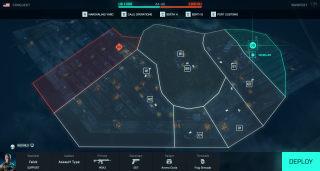
Map Rework: Manifest
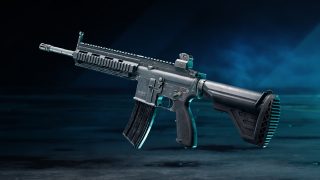
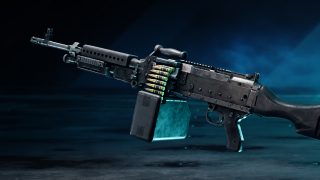
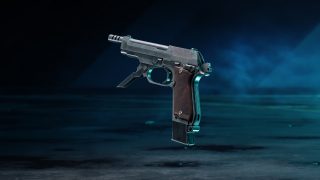
New Vault Weapons: M416, M240B, M93R
Gameplay Responsiveness Improvements around Weapon Reload Animation and Audio
MANIFEST
Our main focus with the rework of Manifest is to ensure it becomes more streamlined and offers up a tighter game space, this has also given us an opportunity to do a complete pass throughout the location and provide stronger themes to previously underutilized spaces.
Across the main gamemodes we have adjusted and added flag spaces to reduce travel times and create stronger paths and frontlines as you make your way towards those capture points.
Points of Interest:
Container Yard – North: The northern container yard has seen further military presence buildup, with the location now becoming an ad hoc refueling station for the ongoing conflict. The paths leading to and from the flag have been improved while the flag placement has been repositioned slightly towards the Quay.
Quay: As conflicts continue, the Quay has been treated to increased military defense encampments, with two new spaces on either end of the Quay. These locations act as Capture Points in certain modes, and when they aren’t in use they act as staging posts for entry onto the boats themselves.
Container Yard – South: This location has been moved closer to the action around the docked boats, with pathing improvements and further military buildup taking place throughout.
Weather Station: Time has not been a worthy ally for the Weather Station after recently suffering from a ground attack, one of these stations now sits in a burning ruin. The surrounding hillside has also received a traversal pass alongside additional light sources and ziplines to allow for increased traversal opportunity.
VAULT WEAPONS
M416 – BATTLEFIELD 3
The M416, a fan-favorite from Battlefield 3 makes its way to the Weapon Vault. It’s compact and light AR with a good damage profile capable of taking out targets at mid-range.
Unlock Assignments:
Kills and Assists with the M416 or the PBX-45: 100
Kills with Assault Rifles or Teammates Revived: 60
M240B – BATTLEFIELD 3
The M240B is a powerful machine gun that becomes a monster when mounted on a bipod, having great bullet velocities that allow you to engage targets at medium to long ranges
Unlock Assignments:
Kills and Assists with the M240B or the Avancys: 100
Kills with LMGs in a Round: 20
M93R – BATTLEFIELD 3
The M93R, is a Burst fire sidearm that devastates at close range but with accuracy quickly deteriorating under sustained fire. Get up close and personal with this sidearm to deal its best damage
Unlock Assignments:
Kills and Assists with the M93R or the G57: 100
Kills in a Round with Secondary Weapons: 8
CHANGELOG
GAMEPLAY IMPROVEMENTS
You are now able to dynamically change the zoom radius of the minimap via keybind
Improved hit registration against soldiers on moving platforms or vehicles
Resolved an issue where a vault animation could play on top of a reload animation
Further improvements to improve responsiveness around weapon deploy and undeploy animations, aiming down sight, sprint traversal and reduced the time around enter soldier movement speeds these changes will be particularly felt on animation
Improved responsiveness on transition into movement from standing still
Fixed an issue where it was possible to skip the traversal sprint recovery time
Fixed animation not playing properly when entering vehicles though entrance that is high above the ground
Resolved an issue where the Character is stuck in downed state after dying during a takedown and then getting revived
Fix a rare issue that could make the player stuck in a limbo state after dying during a takedown
Making hit reactions more pronounced to improve the shooting experience
Fixed an issue where Sundance may have a more bouncy landing via their Wingsuit than anticipated
Fixed a bug where landing with the wingsuit on a fence shortly after activating could cause lethal fall damage
Fixed an issue with Blood Splatter not appearing correctly when shooting enemy soldiers
Fixed an issue causing blood spatter effects to appear in unintended places
Added blood mist elements to the regular body and head shot impacts on soldiers to better convey that you hit an enemy
Fixed a bug where you could attach to a rope through thin walls
Fix for left hand animations breaking after entering a vehicle from traversal sprint
Fixed a bug when traversal sprinting into water could make the swimming animation break
Fixed an issue where you could sometimes see floating weapon parts after throwing a smart grenade
MAPS
Renewal
Adjusted the Capture Zone for Sector A and B to encourage a smoother flow of gameplay as an Attacker.
Kaleidoscope
Removed C1 and G1 Capture Points on Conquest Large, and merged the subsequent capture area into nearby Capture Points. The win rate was balanced towards one side unfairly with Kaleidoscope, and these changes should hopefully improve and encourage a more natural flow of play throughout
Stranded
Tweaked ticket count for Conquest to encourage a slightly longer duration of match time
Adjusted the combat area and out of bounds limits on Breakthrough, for the last sector
Defender HQ has been moved closer to the flag on Breakthrough, for the last sector
Adjusted the HQ area and out of bounds limits for the first sector on Rush
The MCOM for the first sector has been relocated out of the hanger on Rush
Made improvements to other MCOM positions to improve attacking flow for Rush
Fixed an instance of flickering terrain when in low flying aircraft around D1
Fixed the ability to hide in in-world stationary Tanks near the C1 Objective
Fixed level of detail issue on destroyed showroom screens
We’ve placed extra lubrication on the crane rails for the Shipping Container grabber inside the ship, this means it shall no longer be jittery in motion and should be much smoother!
Manifest
Fixed a rare issue that allowed grenades to fall through the ground
Resolved a visual issue where flying close to the incoming storm on Manifest would result in a black vignette around the screen
A melee attack to a chair in the office suite will no longer destroy the entire desk, we have yet to invent Adamantium as part of your arsenal loadout
Fixed audio issue where metal scaffolding throughout the level did not sound correct to its material type
Improved lighting draw distance scenarios for the Toll Station at distance
Fixed issue in FFA where players got deployed under the map on small layout
Fixed issue where enemies could be seen deploying in the same spot
Fixed issue where the Spawn Beacon could be placed after crawling under containers
Fixed issue where the lighting poles on the map remained lit after being destroyed.
Fixed an instance of lighting draw distance inside the Storage Facility
Spearhead
Further improvements to the initial spawning phase on Rush
Fixed some debris issues when the Landed Drone’s propeller was destroyed
Fixed an issue where at certain angles during the downed-state, some water sources could disappear
Fixed an issue where players were not taking damage from fire around the tire piles
Fixed issue where several entrances of the cube buildings were very darkly lit
Sealed the roof of the tunnel so rain no longer appears inside it
Fixed Printer Boxes issue where the robotic arm was still functional after the printer box got destroyed
Fixed issue where Deploy Point UI was missing from the Deploy screen on FFA
Fixed issue where a stack of four yellow tank containers were floating inside the E2 flag
Fixed issue where killcam transition to deploy screen showed the whole interior of the building when dying inside C2 & E1 buildings
Fixed some minor tree clipping issues around vents and containers
Fixed issue with movers where Ammo/Health crates would not get destroyed when a Mover passing over them
Fixed level of detail issues for base of robot arm after the yellow robots were destroyed
Fixed issue with unnatural stretched ground texture placed near the tunnel entrance
Fixed issue where it was possible to destroy the ruin state of Nordvik water tank
Fixed audio issue where the distant warfare on Spearhead was still present during end of round screen
AI
Given each AI Soldier a navigation manual that should help them through the road between Sector D and E with more ease on Spearhead
With this navigation manual, we have also told them to look out for small objects and not to get confused by them on Spearhead
Fixed an issue where AI could get stuck navigating through the Ventilator Zone on C2 and E1 on Spearhead
Given driving instructions for AI driving larger vehicles for Rush on Spearhead
Fixed issues where AIs were unable to climb ladders on Spearhead’s Capture Point E2
WEAPONS
Toggle Optics should now be listed for the NVK-NXT 2X scope in the Rorsch Mk-4 collection menu
Fixed an issue that was causing the PKS-07 to clip through the camera when equipped on the A-91
Fixed an issue that allowed the primary scope on the Rorsch Mk-4 to float slightly above the weapon on PlayStation 4
Fixed an issue where flashlights or lasers would sometimes be visible on secondary weapons and gadgets
Fixed an issue where the HUD would sometimes fail to load after switching attachments on weapons
Fixed an issue that was causing laser beams to be misplaced at different FOV values
Ensured that the sound effects are aligned with the firing of the 12M Auto
Subsonic magazine no longer interferes with other magazines ammo capacity on the VCAR
Subsonic mesh is visible when swapping from other magazines on the VCAR
Fixed an issue that was causing a broken weapon position to be displayed on the M16A3 while prone and using the M26 underbarrel attachment.
MP412 Rex now has the intended rate of fire.
AKS-74u now has the intended rate of fire.
Fixed an issue where the MP9 shooting animation while ADS would break when exiting a vehicle.
Added several missing weapon attachments to Portal.
VCAR magazines now have the intended color.
Fixed orientation of the TV 2x Sight within the icon on the AK24.
Minor VFX tweaks to the PF51
Improvements made to the Rorsch Mk-4 trail FX
An additional layer of Animation polish has been applied to the M16A3
Updated textures on the Avancys iron sights while viewing them from view
We have updated several elements of our weapons to improve the overall ‘feel’ of them. This includes work across our Reload Animations which should make all weapons, across the entire game, feel a lot more snappier and responsive.
VEHICLES
Call-in audio now plays when calling in the EMKV90-TOR
Updated the description of the Active Protection System to convey that it does not block close range projectiles
Fixed an issue where VFX was not displaying correctly when Active Protection Systems were firing
Fixed an issue where vehicles could have a repeating wet pattern on them
Fixed an issue that was preventing deployable gadgets such as the Spawn Beacon from being placed closed to either of the EBLC-RAM or EMKV90-TOR while Active Protection Systems were enabled
Fixed an issue where aiming within a tank could become problematic while looking at smoke
Parts of aircraft would sometimes animate in the wrong direction, we’ve turned them around so now they’ll be rotating on the correct axis
Fixed an issue that would allow drivers in the MAV to be able to ADS while in 1P view
Fixed an issue that was causing overheat circle to wrongly display while using the Howitzer cannon on the EBLC-RAM
Fixed an issue that was causing vehicles such as the LATV4 and LCAA Hovercraft from receiving too much damage when colliding with various objects around a map
Overheat and cooldown states are communicated with red in the crosshair HUD circle
We have lowered the ground pull effect and tweaked the force, may it be with you always
Fixed an issue when deploying into a vehicle that would cause the camera to briefly go inside the vehicle and look weird
Calling in a LCAA Hovercraft on top of a tank will propel the tank high in the sky or under the map. Physics are weird sometimes
The LATV4 has had its swole levels reduced and can no longer ram tanks (Thanks for the intel, Carpo!)
The “Unassigned” UI is no longer present in 1p view after repeatedly switching the seats on AAV-7A1 AMTRAC
Smoke Launcher VFX is now more accurately aligned across game clients
Active Protection Systems no longer block damage from C5 or AT Mines
Fixed an issue where the spotter seat on the MD540 Nightbird would only update the minimap and not provide the in-world spot
Improved behavior while flying the MD540 Nightbird with Helicopter control assists disabled
Improvements made to the VFX on fighter jets
Animated leading edge flaps on the F-35E Panther and SU-57 FELON
Updated and overhauled locking ranges and behavior of all locking weapons when laser designated
Tweaks to the vehicle HUD and crosshair, including updating alpha channels and ensuring decorative HUD elements are less visually impacting to players
SPECIALISTS & GADGETS
Fixed an issue where weapon meshes could be seen breaking after throwing Sundance’s Smart grenade
Fixed an issue where the Throwing knife was visible floating on player when being headshot with throwing knife
Fixed FPS drops when ADSing with the XM370A on Stranded and Hourglass on previous generation systems
The XM370A now has SFX for when its projectile is traveling in the air
Fixed an issue where Ammo was present in empty magazine when reloading the XM370A
Fixed a bug with Falck Stim Pistol where it could get stuck in self heal animations
Fixed a bug where players were able to resupply from ammo bags while inside a vehicle
Fixed an issue where players who were manning the Mounted Vulcan in smokes would have their animations break
Added Missing Gadget descriptions for Lis and Zain in Hazard Zone screen
Fixed issues where Players were able to spot insertion beacons through the wall
Fixed an issue where Irish shield couldn’t be deployed in tight corridors
Fixed an issue where the camera would shake when using the Raos’ Cyber Warfare Suite after switching from main weapon
Fixed an issue with Broken Hit animations when hitting Dozer while he’s using the Ballistic Shield
Fixed a bug Hacked/EMP icon was missing on enemy gadgets
Fixed situations where Paik’s EMG-X Scanner overlay does not immediately disappear when entering a vehicle
Fixed an issue where the Insertion Beacons could be seen through the floor of the building near A2 on Kaleidoscope, Conquest
Fixed a bug where the Prox Sensor grenade in-world Icon was not displayed on the grenade
Fixed a bug where Angel’s Loadout Crate were not being fully absorbed by the player and would bounce away (Eyes in the sky, people >:))
Fixed a bug where Dozer’s shield did not protect user against close range attacks
Fixed abusable behaviors where players could progress on missions by damaging and repairing their own gadget
Fixed a bug where when you would cancel self-heal with Med-Pen audio keeps playing
Fixed a bug where the player was unable to pick up Mounted Vulcan after dying/redeploying
Heal needed UI Icons are now visible for non support characters with the health create, without first having to deploy the health create
Fixed issues with Grenade throw animations not playing correctly
Fixed an issue where after fragmentation the grenades would get stuck into the ceilings
Open and character gadgets can now not be placed on top of bushes
Fixed a bug where Rocket Launchers would deal no damage on a user mid vault
World Log event messages for vehicle repair and Angels’ ammo resupply now informs who is doing the action
Fixed a bug where after exiting the OV-P Recon Drone, the Enter hint would remain displayed on the screen
Fixed an issue where Zain’s trait would trigger in vehicles with closed seats
AUDIO
Fixed an issue where requesting orders from a dead squad leader would default to MacKay
Several Voice Over improvements have been included around ping reviving and canceling pings
Airstrike voice over lines have been added
Added Audio improvements for the XM370A, including new projectile sounds for the Airburst
Fixed an issue where audio keeps playing when you cancel self-heal with Med-Pen
Fixed an audio issue when reloading after an empty reload
Fixed an issue where sound effects were not triggering when reloading the DM7 while running/walking during the first part of the reload
Added hit reaction camera shake and bullet damage sound polish
Fixed an issue where no call-in audio is played when calling in the EMKV90-TOR
Fixed an issue where distant warfare sound effects were still present during EOR screen
PORTAL
Added the S3 map, Spearhead, as an available map under the Custom Conquest Portal mode.
Added the S3 Battle Pass Weapon, Rorsch Mk-4, to the InventoryPrimaryWeapons block
Added the S3 Battle Pass Vehicle, EMKV90-TOR, to the Vehicles block
Added the S3 specialist, Zain, to the PlayerSoldiers block
Added Zain’s specialist Gadget, XM370A, to the InventoryCharacterSpecialties block
Added the S3 Battle Pass Weapon, NVK-P125, to the InventorySecondaryWeapons block
Added the S3 Battle Pass Throwable, Throwing Knife, to the InventoryThrowables block
Added the S3 Battle Pass Weapon, NVK-S22, to the InventoryPrimaryWeapons block
PROGRESSION & XP
Reviving a teammate that has requested it will now reward you with Request Fulfilled XP
Increased the XP from “Match Reward” in Hazard Zone by 50%
Increased the XP from successfully destroying an MCOM in Rush from 150 to 300
Solo & Co-Op XP Changes
Enabled all Ribbons, but at 40% XP value.
Doubled “Round Actions” XP cap, but each action gives 50% reduced XP.
In Rush, the Scoreboard now shows the correct objective icon for Attackers and Defenders
Fixed an issue with displaying the Player Levels correctly at the End of Round Progression screen
Fixed an issue where the unlock requirement progress for an already unlocked Player Card item would look like it had been reset
Fixed an issue where the wrong unlock requirement would be displayed on attachments
Fixed an issue where an item would show up as new even if you had previously unlocked it in a different way
Improved scenarios where people look like they are awarded 0 XP at end of the round
DICE has deployed Battlefield 2042 update 1.24 today for all platforms. This is for update Season 3.1 which includes a map rework, new weapons, and tons of bug fixes. Here are the Battlefield 2042 December 7 patch notes posted down below.
Here is an overview of the changes and improvements in this Update:
Map Rework: Manifest
New Vault Weapons: M416, M240B, M93R
Gameplay Responsiveness Improvements around Weapon Reload Animation and Audio
MANIFEST
Our main focus with the rework of Manifest is to ensure it becomes more streamlined and offers up a tighter game space, this has also given us an opportunity to do a complete pass throughout the location and provide stronger themes to previously underutilized spaces.
Across the main gamemodes we have adjusted and added flag spaces to reduce travel times and create stronger paths and frontlines as you make your way towards those capture points.
Points of Interest:
Container Yard – North: The northern container yard has seen further military presence buildup, with the location now becoming an ad hoc refueling station for the ongoing conflict. The paths leading to and from the flag have been improved while the flag placement has been repositioned slightly towards the Quay.
Quay: As conflicts continue, the Quay has been treated to increased military defense encampments, with two new spaces on either end of the Quay. These locations act as Capture Points in certain modes, and when they aren’t in use they act as staging posts for entry onto the boats themselves.
Container Yard – South: This location has been moved closer to the action around the docked boats, with pathing improvements and further military buildup taking place throughout.
Weather Station: Time has not been a worthy ally for the Weather Station after recently suffering from a ground attack, one of these stations now sits in a burning ruin. The surrounding hillside has also received a traversal pass alongside additional light sources and ziplines to allow for increased traversal opportunity.
VAULT WEAPONS
M416 – BATTLEFIELD 3
The M416, a fan-favorite from Battlefield 3 makes its way to the Weapon Vault. It’s compact and light AR with a good damage profile capable of taking out targets at mid-range.
Unlock Assignments:
Kills and Assists with the M416 or the PBX-45: 100
Kills with Assault Rifles or Teammates Revived: 60
M240B – BATTLEFIELD 3
The M240B is a powerful machine gun that becomes a monster when mounted on a bipod, having great bullet velocities that allow you to engage targets at medium to long ranges
Unlock Assignments:
Kills and Assists with the M240B or the Avancys: 100
Kills with LMGs in a Round: 20
M93R – BATTLEFIELD 3
The M93R, is a Burst fire sidearm that devastates at close range but with accuracy quickly deteriorating under sustained fire. Get up close and personal with this sidearm to deal its best damage
Unlock Assignments:
Kills and Assists with the M93R or the G57: 100
Kills in a Round with Secondary Weapons: 8
CHANGELOG
GAMEPLAY IMPROVEMENTS
You are now able to dynamically change the zoom radius of the minimap via keybind
Improved hit registration against soldiers on moving platforms or vehicles
Resolved an issue where a vault animation could play on top of a reload animation
Further improvements to improve responsiveness around weapon deploy and undeploy animations, aiming down sight, sprint traversal and reduced the time around enter soldier movement speeds these changes will be particularly felt on animation
Improved responsiveness on transition into movement from standing still
Fixed an issue where it was possible to skip the traversal sprint recovery time
Fixed animation not playing properly when entering vehicles though entrance that is high above the ground
Resolved an issue where the Character is stuck in downed state after dying during a takedown and then getting revived
Fix a rare issue that could make the player stuck in a limbo state after dying during a takedown
Making hit reactions more pronounced to improve the shooting experience
Fixed an issue where Sundance may have a more bouncy landing via their Wingsuit than anticipated
Fixed a bug where landing with the wingsuit on a fence shortly after activating could cause lethal fall damage
Fixed an issue with Blood Splatter not appearing correctly when shooting enemy soldiers
Fixed an issue causing blood spatter effects to appear in unintended places
Added blood mist elements to the regular body and head shot impacts on soldiers to better convey that you hit an enemy
Fixed a bug where you could attach to a rope through thin walls
Fix for left hand animations breaking after entering a vehicle from traversal sprint
Fixed a bug when traversal sprinting into water could make the swimming animation break
Fixed an issue where you could sometimes see floating weapon parts after throwing a smart grenade
MAPS
Renewal
Adjusted the Capture Zone for Sector A and B to encourage a smoother flow of gameplay as an Attacker.
Kaleidoscope
Removed C1 and G1 Capture Points on Conquest Large, and merged the subsequent capture area into nearby Capture Points. The win rate was balanced towards one side unfairly with Kaleidoscope, and these changes should hopefully improve and encourage a more natural flow of play throughout
Stranded
Tweaked ticket count for Conquest to encourage a slightly longer duration of match time
Adjusted the combat area and out of bounds limits on Breakthrough, for the last sector
Defender HQ has been moved closer to the flag on Breakthrough, for the last sector
Adjusted the HQ area and out of bounds limits for the first sector on Rush
The MCOM for the first sector has been relocated out of the hanger on Rush
Made improvements to other MCOM positions to improve attacking flow for Rush
Fixed an instance of flickering terrain when in low flying aircraft around D1
Fixed the ability to hide in in-world stationary Tanks near the C1 Objective
Fixed level of detail issue on destroyed showroom screens
We’ve placed extra lubrication on the crane rails for the Shipping Container grabber inside the ship, this means it shall no longer be jittery in motion and should be much smoother!
Manifest
Fixed a rare issue that allowed grenades to fall through the ground
Resolved a visual issue where flying close to the incoming storm on Manifest would result in a black vignette around the screen
A melee attack to a chair in the office suite will no longer destroy the entire desk, we have yet to invent Adamantium as part of your arsenal loadout
Fixed audio issue where metal scaffolding throughout the level did not sound correct to its material type
Improved lighting draw distance scenarios for the Toll Station at distance
Fixed issue in FFA where players got deployed under the map on small layout
Fixed issue where enemies could be seen deploying in the same spot
Fixed issue where the Spawn Beacon could be placed after crawling under containers
Fixed issue where the lighting poles on the map remained lit after being destroyed.
Fixed an instance of lighting draw distance inside the Storage Facility
Spearhead
Further improvements to the initial spawning phase on Rush
Fixed some debris issues when the Landed Drone’s propeller was destroyed
Fixed an issue where at certain angles during the downed-state, some water sources could disappear
Fixed an issue where players were not taking damage from fire around the tire piles
Fixed issue where several entrances of the cube buildings were very darkly lit
Sealed the roof of the tunnel so rain no longer appears inside it
Fixed Printer Boxes issue where the robotic arm was still functional after the printer box got destroyed
Fixed issue where Deploy Point UI was missing from the Deploy screen on FFA
Fixed issue where a stack of four yellow tank containers were floating inside the E2 flag
Fixed issue where killcam transition to deploy screen showed the whole interior of the building when dying inside C2 & E1 buildings
Fixed some minor tree clipping issues around vents and containers
Fixed issue with movers where Ammo/Health crates would not get destroyed when a Mover passing over them
Fixed level of detail issues for base of robot arm after the yellow robots were destroyed
Fixed issue with unnatural stretched ground texture placed near the tunnel entrance
Fixed issue where it was possible to destroy the ruin state of Nordvik water tank
Fixed audio issue where the distant warfare on Spearhead was still present during end of round screen
AI
Given each AI Soldier a navigation manual that should help them through the road between Sector D and E with more ease on Spearhead
With this navigation manual, we have also told them to look out for small objects and not to get confused by them on Spearhead
Fixed an issue where AI could get stuck navigating through the Ventilator Zone on C2 and E1 on Spearhead
Given driving instructions for AI driving larger vehicles for Rush on Spearhead
Fixed issues where AIs were unable to climb ladders on Spearhead’s Capture Point E2
WEAPONS
Toggle Optics should now be listed for the NVK-NXT 2X scope in the Rorsch Mk-4 collection menu
Fixed an issue that was causing the PKS-07 to clip through the camera when equipped on the A-91
Fixed an issue that allowed the primary scope on the Rorsch Mk-4 to float slightly above the weapon on PlayStation 4
Fixed an issue where flashlights or lasers would sometimes be visible on secondary weapons and gadgets
Fixed an issue where the HUD would sometimes fail to load after switching attachments on weapons
Fixed an issue that was causing laser beams to be misplaced at different FOV values
Ensured that the sound effects are aligned with the firing of the 12M Auto
Subsonic magazine no longer interferes with other magazines ammo capacity on the VCAR
Subsonic mesh is visible when swapping from other magazines on the VCAR
Fixed an issue that was causing a broken weapon position to be displayed on the M16A3 while prone and using the M26 underbarrel attachment.
MP412 Rex now has the intended rate of fire.
AKS-74u now has the intended rate of fire.
Fixed an issue where the MP9 shooting animation while ADS would break when exiting a vehicle.
Added several missing weapon attachments to Portal.
VCAR magazines now have the intended color.
Fixed orientation of the TV 2x Sight within the icon on the AK24.
Minor VFX tweaks to the PF51
Improvements made to the Rorsch Mk-4 trail FX
An additional layer of Animation polish has been applied to the M16A3
Updated textures on the Avancys iron sights while viewing them from view
We have updated several elements of our weapons to improve the overall ‘feel’ of them. This includes work across our Reload Animations which should make all weapons, across the entire game, feel a lot more snappier and responsive.
VEHICLES
Call-in audio now plays when calling in the EMKV90-TOR
Updated the description of the Active Protection System to convey that it does not block close range projectiles
Fixed an issue where VFX was not displaying correctly when Active Protection Systems were firing
Fixed an issue where vehicles could have a repeating wet pattern on them
Fixed an issue that was preventing deployable gadgets such as the Spawn Beacon from being placed closed to either of the EBLC-RAM or EMKV90-TOR while Active Protection Systems were enabled
Fixed an issue where aiming within a tank could become problematic while looking at smoke
Parts of aircraft would sometimes animate in the wrong direction, we’ve turned them around so now they’ll be rotating on the correct axis
Fixed an issue that would allow drivers in the MAV to be able to ADS while in 1P view
Fixed an issue that was causing overheat circle to wrongly display while using the Howitzer cannon on the EBLC-RAM
Fixed an issue that was causing vehicles such as the LATV4 and LCAA Hovercraft from receiving too much damage when colliding with various objects around a map
Overheat and cooldown states are communicated with red in the crosshair HUD circle
We have lowered the ground pull effect and tweaked the force, may it be with you always
Fixed an issue when deploying into a vehicle that would cause the camera to briefly go inside the vehicle and look weird
Calling in a LCAA Hovercraft on top of a tank will propel the tank high in the sky or under the map. Physics are weird sometimes
The LATV4 has had its swole levels reduced and can no longer ram tanks (Thanks for the intel, Carpo!)
The “Unassigned” UI is no longer present in 1p view after repeatedly switching the seats on AAV-7A1 AMTRAC
Smoke Launcher VFX is now more accurately aligned across game clients
Active Protection Systems no longer block damage from C5 or AT Mines
Fixed an issue where the spotter seat on the MD540 Nightbird would only update the minimap and not provide the in-world spot
Improved behavior while flying the MD540 Nightbird with Helicopter control assists disabled
Improvements made to the VFX on fighter jets
Animated leading edge flaps on the F-35E Panther and SU-57 FELON
Updated and overhauled locking ranges and behavior of all locking weapons when laser designated
Tweaks to the vehicle HUD and crosshair, including updating alpha channels and ensuring decorative HUD elements are less visually impacting to players
SPECIALISTS & GADGETS
Fixed an issue where weapon meshes could be seen breaking after throwing Sundance’s Smart grenade
Fixed an issue where the Throwing knife was visible floating on player when being headshot with throwing knife
Fixed FPS drops when ADSing with the XM370A on Stranded and Hourglass on previous generation systems
The XM370A now has SFX for when its projectile is traveling in the air
Fixed an issue where Ammo was present in empty magazine when reloading the XM370A
Fixed a bug with Falck Stim Pistol where it could get stuck in self heal animations
Fixed a bug where players were able to resupply from ammo bags while inside a vehicle
Fixed an issue where players who were manning the Mounted Vulcan in smokes would have their animations break
Added Missing Gadget descriptions for Lis and Zain in Hazard Zone screen
Fixed issues where Players were able to spot insertion beacons through the wall
Fixed an issue where Irish shield couldn’t be deployed in tight corridors
Fixed an issue where the camera would shake when using the Raos’ Cyber Warfare Suite after switching from main weapon
Fixed an issue with Broken Hit animations when hitting Dozer while he’s using the Ballistic Shield
Fixed a bug Hacked/EMP icon was missing on enemy gadgets
Fixed situations where Paik’s EMG-X Scanner overlay does not immediately disappear when entering a vehicle
Fixed an issue where the Insertion Beacons could be seen through the floor of the building near A2 on Kaleidoscope, Conquest
Fixed a bug where the Prox Sensor grenade in-world Icon was not displayed on the grenade
Fixed a bug where Angel’s Loadout Crate were not being fully absorbed by the player and would bounce away (Eyes in the sky, people >:))
Fixed a bug where Dozer’s shield did not protect user against close range attacks
Fixed abusable behaviors where players could progress on missions by damaging and repairing their own gadget
Fixed a bug where when you would cancel self-heal with Med-Pen audio keeps playing
Fixed a bug where the player was unable to pick up Mounted Vulcan after dying/redeploying
Heal needed UI Icons are now visible for non support characters with the health create, without first having to deploy the health create
Fixed issues with Grenade throw animations not playing correctly
Fixed an issue where after fragmentation the grenades would get stuck into the ceilings
Open and character gadgets can now not be placed on top of bushes
Fixed a bug where Rocket Launchers would deal no damage on a user mid vault
World Log event messages for vehicle repair and Angels’ ammo resupply now informs who is doing the action
Fixed a bug where after exiting the OV-P Recon Drone, the Enter hint would remain displayed on the screen
Fixed an issue where Zain’s trait would trigger in vehicles with closed seats
AUDIO
Fixed an issue where requesting orders from a dead squad leader would default to MacKay
Several Voice Over improvements have been included around ping reviving and canceling pings
Airstrike voice over lines have been added
Added Audio improvements for the XM370A, including new projectile sounds for the Airburst
Fixed an issue where audio keeps playing when you cancel self-heal with Med-Pen
Fixed an audio issue when reloading after an empty reload
Fixed an issue where sound effects were not triggering when reloading the DM7 while running/walking during the first part of the reload
Added hit reaction camera shake and bullet damage sound polish
Fixed an issue where no call-in audio is played when calling in the EMKV90-TOR
Fixed an issue where distant warfare sound effects were still present during EOR screen
PORTAL
Added the S3 map, Spearhead, as an available map under the Custom Conquest Portal mode.
Added the S3 Battle Pass Weapon, Rorsch Mk-4, to the InventoryPrimaryWeapons block
Added the S3 Battle Pass Vehicle, EMKV90-TOR, to the Vehicles block
Added the S3 specialist, Zain, to the PlayerSoldiers block
Added Zain’s specialist Gadget, XM370A, to the InventoryCharacterSpecialties block
Added the S3 Battle Pass Weapon, NVK-P125, to the InventorySecondaryWeapons block
Added the S3 Battle Pass Throwable, Throwing Knife, to the InventoryThrowables block
Added the S3 Battle Pass Weapon, NVK-S22, to the InventoryPrimaryWeapons block
PROGRESSION & XP
Reviving a teammate that has requested it will now reward you with Request Fulfilled XP
Increased the XP from “Match Reward” in Hazard Zone by 50%
Increased the XP from successfully destroying an MCOM in Rush from 150 to 300
Solo & Co-Op XP Changes
Enabled all Ribbons, but at 40% XP value.
Doubled “Round Actions” XP cap, but each action gives 50% reduced XP.
In Rush, the Scoreboard now shows the correct objective icon for Attackers and Defenders
Fixed an issue with displaying the Player Levels correctly at the End of Round Progression screen
Fixed an issue where the unlock requirement progress for an already unlocked Player Card item would look like it had been reset
Fixed an issue where the wrong unlock requirement would be displayed on attachments
Fixed an issue where an item would show up as new even if you had previously unlocked it in a different way
Improved scenarios where people look like they are awarded 0 XP at end of the round
As one might expect given FromSoftware’s announcement yesterday of new content coming to Elden Ring, Bandai Namco has taken Elden Ring servers down this December 7 and this is to usher in the new title update!
Elden Ring Servers Down Server Status and Updates for December 7:
Here’s the announcement from the studio:
The #ELDENRING servers will undergo maintenance today, December 7, 2022, in preparation for the Colosseum update.
The estimated down time is around one hour for all game platforms.
Maintenance will begin at 1:00 AM PDT | 10:00 CEST | 18:00 JST.
The #ELDENRING servers will undergo maintenance today, December 7, 2022, in preparation for the Colosseum update.
The estimated down time is around one hour for all game platforms.
Maintenance will begin at 1:00 AM PDT | 10:00 CEST | 18:00 JST.
Thank you for your patience.
Same as always, once the title update and patch notes are out, we’ll update the article with a proper link out.
If the maintenance is extended or we get any new info about it, we’ll be sure to update the article as well, so make sure to refresh this post from time to time if maintenance still isn’t finished.
It’s Tuesday, and that means another heaping of activities are live for players to complete in Destiny 2 are now live! The Destiny 2 weekly reset December 6, 2022 refresh of activities is now live along with the Eververse inventory of items for sale. Read on for the full info for this week.
Destiny 2 Weekly Reset December 6, 2022 and Eververse Inventory:
Champion Foes: You will face [Shield-Piercing] Barrier and [Stagger] Unstoppable Champions. You must equip Anti-Barrier and Anti-Unstoppable mods to your arms armor to defeat them. These mods come from the Seasonal Artifact.
Champion Foes: You will face [Shield-Piercing] Barrier and [Stagger] Unstoppable Champions.
Hero Modifiers: Extra Shields
Ashes to Ashes: Dealing damage with a Solar weapon now applies scorch to your targets, but your foes also now apply scorch to you when they deal Solar or explosive damage.
Nightfall: Master
All previous modifiers
Attrition: Regeneration is greatly impaired. Defeating enemies may create wells of Light.
Equipment Locked: You will not be able to change your equipment after this activity starts.
Match Game: Enemy shields are highly resistant to all unmatched elemental damage.
Master Modifiers: Champions: Mob Locked Loadout Match Game Extra Shields
Champions: Mob: This mode contains additional Champions.
Shielded Foes: You will face combatants with [Arc] Arc and [Void] Void Shields. Activity modifiers may add more shield types.
Shielded Foes: [Arc] Arc and [Void] Void Shields
Nightfall: Legend
All previous modifiers
Legend Modifiers: Locked Loadout Match Game Extra Shields
Rewards:
Powerful (Tier 1) reward: Get 3 points by completing runs. Higher difficulties grant more points.
Pinnacle reward: Get a score of 100k. Since modifiers are fixed, this requires a high difficulty run.
Weekly Crucible Rotator: Rift
Achieve victory by collecting the Spark and igniting the opponent’s Rift.
Vanguard Burn: Arc Singe
The other modifiers rotate daily, check out the Daily Reset Thread for them!
Raids and Dungeons
Weekly Raid and Dungeon
The weekly featured raid and dungeon have all challenges available and are infinitely farmable for loot.
Raid: Last Wish
Dungeon: The Shattered Throne
Raid Challenges
Deep Stone Crypt
The Core Four: A challenge awaits…
Garden of Salvation
A Link to the Chain: A challenge awaits…
Vow of the Disciple
Base Information: A challenge awaits…
Vault of Glass
Out of Its Way: A challenge awaits…
King’s Fall
Devious Thievery: A challenge awaits…
Last Wish
Summoning Ritual: A challenge awaits…
Which Witch: A challenge awaits…
Forever Fight: A challenge awaits…
Keep Out: A challenge awaits…
Strength of Memory: A challenge awaits…
Dares of Eternity: Legend
Contestants: The Way of the Hoof
Round 1: Hive
Round 2: Fallen
Final Round: Valus Ta’aurc
Loot
Temporairly unavailable until documentation on the new pools is established.
Savathûn’s Throne World
Campaign Mission: The Ritual
Disrupt Savathûn’s ritual to steal the Traveler by revealing a lost secret from her past.
Legacy Activities
Europa
Eclipsed Zone: Cadmus Ridge
Empire Hunt: The Technocrat: Defeat Eramis’s technology expert, Praksis, the Technocrat.
Exo Challenge: Simulation: Safeguard: Simulated Skill-Set Training: Test your defensive abilities amongst a Vex onslaught.
Moon:
Wandering Nightmare: Nightmare of Jaxx, Claw of Xivu Arath (Hellmouth)
Trove Guardian is in Hellmouth
Dreaming City: Strong Curse
Petra is at Rheasilvia.
Weekly Mission: Dark Monastery – Provide recon for Petra’s forces by investigating strange enemy activity in Rheasilvia.
Modifications for your ship’s transmat systems, so you’ll always arrive in style.
Transmat Effect
450 Bright Dust
Weekly Bounties
Petra Venj, The Dreaming City
Name
Description
Cost
Requirement
Reward
Ascendant Challenge
“The Awoken have long practiced the art of walking between worlds.” —Techeun Kalli
1500 Glimmer
1 Ascendant challenge completed
XP++ & Dark Fragment & Legendary Gear
Gateway Between Worlds
“The Blind Well can split wide the veins that run between realities.” —Techeun Sedia
40 Dark Fragment
10 Activity completions
XP++ & Offering to the Oracle
Eris Morn, Moon
Name
Description
Cost
Requirement
Reward
Slow-Wave Disruption
Complete waves of Altars of Sorrow in Sorrow’s Harbor.
1000 Glimmer
7 Waves completed
Hymn of Desecration
Lunar Spelunker
Loot chests in 3 of the Moon’s Lost Sectors.
1000 Glimmer
1 K1 Communion Lost Sector looted & 1 K1 Logistics Lost Sector looted & 1 K1 Crew Quarters Lost Sector looted
1 Firewall Data Fragment
Lectern of Enchantment, Moon
Name
Description
Cost
Requirement
Reward
Nightmare Hunter
Defeat Nightmares in Nightmare Hunts.
5 Phantasmal Fragment
100 Nightmares
XP++ & 1 Phantasmal Core
Nightmare Sojourner
Defeat Nightmares in Lost Sectors across the solar system. Nightmares defeated on the Moon only grant reduced progress.
5 Phantasmal Fragment
100 Nightmares
XP++ & 1 Phantasmal Core
Variks, Europa
Name
Description
Cost
Requirement
Reward
Courageous Expedition
On Europa, complete Lost Sectors, public events, and patrols.
1000 Glimmer
15 Progress
XP++
Controlled Experiment
During the Empire Hunt “The Technocrat,” defeat Praksis and earn points by defeating combatants with precision final blows. Higher difficulties grant more efficient progress.
1000 Glimmer
50 [Headshot] Precision & 1 Praksis, the Technocrat defeated
XP++
Shaw Han, Cosmodrome
Name
Description
Cost
Requirement
Reward
Public Disturbance
Complete public events on the Cosmodrome. Heroic public events grant the most efficient progress.
1000 Glimmer
3 Public events
XP++ & Glimmer
Full Spectrum
Defeat combatants on the Cosmodrome with Arc, Void, and Solar damage.
1000 Glimmer
25 [Arc] Arc & 25 [Void] Void & 25 [Solar] Solar
XP++ & Glimmer
Starhorse, Eternity
Name
Description
Cost
Requirement
Reward
Old-Fashioned Way
Complete the following objectives in a single run of Dares of Eternity. Objectives will reset if not completed when the activity ends. Defeat combatants with charged or uncharged melee abilities, defeat combatants with weapons equipped in the Kinetic slot, and complete the activity with an impressive score.
Complete the following objectives in a single run of Dares of Eternity. Objectives will reset if not completed when the activity ends. Defeat combatants with your Super, disintegrate combatants with high-damage elemental final blows, and complete the activity with an impressive score.
5 Strange Coin
75 Super & 80 Disintegrations & 1 {var:3447066373} Points
Complete the following objectives in a single run of Dares of Eternity on Legend difficulty. Objectives will reset if not completed when the activity ends. Defeat combatants with Submachine Guns, Sidearms, Fusion Rifles, or Shotguns; defeat combatants within streaks; and complete the activity with an incredible score.
Defeat combatants with Stasis or Arc damage in Heist Battlegrounds.
150 [Stasis] or [Arc] final blows
Challenger XP+
Precision Loadout
Defeat targets with Bows or Linear Fusion Rifles. Bonus progress for defeating Guardians. Defeat combatants in Heist Battlegrounds with precision final blows.
250 [Bow] or [Linear Fusion Rifle] final blows & 100 [Headshot] Precision
Challenger XP+
Classified
Keep it secret. Keep it safe.
Taking All Challenges
Complete weekly playlist challenges.
3 Challenges
Challenger XP+ & Bright Dust
Long-Range Calibration
Calibrate long-range weapons—Pulse Rifles, Bows, Trace Rifles—on the Moon. Bonus progress in Lost Sectors.
100 Calibration
Challenger XP+ & Bright Dust
Dredgin’ Up Victory
Complete Gambit matches. Earn bonus progress for wins.
15 Progress
Challenger XP+ & Bright Dust
Spark Defender
Score points in Rift. Bonus progress is awarded for igniting the Rift.
50 Points
Challenger XP+ & Bright Dust
Hive Slayer
Defeat Hive combatants in Vanguard playlists or strikes. Earn bonus progress for defeating tougher combatants.
200 Hive
Challenger XP+ & Bright Dust
Notable Armor Rolls
Only notable rolls (stat total >= 59 or single stat >= 26) are listed here.
While Microsoft’s acquisition of Activision-Blizzard is still being investigated, that hasn’t stopped the software giant from inking a deal with Nintendo to bring the Call of Duty franchise to Nintendo platforms.
This was announced by Xbox division boss Phil Spencer over on Twitter, where he also confirmed that they are committed to continue bringing Call of Duty on Steam.
I'm also pleased to confirm that Microsoft has committed to continue to offer Call of Duty on @Steam simultaneously to Xbox after we have closed the merger with Activision Blizzard King. @ATVI_AB@ValveSoftware
Microsoft has entered into a 10-year commitment to bring Call of Duty to @Nintendo following the merger of Microsoft and Activision Blizzard King. Microsoft is committed to helping bring more games to more people – however they choose to play. @ATVI_AB
I’m also pleased to confirm that Microsoft has committed to continue to offer Call of Duty on @Steam simultaneously to Xbox after we have closed the merger with Activision Blizzard King. @ATVI_AB @ValveSoftware
This is definitely a step in the right direction for the franchise, and could further add credence to Spencer’s claims that they do not want to keep Call of Duty away from any platform with “no strings attached.”
No word on when we’ll see this Nintendo deal start, though given the acquisition is far from being final, that could be for quite some time. That said, we have seen Call of Duty games appear on Nintendo franchise before, and if we see a new entry in the franchise in 2023 — and the deal is finalized within the year — don’t be surprised to see the series grace Nintendo platforms once again.
Speaking to the Washington Post, Spencer offers a bit more insight into Call of Duty’s Nintendo re-emergence:
“You can imagine if [the deal] closed on that date, starting to do development work to make that happen would likely take a little bit of time,” Spencer said, referring to the June 2023 date the merger is supposed to close, if it is not blocked by regulators. “Once we get into the rhythm of this, our plan would be that when [a Call of Duty game] launches on PlayStation, Xbox, and PC, that it would also be available on Nintendo at the same time.”
Do you trust Microsoft to keep video games’ biggest franchise on both Steam and competing console platforms? Sound off and leave a comment below to let us know.
Psyonix has released Rocket League update 2.24, and this patch is in preparation for Season 9! Don’t expect any player-facing changes in this title update. Read on for what’s new in the official Rocket League December 6 patch notes.
Rocket League Update 2.24 Patch Notes | Rocket League December 6 Patch Notes:
Update: The official patch notes for Season 9 are now available!
THE HEADLINES
Season 9 Rocket Pass, featuring the Emperor car, has begun
The new ‘Forbidden Temple (Fire & Ice)’ Arena is live in Online Playlists, Private Matches, Exhibition Matches, and Free Play
Season 8 Rewards are dropping for all eligible players
SEASON 9
Rocket Pass
Season 9 Rocket Pass, featuring the Emperor car, has begun
Emperor uses the Breakout hitbox
Tournaments
Season 9 Tournaments are now available
Any unspent Season 8 Tournament Credits automatically convert into rewards
Tournament Credits have converted to the highest level reward you are capable of earning based on your Tournament Rank and the amount of Tournament Credits you have remaining
Every player who played in at least one tournament this season will receive one All-Star cup
New Tournament Reward items have been added
Challenges
Season 9 Stage 1 Challenges are live
Competitive
Season 9 Competitive has started
Season 9 Changes
Similar to previous seasons, a soft reset has been applied to all Competitive Playlists
NEW CONTENT
New Arena Variant
The new Arena ‘Forbidden Temple (Fire & Ice)’ is now available
Season 8 Competitive Rewards
Season 8 Competitive has ended. Season Reward Items and Titles will be awarded for your highest Rank achieved during the season, and successful completion of the appropriate Season Reward Levels.
Season 8 Rewards are non-tradable Player Banners
Bronze I or higher: ‘S8 – Bronze’ Player Banner
Silver I or higher: ‘S8 – Silver’ Player Banner + lower rewards
Gold I or higher: ‘S8 – Gold’ Player Banner + lower rewards
Platinum I or higher: ‘S8 – Platinum’ Player Banner + lower rewards
Diamond I or higher: ‘S8 – Diamond’ Player Banner + lower rewards
Champion I or higher: ‘S8 – Champion’ Player Banner + lower rewards
Grand Champion I: ‘S8 – Grand Champion’ Player Banner + lower rewards
Today’s update is now available on all platforms. This update (v2.24) helps prepare Rocket League for the start of Season 9! Patch notes will be shared when Season 9 begins on December 7 at 8am PST (4pm UTC).
As for what to expect in Season 9, check out the trailer and info straight from the devs:
HOT LIKE FIRE, COOL LIKE ICE
Long held in place by an ancient seal, the dragons of Forbidden Temple Arena have finally awoken from their slumber. As the two resume their eternal battle, these legendary beasts have left a treasure trove of elemental Items in their wake.
Discover the secrets of a long-lost Rocket Pass, unearth Forbidden Temple (Fire & Ice), and harness the power of the Emperor Car in Season 9, starting December 7!
AN ELEMENTAL ROCKET PASS
While dragons may claim the skies above, the Arena is ruled by a different breed of beast. Wrought from the elements, the Emperor muscle car comes to Rocket League with four different versions! The base car is available immediately with Rocket Pass Premium, and working through the Tiers will unlock the upgraded Emperor II.
Two more Special Edition versions will be available in the Pro Tiers. Emperor II: Frozen brings chill vibes to your sweatiest matches, or you can light up the Arena with Emperor II: Scorched. All versions of Emperor will use the Breakout Hitbox and are available in Rocket Pass Premium.
After you’ve got the new car, you’ll need some Items to go with it! Fans of the Interstellar Decal will be starstruck by the constellation-inspired Constella Decal, while the fire and ice theme continues with two sets of Special Edition Wheels. Equip the Piercer: Crystalized Wheels to freeze out the competition, or slip into the Forerunner: Roasted Wheels for your next barn burner.
Missed out on 2017’s Dragon Banner Season Rewards? You’ll have another chance to feed your draconic side with the Ice Drake and Fire Drake Player Banners.
Those who venture into the Rocket Pass Pro Tiers can earn two new Goal Explosions. Unleash the fury of fire with the Brimstone Goal Explosion at Tier 95, or unlock the Ice Age Goal Explosion at Tier 115 to put the world on freeze. But that’s just the tip of the iceberg—just like Season 5’s Cosmosis Goal Explosion, both these effects will spread across the Arena, briefly covering the pitch in fire or ice whenever you score!
PLAY WITH FIRE, BREAK THE ICE
We finally found out why the Forbidden Temple is so, well… forbidden. With both dragons let loose, the once lush Arena has been transformed into a wasteland of permafrost and molten lava. Despite the damages, Forbidden Temple (Fire & Ice) seems like the perfect place for a friendly game of Soccar!
TOURNAMENT REWARDS
This Season’s Tournament Rewards really bring the heat. Leave a trail of flames behind you with the Seared Trail and Fireball Boost. But first, you’ll need something to burn, and the Oil Can Antenna has all the fuel you’ll ever need.
For the truly lucky, this Season’s Black Market Rewards bring out the fiery side of competition. Light up the night with an incendiary Fire Clap Goal Explosion, or tap into something monstrous with the Skulking Scale, an animated Decal that mixes glittering crystal with the scales of a dragon.
SECRETS OF THE TEMPLE
After the devastation of the temple grounds, we discovered several ancient tomes amongst the rubble. Their true meaning has yet to be unlocked, but so far we’ve deciphered two short messages: Frosty Fest will bring extremely chill vibes, and Neon Nights is returning with the hottest beats ever! Our trained Psyonix Archeologists will report back with more info soon.
Season’s end also means Season 8 Tournament Credits will reset. Players who participated in Competitive Tournaments during Season 8 will receive an All-Star Cup reward. Unspent Tournament Credits will be converted to the highest level reward a player is eligible to earn based on their Tournament Rank and Tournament Credit amount. This conversion will happen automatically the first time you log into Season 9.
Keep your thermostat close—Season 9 begins Wednesday, December 7!
We will update this post when the patch notes are revealed later today. Rocket Legaue is out now and free to play on all platforms.
Genshin Impact update 3.30 (PS5 version 3.300) has been released, and this is for patch version 3.3! Called “All Senses Clear, All Existence Void,” this adds new features, a new character and more. Check out the complete Genshin Impact December 6 patch notes.
〓Update Details〓
I. New Gameplay
New Gameplay: Genius Invokation TCG
Genius Invokation TCG is a tightly-paced, heart-stopping tabletop card dueling game.
Join as a “Genius Invokation TCG” player, collect cards, build your deck, and go toe-to-toe with various opponents at the table!
◇ Unlock Criteria:
• Reach Adventure Rank 32 or above
• Complete the Archon Quest “Song of the Dragon and Freedom”
◇ System Rules:
1. Find challengers in the open world or enter the tavern to play matches against weekly visiting challengers, and earn Player EXP, and Lucky Coins.
2. Player EXP can be used to increase your Player Level, which in turn unlocks new functions and more challengers. Lucky Coins can be used to purchase Genius Invokation cards and used to purchase Match Invitation Letters and various items related to Genius Invokation TCG.
3. You can use the invitation board to send invitations to registered challengers on the Player List and partake in duel matches. Should you prevail in these matches, you can also earn corresponding Character and Talent Cards.
4. You can use the invitation board and connect with your friends via Co-Op to partake in a Genius Invokation TCG match. After reaching a certain Player Level, you can also match with faraway strangers to duels of skill.
*After Genius Invokation TCG is officially launched, we will continue to adjust and optimize the balance of cards based on the duel situation and feedback of Travelers, so as to continuously improve the gameplay experience of Genius Invokation TCG.
The Genius Invokation TCG balance adjustment in the Version 3.3 update is as follows:
Adjusts Elemental Burst damage dealt by the Character Card “Maguu Kenki” in Genius Invokation TCG: “Deals 6 Anemo DMG…” is now adjusted to “Deals 4 Anemo DMG…”.
II. New Characters
5-Star Character “Eons Adrift” Wanderer (Anemo)
◇ Vision: Anemo
◇ Weapon: Catalyst
◇ A wayfaring figure whose identity is a mystery. He dresses like a mountain ascetic, but he certainly does not act the part.
◆ Elemental Skill “Hanega: Song of the Wind”
◆ Deals AoE Anemo DMG before leaping into the air and entering the Windfavored state. In this state, the Wanderer is unable to use Plunging Attacks, and his Normal and Charged Attacks are converted to Kuugo: Fushoudan and Kuugo: Toufukai. The DMG they deal and their AoE will be increased, and their DMG will be considered Normal and Charged Attack DMG respectively. The Wanderer will hover persistently during this time. Consume Kuugoryoku Points to maintain this hovering state, move and sprint mid-air, and increase hovering height. Running out of Kuugoryoku Points or casting the Elemental Skill again while in this state will end the Windfavored state.
◆ Elemental Burst “Kyougen: Five Ceremonial Plays”
◆ Deals multiple instances of AoE Anemo DMG. If the character is in the Windfavored state due to the skill “Hanega: Song of the Wind,” Windfavored state will end after casting.
4-Star Character “Enigmatic Machinist” Faruzan (Anemo)
◇ Vision: Anemo
◇ Weapon: Bow
◇ A researcher from “one hundred years ago.” She enjoys self-identifying as everyone’s senior, and has significant knowledge of ancient scripts and machines of all kinds.
◆ Elemental Skill “Wind Realm of Nasamjnin”
◆ Deploys a polyhedron that deals AoE Anemo DMG to nearby opponents. She will also enter the Manifest Gale state. While in the Manifest Gale state, Faruzan’s next fully charged shot will consume this state and will become a Hurricane Arrow that contains high-pressure currents. This arrow deals Anemo DMG based on the DMG of a fully charged Aimed Shot from “Normal Attack: Parthian Shot.” The Hurricane Arrow will apply a Pressurized Collapse effect to the opponent or character hit. This effect will be removed after a short delay, creating a vortex that deals AoE Anemo DMG and pulls nearby objects and opponents in. If the Hurricane Arrow does not hit any opponent or character, it will create a Pressurized Collapse effect at its point of impact.
◆ Elemental Burst “The Wind’s Secret Ways”
◆ Deploys a Dazzling Polyhedron that unleashes a Whirlwind Pulse and deals AoE Anemo DMG. While the Dazzling Polyhedron persists, it will continuously move along a triangular path. Once it reaches each corner of that triangular path, it will unleash 1 more Whirlwind Pulse. When the Whirlwind Pulse is unleashed, it will apply Perfidious Wind’s Bale to nearby opponents, decreasing their Anemo RES. The Whirlwind Pulse will also apply Prayerful Wind’s Benefit to all nearby party members when it is unleashed, granting them an Anemo DMG Bonus.
III. New Domain
Domain of Blessing: City of Gold
◇ This stronghold, once protected by seven mighty battlements, crumbled overnight when King Deshret fell and an age of chaos ensued. Where gold-eyed warriors once stood guard over watchtowers of gilded luster, now, only a desiccated temple built upon sundered rocks remains, more akin to a tomb for an age of radiance long lost.
◇ Unlock Criteria:
• Reach Adventure Rank 22 or above
• Or complete the Archon Quest “Prologue: Act III – Song of the Dragon and Freedom”
◆ Challenge the Domain to obtain artifacts in the “Desert Pavilion Chronicle” and “Flower of Paradise Lost” sets.
IV. New Equipment
1. New Weapons
Tulaytullah’s Remembrance (5-Star Catalyst)
Normal Attack SPD is increased by 10%. After the wielder unleashes an Elemental Skill, Normal Attack DMG will increase by 4.8% every second for 14s. After this character hits an opponent with a Normal Attack during this duration, Normal Attack DMG will be increased by 9.6%. This increase can be triggered once every 0.3s. The maximum Normal Attack DMG increase per single duration of the overall effect is 48%. The effect will be removed when the wielder leaves the field, and using the Elemental Skill again will reset all DMG buffs.
◆ During the event wish “Epitome Invocation,” the event-exclusive 5-star weapon Tulaytullah’s Remembrance (Catalyst) will receive a huge drop-rate boost!
Toukabou Shigure (4-Star Sword)
After an attack hits opponents, it will inflict an instance of Cursed Parasol upon one of them for 10s. This effect can be triggered once every 15s. If this opponent is taken out during Cursed Parasol’s duration, Cursed Parasol’s CD will be refreshed immediately. The character wielding this weapon will deal 16% more DMG to the opponent affected by Cursed Parasol.
◆ Toukabou Shigure (Sword) and its refinement materials can be redeemed in the event “Akitsu Kimodameshi.”
2. New Artifacts
Desert Pavilion Chronicle (4-Star and 5-Star)
◇ 2-Piece Set: Increased Anemo DMG Bonus.
◇ 4-Piece Set: When Charged Attacks hit opponents, the equipping character’s Normal Attack SPD will increase by 10% while Normal, Charged, and Plunging Attack DMG will increase by 40% for 15s.
Flower of Paradise Lost (4-Star and 5-Star)
◇ 2-Piece Set: Increased Elemental Mastery.
◇4-Piece Set: The equipping character’s Bloom, Hyperbloom, and Burgeon reaction DMG are increased by 40%. Additionally, after the equipping character triggers Bloom, Hyperbloom, or Burgeon, they will gain another 25% bonus to the effect mentioned prior. Each stack of this lasts 10s. Max 4 stacks simultaneously. This effect can only be triggered once per second. The character who equips this can still trigger its effects when not on the field.
V. New Main Story
1. New Archon Quest
Archon Quest Interlude Chapter: Act III “Inversion of Genesis”
◆ Quest Unlock Criteria
• Reach Adventure Rank 40 or above
• Complete Archon Quest Chapter III: Act V “Akasha Pulses, the Kalpa Flame Rises”
• Complete Kaedehara Kazuha’s Story Quest: Acer Palmatum Chapter – Act I “A Strange and Friendless Road”
◇ After the Version 3.3 update, Archon Quest Interlude Chapter: Act III “Inversion of Genesis” will be permanently available.
VI. Other Additions
New Recipes:
○ Sumeru NPC Jahangir: Samosa
○ Wanderer’s specialty: “Shimi Chazuke”
○ Faruzan’s specialty: Traditionally-Made Charcoal-Baked Ajilenakh Cake
New “Genius Invokation TCG” Achievement category added, new Achievements added to the “Wonders of the World” category.
New Namecards:
“Wanderer: Drifter’s Ballad”: Reward for reaching Friendship Lv. 10 with the Wanderer
“Faruzan: Sealed Secret”: Reward for reaching Friendship Lv. 10 with Faruzan
“Achievement: Invoker”: Reward for completing all achievements under “Genius Invokation TCG”
“Travel Notes: Stellar Rivers”: Reward obtained via the BP system
Adds some prompts for loading screens.
New Liyue Daily Commission:
Follow-up content of “The Sparrow Studies the Blade” – “The Day the Sword Departs” series
and follow-up content of “Where Is the Unseen Razor?”
Adds a search function for Furnishings: type in keywords to search for Furnishings in the Furnishing Creation interface and Serenitea Pot editing menu.
After Trust Rank reaches Level 10, the purchase limit cap of products in Realm Depot > Furnishings will be raised.
Adds the source of the Furnishing in the item description.
Adds Coral Butterfly to items sold by the Teapot Traveling Salesman.
Stellar Reunion Adjustments:
Interface Optimization: Adds access to Genius Invokation TCG to “Returner’s Journey.”
Event Adjustment: Updates the completion conditions of certain “Homeward Path” missions.
Adds a new Battle Pass Mission in “Battle Pass > Weekly Missions”: Complete Invokation TCG Weekly Guest Challenges 2 times.
After the Version 3.3 update, two new languages will be available for the game client: Italian and Turkish.
Spiral Abyss
Floor 11 Ley Line Disorders changed to:
• All characters in the party gain a 75% Anemo DMG Bonus.
※ After the Spiral Abyss resets on December 16, the “Deepwood Memories” and “Gilded Dreams” Artifact set rewards in “Domain Reliquary: Tier I,” and “Domain Reliquary: Tier II” for Floors 9-12 will be replaced with “Desert Pavilion Chronicle” and “Flower of Paradise Lost.”
Updates the monster lineup on Floor 11 of the Spiral Abyss.
Updates the monster lineup on Floor 12 of the Spiral Abyss.
Starting from the first time that the Lunar Phase refreshes after updating to Version 3.3, the three Lunar Phases will be as follows:
Phase I:
Terminal Moon
After the active character’s Normal, Charged, or Plunging Attack deals DMG to an opponent, the character will gain a 10% corresponding Elemental or Physical DMG Bonus of that attack for 4s. This effect can be triggered once every 1s. Max 6 stacks. It will be removed when the character leaves the field or deals a different type of Elemental or Physical DMG.
Phase II:
Breezecall Moon
After the active character triggers a Swirl reaction, all party members will have their CRIT DMG increased by 20% for 8s. Max 3 stacks. This effect can be triggered once every 1s.
Phase III:
Supreme Moon
When the active character deals consecutive instances of Elemental DMG of the same Elemental Type using Normal, Charged, and Plunging Attacks, Elemental Skills, and Elemental Bursts to an opponent, they will gain 1 count stack. 1 stack can be gained every 1s. After 5 stacks have been gained, a shockwave will be unleashed at the opponent’s position, dealing True DMG and clearing all heretofore accumulated stacks. Should the active character leave the field or deal a different type of Elemental DMG, these stacks will also be cleared. Dealing Physical DMG will not clear the stacks.
*In the content updated in version 3.3, there are text errors for some English voice-over lines.
Akitsu Yuugen should be: Akitsu Yuugei
Akitsu Hazura should be:Akitsu Haneasobi
We seek your kind understanding on this matter.
〓Adjustments & Optimizations〓
● System
Adds the feature of adding 1–3-Star Artifacts at once to the Destruction System.
Adds the function of filtering by Artifact status in Inventory > Artifacts: you can filter by Artifact Lock Status, Level Status, and Equipment Status.
● Audio
Optimizes the sound performance when a character defeats an opponent or inflicts a CRIT Hit.
Optimizes the sound performance of some objects.
Optimizes the English, Korean, and Japanese voice-over for certain characters and quests.
Optimizes the English voice-over related to a certain region’s name as well as the English voice-over performances of some NPCs.
Decreases the volume of environmental sound effects under certain circumstances.
● Other
Reduces the difficulty of the Daily Commission “Hey, Come Out!” and adds gameplay tips.
Adjusts the display order of Mora converted from Adventure EXP in the Reward Preview after reaching Adventure Rank 60.
Optimizes the special effects display of the Tranquility Aura from Nilou’s Elemental Skill.
Optimizes the special effects performance of Polearm characters’ Plunging Attacks.
〓Bug Fixes〓
● Quests
Fixes an issue whereby under certain circumstances, during the Daily Commission “Akademiya Q&A,” the corresponding achievement was not unlocked after answering all the questions correctly for the first time. If you are affected by this issue, complete the Daily Commission “Akademiya Q&A” again after the version update to unlock the achievement in question (it is not mandatory to answer all questions correctly this time around).
Fixes an issue whereby the NPC Alhaitham might abnormally disappear after completing the target “Go to Port Ormos” in the Archon Quest “A Toast to Victory.”
Adds a sound effect to Nilou’s voiced-over internal monologue during the Story Quest “The Reason We Are Gathered Here.”
Fixes an issue with a cutscene in the Story Quest: “Astrology and the 50-Year Pact” whereby some Korean voice-over lines could not be played properly.
Fixes an issue with the Archon Quest “A Toast to Victory” whereby some characters’ Japanese voice-over lines could not be played properly.
Fixes errors in the description of some Daily Commissions.
● Enemies
Fixes an issue in Co-Op Mode whereby there is a small chance that enemies would enter the parry state abnormally.
Fixes an issue whereby when challenging the boss Signora in Co-Op Mode or matchmaking mode, if Signora entered the Ice Cocoon phase before a Traveler’s loadout was complete, the Crimson Lotus Moth that said Traveler used could not take effect normally.
Fixes an issue whereby wn challenging the boss “Shouki no Kami, the Prodigal,” there would be a small chance that the character would remain in the high speed state when players use the Four-Leaf Sigil to move quickly at the moment of switching characters.
Fixes an issue with the boss Shouki no Kami, the Prodigal whereby his Setsuna Shoumetsu skill released in the second combat phase would not apply normally under certain circumstances.
Fixes an issue with the boss Shouki no Kami, the Prodigal whereby when he is suppressed while unleashing certain skills in the first combat phase, those skills would still take effect abnormally under certain circumstances.
Fixes an issue whereby constructs still appear abnormally after the boss Shouki no Kami, the Prodigal has been defeated (although these constructs cannot deal DMG).
Fixes an issue whereby when the enemy “Ruin Destroyer” is charging up energy, the Normal Attack of bow characters might not be able to lock on to this enemy.
Fixes an issue whereby some enemies would exit combat when they leave or move too far away.
● Characters
Fixes an issue with Nahida’s Talent “Awakening Elucidated” whereby there is a small chance that the Elemental Mastery increase buff of the 4-Piece Artifact set “Gilded Dreams” was not properly included in the effect of the Talent.
Fixes an issue with Tighnari whereby during his Plunging Attack, parts of his ribbons and clothing would flap abnormally.
Fixes an issue whereby when Keqing used Normal Attacks consecutively on enemies affected by the Electro element, her Lv.2 Constellation’s effects would be triggered at an abnormal interval.
Fixes an issue whereby when Cyno unleashed his Elemental Burst, the effects on his face were abnormal.
Fixes an issue with Thoma whereby after he casts his Elemental Burst, when an active character triggers Fiery Collapse, there’s a discrepancy between its special effects and its actual damage location.
Fixes an issue with Candace whereby when she is frozen after casting her Elemental Skill, the position of her weapon would be displayed abnormally.
Fixes an issue with Nilou whereby part of her skirt appeared to be abnormally blurry.
Fixes an issue that caused some characters to move abnormally in an idle state under certain specific circumstances.
● System
Fixes an issue whereby the character sorting order was in disarray after clearing the Filtering Conditions on the Spiral Abyss character selection page.
● Audio
Fixes an issue whereby some audio effects of the Dusk Birds in Sumeru disappeared abnormally.
Fixes an issue whereby Mona’s “When It Snows” voice line could not be triggered correctly.
Fixes an issue with Shikanoin Heizou whereby his Friendship Level and Ascension voice-over would fail to trigger properly.
Fixes an issue whereby Mona’s “When It Snows” voice line could not be triggered correctly.
Fixes an issue whereby the Chinese voice-over did not match the text in some quests.
Fixes an issue of incorrect Chinese and Japanese voice-over for certain opponents.
● Other
Fixes an issue whereby the Ley Line Disorder effect “increases all party members’ ATK and DEF by 6%” of Spiral Abyss Floor 6 did not take effect for characters on standby.
Fixes an issue whereby when characters on standby have 5 or more stacks of this effect, they have to cast their Elemental Burst once after they take the field to obtain the “increase character Normal Attack SPD and Movement SPD by an additional 30%” buff.
Fixes an issue with abnormal collision size in some environments.
Fixes an issue whereby Polearms would be abnormally affected by Elements under certain circumstances.
Fixes an issue whereby the Elemental effect icon would appear above the opponents (even though they were not affected by said Element) under certain circumstances.
Fixes an issue whereby there is a probability that the Burgeon reaction would not be properly included in the Elemental Mastery increase buff of the 4-Piece Artifact set “Gilded Dreams.”
Fixes some textual errors in 13 languages and optimizes text. “Note: Related in-game functions have not changed.” (Travelers can view the changes in different languages by going to the Paimon Menu > Settings > Language and changing the Game Language.)
Text-related fixes and optimizations in English include:
◆ Optimized some lines in Ganyu’s Profile.
◆ Optimized some lines in the Open World.
◆ Optimized some lines in Candace’s Profile.
◆ Optimized some lines in Kamisato Ayato’s Profile.
◆ Optimized some lines in Arataki Itto’s Profile.
◆ Optimized instances of the term “the Eremites” for consistency.
◆ Optimized instances of the term “matra” for consistency.
◆ Optimized instances of the term “chilis” for consistency.
◆ Optimized instances of “Quicksand Unagi” to “Quicksand Eel.”
◆ Optimized the description for Kaeya’s Constellation Lv.2
◆ Optimized the description for Lisa’s Constellation Lv.4
◆ Optimized the translation “Increases the number of lightning bolts released by Lightning Rose by 1-3.” to “Lightning Rose now unleashes 1-3 lightning bolts when it attacks.”
◆ Optimized some of Xinyan’s voiced lines.
◆ Optimized some lines in Archon Quests.
◆ Optimized some of Paimon’s voiced lines.
◆ Optimized instances of a character’s name from “Michihira/Doukei” to “Michihiro.”
◆ Optimized instances of a character’s designation from “Armory Officer” to “Vice Armory Officer.”
After an announcement made last week, the Dead Island 2 Showcase finally premiered, and we got a good look at the survival zombie co-op in the form of a live action short. The short includes plenty of Dead Island 2 gameplay footage, including the game’s maps, characters, and more.
You can find the dedicated gameplay trailer below.
Today’s showcase featured a live-action pulp-adventure starring three fictional characters set in a similar universe to Dead Island 2. With the military long gone, we follow the fearless survivors as they search for a safe haven from the virus outbreak and zombie hordes. As they roam the supposedly abandoned mansion of a local video game and movie producer in Los Angeles’ Hollywood Hills, they’ll soon discover that nowhere is safe.
There are a few interesting details to note from the showcase. For one, players are able to seemingly tap in and control the zombie infection for themselves, giving them superhuman strength to tear through hordes of zombies. The trailer also shows off all the weapons you’re able to play with, including a slew of melee weapons and guns.
With the premiere of the Dead Island 2 showcase, the game is now finally available for pre-order. You can pre-order various editions of the game, with special editions including extra content for die-hard Dead Island fans. There’s also a pre-order bonus that includes two bat-shaped melee weapons you can use in-game once it’s available to play.
Whether you’ve preordered the game or not, you can expect to fight hordes of zombies in the streets of HELL-A when Dead Island 2 releases on April 28 next year. It’ll be available on PS4, PS5, Xbox One, Xbox Series X|S, and PC.




 NEW CONTENT