Home > Title Updates and Patches

Granblue Fantasy Versus Rising Update 2.01 Released; Brings Sandalphon DLC

[summaraize]

Granblue Fantasy Versus Rising update 2.01 is now available to download, and this is a major update as it adds a new playable character, along with plenty of story updates, gameplay changes, and bug fixes.

Here’s a breakdown of everything in today’s update.

Granblue Fantasy Versus Rising Update 2.01 Is All About Sandalphon

New DLC Character

• Sandalphon has been added as a playable character.

• Sandalphon has been added as a Premium Avatar.

• A music track, weapon skins, badges, trophies, card design, sticker, weapon cutout, and Figure Studio poses and expressions for Sandalphon have been added.

– Sandalphon must be unlocked as a playable character to access these features (except stickers).

• Sandalphon has been added to the Rupie Shop under Special Content.

– Purchases made via the Special Content tab do not come with a bonus serial code.

 (PS5/PS4 only) Sandalphon Purchase Bonus has been added to the Serial Codes screen in the Options menu.

>> Granblue Fantasy Versus: Rising – Sandalphon Character Guide

A new gameplay video showcasing Sandalphon’s unique skills is now available.

Check it out now on YouTube!

Battles and Online Matches

• Character level cap has been increased from 999 to 2000.

• New rewards have been added beyond level 500.

• A new stage, Canaan Shrine, has been added.

The above stage can be unlocked by purchasing it from the in-game Rupie Shop or as part of Deluxe Character Pass 2.

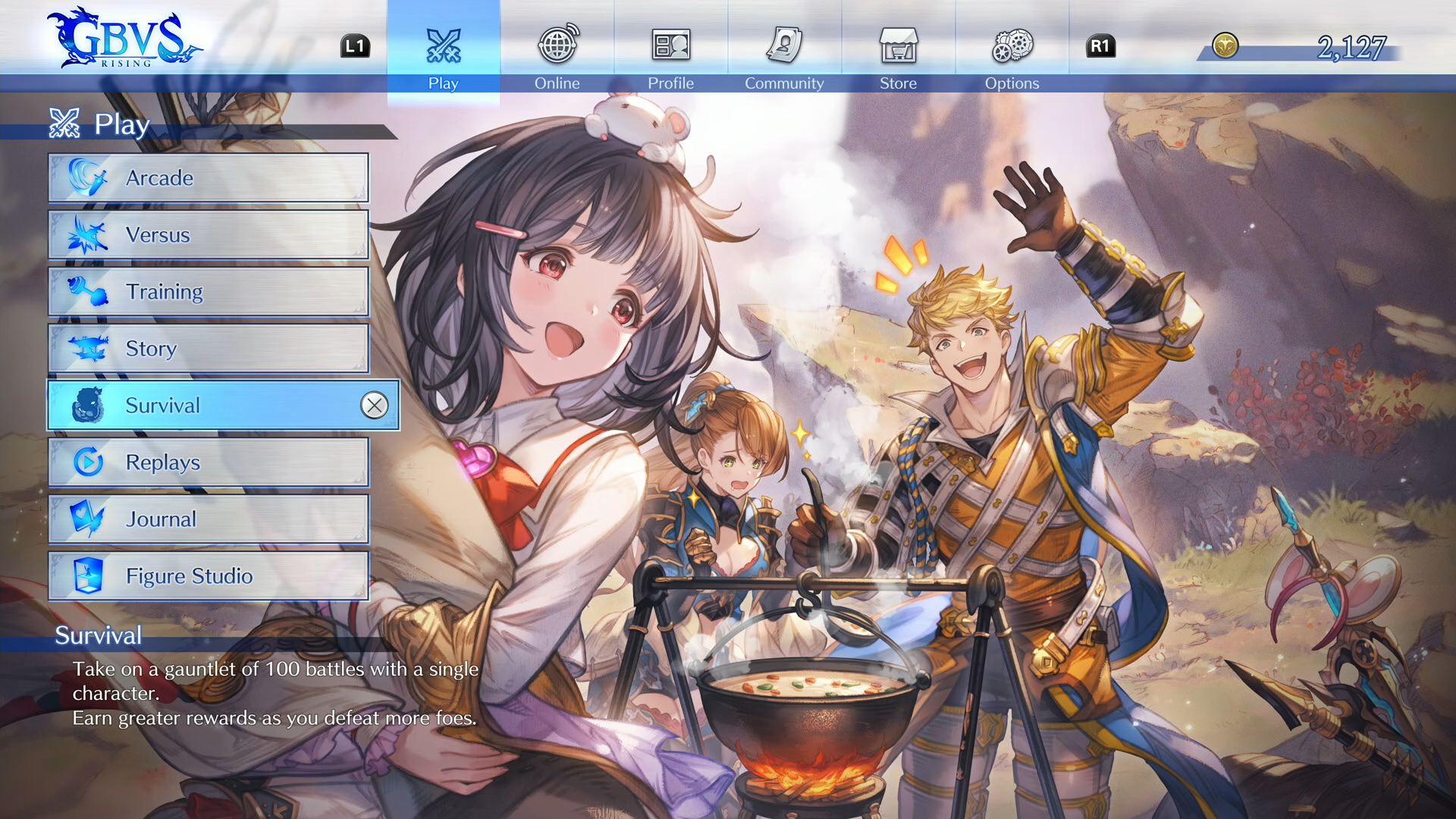
• Survival Mode has been added.

Unlock upgrades to your character and defeat as many CPU foes as you can!

Receive completion rewards based on how many foes are defeated.

This new game mode can be accessed from the main menu on the Play screen.
• A fast-forward feature has been added to replays.

• Added the option to set opponent character illustrations to always display as the default illustration for online matches under Battle Settings.

• The following features have been added to Button Configuration (Battle).

    • Added the option to set ← (Hold) → inputs to On, Off, or ↓↘→ .

This setting applies to the following characters and skills.

– Charlotta: Shining Onslaught

– Vaseraga: Battalions of Fear

– Eustace: Flamek Thunder

    • Added the option to set ↓ (Hold) ↑ inputs to either On or Off.

This setting applies to the following characters and skills.

– Charlotta: Holy Ladder

– Anre: Fleeting Spark

– Eustace: Slow Kill

– Seox: Empty Hand

  • Added the option to toggle between technical and simple inputs for SBAs and SSBAs (with some specific exceptions). As a result of this change, using the Technical Inputs option now only applies to skills.

• Online match-ups will now cancel if a player does nothing for a set period of time on the battle results screen.

Community Features

• The crew feature has been added.

The newly added crew feature allows players to create and join crews to connect with fellow players. Members in a crew can chat with one another via a private guest book.

This new feature can be accessed from the main menu on the Community screen.
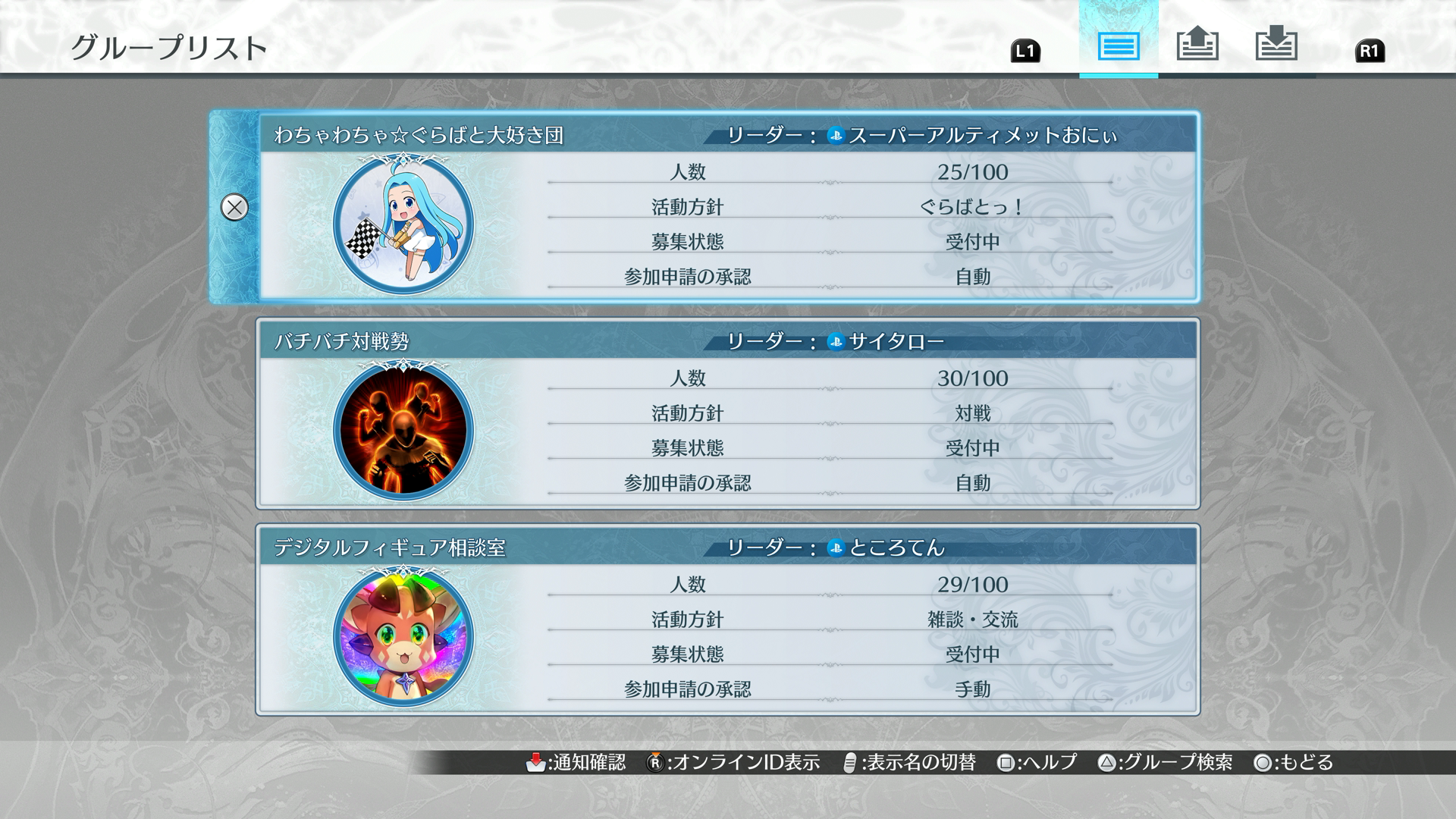
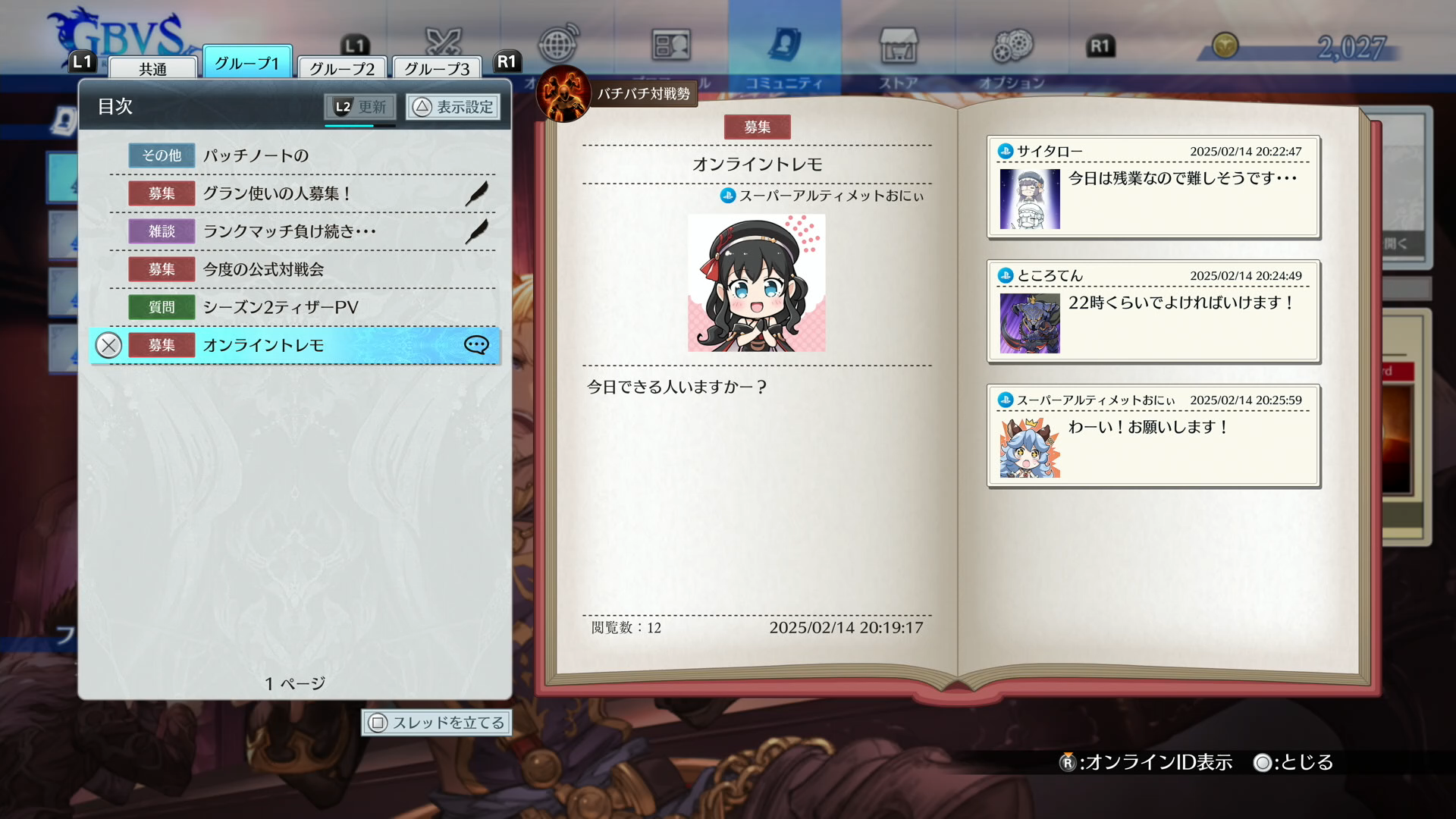
• Unique player IDs have been added. Players can use IDs to search for and invite other players to their crew.

Player ID can be confirmed on the Player Info screen.

• Players can now view the player profiles of posters in the guest book.

Room Matches

• An Online Training feature has been added, available at stations that have been set as training stations via Room Settings.

• Added the option to view the room password while within a room.

• The UIs for Create a Room and Find a Room have been updated.

Online Lobby

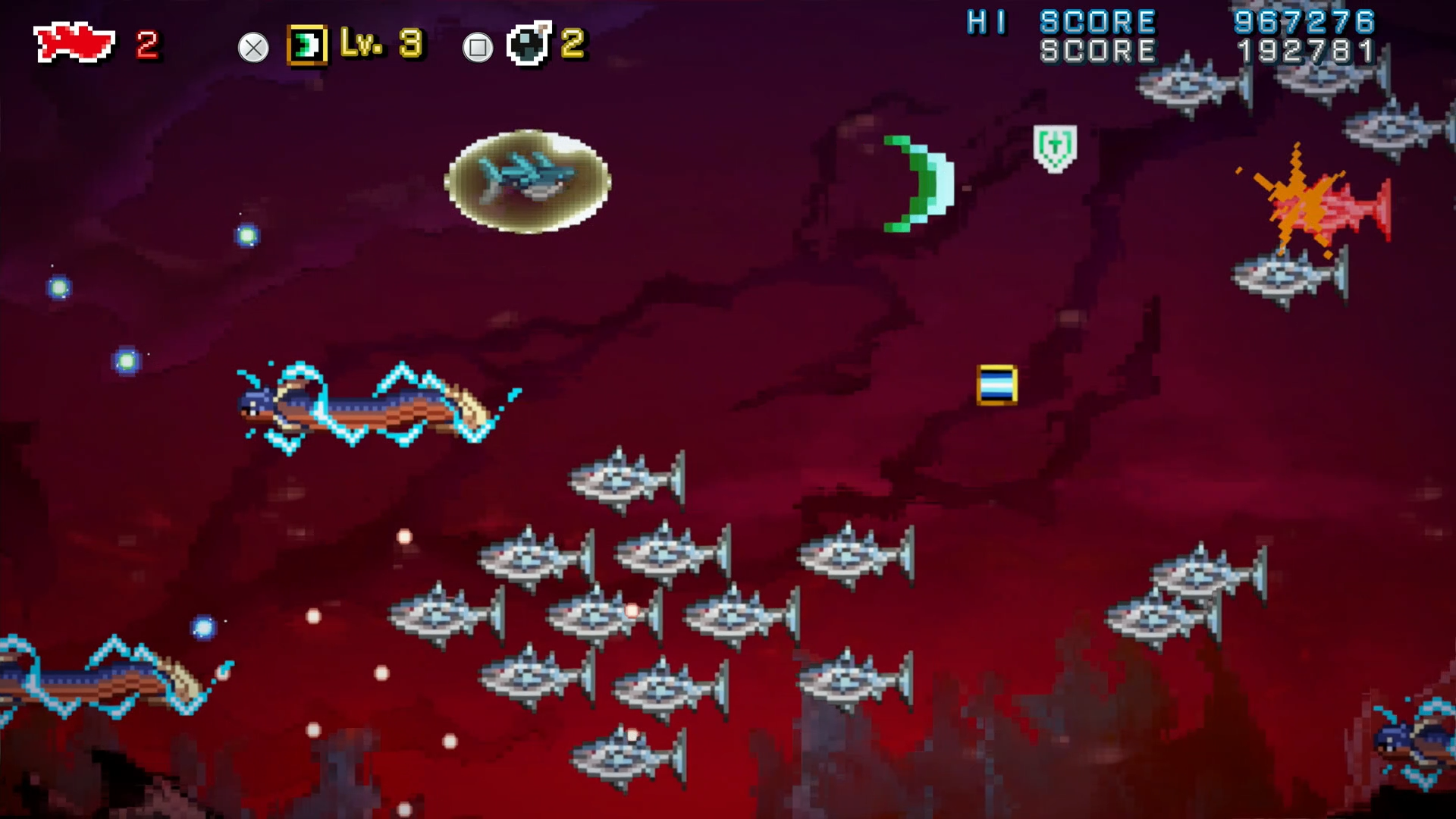
• A new mini-game, SHARK TO GLORY, has been added to the online lobby.
Store/Rupie Shop

The following items have been added to the Rupie Shop.

    • Character Colors
  • Sandalphon Colors 5–21
  • Color 22 for the 5 characters who received it in Battle Pass Round 1
  • Color 22 for the 4 characters who received it in Battle Pass Round 2
    • Weapon Skins
  • Sandalphon Weapon Skins 2–9
  • Weapon Skin 10 for the 4 characters who received it in Battle Pass Round 1
  • Weapon Skin 10 for the 5 characters who received it in Battle Pass Round 2
    • Character Illustrations
  • Sandalphon (Original Ver.)
  • Character illustrations for the 3 characters who received them in Battle Pass Round 1
  • Character illustrations for the 3 characters who received them in Battle Pass Round 2
    • Lobby Avatars
  • Bloody-Blood Stabby Man
  • Jade
    • Stages
  • Canaan Shrine
    • Stages & Music
  • 2 stage music tracks introduced in Battle Pass Round 1
  • 2 stage music tracks introduced in Battle Pass Round 2
    • Card Designs
  • 5 card designs introduced in Battle Pass Round 1
  • 4 card designs introduced in Battle Pass Round 2
    • Other Figures
    • Lobby Avatars

Can be obtained either by purchasing Figure Studio Set 1 or through the in-game Rupie Shop.

    • Extra Effects and Objects Set

Can be obtained either by purchasing Figure Studio Set 2 or through the in-game Rupie Shop.

Special Content

    • Beelzebub (Conqueror’s Carapace)
    • Narmaya (The Black Butterfly)
    • Zeta (Crimson Bomber)
    • Unlock Character: Sandalphon

Also available for purchase on each platform’s respective stores.

Training Mode

• Added the option to toggle the display of the combo limit gauge on the Display menu.

Story Mode

• A new quest, Shifting Skies and Sinking Stars, has been added to part 3 of the story.

It can be unlocked by completing Episode 82: When Tomorrow Comes.

• A notification will now show up when unlocking soundtracks, stages, card designs, trophies, badges, or avatars from completing a quest.

Ranked and Casual Matches

• Players will now be removed from standby if the match-up timer runs out without player input.

Grand Bruise!

• Game selection odds for the second stage have been adjusted.

• Appearance rates for items have been adjusted in all game modes.

• Properties for the following items have been adjusted.

  • Bahamut Anima: Knockback has been reduced.
  • Spear: Knockback has been reduced.
  • Bow: Knockback has been reduced.
  • Sword (charged): Knockback has been reduced.
  • Axe (charged): Knockback has been reduced.
  • FRIED SHRIMP: Time until activation has been extended.
  • FRIED SHRIMP: Total ammunition has been reduced from 3 to 2.
  • Shield: Attack speed has been reduced.

• The following game modes have been adjusted.

  • Rising Royale: Positions where the game will respawn the character at a checkpoint in all stages have been adjusted.
  • Rising Royale: Time limit has been adjusted.
  • Rising Royale (Final Stage): Width of the final bridge before the finish line has been increased.
  • Rising Royale (Final Stage): Wind strength in front of the finish line has been adjusted.
  • Golem Defense Force: Laser attack speed and reload speed have both been increased.
  • Gold Brick Hoarder: Travel speed while carrying gold bricks has been reduced.
  • Slime Blaster: Points lost from getting knocked down have been reduced.
  • Beam Bouncers: Launch distance when hit by the laser has been adjusted.

Bug Fixes and Other Changes

• The Gift Crate screen’s UI has been updated.

• Trophies in the PlayStation® version will now default to English instead of Japanese if the system language is not supported.

• The Figure Studio object Spoon is now categorized as Tableware.

• Fixed an issue with Lunalu in online matches where the character selected at random from the second match forward would sometimes differ for each player.

• Notes have been added to the Story Mode Command Lists for characters whose skills have differing properties from other game modes.

• Fixed an issue where the game would sometimes become unresponsive when the announcements on the main menu and another window were displayed at the same time.

• Fixed an issue where the trophy That’s How We Do It in Zinkenstill! would not unlock in some instances when the player used Vikala in Combo Practice due to the total number of successful combos not updating correctly.

• Fixed an issue where the trophy Where’s My Hug? would not unlock in some instances when the player used Lucilius’s , , or  versions of Iscariot due to the total number of throws not updating correctly.

• Fixed an issue where the opponent’s total number of matches played would display incorrectly on the RTT display screen when a player matched up with a blocked player at a match station.

• Fixed an issue in Situational Training where players would sometimes successfully clear Vikala: Using Fire! Strategically even if they did not follow up with Fire!

• Fixed an issue in Grand Bruise! where players could not view replays in some instances if the room that they were in was disbanded.

• Fixed an issue where an application error would occur when users in the following regions changed their Sound and Language settings for System Voice, Display Language, and Voice Language at once and then canceled the changes.

  • Steam
  • PS4: North America / Europe / Asia
  • PS5: North America / Europe / Asia

• Fixed an issue where the game would sometimes become unresponsive if the player accepted items from the Gift Crate and switched tabs at the same time.

• Fixed an issue where an application error would sometimes occur if the player mashed the cancel button after selecting Claim All in the Gift Crate.

• Fixed an issue where an application error would sometimes occur if the player selected Retreat during a Story Mode battle after their internet connection cut out.

Battle and Character Adjustments

Building upon the adjustments made in Version 1.50, the primary focus of this update is to further refine and balance the risk and reward aspects of gameplay, making necessary improvements to enhance overall game balance.

For all characters, we have implemented changes to Brave Counters, invincible skills, and counters—specifically, we have increased the reward for players who successfully anticipate and block or evade these moves, thereby making such actions riskier to perform.

Brave Counters

Brave Counters are a universal action that, despite costing Bravery Points to perform, have been a highly effective and powerful reversal option. While it is possible to block a Brave Counter, blocking one would still result in a frame disadvantage, leading to scenarios where players would counter Brave Counters with their own, creating a loop that undermined strategic gameplay involving Bravery Points.

To address this issue while preserving the effectiveness of Brave Counters as a reversal tool, we have adjusted them to grant frame advantage to the blocking player. The properties of Brave Counters on hit and counter hit remain unchanged.

Invincible and Counter Skills

We have implemented adjustments to skills with invincibility (including armored invincibility) on start-up, as well as certain skills with guard point properties and skills that counter incoming attacks. This includes Skybound Arts and Super Skybound Arts.

Previously, these skills were difficult to punish even when successfully blocked or dodged. To address this, we have adjusted their frame advantage and pushback on block, making them easier to punish.Additionally, to increase the inherent risk of performing these actions, any hits taken during their recovery will now count as counter hits. The goal of these changes is to ensure that players who successfully defend or evade these powerful skills are appropriately rewarded.

Character Balance

As a result of these universal adjustments, some characters may become relatively stronger, while others may be significantly affected. With these potential outcomes in mind, we have also implemented some individual changes to characters to maintain overall game balance.

On the whole, we have reduced the effectiveness of characters who possessed overwhelming strengths, actions that were difficult to punish, or skills where the rewards heavily outweighed the risks. These changes are aimed at improving the overall competitive environment. Conversely, characters and mechanics that struggled to find their footing have been enhanced, focusing on increasing their utility.

In line with the extensive adjustments made in the Version 1.50 update, this update introduces significant changes to the game’s overall balance. We will continue to fine-tune as needed, incorporating player feedback to guide future adjustments.

The F used in the descriptions below refers to frames.

Button inputs will use the following format:

 = Light Attack /  = Medium Attack /  = Heavy Attack /  = Unique Action

System-Wide

Skill Name Details
Brave Counter Block stun has been reduced by 8 frames, reducing frame advantage from +6F to -2F.
Invincible Skills (Including SBA and SSBA) Skills with invincibility (including armored invincibility) on startup are now counter hittable until the end of the action.

Individual changes for each character have not been included in these patch notes.

For information on which skills for each character have invincibility, please refer to Display Attack Properties for each skill in the Character Guide.

Now counter hittable during recovery.

Does not apply to Ultimate skills.

Individual changes for each character have not been included in these patch notes.

For information on which skills for each character have invincibility, please refer to Display Attack Properties for each skill in the Character Guide.

Skybound Arts and Super Skybound Arts are now counter hittable until the end of the action.
Counter Skills Now counter hittable during recovery.

Does not apply to Ultimate skills.

Individual changes for each character have not been included in these patch notes.

For information on which skills for each character are considered counters, please refer to Display Attack Properties for each skill in the Character Guide.

Skybound Art/Super Skybound Art Combo limit no longer resets on hit.
Invincible Skills/Skybound Art/Super Skybound Art Recovery frames or pushback have been adjusted for skills that were difficult to counter after blocking.

See each character’s adjustments for specific details.

A full list of fighter adjuments can be found on the Granblue Fantasy Versus Rising page.

Avatar photo

James Lara

A gamer at heart, James has been working for MP1st for the last decade to do exactly what he loves, writing about video games and having fun doing it. Growing up in the 90's gaming has been in his DNA since the days of NES. One day he hopes to develop his own game.

Home > Title Updates and Patches

Infinity Nikki New Update 1.3 Hits the Ramp for Eerie Season

[summaraize]

Papergames’ Infinity Nikki has now received its latest seasonal content update version 1.3! Those on consoles will see this as Infinity Nikki update 1.003, and is called the “Eerie Season” by the developers.

There are new clothes to obtain, new events, rewards and more! There’s a lot to take in, so go read on for the official patch notes.

Infinity Nikki New Update Version 1.3 / 1.003 Brings Eerie Season Content

★ New Content ★

■ Event “The Queen’s Lament” unlocks.

● Exclusive quest “Song of the Lost” unlocks and will be available permanently.

After the update on February 25, stylists can complete the new exclusive quest and earn rewards like Diamonds.

● The limited-time check-in event “Queen’s Favor” unlocks.

Event Duration: February 25 (Server Launch) – March 11, 18:59 (UTC-7)

Log in for a total of 7 days to claim Revelation Crystal*10.

● The limited-time event “Tales of Mystery” unlocks.

Event Duration: February 25 (Server Launch) – March 25, 12:49 (UTC-7)

Stylists can join the event’s “Ruins Adventures” and “Eerie Encounters.” Complete the quests to earn rewards such as Diamonds and the earrings sketch [Mystic Illusion].

● The limited-time event “Memories of Yesterday” unlocks.

Event Duration: February 25 (Server Launch) – March 25, 12:49 (UTC-7)

Take photos to fill the album “Memories of Yesterday”, you can claim Diamonds based on your collection progress.

● The limited-time event “In Search of Lost Dreams” unlocks.

Event Duration: February 25 (Server Launch) – March 25, 12:49 (UTC-7)

Complete tasks to earn [Dream’s Turn] and claim the outfit [Dream Chaser] for free.

● The limited-time event “Illusibloom Depths” unlocks.

Event Duration: February 25 (Server Launch) – March 25, 12:49 (UTC-7)

The Illusibloom Depths consists of 6 levels. During the event, 1 level will be unlocked daily. After clearing the levels, stylists can earn rewards such as Diamonds and the title [Solitary Wanderer].

●The limited-time event “The Palace Feast” unlocks.

Event Duration: March 4, 13:00 – March 25, 12:49 (UTC-7)

Collect Whimstars and Dews of Inspiration scattered across the Queen’s Palace Ruins. Reach the required amounts to claim generous rewards, including Diamonds and [Stylist Card Background: Lone Elegy].

■ Event “Bullquet Care Day” unlocks.

● The limited-time event “Caring for the Bullquet” unlocks.

Event Duration: February 25, 2025 (Server Launch) – March 25, 2025, 12:49 (UTC-7)

Stylists can join the event’s “Care Notes” and “Color-changing Tales.” Complete the quests to earn rewards such as Diamonds and the title [Witness of Vibrant Colors].

● Changing the color of the Bullquet is available for a limited time.

Event Duration: February 25, 2025 (Server Launch) – March 25, 2025, 12:49 (UTC-7)

Use the [Soothing Aroma Vial] and follow the [Aroma Formulas] to add the ingredients, and then you can treat the Bullquet and change its color.

■ Limited-Time Resonance Event “Lingering Finale” unlocks.

Event Duration: February 25, 2025 (Server Launch) – March 25, 2025, 12:49 (UTC-7)

Head over to Resonance and obtain the new 5-star outfit [Timeless Melody] and 4-star outfit [Spectral Mist].

>> Completing the 5-star outfit [Timeless Melody] grants the ability to hypnotize enemies with a calming melody, while drifting notes carry purifying power to knock them back.

>> Completing the 4-star outfit [Spectral Mist] grants the ability to capture adorable little ghosts in the frame at night.

>> New Resonance Reward: Upon reaching 160 Resonance attempts in [Lingering Finale], you can claim the decoration [Pure Reverie]. [Pure Reverie] can be placed in open spaces for photo shooting or as decoration.

■ New dungeon “Queen’s Palace Ruins: Inner Court” will be available permanently.

After the update on February 25, the new permanent dungeon “Queen’s Palace Ruins: Inner Court” will be added in the Breezy Meadow area. Stylists can follow the bear plushies’ guidance, trace the lost song, purify the Dark Essence, and uncover the secret hidden in the inner court of the Queen’s Palace Ruins.

■ New gameplay “Piano Duet with Ms. Glove” will be available permanently.

After the update on February 25, unlock the exclusive quest “In the Lonely Song” and clear the dungeon “Queen’s Palace Ruins: Inner Court” in the following week to unlock the new gameplay “Piano Duet with Ms. Glove.” Stylists can go to the attic in the high tower of the Queen’s Palace Ruins late at night and interact with the piano stool to play the piano with Ms. Glove.

■ Update: Lore Compendium

After the update on February 25, the Lore Compendium will be added to Compendium. Stylists can read your collected books and learn about Miraland’s stories in this compendium.

■ Update: Esseling Materials Tracking

After the update on February 25, Esseling Materials will be added to Collections for stylists to track.

■ Update: Mira Crown Pinnacle Contest

Event Duration: February 25, 2025 (Server Launch) – March 11, 2025, 18:59 (UTC-7)

Effects: + 35% to Dresses Score

■ Mira Journey: New Phase

Event Duration: February 25, 2025 (Server Launch) – March 25, 2025, 12:49 (UTC-7)

When [Mira Journey] begins, [Journey Overture] will automatically unlock. Complete [Journey Tasks] to earn Journey EXP, level up, and receive rewards like Resonite Crystals and Energy Crystals.

>> Stylists can also unlock [Distant Anthem] and [Miracle Epic] for even more rewards such as Stellarites, Diamonds, Revelation Crystals and the frame [Faded Moon].

■ [Store] Various Items Available

● [Store: Heartfelt Gifts] Free Outfits Update

Event Duration: February 25, 2025 (Server Launch) – March 25, 2025, 12:49 (UTC-7)

Heartfelt Gifts Phase 2 will be available! During the event, the 4-star outfit [Dream in Glimpses] and the 3-star outfits [The Perfectionist] and [Jade Dreams] can be claimed for free!

● New Arrivals in [Store: Clothing]

Event Duration: February 25, 2025 (Server Launch) – March 25, 2025, 12:49 (UTC-7)

During the event, new outfits [Golden Hour] and [Rosie Sweetheart] will be available in [Store: Clothing] for a limited time.

● Featured Packs Update

Event Duration: February 25, 2025 (Server Launch) – March 25, 2025, 12:49 (UTC-7)

Stylists can go to [Store: Featured] to purchase the [Whispered Resonance Pack].

★ Optimizations ★

■ More custom looks in Wardrobe, and optimizations for Glow Up and Evolution features.

● 3 more custom looks are available in Wardrobe, which can be unlocked one by one when the number of your clothing pieces reaches certain thresholds.

● Added dressed markers to all tabs in Wardrobe, enabled automatic orientation after changing tabs back, and optimized the result message and icons after using Filter.

● Added star rates, labels of outfits and pieces, and outfit names in Glow Up.

● Added switch tabs for 5-star and 4-star outfits, markers for completed evolution and a sorting button in Evolution.

■ PC Mouse and Keyboard Custom Key Bindings Update

● Added custom key binding support for the following actions on PC: [Whimcycle] controls, Fishing [Reel-In] action, ability outfit controls and custom outfit controls. After the update, these can be configured in [Settings – Controls – Key Setting].

>>As [Plunge] has been reset to the Q key and cannot be remapped at this time, stylists who previously assigned a custom key to Q will need to change it to another key (e.g., E key) to ensure optimal gameplay experience.

■ Optimizations for Styling Challenges

● Optimized the settlement process of Styling Challenges. After the update, the scoring details interface will add new buttons for jumping to outfit Glow Up and jumping to Eurekas. If stylists receive a non-perfect score in the Styling Challenge, a button for retrying the challenge has also been added to the scoring interface.

● Optimized the cutscene in Styling Challenges. After the update, if it’s not the first attempt, a skip button will appear in the top right corner, allowing stylists to skip the showcase cutscene.

■ Optimizations for Resonance and Store

● Optimized the display of outfit ability bars in the Resonance interface. After the update, checking the ability bar will allow you to view detailed explanations of the outfit ability.

● Optimized the Store redirection in the Resonance interface. After the update, you can directly go to the [Store: Featured] page through Value Pack.

● Optimized the crystal exchange experience in the [Store: Diamond]. After the update, your current crystal count will be displayed in the top-right item bar when exchanging crystals in the [Store: Diamond].

■ Iteration of Profile

● Optimized the display of Mira Crown record in [Pear-Pal: Profile]. Checking the icon will now show the number of clears and stars achieved in both Styling Contest and Pinnacle Contest. Stylists can choose whether to make this information public.

● Added [Pear-Pal Name Card] to Snapshot Hourglass and Luminous Bloom. After the update, you can check other stylists’ avatars to quickly access their detailed information.

■ Others

● Added playback progress bars to certain Poses. After the update, stylists can freely adjust the playback progress to take photos.

● Added a button for jumping to sketches crafting interface when getting a new sketch, with the relevant sketch automatically selected.

>> This button will not appear in the reward display interface for outfit and piece sketches but will be available in the outfit sketch display interface. The reward display interfaces for Rare Pieces, Whim Fragrances, and Momo’s Cloaks will also support this redirection.

● Optimized the readability of certain icons when using a controller. Adjusted the controller interaction experience for systems such as Sketches, Momo’s Camera, Quests, Mails, Compendium, and Tutorials.

● Optimized the stop mechanism. After the update, stylists can more precisely control the position and direction of your steps.

● Optimized the availability of the Random quest [Another Night of Fireworks]. After the update, it will be adjusted to a permanent quest.

● Optimized the sound effects in the [Compendium – Outfit Compendium] interface.

● Optimized the animation effects of the [Ability] icon in the bottom right corner of the main interface.

● Optimized the descriptions of redirect targets displayed in the [Quest] interface.

● Optimized the red dot display logic for [Heart of Infinity].

● Optimized the interface display of the [Events].

● Optimized the sticker styles for [Courses].

★Fixed Issues★

● Fixed an issue where the prompt in the bottom-left corner of the loading screen on mobile devices could not be manually switched under certain conditions.

● Fixed an issue where shadows for some animals were not displaying correctly on mobile devices under certain conditions.

● Fixed an issue where handheld items would disappear abnormally after interacting with a [Warp Spire] or [Fireworks Crafting Station] under certain conditions.

● Fixed an issue where the model of Nikki would behave abnormally when interacting with the [Picnic Charm: Mushroom Magic] or [Flowery Picnic] decorations and being attacked under certain conditions.

● Fixed an issue where the [Total Load] in the top-right corner would display abnormally when placing decorations under certain conditions.

● Fixed an issue where building models in the [Gloomy Cavern] of the [Firework Isles] would display abnormally under certain conditions.

● Fixed an issue where the position of Blings in the [Gloomy Cavern] of the [Firework Isles] was abnormal under certain conditions.

● Fixed an issue where some water surfaces in the [Firework Isles] displayed abnormally under certain conditions.

● Fixed an issue where some chairs in the [Firework Isles] could not be interacted with under certain conditions.

● Fixed an issue where the keyboard Shift key could be used to sprint in controller mode under certain conditions.

● Fixed an issue where [Consumables] were showing incorrectly in [Fishing] when playing with a controller under certain conditions.

● Fixed an issue where the PS version would incorrectly display the previously opened photo when viewing [Nikki’s Album] under certain conditions.

● Fixed an issue where nearby NPCs would display abnormally after toggling the [NPC] display switch in the top-right corner off and then on while in [Performance] mode under certain conditions.

● Fixed an issue where the voiceover for NPC [Captain Hiya] would play abnormally during the Chapter 2 main quest under certain conditions.

● Fixed an issue where Nikki’s spawn location would be abnormal when riding a Whimcycle near the Warp Spire and entering the Realm Challenge through the event interface under certain conditions.

● Fixed an issue where players could get stuck in the Momo transformation state after using the shrinking ability in a dungeon, switching outfits, and exiting the level under certain conditions.

● Fixed an issue where photos could be submitted using the F12 screenshot function after correctly taking and closing a photo of an interactive object under certain conditions.

● Fixed an issue where players could enter the [Folklore Guide] during combat with Esselings under certain conditions.

● Fixed an issue where accepted Random quests could not be properly navigated when untracked under certain conditions.

● Fixed an issue where some weekly tasks in Mira Journey could not be completed under certain conditions.

● Fixed an issue where Nikki’s model would sink abnormally into the ground under certain conditions.

● Fixed an issue where NPC Gritti would sink into the ground abnormally under certain conditions.

● Fixed an issue where some NPCs would appear in incorrect positions under certain conditions.

● Fixed an issue where Snapshot Hourglasses would not refresh in event island levels under certain conditions.

● Fixed an issue where the game would freeze after jumping from [Sketches] to [Collections] under certain conditions.

● Fixed an issue where the camera could not zoom while riding [Whim Pedals: Fireworks] under certain conditions.

● Fixed an issue where the models of the [Picnic Charm: Mushroom Magic] and [Flowery Picnic] decorations could display abnormally when interacting and taking photos under certain conditions.

● Fixed an issue where Nikki’s model would behave abnormally when using the outfit pose [Firework Call] and adjusting the focal length to 20mm during photography under certain conditions.

● Fixed an issue where the main interface of the world displayed abnormally after entering features like [Friends] in Pear-Pal under certain conditions.

● Fixed an issue where the sketch would flicker abnormally when switching between [Wishful Aurosa] and [Silvergale’s Aria] in the Miracle Outfit sketch interface under certain conditions.

● Fixed an issue where the animation of flying together with the [Astral Swan] would display abnormally under certain conditions.

● Fixed an issue where system icons would display abnormally during [Fishing] under certain conditions.

● Fixed an issue where some controller key bindings were duplicated under certain conditions.

That’s it for the fashion game’s lastest seasonal content drop. If Papergames release another patch, we’ll let our readers know.

Avatar photo

Alex Co

Father, gamer, games media vet, writer of words, killer of noobs.

Home > News

Warner Bros. Games Shuts Down Multiple Studios, Cancels Wonder Woman Game

[summaraize]

Just three weeks ago, a report stated that the Wonder Woman game was being rebooted and was “years away” from seeing the light of day. As it turns out, that was being generous, as the game is now officially cancelled.

Not only that, but Warner Bros. Games is also shutting down three studios as well.

Warner Bros, Games Confirms “Strategic Change in Direction”

The news was first reported by Bloomberg’s Jason Schreier who obtained an internal memo. According to it, not only is the Wonder Woman game cancelled, but three studios: Monolith Productions (Shadow of Mordor), Player First Games (MultiVersus) and Warner Bros. Games San Diego.

In a statement, Warner Bros. Games has confirmed the news, stating (via shinobi), “We have had to make some very difficult decisions to structure our development studios and investments around building the best games possible with our key franchises — Harry Potter, Mortal Kombat, DC and Game of Thrones. After careful consideration, we are closing three of our development studios – Monolith Productions, Player First Games and Warner Bros. Games San Diego. This is a strategic change in direction and not a reflection of these teams or the talent that consists within them. The development of Monolith’s Wonder Woman videogame will not move forward. Our hope was to give players and fans the highest quality experience possible for the iconic character, and unfortunately this is no longer possible within our strategic priorities. This is another tough decision, as we recognize Monolith’s storied history of delivering epic fan experiences through amazing games. We greatly admire the passion of the three teams and thank every employee for their contributions. As difficult as today is, we remain focused on and excited about getting back to producing high-quality games for our passionate fans and developed by our world class studios and getting our Games business back to profitability and growth in 2025 and beyond.”

This announcement further adds to this year’s bloodbath regarding the game’s industry’s job security. We’re two months in, and there are already multiple studio closures, layoffs and more.

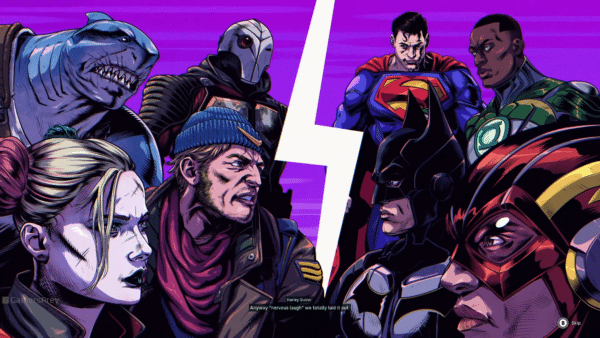
Warner Bros. Games’ massive movements in their gaming division are in response to Suicide Squad: Kill the Justice League’s disappointing reception and MultiVersus’s failure to retain its player base, which led to the announcement that the game is shutting down.

Aside from a report about Hogwarts Legacy DLC and a sequel, the only good news we have from Warner Bros. Games is that Rocksteady Studios seems to be working on a new single-player Batman game, as their recent job listing reveals.

Avatar photo

Alex Co

Father, gamer, games media vet, writer of words, killer of noobs.

Home > Title Updates and Patches

Minecraft Update 3.07 Delivers Bedrock Version 1.21.62

[summaraize]

Mojang and 4J Studios have a fresh Minecraft patch for players to download and bring the game to Bedrock version 1.21.62. This brings various bug fixes, technical updates and more.

For those on consoles, you’ll see this as Minecraft update 3.07 and as download version 1.014 for current-gen. You can check out the complete patch notes available below.

Minecraft Bedrock 1.21.62 Now Out via Update 3.07

Minecraft Update 3.02

Features and Bug Fixes

Gameplay

  • Fixed an issue where attacking a mob while sprint jumping would remove all player momentum (MCPE-189501)
  • Fixed an issue where laggy players fighting would occasionally not be able to hit each other (MCPE-190552)
  • Fixed an issue where Player’s collision box would sometimes be incorrect after using a bed (MCPE-190604)

User Interface

  • Trying to craft a Bundle while holding a Bundle with a Bundle inside of it now correctly crafts a Bundle instead of only consuming ingredients (MCPE-190550)
  • Fixed an issue that could preventing joining a Realm through the Friends drawer

Technical Updates

Dedicated Server

  • Exposed a new parameter for dedicated server when in server-auth-with-rewind. This will make the server more strict on entity interactions. Look in server.properties for more information on what these do
    • server-authoritative-entity-interactions-strict default to false and can be set to true. Will affect Entity interaction acceptance.


Gameplay

  • Command Block hover name is now shown in GUI messages generated from commands (MCPE-190606)

That’s it from the Minecraft team for this title update.

Avatar photo

Alex Co

Father, gamer, games media vet, writer of words, killer of noobs.

Home > Title Updates and Patches

Destiny 2 Update 3.52 for Version 8.2.0.2 Now Out

[summaraize]

Bungie’s latest patch for Destiny 2 can now be downloaded by players on consoles and PC, and this is for version 8.2.0.2. Console gamers on last-gen will see this as Destiny 2 update 3.52, and this brings various fixes and adjustments to Episode: Heresy, items and more.

For those on PS5 and Xbox Series X|S, this will show up as Destiny 2 patch 1.147. The complete patch notes are available below.

Destiny 2 Update 8.2.0.2 Now Live

Destiny 2 New Update 3.51

Activities

Episode: Heresy

  • Fixed an issue where Sigil Stones could drop from defeated combatants much faster than intended.

Crucible

Trials of Osiris

  • Reduced how much going Flawless affects Weekly Performance Based matchmaking for solo players.
  • Lighthouse Passages can no longer be reset from the Director if a loss has not been recorded on the passage.
  • Fixed an issue where the Seasonal and Lifetime Flawless Passages trackers were incorrect.
  • Fixed an issue where wins were not correctly granting progress points towards Ghosts dropping.

Competitive

  • Rank point gains and losses have been adjusted.
    • Increased the effectiveness of the quitter compensation aspect of the contribution scalar.
    • Reduced the number of points that the skill modifier can add or remove.

Dungeons and Raids

Sundered Doctrine

  • Mission Complete should now fire shortly after defeating Kerrev and receiving loot unless players are actively trying to open the vault door.
  • Fixed an issue where the drop rate for Finality’s Auger was not properly scaling with boosts from Triumphs.
    • In addition, all players that complete Sundered Doctrine will receive an additional boost to its initial drop rate.
  • Fixed an issue where opening one of the hidden chests could lock that character out of acquiring focused gear for that week.
  • Fixed an issue where hidden chests could despawn shortly after being opened.
  • Fixed an issue where Pyramid Switches could be activated by AOE damage sources.

Exotic Missions

Zero Hour

  • Fixed an issue preventing players from completing the activity which also affected rewards and pursuit progress.
    • Zero Hour has been reenabled.

Gameplay and Investment

Exotic Armor

Hunter

  • Blight Ranger
    • Cancelling Arc Staff with Blight Ranger now triggers Bolt Charge.

Titan

  • Arbor Warden
    • Arbor Warden’s “Barri-nade” now picks up the benefits of Storm’s Keep.

Warlock

  • Speaker’s Sight
    • Fixed an issue where the Speaker’s Sight healing turret was healing more than intended in The Nether.
  • Solipsism – Spirit of Filaments
    • Fixed an issue that caused Spirit of the Filaments to not reward class ability energy properly.
  • Solipsism – Spirit of Necrotic
    • Fixed an issue where Spirit of Necrotic was granting Devour.

Weapons

General

  • Fixed an issue where Redrix’s Estoc could not roll with random Stocks.
  • Fixed an issue where, after unlocking a pattern from Vault of Glass, the Deepsight mod socket would still appear visible.

Exotic Weapons

  • Lodestar
    • Reduced the damage fall off range when fired from the hip.
    • Fixed an unintended aim assist disparity between mouse/keyboard and controller when using Lodestar’s hip fire.
  • Finality’s Auger
    • Fixed an issue where the turret could linger after swapping to another Heavy weapon.
  • Barrow-Dyad
    • Fixed an issue causing Barrow Dyad’s particles to not render correctly when impacting Phalanx shields.

Abilities

Warlock

  • Fixed an issue where Ionic Sentry turret damage/kills did not count as ability damage/kills.
  • Fixed an issue causing Bolt Charge to discharge when healing an ally with a Rift.

Hunter

  • Fixed an issue causing roaming Supers to end early when using Ascension.

Artifact

  • Updated Flashover to no longer provide increased Bolt Charge lightning bolt damage vs players in PvP.
  • Fixed an issue where the boost from Volatile Marksman was providing class ability energy on any instance of splash damage instead of just Volatile detonations.
    • To compensate for the reduction:
      • Increased Class Ability energy on Volatile detonation to 9% (from 7%).
      • Reduced cooldown to 0.1s (from 0.35s).
    • Fixed an issue where Particle Reconstruction was stacking with other debuffs.
    • Fixed an Issue where Particle Reconstruction couldn’t be applied by certain Fusion Rifles.

General

  • Fixed an issue with Facet of Hope that was contributing to players receiving BIRD errors.

General

  • Fixed an issue causing the Eris vendor on the Moon to T pose.
  • Fixed an issue with shield regen audio looping continuously in The Nether.
  • Fixed an issue where the Wish-Ending Bundle and the Rat King Bundle could appear owned, even if never purchased.
  • Fixed a labeling issue affecting some Weapon Ornament bundles.

That’s it from Bungie regarding the patch. Once another one is released, we’ll let our readers know.

Avatar photo

Alex Co

Father, gamer, games media vet, writer of words, killer of noobs.

Home > Title Updates and Patches

Delta Force: Black Hawk Down Update for February 25 Pushed Out

[summaraize]

Following its release last week, Team Jade has now pushed out the Delta Force: Black Hawk Down update for February 25. Players will be able to download and install it with no downtime.

This is a super-small title update that fixes a few nagging issues with the single-player campaign, that was surprisingly released for free.

Delta Force: Black Hawk Down Campaign Gets First Update

The fixes implemented today by Team Jade include:

Bug Fixes & Optimizations

  • Fixed the issue where the game would crash during loading.
  • Fixed the abnormal bullet collisions in certain environments.
  • Fixed issues with operator selection and display errors when entering matches in Chapter 5.
  • Fixed the rare crash that could occur during Chapter 6.
  • Optimized grenade damage detection logic against enemy soldiers
  • Optimized server stability.

If you’ve yet to play it, go download it for free right now! Our hands-on time with it was an eventful one where we said, “The Delta Force Black Hawk Down campaign is shaping up to be a cinematic, highly-polished experience with a difficulty curve many will liken to a Souls game.”

Avatar photo

Alex Co

Father, gamer, games media vet, writer of words, killer of noobs.

Home > News

Destiny 2 Servers Go Down on Feb. 25, 2025 for 8.2.0.2 Patch

[summaraize]

Guardians stuck at the login screen, don’t panic! Bungie has taken the Destiny 2 servers down this February 25, 2025, and this is in order to roll out a patch later today.

Players will be unable to hit orbit for a few hours, as Bungie prepares the game for patch version 8.2.0.2, which will be released within the last 30 minutes of the servers going live (assuming everything goes according to plan).

Destiny 2 Downtime for February 25, 2025 Explained

Update: Complete patch notes for 8.2.0.2 is available here.

Tuesday, February 25, 2025 — Update 8.2.0.2

 AM PST -8 UTC
    • Destiny 2 will undergo maintenance.
    • Sign-on and game integration features will be unavailable on web, mobile, third-party apps, and the Bungie Store.
    • Players who observe issues should report to the #Help forum.
7:45 AM PST -8 UTC
    • Destiny 2 and all APIs will be brought offline for expected maintenance.
    • Players will be removed from activities.
    • Destiny 1 may be impacted.
9:00 AM PST -8 UTC
    • The latest Destiny 2 update will be available across all platforms and regions.
    • Players will be able to log back into Destiny 2.
    • Players logging into the game may be placed in a queue and may experience sign-on issues as background maintenance is still ongoing.
    • The Destiny 2 API will be brought online.
    • Clan features may remain offline until maintenance is complete.
11:00 AM PST -8 UTC
    • Destiny 2 maintenance is expected to conclude.
    • Console players who encounter issues updating should restart their console and try downloading the update.
    • Players who observe issues should report to the #Help forum.

Once the patch is live, we’ll provide a link to it within this article.

If anything changes regarding the downtime or if it gets extended, we’ll update the article to reflect it.

Avatar photo

Alex Co

Father, gamer, games media vet, writer of words, killer of noobs.

Home > Title Updates and Patches

Sniper Elite Resistance Update 1.006 Released for Hotfix

[summaraize]

Rebellion has served Sniper Elite Resistance update 1.006 (for version 1.06), a hotfix for the shooter. This update doesn’t bring in any new content or major gameplay changes, but it was rolled out to target some pesky bugs.

Given that we just got a huge content drop for free last week, which gave us two Sniper Elite 5 maps, it’s understandable if this patch doesn’t really deliver any new content.

Console gamers, this patch is also tagged as version 01.006.000, so don’t get confused by the various version numbers.

Sniper Elite Resistance’s Latest Hotfix Resolves Crashes

Per Rebellion, here’s what’s in today’s title update:

General Fixes:

  • Fixed a memory issue that led to various crashes
  • Fixed a crash caused by AI
  • Fixed issues with extra magazines appearing on the Lee Enfield and ZK-420S
  • Fixed an issue with a misaligned barrel on the M1918
  • Fixed an issue with the mission description for Devil’s Cauldron
  • Fixed an issue with the Propaganda medals not appearing as achieved on the mission prep screen

Hopefully, we’ll get another major update in the coming month. If we do, we’ll be sure to let our readers know.

Sniper Elite Resistance has been one of the biggest surprises of the year, with our review stating, “Besides the new protagonist and setting, the gameplay is essentially the same as you remember it, though that gameplay is still very satisfying at its core, especially the x-ray shots.”

Avatar photo

Alex Co

Father, gamer, games media vet, writer of words, killer of noobs.

Home > Title Updates and Patches

DayZ Update 1.75 Delivers Stable Patch 1.27

[summaraize]

The latest significant patch for DayZ is finally live on all platforms on February 25, 2025. Bohemia Interactive has released DayZ update 1.75, which should be available for download now on consoles and PC.

Players can expect new features and locations for the Frostline expansion, new items for the base game, and a ton of improvements across the board. Read on for everything new in the patch notes below.

DayZ Stable Update 1.27 Now Live on PC and Consoles

Console Stable 1.27 Update 1 – Version 1.27.159420 (Release on 25.02.2025)

NOTES

FROSTLINE EXPANSION 

ADDED

  • New Features and Locations
    • New villages added to eastern coast
    • New ship wreck location off the coast of the Shantar island
    • Added wooden log cabins on mountain sides
  • Loot and Map Enhancements
    • Improvised sandbag bunkers on Burukan island replaced with new concrete bunkers
    • Dynamic military containers now require a corresponding key to be unlocked
    • VSD variant with wooden stock, handguard and old metal body
    • Aniva city has been expanded
    • Reduced the vegetation cover on the military island
  • Environmental Interactions
    • Snow falling from the trees and on various interactions: cutting, harvesting, tree falling, car hit, and sprinting through
    • Naval buoys with flashing red lights to serve better navigation through the ice sheet maze
    • Particles for explosions on snow terrain added
  • Functional Additions
    • Functioning mounted outdoor thermometers reflecting the current temperature
    • Boats can now despawn – degrade continuously until destroyed

CHANGED

  • Gameplay and Effects
    • Player is now able to get longer heat buffer with all clothing. (increased for low insulation)
    • Added a delay between falling unconscious due to blood loss.
    • Behavior of lights in the warhead storage rooms
  • Audio 
    • Sounds of footsteps from walking in the forest with and without snow
    • New ambient sounds for Warhead storage
    • New sounds for the power generator added
    • New audio of birds, changed in intensity and variations
    • Reduced noise level of owl sounds
    • Loudness and reverb for electricity and storage doors
    • Barefoot movement on Sakhal snow surfaces had no footstep sounds

FIXED

  • Gameplay and Effects
    • Heavy metal poisoning effect could persist after player death with a new character
    • Collecting and eating snow inconsistently impacted player temperatures
    • Fixed inconsistencies in the freezing calculation
    • Heat buffer “+” signs now display accurate heat buffer duration.
    • Portable power generator could not warm up the player
    • Characters could keep fast swimming or climbing even after running out of stamina (T188552)
    • Players could perform multiple heavy attacks in quick succession while consuming very little stamina (T175065)
  • Clipping and Collision Issues
    • The player is able to clip through the drill geothermal plant tower
    • Clipping and collision issues within the Antonov plane wreck
    • Goats could spawn inside rocks
    • Specific items could be built inside warhead storage
    • Fixed exploits used to look through walls
  • Environment and Visuals
    • Wheel particles will no longer be present if a vehicle is driving on a surface without any defined.
    • Boats could disappear when left on the shore or ice shelf
    • Mushrooms spawn in a dried state
    • Incorrect surface and interior detection in the Sakhal power station building
    • Fire barrel fire could look different compared to a fireplace when dying out
  • Structures and Objects
    • Levers in Sakhal power station are off after server restart
    • Sakhal school had a Chernarus flag
    • Opening the storage doors in the bunker is not properly matching the sound
    • Stash buried in snow did not properly save in server storage.
  • Animal and Player Interaction
    • Player could drink from springs from any possible direction
    • Frozen animal corpses could be skinned
    • It was possible to cut out seeds from frozen vegetables
  • Sound and Audio
    • Sprinting through a snow-covered tree could not make a sound
    • Soundtrack related to Volcano could not play near it

GENERAL GAME

ADDED

  • Backpack and Item Attachments
    • New item attachment slots for specific backpacks
  • Sound Effects
    • Sound of rattling teeth when a player is exposed to low temperatures for an extended time
    • Sound of boat propeller
    • Sounds of boat splashes are now matching the animations
    • Sounds for deploying and disarming mines and explosives
    • More variations for bullet cracks sound
  • Particle Effects
    • Bullet hit effects on vegetation – different hit particles for autumn, green, and conifer trees
    • Animations
    • Patching items
    • Repairing with tape
    • Cleaning/repairing firearms
    • Splitting long sticks
    • Splitting firewood
    • Splitting logs with axes
  • UI and Quality of Life
    • Controls options settings now have numerical values
    • Controls options settings can now be edited by entering specific desired value
    • Clickable link in the main and pause menus to access the Feedback Tracker directly
    • New hints added during the loading screen
    • New cartridge icon for crossbow bolts
    • Show/hide UI cursor in main and in-game menu menus when the input device is changed
    • Feedback tracker QR link within the main menu
    • ‘Previously played’ tab in the server browser
  • Technical Improvements
    • Latency exploit mitigation, freezing players in place when having bad network connection

CHANGED

  • Loading times
    • Improved general game loading times
  • Sound and Audio Improvements
    • Reworked SMG weapons sound
    • Improved cooking sound effects system indicating “done,” “in progress,” and “cooking without ingredients”
    • The sound of the wind when driving the boat is only audible to the boat driver
    • Improved footstep sounds for some building interiors
    • Improved trigger zones to ensure consistent soundtrack playback in specific areas
    • Foot steps sounds changed with the aim of making running enemy more audible than the one carefully approaching
    • Boat sounds reduced from close ranges and increase on long distance.
  • Weapons and Combat
    • Reduced smoke of VSS because it was too obstructive.
    • Particles for M4-A1, M16-A2, VSD, LE-MAS, USG-45, VSS, Mosin 91/30 rifles were updated
    • Rebalanced dispersion and damage of the Mosin, VS-89, and VSD.
    • Heavy attack modifier keybind moved correctly under the Combat category instead of Unsorted.
  • Vehicles and Boats
    • Boats now slowly decay when abandoned for too long.
    • Hoods of car wrecks are opening in the same direction as the drivable cars
  • Crafting and Actions
    • Splitting items from attachments is now possible
    • Cutting up the guts to make a rope leaves player hands bloody
    • Added continuous crafting option for some actions and recipes:
      • Digging worms
      • Repair tent and its parts
      • Repair car parts and chassis
      • Repair with blowtorch
      • Crafting bone and stone knife
      • Repiring electricity
      • Repairing with epoxy
      • Sharpening
      • Patching
      • Repairing with rags
      • Repairing with tape
      • Cleaning weapons
      • Repairing planks
      • Repairing with pliers
  • Inventory and Interaction
    • When scrolling through the inventory, the active gear section remains pinned to the top of the screen (T178787)
    • Items created after player actions are found below the player more randomly, not directly on top of each other
  • Cooking and Food Mechanics
    • Food poisoning has been reworked.
    • Chances to catch Salmonella vs Food Poisoning have been rebalanced.
    • Cooking human steak to burned steak is no longer removing the brain disease
    • Water boiling when cooking is now indicated by particles and new audio sound
    • Fishing mechanics and equipment were rebalanced, reducing junk catch rates, adjusting signal timing, and tweaking bait and hook performance
    • Burn rate of fireplace fuel (except firewood) and kindling has been increased
  • Character and Gameplay Mechanics
    • Increased blood regeneration for low food and water levels
    • Increased blood regeneration while unconscious if the blood level is low.
    • Items carried by players while swimming now adjust more quickly to match the water’s temperature
    • Surrender emote is no longer possible while standing on cars and boats
  • Particles and Visual Effects
    • Particles for cooking, hot items, and breath of characters
    • Particles for vomiting and bleeding
    • Disabled water reflection to improve performance
  • Controllers and Input Adjustments
    • Minimum left and right gamepad stick input changed from 0.5 to 0.7, for both PS and Xbox controllers
  • Fishing and Gathering
    • Items that are obtained by fishing, like pots and wellies, are no longer of pristine quality
    • Balanced fishing mechanics: Improvised rods and wooden hooks are now less effective
  • Miscellaneous Changes
    • Fireplace goes from scorching to cold slower to make more space for re-igniting it
    • Dead fox tail changed on the model and in the inventory to look more natural
    • Removed the redundant rough and precise skill meter from the tutorial screens
    • Player could receive chemical poisoning instead of food poisoning when opening Unknown food can
    • Cow, goat and sheep are now more likely to run away
    • Sherpa hat braids are now moving less frantically (T185025)

FIXED

  • Performance and Gameplay 
    • Fixed a game crash related to throwing physics
    • Possible to see through walls when canceling or finishing Dig up action
    • Exploit of players being able to peek through the trees
    • Exploit of getting inside a locked room in certain houses through closed windows
    • Exploit of moving unseen beneath the the map
    • Players could perform actions and move freely while inspecting an item
    • When digging worms, players could see through the walls
    • Items could get stuck in hands after jumping or fast actions, making them unable to be swapped or removed until reconnecting (T188352)
    • Character would stop taking damage from hunger and thirst after eating or drinking, even if their energy/water remained critically low, until relogging (T188364)
    • Eating cold or chilly food incorrectly increased the player’s heat comfort
    • Client crash occurring when viewing specific characters from above from certain distance range
    • Game freezes when player unfavorites all favourites on the first page and switches to the second page
  • Sound and Audio 
    • The infected and animals in the water did not have correct sound
    • Wrong sound played when crafting a fireplace with firewood in hands
    • Boat engine sound did not turn off after the boat was beached with the engine
    • Sound of infected falling to the ground after being killed did not play correctly
    • Sound of some doors could be silent and delayed
    • Weapons sounds sometimes had delay issues when firing large magazines continuously
    • Tree ambient sounded like footsteps in the forests
    • Changed the volume and audible range of bullet impacts for players to hear (T179210)
    • Some weapons missing jamming sounds when jamming occurs
  • Inventory and Interaction
    • Combine action to mount barbed wire in the inventory was not working as expected
    • Items dropped in corners were floating in mid-air in small houses
    • Possibility to scroll in both inventory and vicinity at the same time in certain conditions
    • Dragging and dropping items from inventory to vicinity slot sometimes did not work
    • Mounting barbed wire action prompt could be hard to target
    • Splitting the stick could trigger desynchronization with the server
    • Splitting item stacks in the inventory would sometimes place them in the vicinity instead of the inventory
    • Single seeds couldn’t be planted via the widget, only by drag-and-drop. The last seed in a stack was also unplantable (T188464)
    • Ensured repair and crafting actions correctly complete or stop when expected during chained actions
    • Players were sometimes unable to water garden plots due to targeting problems (T183542)
  • Weapons and Combat
    • Single/double fire mode does not work when using shotguns and firing single rounds on double fire mode
    • Switching scope modes on one weapon carried over to other weapons
    • Noise levels increased unexpectedly while crouch-walking with a raised firearm
    • Players couldn’t sprint after lowering a firearm while crouch-walking
    • Attaching a suppressor to a weapon was sometimes not possible
    • PSO-1-1 Optic displayed duplicate reticles when a battery was attached (T188335)
  • Vehicles and Boats
    • Start engine action was not displayed when starting the boat without the spark plug
    • Vehicles and boats could start bouncing when hitting rocks
    • Items stored within fire barrels mounted in trucks could fall to the ground during server restart
    • The car startup for missing spark plug would not play if no fuel was in the car
  • Environment and Building Placement
    • Clipping and seeing through various buildings and objects has been fixed.
    • It is now possible to place large tents in big hangar buildings.
    • Players will no longer be able to place Fireplaces and Garden plots in the air even if a server has placement collision checks disabled.
    • Balota sign pointing in the incorrect direction
    • Mitigated the issue of some objects clipping through the containers
    • Some trees had incorrect particle effects when being shot
    • New exterior wall texture on Old military barracks asset
    • Sun rays could be present in the Tisy HQ basement
    • Fixed a gap in the warhead storage ground that could have been exploited for an advantage
    • LOD issues on some broken-down houses would cause unintended visual changes at short distances
    • Thawed area around the fireplace was not visible at night despite any light source
    • Character would be unable to climb up the ladder to the life boat
  • Animations and Character Actions
    • Fixed a faulty pose in the hare animations (T183546)
    • Players were be coughing, laughing, and shaking when unconscious
    • Animation for taking Improvised fishing rod to hands from shoulders was incorrect
    • Left hand could get deformed while jumping backward with a two-handed firearm
    • Axes could temporarily vanish during firewood splitting and fly back to the player’s hands once the action was completed.
    • The character would stand up when filling a gasoline canister with snow
  • Food and Cooking
    • Burning sound of food continues playing even after it has cooled down
    • The water bottle containing liquid could get damaged when cooking even before it lost the water inside
    • Cereal box was misplaced when cooking on cooking spots
    • Burnt green bell peppers would stand unnaturally on the fireplace grate
    • Cooking items could clip through the fireplace
  • Items
    • Hatchet now has correct textures in all of its damage states.
    • Unknown food cans could sometimes not be eaten after opening.
    • Damaged state for the female hoodie was not visually displayed.
  • Localization and UI Issues
    • Buttons for audio settings had the wrong focus when changing menu tabs
    • The Online Tab loses focus after the focused player disconnects
    • In-game server browser could focus on “Search by name” line instead of server names
    • Localization for “Lock” and “Unlock” briefcase was not correct in some languages
    • Changing any slider in the Controls tab would reset it back to 100 after applying
    • Sliders in the Audio and Video tabs would revert to arbitrary values after applying changes
    • Sensitivity slider values do not always increase or decrease correctly when adjusted
    • OPEN STORE button in main menu was not highlighted when the cursor hovered over it
    • Correct translation of Server Browser buttons
    • Xbox: scrolling in the Xbox Main Menu could get stuck on specific options
    • Xboxb: attempting to join a server via a friend’s invite on Xbox might result in a connection timeout and failure to connect.

CHERNARUS

  • Part of the Vybor air base was visible on the in game 2D map

LIVONIA

  • Fixed issues with certain houses that player can see through when looking around the corner
  • Wrong street sign to Gieraltow
  • New and more coherent set of footsteps for some surfaces
  • Water was not properly aligned with the canal in the Livonia underground

SERVER

  • Added: boatDecayMultiplier to gameplay settings json to tweak the newly introduced boat despawn mechanic
  • Added: Admin logs now inform on player death by selecting respawn (while uncon/restraint logout) or drowning (T179382T174730)
  • Fixed: Linux servers could crash on shutdown
  • Fixed: Weapons spawned through the init.c could not be reloaded.
  • Fixed: Optimized JSON file loading
  • Fixed: Synced player stats of int type is always 0 on client
  • Fixed: Players could remain locked to a server after disconnecting, preventing them from joining another server (T182340T182316T182304T182260 , T182313, T182311T183634)
  • Fixed: A server crash
  • Fixed: The server shutdown message incorrectly displayed #tmin instead of showing the actual countdown time before shutdown
  • Fixed: Players could remain locked to a server after disconnecting, preventing them from joining another server (T182340T182316T182304T182260 , T182313T182311T183634)
  • Fixed: A server crash
  • Fixed: The server shutdown message incorrectly displayed #tmin instead of showing the actual countdown time before shutdown
  • Changed: Updated the debug monitor to allow higher resolutions
  • Changed: Added count in map flag to certain flag items (https://feedback.bistudio.com/T186626 – private)
  • Changed: Added Lunapark flag to Sakhal (still not actively used in default configuration)(T185827)

KNOWN ISSUES

  • Equipping and unequipping items between hands and shoulder/belt slots in multiplayer could cause animation glitches, missing or doubled audio, and character twitching.
  • Spamming Reset Filters and Apply Filter in the server browser while official servers are still loading could cause the client to freeze
  • The Right Upper Frame of a Watchtower on the top floor creates an invisible collision, preventing players from walking across
  • Players can get stuck while Pushing the boat if the water level rises while performing the action, resulting in a frozen state with a loading wheel on screen

PC Stable 1.27 Update 1 – Version 1.27.159420 (Release on 25.02.2025)

NOTES

  • Consider using the Steam client option to verify the integrity of the local game cache to avoid corrupted data after downloading this update.
  • Consider de-fragmenting your HDD after downloading large updates.
  • In case of problems, please check the Bohemia Interactive support F.A.Q.DayZ F.A.Q., or BattlEye F.A.Q.
  • You can help us to further improve the game by posting your feedback on the Feedback Tracker.

FROSTLINE EXPANSION 

ADDED

  • New Features and Locations
    • New villages added to eastern coast
    • New ship wreck location off the coast of the Shantar island
    • Added wooden log cabins on mountain sides
  • Loot and Map Enhancements
    • Improvised sandbag bunkers on Burukan island replaced with new concrete bunkers
    • Dynamic military containers now require a corresponding key to be unlocked
    • VSD variant with wooden stock, handguard and old metal body
    • Aniva city has been expanded
    • Reduced the vegetation cover on the military island
  • Environmental Interactions
    • Snow falling from the trees and on various interactions: cutting, harvesting, tree falling, car hit, and sprinting through
    • Naval buoys with flashing red lights to serve better navigation through the ice sheet maze
    • Particles for explosions on snow terrain added
  • Functional Additions
    • Functioning mounted outdoor thermometers reflecting the current temperature
    • Boats can now despawn – degrade continuously until destroyed

CHANGED

  • Gameplay and Effects
    • Player is now able to get longer heat buffer with all clothing. (increased for low insulation)
    • Added a delay between falling unconscious due to blood loss.
    • Behavior of lights in the warhead storage rooms
  • Audio 
    • Sounds of footsteps from walking in the forest with and without snow
    • New ambient sounds for Warhead storage
    • New sounds for the power generator added
    • New audio of birds, changed in intensity and variations
    • Reduced noise level of owl sounds
    • Loudness and reverb for electricity and storage doors
    • Barefoot movement on Sakhal snow surfaces had no footstep sounds

FIXED

  • Gameplay and Effects
    • Heavy metal poisoning effect could persist after player death with a new character
    • Collecting and eating snow inconsistently impacted player temperatures
    • Fixed inconsistencies in the freezing calculation
    • Heat buffer “+” signs now display accurate heat buffer duration.
    • Portable power generator could not warm up the player
    • Characters could keep fast swimming or climbing even after running out of stamina (T188552)
    • Players could perform multiple heavy attacks in quick succession while consuming very little stamina (T175065)
  • Clipping and Collision Issues
    • The player is able to clip through the drill geothermal plant tower
    • Clipping and collision issues within the Antonov plane wreck
    • Goats could spawn inside rocks
    • Specific items could be built inside warhead storage
    • Fixed exploits used to look through walls
  • Environment and Visuals
    • Wheel particles will no longer be present if a vehicle is driving on a surface without any defined.
    • Boats could disappear when left on the shore or ice shelf
    • Mushrooms spawn in a dried state
    • Incorrect surface and interior detection in the Sakhal power station building
    • Fire barrel fire could look different compared to a fireplace when dying out
  • Structures and Objects
    • Levers in Sakhal power station are off after server restart
    • Sakhal school had a Chernarus flag
    • Opening the storage doors in the bunker is not properly matching the sound
    • Stash buried in snow did not properly save in server storage.
  • Animal and Player Interaction
    • Player could drink from springs from any possible direction
    • Frozen animal corpses could be skinned
    • It was possible to cut out seeds from frozen vegetables
  • Sound and Audio
    • Sprinting through a snow-covered tree could not make a sound
    • Soundtrack related to Volcano could not play near it

GENERAL GAME

ADDED

  • Backpack and Item Attachments
    • New item attachment slots for specific backpacks
  • Sound Effects
    • Sound of rattling teeth when a player is exposed to low temperatures for an extended time
    • Sound of boat propeller
    • Sounds of boat splashes are now matching the animations
    • Sounds for deploying and disarming mines and explosives
    • More variations for bullet cracks sound
  • Particle Effects
    • Bullet hit effects on vegetation – different hit particles for autumn, green, and conifer trees
  • Animations
    • Patching items
    • Repairing with tape
    • Cleaning/repairing firearms
    • Splitting long sticks
    • Splitting firewood
    • Splitting logs with axes
  • UI and Quality of Life
    • Controls options settings now have numerical values
    • Controls options settings can now be edited by entering specific desired value
    • Clickable link in the main and pause menus to access the Feedback Tracker directly
    • New hints added during the loading screen
    • New cartridge icon for crossbow bolts
  • Technical Improvements
    • Latency exploit mitigation, freezing players in place when having bad network connection

CHANGED

  • Loading times
    • Improved general game loading times
  • Sound and Audio Improvements
    • Reworked SMG weapons sound
    • Improved cooking sound effects system indicating “done,” “in progress,” and “cooking without ingredients”
    • The sound of the wind when driving the boat is only audible to the boat driver
    • Improved footstep sounds for some building interiors
    • Improved trigger zones to ensure consistent soundtrack playback in specific areas
    • Foot steps sounds changed with the aim of making running enemy more audible than the one carefully approaching
    • Boat sounds reduced from close ranges and increase on long distance.
  • Weapons and Combat
    • Reduced smoke of VSS because it was too obstructive.
    • Particles for M4-A1, M16-A2, VSD, LE-MAS, USG-45, VSS, Mosin 91/30 rifles were updated
    • Rebalanced dispersion and damage of the Mosin, VS-89, and VSD.
    • Heavy attack modifier keybind moved correctly under the Combat category instead of Unsorted.
  • Vehicles and Boats
    • Boats now slowly decay when abandoned for too long.
    • Hoods of car wrecks are opening in the same direction as the drivable cars
  • Crafting and Actions
    • Splitting items from attachments is now possible
    • Cutting up the guts to make a rope leaves player hands bloody
    • Added continuous crafting option for some actions and recipes:
      • Digging worms
      • Repair tent and its parts
      • Repair car parts and chassis
      • Repair with blowtorch
      • Crafting bone and stone knife
      • Repiring electricity
      • Repairing with epoxy
      • Sharpening
      • Patching
      • Repairing with rags
      • Repairing with tape
      • Cleaning weapons
      • Repairing planks
      • Repairing with pliers
  • Inventory and Interaction
    • When scrolling through the inventory, the active gear section remains pinned to the top of the screen (T178787)
    • Items created after player actions are found below the player more randomly, not directly on top of each other
  • Cooking and Food Mechanics
    • Food poisoning has been reworked.
    • Chances to catch Salmonella vs Food Poisoning have been rebalanced.
    • Cooking human steak to burned steak is no longer removing the brain disease
    • Water boiling when cooking is now indicated by particles and new audio sound
    • Fishing mechanics and equipment were rebalanced, reducing junk catch rates, adjusting signal timing, and tweaking bait and hook performance
    • Burn rate of fireplace fuel (except firewood) and kindling has been increased
  • Character and Gameplay Mechanics
    • Increased blood regeneration for low food and water levels
    • Increased blood regeneration while unconscious if the blood level is low.
    • Items carried by players while swimming now adjust more quickly to match the water’s temperature
    • Surrender emote is no longer possible while standing on cars and boats
  • Particles and Visual Effects
    • Particles for cooking, hot items, and breath of characters
    • Particles for vomiting and bleeding
  • Fishing and Gathering
    • Items that are obtained by fishing, like pots and wellies, are no longer of pristine quality
    • Balanced fishing mechanics: Improvised rods and wooden hooks are now less effective
  • Miscellaneous Changes
    • Fireplace goes from scorching to cold slower to make more space for re-igniting it
    • Dead fox tail changed on the model and in the inventory to look more natural
    • Removed the redundant rough and precise skill meter from the tutorial screens
    • Player could receive chemical poisoning instead of food poisoning when opening Unknown food can
    • Cow, goat and sheep are now more likely to run away
    • Sherpa hat braids are now moving less frantically (T185025)

FIXED

  • Performance and Gameplay 
    • Fixed a game crash related to throwing physics
    • Possible to see through walls when canceling or finishing Dig up action
    • Exploit of players being able to peek through the trees
    • Exploit of getting inside a locked room in certain houses through closed windows
    • Exploit of moving unseen beneath the the map
    • Players could perform actions and move freely while inspecting an item
    • When digging worms, players could see through the walls
    • Items could get stuck in hands after jumping or fast actions, making them unable to be swapped or removed until reconnecting (T188352)
    • Character would stop taking damage from hunger and thirst after eating or drinking, even if their energy/water remained critically low, until relogging (T188364)
    • Eating cold or chilly food incorrectly increased the player’s heat comfort
    • Client crash occurring when viewing specific characters from above from certain distance range
  • Sound and Audio 
    • The infected and animals in the water did not have correct sound
    • Wrong sound played when crafting a fireplace with firewood in hands
    • Boat engine sound did not turn off after the boat was beached with the engine
    • Sound of infected falling to the ground after being killed did not play correctly
    • Sound of some doors could be silent and delayed
    • Weapons sounds sometimes had delay issues when firing large magazines continuously
    • Tree ambient sounded like footsteps in the forests
    • Changed the volume and audible range of bullet impacts for players to hear (T179210)
    • Some weapons missing jamming sounds when jamming occurs
  • Inventory and Interaction
    • Combine action to mount barbed wire in the inventory was not working as expected
    • Items dropped in corners were floating in mid-air in small houses
    • Possibility to scroll in both inventory and vicinity at the same time in certain conditions
    • Dragging and dropping items from inventory to vicinity slot sometimes did not work
    • Mounting barbed wire action prompt could be hard to target
    • Splitting the stick could trigger desynchronization with the server
    • Splitting item stacks in the inventory would sometimes place them in the vicinity instead of the inventory
    • Single seeds couldn’t be planted via the widget, only by drag-and-drop. The last seed in a stack was also unplantable (T188464)
    • Ensured repair and crafting actions correctly complete or stop when expected during chained actions
    • Players were sometimes unable to water garden plots due to targeting problems (T183542)
  • Weapons and Combat
    • Single/double fire mode does not work when using shotguns and firing single rounds on double fire mode
    • Switching scope modes on one weapon carried over to other weapons
    • Noise levels increased unexpectedly while crouch-walking with a raised firearm
    • Players couldn’t sprint after lowering a firearm while crouch-walking
    • Attaching a suppressor to a weapon was sometimes not possible
    • PSO-1-1 Optic displayed duplicate reticles when a battery was attached (T188335)
  • Vehicles and Boats
    • Start engine action was not displayed when starting the boat without the spark plug
    • Vehicles and boats could start bouncing when hitting rocks
    • Items stored within fire barrels mounted in trucks could fall to the ground during server restart
    • The car startup for missing spark plug would not play if no fuel was in the car
  • Environment and Building Placement
    • Clipping and seeing through various buildings and objects has been fixed.
    • It is now possible to place large tents in big hangar buildings.
    • Players will no longer be able to place Fireplaces and Garden plots in the air even if a server has placement collision checks disabled.
    • Balota sign pointing in the incorrect direction
    • Mitigated the issue of some objects clipping through the containers
    • Some trees had incorrect particle effects when being shot
    • New exterior wall texture on Old military barracks asset
    • Sun rays could be present in the Tisy HQ basement
    • Fixed a gap in the warhead storage ground that could have been exploited for an advantage
    • LOD issues on some broken-down houses would cause unintended visual changes at short distances
    • Thawed area around the fireplace was not visible at night despite any light source
    • Character would be unable to climb up the ladder to the life boat
  • Animations and Character Actions
    • Fixed a faulty pose in the hare animations (T183546)
    • Players were be coughing, laughing, and shaking when unconscious
    • Animation for taking Improvised fishing rod to hands from shoulders was incorrect
    • Left hand could get deformed while jumping backward with a two-handed firearm
    • Axes could temporarily vanish during firewood splitting and fly back to the player’s hands once the action was completed.
    • The character would stand up when filling a gasoline canister with snow
  • Food and Cooking
    • Burning sound of food continues playing even after it has cooled down
    • The water bottle containing liquid could get damaged when cooking even before it lost the water inside
    • Cereal box was misplaced when cooking on cooking spots
    • Burnt green bell peppers would stand unnaturally on the fireplace grate
    • Cooking items could clip through the fireplace
  • Items
    • Hatchet now has correct textures in all of its damage states.
    • Unknown food cans could sometimes not be eaten after opening.
    • Damaged state for the female hoodie was not visually displayed.
  • Localization and UI Issues
    • Buttons for audio settings had the wrong focus when changing menu tabs
    • The Online Tab loses focus after the focused player disconnects
    • In-game server browser could focus on “Search by name” line instead of server names
    • Localization for “Lock” and “Unlock” briefcase was not correct in some languages
    • Changing any slider in the Controls tab would reset it back to 100 after applying
    • Sliders in the Audio and Video tabs would revert to arbitrary values after applying changes
    • Sensitivity slider values do not always increase or decrease correctly when adjusted
    • OPEN STORE button in main menu was not highlighted when the cursor hovered over it

CHERNARUS

  • Part of the Vybor air base was visible on the in game 2D map

LIVONIA

  • Fixed issues with certain houses that player can see through when looking around the corner
  • Wrong street sign to Gieraltow
  • New and more coherent set of footsteps for some surfaces
  • Water was not properly aligned with the canal in the Livonia underground

SERVER

  • Added: boatDecayMultiplier to gameplay settings json to tweak the newly introduced boat despawn mechanic
  • Added: Admin logs now inform on player death by selecting respawn (while uncon/restraint logout) or drowning (T179382T174730)
  • Fixed: Linux servers could crash on shutdown
  • Fixed: Weapons spawned through the init.c could not be reloaded.
  • Fixed: Optimized JSON file loading
  • Fixed: Synced player stats of int type is always 0 on client
  • Fixed: Players could remain locked to a server after disconnecting, preventing them from joining another server (T182340T182316, T182304T182260 , T182313T182311-private, T183634)
  • Fixed: A server crash
  • Fixed: The server shutdown message incorrectly displayed #tmin instead of showing the actual countdown time before shutdown
  • Fixed: Players could remain locked to a server after disconnecting, preventing them from joining another server (T182340T182316T182304T182260 , T182313T182311-private, T183634)
  • Fixed: A server crash
  • Fixed: The server shutdown message incorrectly displayed #tmin instead of showing the actual countdown time before shutdown
  • Changed: Updated the debug monitor to allow higher resolutions
  • Changed: Added count in map flag to certain flag items (https://feedback.bistudio.com/T186626 – private)
  • Changed: Added Lunapark flag to Sakhal (still not actively used in default configuration)(T185827)

LAUNCHER

  • Added: Description field for servers, displayed in the server browser (T185547)
  • Added: You can now double-click a server to join it
  • Fixed: The server browser would falsely report servers with more than 36 mods as “No Mods” (T186332)
  • Fixed: Launcher displayed thousands of fake servers in the Community tab, affecting the visibility of legitimate servers
  • Fixed: “too many mods” string in launcher was not localized

MODDING

  • Game version 1.27 Workbench have received major improvements in many areas which have made Workbench incompatible across versions. Please make sure that you always use a matching version of Workbench with your game, especially when using the Script Editor and its tools.
  • Added: New winter snow covered Chernarus Rocks
  • Added: Better script API for obtaining game framerate
  • Added: Script Editor: Option to debug on custom port (in addition to 2 predefined ones)
  • Added: Script Editor: Forward navigation (Alt+Right)
  • Added: Script Editor: Mouse 4 and 5 buttons can be used for navigation forward and back respectively
  • Added: Script Editor: Cut and copy with no selection will now cut and copy entire line respectively
  • Added: Script Editor: It is now possible to zoom in/out documents using Control+MouseWheel
  • Added: Script Editor: Font selection to options
  • Added: Script Editor: File tabs have option to “Show in explorer”
  • Added: Script Editor: Added a selection of module to execute script. Please note that you should always use proper version of Workbench that matches the Game Version.
  • Added: Script Editor: Class highlighting
  • Added: Surface detection API ‘CGame.GetSurface’
  • Added: DynamicMusicPlayer: Support for defining/processing polygonal locations; debug; unified shape cleanup
  • Added: Support for overwriting GetCurrentStance, GetCurrentMovement and GetCurrentLeaning to Human_CommandScript to allow retain certain functionality after moving DayZPlayer::IsPlayerInStance to native
  • Added: ScriptCommands to override the SoundController values: SetSoundControllerOverride, MuteAllSoundControllers, ResetAllSoundControllers
  • Added: Script changes for new arrow cartridge type
  • Added: BulletComponent (and BulletDynamicComponent) can now animate with named property ‘animatedColliders’ = 1
  • Added: Addressing limitations in overriding constructors for post-process requester packages
  • Added: Physics: Log message to detect mismatched usage of ‘physLayer’ (config and named properties) across .p3d files used with multiple Entity types due to reduction in memory used for physic
  • Added: Addressing limitations in overriding constructors for post-process requester packages
  • Fixed: Frequent Workbench crashes on widget property changes
  • Fixed: Condition assigned to static array produce malfunction code leading to heap corruption (T173348)
  • Fixed: Script Editor: Some issues with line number scaling in the text editor
  • Fixed: ‘ScriptInputUserData.CopyFrom’ didn’t move the “writing position” meaning any data copied would not be sent
  • Fixed: Several minor issues with attributes, added attributes type checking
  • Fixed: Incorrect debug shape transformation matrix computation for box
  • Fixed: Several false-positive memory leaks with the Serializer class
  • Fixed: Crash when using ‘animPhysDetachSpeed’ on static objects with a skeleton
  • Fixed: Shape diagnostic wind material diag did not work on retail diag as intended
  • Fixed: CarSCript::GetCarDoorsState returned -1 instead of CarDoorState.DOORS_MISSING (T184230)
  • Tweaked: Environment: reuse of env snapshot data structure; previous approach for ProcessHeatBuffer was not modding friendly
  • Tweaked: Modded information text appearing during loading now appears having correct size and place in higher resolution
  • Changed: Moving items to/from/in an inventory will no longer synchronize the items inventory, old parents inventory and new parents inventory, significantly reducing the number of objects being streamed in and out
  • Changed: Functions inside the Boat and adjacent classes have had their signature changed which will require mod updates
  • Changed: Inactive buoyancy simulation improved, now performs a sweep test and starts when the wave is at the highest peak instead of the lowest peak
  • Changed: Script Editor: Changed default colors of qproperty-colorBuiltinTypes and qproperty-colorTypes of ScriptTextEdit in the stylesheet
  • Changed: ‘CGame.AddInventoryJuncture’ timeout is now also passed for streaming relationships
  • Changed: ‘CGame.ExtendActionJuncture’ will also now extend the timeout for streaming relationships
  • Changed: Streaming relationships created through ‘CGame.AddInventoryJuncture’ will now only be created for the items parent hierarchy. Any siblings and children will not have their relationship created and the objects won’t be created on the client
  • Changed: Certain rvmat changes can now be reloaded during runtime
  • Changed: Breaking: ‘CGame.RPCSingleParam and ‘CGame.RPCSelfSingleParam’ are now proto native
  • Changed: Mission ScriptModule is now properly destructed when ending the mission (e.g. going to/from the main-menu or closing the game)
  • Changed: Engine ScriptModule is now properly destructed when closing the game
  • Changed: Diag: List of leaks is now available in the script.log when the ScriptModule is destroyed
  • Changed: Diag: Breakpoints are cleared when recompiling
  • Changed: Enforce Script parser now contains more FIX-ME warnings
  • Changed: Improved ‘Multiple declaration of class’ error
  • Changed: Moved IsPlayerInStance to native for improved performance
  • Changed: Human::CanRoll will now only be called while the Human is prone
  • Changed: Enabled retexturing of a large amount of game models (T183304T160773T161976T160244T183335T155247T183335, T163914T160840T164591T169585T154310T155247)
    • Firearms
      • SSG82
      • SVAL
      • CZ550
      • Famas
      • AUR AX & A1
      • MP5 parts
      • M14
    • Pistols
      • Longhorn
      • P1 Pistol
      • CZ75
      • DeagleGrip
      • Knives
      • Fange Knife
    • Optics
      • Optic_1PN51
      • Optic_acog
      • Optic_acog6x
      • Optic_buis
      • Optic_fnp45_mrds
      • Optic_hunting
      • Optic_kashtan
      • Optic_kobra
      • Optic_m4_carryhandle
      • Optic_m68_cco
      • Optic_pistol
      • Optic_pso1
      • Optic_puscope
      • Optic_reflex
      • Optic_starlight
      • Optic_t3n_rds
    • Shotguns
      • Saiga
      • IZH43
    • Stocks (Retexturable)
      • MP5K StockBttstck
      • M4 OEBttstck
      • Fal_FoldingBttstck
    • Magazines
      • M14 Magazine
      • SSG Magazine
      • MP5K 15Rnd Magazine
      • 1911 Magazine
      • VAL 20rnd Magazine
      • Vikr 30rnd Magazine
    • Miscellaneous Items
      • Jerrycan – Viewpilot added to zbytek selection
      • Scarred motohelmet
      • Medium tent
      • Gas Mask Filter
      • Underground stash
      • Glass Bottle
      • Maska_Glass (Gorka Helmet Visor)
      • Baseball Cap
    • Food Items
      • Tuna Can
    • Animals
      • Deer
      • Wild boar

TERRAIN BUILDER

  • Changed: Terrain Builder will no longer display error pop ups when working with it

KNOWN ISSUES

  • Workbench could crash when opening multiple image sets in the resource browser (modding)
  • Equipping and unequipping items between hands and shoulder/belt slots in multiplayer could cause animation glitches, missing or doubled audio, and character twitching.
  • Spamming Reset Filters and Apply Filter in the server browser while official servers are still loading could cause the client to freeze
  • The Right Upper Frame of a Watchtower on the top floor creates an invisible collision, preventing players from walking across
  • Players can get stuck while Pushing the boat if the water level rises while performing the action, resulting in a frozen state with a loading wheel on screen

Given the scope of this patch, don’t be surprised to see a follow up update be released soon. If Bohemia does release one, expect it here on MP1st.

Avatar photo

Alex Co

Father, gamer, games media vet, writer of words, killer of noobs.

Home > Title Updates and Patches

Palworld Update 1.000.022 Released to Fix Freezing Issues on All Platforms

[summaraize]

Developer Pocketpair Inc. has released Palworld update 1.000.022 on all platforms this February 25, 2025. This title update was released earlier (or yesterday if you’re in the US) on PC, but consoles are getting it just now.

This is a small download that aims to fix a technical issue, and doesn’t seem to house any gameplay-related adjustments. The patch is tagged as v0.4.15.66880 by the studio in case you’re unsure whether you’ve downloaded it or not.

Freezing Issues Fixed in Latest Patch

palworld ps5

The only fix included in this patch according to Pocketpair is the following:

・Fixed a bug that caused freezing and server timeouts when fast traveling on dedicated servers

While this might underwhelm some Palworld players expecting a bigger changelog, the devs did release a major patch last week, which had the following fixes:

Major Bug Fixes

  • Implemented a workaround for a bug that caused map data to reset
  • Fixed several Xbox and SteamDeck crashes.

Mechanics Rework

  • Reworked Random Pal mode. The level of wild pals that appear has been fixed for each region. This means that the strength of enemies will gradually increase as you progress, and only the pals that appear will be random.

Balance Adjustments

  • Adjusted the elemental chest rewards. They are now guaranteed to drop Dog Coins and also have a low chance of dropping work suitability books too.

Network

  • Added measures to address the player rubberbanding issues in multiplayer.

Optimization

  • Optimized save data file sizes.

Bug Fixes

  • Fixed an issue where Pals at bases would get stuck on each other on dedicated servers
  • Fixed an issue where some naturally occurring map objects, such as mushrooms, were not spawning after being destroyed by player construction
  • Fixed an issue where neutral NPCs spawned in random events would not become criminal when attacked
  • Fixed an issue where Pals would not work if summoned too close to a tree
  • Fixed an issue where NPCs would sometimes shake when firing their guns
  • Fixed minor bugs such as texture issues
  • Fixed an issue where anti-aircraft missile launchers would occasionally respawn
  • Fixed an issue where some buildings would not align properly
  • Fixed an issue where Pals would not enter caves

Once another patch is out, we’ll let our readers know.

Avatar photo

Alex Co

Father, gamer, games media vet, writer of words, killer of noobs.

Home > Title Updates and Patches

Front Mission 1st: Remake Update 3.001.000 Out for Patch 3.0.1

[summaraize]

A relatively small update is out today for gamers who play Front Mission 1st: Remake on all platforms. This is officially patch 3.0.1 which is update 3.001.000 on current-gen and 2.01 on last-gen. The update in question fixes an issue with people connecting a gamepad while the game is paused and resolves a problem with New Game+ saves.

Check out the rest of the patch notes down below.

Front Mission 1st: Remake Update 3.001.000 Fixes Gamepad Issues and More

FRONT MISSION 1st: Remake 3.0.1 update is now live!

  • Fixed input issues when connecting a gamepad while the Pause Menu is open.
  • Resolved problems with selecting a New Game+ save.
  • Supply trucks now properly heal friendly units.
  • Addressed Wanzer spawning on occupied fields in Mercenaries single-player missions.
  • Fixed a lobby bug in PvP Two Controllers where dialogs remained visible after disconnecting the gamepad and exiting to the main menu.
  • Additional minor fixes and upgrades.

If you want to check out more info about this game, visit the official Steam page.
Damien Seeto

Home > Title Updates and Patches

The Division 2 Update 2.01 Ushers in Title Update 23 Y6S3; Complete Patch Notes Listed

[summaraize]

The latest major update for The Division 2 is here as the big Y6S3: Burden of Truth patch. Also called Title Update 23, players on consles will see this as The Division 2 update 2.01, and this brings new narrative  content and more/

Once players connect to the game’s servers (the moment downtime ends), you should see new modifiers, a major balance pass, new cosmetics, a new Season Pass and more. There’s a lot to take in,  so scroll down for the complete patch notes.

The Division 2 Y6S3 Now Available via Update 2.01

MODIFIERS

Global Modifier

Rogue Momentum is all about skill, bending the rules, and using dirty tactics to dominate in high-risk, high-reward combat. The more enemies you eliminate, the more Momentum you build—but keeping it is just as crucial as gaining it.

Momentum builds up through combat actions, with different kills granting different amounts. Standard enemies give a small boost, while headshots, skill-based eliminations, multi-kills, and explosive takedowns provide even bigger gains.

Elite targets offer even greater Momentum, making them high-priority threats. As you take down enemies, your Momentum Meter fills, pushing you through different Tiers—each unlocking powerful combat bonuses.

Momentum Tiers & Bonuses

Higher tiers mean faster movement, better reload speed, increased weapon and skill damage, and even faster rate of fire. At the top tier, you gain Skill Overcharge, letting you use abilities more often.

Tier 1
“Calculated”
Tier 2
“Swift”
Tier 3
“Ruthless”
Tier 4
“Savage”
“Unstoppable”
Weapon Damage +5% +10% +15% +20% +20%
Skill Damage +5% +10% +15% +20% +20%
Movement Speed +10% +15% +20% +20%
Reload Speed +5% +10% +15% +20%
Rate of Fire +15% +20% +25%
Skill Overcharge Yes

However, Momentum doesn’t stack. You only benefit from the tier you’re currently at, and if you lose Momentum, you drop to a lower tier

Momentum Decay

Momentum slowly fades over time, both in and out of combat. Taking damage also slows down how quickly you can earn more Momentum.

To slow down decay, stay active! Sprinting for at least 2 seconds slows the decay rate, and using Pulse stops it entirely for 5 seconds.

Blacklisted Enemies

Keep an eye out for Blacklisted enemies — randomly marked foes with a slashed icon. Taking them down gives a huge Momentum boost:

  • Standard Blacklisted Enemy → +7% Momentum
  • Elite Blacklisted Enemy → +10% Momentum

As a bonus, eliminating a Blacklisted enemy grant Energized, a 15-second buff that increases weapon handling and critical hit chance by 10%.

But be careful — if you don’t take them out quickly, they can drain your Momentum fast, so make them your top priority and eliminate them as soon as possible.

Active Modifiers

The active modifiers enhance the aggressive playstyle and high-stakes theme, where performing well grants powerful bonuses, while failure might even lead to reductions in Armor and health.

  • Overdrive: Instantly maxes out Momentum to 100%, granting powerful combat bonuses for a limited time. After wearing off, Momentum is gained at a rate of -70% for 150 seconds.
  • Vendetta: Activating Vendetta marks several enemies. Killing these enemies using primary, secondary, skill, or pistol grants stacking tank bonuses. Failure to eliminate them imposes armor and health reduction penalties.
  • Tactical Supremacy: Doubles the effects of all equipped Passive Modifiers for a limited time. While active, Momentum gain from Passive Modifiers is frozen, but it also prevents Blacklisted enemies from draining your Momentum.

Passive Modifiers

Players can choose from 12 Passive Modifiers, divided into skill-specific and general modifiers. Up to 3 can be equipped at any time.

  • Explosive Amp: Seeker Mine deals 100% more damage against Blacklisted enemies.
  • Critical Recovery: Performing a critical hit restores 5% of your maximum armor.
  • Critical Momentum: Critical hits have a 50% chance to grant 1% Momentum.
  • Momentum Surge: Kills with skills double Momentum gain.
  • Explosive Expertise: Explosive skill kills reduce the cooldown of that skill by 30% if you score a multi-kill.
  • Reaper Scan: Enemies scanned with the Pulse have a 25% chance to receive a Blacklist Mark.
  • Aggressive Drone: Increases the Striker Drone’s damage by 50%, but reduces its duration by 40%.
  • Fortified Shield: Strengthen any equipped Shield base health by 100%, allowing you to stay on the front lines longer.
  • Reactive Reinforcement: Heals 5% of your maximum armor when your Shield takes damage (cooldown: 10 seconds).
  • Overclocked Projector: The Decoy emits a bright flash when destroyed or deactivated, Blinding up to 2 enemies targeting it. Receive 5% bonus Momentum for every affected hostile.
  • Microwave Coils: Up to 4 enemies affected by Pulse have a 50% chance to receive a Burn status effect. Receive 5% bonus Momentum for every affected hostile.
  • Rigged Battery: Drones that are destroyed or dismantled applies Shock to 2 nearby enemies. Receive 5% bonus Momentum for every affected hostile.

Hostile Countermeasures

Enemies push back against Momentum with Frenzy:

  • Enemy Frenzy: enemies gain rate of fire, movement speed, and armor/health regen.
  • Enemy Frenzy Scaling: the number of enemies and the amount of Rage applied scales as players progress though the Season Chapters.

EXPANDED STASH SPACE

This season introduces a highly requested feature — expanded stash space, giving you more room to manage growing collections of gear. And there’s more to come, with additional stash upgrades planned for the future.

  • 50 extra stash slots for Warlords of New York (WONY) Expansion owners.
  • 50 extra stash slots for Year 1 Pass holders.
  • The stash space obtained on standard characters will also be available to hardcore characters.

GEAR, WEAPONS & TALENTS

This season introduces two new Named Weapons and several new Talents, along with a new Gear Set and Brand Set. Exotic collectors can look forward to a new Exotic SMG, Exotic Gloves, and an exclusive Exotic Backpack awarded for completing the Climax Mission.

NEW EXOTIC WEAPON

Oxpecker
Exotic SMG
Talent Symbiosis

While having a Shield deployed, lose Shield Health at a rate of 10% per second. Your Shield receives repairs of 25% of the damage dealt by this weapon.

Weapon Mods
Muzzle: +10 Rounds
Optic: +50% Optimal Range
Underbarrel: +15% Crit Chance

NEW EXOTIC GEAR

Exodus
Exotic Gloves
Talent Smoke Screen

For PvE: On armor break, drop a Smoke Bomb at your feet, concealing you from enemies for 3s. Cooldown 40s.
For PvP: On armor break, drop a Smoke Bomb at your feet, receive 100% Pulse Resistance and hide your nameplate for 2s. Cooldown 40s.

Attributes

  • Red Core
  • Critical Chance
  • Critical Damage

NEW GEAR

Refactor
Gear Set
2 Pieces equipped give +15% Status Effects
3 Pieces equipped give +25% Skill Damage
4 Pieces equipped unlock a new unique talent.Talent Return to Sender
For PvE: Receive repairs of 10% of the damage dealt by your Skills. Your allies will receive repairs of 20% of the damage dealt by your Skills.For PvP: Receive repairs of 5% of the damage dealt by your Skills. Your allies will receive repairs of 10% of the damage dealt by your Skills.

Chest and Backpack Talents:
Chest Bonus – Talent “Increased Interest”
For PvE: Increase the repairs received from Return to Sender from 5% to 15%, and from 10% to 20%
For PvP: Increase the repairs received from Return to Sender from 10% to 25%, and from 20% to 35%

Backpack Bonus – Talent “Over-engineered”
While at full Armor, repairs received from Return to Sender will provide Bonus Armor, up to 80% of your Total Armor. Does not apply to allies.

Shiny Monkey Gear
Brand Set
1 Piece equipped gives +15% Skill Duration
2 Pieces equipped give +5% Skill Efficiency
3 Pieces equipped +52% Repair SkillsNamed Gear Pieces:
Named Backpack “Axel” – Talent “Perfect Energize”
Using an armor kit grants +1 Skill Tier for 15s. If already at Skill Tier 6, grants Overcharge. Cooldown 30s.
Named Kneepads “Grease” – Talent “Perfect Attribute”
+16% Status Effects

Players can obtain the Refactor Gear Set through seasonal caches, by progressing through the final three chapters of the Seasonal Journey, or by exploring the Open World. It can also be farmed through targeted loot for those looking to complete their set. Additionally, Blueprints for the set will be available exclusively through the Seasonal Journey.

NEW NAMED WEAPONS & TALENTS

Rusty
Classic RPK-74
Talent “Perfect Pressure Point”

Amplifies Weapon Damage by 20% to enemies under Status Effect.

Goalie
FAL
Talent “Perfect Pressure Point”

Amplifies Weapon Damage by 20% to enemies under Status Effect.

Talent “Pressure Point” Amplifies Weapon Damage by 15% to enemies under Status Effect.

MASTER CLIMAX MISSION

Successfully completing the Master Climax Mission for the first time guarantees players the Exotic Backpack “Birdie’s Quick Fix” as a special reward.

“Birdie’s Quick Fix” can drop as a reward from any difficulty, with higher difficulties offering better chances. There is no requirement to complete the Master Climax Mission first to unlock this chance—however, lower difficulties will have reduced drop rates.

Birdie’s Quick Fix
Exotic Backpack
Talent Combat Medic

+50% Revive Speed; -50% Weakened debuff time;

Provides 50% damage Resistance to both agents while reviving or being revived, and for 5s after a successful revive. Successful revives provide +1 Skill Tier for 30s. Revives at Skill Tier 6 grant Overcharge for 15s.

Note: An improvement to functionality is under investigation to improve its effectiveness with the Revive Hive.

The Division 2 Y6S3 Weapon Reworks and Updates

Exotic Weapons

Unchanged: Ouroboros, Strega, Chameleon, Bullet King, The Ravenous, Diamondback.

AR

Unchanged: FAL

SMG

Unchanged: Vector 45, The Sleigher

LMG

Unchanged: L86

Rifle

Unchanged: M1A Variants, 1886

Pistol

Unchanged: M45A1

The Division 2 Y6S3 Quality of Life Changes

Modifiers

  • Modifiers have been removed from Priority Objectives and are now available as rewards in the Season Journey.
  • Active Modifiers now trigger without ADS.
  • Clearer visibility of Active Modifier duration and cooldown.

Progression and Objectives

  • Players receive a 10% Season Pass progression boost for having Seasonal Modifiers active.
    • This bonus also stacks with the additional progression boost granted to Season Pass Premium owners, helping you level up faster.
  • Season Pass XP is now available as a reward for completing select in-game activities, including Main Missions, Countdown, Conflict, Descent, Summit, LWAs, and DZ Landmark activities.
    • Rewards are granted upon completing objectives, not for individual eliminations.
  • Warhound Convoy, Elite Resource Convoy and Elite Territory Control objectives have been removed from the list of priority objectives.
  • Priority Objective reroll bars now automatically refill to 3 every 24 hours.

Scavenger Points

Scavenging Points rewards on the Watch have been rebalanced to ensure a consistent “resource per point” ratio.

Material Y6S2 Y6S3
E-Credits 10000 11500
Ceramics 50 100
Polycarbonate 50 100
Steel 50 100
Carbon Fiber 25 75
Electronics 25 75
Titanium 25 75
Printer Filament 10 15
SHD Calibration 1 1
Field Recon Data 2 2

For details on the new Season Pass and one-time offer, head on over here.

Avatar photo

Alex Co

Father, gamer, games media vet, writer of words, killer of noobs.

Home > News

The Division 2 Servers Taken Down This Feb. 25 to Bring Y6S3 Patch

[summaraize]

Agents, the latest major update for The Division 2 is here, though before that starts, Ubisoft will need to pull down the game’s servers and conduct maintenance. If you’re seeing The Division 2 servers are down, it’s only for a few short hours, as Y6S3 Burden of Truth patch is being prepped for rollout.

Head on below for the schedule and a rundown of what to expect when the new season starts.

The Division 2 Down for Maintenance This February 25

Update: The patch download is live and the complete changelog is here.

Downtime starts: 09:00 CET / 03:00 ET / 00:00 PT / 16:00 HKT

Duration: 3.5 hours (though might go longer given the update’s scope)

Players can expect a new narrative intrigue, weapon updates, a new Season Pass, new modifiers and more.

Ubisoft’s description of the new season reads: “Titled “Burden of Truth,” Season 3 of Year 6 will find Agents in search of Alani Kelso; once a standout Division Agent, Kelso is now deeply embroiled with Aaron Keener and currently in hiding after the events of Year 6 Season 1, First Rogue. The story will play out through manhunt scout missions, which are weekly challenges that lead up to a climax mission as the drama intensifies towards the end of the season. As they complete these missions, players will now be earning seasonal XP for all open-world activities along the way; this update aims to further enable players to progress their season pass and earn both free and premium rewards more quickly. Finishing the climactic mission at the end of the scout missions will unlock a master difficulty level, which will guarantee an exotic item drop for those who complete it (note that this exotic item can drop at any difficulty, with higher difficulties offering better drop rates).”

Players can expect the following from the new season: “Burden of Truth will introduce a suite of new modifiers, all themed around high-risk, high-reward tactics. A new global modifier will encourage a bold approach to combat, granting escalating buffs as players eliminate enemies in quick succession. Those enemies, in turn, will be benefitting from a hostile modifier that gives them buffs and gets progressively more dangerous as players progress further in their seasonal journey. Active modifiers, which players can trigger to help turn the tide of battle, and passive modifiers, which can be equipped to boost a variety of attributes and skills, will be unlockable earlier than in prior season and through seasonal journey progression, offering more flexibility and seasonal XP bonuses.”

Once the patch is live, we’ll provide a link out to the complete patch notes and update version.

Avatar photo

Alex Co

Father, gamer, games media vet, writer of words, killer of noobs.

Home > Title Updates and Patches

Final Fantasy 14 Update 1.000.294 Released for Patch 7.18 Notes

[summaraize]

A new update has been released for Final Fantasy 14 and this is for patch 7.18. On current-gen platforms this is update 1.000.294, and patch 10.93 on last-gen. This update includes a new emote, PVP action adjustments and more.

Read on to see the rest of today’s patch notes down below.

Final Fantasy 14 Update 1.000.294 Contains a New Emote and Balance Adjustments

Playable Content

Miscellaneous

A new emote has been added.

Battle System

The weekly restriction on receiving Light-heavy Holoblades from AAC Light-heavyweight M4 has been removed.

The following adjustments have been made to AAC Light-heavyweight Tier (Savage):

Treasure coffers will now always appear, with no reduction of rewards, regardless of whether any party members have previously cleared the area.
The weekly restriction on rewards obtained from treasure coffers has been removed.
The weekly entrance restriction has been removed.
Players may now proceed directly to any area.

The item required to enhance weapons purchased with Allagan tomestones of heliometry, Surgelight Solvent, can be purchased from the following vendor:

Vendor Item Required
Uah’shepya, Solution Nine (X:8.7 Y:13.5) Ordelle Coin

Upgrading Equipment

  • After acquiring the item to enhance your equipment from Uah’shepya, speak with Theone in Solution Nine (X:8.5 Y:13.6) and exchange it for an augmented weapon of your choice.

PvP

The following adjustments have been made to PvP actions:

Further explanations of PvP action changes and adjustments can be found in the job guide.
View the job guide.

All Jobs

Action Adjustment
Guard Effect duration has been reduced from 5 to 4 seconds.
Movement speed reduction has been decreased from 50% to 33%.

Paladin

Action Adjustment
Holy Spirit Healing potency has been reduced from 8,000 to 6,000.
Intervene Recast time has been increased from 12 to 15 seconds.

Monk

Action Adjustment
Wind’s Reply Additional damage from the Pressure Point effect has been increased from 10,000 to 12,000.
Meteodrive Range has been increased from 15 to 20 yalms.

Ninja

Action Adjustment
Fuma Shuriken Recast time has been reduced from 12 to 10 seconds.
Dokumori Recast time has been increased from 20 to 24 seconds.
Effect duration has been reduced from 10 to 8 seconds.
Bunshin Potency of the additional damage granted by Bunshin has been reduced from 4,000 to 2,000 when using Forked Raiju or Fleeting Raiju.
Additional damage granted by Bunshin will no longer ignore the effects of Guard when using Assassinate.
Doton Reduction to damage taken has been reduced from 20% to 15%.
Seiton Tenchu Now ignores the effects of Guard when dealing damage.
Samurai

Action Adjustment
HP Reduced from 63,000 to 61,500.
Zanshin Potency has been increased from 5,000 to 6,000.

Viper

Action Adjustment
HP Increased from 60,000 to 61,500.
World-swallower Movement speed has been increased from 25% to 50%.
Ouroboros Damage converted into HP has been increased from 50% to 100%.

Bard

Action Adjustment
Powerful Shot Reduction to the recast time of Harmonic Arrow has been increased from 4 to 5 seconds.
Pitch Perfect Reduction to the recast time of Harmonic Arrow has been increased from 4 to 5 seconds.
Harmonic Arrow Recast time has been reduced from 16 to 15 seconds.

Machinist

Action Adjustment
Blast Charge Number of Heat stacks required to grant Overheated has been reduced from 5 to 4.

Dancer

Action Adjustment
Saber Dance When striking multiple targets, potency has been changed to 12,000 for the first target and 8,000 for all remaining enemies.
Dance of the Dawn When striking multiple targets, potency has been changed to 15,000 for the first target and 10,000 for all remaining enemies.

Black Mage

Action Adjustment
Lethargy Reduction to target’s damage dealt has been increased from 25% to 33%.
Duration of target damage reduction has been increased from 4 to 5 seconds.
Heavy effect duration has been reduced from 4 to 3 seconds.
Recast time has been reduced from 16 to 15 seconds.

Pictomancer

Action Adjustment
Holy in White Potency has been increased from 8,000 to 9,000.
Smudge Recast time has been reduced from 16 to 12 seconds.
Tempera Grassa Barrier potency has been increased from 6,000 to 8,000.
Tempera Coat recast time is no longer reduced when the barrier is completely absorbed.

Crystalline Conflict

Final Fantasy 14 Update 10.11

The duration of the Swift Sprint status given at each team’s starting point will be adjusted in the following arenas:

The Palaistra

  • The duration of the Swift Sprint status given at each team’s starting point when the tactical crystal has not cleared either checkpoint will be reduced from 5 to 4 seconds.
  • The duration of the Swift Sprint status given at a team’s starting point when the tactical crystal has cleared the opposing team’s checkpoint will be reduced from 10 to 8 seconds.

The Volcanic Heart

  • The duration of the Swift Sprint status given at each team’s starting point when the tactical crystal has not cleared either checkpoint will be reduced from 4 to 3 seconds.
  • The duration of the Swift Sprint status given at a team’s starting point when the tactical crystal has cleared the opposing team’s checkpoint will be reduced from 8 to 6 seconds.

System

The following text command has been added:

Command Description
/photograph USAGE:
/photograph [subcommand]→Take out your instant camera and snap a photo.>>Subcommands:
motion Perform motion only.Both text and motion will be displayed when no subcommand is specified.

Resolved Issues

  • The following issues have been addressed.
    • An issue when selecting the “Visit Another Data Center” subcommand via the character selection screen wherein a portion of the text displayed under “Using the Data Center Travel System” was incorrect.
    • An issue in specific areas on island sanctuaries wherein gathering points did not display on the minimap under certain conditions.

Other various issues have also been addressed.

Make sure to visit the official Final Fantasy 14 website for more info about the game.

Damien Seeto

Home > News

Revenge of the Savage Planet Releases May 8; Different Editions Revealed

[summaraize]

Officially announced six months ago, Journey to the Savage Planet sequel “Revenge of the Savage Planet” now has a release date, and it’s May 8, 2025! This was announced today as part of the ID@Xbox event where many indie games were spotlighted.

Alongside the release date, developer Raccoon Logic also revealed the different editions of the sci-fi adventure that will be available at launch.

Revenge of the Savage Planet Will Come in Three Editions

$39.99 Super Standard Edition – Digital Only

  • Revenge of the Savage Planet
  • Cinco de Mayo Trash Panda (First Month Only)
  • Xbox – Available Day One with Game Pass

$49.99 Cosmic Hoarder Edition – Digital Only

  • Revenge of the Savage Planet
  • Cinco de Mayo Trash Panda (First Month Only)
  • 3-Day Early Access
  • Shama Lama’s Influencer Accelerator Program (4 Missions)
  • Cinco de Mayo Trash Panda Suit
  • HR Enforcer Deluxe Suit
  • Gold Lamé Space Suit
  • Official Soundtrack and Artbook
  • Xbox – Cosmic Hoarder Edition Upgrade Available to Game Pass Members on May 5th

$49.99 D1 Retail Edition – Physical Retail Only

Day-1 Special Retail Edition Bonus:

  • Revenge of the Savage Planet
  • Cinco de Mayo Trash Panda Suit
  • Hott Whiz Deluxe Skin
  • Scratch and Sniff Pack-In

If you’re not familiar about the game,  the press release mentions the game’s plot: “Abandoned on an alien planet with no job and no plan by Alta Interglobal, your now former employer, you’ll need to utilise every tool in your arsenal as you attempt to return home. Thankfully, that arsenal is well stocked, allowing you to use gathered resources to craft the right tool for the job, from goo cannons and lassos to pistols and mag forks, all your exploration needs can be met… for the right price.”

Revenge of the Savage Planet Key Features:

  • Third-Person Online Co-Op & Crossplay – Play with your best friend, partner or hellspawn on/or between any platform and now in third-person! You’ll be tasked with fully exploring and understanding these beautiful alien landscapes and uncovering its secrets.
  • Couch Co-Op with Split Screen – Experience the nostalgia tinged joy of sitting on the same couch and playing on the same screen with someone you love, like the olden days but with 100% more corporate satire
  • Survive a FOUR Savage PlanetS – Populate your Kindex by exploring four large, vibrant worlds each with their own weird and wonderful plants and creatures. Scan everything, catalog everything, hopefully increase your clearance level… and you might even unlock new (yet still 4th best) gear! Plus… there may be more than four planets. Maybe.
  • Space Action & Adventure – Run, Jump, Shoot, Grind, Stomp, Dodge, Slide, Lasso and Grapple your way through the world! While you’re at it you’ll also be experimenting with three different types of gameplay goo, most of which are highly flammable! Overcome challenging combat encounters with alien boss battles, suggestive fauna, problematic software and maybe even a greedy CEO.
  • Habitat & Character Customization – Alien plants! Exciting gear! Weird rocks! Each planet is packed with nooks and crannies hiding all manner of rewards and secrets.  While you’re at it you can even customize yourself,  and your tiny habitat-like corner of the universe.
  • Collect Alien Creatures – Intergalactic Hoarders can also use their Lasso to Capture and Collect dozens of strange creatures, then go visit them once they’re relocated “happily placed” in Pens outside your customizable space trailer in scenic Nu Florida.  After all, who is the real dangerous enemy, the corporate profiteers who fired you or a slimy exploding alien creature?
  • Savage Planet Franchise – Originally released on Xbox, PS4, Epic Games Store, Steam, Stadia and Switch platforms enabling fun space adventures for millions of players across the globe.  The original game earned multiple awards as a humorous, cooperative indie adventure, Typhoon Studios captured attention of press, creators and earned its Very Positive consumer ratings and Critics endorsements

Revenge of the Savage Planet will be out on May 8 for the PS5, Xbox Series X|S and PC.

Avatar photo

Alex Co

Father, gamer, games media vet, writer of words, killer of noobs.

Home > Title Updates and Patches

Ravenswatch New Update Released on Feb. 24 Brings Hotfix for Various Issues

[summaraize]

Passtech Games has released a new Ravenswatch update on February 24, 2025, which the developers call Hotfix version 1.1.02. For console players, they’ll see this as update version 1.07 on last-gen, and download version 1.007 on current-gen.

This doesn’t bring in any new content, but is focused on fixing various issues plaguing players.

Ravenswatwch Gets a New Update Version 1.07 for Fixes

Fixed bugs:

  • 🐦 Fix of Aladdin’s Defense Wish that didn’t occasionally heal and give SHIELD
  • 🐦 Fix for some Talents and Abilities (multiple Heroes) that didn’t display stats correctly in HUD (e.g., Heart Ties, Shimmering Scales…)
  • 🐦 Fix of the Refugees’ camp teleporter that was sometimes not interactable
  • 🐦 Fix of the Reroll at max level at the Astral Shrine, breaking the level 10 talent (HUD and gameplay)
  • 🐦 Fix of Horn of Plenty that could spawn its consumables in inaccessible zones with Locked Chests
  • 🐦 Fix of the Faceless Master Nightmare that was targeting players at Death’s Door
  • 🐦 Fix of audio mixing (Carmilla, Cinematics, Baba Yaga, Master Nightmares)
  • 🐦 Added the “Key” label on the Minimap

Improvements:

  • 🐦 Network stability improvements
  • 🐦 Abu Al Jaan (Storm Island Mini-boss) has less regular phases of possession now
  • Various localization and misspelling fixes

Once Passtech Games releases another patch, we’ll be sure to let our readers know.

Avatar photo

Alex Co

Father, gamer, games media vet, writer of words, killer of noobs.

Home > Title Updates and Patches

NHL 25 Update 1.050 Slaps in Improvements and Player Ratings Update

[summaraize]

NHL 25 update 1.050 is now live on all platforms. In addition to bug fixes, this update also brings a new player ratings update. Players can expect improved AI forecheck behaviour, fixes in Ultimate Team, and more.

In terms of player ratings, the list has both winners and losers, which you can read in the complete list.

NHL 25 New Update This Feb. 25 Brings Fixes and Player Rating Changes

NHL 25 Update 1.022


1.5.0 Patch Notes

Gameplay

General

  • Improved AI forecheck behavior when deciding to go after the puck carrier

Hockey Ultimate Team

  • Various visual/art fixes
  • PWHL Arena digital banners are fixed.

Art

Coaches

  • Added Coach Todd McLellan of the Detroit Red Wings

Uniforms

  • The following uniforms have been added or updated in NHL 25

AHL

  • Hershey Bears – Third
  • Grand Rapids – Third

ECHL

  • Indy Fuel – Third
  • Trois-Rivieres Lions – Third

 Canadian Hockey League

  • Seattle Thunderbirds – Third


Players going down

FIRST LAST Pos Team Overall NEW OVR OVR MOD
J.T. Miller F NYR 92 91 -1
Charlie McAvoy D BOS 91 90 -1
Elias Pettersson F VAN 90 88 -2
Mathew Barzal F NYI 88 87 -1
Roope Hintz F DAL 88 87 -1
Zach Hyman F EDM 88 87 -1
Mika Zibanejad F NYR 88 87 -1
Alexis Lafrenière F NYR 87 86 -1
Casey Mittelstadt F COL 87 85 -2
Phillip Danault F LAK 86 85 -1
Jake DeBrusk F VAN 86 85 -1
Cole Perfetti F WPG 86 85 -1
Chris Kreider F NYR 86 85 -1
Ross Colton F COL 85 84 -1
William Karlsson F VEG 85 84 -1
Ryan Lindgren D NYR 85 84 -1
K’Andre Miller D NYR 85 84 -1
Trevor Moore F LAK 85 84 -1
Logan Stankoven F DAL 85 84 -1
Viktor Arvidsson F EDM 84 83 -1
Nick Bjugstad F UTA 84 83 -1
Charlie Coyle F BOS 84 83 -1
Anthony Duclair F NYI 84 83 -1
Dawson Mercer F NJD 84 83 -1
Gustav Nyquist F NSH 84 83 -1
Sean Walker D CAR 84 83 -1
Olen Zellweger D ANA 84 82 -2
Max Domi F TOR 83 82 -1
Trent Frederic F BOS 83 82 -1
Yanni Gourde F SEA 83 82 -1
Erik Haula F NJD 83 82 -1
Pierre-Olivier Joseph D PIT 83 82 -1
Andrei Kuzmenko F PHI 83 82 -1
Timothy Liljegren D SJS 83 82 -1
Jack McBain F UTA 83 82 -1
Pavel Mintyukov D ANA 83 82 -1
Michael Rasmussen F DET 83 82 -1
Teddy Blueger F VAN 82 81 -1
Joel Farabee F CGY 82 81 -1
Ryan Graves D PIT 82 81 -1
Adam Henrique F EDM 82 81 -1
Mathieu Joseph F STL 82 81 -1
Dakota Joshua F VAN 82 81 -1
Arthur Kaliyev F NYR 82 81 -1
Carson Soucy D VAN 82 81 -1
William Carrier F CAR 81 80 -1
Philipp Kurashev F CHI 82 80 -2
Tyson Barrie D CGY 81 80 -1
John Beecher F BOS 81 80 -1
Derek Forbort D VAN 81 80 -1
Alexander Holtz F VEG 81 80 -1
Henri Jokiharju D BUF 81 80 -1
Tye Kartye F SEA 81 80 -1
Isac Lundeström F ANA 81 80 -1
Jimmy Vesey F NYR 81 80 -1
Miles Wood F COL 81 80 -1
Mark Jankowski F NSH 80 79 -1
Klim Kostin F SJS 80 79 -1
Daniel Sprong F SEA 81 79 -2
Erik Gudbranson D CBJ 80 79 -1
Sam Lafferty F BUF 80 79 -1
Alexander Alexeyev D WSH 79 78 -1
Walker Duehr F CGY 79 78 -1
Tyler Motte F DET 79 78 -1
Conor Sheary F TBL 79 77 -2
Matt Martin F NYI 78 77 -1
Michael Pezzetta F MTL 78 77 -1
Derek Ryan F EDM 78 77 -1
Vasiliy Ponomarev F PIT 77 76 -1
Mark Friedman D VAN 77 75 -2
Noah Juulsen D VAN 76 75 -1

Goalies going down

FIRST LAST Overall New Overall Overall Mod
Igor Shesterkin 93 92 -1
Thatcher Demko 91 90 -1
Jeremy Swayman 87 86 -1
Ukko-Pekka Luukkonen 86 85 -1
Joonas Korpisalo 83 82 -1
Semyon Varlamov 83 82 -1
Connor Ingram 82 81 -1
Tristan Jarry 82 81 -1
Vítek Vaněček 82 81 -1
Alexandar Georgiev 81 80 -1
Philipp Grubauer 81 80 -1

If we get a new update from EA, we’ll let our readers know.

Avatar photo

Alex Co

Father, gamer, games media vet, writer of words, killer of noobs.

Home > Title Updates and Patches

Balatro New Update for Feb. 24 Brings Friends of Jimbo 4

[summaraize]

Developer LocalThunk has released a new Balatro update this February 24 o all platforms, which players will see as update version 1,14 on last-gen consoles, and version 1.014 on current-gen.

This patch brings the Friends of Jimbo 4 content, which houses an Assassin’s Creed collaboration, Vault Boy from the Fallout franchise and more.

Friends of Jimbo Pack 4 Now Live in Balatro via New Update

Ubisoft’s press release mentions, “In this free update, Balatro players can swap out the traditional face cards (Kings, Queens, Jacks) with three beloved characters from the Assassin Brotherhood. They have the opportunity to meet old friends, such as Ezio Auditore (King of Spades) or Jacob Frye (Jack of Spades), but also new faces, such as Fujibayashi Naoe (Queen of Spades) from Assassin’s Creed Shadows.”

The new cosmetic cards also include Vault Boy, Ezio Auditore da Firenze, Percival Fredrickstein von Musel Klossowski de Rolo III and more.

There doesn’t seem to be any gameplay-related fixes, so outside of the new collaboration content, the gameplay should remain the same as before. Will we see more of these collaborations? Given Balatro’s success, I wouldn’t be surprised.

If you’re looking for more card games to play, Yu-Gi-Oh Early Days Collection is out, and our review speaks highly of it.  Our reviewer states, “Yu-GI-Oh Early Days Collection does a fantastic job at providing players with pretty much all of the important handheld titles based on the original series for the Game Boy up through the Game Boy Advance.”

Avatar photo

Alex Co

Father, gamer, games media vet, writer of words, killer of noobs.

Home > News

Japan Reports 89 Cases of Pedophilia Linked to Online Games Like Fortnite in 2023

[summaraize]

There has been an increase in cases of pedophilia crimes in Japan involving online games, where these games were used to lure victims. This information was shared by the Japanese news agency FNN News on February 20, which had access to data from the National Police Agency.

According to the report, 89 minors under the age of 17 were involved in crimes committed through online games in 2023, with some cases including kidnapping and sexual assault.

Online Games Used in 89 Cases Related to Pedophilia in Japan

Out of the 89 cases, 37 involved individuals who contacted children through Knives Out, a battle royale game by NetEase Games. The report also mentioned games like Fortnite by Epic Games and Identity V, a multiplayer horror survival game by NetEase Games, with 13 cases each linked to these games.

The issue of crimes starting through online games is not new in Japan. In 2023, two cases were reported where adults contacted minors through Fortnite and Splatoon, a popular game for the Nintendo Switch. One case led to sexual exploitation, while the other involved stalking. Many adults are taking advantage of online games where minors are more likely to be found, targeting them to fulfill their sexual fantasies, often because these games are easy to access and lack proper controls from game developers.

The police shared this data due to the increasing number of similar cases year after year, which is becoming a growing concern in Japan. It seems that these kinds of reports were never made public before. The goal now is to raise greater awareness of the issue among minors and parents.

In related news, Turkey has banned Roblox over issues related to child safety. The Turkish government took this step after reports of inappropriate content on the platform which is primarily used by children and young adults.

Thanks, Automaton-Media!

Avatar photo

Taha

Television kills your vision.

Home > Title Updates and Patches

Apex Legends New Update 1.000.092 Fixes Wattson’s Fences, Ash’s Dash and More

[summaraize]

Heads up, legends! Respawn has rolled out Apex Legends new update 1.000.092 on all platforms, and this is to bring in fixes related to Wattson’s Fences (finally!), crashing issues, Ranked Match RP fixes and more.

Given we just got the big Takeover patch two weeks ago, this patch is purely for fixes, and as such, don’t expect any balance tuning, or new content included with the download.

Apex Legends’ New Update 1.000.092 Fixes Wattson’s Fences

Here’s what’s new per Respawn:

  • Updated Ash’s dash to prevent players from accidentally triggering it
  • Resolved a visual delay when deploying Wattson’s fences
  • Mythic R-301 attachments are no longer lost after being respawned
  • Resolved a crash when viewing your Match Summary
  • An issue causing the incorrect total of RP to be shown in Ranked Match Summary
  • Resolved a crash that was happening on Xbox Series X/S consoles
  • Wraith’s Slow Clap emote will now display c
    orrectly
  • Fixed a crash that occurred when updating video settings on the Nintendo Switch

Aside from today’s fixes, just a few days ago, the studio also relayed a list of fixes they rolled out via a server-side patch:

  • Weapon tuning for L-Star and Rampage to 19 (was 20) & overheats slightly faster
  • Weapon tuning for Rampage to 29 (was 30
  • Assault Class scan reduced to 2s (was 4s)
  •  Mirage’s health bars no longer appear with Assault Class Scan
  • Ash’s Upgrades have been shuffled (double ult moved to level 3)
  • Ash’s Dash cooldown has been doubled to give you more time to react against this Apex assassin.

Once another one is released, we’ll be sure to let our readers know.

Avatar photo

Alex Co

Father, gamer, games media vet, writer of words, killer of noobs.