Home > News

New Final Fantasy 16 Trailer Highlights the Game’s World and the Role of the Crystals

A new Final Fantasy 16 trailer has arrived. The trailer gives us a deeper look at the world of Final Fantasy 16, highlighting various kingdoms, with each of them having a different theme. Both Clive and Joshua make an appearance in the trailer, and Joshua summons Phoenix again. Check out the latest Final Fantasy trailer below:

Unfortunately, the trailer only taps a little into the game’s storyline. However, it is seen from the trailer that several kingdoms showcased are at war as they are all fighting to claim the fading light of the crystals. Crystals have been a part of the Final Fantasy lore, but haven’t been a part of all the games in the series. It looks like Square Enix has decided to bring the crystals back and make them a major part of Final Fantasy 16’s story.

Much like the Silent Hill 2 Remake announced yesterday, Final Fantasy 16 will launch as a timed exclusive for PS5 and PC. Square Enix hasn’t given an official release date as of yet, but the game is slated for a 2023 release. 

Ibrahim Kabir

Home > News

F1 22 Update 1.14 Drives Out This October 20

Codemasters has released F1 22 update 1.14 (PS5 version 1.014), which is another unannounced title update. Given the free play weekend that was announced yesterday, don’t expect anything major in this title update. Read on for what’s new in the F1 22 October 20 patch notes.

F1 22 Update 1.14 Patch Notes | F1 22 Update 1.014 Patch Notes | F1 22 October 20 Patch Notes:

Same as in the last patch released last week, Codemasters has not acknowledged the patch for today, too.However, you can check out the list of known issues being worked on and the like below.

The below issues have been updated as of Wednesday, October 19th | Those marked 🆕 have been recently updated/moved.

🚧 INVESTIGATING 🚧 

  • Friends list appears as empty due to a large number of EA Friends
  • Tyre and brake temperatures reset in online mode after the formation lap for non-host
  • Crashes on boot (PC) – Click here for troubleshooting steps
  • AI can backout on overtakes too easily in certain scenarios
  • Audio stuttering issues
  • Inconsistent force feedback when using a controller (PC)

⏳ AWAITING PATCH ⏳ 

  • 🆕 Unable to access My Team after redeeming Mika Häkkinen Icon
  • 🆕 The Griddy podium emote not available
  • Engineer incorrectly states DSQ’d cars are still running
  • Zhou’s name incorrectly showing in-game

✅ RESOLVED ✅ 

Online Fix – Oct. 18

  • ✅ ‘Failed to connect to Playfab’ error

As for official announcements, here are the latest from the official F1 22 Twitter account:

If we get any updated info from EA, we’ll update the article accordingly.

Source: EA Answers

Avatar photo

Alex Co

Father, gamer, games media vet, writer of words, killer of noobs.

Home > News

Gotham Knights Review – Knights in the Belfry (PS5)

WB Games Montreal is taking the reins for a brand-new game based on the Batman universe without actually starring the Dark Knight.  Even without Batman, the caped crusader colorful backstory in the comics has managed to assemble a proper “Bat Family” that pulls from different parts of Bruce Wayne’s life. Here is where Gotham Knights come in; with Batman dead, it’s now up to Nightwing, Batgirl, Robin, and the Red Hood to ensure Gotham is safe against criminals, and against a new criminal organization sweeping the streets. 

The question is: can a Batman game work without Batman? Will this feel like a Batman game but with just a different set of character skins to play as? Read on for our Gotham Knights review to find the answers to that.

Welcome to the Bat Family

Right off the bat (pun intended,) Gotham Knights kicks off its story with a message left from Bruce Wayne to his fellow knights, stating that he is dead. It’s no trick, as the body of Bruce Wayne is retrieved from the wreckage of a now-destroyed Batcave. Batman prepared for a situation like this to happen, reuniting the members of the Bat Family, so that they may be the new protectors of Gotham City.  

With crime soaring due to the absence of Batman, the Knights must put their differences aside and unite as one, if they’re going to honor Bruce’s final wishes, and protect Gotham from a new emerging threat, The Court of Owls. 

Without spoiling too much, the story of Gotham Knights is certainly an interesting one, if not engaging and fun to play through. There are plenty of twists, and while I was ultimately disappointed by where it ended up going, I did nonetheless really enjoy what it had to offer. The pacing is an issue, since it’s hampered by the open-world (more on that later) but any fan of the Batman IP will be really happy with the direction this game goes for the story, even if it’s a bit predictable.  

Moving away from the main plot, there are side cases (missions) that are centered around some of the biggest villains in Batman’s rogues gallery. Mr. Freeze, Clayface, Penguin, and Harley Quinn all have their own stories separate from the main game, and honestly they’re some of the best we’ve seen in a Batman universe set in-game. If you were disappointed with how any of those villains were handled in the Arkham franchise (I personally wish we got more Mr. Freeze), then you’re absolutely going to love how they’re handled in Gotham Knights. Some of the most enjoyable, multi-stage boss fights, and their missions feel so wonderfully thought out. I enjoyed these a lot more than the main plot itself, though they do end up being a bit short, and lacking in quantity. 

As for the knights themselves, the game is sort of odd in how they handle them. While the characters are united together, they don’t necessarily share a whole lot of on-screen time with each other outside of their hideout, The Belfry. That’s because the game caters the story to whichever of the four characters you’re playing.

I played as Red Hood for my first playthrough, and found the game’s central plot to really be geared towards him, since the Court of Owl deals in a lot of subjects around resurrecting the dead for their Talon army. Playing through again, though the main plot remained unchanged, Nightwing had different conversations and even flashback memories than that of Red Hood. There’s an added level of character development there, and I thoroughly enjoyed my second playthrough with not only a different play style, but a bit of new story elements as well — something the devs alluded to before release.

Still, I did find it odd that none of the other knights will fight alongside you, yet make comments as if they did. You’ll only see another knight in the same scene if it’s at the Belfry, or during cooperative play. There is such a big emphasis on this family, yet you lone wolf it throughout the entire thing. It’s almost suggestive that they intended the game to be played in co-op, but even then you’re only watching cutscenes from the perspective of whoever is the host. I would have liked to see a lot more dynamic happenings between the knights, but nonetheless I enjoyed the story they had to tell. 

Combat, Character Building, and Customization 

I was a bit worried going into this that the combat would be a direct rip off the Arkham series, or that all four knights would play identical, but to my surprise, there’s some depth and variety to it.

While I’ll admit that the combo system isn’t at all that special (there’s a lot left to desire there,) playing as any of the knights is pretty fun. As I mentioned before, I played as Red Hood my first playthrough. He’s not as acrobatic as the other knights, but he makes up for that as he doesn’t pull his punches, unleashing his brute strength on foes. He gets to use guns, which have a high rate of firing compared to the other knight’s ranged attacks. 

Nightwing on the other hand makes great use of his acrobatic skills, pulling off flips mid-combat and using vantage points to his advantage, as he can chain attacks from one enemy after another.

gotham knight trophies

Robin is geared more as the stealth expert, making stealth play and being sneaky better approaches for him overall, as he has abilities, like decoy to distract enemies. 

Finally, Batgirl. She’s the gadget expert, she can summon drones to aid her in combat, as well as having a number of support abilities like second wind, or being able to interrupt certain enemies during what would otherwise be an uninterruptable attack for another knight. 

Each of the four Knights also have uniquely designed specials known as momentum abilities. These are devastating attacks, or buffs that are earned by filling a momentum meter, which gains more as you attack and dodge. There are several of these that you can unlock, all automatically equipped to the quick selection, making them super easy to access during combat. You’ll find that you’ll make use of these real quick, as they can really help you out of a pinch. 

All the knights have a counter mechanic too, but this is probably the weakest part of the combat itself. Unlike in Arkham series where countering was tied to a single button press, you have to now time your dodges to land a perfect dodge, then follow up an attack to counter. You could press the attack button as an enemy strikes to perform it also, but that window of opportunity is tiny, so you’re just better off dodging anyway. 

The lack of a counter button is sort of a bummer honestly, because it was one of the best things about the Arkham games. Even Marvel’s Spider-Man recognized that and implemented an easy counter system. It’s just fun being able to block incoming attacks from any direction, and wail endlessly on one enemy after another in such a fluid motion. I’m not saying it’s impossible to do that, it’s just a lot harder now and a lot less enjoyable.

The stealth isn’t as good as it should be either. It’s actually pretty barebones when compared to the Arkham games with silent takedowns, crouching and grappling to nearby vantage points being the only real mechanics to the stealth. The Arkham games catered their level design to make full use of everything Batman had to his arsenal. So you could plant explosives, break through walls and windows, and other environments, duck into floor grates, and have several points you could grapple to. He has also had smoke bombs freely at his disposable, rather than just when he grapples away. 

Gotham Knights tries really hard not to be that. Even in the linear sections, grappling points are extremely limited, to the point that if you’re caught, the enemy will always remain alerted due to how little there is to actually hide around. There are no breakable environments either outside of your standard explosive barrel, or electric terminal. Basically, it feels more catered to the direct approach rather than the quiet one. 

Not to say I didn’t have any fun, but the lack of deep stealth play is such a huge missed opportunity for a game centered in the Batman universe. 

What I think a lot of players are going to end up loving is how many crazy builds you can make for each character in the game. Yes, you read right, Gotham Knights features customizable character builds with power levels, granted they are just suits, guns, and melee weapons. I really liked this aspect, as it added a layer of progression that made me feel like I was getting better as the story went on. Sure, it does remind me a bit of say Marvel’s Avengers, but I think it works a lot better in Gotham Knights. Each gear also has mod slots that you can add or remove unlocked mods. Those all vary too, some elemental based, others are about damage, and even ones for defense. 


In addition to this, you can also customize the suit you’re wearing. Each suit you unlock in the loadout, all fall under what are called “styles,” which are essentially iconic character outfits. In total, there are 15 of them you can unlock by simply crafting gear that have those types of style. You can also transmog your current suit into any of the other styles, so if you aren’t a fan of how one looks you can change it into another without losing all the added perks of the better loadout. Otherwise, any given suit can be customized a bit. Mask, symbol, cowl, and boots all have three different options, and depending on the style they’ll look different. You can modify the color of each suit too, though these are predetermined, meaning you can’t have custom colors, nor customize the individual components of a suit. Hopefully a future update changes that. 

Gorgeous, Boring, Tacked On Open-World, and Other Issues

The world of Gotham in Gotham Knights is by far one of the best representations of the fictional city to date. I would wager it’s better than even the Arkham City version of it in some regards. It’s big (three islands big) and there are tons of iconic locations to visit, and it all looks gorgeous. The use of neon lighting, smoke effects, and coloring really makes the city pop in a good way, without sacrificing that grim noir feeling that has been consistent between Batman mediums throughout the decade.

It really looks like Gotham City. Unfortunately that’s all the praise I can give it because quite frankly, it’s pretty boring, as it mainly centers players around perhaps one of the most repetitive gameplay loops I have ever played in a game.

The open-world of Gotham Knights is littered with activities that mostly revolve around stopping crimes. That entails defusing bombs, preventing bank robberies, and saving ordinary citizens. There are also collectibles throughout the world, though none from Riddler this time around.

Reading that, you’re probably saying to yourself, “Wait! This is no different than what’s offered in the Arkham series?” To that, I would typically say you’re right, but let me explain how this works in Gotham Knights.

Rather than take place over the period of one night, Gotham Knights has progression taking place over an unlimited amount of nights. Every time you return to the Belfry the world resets again with fresh criminal activities. It’s actually a nice mechanic, making the war on crime in Gotham City feel endless. However, it’s those very same activities that become repetitive because you can’t progress without doing certain ones. That means that you need to repeat the same thing in the open world over and over in order to continue the story, and even side missions. The loop goes like this. Visit The Belfry to get a mission, go to the open world to interrogate five people, or stop a random specific crime. Return to The Belfry, get another mission, and go back to the open-world to do the same thing. 

It’s a poor design that just makes the game feel bloated with a whole lot of nothing. The loop is the same every night, too. Granted there are different types of activities sometime,. it’s just not fun, having to go out just to beat up a grunt to get intel, and then having to go back just for a mission to become available because for some reason, the game can’t just spawn it into the world without having to reload it. 

It’s fluff, purposely padding the hours onto the game to make it seem like there’s a lot more than there actually is to do. The game would have been better in fact if it didn’t have an open-world and just stuck to its strength of being linear. I would almost wager that it was almost intended to be linear at one point. Outside of the Court of Owls, there are other villain plots that are optional. They follow the same loop, yet in the very end, you don’t get to go on their missions via the open-world, but through a mission selected from The Belfry itself. What’s the point of the open-world if you’re just going to have us select and load things from a mission screen? How does a game that offers an open-world tries everything to not want to be an open-world? It’s strange, and I couldn’t help but feel detached from the world the studio tried to craft here, because in the end, I couldn’t attach any of the side villains to it.  

Elsewhere, the general movement around the world isn’t very good at all either. You can summon your Batcycle, which is fun the first couple of minutes until you realize how everything wants to wrestle against you, getting caught on the smallest of things. This is especially more emphasized with the character themselves. You could walk along a path and suddenly a tiny piece of something gets you stuck in place, forcing you to swirl around in circles. That happens a lot, be it in the open-world or in the linear portions. There’s no jump button either. I know the Arkham series didn’t have one, but this game is also trying not to be that. But not having a dedicated jump button really limits movement, as you have to search for paths to take rather than jumping up onto a ledge right above you. There’s vaulting, and ledge climbing, but it’s not for everything. 

Gotham also suffers from some rather dated mechanics. Every action you do, you have to press and hold the action button in order to interact. See that piece of paper? Hold X for five seconds to pick it up. That door? Hold X to open it. Talk to an NPCs? Well, you get it. That’s a nitpick for sure, but it’s the precision needed to even do it too. If you move a little, or rotate the camera a bit, the prompt disappears. It needs you to be precise on it, which gets annoying when you end up getting stuck on something close to said object. I also despise how unnecessary some of the steps are to interact with certain things. 

Take this example: early on you need to retrieve a set of files. You can highlight where they are with your detective vision, but in order to interact with them you need to scan them first. After you scan them, then the prompt to pick them up pops up. There are a lot of objects like this, where you need to scan them first in order for you to be able to interact with them, but there is absolutely no reason why you would need to scan them in the first place. Why would you need to scan a document if you could just pick it up in the first place? It’s not like there are other items around and you have to find the correct one. It’s literally the only thing you can interact with. It’s annoying, and you’ll find this to be a constant thing throughout the entire game. 

A minor nitpick is also with opening doors. For whatever reason, every time you open a door the camera zooms in on the character as if there’s going to be a cutscene playing. There are other instances where the character takes their time doing some simple tasks, which I can only assume is a way for the game to load some assets for the next area. Who knows, it’s a nitpick for sure, but you can’t help but notice it. 

Now don’t get those complaints confused with Gotham Knights being a buggy game, because it’s not. In my full 12-hour campaign, I hadn’t experienced any game-breaking bugs, glitches, or system crashes. There are just some things mechanically that don’t work well, or are more of a nuance, and a few things in the world that could have used some more polishing. 

Speaking of polishing, let’s talk about the performance of Gotham Knights on the PS5. 

A bit of backstory before this review was published, the developers cleared the air, and confirmed that Gotham Knights ran at 30fps (frames-per-second) on both the PS5 and Xbox Series. I suspected as much when I started playing, because there were no graphical options available. I know we’re playing on the latest and greatest hardware for consoles, and while I can dismiss a game running at 30fps, what I can’t do is dismiss a 30fps game that struggles to maintain that framerate. Gotham Knights on the PS5 has frame-rate issues (!). It’s either really bad pacing that gives the appearance that it’s dropping, or it’s just plain dropping. Whatever it is, it isn’t smooth, and to me that’s an issue. If you built a game to push visual fidelity, with all your fancy lighting system and ray tracing, but in the end don’t have it running smoothly, in my honest opinion, it probably isn’t worth the cost of the user experience. 30fps and it’s not even close to being locked to it, that should have been a good indicator that it’s time to cut back on something. 

Heck, that cutback may have just been the reason why they abandoned last-gen, yet it still doesn’t manage to hit a consistent frame-rate. Whether you’re roaming the open-world, inside a linear building, or even watching a cutscene. There is jitter, and lots of it. I’m hoping we get some sort of update after launch that removes the ray-tracing, so it could at least allocate some of those resources to better performance. It’s worse in co-op too, so beware. 

A Court’s Verdict

While I can strongly recommend Gotham Knights to any Batman fan out there, I will say that you should temper expectations a bit, especially if you’re going into this thinking it’ll be anything like the Arkham series. There’s a lot to enjoy about it, such as the combat, and the story that helps keeps you going, but outside of that, there is just too much left to be desired. The open-world isn’t particularly special in anyway, mostly serving as a way to pad hours with boring side activities that are forced to progress. Not the most interesting of gameplay loops that gets tiring well before the midpoint. Then there’s the stealth that just doesn’t build upon the working formula of the Arkham franchise, if not regresses it. 

It’s worth a play for sure, but nothing I would say that anyone needs to rush out and experience. 

Score: 6.5/10

Pros:

  • Each Knight has their own unique playstyle that all feel different, but fun to play.
  • The story, though predictable, is still fun and entertaining.
  • Side missions involving any of the rogue gallery bosses are incredible. 
  • Enjoyable subplots for each Knight, and their interactions between each other are great, though come in light doses. 
  • Co-op is fun when it runs smooth enough.  

Cons:

  • Frame rate dips, and potentially frame pacing issue can be jarring at times. Worse during cooperative play. No performance mode on consoles to help with that. 
  • Characters seems to get stuck on a lot of things in the environment. Gets really annoying.
  • Forced, boring side activities in order to progress the main story and other side missions. Repetitive to say the least. 
  • Stealth is unsatisfying and lacking. 
  • Combat’s combo system is also lacking, though momentum abilities does help keep it varied. 
  • Counter system isn’t all that great either. 
  • The story is very one Knight geared, rather than focusing on all of them at once. Sort of defeats the purpose of the whole “family” theme it’s pushing. 

Gotham Knights review code provided by the publisher. Played on PS5. You can read MP1st’s review and scoring policy right here.


Avatar photo

James Lara

A gamer at heart, James has been working for MP1st for the last decade to do exactly what he loves, writing about video games and having fun doing it. Growing up in the 90's gaming has been in his DNA since the days of NES. One day he hopes to develop his own game.

Home > News

King of Fighters 15 Update 1.52 Out for Bug Fixes This October 20

SNK has released King of Fighters 15 update 1.52 (PS5 version 1.005.002) today for all platforms. While no new content is added, today’s update has several bug fixes. Here’s the KOF15 October 20 patch notes below.

King of Fighters 15 Update 1.52 Patch Notes | King of Fighters 15 Update 1.005.002 Patch Notes | KOF15 October 20 Patch Notes:

Online
・Resolved an issue where, under certain circumstances, setting the music to
RANDOM would cause problems during matchmaking.
*Only on STEAM / Epic Games Store / Windows 10.
Room Match
・Resolved an issue where the game could crash whenever a connection
error occurred.
Gallery
・Resolved an issue where the Special Movies would not play correctly.
*Only affects the PlayStation4 version.
Other
・Resolved minor issues concerning the UI.
・Resolved minor visual issues on the Character Select screen.

■DARLI
Serpentine Breaker (Heavy Ver.)
・Resolved an issue where, under certain circumstances, the Light Ver. would trigger instead

That’s it for the patch notes. The King of Fighters 15 is out now for PC, PS5, and PS4. 

Source: SNK PDF

Damien Seeto

Home > News

Battlefield 2042 Update 1.000.025 Patch Notes; Out for Patch 2.2.0 This Oct. 20

Battlefield 2042 update 1.000.025 has been released by DICE on all platforms, and this is for the mid-season patch 2.2.0 that introduces the Orbital map rework, Specialist adjustments, new Vault Weapons and more! Read on for the BF2042 PS5, Xbox Series X|S patch notes for October 20 below.

Battlefield 2042 Update 1.000.025 Patch Notes | BF2042 PS5, Xbox Series X|S Update Patch Notes for Oct. 20:

Size: 4.4GB (PS5)

We’re about to head into the second major game update for Season 2: Master of Arms. We hope you continue to enjoy everything new so far in this Season. 

Update 2.2 for Season 2: Master of Arms releases on Thursday, October 20 @ 08:00 UTC.

Here’s an overview of some of the key changes and improvements that are included in this Update:

  • A reworked version of Orbital with an improved gameplay flow, more cover and assets, and terrain improvements
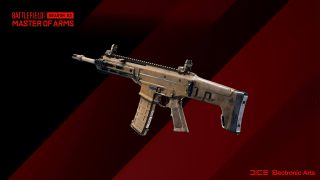
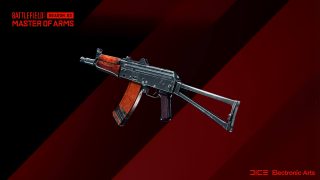
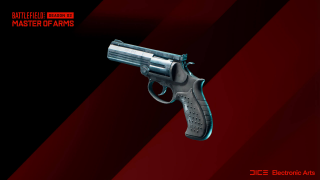
  • 3 new Vault Weapons enter the All-Out Warfare arsenal; the ACW-R, AKS-74u and MP412 REX
  • Premium Battle Pass holders will have the option to keep their servers visible in the Server Browser via the new Persistent Servers Feature even when they’re not playing
  • Laser Sight behavior on weaponry has received improved visuals and is now more fluid and reactive with movement

With a new reworked map and 3 new Vault weapons available for play alongside a variety of changes and improvements, we’re looking forward to hearing your feedback once you’ve been able to play.

New Vault Weapons

ACW-R – Battlefield 3

A lightweight, feature-heavy rifle platform chambering a recoil-reducing round. It’s reliable in all weather conditions from wet, sticky jungles to gritty deserts.

Unlock Assignments:

  • 100 Kills and Assists with the ACW-R or M5A3
  • 20 Headshot Kills with Assault Rifles

AKS-74u – Battlefield: Bad Company 2 / Battlefield 3

A compact and maneuverable platform that excels in CQB situations. 30-round magazine and high rate of fire help you say goodbye to the competition. Just keep it under control.

Unlock Assignments:

  • 100 Kills and Assists with AKS-74u or AM40
  • 8 Kills with Assault Rifles from a distance of 25m or less in a round

MP412 REX – Battlefield: Bad Company 2 / Battlefield 3

The “revolver for export” chambers the .357 round with a 6 round capacity and high damage. But being a revolver, it is low capacity and requires more time to reload.

Unlock Assignments:

  • 60 Kills and Assists with the MP-412 REX or M44
  • 10 Headshot Kills with Secondary Weapons

Changelog

General

  • The in-game Blocked Players list now updates in realtime when Blocking or Unblocking a user from the same platform
  • The Squad VOIP UI is no longer visible on the Home Menu when starting the game
  • When joining a Portal Featured Experience, the map location icon is now displayed on the loading screen in the bottom-left corner of the screen
  • Resolved an issue that could display the same Welcome Screen multiple times when booting the game
  • When joining a friend in Conquest in All-Out Warfare, the bottom left corner of the loading screen now correctly states US/RU instead of No-Pat Conquest
  • Some PC menu buttons and screens have been updated to no longer show “(F) Change Settings” if pressing that button would have no effect
  • Red background lights should no longer clip through player models in the Home Screen
  • PS5 – The Activity menu on PlayStation 5 now correctly show the actual in-game activity, instead of always stating Conquest
  • The “5 Kills and Assists as” Assignment to unlock a cosmetic for Crawford and Lis now track Assists correctly
  • The “Hellbent” Player Card Tag now tracks Season 2 missions correctly. This fix should be retroactive
  • The name of Crawfords Mounted Vulcan in the Mastery criteria has been corrected. Turret Assists now also progress it
  • Fixed an issue with the Statistics page not correctly tracking damage dealt with Season 2 weapons
  • Unobtainable Seasonal badges for expired Seasons are no longer present in the Upcoming rewards screen
  • Fixed an issue with Battle Rass rank ups being missed when a player ranks up too quickly
  • Added the ability to equip Player Card Backgrounds from the Battle Pass screens
  • Fixed an issue with the Battle Pass Mastery Badge tracking slowly. The badge should now track correctly when progress is made 
  • Fixed an issue where the XP bar travels backwards in the XP summary screen

Audio

  • Added improvements and fixes to the Audio of C5
  • Removed a faulty Voice Line after capturing E2 on Renewal
  • Added general Audio tweaks and mixing on Orbital
  • Added sound on burning wreck on Orbital
  • Made audio improvements to Ranger’s footstep patterns when they are off screen
  • Fixed an audio issue with Ranger’s footsteps when they come to a standstill

Gadgets

  • Fixed a minor bug where a backslash symbol was present in the World Log while AI resupplies, heals or revives revives
  • Fixed an issue where grenades did not show any indicators unless facing an enemy grenade. Sometimes problems just hit you in the face
  • Fixed an issue where the “No Ammo” prompt is displayed when throwing your last available grenade
  • The wrong name is no longer displayed for the FXM-33 within the Collection screen
  • Fixed a bug where the left arm is not visible while using the Med-Pen while traversal sprint is active
  • Fixed an issue where the Repair Tool was shaking during the repairing or damaging animation
  • The Recoilless M5, SOFLAM, FXM-33 AA Missile and Javelin can now lock onto empty or neutral vehicles

Portal

  • Stranded has been added to the Custom Conquest Game Mode
  • MCOMs added to TDM, FFA, VTDM, and Custom Conquest Game Modes 

Rules Editor

MCOM releated blocks have been added to the Rules Editor. Using these new blocks, you will be able to listen for and manipulate MCOMs to add to your game modes:

  • MCOM Objectives
  • MCOMDefused block 
  • MCOMDestroyed block 
  • MCOMArmed block 
  • AllMCOMs block 
  • SetFuseTime block
  • Added MCOM objective to EnableObjective block 
  • Added MCOM objective to Teleportation block
  • Added MCOM objective to SetTeamOwner block
  • Added MCOM objective to TeamOwner block
  • Added MCOM objective to IsActive block
  • RemainingFuseTime block
  • IsDefusing block
  • IsDefused block
  • IsArming block
  • IsArmed block

Other new blocks have been added to the Rules Editor:

  • GetCapturePointPosition block
  • EnableCapturing block
  • IsType block
  • OnPlayerDamaged block
  • OnPlayerEarnKillAssist block
  • Vehicle Repair block
  • Vehicle Damage block

Mutators

  • FriendlyFireDamageReflection mutator has been added. When using this Mutator, all damage dealt to friendlies will be reflected back at the player after two friendly fire kills.

Soldier

  • Fixed an issue which prevented movement in any direction while using a parachute
  • Soldiers are no longer able to stand on Flying Drones. Drones are not made for surfing and you should know better
  • Soldiers no longer spin for a brief moment after exiting vehicles
  • Fixed an issue where reload animations sometimes wouldn’t play as intended directly after being revived
  • Fixed an issue where moving slowly while prone could prevent the matching animations from being played
  • Soldier physics and animation stances were sometimes out of sync. This allowed movement into spaces where there wasn’t enough room to stand
  • Fixed several instances where input didn’t work while parachuting
  • Soldiers will now stop faster when starting a revive while sliding. This should prevent you from sliding out of range while starting a revive
  • Fixes several instances where the vaulting animation didn’t trigger on stairs or steep slopes
  • You can no longer deploy on a squad mate who is close to an enemy vehicle
  • It’s no longer possible to to revive teammates through glass windows on Renewal and Exposure

Specialists

Angel

  • Fixed a bug where playing Angel and being in the MD540 Nightbird passenger seat prevented you from dropping a Supply Crate

Boris

  • Fixed an issue where going outside the SG-36 Sentry Gun’s range breaks its firing animation while the Sentry Gun is moving

Casper 

  • Fixed a bug where “Enter Drone” prompt is present on screen even when the player does not use Casper’s tablet
  • Fixed an issue with the EMP weapon icon missing while controlling Caspers’ Recon Drone

Crawford

  • Fixed a bug where you could disappear from the map, and squad mates wouldn’t be able to spawn on you when operating the Mounted Vulcan
  • Fixed an animation issue when picking up the Mounted Vulcan
  • Fixed an issue where the “No Ammo” prompt appears when picking up the Mounted Vulcan
  • Fixed an issue where the Mounted Vulcan shooting sound gets stuck while alt-tabbed
  • The Mounted Vulcan can now be repaired

Dozer 

  • Fixed a bug where bashing a vehicle with Dozer’s SOB-8 Ballistic Shield and entering it at the same time will break 1P animations
  • Friendly players can no longer move through Dozer while his Shield is deployed

Falck

  • Resolved a broken self-heal animation upon using the S21 Syrette Pistol

Irish

  • Fixed an issue where Irish’s “Veteran” Trait prevented picking up ammo from fallen enemies
  • Fixed an issue where the APS-36 Shootdown Sentinel’s in-world icon appears blue instead of green
  • Fixed an issue where the APS-36 Shootdown Sentinel’s icon is not aligned when placing it on uneven terrain
  • Fixes several bugs which allowed the DCS Deployable Cover to be deployed inside players, vehicles or assets

Lis

  • Fixed a bug where Lis dealt 0 damage when shooting herself with the G-84 TGM. We don’t know why you want to do that though.
  • Fixed an art issue with Lis after entering BF3 Portal Collection

Mackay

  • An animation issue for Mackay during End of Round has been fixed

Paik

  • Fixed an issue with Paiks’ Scanner where the “Got one!” Voice Over would trigger while no enemy was visible on the minimap

Rao

  • Fixed an issue with Rao’s Cyber Warfare Suite where a white scanning Indicator was momentarily visible when first equipping it
  • Fixed an issue with Rao not getting XP when Hacking doors

Sundance

  • Fixed an issue where Sundance bounces while opening the Wingsuit close to the ground
  • Fixed an issue where the wrong name isdisplayed for Sundance’s Grenade Belt

Maps

We have made numerous smaller fixes across several maps with a focus on fixing bugs which could detract from a smooth and immersive gameplay experience. You should find less distractions such as becoming stuck, seeing floating, glitched or low quality terrain and assets.

Breakaway

  • Fixed some ice and snow covered mounds spawning with low quality textures when explosives are used nearby

Discarded

  • Fixed reflecting lights on the ship interior floor that didn’t accurately change position during movement

Exposure

  • Fixed an issue where soldiers could clip through the roof texture and see outside a building at A2
  • Fixed extended collision of several pine trees that prevented players from shooting through them
  • Fixed an issue where players could get stuck behind an invisible collision after falling from a cliff at B1
  • Players will no longer clip through metal beams after climbing on crates at D4
  • Fixed an issue in 64 player Breakthrough where the terrain around fences could be destroyed enough to them float
  • Fixed several areas in structures where soldiers could get stuck
  • Fixed an issue on B1 between containers and landslides which allowed players to crawl through them towards the other side 
  • Fixed issue in Breakthrough where soldiers could get stuck between barriers and containers in the tunnel from US HQ to the C1 flag
  • Fixed issue at D3 where soldiers could not traverse the middle of this elevation when running towards the zipline
  • Fixed an issue on several locations where sometimes Soldiers could either go below, or into unintended locations of the map
  • Fixed issue where it was possible to see through mountain textures
  • Fixed issue where the Interaction Key remained visible after having interacted with automatic doors
  • Fixed an issue at where grenades could get glitched in the ceiling of the room with the D1 flag
  • Fixed multiple issues of stretched and corrupted textures across the map
  • Fixed multiple areas on the map where Soldiers could clip through assets or terrain
  • Fixed multiple misplaced or floating assets across the map

Hourglass

  • Fixed an issue with several buildings having collisions outside their visuals. This means they unintentionally could blog bullets
  • Fixed issue on Deploy Screen where the button to select a vehicle was covered by the loadout UI
  • Hourglass – Fixed an issue where light panels near C1 had no animation when being destroyed

Kaleidoscope

  • Culling behavior on windows at the base of buildings has been improved
  • Fixed an issue at C2 where the terrain near the plaza avenue planter could be destroyed enough to see the front of the asset partially float
  • Fixed several terrain and craters issues at B3
  • Fixed issue where anti-air background atmosphere tracers were placed too close to the air OOB area.
  • Fixed an issue at C2 between the electrical box and plaza foundation which prevented traversal
  • Fixed multiple asset clipping issues across the map
  • Fixed an issue on B4 where destroyed terrain could cause assets to float
  • Fixed an issue at C1 with hydrant water VFX inside the building.
  • Fixed an issue with the command post in B1 that had the material physics set to metal resulting in the wrong footsteps SFX

Manifest

  • Removed several invisible walls on Manifest
  • Fixed several light culling issues on floodlights

Orbital

  • Fixed several areas on Orbital where the light was overexposed when looking outdoors from inside a building
  • Fixed several lighting and shadow issues across tunnels in Orbital
  • Fixed several issues at B2 where Soldier encountered traversal issues when passing through two rocks and trying to return
  • Fixed an C5 Explosive issue that disappeared and did not do any damage when placed in the buildings around the D2 flag
  • Fixed an issue where soldier could get stuck under the rocket launching pad
  • Fixed an issue where multiple different impact SFX are audible when throwing any grenade at the ceiling inside D2 storage units
  • Fixed multiple issues where light was bleeding inside/outside buildings and containers
  • Fixed an issue where control panels would remain and float after their surrounding buildings were destroyed
  • Fixed an issue where you could not Hack after being Hacked by an enemy

Renewal

  • Fixed several issues with draw distance and culling of objects across the map
  • Fixed an issue in Hazard Zone where Uplinks were in locations where they couldn’t be interacted with
  • Fixed an issue on Sector D where Soldiers could be flag as out of bounds

Stranded

  • Battlefield Portal layouts are now available for Stranded
  • Fixed issue at B1 where defenders in Rush were able to snipe at the A objective in the first sector from their HQ
  • Fixed an issue at C2 where prone soldiers could clip with the tower platforms and could be damaged by bullets
  • Fixed an issue where the widget for the random deploy point was missing in FFA based Portal modes
  • Fixed an issue at C1 where an occluder was visible when looking inside the middle part of the ship near a container
  • Fixed an issue where soldiers were able to interact with a non usable ladder on the ship deck
  • Fixed an issue at C1 where a corner from the marketplace section in the middle of the ship was turning bright when the player was facing the wall
  • Fixed an issue at C2 where Mackay could camp on top of support beam
  • Fixed an issue in Breakthrough where squad members could be seen walking through boxes during the insertion sequence

Vehicles

  • Bolte – Reduced size of Bolte incendiary mine AOE to match VFX.
  • Characters with items on their backs should no longer clip through the seat of the Tuk-Tuk
  • AMPs on the EBLC-RAM now blocks Sundance’s Scatter Grenades
  • The EBLC-RAM spawn beacon now gets destroyed by storms
  • Fixed an issue that would cause vehicles to jitter while using the 3p cameras of Tanks and Stealth Helicopters
  • Fixed an issue where overlapping icons would be present when AI’s are occupying all the remaining seats in a vehicle
  • Fixed vehicles freezing for a few seconds when switching seats on a moving platform.
  • Fixes an issue which was causing some vehicle cameras to drift upwards while turning.
  • Ground Vehicles – Reduced the impulse of ground vehicles 50mm cannon. This should stop vehicles such as the MD540 Nightbird from being pushed too much by weapon impacts.
  • Improved the collision of tank shells when aiming close to the side of an object.
  • KA-520 Super Hokum and MV-38 Condor – The Miniguns for Ground Vehicles now properly damage the Condor and Hind across various distances
  • Lock on missiles will no longer hit the helicopter pilot but instead deal damage to vehicle as intended
  • RAH-68 Huron – Fixed an issue where rain could be seen inside the cockpit of the RAH-68 Huron
  • Smart rockets now follow the same scatter angles as heavy rockets. They shoot more inwards and are more accurate
  • Stealth Helicopter Bombs will now play the bomb trail visual effects as intended for players other than the pilot dropping them.
  • The 1st person view in the Polaris RZR now displays dynamic values.
  • The audibility of the stealth helicopter bombs for low altitude bombings has been improved
  • The name of the M1A5 and T28 HEAT Shell to HE Shell to better match its functionality as anti-infantry
  • The Polaris RZR is now affected by systemic damage on its wheels.
  • The SFX from Passenger pings would sometimes play twice, so we’ve removed the repeat button
  • Wildcat – Fixed an issue which caused the crosshair for 40 and 57mm Cannons to not work properly on the Wildcat
  • Wildcat – The projectiles from the Wildcat’s 40mm cannon are now aligned with the center of the crosshair when shooting from a 1P perspective.
  • The enemy vehicle type is now shown on the Kill Card when a vehicle blows up due to vehicle collision
  • Fixed a bug where some Specialists still have their backpack gadget on while in the Polaris RZR
  • Fixed a bug where players could lock onto friendly helicopters after locking onto an enemy helicopters

EBAA Wildcat, MAV, M1A5, T28

We have increased the health for the Track / Wheel Damage Zone on Heavy Armor vehicles to ensure players have to be accurate at disabling specific vehicle parts. It now takes 2 shots to disable.

  • Tank Track / Wheels – Health Increased from 200 -> 300

EBAA Wildcat, M1A5, T28

The Turret Damage Zone also had its health increased to reward accuracy versus vehicles. It now also takes 2 shots to be taken down. To compensate, the health regenerates slower.

  • Tank / Wildcat Turret – Health increased from 250 -> 350
  • Health Regeneration Duration increased from 10 -> 14

Weapons

  • The Target 8T Iron Sight is no longer blocked when using the Skeletonized skin.
  • Added suppressor sounds to the GVT 45-70
  • DM7 – The DM7 magazine would sometimes disappear for a second after reloading when viewed from a 3rd person perspective. The mags have been given a confidence boost and no longer hide
  • Added a missing animation for the DXR-1 casing ejection
  • The AM40’s standard issue / Drum Mag now displays the correct ammo count.
  • Toggling an underbarrel will no longer appear in the HUD of nearby players
  • Fixed an issue where bipods appeared closed from another players perspective
  • Removed muzzle flash that was incorrectly visible across a number of weapons when using a suppressor
  • The M16A3 was missing pros and cons for some of its underbarrels. These have been located
  • Resolved an issue with missing SFX while reloading
  • The barrel is no longer visible while Aiming Down Sight while using the Avancys with certain scopes
  • The GAR45 silencer now properly hides you from the minimap like all light silencers.
  • Fixed an issue that was causing an invisible mesh to appear on the standard magazine of the PF51
  • Laser sight is no longer misaligned on weapons when using traversal sprint and a FOV above 55
  • In-game hints now display correctly for the Canted Sight Sig Tango 4
  • Improved spin-up weapon behavior when firing soon after entering vehicle weapon stations
  • Fixed an issue where the ADS animation would look odd from another player’s perspective
  • Fixed an issue that was causing the animated bolt to clip through the gun on an empty magazine reload

Laser Sights

Laser Sight behavior on weaponry has received multiple fixes and visual improvements

  • Fixed an issue where the laser was floating around the weapon attachment in 1p view when using a high FOV setting
  • Fixed an issue where the laser was pointing forward too much in 1p while sprinting and using a high FOV setting
  • Fixed issue where the glare from green and blue lasers was red when looking at other players
  • Green and blue lasers are now slightly more intense than the red one 
  • Lasers are now accurately blocked by geometry
  • Laser dots are now visible as intended when ADS through most sights/scopes
  • Added further visual polish and fixes to lasers 

You can read more about persistent servers right here.

Source: EA

Avatar photo

Alex Co

Father, gamer, games media vet, writer of words, killer of noobs.

Home > News

Battlefield 2042 Update 1.22 Fires Out for 2.2.0 Patch This October 20

As expected, DICE has released Battlefield 2042 update 1.22! This title update brings in the Orbital map rework, new Vault Weapons, persistent servers in Battlefield Portal for Battle Pass owners and more! Read on for the full BF2042 October 20 patch notes.

Battlefield 2042 Update 1.22 | BF2042 October 20 Patch Notes:

We’re about to head into the second major game update for Season 2: Master of Arms. We hope you continue to enjoy everything new so far in this Season. 

Update 2.2 for Season 2: Master of Arms releases on Thursday, October 20 @ 08:00 UTC.

Here’s an overview of some of the key changes and improvements that are included in this Update:

  • A reworked version of Orbital with an improved gameplay flow, more cover and assets, and terrain improvements
  • 3 new Vault Weapons enter the All-Out Warfare arsenal; the ACW-R, AKS-74u and MP412 REX
  • Premium Battle Pass holders will have the option to keep their servers visible in the Server Browser via the new Persistent Servers Feature even when they’re not playing
  • Laser Sight behavior on weaponry has received improved visuals and is now more fluid and reactive with movement

With a new reworked map and 3 new Vault weapons available for play alongside a variety of changes and improvements, we’re looking forward to hearing your feedback once you’ve been able to play.

New Vault Weapons

ACW-R – Battlefield 3

A lightweight, feature-heavy rifle platform chambering a recoil-reducing round. It’s reliable in all weather conditions from wet, sticky jungles to gritty deserts.

Unlock Assignments:

  • 100 Kills and Assists with the ACW-R or M5A3
  • 20 Headshot Kills with Assault Rifles

AKS-74u – Battlefield: Bad Company 2 / Battlefield 3

A compact and maneuverable platform that excels in CQB situations. 30-round magazine and high rate of fire help you say goodbye to the competition. Just keep it under control.

Unlock Assignments:

  • 100 Kills and Assists with AKS-74u or AM40
  • 8 Kills with Assault Rifles from a distance of 25m or less in a round

MP412 REX – Battlefield: Bad Company 2 / Battlefield 3

The “revolver for export” chambers the .357 round with a 6 round capacity and high damage. But being a revolver, it is low capacity and requires more time to reload.

Unlock Assignments:

  • 60 Kills and Assists with the MP-412 REX or M44
  • 10 Headshot Kills with Secondary Weapons

Changelog

General

  • The in-game Blocked Players list now updates in realtime when Blocking or Unblocking a user from the same platform
  • The Squad VOIP UI is no longer visible on the Home Menu when starting the game
  • When joining a Portal Featured Experience, the map location icon is now displayed on the loading screen in the bottom-left corner of the screen
  • Resolved an issue that could display the same Welcome Screen multiple times when booting the game
  • When joining a friend in Conquest in All-Out Warfare, the bottom left corner of the loading screen now correctly states US/RU instead of No-Pat Conquest
  • Some PC menu buttons and screens have been updated to no longer show “(F) Change Settings” if pressing that button would have no effect
  • Red background lights should no longer clip through player models in the Home Screen
  • PS5 – The Activity menu on PlayStation 5 now correctly show the actual in-game activity, instead of always stating Conquest
  • The “5 Kills and Assists as” Assignment to unlock a cosmetic for Crawford and Lis now track Assists correctly
  • The “Hellbent” Player Card Tag now tracks Season 2 missions correctly. This fix should be retroactive
  • The name of Crawfords Mounted Vulcan in the Mastery criteria has been corrected. Turret Assists now also progress it
  • Fixed an issue with the Statistics page not correctly tracking damage dealt with Season 2 weapons
  • Unobtainable Seasonal badges for expired Seasons are no longer present in the Upcoming rewards screen
  • Fixed an issue with Battle Rass rank ups being missed when a player ranks up too quickly
  • Added the ability to equip Player Card Backgrounds from the Battle Pass screens
  • Fixed an issue with the Battle Pass Mastery Badge tracking slowly. The badge should now track correctly when progress is made 
  • Fixed an issue where the XP bar travels backwards in the XP summary screen

Audio

  • Added improvements and fixes to the Audio of C5
  • Removed a faulty Voice Line after capturing E2 on Renewal
  • Added general Audio tweaks and mixing on Orbital
  • Added sound on burning wreck on Orbital
  • Made audio improvements to Ranger’s footstep patterns when they are off screen
  • Fixed an audio issue with Ranger’s footsteps when they come to a standstill

Gadgets

  • Fixed a minor bug where a backslash symbol was present in the World Log while AI resupplies, heals or revives revives
  • Fixed an issue where grenades did not show any indicators unless facing an enemy grenade. Sometimes problems just hit you in the face
  • Fixed an issue where the “No Ammo” prompt is displayed when throwing your last available grenade
  • The wrong name is no longer displayed for the FXM-33 within the Collection screen
  • Fixed a bug where the left arm is not visible while using the Med-Pen while traversal sprint is active
  • Fixed an issue where the Repair Tool was shaking during the repairing or damaging animation
  • The Recoilless M5, SOFLAM, FXM-33 AA Missile and Javelin can now lock onto empty or neutral vehicles

Portal

  • Stranded has been added to the Custom Conquest Game Mode
  • MCOMs added to TDM, FFA, VTDM, and Custom Conquest Game Modes 

Rules Editor

MCOM releated blocks have been added to the Rules Editor. Using these new blocks, you will be able to listen for and manipulate MCOMs to add to your game modes:

  • MCOM Objectives
  • MCOMDefused block 
  • MCOMDestroyed block 
  • MCOMArmed block 
  • AllMCOMs block 
  • SetFuseTime block
  • Added MCOM objective to EnableObjective block 
  • Added MCOM objective to Teleportation block
  • Added MCOM objective to SetTeamOwner block
  • Added MCOM objective to TeamOwner block
  • Added MCOM objective to IsActive block
  • RemainingFuseTime block
  • IsDefusing block
  • IsDefused block
  • IsArming block
  • IsArmed block

Other new blocks have been added to the Rules Editor:

  • GetCapturePointPosition block
  • EnableCapturing block
  • IsType block
  • OnPlayerDamaged block
  • OnPlayerEarnKillAssist block
  • Vehicle Repair block
  • Vehicle Damage block

Mutators

  • FriendlyFireDamageReflection mutator has been added. When using this Mutator, all damage dealt to friendlies will be reflected back at the player after two friendly fire kills.

Soldier

  • Fixed an issue which prevented movement in any direction while using a parachute
  • Soldiers are no longer able to stand on Flying Drones. Drones are not made for surfing and you should know better
  • Soldiers no longer spin for a brief moment after exiting vehicles
  • Fixed an issue where reload animations sometimes wouldn’t play as intended directly after being revived
  • Fixed an issue where moving slowly while prone could prevent the matching animations from being played
  • Soldier physics and animation stances were sometimes out of sync. This allowed movement into spaces where there wasn’t enough room to stand
  • Fixed several instances where input didn’t work while parachuting
  • Soldiers will now stop faster when starting a revive while sliding. This should prevent you from sliding out of range while starting a revive
  • Fixes several instances where the vaulting animation didn’t trigger on stairs or steep slopes
  • You can no longer deploy on a squad mate who is close to an enemy vehicle
  • It’s no longer possible to to revive teammates through glass windows on Renewal and Exposure

Specialists

Angel

  • Fixed a bug where playing Angel and being in the MD540 Nightbird passenger seat prevented you from dropping a Supply Crate

Boris

  • Fixed an issue where going outside the SG-36 Sentry Gun’s range breaks its firing animation while the Sentry Gun is moving

Casper 

  • Fixed a bug where “Enter Drone” prompt is present on screen even when the player does not use Casper’s tablet
  • Fixed an issue with the EMP weapon icon missing while controlling Caspers’ Recon Drone

Crawford

  • Fixed a bug where you could disappear from the map, and squad mates wouldn’t be able to spawn on you when operating the Mounted Vulcan
  • Fixed an animation issue when picking up the Mounted Vulcan
  • Fixed an issue where the “No Ammo” prompt appears when picking up the Mounted Vulcan
  • Fixed an issue where the Mounted Vulcan shooting sound gets stuck while alt-tabbed
  • The Mounted Vulcan can now be repaired

Dozer 

  • Fixed a bug where bashing a vehicle with Dozer’s SOB-8 Ballistic Shield and entering it at the same time will break 1P animations
  • Friendly players can no longer move through Dozer while his Shield is deployed

Falck

  • Resolved a broken self-heal animation upon using the S21 Syrette Pistol

Irish

  • Fixed an issue where Irish’s “Veteran” Trait prevented picking up ammo from fallen enemies
  • Fixed an issue where the APS-36 Shootdown Sentinel’s in-world icon appears blue instead of green
  • Fixed an issue where the APS-36 Shootdown Sentinel’s icon is not aligned when placing it on uneven terrain
  • Fixes several bugs which allowed the DCS Deployable Cover to be deployed inside players, vehicles or assets

Lis

  • Fixed a bug where Lis dealt 0 damage when shooting herself with the G-84 TGM. We don’t know why you want to do that though.
  • Fixed an art issue with Lis after entering BF3 Portal Collection

Mackay

  • An animation issue for Mackay during End of Round has been fixed

Paik

  • Fixed an issue with Paiks’ Scanner where the “Got one!” Voice Over would trigger while no enemy was visible on the minimap

Rao

  • Fixed an issue with Rao’s Cyber Warfare Suite where a white scanning Indicator was momentarily visible when first equipping it
  • Fixed an issue with Rao not getting XP when Hacking doors

Sundance

  • Fixed an issue where Sundance bounces while opening the Wingsuit close to the ground
  • Fixed an issue where the wrong name isdisplayed for Sundance’s Grenade Belt

Maps

We have made numerous smaller fixes across several maps with a focus on fixing bugs which could detract from a smooth and immersive gameplay experience. You should find less distractions such as becoming stuck, seeing floating, glitched or low quality terrain and assets.

Breakaway

  • Fixed some ice and snow covered mounds spawning with low quality textures when explosives are used nearby

Discarded

  • Fixed reflecting lights on the ship interior floor that didn’t accurately change position during movement

Exposure

  • Fixed an issue where soldiers could clip through the roof texture and see outside a building at A2
  • Fixed extended collision of several pine trees that prevented players from shooting through them
  • Fixed an issue where players could get stuck behind an invisible collision after falling from a cliff at B1
  • Players will no longer clip through metal beams after climbing on crates at D4
  • Fixed an issue in 64 player Breakthrough where the terrain around fences could be destroyed enough to them float
  • Fixed several areas in structures where soldiers could get stuck
  • Fixed an issue on B1 between containers and landslides which allowed players to crawl through them towards the other side 
  • Fixed issue in Breakthrough where soldiers could get stuck between barriers and containers in the tunnel from US HQ to the C1 flag
  • Fixed issue at D3 where soldiers could not traverse the middle of this elevation when running towards the zipline
  • Fixed an issue on several locations where sometimes Soldiers could either go below, or into unintended locations of the map
  • Fixed issue where it was possible to see through mountain textures
  • Fixed issue where the Interaction Key remained visible after having interacted with automatic doors
  • Fixed an issue at where grenades could get glitched in the ceiling of the room with the D1 flag
  • Fixed multiple issues of stretched and corrupted textures across the map
  • Fixed multiple areas on the map where Soldiers could clip through assets or terrain
  • Fixed multiple misplaced or floating assets across the map

Hourglass

  • Fixed an issue with several buildings having collisions outside their visuals. This means they unintentionally could blog bullets
  • Fixed issue on Deploy Screen where the button to select a vehicle was covered by the loadout UI
  • Hourglass – Fixed an issue where light panels near C1 had no animation when being destroyed

Kaleidoscope

  • Culling behavior on windows at the base of buildings has been improved
  • Fixed an issue at C2 where the terrain near the plaza avenue planter could be destroyed enough to see the front of the asset partially float
  • Fixed several terrain and craters issues at B3
  • Fixed issue where anti-air background atmosphere tracers were placed too close to the air OOB area.
  • Fixed an issue at C2 between the electrical box and plaza foundation which prevented traversal
  • Fixed multiple asset clipping issues across the map
  • Fixed an issue on B4 where destroyed terrain could cause assets to float
  • Fixed an issue at C1 with hydrant water VFX inside the building.
  • Fixed an issue with the command post in B1 that had the material physics set to metal resulting in the wrong footsteps SFX

Manifest

  • Removed several invisible walls on Manifest
  • Fixed several light culling issues on floodlights

Orbital

  • Fixed several areas on Orbital where the light was overexposed when looking outdoors from inside a building
  • Fixed several lighting and shadow issues across tunnels in Orbital
  • Fixed several issues at B2 where Soldier encountered traversal issues when passing through two rocks and trying to return
  • Fixed an C5 Explosive issue that disappeared and did not do any damage when placed in the buildings around the D2 flag
  • Fixed an issue where soldier could get stuck under the rocket launching pad
  • Fixed an issue where multiple different impact SFX are audible when throwing any grenade at the ceiling inside D2 storage units
  • Fixed multiple issues where light was bleeding inside/outside buildings and containers
  • Fixed an issue where control panels would remain and float after their surrounding buildings were destroyed
  • Fixed an issue where you could not Hack after being Hacked by an enemy

Renewal

  • Fixed several issues with draw distance and culling of objects across the map
  • Fixed an issue in Hazard Zone where Uplinks were in locations where they couldn’t be interacted with
  • Fixed an issue on Sector D where Soldiers could be flag as out of bounds

Stranded

  • Battlefield Portal layouts are now available for Stranded
  • Fixed issue at B1 where defenders in Rush were able to snipe at the A objective in the first sector from their HQ
  • Fixed an issue at C2 where prone soldiers could clip with the tower platforms and could be damaged by bullets
  • Fixed an issue where the widget for the random deploy point was missing in FFA based Portal modes
  • Fixed an issue at C1 where an occluder was visible when looking inside the middle part of the ship near a container
  • Fixed an issue where soldiers were able to interact with a non usable ladder on the ship deck
  • Fixed an issue at C1 where a corner from the marketplace section in the middle of the ship was turning bright when the player was facing the wall
  • Fixed an issue at C2 where Mackay could camp on top of support beam
  • Fixed an issue in Breakthrough where squad members could be seen walking through boxes during the insertion sequence

Vehicles

  • Bolte – Reduced size of Bolte incendiary mine AOE to match VFX.
  • Characters with items on their backs should no longer clip through the seat of the Tuk-Tuk
  • AMPs on the EBLC-RAM now blocks Sundance’s Scatter Grenades
  • The EBLC-RAM spawn beacon now gets destroyed by storms
  • Fixed an issue that would cause vehicles to jitter while using the 3p cameras of Tanks and Stealth Helicopters
  • Fixed an issue where overlapping icons would be present when AI’s are occupying all the remaining seats in a vehicle
  • Fixed vehicles freezing for a few seconds when switching seats on a moving platform.
  • Fixes an issue which was causing some vehicle cameras to drift upwards while turning.
  • Ground Vehicles – Reduced the impulse of ground vehicles 50mm cannon. This should stop vehicles such as the MD540 Nightbird from being pushed too much by weapon impacts.
  • Improved the collision of tank shells when aiming close to the side of an object.
  • KA-520 Super Hokum and MV-38 Condor – The Miniguns for Ground Vehicles now properly damage the Condor and Hind across various distances
  • Lock on missiles will no longer hit the helicopter pilot but instead deal damage to vehicle as intended
  • RAH-68 Huron – Fixed an issue where rain could be seen inside the cockpit of the RAH-68 Huron
  • Smart rockets now follow the same scatter angles as heavy rockets. They shoot more inwards and are more accurate
  • Stealth Helicopter Bombs will now play the bomb trail visual effects as intended for players other than the pilot dropping them.
  • The 1st person view in the Polaris RZR now displays dynamic values.
  • The audibility of the stealth helicopter bombs for low altitude bombings has been improved
  • The name of the M1A5 and T28 HEAT Shell to HE Shell to better match its functionality as anti-infantry
  • The Polaris RZR is now affected by systemic damage on its wheels.
  • The SFX from Passenger pings would sometimes play twice, so we’ve removed the repeat button
  • Wildcat – Fixed an issue which caused the crosshair for 40 and 57mm Cannons to not work properly on the Wildcat
  • Wildcat – The projectiles from the Wildcat’s 40mm cannon are now aligned with the center of the crosshair when shooting from a 1P perspective.
  • The enemy vehicle type is now shown on the Kill Card when a vehicle blows up due to vehicle collision
  • Fixed a bug where some Specialists still have their backpack gadget on while in the Polaris RZR
  • Fixed a bug where players could lock onto friendly helicopters after locking onto an enemy helicopters

EBAA Wildcat, MAV, M1A5, T28

We have increased the health for the Track / Wheel Damage Zone on Heavy Armor vehicles to ensure players have to be accurate at disabling specific vehicle parts. It now takes 2 shots to disable.

  • Tank Track / Wheels – Health Increased from 200 -> 300

EBAA Wildcat, M1A5, T28

The Turret Damage Zone also had its health increased to reward accuracy versus vehicles. It now also takes 2 shots to be taken down. To compensate, the health regenerates slower.

  • Tank / Wildcat Turret – Health increased from 250 -> 350
  • Health Regeneration Duration increased from 10 -> 14

Weapons

  • The Target 8T Iron Sight is no longer blocked when using the Skeletonized skin.
  • Added suppressor sounds to the GVT 45-70
  • DM7 – The DM7 magazine would sometimes disappear for a second after reloading when viewed from a 3rd person perspective. The mags have been given a confidence boost and no longer hide
  • Added a missing animation for the DXR-1 casing ejection
  • The AM40’s standard issue / Drum Mag now displays the correct ammo count.
  • Toggling an underbarrel will no longer appear in the HUD of nearby players
  • Fixed an issue where bipods appeared closed from another players perspective
  • Removed muzzle flash that was incorrectly visible across a number of weapons when using a suppressor
  • The M16A3 was missing pros and cons for some of its underbarrels. These have been located
  • Resolved an issue with missing SFX while reloading
  • The barrel is no longer visible while Aiming Down Sight while using the Avancys with certain scopes
  • The GAR45 silencer now properly hides you from the minimap like all light silencers.
  • Fixed an issue that was causing an invisible mesh to appear on the standard magazine of the PF51
  • Laser sight is no longer misaligned on weapons when using traversal sprint and a FOV above 55
  • In-game hints now display correctly for the Canted Sight Sig Tango 4
  • Improved spin-up weapon behavior when firing soon after entering vehicle weapon stations
  • Fixed an issue where the ADS animation would look odd from another player’s perspective
  • Fixed an issue that was causing the animated bolt to clip through the gun on an empty magazine reload

Laser Sights

Laser Sight behavior on weaponry has received multiple fixes and visual improvements

  • Fixed an issue where the laser was floating around the weapon attachment in 1p view when using a high FOV setting
  • Fixed an issue where the laser was pointing forward too much in 1p while sprinting and using a high FOV setting
  • Fixed issue where the glare from green and blue lasers was red when looking at other players
  • Green and blue lasers are now slightly more intense than the red one 
  • Lasers are now accurately blocked by geometry
  • Laser dots are now visible as intended when ADS through most sights/scopes
  • Added further visual polish and fixes to lasers 

Source: EA

Avatar photo

Alex Co

Father, gamer, games media vet, writer of words, killer of noobs.

Home > News

Gran Turismo 7 Update 1.25 Drives Out for New Cars, Scapes This October 20 (Update)

Gran Turismo 7 update 1.25 (PS5 version 1.250) has been released by Polyphony Digital, and is the racing game’s big October update! This brings four new cars, new scapes and more into the driving sim. Read on for the GT7 October 20 patch notes.

Gran Turismo 7 Update 1.25 | GT7 Update 1.250 Patch Notes | GT7 October 20 Patch Notes:

Update: Polyphony has released the official patch notes, which can be seen below.

Main Features Implemented

1. Cars
– The following four new cars have been added:
・Maserati Merak SS ’80 (available for purchase Legend Cars)
・Mazda Roadster NR-A (ND) ’22
・Nissan GT-R Nismo GT3 ’18
・Nissan Skyline 2000GT-R (KPGC110) ’73 (available for purchase at Legend Cars)

2. Brand Central
– New color variations for the following three cars have been added to the Mazda Showroom for use in the Mazda Spirit Racing GT Cup 2022, an online event available only in Japan.
・Roadster NR-A (ND) ’22
・Atenza Gr.4
・RX-VISION GT3 CONCEPT

3. Café
– The following Menu Book has been added:
・Menu Book No. 46: Historic Sports Car Masters (Collector Level 29 and above)
– The following two Extra Menus have been added:
・Extra Menu No. 10: Collection: Honda NSX (Collector Level 36 and above)
・Extra Menu No. 11: Collection: Nissan Silvia (Collector Level 26 and above)

The new Menu Books and Extra Menus will appear after clearing Menu Book No. 39 (Championship: World GT Series) and watching the ending.

4. World Circuits
– The following new events have been added to World Circuits:
・Historic Sports Car Masters
– Spa-Francorchamps
– Nürburgring Nordschleife
– Goodwood Motor Circuit
・Gr.1 Prototype Series
– Fuji Speedway
・Silvia Sisters
– Tokyo Expressway – South Clockwise

5. Scapes
– “Whitby” and “Autumn Leaves” have been added to Curations in Scapes.

Other Improvements and Adjustments

1. Physics Simulation Model
– The simulation for tire heat generation and wear ratio has been adjusted.
– The suspension geometry for each car has been adjusted.
– The initial values for suspension parts have been adjusted.
– The initial values for the Differential Gear (with Fully Customizable LSD equipped) on certain cars have been adjusted.
– The Performance Points (PP) of some cars have been adjusted.
– The conditions for mechanical damage occurring from a collision or contact if Mechanical Damage is set to Light or Heavy in the Race Settings have been changed. As a result, cars are now less likely to sustain damage after hitting a track wall or other obstacles.

2. Steering Controllers
– Performance of the wireless controller has been adjusted.

3. Sport
– In Daily Races and Championships, it is now possible to select the Styles of an Event-Specified Car. Please note that while it is possible to open the Car Settings menu on Event-Specified Car with Styles, only the tires can be changed.
– A Points Table button has been added to the Quick Menu in Championships events.

4. My Page
– We fixed an issue where achieving All Bronze or All Gold in License Tests, Missions, and Circuit Experiences would cause the milestone to show up multiple times.

5. Custom Race
– Rival cars selected via ‘Rivals Settings’ > ‘Rivals Selection’ > ‘Select from Garage’ will now use the appropriate tires as per the Race Settings, regardless of whether you own the tires for that car.

6. Localization
– Fixed various text localization issues.

7. Others
– Various other issues have been addressed.


For now, the official patch notes have not been released yet by Polyphony, but here are the confirmed new cars and other stuff incoming today.

1. Four new cars, from a historically valuable classic to a new sports model.

  • Maserati Merak SS ’80
  • Mazda Roadster NR-A (ND) ’22
  • Nissan Skyline 2000GT-R (KPGC110) ’73
  • Nissan GT-R NISMO GT3 ’18

2. “Autumn Leaves” and “Whitby” will be added as a featured Curation in Scapes.

Same as always, once the patch notes are released, we’ll update the post to reflect it, so sit tight!

Update: Official patch notes have been released, and the article has been updated accordingly.

Source: Gran Turismo

Avatar photo

Alex Co

Father, gamer, games media vet, writer of words, killer of noobs.

Home > News

Dragon Ball: The Breakers Update 1.03 Blasts Out This Oct. 20 (Update)

Developer Dimps has released Dragon Ball: The Breakers update 1.03 today for all platforms. This update should further improve the launch week issues that people have been experiencing. Check out the Dragon Ball: The Breakers October 20 patch notes below.

Dragon Ball: The Breakers Update 1.03 Patch Notes | Dragon Ball: The Breakers October 20 Update Patch Notes:

While patch notes for update 1.03 have not been released yet, Dimps have posted some changes that have been made based on player feedback as the day one patch. You can read these details down below. Also, maintenance is currently being done as announced on Twitter.

Game Balance Adjustment

<Survivor>

◆ Skill “Saiyan Pod Remote”

・The cooldown time of the skill has been extended.

・The time duration between which the Saiyan Pod is called and when it arrives at the player’s location has been extended.

◆ Item “Barrier Recovery Device”

The time between the use of the item and its completion has been shortened.

◆ Item “Cooldown Drink” and “Super Cooldown Drink”

・The time between the use of the item and its effect has been extended.

・The effect of “Cooldown Drink” has been decreased.

・The effect of “Super Cooldown Drink” has been increased to 100% for all transformation levels; however, it will now decrease based on the tranformation level.

◆ Vehicle

・The speed difference between the vehicles that are initially on the field and those that appear from the capsule has been removed.

◆ Revive

・The time to revive has been shortened.

◆ Startup System

・The increasing rate of the gauge when the Survivor accesses the activation system has been adjusted to improve.

<Raider>

◆ Blow-blast after evolution

・The network has been adjusted to reduce the effects of lag and misalignment caused by the network.

・ The area of the hit judgment has been expanded the time to receive the effect has been increased. In accordance of these adjustments, the distance of the blast has been expanded.

Others

◆ Improvements on item acquisition priortized over player revival

・Improved the issue when the position of wounded players and fallen items overlaps, picking up items was prioritized over player revivals.

◆ Adjustment on Power Key Position

・To avoid finding all power keys early in the game, we have adjusted the placement of the power keys so they are not placed in the crate near the Survivor’s starting point.

◆ Improved an issue with multiple Survivor melee rushes

・When a rush attack misses due to another player pushing it out of the way, it will return to a neutral state and the rush attack can be started again.

・Fixed a bug where the final blowout of the rush attack did not blow up.

・Fixed a bug that prevented the blowout if an attack such as an air bullet was received just before the blowout.

◆ Game Balance Between Survivor and Raider

・Adjustments have been made so that when a rush attack from multiple survivors is established, the damage is compensated for the level difference between the Raider and the Survivor.

*If the Raider has a higher level, the damage will be lower even it follows a melee rush.

We will update this post if Dimps updates its patch notes for the game. Dragon Ball: The Breakers is out now for PC, PlayStation, Xbox and Nintendo Switch. Stay tuned to our review hitting the site soon.

Source: Bandai Namco

Damien Seeto

Home > News

Gran Turismo 7 Servers Down for Maintenance and Patch Deployment This October 20

If you can’t log in to Gran Turismo 7, it’s not just you, as Polyphony Digital has taken the Gran Turismo 7 servers down for planned maintenance! Same as in every month, this will see the October update for the game be released.

Gran Turismo 7 Servers Down Maintenance Status and Updates for October 20:

Update: The full patch notes for update 1.25 have been released!

Here’s the full announcement from Polyphony Digital:

At the following time, we will perform game update maintenance on the Gran Turismo 7 servers.

[Day & Time]

  • October 19, 2022, 23:00 – 01:00 PDT
  • October 20, 2022, 06:00 – 08:00 UTC
  • October 20, 2022 02:00 EDT
  • October 20, 2022 14:00 HKT

[IMPORTANT]
Please note that during this time only Arcade Race within World Circuits, and Music Rally will be playable. other online services like Sport mode will not be available and progress will not be saved.

Furthermore, the Performance Points (PP) requirements for some events may change with this update: please be sure to complete any championships within World Circuits that might be on hold before the start of the maintenance.

Same as before, once the patch is out, we’ll be sure to provide a link out to it in the article. If the maintenance schedule changes, we’ll update the post to reflect that too.

Source: Gran Turismo

Avatar photo

Alex Co

Father, gamer, games media vet, writer of words, killer of noobs.

Home > News

PUBG Update 2.23 Shoots Out for Patch 20.1 on Consoles This Oct. 20

PUBG Corp has released PUBG update 2.23 today for the console versions of the game. This is update 20.1 which was available for PC owners earlier this month. This update comes with some new content as well as a ton of gameplay improvements and bug fixes. Check out the PUBG October 20 patch notes below.

PUBG Update 2.23 Patch Notes | PUBG October 20 Update Patch Notes:

LIVE MAINTENANCE SCHEDULE

※ The times shown below are subject to change.

  • PC
    • PDT: October 11, 5:30 PM – October 12, 1:30 AM
    • CEST: October 12, 2:30 AM – 10:30 AM
    • KST: October 12, 9:30 AM – 5:30 PM
  • Console
    • PDT: October 19, 9 PM – October 20, 4 AM
    • CEST: October 20, 6 AM – 1 PM
    • KST: October 20, 1 PM – 8 PM

MAP SERVICE

  • TEST SERVER
    • Normal Match: Erangel / Deston / Karakin
      • AS region: Squad
      • NA region: Squad – FPP
  • LIVE SERVER
    • AS, SEA, KR/JP
      • Starting this update, Deston has been removed as a Featured Map and will replace Miramar in Normal Matches.
      • Normal Match: Erangel / DESTON / Taego / Sanhok / KARAKIN
      • Ranked: Erangel / Miramar / Taego
    • NA, EU, SA, OC, RU
      • In this update, Deston will be replacing Miramar in Normal Matches.
      • Normal Match: Erangel / DESTON / Taego / Sanhok / KARAKIN
      • Ranked: Erangel / Miramar / Taego
    • CONSOLE (XBOX, PLAYSTATION®, STADIA)
      • Normal Match: Erangel / DESTON / Taego / Sanhok / KARAKIN
      • Ranked: Erangel / Miramar / Taego

※ PLEASE KEEP IN MIND THE FEATURES AND UPDATES SHOWN BELOW MAY BE MODIFIED OR EVEN POSSIBLY REMOVED DUE TO REASONS SUCH AS BUGS, IN-GAME ISSUES, AND/OR COMMUNITY FEEDBACK. ALSO, THE IMAGES SHOWN BELOW ARE PROVIDED AS VISUAL GUIDELINES – THEY MAY LOOK DIFFERENT IN THE ACTUAL GAME AS BUILDS ARE CONTINUOUSLY DEVELOPED AND FIXED BEFORE THEY GO LIVE.

GUNPLAY

Balancing weapon attachments and vehicle gameplay this patch, along with a reticle option update for the 4x Scope.

WEAPON ATTACHMENTS

  • THUMBGRIP
    • Vertical recoil control: +5% → +8%
    • ADS speed: +30% → +40%
    • Sway control (breathing): +20%
  • ANGLED FOREGRIP
    • Sway control (firing): +5% → 0%
    • Horizontal recoil control: +15% → +20%
    • ADS speed: +10%
    • Sway control (breathing): -20% → –10%
  • HALFGRIP
    • Vertical recoil control: +8%
    • Horizontal recoil control: +8%
    • Sway control (breathing): -20% → –10%
    • Recoil recovery: +10%
    • Sway control (firing): -15% → -5%
  • VERTICAL FOREGRIP
    • Vertical recoil control: +15%
    • Sway control (firing): +15% → 0%
  • LIGHTWEIGHT GRIP
    • Sway control (firing): +20%
    • Initial shot recoil control: +40%
    • Sway control (breathing): +20%
    • Recoil recovery after shot: +20% ADDED

DEV COMMENT

The Vertical Foregrip shows strong performance and receives much love from our players – which is quite obvious, as the attachment definitely helps control vertical recoil and accuracy when firing at long range.

However, we didn’t want to sustain a meta where everyone uses the same attachment and repeating similar combat styles every match. Therefore, we’ve decided to buff other attachments based on their individual, unique traits.

We’ll of course continue to monitor your plays after this balance update and make sure we’re providing more options and room for possible tactics moving forward.

Additionally, we’ve also noticed that the current in-game terms of the attachments’ features (such as weapon steadiness) could be much clearer – so we’re also planning to polish up some of the terms very soon.


FIRING FROM VEHICLES

Using vehicles to fight enemies has great merits (and is a lot of fun). You can move so much faster and find yourself being able to hurl relatively stable shots at enemies running for their lives barefoot.

So we’ve received lots of feedback from players facing major disadvantages on foot, such as getting barraged by a horde of ammo from moving vehicles and ending up dying too fast.

Therefore, after many tests on in-vehicle recoil control and thoughts on how we could reduce these one-sided situations in a healthy direction, we’ve decided to balance vehicle gameplay as the following based on your feedback:

  • DRIVER’S SEAT
    • Reloading handguns will be instantly canceled if the driver controls the vehicle’s steering wheel.
      • Therefore, players can reload handguns when the vehicle is moving in a single direction only.
    • Handgun reload duration in the vehicle has increased by approximately 50%.
    • Handgun recoil has increased by approximately 20%.
      • This recoil update only applies to PC.

DEV COMMENT

Since players in the vehicle driver’s seat are able to reload handguns while driving and receive considerable protection from the vehicle at the same time, one-sided combats were quite common against vulnerable players on foot. Therefore, we’ve decided to make these balance updates to firing from moving vehicles.


  • PASSENGER SEATS
    • Weapon recoil increased by approximately 10%. (Total recoil: 10% → 20%)
      • This recoil update only applies to PC.

DEV COMMENT

A vehicle with fewer passengers naturally has greater disadvantages when it’s attacked by a full-packed vehicle. It is also difficult to flee from combat due to similar movement speed among most vehicles. So we’ve also added a slight nerf to the passenger seats.


  • 8X SCOPE AND 15X SCOPE
    • To have ARs not capable of full-auto more useful, Scopes 8x and higher are now attachable to M16A4 and Mk47 Mutant.
    • 8x Scopes added to M16A4 and Mk47 Mutant spawn kits in Arcade – Team Deathmatch.
  • 4X SCOPE RETICLE TYPE
  • Added 3 reticle types to the 4x Scope to allow you to freely select and use your preferred type:
    • Press Page Up, Page Down buttons for PC and Settings for Console to switch between reticle types.

RANKED – SEASON 20

Begin your new competitive endeavor among the best at Season 20 of Ranked!

  • The leaderboard will reset after the Live Server maintenance.
  • Check out your final Tier from the previous season at the Career page.

SEASON 19 REWARDS

Below are the rewards you’ll be receiving based on your final Tier from the previous Ranked season.

TIER SEASON 19 REWARDS
Bronze Bronze PUBG ID Emblem
Silver Silver PUBG ID Emblem
Gold Gold PUBG ID EmblemRanked Parachute Skin
Platinum Animated Platinum PUBG ID EmblemRanked Parachute SkinPlatinum Medal
Diamond Animated Diamond PUBG ID EmblemRanked Parachute SkinPlatinum ~ Diamond Medal
Master Animated Master PUBG ID EmblemAnimated Master NameplateRanked Parachute SkinPlatinum ~ Master Medal
Top 500 Bonus rewards for Top 500 players:Animated Top 500 PUBG ID EmblemAnimated Top 500 Nameplate
  • TheParachute skin and Medals are permanent rewards.
  • The rest of the obtainable rewards are available for use during a single Ranked season.
  • Rewards can be found in your Inventory once Season 20 starts.
  • Once Season 20 is over and the server undergoes maintenance, every reward but the Parachute and Medal will be withdrawn from your Edit Profile page.

WORLD

PGC 2022

  • Celebrating the upcoming PGC 2022 with the newly added Esports objects such as flags, billboards, and building decorations scattered throughout Erangel, Taego, and Miramar!

DESTON

  • SAFE ZONE
    • Phase 1
      • Radius Rate (size of the circle compared to the previous one): Increased by approximately 30%.
      • Start delay: 150s → 180s
    • Phase 2
      • Radius Rate: Increased by approximately 15%.
      • Damage Magnifier per Distance: Increased by approximately 6%.

DEV COMMENT

Players seemed to be dying more often in the Blue Zone compared to other maps, so readjustments were made to the Safe Zone as above.


  • O12
    • Can now attach 2x Scopes to 6x Scopes.
      • 2x Scopes to 6x Scopes added to the O12 spawn kit in Arcade – Team Deathmatch.
  • CHANGING WEATHER
    • Now available to use in Custom Matches.

JAMMER PACK

  • Continuing with the Safe Zone update above, we’ve also decided to readjust the Jammer Pack to the following:
    • The Blue Zone damage the Jammer Pack receives increased by approximately 27%.
  • The Jammer Pack can only be found as a world spawn item in Miramar, Karakin, Haven, and Deston.

ERANGEL

  • Sunset weather has been added.
    • Available in Normal and Custom Matches.

CUSTOMIZE – WARDROBE

  • Preset Feature Improvements
    • Preset slots from 1 to 5 will now be shown as tabs on the Wardrobe page.
      • The first slot will be set as default.
      • As usual, you can unlock the second preset slot with rewards obtained through the Survivor Pass. The third to fifth preset slots can also be opened with coupons purchasable at the Store.
    • Pressing a preset tab will automatically show a preview of your character equipped.
  • Preview
    • Previews will be shown for each body part.
    • You can click once to Preview and re-click to unequip the Preview.
    • (PC) +/- icons are provided to equip/unequip items.
    • (PC) You can select various items to test out various combinations beforehand.
    • (PC) Your customized preview will maintain its state even when you flip through different item categories.
      • It will reset to its original state when you switch between preset slots or if you exit the Wardrobe page.

QOL

  • CARRY
    • The Carry feature can now be used/canceled with the Limited Interact keys.
      • Limited Interact default keys
        • PC: H
        • Xbox/Stadia: LB + X
        • PlayStation®: L1 + ▢
      • You can also choose to customize your keys in Settings.
    • The following bug fixes/improvements have been made when using Carry during certain situations such as:
      • Carrying a moving, knocked out player
      • Using Carry while moving
      • Using Carry while both players are moving
        • However, you can NOT carry a knocked out player while sprinting.
      • Putting down a player in an area that clearly has enough space
      • Experiencing delay after pressing the Carry key

DEV COMMENT

We’ve received many feedback on how the fixed keybinding of the Carry feature was causing many inconveniences, so we’ve transferred its key to the Limited Interact key and also improved several Carry-related bugs that affected gameplay.


  • SCREEN PING MARKER
    • The screen ping marker will now look more transparent the closer a player/weapon crosshair is to the marker.
    • The marker will be automatically removed after 30 seconds.
    • Screen ping markers that were only available in Normal Matches are now available in RANKED MATCHES as well.

DEV COMMENT

The update on the screen ping marker above was based on the feedback that the screen ping marker hindered players’ field of view and aim due to the marker’s consistent transparency. Additionally, many players wished there was a limited duration to the marker once it was made and the screen ping marker’s implementation to other modes.


  • RADIO MESSAGE
    • New Inventory-related Radio Messages have been added.
      • Alert the number of a certain item in your vicinity or Inventory.
        • Inventory: “I have 1 Energy Drink.”
        • Vicinity: “Found 1 Energy Drink here.”
      • Let teammates know if you’ve equipped or need a specific item/attachment/weapon.
        • “Equipped/Equipping 1 2x Scope.”
        • “Need low-magnification Scope.”
      • Default keys are Wheel Click for PC and L Button for Console, but you can also customize keys in the settings.

DEV COMMENT

The current Radio Messages do not seem to have enough flexibility for various situations, so we’ve added new Radio Message options to let you quickly communicate about your item situation. Let your teammates know what you currently possess, what items you need, and more!


  • STARTING PLANE UI
    • Added the number of remaining/total players to the starting plane icon to help players plan out their jumps easier.
      • Applies to every mode.
    • This does NOT apply to the Comeback Arena Plane.
  • (PC) INSTANT VOLUME REDUCER ADJUSTMENT FEATURE
    • You can now adjust the volume of the Instant Volume Reducer feature.
    • Enter Options → Gameplay → Instant Volume Reducer to manually adjust the volume.
  • (CONSOLE) VOICE CHAT
    • We’ve added an option that allows you to adjust the Voice Chat volume.
    • You can enter Settings → Audio → Voice Chat to adjust the volume.
  • (CONSOLE) GRAPHIC OPTIONS
    • Resolution and framerate graphic options will appear in Settings for all Console devices.
      • However, devices/monitors that do not support 4K will find the options disabled.
      • Anti-aliasing settings will only be available on Xbox Series X and PlayStation®5 devices.

ARCADE – TEAM DEATHMATCH

  • We’ve added a feature that auto-saves your spawn kit settings. The attachments you attach to your weapon will be saved so you can reuse it right away every time you swap weapons in TDM.
    • This feature applies to each respawn, round, and match.
  • Even if you switch to a weapon that does not support a certain attachment you previously used, the attachment used before the switch will be saved.

WORKSHOP

  • New item sets have been added to the Hunter’s Chest and Archivist’s Chest.
    • Bunny Express
    • Emotes
      • Special Delivery
      • Victory Dance 83
      • Victory Dance 84

HIDEOUT

  • An auto-lock feature has been added to progressive weapon skins that are at least Level 2 to help prevent players’ unfortunate, accidental salvaging.
    • This feature only applies to skins upgraded AFTER the 20.1 patch.

UI/UX

  • We’ve polished the Profile page a bit to make it more convenient and concise:
    • We’ve removed the EDIT PROFILE pop-up and added an EDIT PROFILE tab to the Profile page.
    • We’ve removed the Career page navigation feature from Profile – Overview.
    • We’ve removed the Exchange for BP option when you select an item.
    • Any changes you make will be auto-saved when you move to a different tab.
    • You can equip items by:
      • PC: Double click
      • Console: Item menu that pops up when you select an item
    • You can exit the Profile page by pressing the ESC key for PC.
    • We’ve polished the general design of the header, box modules, and footer buttons.

PERFORMANCE

  • The average cumulative memory usage has been reduced when you go from the loading screen to the map to help improve loading times.
  • In-game performance has been optimized to help improve inconsistent frame drops.
  • Applied a certain allocator to the latest Unreal Engine and saved additional memory on Win64/Xbox platforms. This will also help improve Out of Memory crashes on Xbox.

BUG FIXES

GAMEPLAY

  • Fixed the issue of Commanders in War Mode: Conquest/Platoon Battle unable to use the Red Zone bombings.
  • Fixed the issue of the previous magazine remaining on the weapon after a player (holding a Drone) reloads it.
  • Fixed the issue of being able to use emotes when a player moves to stick to a wall.
  • Fixed the issue of the DBNO kill message showing up after a revived enemy holding a Self-AED makes a kill nearby.
  • Fixed the issue of the Flare Gun’s Care Package/BRDM count UI showing up as 0 in the driver’s seat.
  • Fixed the issue of the flashing effect of a thrown BZ Grenade not showing up.
  • Fixed the issue of the screen’s sudden zoom-in and glitch after a player carries a knocked out player.
  • Fixed the issue of being able to hear the sound effect twice after putting down a player you carried.
  • (PC) Fixed the issue of bots moving very smoothly while getting up after going prone.
  • (PC) Fixed the issue of the Zeroing Distance UI showing up in ADS mode even when the UI is toggled off.
  • (PC) Fixed the issue of being able to acquire a wider field of view due to high transparency of a vehicle’s skin effect.
  • (PC) Fixed the issue of the number of Mortar ammo being doubled in the death crate of a player who had Mortar ammos.
  • (Console) Fixed the awkward movement of a player who left the client during landing.

WORLD

  • Fixed collision, texture, performance, and more general issues in Karakin.

UX/UI

  • Fixed the issue of being able to see the Played With information of a player you search up on the Social page.
  • Fixed the issue of the long item names of McLaren’s items in Special Crafting not being shortened.
  • Fixed the issue of the incorrect font used for “Last 20 Match Stats” in Career – Match History.
  • (Console) Fixed the issue of being able to hear the sound effect twice when selecting items/changing colors in Customize – Appearance.
  • (Console) Fixed the issue of being unable to hear the sound effect after changing the filter option in Social – Team Finder/Settings.
  • (Console) Fixed the issue of being unable to equip a weapon skin to the Last Weapon Kill weapon using the preset slot in Career – Overview.
  • (Console) Fixed the issue of the BATTLEGROUNDS text and item name overlapping in certain purchasable items.

ITEMS & SKINS

※ Clipping issue: Graphics that are shown outside the visible part of an image/object.

  • Fixed the clipping issue when a female character equips Hairstyle 30 with Explorer Hat.
  • Fixed the clipping issue when a male character equips the B.A.S.A. Bunny Jacket with the Bunny Academy Hazard Mask.
  • Fixed the clipping issue when equipping both the Shiba Crew Hoodie and the Bunny Academy Sailor Hat.
  • Fixed the issue of the underarm part of the Bunny Academy Sailor Top being shown a bit too dark in shadows.
  • Fixed the issue of the slow transition between tabs in Customize when you possess more than a certain amount of items.
  • (PC) Fixed the issue of having trouble selecting the correct item in Customize when you possess more than a certain amount of items.
  • (PC) Fixed the issue of being unable to equip an individual item you purchased at the Store in the Customize page.
  • (PC) Fixed the issue of the hairstyle disappearing once you equip both a hooded jacket and a hat with Hairstyle 31.
  • (PC) Fixed the clipping issue when equipping both Mr. Ma’s Outfit and Bunny Academy Sailor Boots.

That’s it for the patch notes. PUBG is out now for PC, PS5, PS4, Xbox Series X/S, Xbox One, and Google Stadia.

Source: PUBG

Damien Seeto

Home > News

“Return to Silent Hill” Movie Announced, Christopher Gans Returning to Direct

It looks like the reports were true, we are indeed getting another Silent Hill movie! During today’s Silent Hill Transmission, Konami announced “Return to Silent Hill,” which is a live-action movie that will once again be helmed by Christopher Gans who directed the first Silent Hill movie that was released back in 2006.

In the digital event, Gans officially confirmed that they’re working on a new Silent Hill movie, currently dubbed “Return to Silent Hill”. He went on to show a number of artwork in a newly released teaser video that you can watch below.

The film is currently in production with an arrival expected sometime next year. Gans note that it’ll be based on the second Silent Hill game, which is also getting a remake by Bloober Team, exclusively (timed) for the PS5 and PC. Film producer Victor Hadida also had this to add about the film (via DigitalTrends):

“This one now has so many years from the first one that there is a clear idea from Christophe to make it modern, but also very true to the video game,” said Hadida. “And that’s also what it is. We are also respecting the will of the author, the producers and Konami into this adaptation. Christophe is really somebody that respects the work that has been done, but that also has his own vision. It nurtures the creative vision of the authors from the game, but with a different vision from a filmmaker. And both have created, I believe, something that has struck the minds of the fans.”

Return to Silent Hill will be released next year. It’s currently unclear whether it is planned for a theatrical release, or released on a streaming platform such as Netflix, or somewhere else. 

Avatar photo

Alex Co

Father, gamer, games media vet, writer of words, killer of noobs.

Home > News

Overwatch 2 Junkertown Disabled for Performance Issues, Next Update Set for Oct. 25

Following Bastion and Torbjorn’s recent pull out by Blizzard Entertainment (Torbjorn can still be played in Quick Play), it looks like a map is being pulled this time. Blizzard has announced that Junkertown has been disabled in all game modes due to performance issues.

This was announced by the the studio via the game’s official forums:

Hiya folks,

We have temporarily disabled Junkertown in all queues queues due to a bug that was causing graphic performance issues. Our goal is to re-enable the map, along with Torbjorn and Bastion, with our next planned update on October 25th

Our apologies for the inconvenience and thank you for your continued support

As you can see, both the map and heroes will be available again next week when the next Overwatch 2 update is released on October 25.

This was the previous announcement made regarding Bastion and Torbjorn’s removal back on October 11:

https://twitter.com/PlayOverwatch/status/1579605928495616000

Once more news regarding the patch is made public, we’ll let our readers know.  Hopefully, this is the last map that will get pulled out for the foreseeable future. 

Do you think another map deserves some time to be tinkered? What about heroes? Let us know down in the comments below.

Avatar photo

Alex Co

Father, gamer, games media vet, writer of words, killer of noobs.

Home > News

F1 22 Free Play Weekend During USGP Runs Oct. 20 – Oct. 24; New Cosmetics Available Now

A new F1 22 Free Play Weekend has been announced in connection with the USGP race weekend, along with a sale on both the Standard and Champions Edition of the game. New cosmetics, including a “Stars and Stripes” livery set and Beats headphones designed by Daniel Ricciardo for the F1 Life mode are available now.

During the USGP race weekend (October 20 through October 24), F1 22 will be free-to-play across PlayStation, Xbox and Steam. The full Free Play Weekend schedule is as follows:

  • PlayStation: October 20 (3:01am ET/12:01am PT/3:01pm HKT) – October 25 (2:59am ET/11:59pm PT/2:59 HKT)
  • Xbox: October 20 (12:00pm ET/9:00am PT/12:00am HKT) – October 24 (12:00pm ET/9:00am PT/12:00am HKT)
  • Steam: October 20 (1:00pm ET/10:00am PT/1:00am HKT) – October 24 (1:00pm ET/10:00am PT/1:00am HKT)

The Standard and Champions Edition of the game are now on sale across all platforms through October 27. The Standard Edition is priced at $41.99 ($35.99 on PS4 and Xbox One), while the Champions Edition now costs $79.99 for both current-gen and last-gen platforms.

In addition to the Free Play Weekend, all players will receive the new My Team Icon Mika Häkkinen for free as a login reward. The icon can be claimed starting 5pm ET/2pm PT on October 17 and will be available until November 7. Players will also receive free US-inspired content: The Stars and Stripes livery, helmet, race suit, and gloves will be available in-game starting October 17. Later on, a “The Griddy” podium celebration will also be made available for free.

F1 22 is now available on Xbox Series X|S, Xbox One, PS5, PS4, and PC.

Avatar photo

Salman Haider Zaidi

That's a nice argument, Senator.

Home > News

Silent Hill 2 Remake Features Rebuilt Combat, No Loading Screens, “New Ideas” With DualSense Tech

In case you didn’t know, Konami officially announced Silent Hill 2 today, which is a remake of the classic being developed by Bloober Team (The Medium), and is being built on Unreal Engine 5. Alongside that, more details regarding the game have officially been announced, with Bloober confirming that the Silent Hill 2 remake will feature a “rebuilt” combat system.

Talking about the horror game on the PlayStation Blog, Bloober Team Creative Director and Lead Designer Mateusz Lenart not only talks about the combat, but about the game’s new perspective too.

“One of the new elements that you could spot in the reveal trailer is the adoption of an over-the-shoulder camera. With that change we want to immerse players even deeper into the game, make them feel like they are a part of this unreal world, and deliver them a more visceral experience across the board.”

Fans can expect not only the combat to be rebuilt, but there are also new setpieces that wil be available as well.

One change often brings another. With a new perspective, we’re rebuilding the combat system and certain set-pieces, among other things. Now that you see basically what James can see, we could find new ways to keep the player on edge.

When talking about the PS5 features, the studio touches on the console’s SSD, and how this will mean that there will be no loading screens that will be seen by players as they explore the “entirety” of Silent Hill. 

Finally, regarding the PS5, Lenart states they are using the console’s 3D audio capabilities to let players hear and determine the exact direction of the sound. As for the DualSense, Lenart brings up The Medium as proof on how creative they can get with it, and teases that there are “more new ideas” for Silent Hill 2 when it comes to it, but it’ll be a surprise for now.

Silent Hill 2 will be coming to the PS5 at a still-undisclosed release date.

Avatar photo

Alex Co

Father, gamer, games media vet, writer of words, killer of noobs.

Home > News

Silent Hill 2 Remake Screenshots, Official Description, PC Requirements Revealed via Steam Page

With today’s Silent Hill 2 remake announcement now over, it seems the game’s Steam page is now live, and with it, brings us a little bit more info about the upcoming horror game such as the PC requirements and more. In addition to that, we get some new Silent Hill 2 remake screenshots, too!

Check out the screenshots in the gallery below.

In addition to that, check out the description via the Steam Page, as well as the PC requirements.

ABOUT THIS GAME

Having received a letter from his deceased wife,
James heads to where they shared so many memories,
in the hope of seeing her one more time: Silent Hill.
There, by the lake, he finds a woman eerily similar to her…

“My name…is Maria,” the woman smiles. Her face, her voice… She’s just like her.

Experience a master-class in psychological survival horror―lauded as the best in the series―on the latest hardware with chilling visuals and visceral sounds.

Silent Hill 2 Remake PC Requirements:

MINIMUM:

    • Requires a 64-bit processor and operating system
    • OS: Windows 10 x64
    • Processor: Intel Core i5-8400 | AMD Ryzen 3 3300X
    • Memory: 12 GB RAM
    • Graphics: AMD Radeon™ RX 5700 / NVIDIA® GeForce® GTX 1080
    • DirectX: Version 12
    • Storage: 50 GB available space
    • Sound Card: Windows Compatible Audio Device.
    • Additional Notes: Playing on minimum requirements should enable to play on Low/Medium quality settings in FullHD (1080p) in stable 30 FPS.

RECOMMENDED:

    • Requires a 64-bit processor and operating system
    • OS: Windows 11 x64
    • Processor: Intel Core i7-8700K | AMD Ryzen 5 3600X
    • Memory: 16 GB RAM
    • Graphics: NVIDIA® GeForce® 2080RTX or AMD Radeon™ 6800XT
    • DirectX: Version 12
    • Storage: 50 GB available space
    • Sound Card: Windows Compatible Audio Device.
    • Additional Notes: Playing on recommended requirements should enable to play on Medium quality settings in 60 FPS or High quality settings in 30 FPS, in FullHD (or 4k using DLSS or similar technology).
Note that for the requirements, given the game is quite far out, things could change. For the rest of the announcements today, head on over to the links below.
 
More Silent Hill Reading:
Avatar photo

Alex Co

Father, gamer, games media vet, writer of words, killer of noobs.

Home > News

Silent Hill: Ascension Announced, Is a Live Real-Time Interactive Series That Lets Fans Decide What Happens

In today’s Silent Hill Transmission event, Konami unveiled Silent Hill: Ascension, which seems to be a game and movie hybrid. In development by Genvid Entertainment, Silent Hill: Ascension seeks to be a live, real-time interactive experience that will let fans decide what’s happening.

Check out the trailer below.

SILENT HILL: Ascension is a new interactive streaming series where the entire community shapes the canon of Silent Hill. Available 24×7 in 2023.

Check out our Silent Hill hub page for the rest of the announcements today, with the biggest one being the Silent Hill 2 remake announcement, and how it’ll be exclusive to the PS5 for 12 months.

Avatar photo

Alex Co

Father, gamer, games media vet, writer of words, killer of noobs.

Home > News

Silent Hill: f Announced and in Development by Neobards Entertainment

At today’s Silent Hill Transmission event, Konami announced yet another Silent Hill project titled “Silent Hill f” and it’s being developed by Neobards Entertainment (Resident Evil:Re:Verse, Resident Evil: Resistance).

Check out the trailer for Silent Hill f below.

SILENT HILL f – will be a completely new story set in 1960’s Japan featuring a beautiful, yet horrifying world. Written by Ryūkishi07, famed for Japanese visual novels dealing with murder mysteries, psychological and supernatural horror.

The story of Silent Hill f is being crafted by Ryukishi07, while the creature and character designs are being made by kera, and Producer Motoi Okamoto. 

The highlight of the show was undoubtedly the reveal of Silent Hill 2 remake, which is being built on the Unreal Engine 5, and will be console exclusive to the PS5 for 12 months.

Once we know more details regarding the game, we’ll be sure to let our readers know.

Avatar photo

Alex Co

Father, gamer, games media vet, writer of words, killer of noobs.

Home > News

Silent Hill: Townfall Announced, in Development by No Code and Annapurna Interactive

As part of today’s Silent Hill Transmission, Konami has announced Silent Hill: Townfall! The game is being developed by No Code in conjunction with video game publisher and developer Annapurna Interactive (Stray).

Aside from that short teaser, there’s nothing else left to mince. There are no confirmed platforms, nor release date available just yet.

Aside from Townfall, the big announcement today is Silent Hill 2, a remake of the classic being built on Unreal Engine 5.

Avatar photo

Alex Co

Father, gamer, games media vet, writer of words, killer of noobs.

Home > News

Silent Hill 2 Remake by Bloober Team Announced; Console Exclusive to PS5 for 12 Months

As part of today’s Silent Hill Transmission event, Konami officially announced “Silent Hill 2.” which seems to be a remake based on the footage, but Konami decided against using that in the title.

In development by Bloober Team (The Medium), Silent Hill 2 is being built on the Unreal Engine 5 with no release date set just yet. Check out the trailer for it below.

Here’s the controversial part, Silent Hill 2 will be exclusive to the PS5 for 12 months for consoles, though it will also be released on PC. 

Once we know more info about the game, we’ll be sure to let our readers know.

Avatar photo

Alex Co

Father, gamer, games media vet, writer of words, killer of noobs.

Home > News

Silent Hill Transmission Stream – Watch the Announcements Here

While we’ve seen years pass by without any new Silent Hill game to play, that’s about to change very soon, as Konami’s Silent Hill Transmission stream is about to kick off promising new reveals! Watch the announcements unfold right here, right now.

Silent Hill Transmission Stream:

While we’re waiting, some of the details surrounding the event have apparently leaked! Our report is here, but the short version is: Konami will allegedly reveal Silent Hill 2 Remake, Silent Hill: Ascension, and a new movie titled “Return to Silent Hill.” It’s worth nothing that these were mined from the official Silent Hill YouTube channel itself, so this seems like the real deal.

Stay tuned here on MP1st for the announcements, as we’ll be covering them all.

Avatar photo

Alex Co

Father, gamer, games media vet, writer of words, killer of noobs.

╳