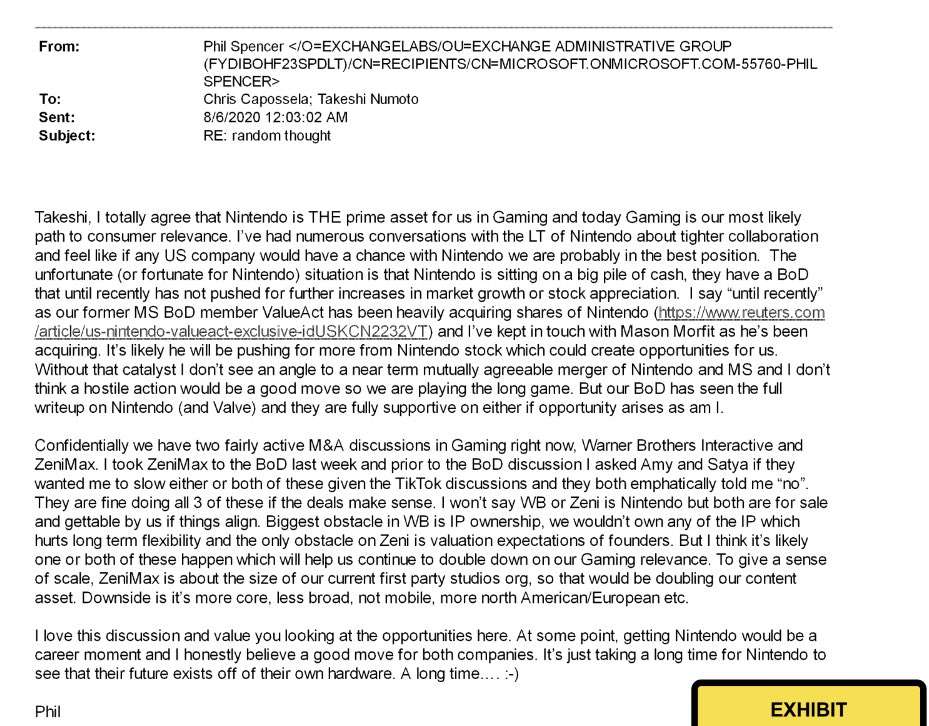
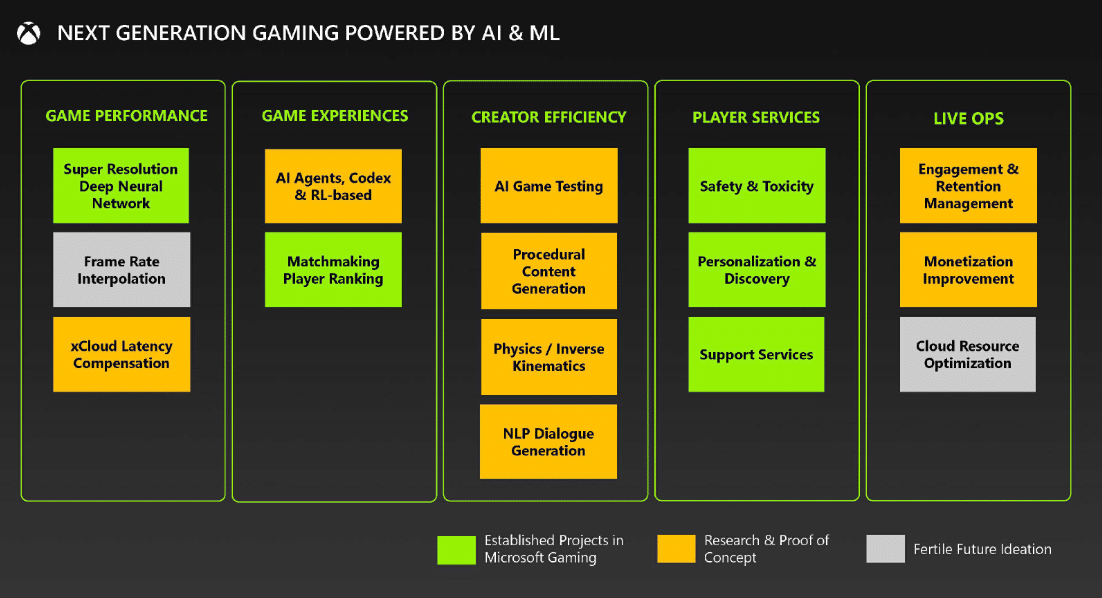
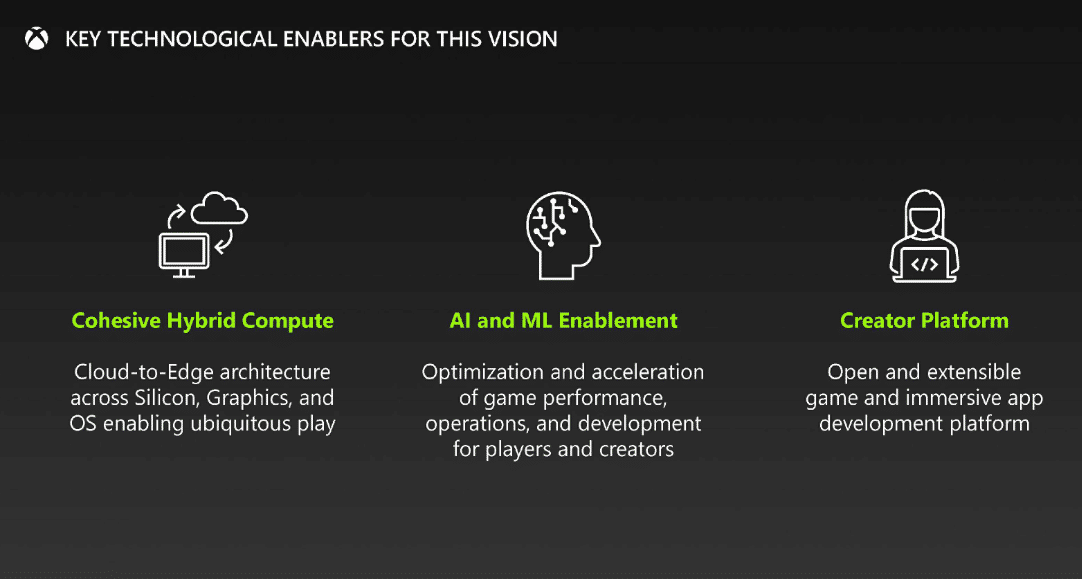
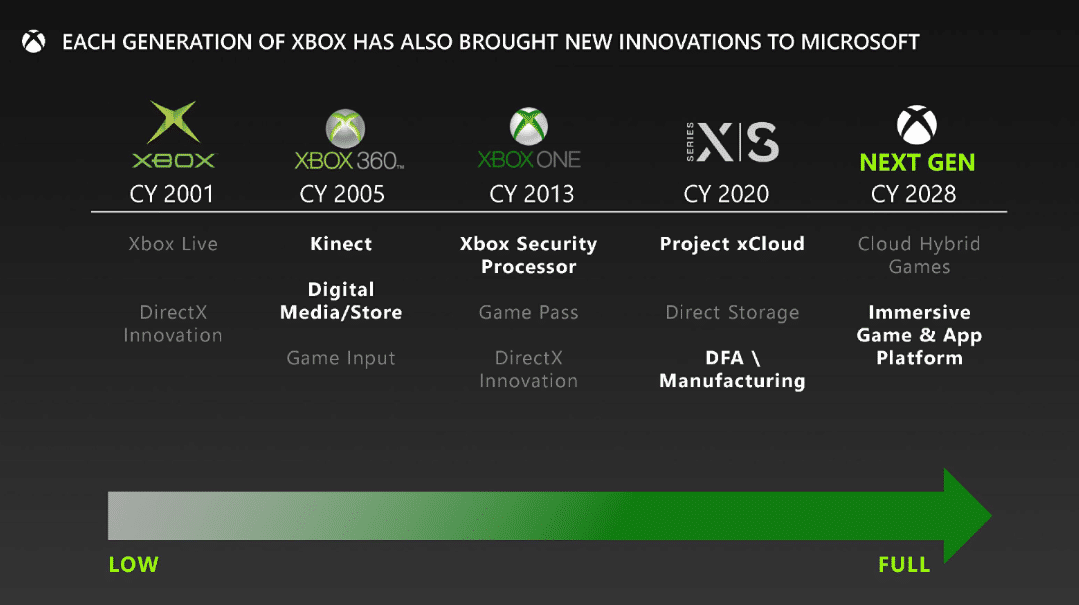
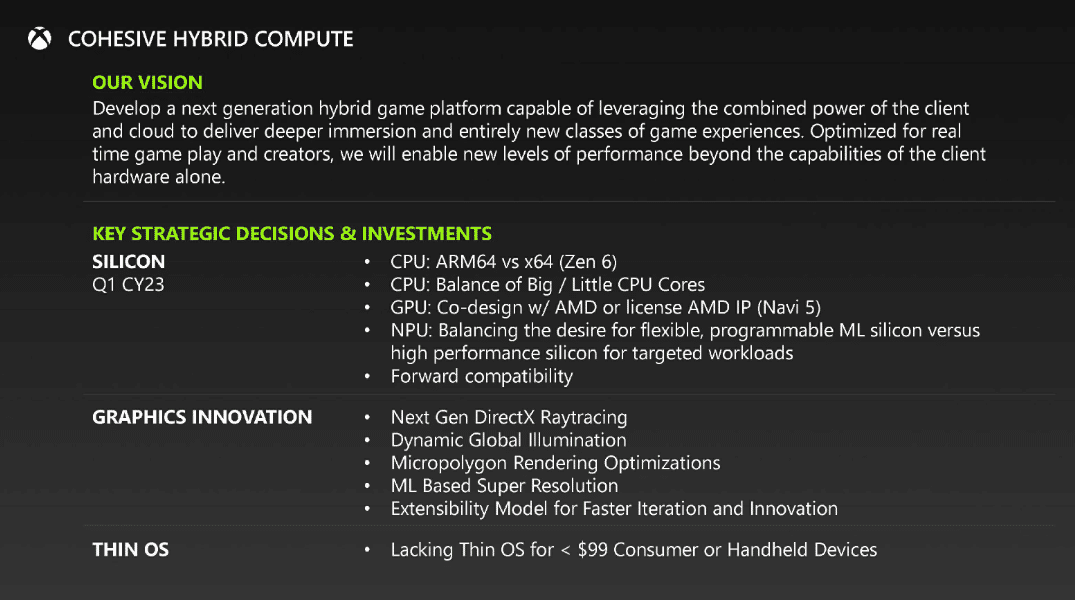
Xbox CEO Phil Spencer is in a big bucket of hot water today. Following numerous leaks of documents from the Microsoft vs. FTC court case, the gaming industry has learned all sorts of interesting things about Xbox’s parent company. For one, we learned that they’re really hoping to release the next Xbox in 2028. We also learned that Phil Spencer really, really wanted to buy Nintendo back in 2020.
In an email conversation that Spencer had with other members of Microsoft’s executive team, the Xbox CEO made it clear that Nintendo was at the top of his acquisition wish list. This email, which was part of the FTC court documents leak, has since been taken down. Not to worry, however, because we’ve got the content of it for you here:
It’s clear to see that Microsoft at one point really hoped to add Nintendo (and even Valve) to their roster. Keep in mind, this was before Xbox tried to acquire Activision Blizzard and went to court for it, so they probably weren’t thinking about the potential consequences of trying to take up that much of the gaming market. If they tried to acquire Nintendo now, they would run into some very strong opposition.
The email also includes talk of Microsoft acquiring ZeniMax and Warner Bros. Interactive, as well as TikTok. While they did successfully buy ZeniMax back in 2021, the company’s attempts to buy Warner Bros. and TikTok ultimately fell through. The leaked email acts as a neat little time capsule to see conversations about these plans as they were happening.
It’s not necessarily surprising to see Xbox considering these companies as worthy investments. They’ve been on a spree of acquisitions over the last few years. The reason we’re even seeing these emails is because of Microsoft’s attempts to buy Activision Blizzard. Regardless, trying to imagine Nintendo reduced to a game development company for Xbox is borderline humorous.
To keep up with all of the insane Microsoft leaks, stay tuned in to us here at MP1st.
Blizzard has released Hearthstone update 27.4 and this brings the Fall of Ulduar Mini-Set alongside other adjustments. Read on for the complete patch notes.
Hearthstone Update 27.4 Patch Notes:
Ulduar Has Fallen
The titans left their charges to watch over the imprisoned Yogg-Saron, but no prison lasts forever. The Old God has escaped to once again wreak havoc on Azeroth! Will you fight back, or will you succumb to the madness within?!
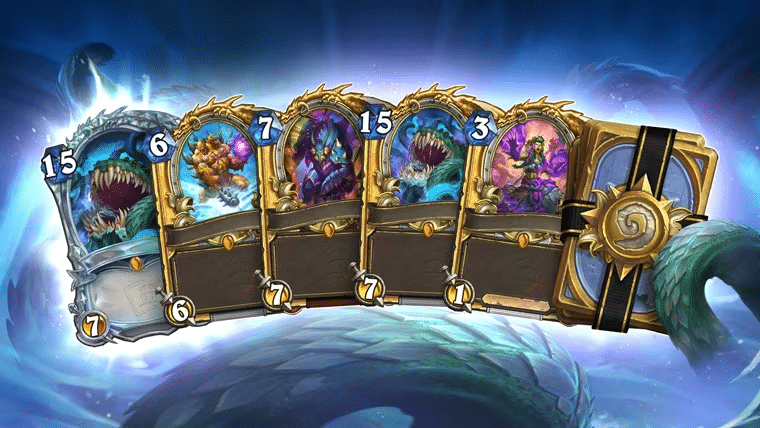
There’s a new Titan in town. Cast spells to fuel the Old God’s power, bring madness to the Tavern with Chaotic Tendrils, and unleash Yogg-Saron on your opponents with this Mini-Set of 38 all-new cards. Get them in TITANS packs, or as a complete 72-card* Mini-Set. Get the normal version in-game for $14.99 or 2000 Gold, or get the all-Golden version for $69.99 or 10,000 Gold. The all-Golden version also comes with a bonus Diamond copy of the Yogg-Saron, Unleashed Legendary minion! You can see all the cards from the Fall of Ulduar Mini-Set in the official Card Library.
* 4 Legendary cards, 1 Epic card (2x), 17 Rare cards (x2), and 16 Common cards (x2).
Yogg-Saron’s Anomalies Consume Hearthstone!
It’s all so clear now: Yogg-Saron’s whispers have been corrupting Battlegrounds this entire Season. Now, Yogg-Saron has escaped, and Anomalies are appearing in Standard, Wild, Twist, Casual, Arena, and Practice Modes, too! The following Anomalies have been unleashed upon the Tavern:
Twist Reality
After a player plays a card this game, shuffle a copy into their deck.
Approaching Nightmare
Both players start with Yogg-Saron, Hope’s End in their hand.
Opportunity Knocks
The first card drawn on a player’s turn is one they can afford to play.
Shifting Fate
Both players start with Gear Shift in their hand.
Light in the Dark
Both players’ Hero Powers cost (1) less.
Gift of Gluttony
Both players start with two more drawn cards.
Shifting Futures
Both players start with 2 copies of Shifter Zerus in their hand.
Control the Makers
Both heroes have +1 Attack on their turns.
Severed Souls
Both heroes start with +5 Health.
Surging Inspiration
Both heroes start with upgraded Hero Powers.
Driven to Greed
Whenever a player ends their turn with unspent Mana, they get a Coin.
Driven to Excess
Whenever a player ends their turn with unspent Mana, they draw a card.
Uncontrollable Growth
Both players start with an extra Mana Crystal.
Seeing Double
Both players start with 2 cards copied from the other players’ hand.
Unimaginable Horrors
Both players Discover a new basic Hero Power on their first turn.
Fortifications
At the end of each player’s turns, give a random one of their minions +1 Health.
Fast Track
Reduce the Cost of all cards in both players’ starting hands by (1).
Your Eyes Betray You
Both players’ cards are Golden.
Army of the Corrupted
The first minion played on each player’s turns costs (1) less.
Spread of Corruption
The first spell played on each player’s turns costs (1) less.
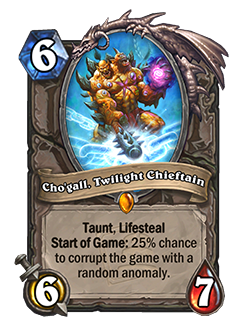
For one week following the launch of Patch 27.4, Anomalies will appear in 100% of Standard, Wild, Twist, Casual, Arena, and Practice Mode games. After that one-week period, they will appear in 25% of games until Patch 28.0. Cho’gall, Twilight Chieftain’s effect offers an additional chance for an Anomaly, meaning that you could have up to two Anomalies active in a game during this event period if you and/or your opponent have Cho’gall in your deck(s). In games where Anomalies are present, all Anomalies have an equal chance of appearing.
In-Game Event: The Great Yogg Escape
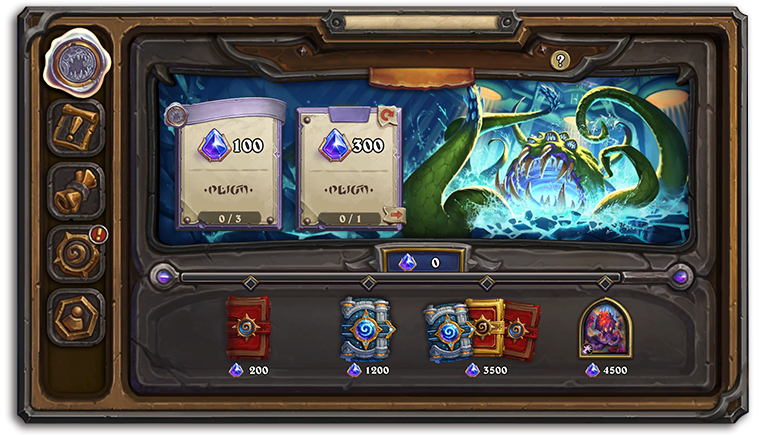
So how did Yogg-Saron escape anyway? Starting September 26, join a rag-tag group of Old Gods as they spring their buddy, Yogg-Saron, from the slammer! From September 26 to October 10, complete Event Quests to earn Event XP on the special event reward track. Complete the rewards track to earn a total of 5 packs (2 Standard, 2 TITANS, and 1 Golden Standard) and the new Kabal N’Zoth Warlock Hero Skin.
New Legendary Skin: C’Thun
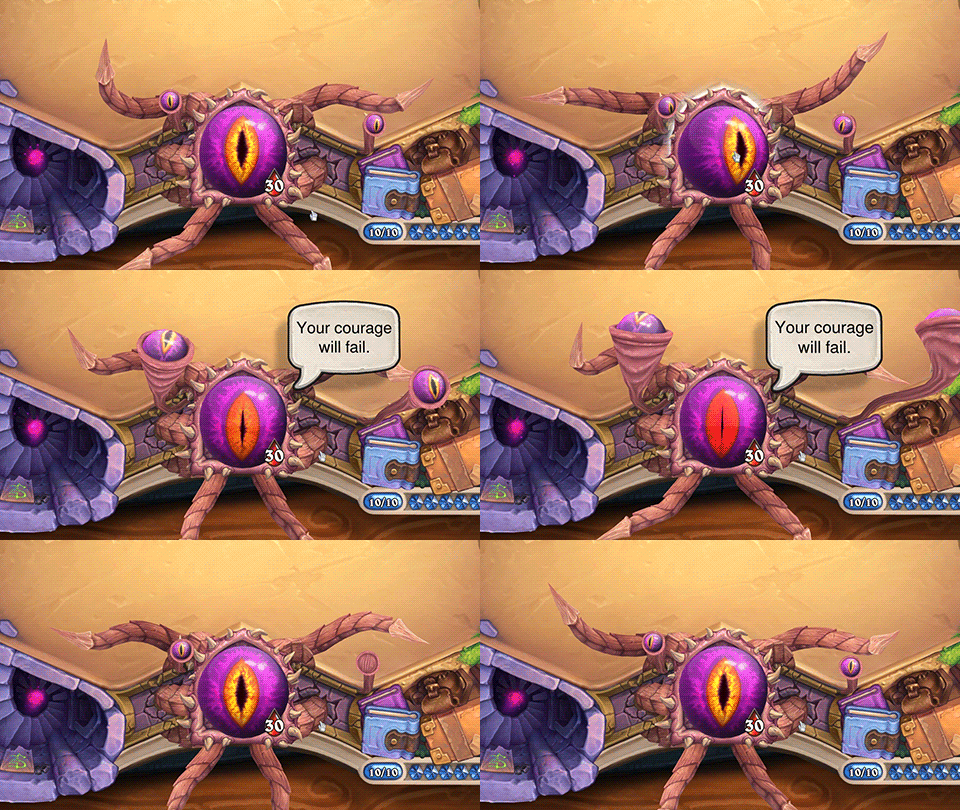
C’Thun’s massive eye watches your every move with this new Legendary Druid Hero Skin. Celebrate Yogg-Saron’s escape and terrorize your opponents with the visage of an Old God!
Battlegrounds Updates
Damage Cap Update
The damage cap now persists for all players until the Top 4. The primary goal of the damage cap in Battlegrounds is to protect players from taking too much damage too early. We’ve heard a lot of feedback from the community that the system was not fully achieving that goal, so now we’re expanding it even further. We’ll closely monitor this change and make additional changes to the damage system as needed.
New Anomalies
The following Anomalies will be added to Battlegrounds throughout Patch 27.4:
The Yogg-iseum
At the start of each turn, spin the Wheel of Yogg-Saron. Dev Comment: Each turn, the Wheel is spun and one result is chosen for all players.
Blessed or Blighted?
Start of Combat: Give your left-most minion Divine Shield and your right-most minion Reborn.
Golganneth’s Tempest
Minions cost 2 Gold. You cannot Refresh the Tavern. It Refreshes itself after you buy a minion.
Match Fixing
Guess which player will win your next combat. If you’re correct, get 3 Gold Coins.
Up-Prizing
After you upgrade the Tavern, Discover a Tier 1 Darkmoon Prize. (Improves in 3 turns!)
Gladiator’s Spoils
After you win a combat, Discover a minion of your Tier. Otherwise, get a random one of a Tier lower.
Shackles of the Primus
After each combat, remove your warband. At the start of your turn, triple your Gold.
Summoning of Champions
At the start of the game, all players Discover a Tier 6 minion from the same choices.
Curse of Aggramar
Start at 5 Health and 5 Gold. Your hero can only take 1 damage at a time.
Reckless Enhancement
Minions in the Tavern each randomly gain Taunt, Windfury, Divine Shield, or Reborn.
Tavern Special
All minion types are in the Tavern. It always has 7 minions.
Eonar’s Overgrown Arena
At the start of your turn, give minions in the Tavern +1/+1 for the rest of the game.
Anomaly Updates
The “A Faire Reward” Anomaly now upgrades every 5 turns, instead of every 4 turns, and appears less frequently.
Piloted Whirl-o-Tron (Sneed’s Buddy) has been removed from the “Bring in the Buddies” Anomaly.
New Battlegrounds Cosmetics
Battlegrounds is getting in the Twist spirit with new Wonders-themed cosmetic options! The Wonders Battlegrounds Mega Bundle celebrates Hearthstone’s past with 4 Epic Hero Skins, 1 Rare Hero Skin, 1 Rare Board, and 8 Epic Emotes, all inspired by Twist’s Wonders format. Or, experience an alternate timeline with the new Epic Bartender: Bartender Roberta!
Twist Seasonal Update
The Wonders format is back for another season in October, but with an extra Twist! For the October season, Wonders is going XL—players can play with a deck of anywhere between 30-40 cards, and a life total equal to the number of cards they put in their deck! As a reminder, the sets that are legal in the Wonders format are:
Caverns of Time
Legacy (not Core)
Curse of Naxxramas
Goblins vs Gnomes
Blackrock Mountain
The Grand Tournament
The League of Explorers
Whispers of the Old Gods
One Night in Karazhan
Mean Streets of Gadgetzan
Duels Updates
New Duels Season
On September 19, with Patch 27.4, the current Duels season will end, ratings will be reset, and current runs will be concluded.
Card Set Updates
On September 19, the following sets will be added to initial deckbuilding and all card pools:
Fall of Ulduar Mini-Set
Rise of Shadows
Mean Streets of Gadgetzan*
The Grand Tournament*
New: Blackrock Mountain
* Mean Streets of Gadgetzan and The Grand Tournament were already added to card pools in a prior update, but have now been added to initial deckbuilding as well.
Other Card Pool Updates
Updated:Tess Greymane, Fencing Coach, Blackwald Pixie, Caldarra Drake, Fallen Hero, Garrison Commander, Maiden of the Lake, Justicar Trueheart, Raza the Chained, Auctionmaster Beardo, Zayle, Shadow Cloak and Cho’gall, Twilight Chieftain are banned from initial deckbuilding and all card pools.
Yogg-Saron, Unleashed is banned from all card pools, but is legal for initial deckbuilding.
New:Astral Communion, Aviana, Patches the Pirate, and Wilfred Fizzlebang, have been banned from draft buckets.
New Arena Season
On September 19, when the the Fall of Ulduar begins, all current Arena runs will end and a new Arena season will begin. The eligible sets will rotate so that the following sets will make up the Arena card pool:
Core
Path of Arthas
Rise of Shadows
Madness at the Darkmoon Faire
Forged in the Barrens
Festival of Legends
TITANS
Bug Fixes and Game Improvements
[Hearthstone] Souleater Scythe will now generate a Signature version of the card if the card it consumed was Signature to begin with.
[Hearthstone] One Amalgam Band, Drone Deconstructor, From the Scrapheap, Elemental Inspiration, Power Slider, Party Animal, Rock Master Voone, and Roaring Applause have all had text-only updates for clarity, no functional changes.
[Hearthstone] Fixed a bug where weapons that adjusted their stats while in play were not updating.
[Hearthstone] Fixed a bug where Prison of Yogg-Saron failed to contain Yogg’s chaotic energies, resulting in spells that targeted sometimes targeting something other than what was selected.
[Hearthstone] Fixed a bug where SP-3Y3-D3R would still lose Stealth after one turn if it was granted permanent Stealth by an outside source (like a Sparkbot).
[Hearthstone] Fixed a bug where a Forged Bellowing Flame’s effect happened all at once, instead of in two steps, resulting it in not hitting minions spawned from the initial target’s Deathrattle or Reborn effect.
[Hearthstone] Fixed a bug where Love Everlasting’s discount was not used up if the first spell played was Countered.
[Hearthstone] Fixed a bug where Lady Naz’jar’s transformation in your hand was visible by your opponent.
[Hearthstone] Fixed a bug where Al’Akir, Winds of Time did not always get the optimal combination of cards to maximize draws.
[Hearthstone] Fixed a bug where Thunder Bluff Valiant’s new Battlecry effect was not treated as a Battlecry.
[Hearthstone] Fixed a bug where, on the turn Jotun, the Eternal was played, its effect would trigger on the next spell drawn, even if it was not the first spell drawn that turn.
[Hearthstone] Fixed a bug where Jotun, the Eternal caused a crash when its effect played Glide.
[Battlegrounds] Zesty Shaker has had a text-only update; no functional change.
[Battlegrounds] Blood Gems can now target minions in the Tavern, not just friendly minions.
[Battlegrounds] Fixed a bug where pirates generated by a Golden Fleet Admiral Tethys did not automatically triple, but instead tripled once an action was taken.
[Battlegrounds] Fixed a bug where Octosari, Wrap God would spawn an extra tentacle when goldenized by The Golden Hammer.
[Battlegrounds] Fixed a bug where some strikes did not appear correctly from the opponent’s perspective.
[Duels] Updated the Treasure offerings to better align with hero power and classes (like not offering some weapon-based treasures to non-weapon classes).
[Arena] Fixed a bug where False Disciple only offered Legendary cards from a few sets.
[Collection] Fixed a bug that prevented players from crafting Golden versions of certain Demon Hunter cards.
[Cosmetics] Fixed a visual bug with Diamond Murozond, Thief of Time’s animation.
[Cosmetics] Fixed a bug where some of Felblaze Illidan’s emotes showed the wrong text.
[Cosmetics] Fixed a bug where the TITANS board constellation effect would occasionally obstruct your hand on mobile.
[General] Raised the minimum spec requirements for Android devices to Android 9.
Misc. other bug fixes and game improvements.
Once a new Hearthstone patch is out, we’ll let our readers know.
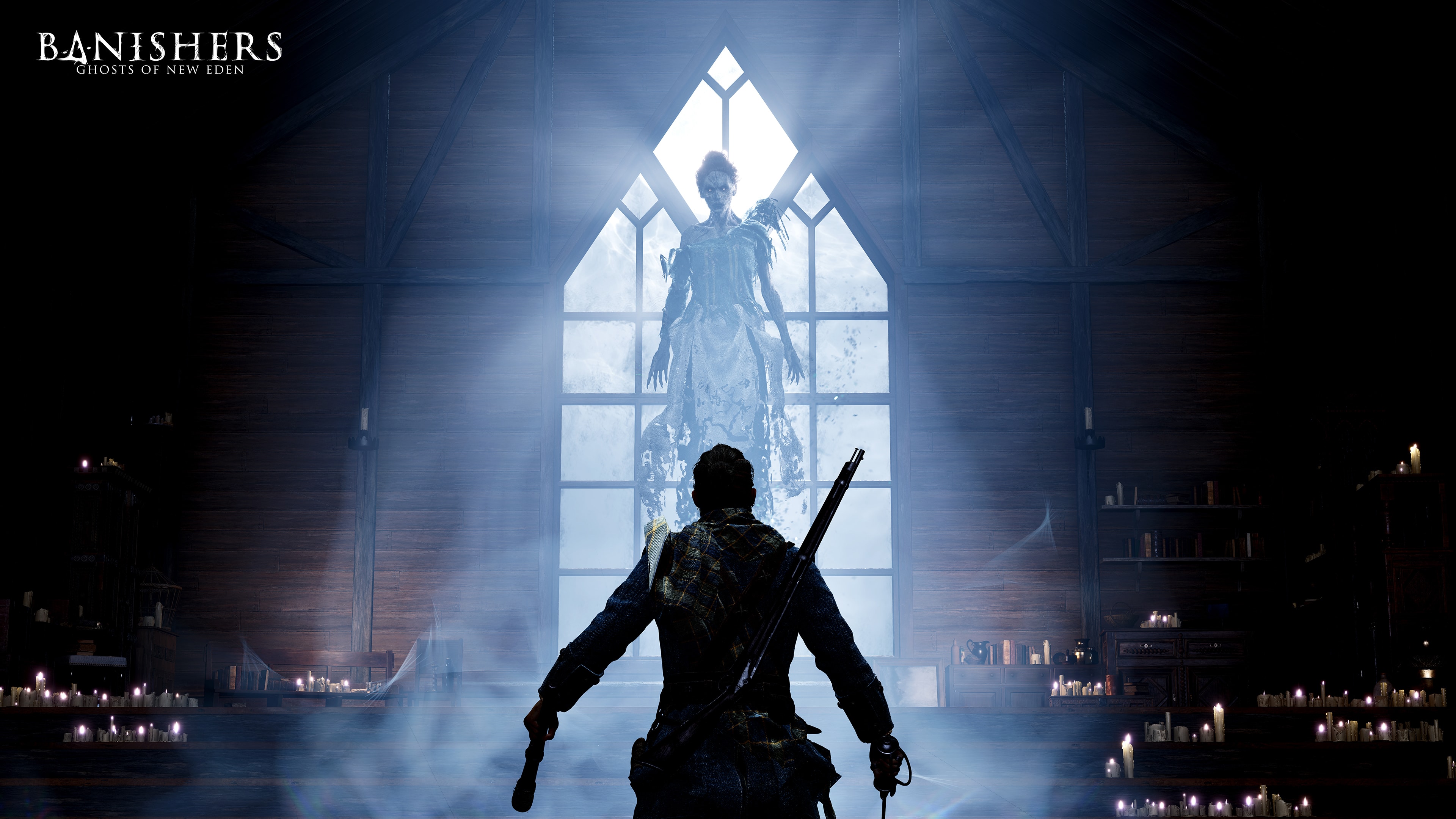
The Banishers: Ghosts of New Eden different editions and pre-order details have just been revealed alongside a new gameplay overview trailer. The content train for DON’T NOD’s upcoming action RPG has been rolling for weeks now, and it looks like it won’t be stopping anytime soon.
Check out the new gameplay overview trailer below:
This hefty trailer shows off the game’s weighty combat, deep equipment system, compelling story, and rich world. As is typical for DON’T NOD games, your choices here matter. How you interact with the game’s cast of NPCs will affect how your story plays out.
Alongside the new trailer, we also got some more details on the different editions available for pre-order and what bonuses come with each version. Here’s the breakdown:
Banishers: Ghosts of New Eden Different Editions and Pre-Order Bonuses:
Standard Edition – The standard edition of the game will grant players with the Wanderer Set DLC, which includes the Wanderer outfit and two weapons: Cortador and Ascua.
Red Echoes Edition – The Red Echoes Edition of the game is a physical version that includes ancient, leather-effect notebook illustrated with Red’s memories, an ink writing set, the game on any platform, and the Wanderer Set DLC.
Collector’s Edition – The Collector’s Edition of the game is also a physical copy, and it includes a statuette of the game’s protagonists Red and Antea, a 128-page artbook, 2 Banishers signet rings, a Steelbook case, and of course, the Wanderer Set DLC.
Pre-orders for the game are available at this link.
Banishers has plenty of potential given everything we’ve seen thus far. Given the competitive season it’s releasing in, we hope it lands on its feet and leaves an impression.
Banishers: Ghosts of New Eden releases on November 7 for PS5, Xbox Series X|S, and PC.
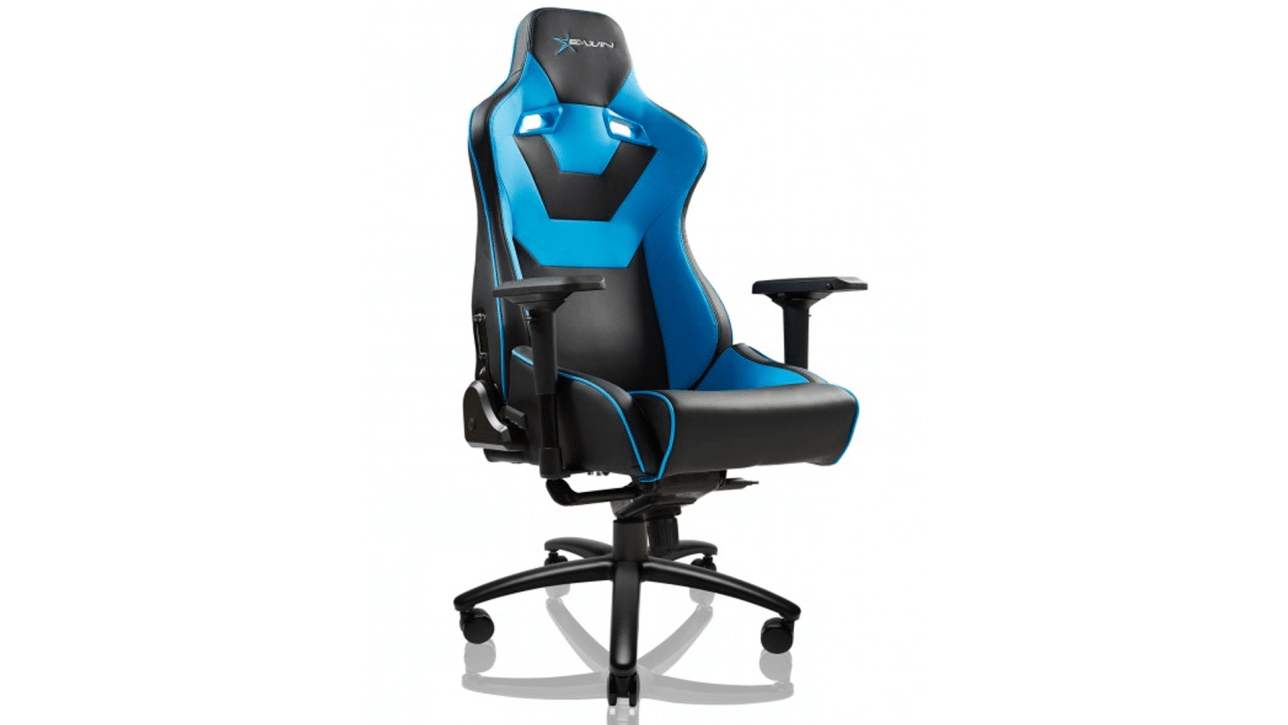
If you game for hours at a time, you want to do so in comfort. While couches are nice, they are very expensive and made for distance viewing. When you’re gaming, you might want to be closer to the television, or simply at a desk in front of a monitor, much closer to the screen in order to take in all the details of the game you are playing. Enter the gaming chair: it’s basically an office chair, but with tons of padding, spill-resistant materials, and of course, bright, bold colors (some even sport RGB lights, though this is rare). E-WIN has their own take on this popular furniture type, and we were allowed to roll around on one of our own over the past month or so, and have a real-world review ready.
Hefty Assembly Required
As is the norm with most furniture, you have to put it together yourself. Assembly is easy, and it should take most people no longer than an hour or so to complete. The included instructions do not match perfectly to the chair in the box, at least ours did not, but it hardly mattered. There’s only a few pieces to the whole unit, and they only fit inside or pair with certain other parts. Really, the most difficult part of assembling the chair is in maneuvering the extra large pieces. Since this chair is oversized, it is also heavier than you might be expecting. The wheel base is metal, which is reassuring in terms of long-term durability, but again, it’s also heavier than competing chairs’ plastic bases. A slight trade-off that feels worth it.
The E-WIN Flash Series XL gaming chair is covered from top to bottom cushion with a form of cold-cure foam. While this is not the Revolutionary edition and thus does not react to temperature, it is extremely thick padding – you’d be hard-pressed to feel any of the chair’s frame hiding under such luxurious foam. Even though this is not E-WIN’s most premium material, even on very hot (over 37/100 degrees C/F) day inside without the AC running, I did not break a sweat while working or gaming. So it seems E-WIN have selected a foam that is comfortable without being too hot, which is a hard problem to solve.
Metal for Heavy Loads
The frame of the Flash XL is all-metal, which is not surprising considering its weight limit of 550 lbs. Combined with the star base, which is also made of metal, results in a heavier weight for this chair than many others out there. Once assembled, the chair is dead silent, as there is very little plastic on the chair so there is nothing to creak and squeak as you move around.
Included in the classic version of the Flash XL are two pillows, one for your neck and the other for your lower back. They are filled with a high density foam that stays firm, providing support where it’s needed most when sitting for long stretches of time, while also serving as a reminder to sit upright in order to feel both pillows.
Armrests are a critical part of a chair to get right, adding to long-term satisfaction when done right, and leading to arm irritation if done incorrectly. The armrests on the Flash XL are made of PU, and they are quite thick. The padding takes a lot of effort to push on, and as such the armrest maintains its shape quite well. Yet the armrest feels forgiving against your arm, instead of hard as a lot of armrests do. These also move in “4D,” meaning you can rotate them, raise or lower them, and slide them in and out. This makes them more versatile than most other chairs’ armrests.
The E-WIN Flash XL next to a regular-sized chair.
Can Your Chair Do This?
Can a piece of furniture be called a gaming chair if it doesn’t recline? E-WIN would probably argue that feature is mandatory in this category, and I’d be inclined to agree. The Flash XL can recline its back up to 155 degrees, which is more than enough to lie comfortably in and take a nap. However, when the chair is in this orientation, it can start to feel a bit unstable. Perhaps it’s just not being used to being in such a large chair, but each time I leaned back it felt like I was going to tilt over. Yet when I sat back up, I did not hear any wheels touch the ground, meaning the chair never tilted. It is just something to get used to when you’re in a larger chair, I suppose.
Speaking of tilting, the whole chair can do just that. A multi-tilt mechanism lets you lean the seat backwards, allowing you to lock the chair to that setting by simply releasing a lever. This can help raise your legs, or let you relax a little bit more. As in, kick off your shoes, lean back, and put your legs on the desk when work is done for the day, or when you complete some hard task, or maybe when you smoke some newbs in your favorite game.
Verdict
Having used this chair as my daily driver for over a month, I can safely say anyone who buys one will not regret it, though their wallet may cry for a little. There are no signs of wear and tear, though of course considering its price I am extra careful around it to begin with. Unlike some other chairs that I have reviewed where falling asleep in them can make you uncomfortable after a few hours, the Flash XL remains comfortable no matter how long you sit down nonstop in it. Whatever padding they’re using is top-notch.
The E-WIN Flash XL gaming chair may be the last chair you’ll need. Its robust construction all but assures it’ll be able to keep up with any intense gaming or work session you can throw at it. With a maximum load rating of 550 lbs, it’ll also hold almost anyone without any creaking or failures. The 4D arm rests are incredibly maneuverable, meaning no matter which way you sit, your arms are likely to find a good angle to work with. The 155-degree wtilt of the back means power naps are as comfortable as they are useful. While it may be easy to feel out of balance on a chair this large when it tilts, it’s an easy sensation to adapt to. Now, is all this durability and comfort worth the MSRP of $599? Well, with not a whole lot of competition at that price point, it’s tough to say. But, E-WIN often runs sales on their equipment: as of this writing, the Flash XL Classic is now as low as $469. This makes it a slightly easier pill to swallow, and it’s hard to argue with the finished product.
Score: 9/10
Pros:
Incredibly comfortable for long stretches of time
All-metal frame means high maximum load and great durability
“4D” armrests, 155-degree reclining round out the package
Paulmichael has been writing in the gaming industry since 2008. Living just outside of Los Angeles, he has been lucky enough to attend numerous gaming events around the world, including the last ten E3 shows (RIP)! A thoughtful reviewer, every game you see scored by PmC has been given careful attention. Paulmichael is also an aviation fan and an avid snowboarder. Favorite games include: No Man's Sky, Gran Turismo 7, skate., CloverPit.
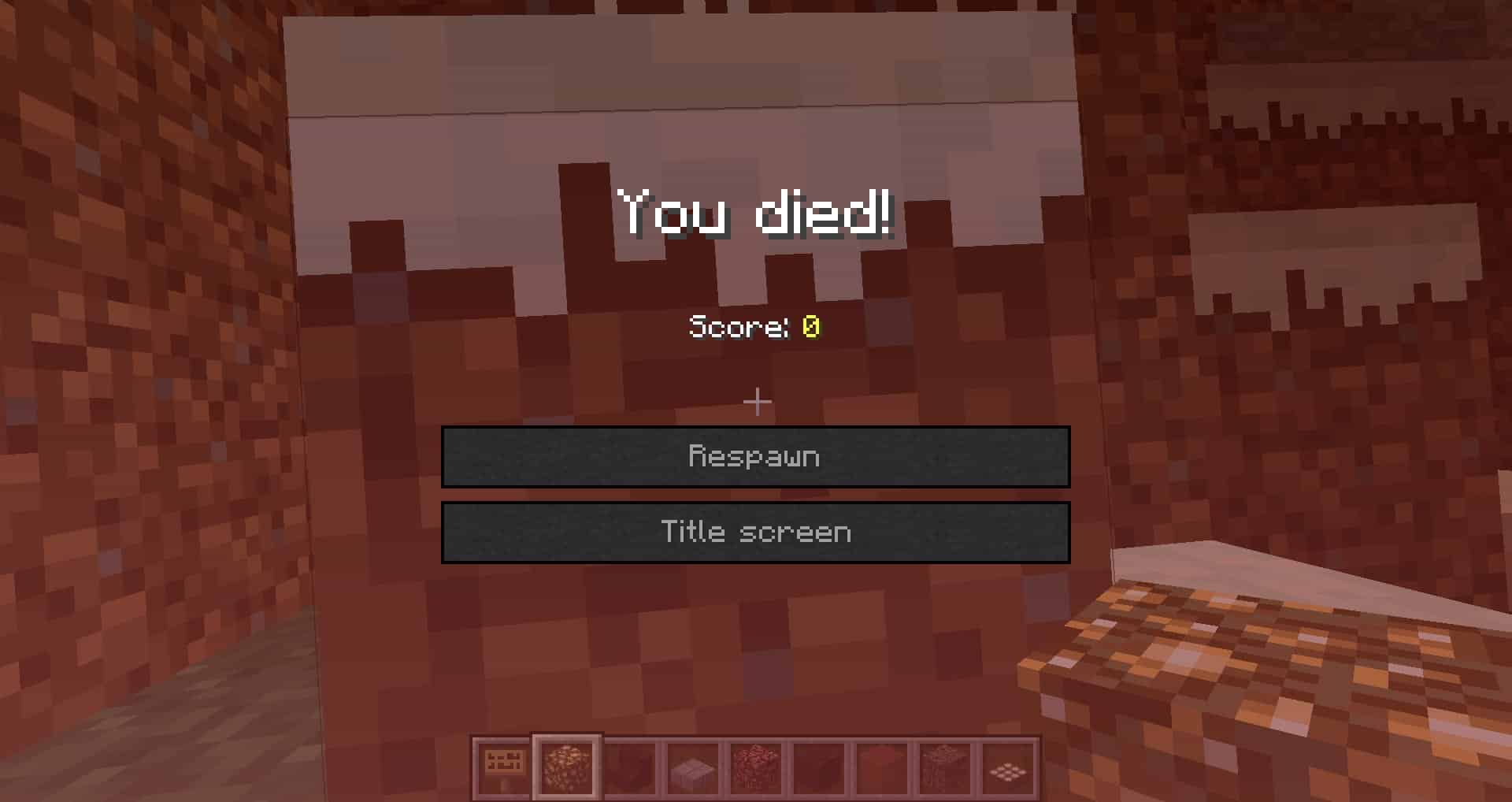
Minecraft update 2.72 has been released on all platforms, and this is for Bedrock patch version 1.20.30! This brings several new changes including an updated “You Died” experience and more! Read on for the Minecraft patch notes for September 19.
A new update has been released, bringing several changes to the game! Here are the highlights:
Updated “You died” experience
Players can now crawl under single block gaps
A new “Recipe Unlocked” notification will now tell you when you’ve found a new crafting material
Increased the amount of Diamond Ore found in the deepest parts of the world
Adjustments to block destroy times and explosion resistance values
Fixes to over 100 community reported issues
New Features
Updated “You Died” Experience
Today we’re making some changes to the screen you see when you die in Minecraft. The camera now zooms out so it’s easier to see why you died, the hotbar is visible at all times, and you can change certain settings before respawning.
These changes are available to everyone, except if you have add-ons applied. Also, the screen has limited text formatting code support, so it might look a bit different. To use the old screen, go to Settings -> Video, and turn off ‘New “You Died” Screen (Experimental)’.
We’d love to hear what you think about this change! Please share your feedback with us here.
Crawling
The Crawling experimental toggle has been removed and Crawling under 1 block gaps is now fully implemented into the game
Updated the camera interpolation rate when crawling to match Java Edition (MCPE-170841)
Fixed some scenarios where crawling was not correctly being triggered on the server (MCPE-171225)
Recipe Unlocking
Recipe Unlocking is no longer an Experimental Feature, but can still be turned on and off per world
You can now enable Recipe Unlocking on the Create New World screen (MCPE-172956)
The command for unlocking recipes has been updated. The autosuggestion to give a player a recipe now says “player: target” instead of “victim: target” (MCPE-172402)
‘Recipe unlocked’ message is no longer visible on the pause menu (MCPE-171112)
Stained Glass Pane recipe now gets unlocked when obtaining any dyes (MCPE-171118)
Recipes unlocked notification now fit text in different languages and no longer bleed out of the screen (MCPE-171141)
Command line auto-complete has been added for recipe unlocking. Useful when you want to see what recipes you can unlock (MCPE-171086)
The order of command inputs was changed to be the same as on Java Edition (MCPE-171098)
Recipe Unlocking Game Rule
Added an optional game rule for limited crafting. The game rule is only relevant when recipe unlocking is enabled. When set to “true” it prevents players from crafting recipes they have not yet unlocked. It is off by default and can only be modified through the “/gamerule” command.
Recipe Book Search
The recipe book search has been updated when playing in Survival mode with the following changes:
The search will only match the beginning of any word in the item’s name. For example, searching for “tor” will now show Torch and Redstone Torch but not Daylight Detector)
Search will now work better together with the Recipe Unlocking system – recipes that haven’t been unlocked will show up in search results.
This change will enable experienced players to find items they are looking for (even if it hasn’t been unlocked yet) while not overwhelming new players with recipes they aren’t yet ready for.
These changes are planned for both Bedrock and Java Edition, but they are still being tweaked and we definitely want to hear your feedback! Send us your thoughts at aka.ms/MinecraftRecipeSearch
Sleeping Percentage Gamerule
Added the ‘playersleepingpercentage’ gamerule, allowing night to be skipped when the specified percent of players logged into a world are sleeping (MCPE-114425)
A zero or a negative value will only require one player to sleep to skip the night
When set to over 100, the night cannot be skipped
Vanilla Parity
Block Breaking
We have adjusted the breaking times of 188 blocks to match Java Edition and our intended design. Some blocks couldn’t be changed yet for technical reasons and Obsidian was left unchanged because we’re still deciding what breaking speed it should have. Bringing more blocks to parity makes it easier for our team to keep both versions up to date. We also hope it will be easier for the community to make and share guides that work for all players on all platforms.
The full list of block breaking times and changes can be found at the very end of this changelog
Gameplay
Wandering Trader now trades Cherry Saplings (MCPE-171521)
Villagers are now prevented from gaining a profession when sleeping (MCPE-81790)
Fixed an issue where beginning to swim while hitting the sneak button could cause the sneak button to be held down until swimming ends (MCPE-130070)
Potions are no longer thrown backwards when looking up (MCPE-138995)
Formation of ice and snow is now controlled by random tick
Fence Gate icon model in UI and Item Frames now match the Fence Gate Block (MCPE-44296)
Pillager Outposts can now generate in Cherry Grove biomes (MCPE-173323)
Fixed a bug that caused the Raid boss bar to automatically deplete to zero when a village was defeated (MCPE-161438)
Witches now throw healing and regeneration potions at raiders during village raids
Blocks
Fixed a bug that caused players to not be able to crawl under Slabs when standing on Top Snow (MCPE-170994)
Top Snow is now in parity with Java Edition and each layer has a different height (MCPE-60024)
Tweaked Shulker Box Redstone signals to match parity with Java Edition
Fence Gate icon model in UI and Item Frames now match the Fence Gate Block (MCPE-44296)
Audio
Missing Thorns damage sound has been added, and is played when appropriate (MCPE-37335)
Anvils now emit the proper sounds when broken, stepped on, fallen onto, etc. (MCPE-33286)
Skeletons and Drowned now play sounds when firing Arrows and Tridents, respectively (MCPE-50609)
Trident Channeling sound is now played when entities are hit (MCPE-43402)
Empty Maps now emit the appropriate sound when players draw them
Nether Portals now emit the Glass breaking sound when their Obsidian frame is broken (MCPE-94722)
Loyalty Tridents returning to players now play their sound at the player’s position (MCPE-43831)
Big Dripleaf Blocks now play the correct sound when their tilt is reset (MCPE-123488)
Conduits now play their deactivation sound when deactivated (MCPE-128117)
Respawn Anchor Blocks now correctly play their ambient sounds (MCPE-136484)
Pigs now emit sounds when transformed into Zombified Piglins (MCPE-169557)
Using Shears to carve Pumpkins now produces a carving sound like in Java Edition
Hoglins now have their own sound when transforming into Zoglins (MCPE-87379)
Sound is now consistently played when an item is dropped into Lava (MCPE-96015)
Sound is no longer played sometimes when Netherite items are dropped into Lava (MCPE-95872)
Snow Golems now play a sound when they throw Snowballs (MCPE-119083)
Husks now play sounds when converting to Zombies underwater
Player entities now play the appropriate sounds when entering/exiting water (MCPE-132511)
Experimental Features
Experimental Trade Changes
This update includes experimental changes to the Wandering Trader and Librarian Villager trades. You must turn on this experiment in the Experiments Menu if you want to test the new trades.
We are trying out these changes to rebalance the villager trade system and make it more fair and fun for everyone. However, these changes are not yet final, and they will stay as experimental features while we continue to work on them. We still need your feedback to help us improve and decide, so please continue to let us know what you think of the new trades, what you like and dislike, and what suggestions you have at aka.ms/VillagerTradingFeedback.
Librarian
Before these changes, players could get any Village enchantment from any Librarian. A novice Librarian could sell the best enchantment in the game! For some players, this felt too random and made trading feel overpowered when compared to using the Enchanting Table or searching for Enchanted Books in structures.
With the new rules, Librarians from different biomes sell different enchantments. Master Librarians are guaranteed to have a special enchantment which is different in each Village biome.
Players will have to work towards getting the best trades instead of relying on random chance. We hope this makes Librarian trading more interesting and skilful, while also revealing some clues about their history of each Village type through the enchantments that are sold there.
Librarians from different biomes now sell different Enchanted Books
Master Librarians with full XP are guaranteed to sell a special enchantment, which is different in each Village biome
This means that players must visit all seven Village biomes to get the full set of Villager enchantments
There are two secret Village biomes where Villages do not generate
A player must build these Villages to access their trades!
Some enchantments have been removed from Village trading and must be found in other ways
Wandering Trader
Some players felt that the Wandering Trader had unfair prices and didn’t sell many useful items. We have lowered their prices, added more trades, and increased the amounts available. The Wandering Trader will also now buy useful items from players, so it’s possible to help them on their journey by giving them supplies even if you don’t feel like buying anything.
As this is an experiment, we would really appreciate your feedback as work continues and to help us decide on the future direction for Villager trades!
Wandering Traders now have lower prices and have a higher amount of each item in stock
Wandering Traders now sell Logs
Wandering Traders can now buy many items, instead of only selling
Fixes and Changes
Diamond Ore Distribution
Increased the amount of Diamond Ore found in the deepest parts of the world. Our goal is to make it more rewarding to mine for Diamonds in the Deepslate layers
Performance and Stability
Fixed a crash when entering a world with a corrupted saved chunk (MCPE-164634)
Fixed a crash that could occur when the game lost focus while entering a world
Addressed ‘Out of Storage’ errors and texture corruption on Xbox in large worlds (MCPE-163050)
Fixed missing low disk space warning on Xbox
Fixed an issue with Local Network games not connecting in certain circumstances on Nintendo Switch
Fixed server becoming unresponsive when players were surrounded by Ghasts stuck in lava columns (MCPE-119093)
Placing one item of an item stack into a full stack of the same item no longer causes the game to crash
The game no longer crashes due to running out of rendering resources while entering a world through the End Portal back to the Overworld (MCPE-139021)
Fixed worlds downloaded from Realms not loading packs correctly
Gameplay
Improved mouse input to be more responsive when used on Xbox (MCPE-163671)
Breath meter now refills when swimming with head above water (MCPE-170969)
The third-person camera will no longer clip through terrain when near Water or Lava
Fixed Creative Mode players not being ignited when standing in fire
The player no longer gets forced into sneak or crawl in Spectator Mode (MCPE-170907)
The player now gets forced out of sneak/crawl when riding (MCPE-170870)
The player no longer gets forced into sneak or crawl during the Riptide animation
Entering flight mode in Creative Mode will now correctly cancel Elytra gliding (MCPE-171797)
Projectiles now sink into Top Snow just like mobs do
Third-person camera now passes through Glass, Glass Panes, and Iron Bars (MCPE-85429)
Third person camera no longer clips through Snow, Mud, and Soul Sand, preventing x-ray exploits (MCPE-168854)
Players will no longer enter End Portals when sleeping in a bed immediately below the portals (MCPE-165062)
The discount for curing a Zombie Villager no longer increases when the same Villager is reinfected and cured multiple times
Players can now toggle flying when crawling or sneaking in Creative Mode
Crouch-jumping while aiming forward and holding down the build button will no longer continue to build blocks upwards past where the player is aiming
Mobs
Wild Horses, Mules, and Donkeys can now be tempted using a Golden Apple/Carrot or Enchanted Apple. Llamas will be tempted by a player holding a Hay Bale (MCPE-140814)
Zombie Villagers now show correct professions when infected (MCPE-80924)
Villagers killed by players no longer drop items held in their hands
Camels now play the same stepping sound when walking on Red Sand, Suspicious Sand, and Concrete Powder Blocks as they do when walking on regular Sand (MCPE-163497)
Mobs can hold and pick up Illager Banner only in their main hand now (MCPE-151745)
Dolphins, Camels, and Sniffers can now have Balloons attached
The following mobs will now set their target on fire if the mob is on fire when attacking: Drowned, Husk, Zombie, and Zombified Villager (MCPE-77746)
Fixed an issue with Parrots facing a different position than the player when the player is in a Boat
Blocks
Falling blocks will now break when falling onto a Boat
Campfires within Trail Ruins are no longer lit by default (MCPE-170033)
Pink Petals can now be fertilized by Dispensers (MCPE-171560)
Shulker Boxes mined without a Pickaxe no longer take a long time to mine
Falling blocks now break and drop their item when falling on a Cocoa Bean
Calibrated Sculk Sensor’s amethyst crystal now lights up alongside the rest of the block during its active phase (MCPE-168813) (MCPE-169953)
Hanging Signs placed with commands now have the proper hitbox (MCPE-163456)
“stained_hardened_clay” block is now split into unique instances, namely “white_terracotta”, “orange_terracotta”, “magenta_terracotta”, “light_blue_terracotta”, “yellow_terracotta”, “lime_terracotta”, “pink_terracotta”, “gray_terracotta”, “light_gray_terracotta”, “cyan_terracotta”, “purple_terracotta”, “blue_terracotta”, “brown_terracotta”, “green_terracotta”, “red_terracotta”, and “black_terracotta”
Commands will still work with “stained_hardened_clay”, but “stained_hardened_clay” won’t be suggested in the command prompt, rather the new names will
Third person camera no longer phases through the lower part of the Composter (MCPE-171213)
Items
Suspicious Stew no longer shows up in the Creative inventory (a recent unintended change caused it to appear there)
It is once again possible to use Bone Meal underwater on Sand, Dirt, Gravel, and Clay (MCPE-171383)
Fixed held Maps not being centered when playing on narrow aspect ratio screens
The correct broken state of the Elytra is rendered in Item Frames (MCPE-19700)
Stonecutter no longer drops as an item when using the wrong tool (MCPE-33950)
Pickaxe can now quickly mine Pistons and Sticky Pistons (MCPE-62797)
Powering and unpowering a Redstone Repeater or Comparator no longer disrupts water flow (MCPE-157055)
Crossbow loses durability when shooting, not when drawn (MCPE-46490)
Sculk Vibrations
Sculk Sensors and Sculk Shriekers no longer risk losing vibrations when receiving them around the simulation distance limit
Vibrations are no longer produced when stopping the use of items while sneaking (MCPE-171254)
Wardens now detect items hitting the ground (MCPE-160889)
Sculk Sensors now send a signal to Sculk Shriekers when detecting items hitting the ground (MCPE-161165)
Throwing an Eye of Ender now emits vibrations
Minecarts now consistently emit vibrations when moving on Rails while empty
Collecting Fish, Axolotls, and Tadpoles with Buckets now emits vibrations
Cleaning items in Cauldrons now emits vibrations
Dying Leather Armor in Cauldrons now emits vibrations
Tipping Arrows in Cauldrons now emits vibrations
Using Dyes to change Cauldrons’ water color now emits vibrations
Non-player actors now emit a vibration event when equipping Shields in their off-hand slot
Collecting Fish, Axolotl, and Tadpoles with Buckets now emits vibrations at the right position
Applying a Nametag now emits vibrations
Evokers summoning Vexes or Fangs now emit vibrations
Chickens laying eggs now emit vibrations
Turtles and Frogs laying eggs now emit vibrations
Using Bone Meal now emits vibrations
Sculk Sensors and Sculk Shriekers no longer activate repeatedly when a projectile is stuck in them (MCPE-172704)
Chiseled Bookshelves now emit vibrations when Books are inserted into them using Hoppers (MCPE-168887)
Extinguishing fire now emits vibrations
Mounting or dismounting a vehicle now emits vibrations
Rabbits eating Carrot crops now emit vibrations
Foxes eating Sweet Berry Bushes now emit vibrations
Unequipping armor now emits vibrations at a different frequency than equipping it
Placing a Banner now emits vibrations
Placing a Bamboo Sapling now emits vibrations
Placing a Mob Head now emits vibrations
Placing a Lily Pad now emits vibrations
Placing Frogspawn now emits vibrations
Placing or adding Sea Pickles now emits vibrations
Adding a Turtle Egg to already placed ones now emits vibrations of the same frequency as placing a block
Destroying a Turtle Egg now always emits vibrations of the same frequency as destroying a block, regardless of how many Turtle Eggs are left
Turtle Eggs cracking now emit vibrations
Realms
Fixed an issue which prevented some worlds from being downloaded from Realms on PlayStation 4
Fixed a bug where repeatedly pressing ‘Esc’ in Realms settings could remove UI or turn the screen black (REALMS-11388)
Accessibility
Fixed an issue where screen narration would read Recipe Book folder items as the first item in the folder
Screen narration now informs the user immediately after they change sliders and toggles
Screen narration will now read the disconnected message in the game menu when opened without an internet connection
Screen narrator will now read out the instruction text as well as the confirm button in the Safe Area menu
Touch Controls
Updated menu HUD icons for touch controls
Fixed an issue where the sneak input while flying would not work correctly with interactable blocks (MCPE-167043)
The functionality of long-pressing a crafting output slot on touch input has been returned to rapidly crafting single instances of the item in the output slot (MCPE-169728)
The rate of item crafting when long-pressing a crafting output slot has been slowed to 4 items per second and the time needed to long-press before starting the rapid crafting functionality has been reduced to 700 ms
User Interface
Nametags are no longer completely invisible while sneaking with the player still visible (MCPE-168789)
Pick Blocking a Decorated Pot will now produce the correct hover hint in the inventory (MCPE-171800)
Moved “Sync Old Worlds” button to the Settings/Storage screen
Changed Joystick Visibility option to a dropdown menu
Changed Sneak option to a dropdown menu
Added alerts for iOS players who have run out of disk space
Fixed UI flickering on Nintendo Switch
Banners’ icons in hotbar and inventory are now properly displayed on Nintendo Switch (MCPE-169928)
The Lapis Lazuli icon in the Enchantment Table now matches the one in the Smithing Table screen
Large enchant labels in the Enchantment Table screen are no longer blocked by overlayed items in the inventory (MCPE-154428)
Fixed various pixel scaling issues on the HUD screen
Added three new user-friendly disconnection error messages and improved two others
iOS only: Fixed a bug in multiline text edits where some text was sometimes deleted when typing after repositioning the caret with spacebar (MCPE-166152)
Changed button text from “Manage” to “Cancel” in Options > Subscriptions
Fixed layering issue causing the underground vignette effect to draw on top of the hotbar (MCPE-159217)
Adding a button on the new death screen to allow player to go to the game menu to change settings, leave the world, and more
Fixed localization of ‘Detected lost connection’ connection is lost from other player or server (MCPE-173028)
Fixed textbox text sometimes not updating correctly when holding backspace on Android devices (MCPE-169840)
Fixed ‘Full Keyboard Gameplay’ support on iOS and Android
Fixed an issue where names with parentheses in them did not display on the inventory/crafting menus in their title (MCPE-161134)
Switching between Book and Quill pages with the gamepad now produces a sound (MCPE-162253)
Added a button to empty the search bar with one click
Pressing Return on the virtual keyboard no longer deletes text after cursor on Xbox (MCPE-172835)
Background now darkens while the Smithing Table UI is open and Pocket UI is enabled
Fixed ZL/ZR icons for Joy-Con and Switch Pro controller on Android
The caret can be re-positioned in text field by taps or mouse clicks (MCPE-131572)
The “Pause menu” has been renamed to “Game menu” in the user interface
Fixed layering issue causing the underground vignette effect to draw on top of all other HUD elements (MCPE-159217)
Audio
Strays now play the proper sound when firing bows (MCPE-172385)
Equipment sound is now played when switching between otherwise identical armor pieces, which may have differing enchantments and/or trims applied (MCPE-171527)
The Trails and Tales music tracks now play in the game menu (MCPE-171489)
Shields now play a sound when equipped in the off-hand slot (MCPE-168039)
Graphical
Added Vertical Sync toggle to Video menu (MCPE-98861)
Added a new experimental toggle to Video menu for players on Windows which reduces input latency; enabling this setting will increase battery consumption
The horizon no longer changes color when the player is standing under blocks (MCPE-85888)
Fixed a problem where blocks’ rendering was not updating unless the player jumped (MCPE-173706)
Cherry Leaf blocks will now generate particle effects at a relatively large distance based on system performance
Transparent blocks viewed through an End Portal will no longer be visible nor flicker (MCPE-162061)
Fixed bottom face of portal effect so its color and transparency match the other faces
Fixed screen fade when sleeping in a Bed to no longer go fully opaque (MCPE-171461)
Name Tag rendering logic is now based on camera position rather than player position
The underwater fog in Cherry Groves now uses a transition that increases visibility after a while (MCPE-171822)
Marketplace
Players will now have a way to send a one-way message to Marketplace creators offering feedback on purchased items. This feedback could be used to improve future content and changes
Minimum Supported Mobile Hardware
As Minecraft grows, so must the operating system and hardware that supports it. For some older Apple devices, you may need to update to iOS 13 or above by February 2024 to continue receiving updates for Minecraft or to access online play. If you are on the most up-to-date version of iOS already, you have nothing to worry about. Please follow Apple’s guide on how to update your device. You can also refer to their list of devices currently compatible with iOS 13/iPadOS13.
For Android, as of February 2024, devices require greater than 1 GB RAM, run OS 8 (Oreo) or above, and have OpenGL ES 3.0 to run Minecraft.
Please refer to our Minecraft Help Center articles for further details:
Updated Add-On templates for 1.20.30 with new resources, behaviors, and documentation are available to download at aka.ms/MCAddonPacks
General
The game no longer crashes when it tries to place an invalid custom feature
Entity names beginning with a number will now result in a content error
Fixed an issue with gliding with Elytra and switching to Creative flight (MCPE-171797)
Moved some entity JSONs that were misplaced to the correct area
Updated Aux-Value to Block-State table in the documentation to account for data upgrade since inception
Added server-authoritative-sound bool to server.properties
Exposed the following feature placement rules from behind the data driven biome experimental toggle. This allows creators to attach their custom features to a biome, and to define the rules by which those features are placed
minecraft:aggregate_feature
minecraft:cave_carver_feature
minecraft:fossil_feature
minecraft:geode_feature
minecraft:growing_plant_feature
minecraft:multiface_feature
minecraft:nether_cave_carver_feature
minecraft:ore_feature
minecraft:partially_exposed_blob_feature
minecraft:scatter_feature
minecraft:search_feature
minecraft:sequence_feature
minecraft:single_block_feature
minecraft:snap_to_surface_feature
minecraft:structure_template_feature
minecraft:surface_relative_threshold_feature
minecraft:tree_feature
minecraft:underwater_cave_carver_feature
minecraft:vegetation_patch_feature
minecraft:weighted_random_feature
Dedicated Server
Notice for Linux Dedicated Server operators: Ubuntu 20.04 LTS (Focal Fossa) is now the minimum supported Ubuntu version
Fixed a Bedrock Dedicated Servers memory leak while loading chunks (BDS-17527)
Fixed an issue with the client failing to attempt connection to dedicated server in some situations
Commands
The /camera command no longer requires the experimental cameras toggle
Note: The cameras experiment still contains several example preset JSON files for reference
Camera commands that are sent in the same tick are no longer ignored (MCPE-173524)
Display a message when the players presses the camera perspective change button but a particular perspective is already set via the camera command
Entities no longer disappear when they are teleported to saved chunks near the edge of the player’s render distance
Released command /scriptevent out of experimental
Fixed an issue where the controllers right/left d-pad autocompletes commands when the text box wasn’t selected, which also selected different UI elements on the screen
Fixed a bug that autocomplete suggestions for values coming after brackets are missing if there is no space between tilde (as Z coordinate) and block name in commands
The unknown block is no longer available to be set or filled via commands (MCPE-165301)
The ‘hasitem’ command will now use the data value as damage when selecting damageable items (MCPE-159409)
“stained_glass” block is now split into unique instances, namely “white_stained_glass”, “orange_stained_glass”, “magenta_stained_glass”, “light_blue_stained_glass”, “yellow_stained_glass”, “lime_stained_glass”, “pink_stained_glass”, “gray_stained_glass”, “light_gray_stained_glass”, “cyan_stained_glass”, “purple_stained_glass”, “blue_stained_glass”, “brown_stained_glass”, “green_stained_glass”, “red_stained_glass”, and “black_stained_glass”
Commands will still work with “stained_glass”, but “stained_glass” won’t be suggested in the command prompt, rather the new names will
“stained_glass_pane” block is now split into unique instances, namely “white_stained_glass_pane”, “orange_stained_glass_pane”, “magenta_stained_glass_pane”, “light_blue_stained_glass_pane”, “yellow_stained_glass_pane”, “lime_stained_glass_pane”, “pink_stained_glass_pane”, “gray_stained_glass_pane”, “light_gray_stained_glass_pane”, “cyan_stained_glass_pane”, “purple_stained_glass_pane”, “blue_stained_glass_pane”, “brown_stained_glass_pane”, “green_stained_glass_pane”, “red_stained_glass_pane”, and “black_stained_glass_pane”
Commands will still work with “stained_glass_pane”, but “stained_glass_pane” won’t be suggested in the command prompt, rather the new names will
“concrete_powder” block is now split into unique instances, namely “white_concrete_powder”, “orange_concrete_powder”, “magenta_concrete_powder”, “light_blue_concrete_powder”, “yellow_concrete_powder”, “lime_concrete_powder”, “pink_concrete_powder”, “gray_concrete_powder”, “light_gray_concrete_powder”, “cyan_concrete_powder”, “purple_concrete_powder”, “blue_concrete_powder”, “brown_concrete_powder”, “green_concrete_powder”, “red_concrete_powder”, and “black_concrete_powder”
Commands will still work with “concrete_powder”, but “concrete_powder” won’t be suggested in the command prompt, rather the new names will
Blocks that had an alias prior to being flattened can now be properly referenced in commands
Sound
Sound definitions now accept both float and integer values for min_distance and max_distance – please set sound_definitions.json “format_version” parameter equal to or greater than 1.20.20 to use this functionality (MCPE-154378)
Items
Released the “minecraft:wearable” item component out of experimental in json formats 1.20.20 and higher
Released the “minecraft:hand_equipped” item component out of experimental in json formats 1.20.20 and higher
Deprecated “minecraft:creative_category” component in json formats 1.20.20 and higher
Creative group and command visibility can now be set in the “description” field in json formats 1.20.20 and higher
Renamed the “minecraft:foil” item component to “minecraft:glint” and released it out of experimental in json formats 1.20.20 and higher
Changed fire enchant duration used on projectiles from a ShooterItemComponent to match vanilla behavior
Released the “minecraft:use_duration” item component out of experimental in json formats 1.20.20 and higher
Released the “minecraft:stacked_by_data” item component out of experimental in json formats 1.20.20 and higher
“minecraft:entity_placer” will now content error when invalid blocks are named in the “use_on” and “dispense_on” lists
Released the “minecraft:use_animation” item component out of experimental in json formats 1.20.20 and higher
Released the “minecraft:allow_off_hand” item component out of experimental in json formats 1.20.20 and higher
Released the “minecraft:should_despawn” item component out of experimental in json formats 1.20.20 and higher
Released the “minecraft:liquid_clipped” item component out of experimental in json formats 1.20.20 and higher
Released the “minecraft:damage” item component out of experimental in json formats 1.20.20 and higher
Released the “minecraft:digger” item component out of experimental in json formats 1.20.20 and higher
Deprecated “on_dig” parameters from “minecraft:digger” item component in formats 1.20.20 and higher
Released the “minecraft:enchantable” item component out of experimental in json formats 1.20.30 and higher
Deprecated “minecraft:mining_speed” in json formats 1.20.30 and higher. Use “minecraft:digger” instead to achieve the same functionality
Released the “minecraft:food” item component out of experimental in json formats 1.20.30 and higher
Added “minecraft:interact_button” item component to enable and set text on the interact button in json formats 1.20.30 and above
Fixed an issue where content errors for items at the latest format version would appear for other items
Add-Ons and Script Engine
Render controllers without textures will now result in a content error and be ignored
Added support for the “allow_random_seed” option in world template manifests
Fixed a bug which prevented certain worlds with add-ons from being downloaded from Realms on some console platforms
Applied a fix with the way block descriptors resolved custom block states where it could resolve to the wrong state if multiple custom block states had the same name
AmethystCluster blocks use state “minecraft:block_face” instead of “facing_direction“. “minecraft:block_face” uses string values (“down”, “up”, “north”, “south”, “east”, “west”)
Slab blocks use state “minecraft:vertical_half” instead of “top_slot_bit“. “minecraft:vertical_half” uses string values (“bottom”, “top”)
Display a warning message when camera perspective option is changed in the settings menu but a camera command is active
Moved PlacementDirection (“minecraft:placement_direction“) and PlacementPosition (“minecraft:placement_position“) block traits out of experimental. These traits can be used for blocks with “format_version” >= “1.20.20”
Added Script Binding functions to get/set the CompoundBlockVolume origin
Added additional params to some methods to query the children of CompoundBlockVolume for their positional relativity to the parent
Added additional params to some methods to freeze positional relativty when origin changes are submitted
Big Dripleaf blocks use state “minecraft:cardinal_direction” instead of “direction”, this state uses string values [“south”, “west”, “north”, and “east”] instead of [0, 1, 2, 3]
Small Dripleaf blocks use state “minecraft:cardinal_direction” instead of “direction”, this state uses string values [“south”, “west”, “north”, and “east”] instead of [0, 1, 2, 3]
Pink Petals blocks use state “minecraft:cardinal_direction” instead of “direction”, this state uses string values [“south”, “west”, “north”, and “east”] instead of [0, 1, 2, 3]
End Portal Frame blocks use state “minecraft:cardinal_direction” instead of “direction”, this state uses string values [“south”, “west”, “north”, and “east”] instead of [0, 1, 2, 3]
Lectern blocks use state “minecraft:cardinal_direction” instead of “direction”, this state uses string values [“south”, “west”, “north”, and “east”] instead of [0, 1, 2, 3]
Anvil blocks use state “minecraft:cardinal_direction” instead of “direction”, this state uses string values [“south”, “west”, “north”, and “east”] instead of [0, 1, 2, 3]
Campfire blocks use state “minecraft:cardinal_direction” instead of “direction”, this state uses string values [“south”, “west”, “north”, and “east”] instead of [0, 1, 2, 3]
Soul Campfire blocks use state “minecraft:cardinal_direction” instead of “direction”, this state uses string values [“south”, “west”, “north”, and “east”] instead of [0, 1, 2, 3]
Calibrated Sculk Sensor blocks use state “minecraft:cardinal_direction” instead of “direction”, this state uses string values [“south”, “west”, “north”, and “east”] instead of [0, 1, 2, 3]
Powered Comparator blocks use state “minecraft:cardinal_direction” instead of “direction”, this state uses string values [“south”, “west”, “north”, and “east”] instead of [0, 1, 2, 3]
Unpowered Comparator blocks use state “minecraft:cardinal_direction” instead of “direction”, this state uses string values [“south”, “west”, “north”, and “east”] instead of [0, 1, 2, 3]
Powered Repeater blocks use state “minecraft:cardinal_direction” instead of “direction”, this state uses string values [“south”, “west”, “north”, and “east”] instead of [0, 1, 2, 3]
Unpowered Repeater blocks use state “minecraft:cardinal_direction” instead of “direction”, this state uses string values [“south”, “west”, “north”, and “east”] instead of [0, 1, 2, 3]
BlastFurnace blocks use state “minecraft:cardinal_direction” instead of “facing_direction”, this state uses string values [“south”, “west”, “north”, and “east”] instead of [0, 1, 2, 3, 5, 6]
Furnace blocks use state “minecraft:cardinal_direction” instead of “facing_direction”, this state uses string values [“south”, “west”, “north”, and “east”] instead of [0, 1, 2, 3, 5, 6]
LitBlastFurnace blocks use state “minecraft:cardinal_direction” instead of “facing_direction”, this state uses string values [“south”, “west”, “north”, and “east”] instead of [0, 1, 2, 3, 5, 6]
LitFurnace blocks use state “minecraft:cardinal_direction” instead of “facing_direction”, this state uses string values [“south”, “west”, “north”, and “east”] instead of [0, 1, 2, 3, 5, 6]
LitSmoker blocks use state “minecraft:cardinal_direction” instead of “facing_direction”, this state uses string values [“south”, “west”, “north”, and “east”] instead of [0, 1, 2, 3, 5, 6]
Smoker blocks use state “minecraft:cardinal_direction” instead of “facing_direction”, this state uses string values [“south”, “west”, “north”, and “east”] instead of [0, 1, 2, 3, 5, 6]
Mobs
“cooldown” field for target descriptors now properly work in “minecraft:behavior.nearest_prioritized_attackable_target” goal
Exposed new data parameter “can_spread_on_fire” for the “minecraft:behavior.melee_attack” component to specify if the mob should set its target on fire when attacking if the attacking mob is on fire (MCPE-77746)
Script API
Converting the CompoundBlockVolume container to use relative coordinates to an internal origin
Normalize the use of CompoundBlockVolume instead of Selection across Editor API
Molang
Renamed block_property and has_block_property to block_state and has_block_state
This is a Molang Versioned Change that only takes effect for Molang expressions in packs that use a min_engine_version of 1.20.20 or higher
Experimental Technical Features
API
Added Scoreboard.addScore and improved Scoreboard.setScore to return the updated score
Using ScoreboardObjective.removeParticipant is now properly synced with clients (MCPE-172920)
ScriptEventCommandMessageAfterEvent
Made initiator, sourceBlock, and sourceEntity optional types
Removed MinecraftEntityTypes from @minecraft/server and replaced with version from @minecraft/vanilla-data
Removed MinecraftItemTypes from @minecraft/server and replaced with version from @minecraft/vanilla-data
Exposed MoonPhase and World.getMoonPhase to script
Removed server-authoritative-sound bool from server.properties
Exposed DimensionType to scripting
Converted “set_block_property” to “set_block_state” for custom blocks
Added defineVector to DynamicPropertiesDefinition
EntityEquipmentInventoryComponent
Implemented slot validation for setEquipment, which now returns a boolean indicating whether the item can be equipped to the specified slot
EntityEquipmentInventoryComponent is currently limited to Players only. However, we hope to reintroduce this component for mobs in a future update
Moved getDay() to 1.4.0
Moved getTimeOfDay() to 1.4.0
Moved setTimeOfDay(timeOfDay: number | TimeOfDay) to 1.4.0
Moved getAbsoluteTime() to 1.4.0
Moved setAbsoluteTime(absoluteTime: number) to 1.4.0
Moved TimeOfDay to 1.4.0
Added length restrictions to setLore – Up to 20 lines with up to 50 characters per line
Moved function setLore to 1.4.0
Moved function getLore to 1.4.0
Moved class SystemAfterEvents to 1.4.0
Moved class ScriptEventCommandMessageAfterEvent to 1.4.0
Moved player onScreenDisplay to 1.4.0
Moved titleDisplayOptions to 1.4.0
Moved screenDisplay to 1.4.0
Moved ProjectileHitBlockAfterEvent to 1.5.0.
Moved ProjectileHitEntityAfterEvent to 1.5.0.
Moved ProjectileHitBlockAfterEventSignal to 1.5.0.
Moved ProjectileHitEntityAfterEventSignal to 1.5.0.
Moved BlockHitInformation to 1.5.0.
Moved EntityHitInformation to 1.5.0.
Moved spawnParticle(effectName: string, location: Vector3, molangVariables?: MolangVariableMap) to 1.5.0
Moved setColorRGB(variableName: string, color: RGB) to 1.5.0
Moved setColorRGBA(variableName: string, color: RGBA) to 1.5.0
Moved setFloat(variableName: string, number: number) to 1.5.0
Moved setSpeedAndDirection(variableName: string, speed: number, direction: Vector3) to 1.5.0
Moved setVector3(variableName: string, vector: Vector3) to 1.5.0
RGB
Moved RGB to 1.5.0
Moved RGBA to 1.5.0
Moved triggerEvent(eventName: string) to 1.5.0
Renamed EntityEquipmentInventoryComponent to EntityEquippableComponent
Fixed issue where prototype properties are not possible to redefine using defineProperty (MCPE-174073)
ItemStack
Added getCanPlaceOn() and getCanDestroy()
Added upper maximum limit of 255 to amount property – will throw if exceeds
Entity
Added function getProperty(identifier: string): boolean | number | string | undefined – Gets an Entity Property
Added function setProperty(identifier: string, value: boolean | number | string): void – Sets an Entity Property during the next tick
Added function resetProperty(identifier: string): boolean | number | string; – Resets an Entity Property to its default value during the next tick and returns the default value
world.beforeEvents
Added event/property removeEvent
world.afterEvents
Renamed event/property removedEvent to removeEvent
Class EntityRemovedAfterEvent
Renamed field removedEntity to removedEntityId: removedEntityId: string
Added field typeId: string
Added class EntityRemovedBeforeEvent
Added field removedEntity: Entity
Moved EquipmentSlot to 1.5.0 and changed enum values to uppercase
Moved EntityEquippableComponent to 1.5.0
Scoreboard
setObjectiveAtDisplaySlot return type now correctly set to ScoreboardObjective or undefined
ScoreboardIdentity
getEntity return type now correctly set to Entity or undefined
setWeather API can now take an optional duration parameter to set the weather duration
Fixed a bug where ContainerSlot would not work with certain container types (MCPE-168805)
Fixed a bug where setLore would incorrectly calculate the length of lore strings containing multi-byte characters (MCPE-173189)
Added function remove – Removes the Entity. This cannot be called on Players but can be used on SimulatedPlayers in Gametest
MolangVariableMap
Added setFloat function
Changed return type of setColorRBG, setColorRGBA, setSpeedAndDirection, and setVector3 to void
Changed the MolangVariableMap property on spawnParticle to be optional: spawnParticle(effectName: string, location: Vector3, molangVariables?: MolangVariableMap): void
Renamed Color interface to RGBA
Added interface RGB
Blocks
Custom blocks will now only transmit Redstone power if they are a unit cube and all materials are opaque (MCPE-168998)
Updated isSolid, isLiquid, and isAir to be properties instead of methods
Items
Fixed issue where items with the “minecraft:wearable” component would be duplicating when equipping by using the item (MCPE-159736)
Items with the “minecraft:wearable” component in non-weapon slots can no longer be stacked (MCPE-159736)
Removed the “minecraft:ignores_permission” component
Removed the “minecraft:mirrored_art” component
Moved the “protection” field from “minecraft:armor” component to “minecraft:wearable” component in json formats 1.20.20 and higher
Deprecate “minecraft:armor” component in json formats 1.20.20 and higher
Removed nonfunctional and redundant slot options from “minecraft:wearable” component, ie. mainhand, hotbar, inventory, enderchest, and equippable
Items with the “minecraft:wearable” component using the “slot.weapon.offhand” slot will no longer equip when item is used in hotbar
Custom items with “minecraft:wearable” component can now be equipped by clicking and dragging in inventory or shift-clicking
Removed the “minecraft:animates_in_toolbar” component
Removed the “minecraft:explodable” component
Extra damage hover text now appears on all component items that have an applied sharpness enchantment
The “minecraft:shooter” component now supports the Quick Charge enchantment with “minecraft:enchantable” when “charge_on_draw” is true
Added support for efficiency enchantment for data driven items using the “minecraft:digger” component
Remove nonfunctional entity slot options from “minecraft:wearable” component, ie. saddle, entity armor, and chest
Custom items with “minecraft:wearable” component auto-equip when dropped from a dispenser, matching parity with Vanilla armor items
Fixed an issue where items with format version 1.20.20 and above using the ‘menu_category’ field in a world with the ‘Holiday Creator Features’ toggle enabled would not load
Removed “minecraft:requires_interact” component
Fixed issue with content errors occurring with the Holiday Creator Features toggle turned on when using a json object version of “max_stack_size”, “can_destroy_in_creative”, “hover_text_color”
Blizzard has pushed out Overwatch 2 update 3.61 (PS5 version 1.000.025), which ushers in the Anniversary 2023 event alongside a few gameplay updates. Read on for what’s new in the OW2 patch notes for September 19.
Overwatch 2 Update 3.61 Patch Notes | Overwatch 2 Update 1.000.025 Patch Notes | OW2 New Update Patch Notes for September 19:
GENERAL UPDATES
HERO MASTERY MODE
Completing a hero mastery course in the gold bonus tier will now grant bonus score based on how fast you completed the course. This bonus score is granted based on the time differential down to the nearest tenth of a second between your time and gold bonus tier. This new bonus time can be viewed in the finish line bonus tooltip on the course summary screen. This change affects all Hero Mastery courses played going forward and should allow the global leaderboards for each course to be more competitive.
BUG FIXES
Fixed in a previous update – Resolved an issue that caused jump pads to stop functioning after a round transition.
Fixed a bug that resulted in Sombra’s EMP failing to apply to some targets.
Fixed a bug in Suravasa that prevented players from contesting the Ruins objective point (E) when standing in certain locations.
Made general bug fixes and improvements.
Once a new Overwatch 2 patch is released, we’ll be sure to let our readers know.
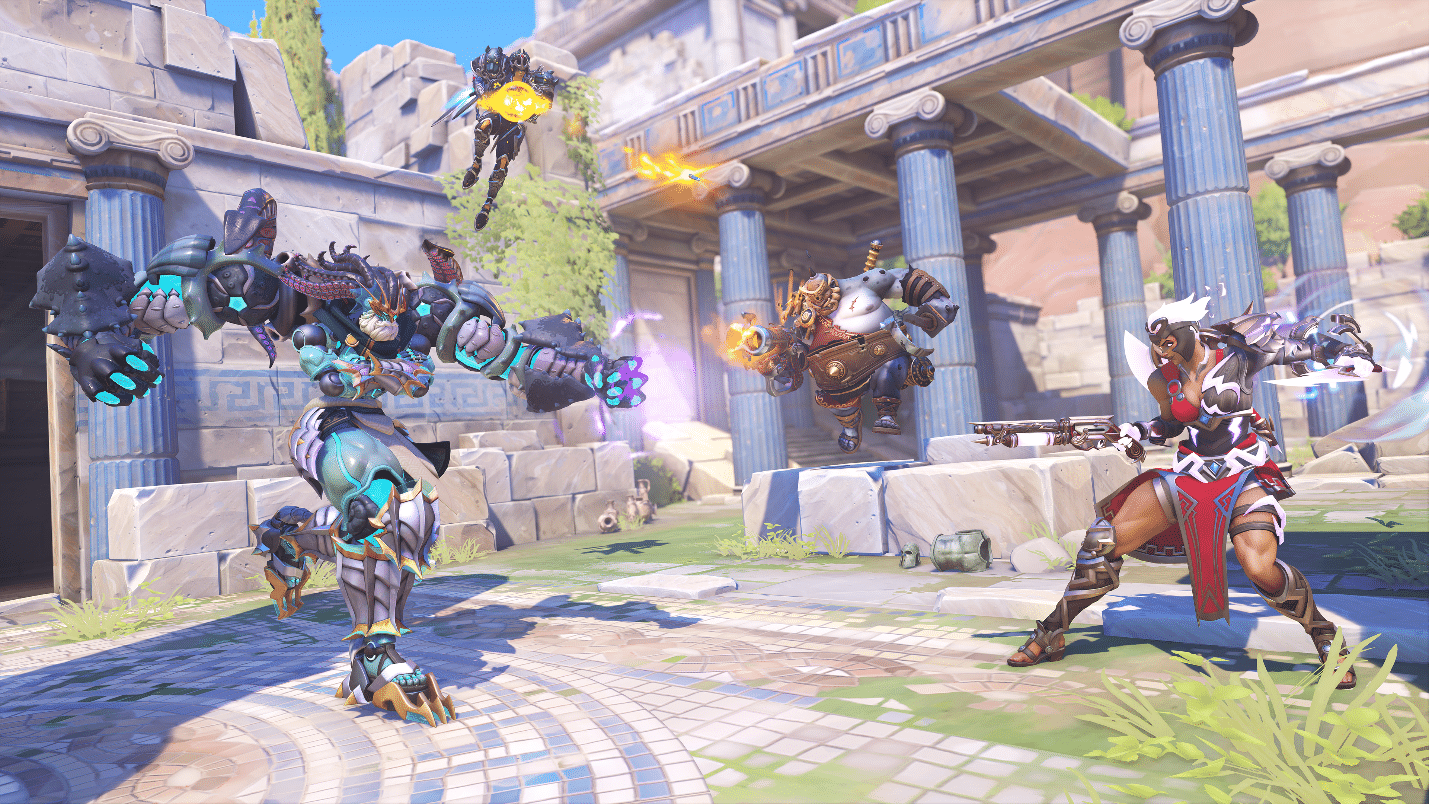
Blizzard Entertainment is opening up its celebratory chapter for Overwatch 2 with three special weeks of multiplayer mayhem. The successful sequel has garnered significant attention from gamers and critics, with a wide variety of audiences tuning in for the action. After a year of new heroes, competitive gameplay, and eye-catching events, players are invited to celebrate the Overwatch 2 anniversary together. Some game modes are actually making a return for the first anniversary of the game.
Overwatch 2 Anniversary 2023 Event Info:
Starting today, September 19, 2023, players can log into Overwatch 2 and start collecting Overwatch Credits throughout three distinctive weeks. Each week, from September 19 to October 9, 2023, new challenges will appear alongside some premium skins.
The three weeks each individually offer different rewards and events, which makes certain gameplay matchmaking sessions limited to some extent. All are explorable through the Arcade of Overwatch 2, where players can select the game modes from. In either case, the three weeks are as listed:
Week 1 – Winter Wonderland and Battle for Olympus
Week 2 – Assault, Catch-A-Mari, and Starwatch: Galactic Rescue
Week 3 – Summer Games and Mischief & Magic
For Week 1, stay frosty with the return of Winter Wonderland and its peculiar event game modes. It’s supported by the Battle for Olympus if players are looking for a beefier game match to engage in throwing snowballs isn’t on the radar. Week 2 opens the nostalgic doors for some classic Arcade gameplay to support the return of the Assault, Catch-A-Mari, and Starwatch: Galactic Rescue modes. Finally, Week 3 whips out the sunshine fun with Summer Games and Mischief & Magic for some little prop-hunting thrills.
Remember, the Overwatch 2 anniversary celebration begins today and will run through October 9. The special Anniversary Shop will close its doors on October 16. Be sure to mark your calendars for the three weeks of Overwatch 2 chaos. Such skins that you can look forward to include Space Raider Cassidy, Beekeeper Sigma, Hermes Lucio, and more.
If you’re looking for more information on Season 7 and its impending arrival of new events, pay a visit to the official blog to see what’s in store. Additionally, we also have BlizzCon 2023 to look forward to from November 3-4.
For the first time in Call of Duty history, the Modern Warfare franchise will feature its own Zombies mode! In development by Treyarch alongside Sledgehammer Games, Modern Warfare Zombies is an open-world PvE (Player vs Enemy) extraction survival experience that players will share with other squads.
Activision has today released the mode’s cinematic trailer, alongside an explanation of its story and lore.
Modern Warfare Zombies Info:
The Break-In
The scene opens on a squad of men in military garb about to conduct a nighttime raid on an unknown location. A familiar voice calls in support to distract the local police while the military unit moves up to breach the back door of a hotel building. Inside, they quickly plant an explosive, blasting a hole in the wall to reveal stairs down to their subterranean destination. What they find in that room changes the nature of the threat in an instant.
The Discovery
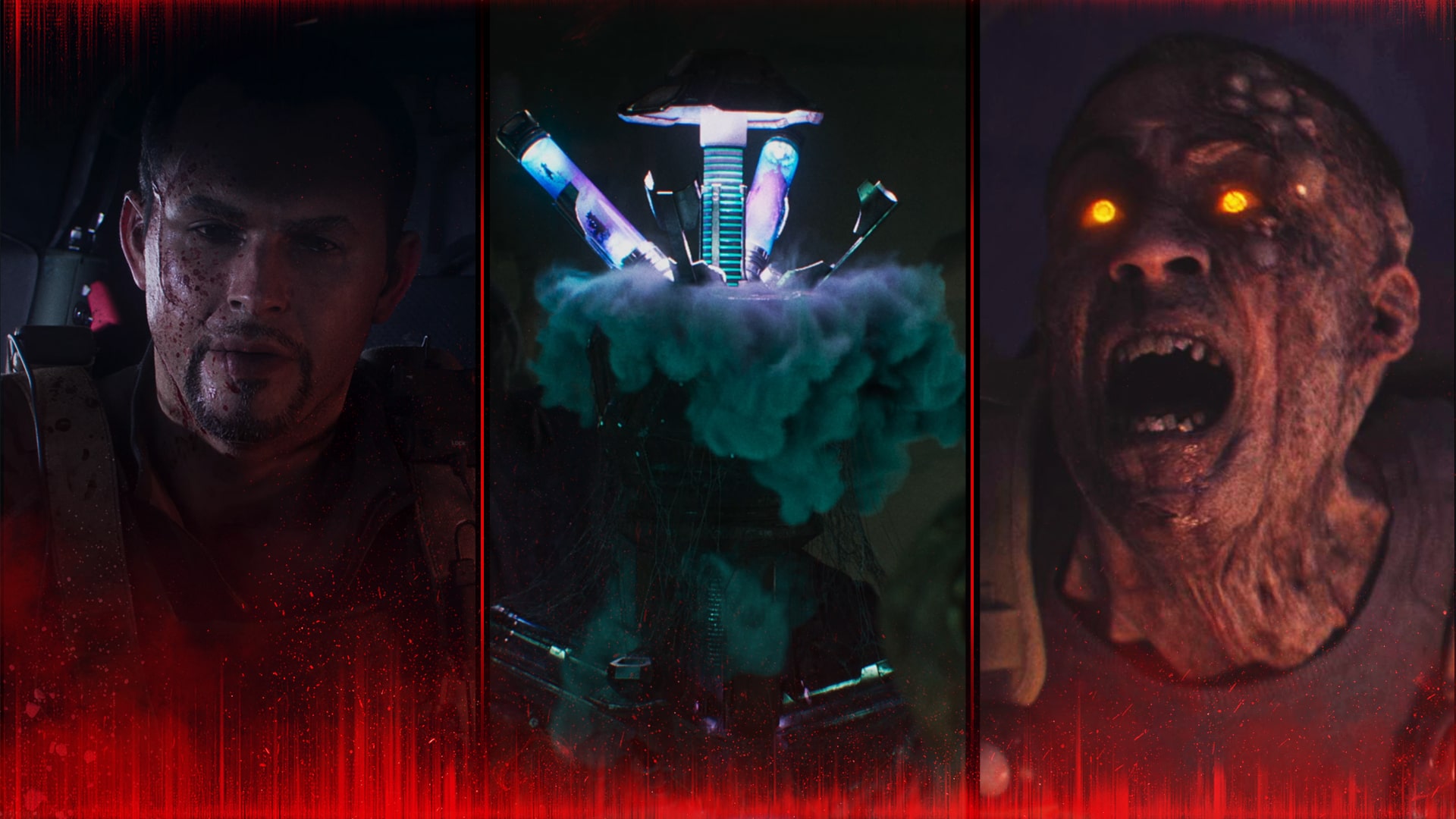
Four heavily decomposed bodies are seated around a table, desiccated almost beyond all recognition. In the middle of the table sits a strange device which opens to reveal two vials filled with an active substance. One of the assailants grabs one and removes his mask to better inspect it, revealing himself as none other than Viktor Zakhaev, the ultranationalist arms dealer and enemy of Task Force 141. He appears equally surprised and pleased to have found what his team is searching for.
The Incursion
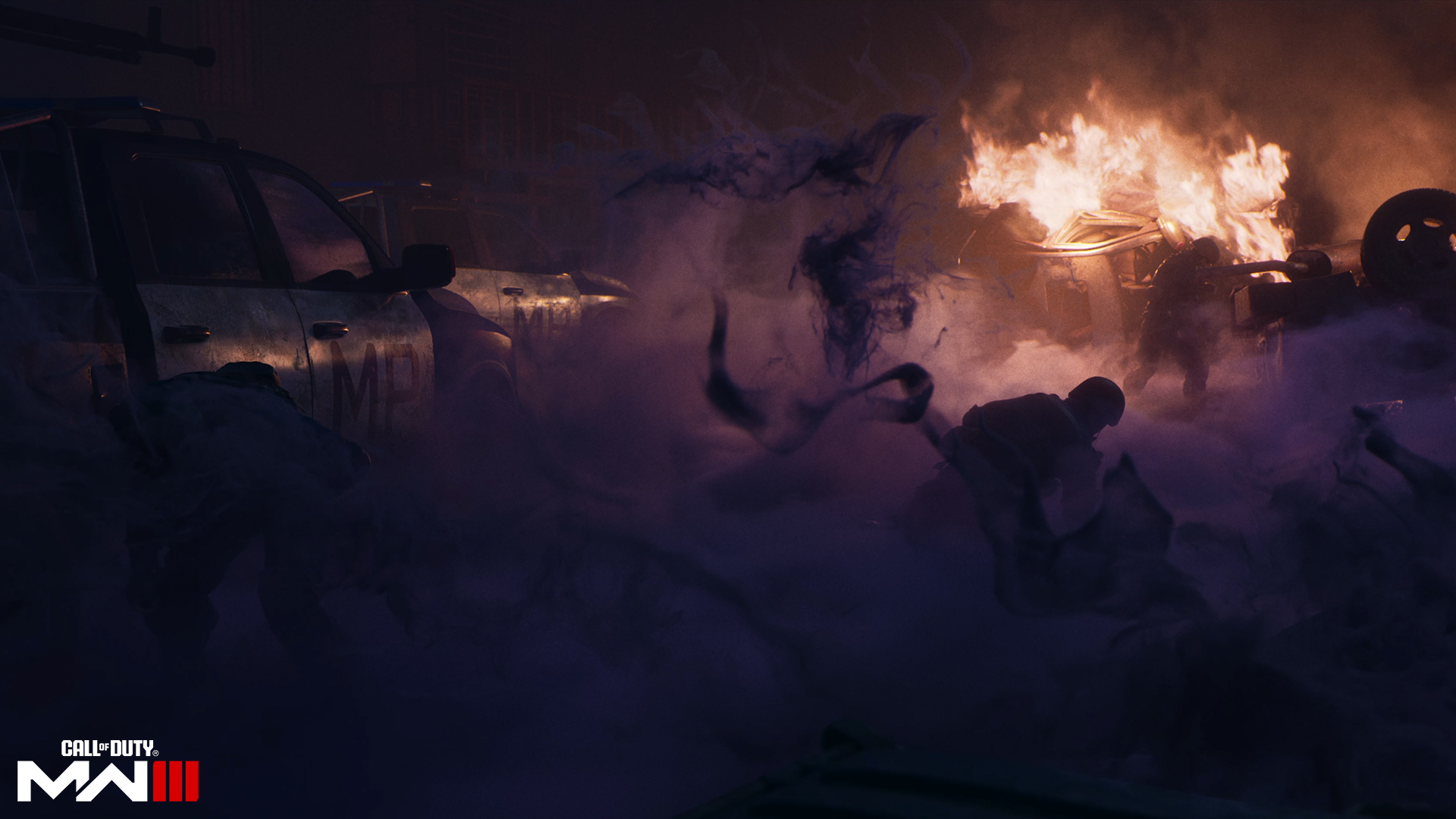
Storing the two vials in a secure container, the squad leaves, only to find that the local security forces have raised the alarm, and the military police have sent in reinforcements. The ensuing firefight is both explosive and bloody, and Zakhaev’s forces are severely outnumbered. As the skirmish continues, all but one of Zakhaev’s men are eliminated. Under fire and in desperate straits, he resorts to throwing one of his vials toward his attackers before retreating into his armored vehicle. The vessel shatters on the ground, and almost instantly, a cloying, purple fog spreads rapidly through the streets, choking out the police forces and rapidly transforming both the living and the fallen into bloodthirsty zombies.
Safe in the confines of their vehicle, Zakhaev and his fellow squadmate witness the transformation firsthand as one of their downed men screams and contorts, his eyes flashing red before attacking the closest survivor. Far from fearful, Zakhaev smiles; this weapon is like no other he could possibly have conceived.
The Aftermath
Following the events on the ground, a helicopter descends onto the area of the outbreak as SSO Kate Laswell and Sergeant Johnny “Soap” MacTavish brief an unseen Operator on the mission at hand, codenamed Operation Deadbolt. Accompanying the team is Captain Sergei Ravenov, an Operator and mission specialist with experience in this kind of incursion. Leading them on the ground is one SSO Greene. The group has intel that Zakhaev was planning something a few months ago, but aren’t sure exactly what that was…
They’re about to find out.
Terminus Outcomes
In this iteration of Zombies, there are enemies both undead and alive. The threat from the living arrives in the form of Terminus Outcomes, a private military company hired by Zakhaev as muscle. Led by one Jack Fletcher — the surviving soldier alongside Zakhaev at the end of the trailer — the PMC makes no judgment on their clients’ motives or ethics. If the money is good, the job is on.
Veterans of the Dark Aether Zombies narrative will recognize the substance contained in the vials: Aetherium, now in a highly enriched state derived from processing vast amounts of the harvested crystalline form.
Operation Deadbolt
An emergency contingency plan put into action by the CIA, Operation Deadbolt was created in the aftermath of the outbreak events witnessed by Requiem operatives during the events of the Cold War.
SSO Laswell is given the job of prepping the plan, placing SSO Selma Greene on the ground as the de facto commander of the operation. When the team arrives at the Exclusion Zone alongside Soap and Ravenov, a few weeks have elapsed since the events shown in the first part of the trailer.
As a member of the team, your Operator joins other multi-national Operators to counter the threat posed by the Exclusion Zone, all running under the basic tenants of Operation Deadbolt: “Nothing gets in, nothing gets out.”
In terms of the actual game, players will face the undead as members of Operation Deadbolt. This combines Modern Warfare map features and systems with Treyarch’s trademark Zombies experience,
Expect to contain the incursion across different regions that escalate in difficulty with “core” Zombies features, and of course, secrets for players to discover. The Modern Warfare Zombies mode will be a shared experience with other squads where there will be special story missions, challenges, cinematics to reinforce the major story developments.
The mode will be one of the pillars of Modern Warfare 3’s overall package, which include the campaign and multiplayer when it’s released this November 10 on the PS4, PS5, Xbox One, Xbox Series X|S and PC.
I don’t know who else remembers Paragon, but if you’re anything like me, you might look back on it fondly. Epic Games shut it down back in 2018 to focus on Fortnite, and that seemed like the end of things. Imagine our surprise, then, when we saw the latest press release for Paragon: The Overprime’s closed beta test on PS5!
Paragon: The Overprime Closed Beta Schedule and Details:
This game has apparently been available on Steam and the Epic Games Store for some time now, but the PS5 version is on the horizon with full crossplay enabled. Here’s the breakdown of the game according to Netmarble themselves:
Paragon: The Overprime is a team-based TPS Action MOBA that anyone can play for free on PC and now PlayStation 5! Players are engaged in 5v5 play while working with teammates to conquer the Prime battlefield. The game celebrates strategic actions and fast-paced battles by two teams aiming to eliminate the opponents’ territories. Players can choose from one of the many powerful heroes utilizing their unique skills – Warrior, Support, Ranger, Caster, Tank, and Assassin. The game will feature full crossplay between PC and PS5 platforms, ensuring there will always be players to matchmake with, and that players will be able to jump into matches with their friends, no matter what platform they are on.
Over 36 playable heroes are available, including the newest hero Riktor. The game’s development team have focused on increasing the number of features specifically for the PlayStation 5 console such as Aim Assist, Adaptive Triggers, Haptic Feedback. Players can launch directly from activity cards, taking full advantage of the PS5’s feature set. Paragon: The Overprime’s Closed Beta Test on PlayStation 5 now records more than ten thousand players joining the CBT currently. Players are urged not to miss out this limited CBT period, since the access codes for players are additionally generated to accommodate a larger number of incoming players.
Additionally, we’ve got some details on a couple of events happening during the closed beta:
Currency Support – In order to provide players the full Paragon: The Overprime experience during the CBT, players can obtain 300 Kima and 10,000 Lenar currency by logging in, and an additional 10 Kima/500 Lenar awarded for each battle they enter.
CBT Participation Emblem Giveaway: A commemorative emblem will be given to players who participate in the CBT. This special badge is to show off their commitment in helping the world of Paragon: The Overprime arrive on consoles following the game’s grand launch.
If you’ve been missing Epic’s classic, this might be worth checking out. The closed beta will run from today through September 25 on PS5. Additionally, the game is already available for free on PC.
For other beta news, check out the Foamstars Beta trailer that just dropped last week. For the rest of your multiplayer news, stay tuned into us here at MP1st.
Gun Interactive has released the Texas Chainsaw Massacre update 1.04) on all platforms, and while this still doesn’t bring PC crossplay functionality back, it does bring with it a host of gameplay adjustments. Read on for everything new in the Texas Chainsaw Massacre patch notes for September 19 below.
Texas Chainsaw Massacre Update 1.04 Patch Notes | Texas Chainsaw Massacre Patch Notes for September 19:
Fixed: Sissy Poison Attacks
This bug resulted in all Sissy attacks having a poison effect.
Sissy’s normal attacks will no longer have a poison effect.
Special Blend can still provide a poison attack only on her next strike.
Rubber Legs can still slow down Victims already affected by poison.
Fixed: Players Blocking Themselves
We’ve resolved an issue where a player could block themselves resulting in matchmaking issues and errors.
Changed: Fusebox Locations on Slaughterhouse
The Fusebox will no longer spawn next to the Slaughterhouse door.
We have replaced that with a new spawn on the side of the shed near the valve exit gate.
Changed: Valve Handle Spawns on Slaughterhouse
We’ve moved the spawn location of the valve handle on the side of the Garage to be in a more high traffic area.
We’ve moved the spawn location of the valve handle on the side of the Animal Pen to be in a more high traffic area.
Tuned: Efficient Grappler Perk Levels Reduced
This perk provides a % chance to keep scrap after a close encounter.
Level 1: 10% chance to keep scrap
Level 2: 15% chance to keep scrap
Level 3: 20% chance to keep scrap
Tuned: Efficient Backstabber Perk Levels Reduced
This perk provides a % chance to keep scrap after a back stab.
Level 1: 10% chance to keep scrap
Level 2: 15% chance to keep scrap
Level 3: 20% chance to keep scrap
Tuned: Connie Ability Cooldown
We have added to the base cooldown time for Connie’s Focused ability.
Tuned: Leland Ability Cooldown
We have added to the base cooldown time for Leland’s Life Saver ability.
Tuned: Escape Restraints Minigame
We have adjusted the minigame to escape your restraints at the start of a match.
It will now require slightly more taps to escape and the overall minigame will take slightly longer to complete.
Strength and Stealth still affect this minigame and players can build accordingly.
Tuned: 7 Player Requirements
We have reinstated the 7 player requirement for lobbies to launch.
Once we know more regarding upcoming patches or when PC crossplay will be brought back in, we’ll let our readers know.
The Texas Chainsaw Massacre update 1.04 is now out on all platforms, bringing with it more bug fixes and tweaks. Read on the full patch notes for today’s, Texas Chainsaw Massacre update (September 19).
A gamer at heart, James has been working for MP1st for the last decade to do exactly what he loves, writing about video games and having fun doing it. Growing up in the 90's gaming has been in his DNA since the days of NES. One day he hopes to develop his own game.
As previously announced, Gun Interactive has released The Texas Chain Saw Massacre update 1.000.005 on all platforms this September 19, bringing with it more fixes, though sadly, no Crossplay restoration on PC yet. Here are the official patch notes for today’s Taxes Chain Saw Massacre update.
The Texas Chain Saw Massacre Update 1.000.005 Patch Notes | The Texas Chain Saw Massacre New Update Patch Notes:
PATCH NOTES
Fixed: Sissy Poison Attacks
This bug resulted in all Sissy attacks having a poison effect.
Sissy’s normal attacks will no longer have a poison effect.
Special Blend can still provide a poison attack only on her next strike.
Rubber Legs can still slow down Victims already affected by poison.
Fixed: Players Blocking Themselves
We’ve resolved an issue where a player could block themselves resulting in matchmaking issues and errors.
Changed: Fusebox Locations on Slaughterhouse
The Fusebox will no longer spawn next to the Slaughterhouse door.
We have replaced that with a new spawn on the side of the shed near the valve exit gate.
Changed: Valve Handle Spawns on Slaughterhouse
We’ve moved the spawn location of the valve handle on the side of the Garage to be in a more high traffic area.
We’ve moved the spawn location of the valve handle on the side of the Animal Pen to be in a more high traffic area.
Tuned: Efficient Grappler Perk Levels Reduced
This perk provides a % chance to keep scrap after a close encounter.
Level 1: 10% chance to keep scrap
Level 2: 15% chance to keep scrap
Level 3: 20% chance to keep scrap
Tuned: Efficient Backstabber Perk Levels Reduced
This perk provides a % chance to keep scrap after a back stab.
Level 1: 10% chance to keep scrap
Level 2: 15% chance to keep scrap
Level 3: 20% chance to keep scrap
Tuned: Connie Ability Cooldown
We have added to the base cooldown time for Connie’s Focused ability.
Tuned: Leland Ability Cooldown
We have added to the base cooldown time for Leland’s Life Saver ability.
Tuned: Escape Restraints Minigame
We have adjusted the minigame to escape your restraints at the start of a match.
It will now require slightly more taps to escape and the overall minigame will take slightly longer to complete.
Strength and Stealth still affect this minigame and players can build accordingly.
Tuned: 7 Player Requirements
We have reinstated the 7 player requirement for lobbies to launch.
Once we know more regarding upcoming patches or when PC crossplay will be brought back in, we’ll let our readers know.
A gamer at heart, James has been working for MP1st for the last decade to do exactly what he loves, writing about video games and having fun doing it. Growing up in the 90's gaming has been in his DNA since the days of NES. One day he hopes to develop his own game.
As Xur bids Destiny players farewell until next Friday, a new set of weekly activities and Eververse offerings are here to keep players busy. The new Destiny 2 weekly reset September 19, 2023 refresh of activities is now live, fully detailed below along with the new Eververse inventory.
Shielded Foes: You will face combatants with [Arc] Arc, [Solar] Solar, and [Void] Void shields.
Shielded Foes: [Arc] Arc, [Solar] Solar, and [Void] Void Shields
Hero Modifiers: Extra Shields Maximum Effective Level 1765
Champion Foes: You will face [Shield-Piercing] Barrier and [Disruption] Overload Champions. Visit the Character or Mod Customization screen to view your active anti-Champion perks.
Champion Foes: You will face [Shield-Piercing] Barrier and [Disruption] Overload Champions.
Arc Threat: 25% increase to incoming Arc damage.
Arach-NO!: When defeated, Fallen Vandals spawn a web mine at their feet.
Overcharged Weapons: Weapon overcharges from the Seasonal Artifact are active in this activity. Kinetic weapons do increased damage when your subclass element matches an active surge.
Strand Surge: 25% bonus to outgoing Strand damage.
Solar Surge: 25% bonus to outgoing Solar damage.
Overcharged Linear Fusion Rifle: 25% bonus to Linear Fusion Rifle damage.
Galvanized: Combatants have more health and are more difficult to stun.
Nightfall: Legend
All previous modifiers
Legend Modifiers: Locked Loadout Extra Shields Maximum Effective Level 1815
Equipment Locked: You will not be able to change your equipment after this activity starts.
Nightfall: Master
All previous modifiers
Master Modifiers: Extra Champions Locked Loadout Extra Shields Maximum Effective Level 1820
Chaff: Radar is disabled.
Nightfall: Grandmaster
All previous modifiers
Grandmaster Modifiers: Extinguish Limited Revives Contest Join In Progress Disabled Extra Champions Locked Loadout Extra Shields Maximum Effective Level 1815
Extinguish: If your fireteam falls in a Restricted Zone, everyone is returned to orbit.
Limited Revives: Limited fireteam revives. Gain additional revives by defeating Champions.
Rewards:
Pinnacle reward: Earn 200,000 cumulative points by completing Nightfalls.
Weekly Crucible Rotators
Relentless: Rift
Achieve victory by collecting the Spark and igniting the opponent’s Rift.
Party: Mayhem
Achieve victory by defeating opponents. Abilities and Supers regenerate faster. Heavy ammo spawns more frequently.
Vanguard Surge: Arc Surge
The other modifiers rotate daily, check out the Daily Reset Thread for them!
Apply this shader to change the color of your gear.
10000 Glimmer
Kairos Bronze
Apply this shader to change the color of your gear.
10000 Glimmer
New Monarchy Diamonds
Apply this shader to change the color of your gear.
10000 Glimmer
Upgrade Module
A collection of universal components that can be used to infuse power between gear items. Can be purchased from the Gunsmith or acquired from special reward sources.
Modifications for your ship’s transmat systems, so you’ll always arrive in style.
Transmat Effect
450 Bright Dust
Weekly Bounties
Petra Venj, The Dreaming City
Name
Description
Cost
Requirement
Reward
Ascendant Challenge
“The Awoken have long practiced the art of walking between worlds.” —Techeun Kalli
1500 Glimmer
1 Ascendant challenge completed
XP++ & Dark Fragment & Legendary Gear
Gateway Between Worlds
“The Blind Well can split wide the veins that run between realities.” —Techeun Sedia
40 Dark Fragment
10 Activity completions
XP++ & Offering to the Oracle
Eris Morn, Moon
Name
Description
Cost
Requirement
Reward
Slow-Wave Disruption
Complete waves of Altars of Sorrow in Sorrow’s Harbor.
1000 Glimmer
7 Waves completed
Hymn of Desecration
Lunar Spelunker
Loot chests in 3 of the Moon’s Lost Sectors.
1000 Glimmer
1 K1 Communion Lost Sector looted & 1 K1 Logistics Lost Sector looted & 1 K1 Crew Quarters Lost Sector looted
1 Firewall Data Fragment
Lectern of Enchantment, Moon
Name
Description
Cost
Requirement
Reward
Nightmare Hunter
Defeat Nightmares in Nightmare Hunts.
5 Phantasmal Fragment
100 Nightmares
XP++ & 1 Phantasmal Core
Nightmare Sojourner
Defeat Nightmares in Lost Sectors across the solar system. Nightmares defeated on the Moon only grant reduced progress.
5 Phantasmal Fragment
100 Nightmares
XP++ & 1 Phantasmal Core
Variks, Europa
Name
Description
Cost
Requirement
Reward
Courageous Expedition
On Europa, complete Lost Sectors, public events, and patrols.
1000 Glimmer
15 Progress
XP++
The Heat of Battle
During the Empire Hunt “The Warrior,” defeat Phylaks and earn points by defeating combatants with precision final blows. Higher difficulties grant more efficient progress.
1000 Glimmer
50 [Headshot] Precision & 1 Phylaks, the Warrior defeated
XP++
Shaw Han, Cosmodrome
Name
Description
Cost
Requirement
Reward
Public Disturbance
Complete public events on the Cosmodrome. Heroic public events grant the most efficient progress.
1000 Glimmer
3 Public events
XP++ & Glimmer
Full Spectrum
Defeat combatants on the Cosmodrome with Arc, Void, and Solar damage.
1000 Glimmer
25 [Arc] Arc & 25 [Void] Void & 25 [Solar] Solar
XP++ & Glimmer
Starhorse, Eternity
Name
Description
Cost
Requirement
Reward
Sticky Situation
Complete the following objectives in a single run of Dares of Eternity. Objectives will reset if not completed when the activity ends. Defeat combatants with attached grenade abilities, defeat combatants with grenades, and complete the activity with an impressive score.
Complete the following objectives in a single run of Dares of Eternity. Objectives will reset if not completed when the activity ends. Defeat combatants with your Super, disintegrate combatants with high-damage elemental final blows, and complete the activity with an impressive score.
Complete the following objectives in a single run of Dares of Eternity on Legend difficulty. Objectives will reset if not completed when the activity ends. Defeat combatants while using abilities of any type, defeat combatants while using Energy or Power weapons, and complete the activity with a incredible score.
7 Strange Coin
80 Ability & 80 Energy or Power weapons & 1 300000 Points
In the Vex Incursion Zone, defeat combatants using Strand to obtain Shellcode Fragments. Open a Terminal Overload Key Chest to obtain a Polymorphic Engine.
1000 Glimmer
8 Shellcode Fragments & 1 Polymorphic Engine
XP++ & Polymorphic Shellcode
Seasonal Challenges
Name
Description
Objectives
Rewards
Acolyte’s Ascent V
Complete Week 5 of “The Bladed Path” quest.
1
Challenger XP
Master Magus
Complete combat encounters in the Altars of Summoning. More difficult encounters grant bonus progress.
20 Encounters completed
Challenger XP+
Runic Rifles
Defeat targets with Scout Rifles or Sniper Rifles. Earn bonus progress by defeating Guardians or by defeating combatants in Season of the Witch activities.
200 [Scout Rifle] or [Sniper Rifle] Final blows
Challenger XP+
Mist and Mysteries
Solve the Cunning Test in the Imbaru Engine and identify Minor Arcana.
1 Cunning conjured & 15 Minor Arcana identified
Challenger XP+
Cursed by Success
Acquire the Hand Cannon, Malediction.
1 [Hand Cannon] Hand Cannon
Challenger XP++ & Bright Dust
Fleeting Glory
Complete Crucible matches in the Competitive playlist. Earn bonus progress for wins.
8 Progress
Challenger XP++ & Bright Dust
Special Forces
Defeat combatants with weapons that use Special ammunition.
150 Special ammo weapon
Challenger XP++ & Bright Dust
Higher Caliber
Defeat Guardians in Crucible or Gambit with Submachine Guns, Bows, Scout Rifles, Sniper Rifles, or Machine Guns. Earn bonus progress for Sniper Rifle or Machine Gun final blows.
100 Weapon
Challenger XP++ & Bright Dust
Notable Armor Rolls
Only notable rolls (stat total >= 59 or single stat >= 26) are listed here.
That’s all for the new weekly reset! Check back here at MP1st for the upcoming Xur inventory and Trials of Osiris posts on Friday, as well as the next weekly reset.
It’s been a crazy 48 hours for the gaming world. Amongst the slew of recent leaks stemming from some poorly redacted FTC vs. Microsoft court documents, astute gamers have noticed a potential confirmation of a native Red Dead Redemption 2 PS5 and Xbox Series release.
Before we go further, it’s important to note that these leaks are not always a firm confirmation of any release. Things can always get postponed, transformed into a new product, or cancelled entirely. That being said, let’s get into the nitty gritty details.
In a handful of emails dated from May of 2022, Xbox’s Corporate Vice President Sarah Bond laid out a list of potential acquisitions for Game Pass. Among other options such as Dying Light 2 and Just Dance, Bond included “T2/RDR2.” At first blush, this might just seem like the company is looking to include the base game in PC Game Pass, but on the same line the release window reads as “D&D for gen9.” D&D likely means day-and-date in this case, but gen9 is the part that really matters.
Gen9 is an abbreviation for 9th generation, which includes the PS5 and Xbox Series X|S. Up until now, Red Dead Redemption 2 has only been released as a PS4 and Xbox One game. Enthusiasts have been clamoring for a modern-gen release of the game for years now, but Rockstar has remained entirely radio silent on the topic. With this latest leak, gamers have a newfound anticipation for an improved version of the game.
What could this updated version of Rockstar’s cowboy masterpiece bring to the table? Higher framerates? Better resolutions? All we can do is speculate currently, but it’s nice to have a glimmer of hope after years of silence.
The email lists the release date for this version as “FY23Q2,” which likely means the second quarter of Xbox’s fiscal year 2023. This quarter ended back in December of 2022, so clearly, the game didn’t hit the speculated release window. This could mean that it’s been delayed or canned entirely, so as always, take all this information with plenty of salt.
If you’re interested in seeing the other FTC leaks, check out our story on Microsoft’s plans for the next Xbox. We also saw leaks of a potential Oblivion remaster, so take a look at that if you’re curious.
It’s a new Tuesday, bringing yet another store refresh for Fallout players. That’s right, the items for sale in Fallout 76’sAtomic Shop have been updated!
As usual, MP1st is here with the new Fallout 76 Atomic Shop weekly update today, September 19’s list of items for sale. Check out this week’s best Atomic Shop items and bundles below.
New Fallout 76 Atomic Shop Weekly Update for September 19:
Notable Items This Week:
Palace of the Winding Path Bundle – 1500
Winding Path Kit – 700
Winding Path Door – 500
Home of a Hero Bundle – 1800
Army Issued Haversack – 300
Surplus Sack Backpack – 500
Vault-Tec Bundle – 1200
Nuka-Cola Bundle – 1500
Nuka-Cola Wallpaper Set – 640
Pink Suit – Free
Free Supply Package (Level 2) – Free
Pickaxe Skin Set – 180
What is the Fallout 76 Atomic Shop?
The Atomic Shop is an in-game store in Fallout 76 offering cosmetics, C.A.M.P. objects and more in exchange for a special currency called Atoms. Most purchases are unlocked account-wide, and may be accessed by any character on the account.
Some objects require an in-game plan to be learned in order to gain access, while other items are only unlocked for a single, specified character. All exclusive items are character-bound, and cannot be dropped or traded with other players. The Atomic Shop is accessible at any time from the main menu, as well as the pause screen after leaving Vault 76 for the first time.
That’s it for this week’s refresh. Is there anything in particular that interests you?
If not, there’s always next week, which we’ll have covered, so be sure to check again next Tuesday!
Deceit 2 is the sequel to the surprise hit that both conquered and scared quite a crowd since its release in 2017. A multiplayer social deduction game with a hefty dose of horror, it messes with the players’ minds as they try to discover who among them are the infected, with hunches and misdirection contributing to the atmosphere of anxiety and distrust. It’s Among Us but not set in space, so everyone will hear you scream over the mic as you try to come up with reasons to uphold your innocence. But you will also scream at some shortcomings such as the lack of focus, or a single map available at the time of launch.
Very Sus
The Texas Chain Saw Massacre is one of the latest examples of how a multiplayer horror game can deliver both the chills and the gameplay. Deceit 2 does lean more to the social deduction aspect instead, sticking to an oppressive atmosphere with the added tension of knowing that two players are plotting against the rest. But how does it all play out when you are in your asylum scrubs and being observed by everyone?
Your initial matches in Deceit 2, which supports a minimum of six and maximum of nine players, may feel a bit overwhelming, despite – or maybe by virtue of – the introductory cinematic that tries to explain the mechanics as you boot up the game for the first time. You can replay this video to clear some lingering doubts, but it’s routine to find yourself amidst a handful of players that already know the game inside out, as you try to learn the better process to win the match, both as an innocent or an infected.
There are various tasks for the two sides to achieve, pretty much in Among Us style. Innocents must find and complete short challenges, such as revealing pairs of cards, achieving checkmate in one move, tuning a radio, cracking open a safe, turning off showers at the same time, giving the right pills to a patient, set the right time on the clock, reassembling a photograph, and more. The infected, on the other hand, have some actions to sabotage the innocent. These tasks range from interesting to bland, giving some purpose to your wandering, with slight variations to each implementation. Besides, these challenges free lost souls that feed the sinister entity known as Peddler.
The Peddler can be described as the go-to in-game shop, regularly offering you diverse gadgets that expand on the gameplay mechanics. The binoculars allow you to find the locations of other players as the best night vision goggles do, the handcuffs can be used to prevent a player from doing some actions, and a mask can be used to disguise yourself as another player. Completing matches rewards you with currency that can be used to unlock new devices and outfits, in a standard progression system that would be the more satisfying if the gameplay loop was more focused.
When the infected fracture the altars, it’s time for the in-between to exert its grasp upon reality, revealing the true form of the hunters. Innocents must flee from the terror creature, and when one is captured and executed, a voting session starts, as the world returns to its temporary normal. Unfortunately, guns are conveniently jammed during these stages, so there’s no gunplay when in theory it made the most sense.
Itchy Trigger Fingers
One of the main concerns is how eager the Peddler is to give every player a gun, right from the very start of each match. Deceit 2 isn’t a shooter and shouldn’t try to be one, but the will to blend genres places a pistol in your hands and lights the spark for chaos and confusion. It’s easy to jump into conclusions gun in hand, nervous shootouts happening frequently, a few shots enough to down a player because someone thought it would be fun, or the argumentation somehow pointed to this or that, despite the often-flawed logic.
Shooting is too tempting for some, social deduction and reasoning be damned; just vote out everyone and hope to win in a system that couldn’t be stranger – shoot a player so that it becomes trapped in this ritualistic circle, then if they get player enough votes, they are banished from the match. That’s right, shooting doesn’t kill anyone, and you can’t even use it against the infected during the in-between stage; guns are but a vehicle for voting on a player.
The other underwhelming aspect is that Deceit 2 comes with only one map, Millhaven Asylum, and no, this isn’t Early Access, but the full launch. Even if it features three floors, the map remains fairly contained and above all without many distinctive areas, being easy to lose yourself in the somewhat labyrinthic areas. More maps are planned, but a single location at launch still feels like the bare minimum for a game that desperately needs content to grab players and keep them coming back for more.
Graphics are average, certainly not something to go nuts about, with character models leaving a lot to be desired, especially when everyone dons the same scrubs for a few matches (even down to the color) before they earn enough currency to unlock an alternate costume. The asylum has a few nice details, with the lighting during the in-between phase being a highlight. However, the game isn’t without its bugs, including players squeezing through cracks on the wall but occasionally doing so by blatantly clipping.
Performance issues also abound, with a beefy computer required to run the game to its full potential, but even more worrying are the frequent disconnect issues while trying to join a game. The loading screen gets us all prepped and excited to start a match, but suddenly we are kicked out to the menu without any information on what just happened.
Social Deduction Identity Crisis
Deceit 2 comes with a potentially capable core, but along the way it forgets that it should be more about the human aspect and dwell less on the urge to put guns on everyone’s hands, letting them grief others and bring whatever hint of intelligent gameplay there is to shambles. Trying to mix two genres that function on very different fundamentals – shooter and social deduction – didn’t yield the best results, birthing a messy concept in dire need of focus.
The low price tag is a good point, but not enough of a saving grace to make us forget about the glaring gameplay and network issues, lifeless characters, and the single map at launch. Deceit 2 feels like an Early Access release turned official launch, a game that tried to reach a larger community, but by doing that forsakes what could have turned it into something special. It’s definitely not one to make you go mad, but surely could have been a lot better with a more focused approach.
Score: 6/10
Pros:
An atmosphere with some chilling potential
Some elements of Among Us but with horror-themed gameplay
Cons:
Only one map at launch
Tries to mix shooting and social deduction in a flawed, game-breaking way
All characters look the same and have no personalities
Frequent disconnect issues and performance troubles
In the mood for some multiversal dragon slaying? Good news: Dragonheir: Silent Gods is a shiny new open-world RPG from the publishers of Marvel Snap. You don’t have to wait long to play it, because it’s out today on Windows, Mac, iOS, and Android.
Here’s what today’s press release revealed about the game:
Dragonheir: Silent Gods is an open-world RPG that gives players the chance to explore magical dimensions, find hidden secrets, and solve challenging puzzles in search of an ancient power that can defeat the draconic evil ruling the multiverse. Players will take on the role of an adventurer who’s lost their memory and strength, fated to rally allies to their cause and explore the vast world of Adenthia and its neighbouring planes, embarking on a multiversal journey that will see them face impossible odds.
The game also has a handful of neat features:
Key Features
Non-Linear Open World Exploration – Embark on epic quests and explore universes ruled by the tyrannic dragon in more than 80 hours of rich story content by defeating your enemies, solving puzzles and exploring, with more to come after launch in the form of a seasonal model. Chart a course across the magical world of Adenthia comparable in size to the continent of Europe.
Strategic Combat – Engage with a semi-strategic combat system that encourages adventurer synergy. Dragonheir’s combat combines auto-battle with careful planning and usage of your adventurers’ special skills to defeat your enemies. Recruit more than 200 adventurers in the open world and during the main questline, each with their own set of abilities, professions, battle traits and element types. Build groups of up to five adventurers with 20 races available in the game, and utilise the environment to your advantage during combat.
Intricate Crafting System – Make sure your fellow adventurers have all they need to become legend as you gather materials and craft new weapons, armour and consumables to further enhance you and your party’s power. Set up your very own camp and prepare for the journey ahead.
Cutting Edge Mobile Experience – Dragonheir: Silent Gods features cutting-edge technology on mobile, including features such as Spatial Audio and Refresh Rate Adaptation to maximize the enjoyment of playing the game on the go.
A handful of in-game events are currently running to celebrate the new launch. Players can participate in these events to gain rewards like unique items and heroes for their party. One of the heroes is even voiced by Matt Mercer, which should excite long-time D&D fans.
This one seems worth checking out if you’re really into meaty mobile games with a fantasy setting. There’s likely plenty of content to sink your teeth into here, and it’s easy to pick up and put down on your phone.
Dragonheir: Silent Gods is available now on iOS, Android, Mac, and Windows. If you’re also interested in Nuverse’s other games, check out the latest update for Marvel Snap.
Cryptic Studios has released Neverwinter update 12.58 for PC, PlayStation, and Xbox today. This new patch includes gameplay balancing and more. Take a look at the full Neverwinter September 19 patch notes posted down below.
The updated powers for the Warlock Soulweaver are not localized for all regions at this time. This will be addressed in a future patch.
Release Notes
Content and Environment
General
Various fight mechanics like the Pool of Decay in Castle Ravenloft that were incorrectly floating above ground or buried underneath have been fixed.
Future Events
Summer Festival: Summer Pinatas can now be bought in bulk.
Protector’s Jubilee: Elminster’s Lunchbox can now be bought in bulk.
Combat and Powers
Classes: Barbarian
Mightier Leap Feat
Feat tooltip updated to reflect actual magnitude of Mightier Leap (780, not 600)
Mighty Leap and Mightier Leap are now considered melee damage.
Hidden Daggers is now considered an area-of-effect attack.
Not So Fast is now considered melee damage.
Punishing Charge is now considered melee damage.
Bounding Slam is now considered an area-of-effect attack.
Classes: Bard
Inspiration
Can now target the nearest ally (not just party member), but prioritizes players.
Heal Magnitude increased to 400, up from 200.
Warding Carol
No longer deducts and extra 100 performance after playing.
Classes: Cleric
Anointed Army can now target up to 10 nearby allies and prioritizes players.
Guardian of Life can now target all nearby allies and prioritizes players.
Cleansing Light now prioritizes players over other allied targets.
Healing Word can now target all nearby allies and prioritizes players.
Classes: Paladin
Sigil of the Paladin artifact now prioritizes players over other friendly targets.
Classes: Ranger
Hindering Strike
Should no longer go on cooldown without activating under some circumstances.
Hindering Strike is now considered an area-of-effect attack.
Aimed Shot At-Will has been fixed to generate AP on the same scaling as other At-Wills.
Rain of Swords is now considered an area-of-effect attack.
Steel Breeze is now considered an area-of-effect attack.
Classes: Warlock (Soulweaver)
Soulweaver Mechanics icons are now more unique.
Soulweavers now generate less threat overall.
Infernal Barrier (shields) has been reworked to scale with Incoming Healing.
Command Lifespark & Lifepact (Mechanics)
‘Command Lifespark’ renamed to ‘Lifelink’.
Lifelink and Lifepact now channel a heal from the player to the Lifemark’d target directly, eliminating the reliance on the Lifespark pet.
Lifelink and Lifepact are not prevented when the Lifespark is dead, missing, or sacrificed to Warlock’s Bargain.
Infernal Barrier (At-Will)
Infernal Barrier has been renamed to Infernal Sanction and updated to serve as a more viable Tank shield option for Soulweavers.
Now heals for 50 Magnitude.
Infernal Barrier (shield) magnitude increased to 800, up from 450
Hellpact feat further increases this shield to 1000.
Cost increased to 80, up from 30.
Vampiric Embrace (Encounter)
Vampiric Embrace has been reworked to function as a more robust healing option for Soulweaver, especially in larger Trials where players are more spread out.
Heal Magnitude increased to 600, up from 330.
Heal Radius increased to 80, up from 50.
Damage Magnitude decreased to 200, down from 275.
Feypact Feat additionally grants a 250 Magnitude Heal-Over-Time.
Hellpact Feat additionally grants a 50% Infernal Barrier (300 Magnitude)
Heal can apply to all nearby friendlies, not just party members, but prefers players over non-players.
No longer cleanses negative effects.
Revitalize (Encounter) now cleanses negative effects.
Soul Barrier (Daily) – Heal Magnitude increased to 250, up from 200.
Soul Pact (Daily)
Now affects 9 targets with Heal, up from 4.
Heal Magnitude increased to 800, up from 500.
Damage Resistance applies to all nearby players (including the caster!)
Soul Siphon (Daily)
Heal can now apply to all nearby friendlies, not just party members, but prefers players.
Heal Magnitude increased to 1,500, up from 800.
Radius increased to 50, up from 40.
The tooltip has been fixed to clarify this power only deals 600 Magnitude damage for Soulweavers.
Soulstorm (Encounter) – Heal can now apply to all nearby friendlies, not just party members, but prefers players.
Swift Command (Class Feature) has been renamed ‘Flowing Link’ to fit the Lifelink rename and theme.
Items and Economy
General
Piñata cooldown (both) has been decreased to 10s, down from 15s.
Collections
The Artifact, Crystal of Soul’s Flight, is now in the Special Artifacts category of the Artifacts collection with the Lockbox of Shadowy Flight location.
Rewards
Hero’s Path: The final reward of the Hero’s Path, Mythic Adventurer Choice Pack – Account, no longer incorrectly contains the Demon Wings mount from the Lockbox of Shadowy Flight. The tooltip on the choice pack has been adjusted accordingly.
While Tekken 8 won’t be released until January of 2024, fighting game fans wont have to wait until then to get their hands on the game, as Bandai Namco has announced the Tekken 8 Closed Beta Test (CBT) that’s kicking off this October!
Aside from the schedule, there’s also details on the “Tekken Fight Lounge” and what to expect from the beta.
Tekken 8 Closed Beta Details for October:
Register for the Tekken 8 CBT Here and it’s open now until October 11. Bear in mind registering is not a guarantee that you’ll be able to participate in the closed beta.
October 11th at 12:00 a.m. PDT – Registration ends.
October 18th at 12:00 a.m. PDT – Selected testers will be notified and provided codes to redeem.
October 20th 1:00 a.m. PDT – Closed Beta Testing starts.
October 21st 1:00 a.m. to 4:00 a.m. PDT – Closed Beta Test downtime for server maintenance.
October 23rd 12:00 a.m. PDT – Closed Beta Testing ends.
It is an immersive lobby where players can interact with one another and access new features and game modes. In the lounge, players can create custom Avatars, communicate with other players with chat and emotes, set up matchmaking, and experience the deep customization and variety of game modes via four distinct areas called Battle Area, Customization Shop, TEKKEN DOJO, and Beach Area. The lounge will also feature the return of Tekken Ball, the beloved mini game that first appeared in TEKKEN 3 where epic battles are “fought” on a beach volleyball court.
Alongside the closed beta announcement, we also have a new trailer featuring Feng!
For the closed beta PC requirements, head on over here.
Tekken 8 is set for release this January 26, 2024 on the PS5, Xbox Series X|S and PC.
The dam has broken wide open for Microsoft this week. In a batch of court documents leaked from the Microsoft vs. FTC case yesterday, we learned that the massive gaming company is targeting a 2028 release for their next-gen Xbox console.
In a couple of slides included in the court documents, Microsoft revealed that their current timeline is targeting a 2028 release for the next Xbox console. With this, they also revealed what sort of things they’re looking to accomplish with said console, including cloud-console hybrid gameplay and potentially even AI technology.
You can check out the images from the leaked court documents below:
Xbox’s “vision” for the next generation is as follows:
Develop a next generation hybrid game platform capable of leveraging the combined power of the client and cloud to deliver deeper immersion and entirely new classes of game experiences. Optimized for real time game play and creators, we will enable new levels of performance beyond the capabilities of the client hardware alone.
This part isn’t all that surprising, given that Xbox has been pursuing cloud gaming for a while now. They seem utterly determined to make it work for them. If they can pull it off, it’ll certainly allow a much wider audience to game on whatever platform they own. As of right now, however, the general sentiment is that gamers prefer to play their games directly off their devices. Having to be connected to the internet lessens the appeal for most gamers. It might take a while to warm up to the cloud ecosystem.
The really intriguing part of this particular leak is Microsoft’s plans for AI. We can see in the images that Microsoft is hoping to fully implement AI and machine learning into the next generation of gaming. Listed amongst their next-gen features are neural network super resolutions, AI game testing, and even NLP dialogue generation, which could mean entire game dialogues that respond reactively to anything the player might say via a learned language AI like ChatGPT.
We’ve seen the idea of AI dialogue tested in indie games before to middling results. With enough attention, care, and time, Xbox could potentially pull it off. It does, however, raise some concerns regarding the future of voice acting and the potential loss of well-written scripted content. Regardless, Xbox seems keen on closely intertwining AI and machine learning with their next system.
How will Xbox react to all these leaks? It remains to be seen. We’ll make sure to keep you posted right here on MP1st.
To take a peek at the Xbox Series X Refresh that was leaked, click here.