In various locations throughout the Resident Evil 4 remake, players will encounter side missions requiring them to locate and destroy hidden blue medallions. While the game does mark them for you, their precise location isn’t always so obvious. If you need help, we’ve prepared this Resident Evil 4 blue medallions locations guide for the quarry.
Resident Evil 4 Blue Medallions Locations for the Quarry (Chapter 3):
Like the farm medallions, there are five blue medallions in Quarry, all marked on your map. While you can collect these in any order, to save time, we have listed their location in the order you’ll likely run into them. The first two are found on your way to the boat, while the other three are in the fish farms.
Blue Medallion #1
Shortly after picking up the quest, you’ll enter the Quarry. There are three enemy dogs in this location that you should clear first. After, look up high, and you’ll see the blue medallion on some wooden scaffolding.
Blue Medallion #2
The next blue medallion is located in the area with the boat. After using the binoculars, you’ll see a ladder you can take down to another platform. From here, staring down towards the level below, you’ll see the medallion underneath the wooden platform.
Fish Farms
The next three medallions are located in the fish farms. You have to go here as this is where the fuel for the boat is. We highly recommend that you clear the area of all the enemies first. Once that’s done, come back to this guide.
Blue Medallion #3
With the fish farms now clear of enemies, you can focus on finding the rest of the medallions. The first one is located in a small hut with a floatie hanging on the outside of it.
Blue Medallion #4
From the last medallion, continue until you reach the next wooden platform. There will be two tripwire traps, and on the opposite side is the next medallion.
Blue Medallion #5
From the last medallion, turn around and continue following the path to the main objective.
You will pass the tripwire from the last medallion and drop back down into the water. From there, turn around, and you notice you can go underneath the platform you just jumped off. On the other side is a chest, and to the right of it is the last blue medallion.
Congrats, you’ve destroyed all the blue medallions in the Quarry. Return to the Merchant and turn in the quest to be rewarded Spinels.
A gamer at heart, James has been working for MP1st for the last decade to do exactly what he loves, writing about video games and having fun doing it. Growing up in the 90's gaming has been in his DNA since the days of NES. One day he hopes to develop his own game.
In various locations throughout the Resident Evil 4 remake, players will encounter side missions where they will be required to locate and destroy hidden blue medallions. While the game does mark them for you, their precise location isn’t always so obvious. So to help, we’ve prepared this quick and easy-to-follow Resident Evil 4 blue medallions locations guide for the Farm.
Resident Evil 4 Blue Medallions Locations Farm Guide:
In the first chapter, you’ll come across a farm while making your way toward the lake. It is here where you’ll encounter your first side mission: locate and destroy five blue medallions located around the area. While it’s a fairly large area, the game does mark the location of all five medallions on the map.
Despite being marked on the map, they can still be hidden, so let’s go over each one.
Blue Medallion #1
These are in no particular order, but you’re likely working on finding the wooden cog to open the main gate in the area. If so, you’ll probably be inside the windmill looking at the mechanism missing the cog. If you look outside the big opening in the wall, towards the barn, you’ll see the first blue medallion hanging in the window opening.
Blue Medallion #2
From the first medallion, follow the path forward, then turn the camera around. You should see the blue medallion on the right side.
Blue Medallion #3
Return to the ground floor and make your way toward the area’s entrance. This medallion is on the outside corner of the house with the save point.
Blue Medallion #4
From the last medallion, if you look to the right, you should see a stable with a cow in the middle of the pathway. The medallion is on the back of one of the wooden supports, so you’ll need to go around the building to get a better angle.
Blue Medallion #5
Starting from the stable, if you look past the cow, there is a small shed in front. Head inside and look at the ceiling. The last and final blue medallion is there.
Once you’ve destroyed all five medallions, the mission will be completed. However, you won’t be able to turn it in until you’ve reached The Merchant shortly after chapter 2 starts. Turning in the quest will reward you with Spinel, which can be used to purchase unique items from The Merchant.
Stay tuned for more guides and coverage of Resident Evil 4 here no MP1st!
A gamer at heart, James has been working for MP1st for the last decade to do exactly what he loves, writing about video games and having fun doing it. Growing up in the 90's gaming has been in his DNA since the days of NES. One day he hopes to develop his own game.
Resident Evil 4 remake has the Crystal <arble puzzle, which is quite possibly the game’s most confusing puzzle. Thankfully, MP1st is here to help with our Resident Evil 4 Crystal Marble puzzle guide! With this in hand, you’ll be able to complete it in no time.
Found in the latter portion of chapter 2, the Resident Evil 4 Remake crystal marble puzzle is proving to be a rather confusing one for many. The idea of solving it is simple, as all you have to do is align the sphere, so it matches the shape of the dragonfly (?) behind it. It sounds easy, right? Well, better said than done, as many, including ourselves, have found it almost impossible to solve on our first attempt.
If that is the case, and you’ve wasted time trying to solve it, then it’s a possibility it’s not actually you, as many have confirmed that this puzzle is bugged.
So before we solve it, the first thing you’ll want to do is save at the typewriter that should be behind you.
Once you’ve done this, press the options button and load the save you just created. This will clear the bug if you’ve been affected by it. Now head back to the door.
So there isn’t a lot you actually have to do to align the sphere with the symbol. Push the left joystick up until all the balls are cluttered closely together like below.
Once you get here, you should only have to rotate it a few times to form the symbol. It should look like this.
Now rotate it completely so that it aligns symbol.
There you go! The door will now open, allowing you to continue to progress through the game.
Honestly, if you were having trouble, it was likely due to the bug that prevented the symbol from aligning properly. At least there’s a workaround for the time being until Capcom has issued a proper fix.
A gamer at heart, James has been working for MP1st for the last decade to do exactly what he loves, writing about video games and having fun doing it. Growing up in the 90's gaming has been in his DNA since the days of NES. One day he hopes to develop his own game.
Techland has given players a developer update on Dying Light 2: Stay Human. Presented at Future Games Show 2023, Franchise Director Tymon Smektala talked about the upcoming Dying Light 2 next update that’s set to launch on April 20 alongside a couple of other announcements.
The April 20 update will include “significant improvements” to the game’s combat system. Smektala claims that the update will make combat “more brutal, physical, and rewarding” for players. The update will also include a much-anticipated gear transmog system, allowing players to dress their characters without compromising on gear stats.
Smektala also highlighted a few community-made maps that were made using the dev tools released by Techland last year in partnership with mod.io. These maps included an underground train map, a derelict tower of crates, and what seems to be an abandoned mineshaft, to name a few.
Finally, Smektala gave players a sneak peek at the upcoming DLC for Dying Light 2, which was also announced earlier this year. The sneak peek showcased a couple of images, featuring abandoned buildings and streets that players will likely explore in the DLC.
You can watch the full showcase below.
With the combat and transmog update arriving this April 20, players will have much to look forward to in a month’s time.
Can’t get enough of sci-fi horror? Here’s one more to add to the pile, as Fallen Leaf debuted the Fort Solis PS5 reveal and gameplay trailer at the Future Game Show where we see the theme the devs are going after.
There’s not a lot of gameplay to be digested in the new video, but it does tell us that this will be one freaky ride.
Want to know more about the game? Check out details regarding it (via Steam):
ABOUT THIS GAME
Fort Solis is a single player, third person thriller experience set on Mars. Responding to an alarm call from a neighbouring base, Jack arrives at a dark and desolate Fort Solis. With storm warnings imminent he heads inside to make contact. As the night grows longer, events escalate, spiral out of control and the mystery of what happened to the crew begins to reveal itself. The storms arrive, limiting Jack’s escape as he looks to hold out until morning arrives.
Fort Solis gives off a The Callisto Protocl, Dead Space vibe, no? Speaking of which, let’s hope this upcoming game can be the start of a new franchise that can rival EA’s newly resurrected horror sci-fi IP (read our Dead Space remake review here).
Fort Solis is due for release in Q3 2023 for the PS5 and PC.
Marvel’s Midnight Suns update 1.010 has been released by Firaxis today, and this is a surprise patch given we just got the Morbius DLC download earlier this week. Read on for what’s new in the Marvel’s Midnight Suns March 24 patch notes.
At the time, Fireaxis Games has yet to post official information about a patch dropping today, though they did release notes a few days ago (a day after the Morbious DLC), so we’ll assume the notes just released are for this patch.
General
General bug fixes and performance improvements
Improvements regarding enemies falling through the map
Level of detail improvements across all maps and the Abbey
Crash reductions and improvements
General audio fixes
Improvements with physical collisions
Texture popping improvements
Foliage improvements
Reduced hitches in dialogues and sequences
Combat
Fixed the Venom tongue error display
Offensive Rush status effect will no longer appear multiple times in a single encounter, and the UI will no longer display a turn counter
Add support to missions so that a modifier can be applied to the number of times a Hero is KO’d
Targeting fixes for Deadpool’s Pain Piñata with improved move-to-range-of-cursor targeting
Changed the Hunter’s Balanced Collar to require 4 Power card plays (up from 3) to resolve infinite XP loop exploit
Mission cards will now always properly spawn in the final mission
Added a way to flag cards as pending discards so that they don’t count against the hand limit during ability effect execution
Hex Charge now removes any pre-existing Taunt effect on the target
Misc
Created and added sort dropdown to Ability Inventory
Added missing objectives on Day 11
Fix for controller not working on initial showing of ability choice screen
Fix for unfocusable scrollbox scrolling in online screens specifically for console long descriptions
Some setting tweaks related to low memory ray tracing and Steam Deck autodetect
A gamer at heart, James has been working for MP1st for the last decade to do exactly what he loves, writing about video games and having fun doing it. Growing up in the 90's gaming has been in his DNA since the days of NES. One day he hopes to develop his own game.
HB Studios has rolled out PGA Tour 2K23 update 1.14, and this major update adds Clubhouse Pass Season 3 support, as well as gameplay improvements! Read on for the official PGA Tour 2K23 update patch notes for March 24.
PGA Tour 2K23 Update 1.14 Patch Notes | PGA Tour 2K23 Update Patch Notes for March 24:
Grab your clubs and get ready to hit the links with the latest patch update for PGA TOUR 2K23. Patch 1.14 includes support for new content and additional gameplay optimizations:
Clubhouse Pass
Support for Clubhouse Pass Season 3 content
Course Designer
New UK Asset Pack which includes objects such as modular castle, playground equipment, a chip shop, bridges, boats, and more
Improvements
Addressed reported concerns of the ELO resetting to the minimum after players lose their first ranked match
Addressed reported concerns of golfers starting off with incorrect amount of strokes when viewing the FedExCup Stroke Adjustment leaderboard
Addressed reported concerns of the First Round Reward UI still appearing during a round after the users claims the reward
Additional gameplay and stability improvements
That’s about it. If there’s a new patch for the golf sim released, we’ll be sure to let our readers know. Bookmark our PGA Tour 2K23 game hub to know when a new patch is swung out.
While monster hunters just got a free Wild Hearts content drop yesterday, that hasn’t stopped EA from announcing what’s next, and it’s right around the corner! The Wild Hearts next update will be out this April 6, and includes quite a number of new stuff!
Wild Hearts Next Update (April 6) Details:
Here’s the announcement from EA:
The first April content update will be on the 6th and includes a new petal-manipulating fox Kemono Murakumo, new weapons and armor set from Murakumo materials, a new Spinning Top Karakuri, the Limit Break system and additional enhancements and fixes. We’ll share a lot more about those as we near their arrival in the game.
Chances are, unlike yesterday’s content drop, this will be a client-side download. Once we know more details about it, we’ll be sure to let our readers know. Outside of April’s content drop, EA hasn’t said anything on what’s coming after, and we’re expecting that to change soon.
SYNCED, the sci-fi companion-based shooter by NExT Studios, is finally set to officially launch sometime later this year. While there isn’t a concrete SYNCED release date just yet, the PvE and PvP FPS title is scheduled for a Summer 2023 launch on PC. Console versions of SYNCED are also in development, with release dates to be confirmed “soon.”
The announcement was made alongside a new trailer that highlights all the unique aspects of SYNCED as a shooter for those who didn’t get to try the game out during its open beta phase.
Thanks to feedback from the open beta test, which ran from December 10, 2022, to January 15, 2023, NExT Studios added a few new features to SYNCED. These include a Solo Mode and a wider variety of Nano mods. Players will also be able to travel across areas more efficiently thanks to new traversal modes.
Here’s the full list of SYNCED’s features as taken from the official Steam store page:
SYNCED is a match-based Rogue-Looter Shooter developed by NExT Studios. In a techno-apocalyptic future, you are a Runner who joins the war with deadly techno-creatures called Nanos inside the sealed exclusion zone known as the Meridian.
Choose your Runner and team up in PvE and PvP matches, defeat the Nanos, and even tame and weaponize them against your enemies.
Tame and synchronize these Nanos into different Companion classes you can deploy in combat. Strengthen your squad, upgrade your weapons, earn your place among the best of the Runners, and win the fight that humanity started.
THE WORLD
SYNCED is set in the near future of our world, where nanotechnology has become the backbone of civilization. In the wake of a cataclysm known as the Collapse, the nanomachines have gone rogue, forming themselves into feral, predatory creatures that roam the wastelands, consuming humans to propagate themselves.
In this apocalypse, fortune-seekers known as Runners have converged on Snake River Valley WA, ground zero for the Collapse, in search of a valuable nano-energy substance known as nerva, the new oil of a new world.
Some have come for the sake of greed, others for the sake of glory. But all runners will stop at nothing to achieve their goals.
WEAPONIZE YOUR ENEMIES
Bring something new to the fight with companion nanos. Synchronize the nanos you defeat to control companion classes with different abilities and customizable modifiers to outsmart and outlast the competition.
DEFEAT YOUR RIVALS
Team up in squads of three for fast-paced action across multiple game modes where you’ll need more than just shooting to survive. Use your environment, your teammates, and your Companion Nanos to deploy unique tactical combinations against roaming hoards and rival squads.
CUSTOMIZE YOUR COMBAT
At your forward base, Haven, you can plan and prepare between matches. Upgrade your weapons and gear, boost your power level, and ready up for your next match.
SYNCED shoots out on PC via Steam and the Epic Games Store this summer. Console versions of the game will be playable on PS5 and Xbox Series X|S when they become available.
HoYoverse (miHoYo) has revealed that its upcoming space fantasy RPG Honkai: Star Rail’s release date has been set for April 26, 2023 on PC (through the official HoYoverse launcher and Epic Games Store), iOS, and Android. Additionally, a PlayStation version of the game has also been confirmed, though its release date will be announced later.
The fourth game in HoYoverse’s Honkai franchise follows the events of Honkai Impact 3rd, incorporating new characters into the story alongside alternate versions of characters from the previous game. The new RPG features turn-based combat in a departure from the series’ usual gameplay format as well as open-world elements.
The developer describes the game and story as follows:
Implanted with a Stellaron, the protagonist bravely set sail for the galaxy to drill down to the truth surrounding the so–called Cancer of All Worlds. Players will able to experience a vast universe abundant in distinctive cultures, landscapes, and scenery. From Herta Space Stationwhere the story starts and you receive the prerequisite knowledge for the forthcoming journey, to Jarilo–VI where numerous dangers and conflicts are frozen beneath the snow, to the eastern–fantasy–infused silkpunk flagship Xianzhou Luofu where the topic of immortality is the cause of both development and strife.
Check out screenshots from the game below:
HoYoverse has hosted multiple Honkai Star Rail closed betas since October 2021, and is finally releasing the game to the public on PC, iOS and Android on April 26. Like Genshin Impact, a PlayStation version of the game will be released later. Check out the game’s Boarding Preparation Special Program video released earlier today, featuring details of in-game rewards as well as exclusive behind-the-scenes stories of the game’s development.
A new trailer for Wayfinder, the upcoming online action RPG by Airship Syndicate, just got a new animated teaser trailer, featuring Venomess, the newest Wayfinder to join the playable character roster. The Wayfinder trailer also included a brief cameo of Niss, the Eldren Shadow Dancer.
The trailer was showcased at PAX East 2023. Here’s the full animated trailer:
Wayfinder separates itself from other online action RPGs by letting players take on the roles of different characters, also known as Wayfinders. This results in more of a character-based game instead of a class-based one, as players who use the same class will appear similar to one another. There will be cosmetic options, however, including cosmetics that change the entire look of your Wayfinder. Airship Syndicate revealed that the studio went for a character-based system to better explore the world of Wayfinder and its stories.
Venomess is the sixth Wayfinder to be announced for the game so far, with the five other Wayfinders being Wingrave, Silo, Niss, Senja, and Kyros. The latest YouTube trailer featuring Venomess labels her as an “expert alchemist,” which may hint at her abilities involving the use of toxins, poisons, and similar substances.
Wayfinder arrives on Early Access this May on both PC and PlayStation platforms.
If you’ve started Resident Evil 4 remake when it launched, chances are you’ve already encountered the mission where a “wooden cog” is need in order to advance. Just in case you need help finding it, check out this Resident Evil 4 Where to Find the Wooden Cog guide.
Where to Find the Wooden Cog in Resident Evil 4 Remake:
After completing the intro, you’ll be tasked with the “Head for the Lake” mission. Making your way to the objective marker, you’ll eventually pass through the farm area, with a gate blocking the path to the lake.
Heading straight towards the gate, you’ll notice a door on the right that leads to the inside of the windmill. Take it, and continue to follow the path. Be careful, as there is an explosive tripwire trap that you’ll need to disarm. Once past this, you should see a ladder, and on top is the “first” puzzle you’ll encounter in Resident Evil 4.
Interacting with the lever will reveal that there is a missing wooden cog. Luckily, while the farm area is somewhat large, you don’t have to travel far to locate the wooden cog. Left of the lever is a large opening in the wall, with a locked barn past it. You can enter this barn from the second floor by jumping through the window. Just follow along the path from the lever, and you’ll see the window you can jump through.
You’ll see an enemy in front of you. Deal with them. There’s a ladder you can take to the lower floor, but before you do, make sure you’re prepared as you’ll encounter a large group of enemies.
Once you’ve dispatched the group, turn around, and right behind the ladder is a table. The wooden cog is here.
Head back inside the windmill and insert the wooden cog into the missing slot. You’ll now be able to use the lever to open the gate, completing the first chapter of Resident Evil 4.
A gamer at heart, James has been working for MP1st for the last decade to do exactly what he loves, writing about video games and having fun doing it. Growing up in the 90's gaming has been in his DNA since the days of NES. One day he hopes to develop his own game.
Following the recent passing of Lance Reddick, Bungie announced in a recent blog post that the company would continue to feature the late actor in future Destiny 2 content. Bungie stated that they would “honor his presence through his performances yet to come in the game.”
In the most recent “This Week at Bungie” blog post that the studio releases to update the Destiny 2 community on current events, an entire section was dedicated to Reddick, citing his character, Zavala, as “virtually synonymous with Destiny itself.” The section also mentions the gathering of Destiny 2 players around Zavala at the Tower after news of Reddick’s passing.
Here’s the full statement from Bungie:
On Friday, we all learned of the tragic news of Lance Reddick’s passing at the age of 60. As the voice of Commander Zavala—the stalwart commander of the Vanguard—Lance brought to life a character who has become virtually synonymous with Destiny itself. For nearly a decade, Guardians around the world have found purpose and comfort in Zavala’s presence, bolstered by that unmistakable voice, so full of strength, serenity, and nobility.
The tributes that have poured in for Lance have been overwhelming; from endless heartfelt messages on social media to impromptu gatherings of respect in Zavala’s corner of the Tower, overlooking the Last City. As an actor, musician, gamer, and family man, the passion Lance brought to the things he loved was reflected in the eyes and hearts of all who loved him.
For now, we will honor his presence through his performances yet to come in the game, and in the memories that will last us a lifetime. We are deeply saddened by his passing but so thankful for the time we spent together, and our thoughts are with his friends and loved ones.
Thank you for everything, Lance. We will miss you.
Bungie doesn’t specifically state any details regarding the future appearances of Reddick as Zavala, but once we learn more, we’ll be sure to keep you informed.
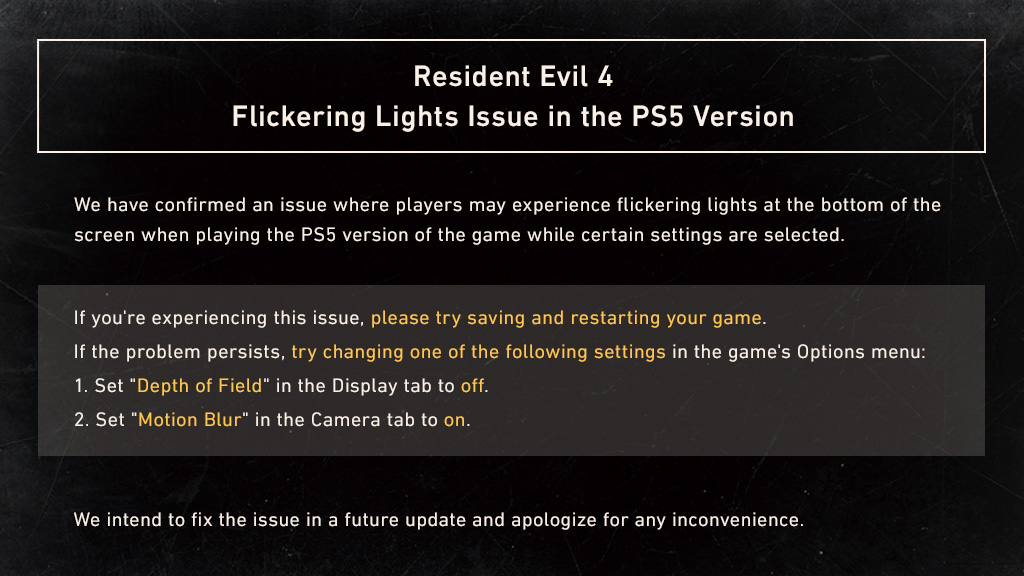
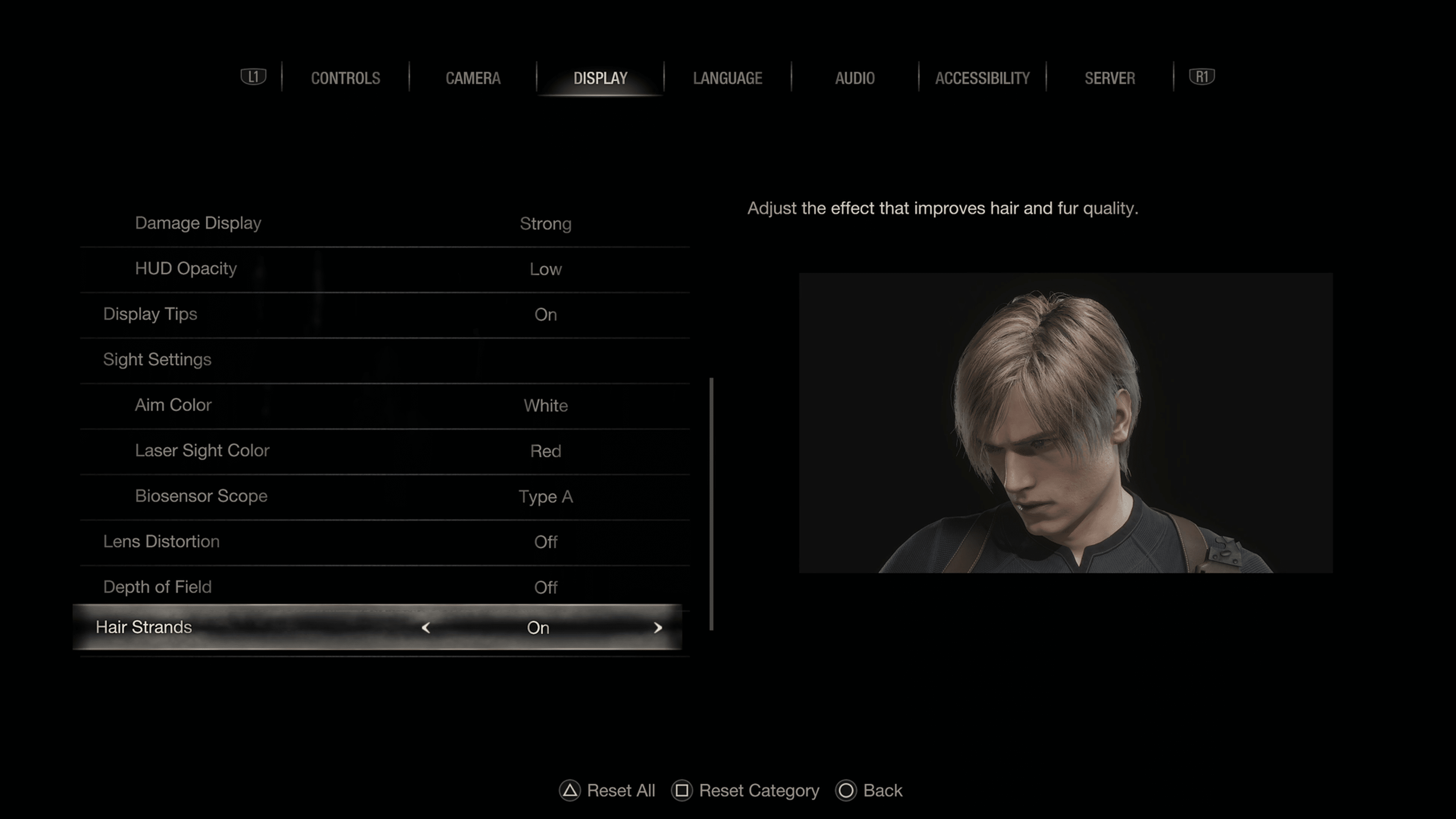
For those playing Resident Evil 4 on the PS5, there’s a flickering issue that players are suffering from now. Capcom is aware of this problem, and has issued a Resident Evil 4 flickering lights workaround while the actual permanent fix will be dished out via a patch.
That’s about it. Just change Depth of Field to “off,” and set Motion Blur in the Camera tab to “on.”
Hopefully, the patch to fix this will be released before April 7, as that’s when The Mercenaries DLC is scheduled to come out, which will most likely come with tweaks and fixes.
Tekken‘s version of the Terminator is back, and he’s angrier and stronger than ever. Bandai Namco Entertainment has released the Tekken 8 Jack gameplay debut trailer, featuring the eighth model of the lean mean high-octane steel machine as he pounds King into submission with explosive Heat abilities and a new Rage Art in which he unleashes a devastating plasma cannon.
Watch the Tekken 8 Jack gameplay trailer below:
The series’ eighth iteration of the Jack robot “Jack-8” takes visible aesthetic inspiration from the last few decades of sci-fi cinema, particularly Robocop. Each punch Jack-8 deals is packed with earth-shattering power, and the Rage Drive gun combos from Tekken 7 have been replaced with earthshattering melee strikes in his Heat abilities that even let him launch an explosive missile at his enemies. Jack-8 does away with Jack-7’s melee barrage Rage Art and instead engages with a downward smash that launches his opponent into the air, following it up with a blinding plasma cannon blast that knocks even him away.
Bandai Namco is regularly releasing Tekken 8 gameplay trailers in anticipation of the game’s launch, with trailers for Jin, Kazuya, Paul Phoenix, Marshall Law, King, and Lars Alexandersson having come out in the last few weeks. The game will launch for PC, PS5, and Xbox Series X|S at a currently-unspecified time.
UPDATE: Bungie has removed Trials for this week; the mode went live in error. Trials is not available while Iron Banner is live.
For those seeking the latest rewards in Destiny 2’s weekly PvP mode, MP1st is here to bring you the new Destiny 2Trials of Osiris rewards and map this week March 24, 2023 edition!
New Destiny 2 Trials of Osiris Rewards This Week March 24, 2023:
Trials of Osiris Map
–
Rewards
Reputation Rank 4: Upgrade Module (2)
Reputation Rank 7: Enhancement Prism (3)
Reputation Rank 10: Trials Weapon (Changes for each rank reset)
Reputation Rank 13: Upgrade Module (2)
Reputation Rank 16: Trials Weapon (Changes for each rank reset)
Reputation System, Trials Engrams, and Adept Farming
Win individual rounds within each match to gain Trials reputation. The amount of reputation you gain increases with each round you’ve won on your card. Earn enough reputation, and you’ll be able to claim a Trials Engram from Saint-14! This engram can be focused into any currently available trials loot you have previously obtained, or it can be taken to Master Rahool for a random Trials drop. Your reputation increases after every match completion, based on the number of round-wins on your card, regardless of the result of that match itself (win or lose, 0-5 or 5-4).
Once you have gone Flawless, keep playing! Every win you achieve while at the 7-win level, even if you lose your Flawless, has a chance to drop bonus Trials Engrams, adept weapons, prisms, and even Ascendant Shards. There is no penalty for losing once you’ve made it to the Lighthouse!
When you’re done, you can cash in your 7-win passage for one additional adept drop, granted you have gone Flawless that week. This resets your card so you can start anew.
Passages
Name
Perk
Cost
Passage of Ferocity
Your third match win grants a bonus win.
10000 Glimmer & 15 Legendary Shards
Passage of Mercy
Forgives one loss per run.
10000 Glimmer & 15 Legendary Shards
Passage of Wealth
Increased Trials Rank points from reaching 3, 5, and 7 match wins on a ticket.
It’s Friday and for Destiny 2 players, this means Xur is back to sell his wares! If you’re asking what Xur is selling in Destiny 2 this week and where he’s holed up, we’re here to help! The MP1st new Destiny 2 Xur location today, March 24, 2023 post is live, and you can check out Xur’s list of items this week in one handy list below.
New Destiny 2 Xur Location Today March 24, 2023 (And What Xur Is Selling):
Xûr, Agent of the Nine
A peddler of strange curios, Xûr’s motives are not his own. He bows to his distant masters, the Nine.
Complete Vanguard playlist activities, or win matches in Crucible or Gambit. Extra progress is awarded for more challenging activities and for succeeding with clanmates.
Engrams
Name
Description
Cost
Exotic Engram
An engram with a predestined outcome. Contains a new Exotic if any of the possible rewards remain to be collected. Preview contents for possible rewards.
Xûr, Agent of the Nine, is a strange vendor who randomly appears in a Public Sector on one of the Worlds. Xûr sells Exotic equipment and only takes Legendary Shards in exchange for them.
TL;DR: He’s the Santa Claus of Destiny and every weekend is Christmas. Sometimes he brings you what you want, sometimes he brings you coal. Mostly it’s coal.
When does Xûr visit?
Xûr visits every Friday at 17:00 UTC and departs at Weekly Reset (Tuesday 17:00 UTC). If you would like to see all the live conversions of Time Zones, please follow this link here.
DICE has announced that the first major update for Season 4 is set to drop this coming week! The studio has revealed the complete Battlefield 2042 update 4.1.0 patch notes ahead of its official release, and it mentions a new mid-season event, new weapons and more.
A special division has begun to stir. The next mid-season event is just around the corner.
You can expect brand-new themed cosmetics to earn alongside the ability to jump into a new mode that will task you with getting up close and personal with the enemy.
But for now, one question remains – will you be able to shut down the Leviathan in time?
Stay tuned for more details.
CONTENT
New Vault Weapons
AEK 971
This fully automatic firing weapon has a 30-round capacity with a low spread and decent recoil. If you’re a fan of utilizing burst-fire modes on your weapons, optics are suggested for staying on target.
RPK-74M
Feeding from a magazine instead of a belt affords this LMG the fastest reload speed of its class – at the cost of magazine capacity. Risk versus lethality.
MP443
This short recoil and high mobility sidearm was standard issue for a long time, but don’t let its age (or size) fool you, this quick-firing weapon means business
IBA Armor Plate Overhaul
In this update we’re overhauling the protective benefits of the Armor Plate.
Armor protection benefits will now only apply to the torso area of your character, and no longer provide protection for the entire character.
This means any hit to an enemies torso while they have IBA Armor Plates applied will result in a deduction to the player’s armor first and once depleted, damage will follow through to the character’s health.
The functionality of the IBA Armor Plate outside of this remains unchanged, including explosive damage to armor.
With this overhaul, we are responding to player feedback that armor plating is too effective, and we’re making steps to allow you to counter that gadget by providing a skill enhancement to gameplay, encouraging you to prioritize your shots in order to earn faster takedowns.
Chat Improvements
We added a new and improved design which leads to a less cluttered experience.
Other improvements include, but are not limited to: Background Opacity decoupling, now allowing for text to remain strong while lowering the opacity of the background. Decoupled the Chat Box background opacity, if the opacity is set to below 20% your text will now glow.
Color formatting changes, resulting in handles being color coded and white text for chat dialogue.
CHANGELOG
General & Gameplay Improvements
As indicated above, IBA Armor Plates will now exclusively provide protection to the chest area of your Specialist. Your limbs and head area will remain unprotected
Increased XP earned and feedback when destroying an enemy EOD Bot
You now earn Objective Fortified XP for placing Gadgets such as Ammo Crates, Claymore Mines, etc. in a friendly objective area
You now earn Objective Revive XP when reviving a teammate inside an objective area in Breakthrough
Resolved an animation issue that would break while crawling in prone with a throwable gadget in hand
Fixed an issue that prevented grenades from being able to be thrown through a window on Renewal at E2
Fixed an issue that would cause inconsistent melee damage to occur when dragging the mouse in any direction just before the hit occurred
Meleeing an enemy who is on a ladder will now deal the same damage as the standard melee attack at a rate of 50 damage
Reduced the traversal sprint delay when barging through doors
You will now be able to barge through doors whilst sliding
Fixed an issue that would cause traversal sprint to become broken upon quickly exiting a vehicle
Fixed an issue that would sometimes result in sliding to gain unintended acceleration
Fixed an issue that caused a small amount of unwanted camera shake after performing a low vault
Smoothed out the animation of vaulting to reduce a popping sensation that occurs at the end
Improved the animations of the Recoilless M5 and G-84 TGM
The default weapon for Engineer has now moved from the DM7 towards the LCMG to appropriately synergise with the Weapon Proficiency
Dev Comment: In order for this change to take place, any Engineer that had a DM7 equipped will find that their loadout has changed to the LCMG.
Specialist Mastery Improvements:
Adjusted Sundance’s Mastery requirement from 30 to 20 Kills and Assists with the Smart Explosives
Adjusted Crawford’s Mastery requirement from 50 to 30 Kills and Assists with the Mounted Vulcan
Adjusted Zain’s Mastery requirement from 50 to 30 Kills and Assists with the XM370A
Updated Lis’ Mastery requirement from 10 Vehicles Destroyed with the G-84 TGM to 10 Kills when destroying Vehicles with the G-84 TGM
Updated Dozer’s Mastery requirement from 20 Kills with the SOB-8 Ballistic Shield to 40 Close-distance Kills, to allow for a more varied playstyle with Dozer, but still making sure he gets up close and personal
Audio
HDR Audio overhaul to create a higher dynamic range in the mix
We have made some gearbox tweaks to the EBLC-RAM to minimize shifting going up hills. This will help with repetitive audio being heard
Fixed an issue where a buzz sound could be heard after using a Sniper scope
Improved the audio that plays when various vehicle projectiles are flying by you, such as Air-to-Ground missiles, 40mm and 30mm cannons, Kinetic Grenade Pods and more. It is worth noting that you’ll mostly benefit from this experience if you’re dodging such projectiles, if you’re not – well, seek a Support Specialist.
The “update airburst distance” sound will now appropriately trigger in accordance to the visuals and range displayed within the UI
The Repair Tool should now be more audible whilst in the MV-38 Condor
Improved the audio feedback when you become stuck with a projectile from the SPH Explosive Launcher
Fixed an issue where Javelin’s lock on sound or engine sound doesn’t trigger
Fixed an issue where Javelin’s projectile sound doesn’t trigger
Gadgets
Updated the tutorial video of the FGM-148 Javelin
Updated EMP grenades description to more accurately reflect its updated damage mode
Tooltips have been added for the defibrillator on Battlefield Portal
Melee weapons from Battlefield 2042 will now be listed within Battlefield Portal
Smoke grenades now explode underwater, sorry Penguins
Fixed an issue that caused the BF3 SOFLAM to not be accessible after being deployed
Friendly Claymores are now displayed on the minimap
The Repair Tool animation will no longer persist when switching to another Gadget
The Tracer Dart can no longer lock-on through large environmental objects
The Tracer Dart now allows friendlies to lock onto stealth helicopters even when they are in stealth mode.
FXM-33 Stinger UI now animates when locking onto an enemy Nightbird that’s designated by a friendly tracer dart
M18 Claymore sensor can no longer be triggered by enemies under its radius
M18 Claymore Icons now flash while looking at them
In some cases players were able to pick up M18 Claymores through solid objects. This should no longer happen
Players are now notified via the correct icon while a Ranger is hacked or under the effect of EMP
Fixed an issue that caused the FXM-33 Stinger to not deal damage to soldiers that had been designated by a tracer dart.
Temporarily disabled the ability to defuse Rush MCOM stations with the EOD Bot. This functionality will be re-enabled in a future update
Specialists
Angel
Angel does it again, as his loadout crate can’t be called in on top of vehicles
Angel’s Loadout Crate can no longer be placed on bushes, try doing that one again
Blasco
Fixed an issue that caused the X6-Infiltration Device to not show in the restrictions section of the Portal Builder
Fixed an issue that would cause Blasco to use misleading voice lines when pinging a threat at long distances
The radius on the X6-Infiltration Device should now display correctly while the Big Map is open
Casper
Casper’s OV-P Recon Drone now deals damage to Claymores, C5, Anti-Tank Grenades, and Proximity Sensors
Casper’s OV-P Recon Drone can now EMP the Deployable Spawn Beacon from the EBLC-Ram
Dozer
Damage numbers will now take Dozer’s 50% damage reduction against explosives into account.;
Falck
It’s no longer possible to heal Ranger by the S21 Syrette Pistol
Irish
Irish’ APS-36 Shootdown Sentinel now intercepts the Ghostmaker R10’s explosive bolt
Improved the consistency of the interaction prompt on Irish’s DC-2 Deployable Cover
Zain
The XM370A range counter should no longer become stuck at 0 while in a vehicle
Weapons
Fixed an issue that caused the wrong icon to appear in the Portal Web Builder for the AC9
Fixed an issue where dropped weapons would be difficult to pick up after a player died whilst they were prone
Fixed an issue where the wrong killcard information would be displayed after killing an enemy with any “Mass” underbarrel
Fixed an issue where the MTAR-21 briefly clips with the camera when aiming down sights in crouch after switching from the Smoke Grenade Launcher
Fixed an issue where players could sometimes get stuck in a melee attack loop while repeatedly pressing both melee attack and weapon fire at the same time
M240B now has the correct headshot multiplier of 2X
Fixed an issue that would cause magazines to disappear while using certain attachment combinations and sprinting
A-91 no longer has incorrect sprint settings applied
Fixed an issue that would cause a flickering dot to be visible on the AC9 Kobra sight
Fixed an issue where scopes were disabling other distortion effects even when not ADSing
Shooting with the RM68 will now display you on the minimap when using non-suppressor barrels
Kobra sight vertical crosshair no longer disappears during ADS when customized on SVD and Type 88 LMG
Fixed an issue where the reload SFX on the RPT-31 would not play as intended
Improved consistency of the VCAR weapon icon
Intended magazine size of 30 bullets is now shown for AC9 Subsonic in Collection tab
Sniper Rifles now have a dispersion penalty while moving
Vehicles
Fixed an issue which would cause open seat blast damage to be improperly applied
Fixed an issue that would cause the overheat crosshair to grow in size when swapping between primary and secondary weapons
RWS on MAV with 50mm cannons now use the correct crosshair
Grenades that have already detonated such as incendiary and smoke are no longer intercepted by vehicle AMPS systems
Fixed an issue that would result in the rotors of Battlefield 3 Air Vehicles not displaying correctly
Rocket lock-on’s will now immediately go away from a vehicle that had SOFLAM lock-on’s active and the vehicle was “Below Radar”
RWS on the LATV4 are now coloured more appropriately to its base color
CAV-Brawler
Player legs should no longer stick out of the vehicle while crouched in the open seats of the CAV-Brawler
Gadgets can no longer be deployed under the CAV-Brawler
Only disabled abilities are now grayed out in the inventory while crouching in the CAV-Brawler open seat
Once the patch is live, we’ll be sure to let our readers know.
On the basis of new evidence submitted by the concerned parties since February, the UK Competition and Markets Authority (CMA) has revised its provisional findings, concluding for now that the Microsoft–Activision deal is unlikely to result in a significant lessening of competition (SLC) in the console gaming services market in the UK. The potential cloud gaming SLC previously outlined by the CMA remains under review.
Today, the CMA published an addendum to its provisional findings from February, stating that its console gaming SLC concerns have been adequately addressed through incorporating new evidence submitted by Microsoft and third parties. Notably, the regulator has found that while the acquisition is greatly dissimilar to any past Microsoft acquisition, the lifetime value (LTV) model it has used to analyze the benefits and losses from the acquisition for each party suggest that Microsoft has no incentive to engage in a total foreclosure strategy with Call of Duty against PlayStation, and cannot use partial foreclosure strategies for this reason either as they would not “materially affect PlayStation’s ability to compete.”
While the arguments of Microsoft’s competitors in the console gaming market claimed that the Redmond company does have an incentive to engage in foreclosure strategies with Call of Duty, the CMA believes – after revising its predictive model based on input from all concerned parties – would lead to a net loss for all these parties in every scenario the regulator “found plausible.” Further, while the CMA recognizes that console manufacturers “place significant value in having exclusive content” and that Microsoft did make ZeniMax Media’s future releases Xbox-exclusive, it holds that this was an “acquisition of talent,” performed specifically for ZeniMax’s studios to create Xbox-exclusive content in the future as opposed to forcibly migrating multi-platform titles’ customer bases to Xbox.
While this does halfway clear the way for the acquisition, the CMA has explicitly stated that its cloud gaming SLC concern is still being reviewed in light of the responses submitted by all concerned parties. It is pertinent to mention that Microsoft’s new access agreements were not a factor in the revision of the CMA’s provisional findings. The deadline for the final report remains April 26, 2023.
Are you starting out Capcom’s Resident Evil 4 remake? Perhaps you’re wondering what control configuration and tweaks are needed in order to dispose of the Las Plagas? MP1st is here to help with our Resident Evil 4 best settings guide for both consoles and PC!
Resident Evil 4 Best Settings (General for Consoles and PC)
Audio (PS5)
If you are on PS5, the very first thing you are going to want to do if you have controller speakers muted is to navigate to the audio and make sure the speaker audio is off. By default, it’s turned on, and if you have speaker volume off, you won’t hear any of the in-game coms. Turning speaker audio off in the option will fix this, making the audio come out of your TV set or speaker.
Controls
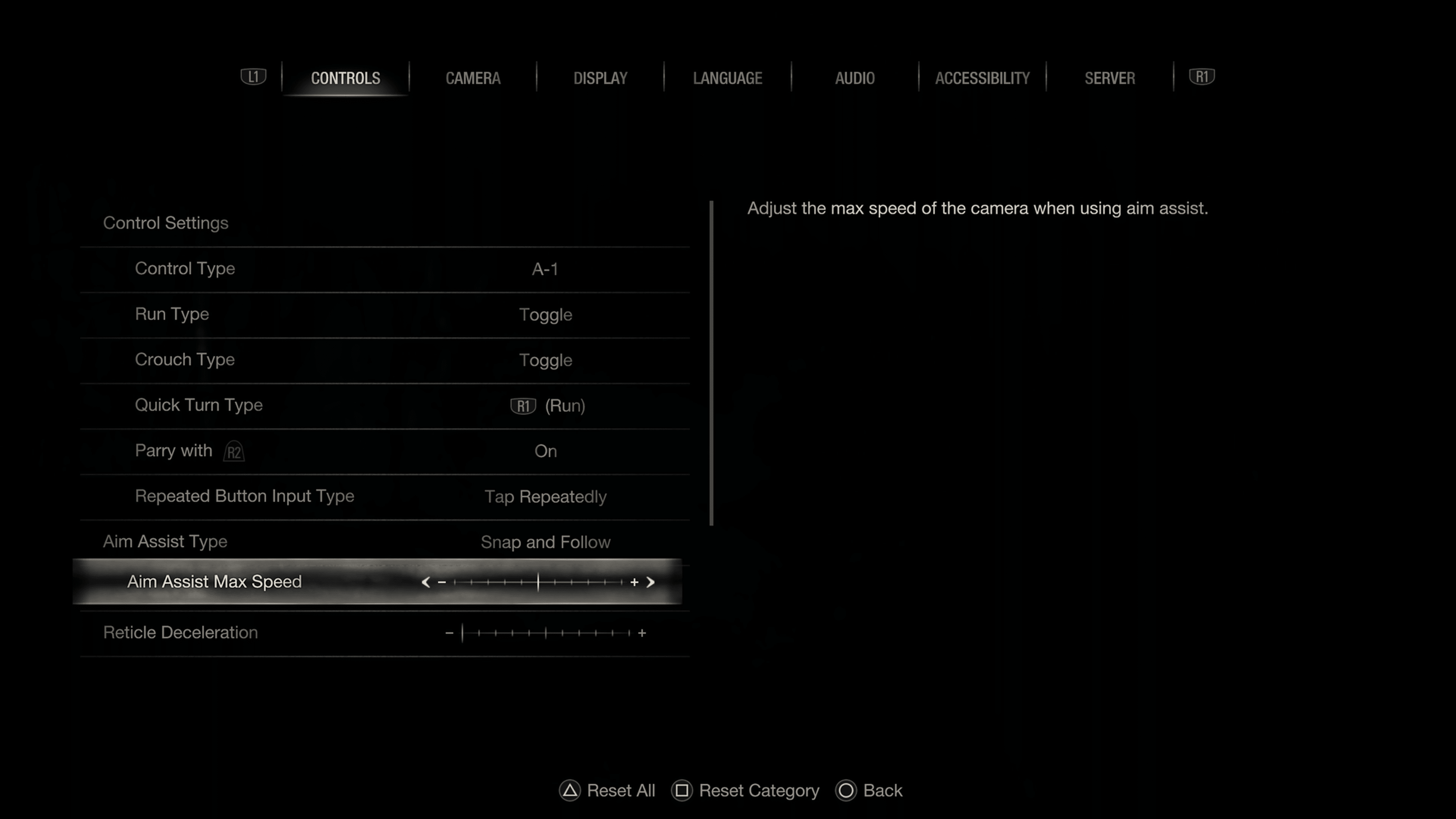
Parry – Depending on your playstyle, you can adjust a few things to make the game “easier.” For those wanting a challenge, we recommend ensuring everything listed below is either off or set to the lowest.
So the first thing I recommend is changing the parry action to R2 (RT). Having it tied to the same button for shooting, we found it a little easier to perform a parry than to use the default L1 (LB).
Aim Assist – If you find it hard to aim and constantly miss shots, you may want to turn aim assist on. Two options are available here: “snap” and “snap and follow.” Snap will cause the crosshair to snap to an enemy as soon as the bottom is pressed, whereas snap and follow will perform the same action, with the aim following if the target moves. Again, if you’re looking for a challenge, make sure this option is off.
Aim Assist Speed – This slider controls the camera’s speed when using aim assist. You can tinker around to find what best suits you, but the default value should be good enough.
Reticle Deceleration – This slider controls how much the reticle slows down when over an enemy. Again, tinker with what you think is best, but the default should be fine.
Camera
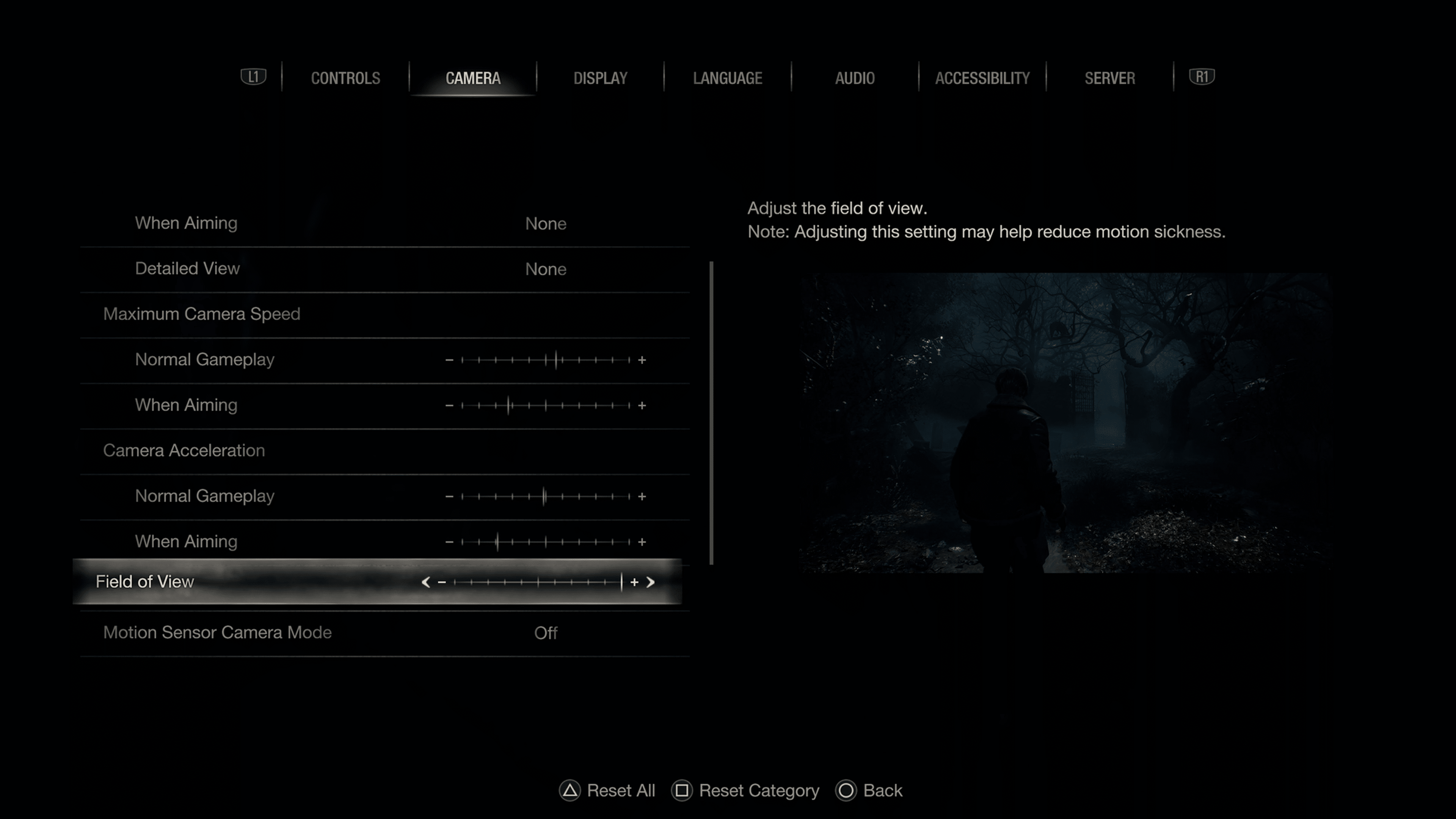
Most of everything here is user preference, but we do recommend changing the field of view. The default value is ok, but don’t go any less as the camera may be too close to the character. Increasing it, however, will give you more viewing space and hardly has a major effect on the game’s performance on consoles.
We also recommend turning motion blur off.
Display
Visuals/Action Priority – Two options available here are resolution and framerate. The resolution will set the game to 30FPS with a 4K resolution target, whereas the framerate mode will decrease the resolution but offer 60FPS. We felt the framerate mode offered the better experience, though if you plan on playing with ray tracing, then you may want to opt for resolution as the impact is greater when it comes to framerate.
Ray tracing – We only recommend using this if you plan on playing RE4 with the resolution mode preset OR if you have a VRR-supported monitor, in which case ray tracing and framerate mode is the definitive way to play.
Brightness – Everyone likes these settings differently, though most titles have an on-screen guide to follow. This typically means adjusting a slider until an image is barely visible. That should be fine for most people, though I like having it offset a few notches.
HUD – Keep this at default, though if you are comfortable with playing with no HUD then you can turn it off completely.
Lens Distortion – Turn this off as it includes chromatic aberration, which seems to be causing an issue. We aren’t a fan of the fish-eye effect either.
Depth of Field – This option controls the focus on objects depending on their distance. They appear “blurry” on screen, though that’s due to the game wanting you to focus on something specific. If you want a clean, sharp image throughout, then turn this off.
Hair Strands – This option is a surprise since it’s typically only on PC. Basically, this will toggle better hair quality, though honestly, the default one isn’t at all bad. Having it off could help with performance, otherwise if you want better hair turn it on.
If your PC is capable of running it, you can turn this to the highest setting.
Language
Options for subtitles are found here. User preference.
Graphics – RTX 4090 GPU (or cards that supports more than 15GB of video ram, including the 3090 and 3090Ti 24GB)
For the graphic options, we’re going to crank everything to max settings for those who have a high-end build. That means turning almost everything to max, resulting in over 13GB of video ram needing to be required. AMD 7900 series cards support 20-24GB, whereas Nvidia RTX 4000 series support 16GB and 24GB in the 4080 and 4090 cards. We don’t recommend maxing these settings out on cards with less memory than the one listed above, as that may produce performance issues.
Diverse enemy animations – on
Motion Blur – Off
Rain quality – High
Terrain – On
Destructible environments – On
Lens flare – On
Lens Distortion – Personally, we prefer off, but if you do turn it on, be sure it’s not the one with chromatic aberration effect.
Depth of field – On, but you can turn it off if you don’t like distant objects blurred out.
Resource-intense lighting quality – High
Resource-intense effects quality – High
Screen resolution – Match what you use for a monitor. In our case, we have this set to 4K.
Refresh rate – Again, match what your screen supports. Be careful going above that threshold, as you could lose input to your display.
Framerate – Variable or Locked – If you want to really push the system, you can use variable which will go above the 120FPS thresholds. However, if you want an experience that’s going to be buttery smooth with ultra settings, set this to either 120FPS or 60FPS.
Display Mode – Full screen
Vertical Synchronization – On
Cinematics resolution – 4K (cutscenes will playback in full 4K) – This doesn’t play a major impact on performance, so every card should be able to handle this if they support 4K output.
Ray Tracing – On-High
FidelityFX Super Resolution 1 or 2?
Play around with both, as results may vary in overall picture quality. We do, however, recommend turning either to one of the quality presets as it will lessen the processing load. FSR2 does offer better performance and improvements overall.
There is no DLSS support, unfortunately.
Image quality – Keep this at 100. It goes up to 200, but even on a 4090 we found it to be too heavy that it impacted performance.
Rendering Mode – Normal
Anti-aliasing – FXAA+TAA
Texture quality – High (8GB)
Texture filtering – High (ANISO x16)
Mesh quality – High
Shadow quality – High
Shadow cache – On
Ambient occlusion – FidelityFX CACAO
Volumetric lighting – Max
Particle lighting quality – High
Bloom – On
Screen space reflection – Off (rat tracing takes care of reflections)
Hair strands – High
Graphic dismemberment – On
Persistent corpses – Many
For builds that use RTX 3000 series cards, starting from the 3090, you should be able to set most things to high, though ray-tracing may need to be set to normal and possibly to screen space. 3080 builds should opt for medium to high settings.
Refresh rate – Go based on your monitor
Frame rate – Variable
Display mode – Fullscreen
Vertical synchronization – On
Cinematics resolution – 4K
Ray tracing – Medium
FidelityFX Super Resolution 2 – Any of the quality modes
FidelityFX Super Resolution 1 –Any of the quality modes.
Image quality – 100%
Rendering mode – Normal
Anti-aliasing – FXAA+TAA
Texture quality – High (1 GB) or High (4GB)
Texture filtering – High (ANISO x16)
Mesh quality – Max
Shadow quality – Max
Shadow cache – On
Contact shadows – On
Ambient occlusion – FidelityFX CACAO
Volumetric lighting – Max
Particle lighting quality: High
Bloom – On
Screen space reflections – On if you aren’t using ray tracing
Subsurface scattering – On
Hair strands – Normal
Graphic dismemberment: On
Persistent corpses: Many
Corpse physics – Low
Diverse enemy animations – On
Motion blur – Off
Rain quality: High
Terrain: On
Destructible environments – On
Lens flare: On
Lens distortion: Off
Depth of field: On
Resource-intense lighting quality: High
Resource-intense effects quality: High
For lower-end cards, we recommend aiming for medium, and if you have to, set some things to low.
That’s about it! Don’t forget, Resident Evil 4 is getting The Mercenaries as a free DLC this April 7! Stay tuned to more Resident Evil 4 guides here on MP1st.
A gamer at heart, James has been working for MP1st for the last decade to do exactly what he loves, writing about video games and having fun doing it. Growing up in the 90's gaming has been in his DNA since the days of NES. One day he hopes to develop his own game.