Home > News

Atomic Heart Trophies List Revealed; 42 Total With 3 Gold Trophies

With just over a week left before Atomic Heart‘s release on February 21, the game’s complete trophy list has finally surfaced. Check out the full Atomic Heart trophies list below, which details a total of 42 trophies (one Platinum, three Gold, eight Silver, and 30 Bronze trophies).

Atomic Heart Trophies List:

The Motherland Does Not Forget its Heroes trophy
Unlock all trophies

Strike trophy
Kill Hedgie without making a single shot / destroy all statues

Medium Rare trophy
Kill Belyash

Make It Go Round trophy
Kill Hedgie

Plyusch Rush trophy
Kill Plyusch

Show’s Over trophy
Kill Natasha

Dew Point trophy
Kill Dewdrop

Murderous Beauty trophy
Kill Twins

Chop Chop Chop trophy
Kill Belyash with a melee weapon

Happy Polymerization Day! trophy
Fly out of Chelomey

Pistils and Stamens trophy
Get out of Vavilov

Tickets, Please! trophy
Take a train at the Lesnaya Maglev train station

Quite an Achievement trophy
Clear the VDNH complex

Curtain trophy
Finish a theater performance

Medical Checkup trophy
Get to a hospital

Freedom Reflex trophy
Explore Pavlov

Kommunism 2.0 trophy
Find out the AoC’s secret

Atomic Heart trophy
Complete the game in Hardcore mode

Artisan trophy
Create a weapon in a crafting machine

Weapon Master trophy
Create five types of weapons

Lord of War trophy
Collect all weapons

Chemist trophy
Craft consumables of all types

Polymerization trophy
Collect 100 jelly

Apple Pie trophy
Pick all apples in Limbo

The Great Inventor trophy
Upgrade a weapon to the maximum level

Lefthand Mastery trophy
Fully upgrade one skill tree

How Can I Help You? trophy
Use a phone booth at Chelomey

Beast Friend trophy
Find all talking dead animals

The Necromancer trophy
Talk to every dead

Burning Ears trophy
Find all Chirpers

More Than Profit trophy
Find all Lootyagins

Explorer trophy
Find a testing ground

Clean-up trophy
Complete all testing grounds

Scanner trophy
Scan all mobs

Avatar trophy
Kill 10 burning enemies, 10 electrified enemies, and 10 frozen enemies

Hothead trophy
Make 25 aimed headshots from Makarov pistol

Below Zero trophy
Freeze a Vova mid-air

Assimilation Procedure Interrupted trophy
Don’t let a sprout grow into a mutant

Bull’s Eye! trophy
Use Telekinesis to throw an object and knock down an Owl

Alcoholics Anonymous trophy
Get drunk with vodka and kill 5 enemies

Triple Penetration trophy
Kill 3 or more enemies with a single Railgun shot

Hands on the Hood trophy
Hit 20 enemies by a car

Atomic Heart goes live on PC, PS5, PS4, Xbox Series X|S, and Xbox One on February 21, 2023. Check out the game’s full PC system requirements to ensure you’re adequately decked out hardware-wise before the game’s launch.

Source: PowerPyx

Avatar photo

Salman Haider Zaidi

That's a nice argument, Senator.

Home > News

GTA 4 Map Recreated Entirely in Unreal Engine 5; Here’s What It Looks Like

The GTA franchise is known for bringing players into large and immersive cities. While plenty of fans make mods for the various GTA games, one fan took things a step further by recreating the entire GTA IV map using Unreal Engine 5.

The map was posted on Reddit by user brucebanner4prez and showcased just how large the scale of this project was. Take a look:

entire GTA IV map re-created in UE5 (WIP)
byu/brucebanner4prez inunrealengine

You can see that the map includes lots of iconic landmarks scattered throughout New York City, such as the Statue of Liberty. The video goes on to highlight all the buildings and roads already put in place. There are even dedicated sewage and drainage areas all modeled out, making for quite an impressive map.

The map apparently 10 months of consistent work to actually get it to the state you see in this video, and the user claims that it’s still a work in progress. When asked why they decided to undertake this endeavor in the first place, here’s what he had to say:

for the same reason that people reference 2d images to build their 3d scenes. to practice modeling without needing to mentally create everything from scratch. plus bragging rights obvi lol

As the user had to make models for everything in order to recreate the GTA 4 map, this project is quite an impressive feat. 

In other GTA news, go check out a flood of details including weapons, gameplay details and more regarding GTA6 via the massive leak that happened last year.

Carlos Perez

Home > guides

Hogwarts Legacy Advanced Combat Guide: Optimizing Your Spell Usage

Hogwarts Legacy’s spell-based combat is pretty fun, with a mix of Basic Casts and spells like Levioso and Expelliarmus to change the flow of battle. There’s a certain learning curve to getting used to the spells, and while you can definitely get away with mashing away every spell available to you, with just a bit of practice, you can improve your combat effectiveness by leaps and bounds. If you need some help, MP1st’s Hogwarts Legacy advanced combat guide should you have clearing enemies and obstacles in no time.

This advanced combat guide will not focus on specific spells like Glacius or Expelliarmus, but will rather go over some useful tips that may require a little repetition to get used to.

Hogwarts Legacy Advanced Combat Guide:

How Juggling Works

Juggling refers to the act of keeping enemies airborne for prolonged periods of time via a chain of attacks. It’s a technique that you can find in fighting games, action games, and more. Being able to prevent your enemies from doing anything for as long as possible not only makes combat easier but also feels incredibly satisfying to pull off. Unlike other games, where juggling may require precise timing and a certain sequence of attacks, Hogwarts Legacy makes juggling so simple that you’re probably doing it without even realizing it.

You’ve learned about juggling while completing the Crossed Wands side quests, as you’d have to juggle a training dummy as part of the questline. However, it’s a lot more than just using Levioso and Accio, and you can effectively juggle with just about any combat-focused spell if you know how the spell works.

Three to Juggle, Four to End

The Basic Cast is your standard ranged attack spell that doesn’t have a cooldown. Pressing R2 repeatedly will fire bolts of your Basic Cast, with the fourth cast dealing significantly more damage. While the fourth Basic Cast’s extra damage is great for finishing off enemies, it’s actually not ideal to use when juggling, as the Basic Cast also knocks the enemy back. Doing so may put the enemy out of range, which may break the juggle and give the enemy an opportunity to strike.

As such, the general idea behind juggling is to send an enemy airborne, perform three Basic Casts, then cast another spell and repeat. By only performing three Basic Casts between spells, you’ll effectively cancel the fourth hit, allowing you to continue your assault on the enemy.

It’s worth noting that for Incendio in particular, you’ll only be able to throw out one Basic Cast at most if they’re already in range. All Basic Casts knock enemies away from you slightly, and doing two or three Basic Casts may push the enemy too far away for you to actually be able to cast Incendio on them.

If the enemy’s already low on health and you’d rather save your cooldowns for another enemy, feel free to simply continue the Basic Casts until you land the fourth one for that sweet extra damage.

Delaying Spells to Wait for Cooldowns

Spell cooldowns in Hogwarts Legacy are fairly short, and you’re able to cast the same spell multiple times in the same fight. As such, you may find yourself pacing around during a fight while waiting for your next Diffindo or Expelliarmus to come up. If you want to execute an extended juggle combo on a single enemy, you’ll want to be able to reuse the same spell more than once, and to do this, you’ll need to delay your spells.

To do this, simply pause briefly between each Basic Cast or spell. Hogwarts Legacy is very forgiving with juggle timings, and by delaying your combo ever so slightly, you can buy enough time for your cooldowns to come back up. Having the “Basic Cast Mastery” talent makes this technique a lot easier as each Basic Cast will also slightly reduce your spells’ cooldowns.

Identifying and Executing AoE Combos

Certain spells, when upgraded via Talents, allow their effects to work over a larger area, and this can open up opportunities for AoE combos. While these are more difficult to pull off, as you’ll want them to be grouped up in the first place, successfully executing an AoE combo can easily turn the tide of battle. 

AoE combos are only feasibly possible against enemies that don’t have magic shields on them, as you can use a single Control spell on them at once, so wolves, spiders, and similar creatures would be easy targets.

Executing an AoE combo is simple—target one of the enemies in the group with your control spell of choice and hit them with a damage-dealing spell. You can do this multiple times in succession, but keep in mind that you can’t use Basic Casts or it’ll ruin the whole combo. A simple example of an AoE combo would be Levioso > Accio > Incendio. Of course, you’ll need the Talents for each of these spells in order to pull this combo off.

https://streamable.com/wxcng8

The most difficult part of using AoE combos is actually identifying situations when you’re able to pull them off. Try to keep your eyes peeled for enemies that have grouped up together and you’ll start to see more and more opportunities as you play the game.

Closing Thoughts

One of the neat things about Hogwarts Legacy’s combat is that it’s stylish and simple while also leaving room for improvement. Players who are simply content with just button mashing will have just as much fun as players who take the time to develop their own combos.

If you’re interested in more Hogwarts Legacy Guides, check out our game hub.

Carlos Perez

Home > News

Ark Survival Evolved Love Evolved 4 Update Details Revealed; New Roadmap to Be Announced Next Month

Ark Survival Evolved is running the Loved Evolved event once again, with the event going live now until February 17. Ark Survival Evolved’s Love Evolved 4 EVO event will feature rates and creature colors.

The post announcing the event details also revealed that a development roadmap would be arriving next month. It will reveal all the planned development updates for games across the Ark franchise, so it’s definitely something to look forward to. With that being said, here are all the details for Ark Survival Evolved’s Love Evolved 4 event!

Ark Survival Evolved Love Evolved 4 Details:

HighresScreenshot_1920.jpg

Welcome to another edition of the Community Crunch!

roadmap.png

We’re excited to announce that we’ll reveal a development roadmap across all iterations of the ARK Franchise next month.  

votewinner.png

With 65,870 votes, this Community Vote has been a popular one!  Ideas from the past and new entries battled it out in RankedVote to determine the next creature.  One of the entries returns to claim a victory and reminds us that bugs are mite-y cool creatures 😎.

rhy.png

56c1b371745ca.jpg

Credit: Prehistoric Bugs and Insects

Rhyniognatha is an extinct genus of arthropod of disputed placement and is considered by many as the oldest insect known.  It lived 35 million years before the first amphibians.

We are excited to get this to the creature design team and start working on Rhyniognatha!  Look for Rhyniognatha to make a grand appearance in ARK: Survival Evolved later this year!

Voting Results

tsotfconsole.png

We’re expecting The Survival of the Fittest console to launch next week between Wednesday and Friday!  Stay tuned for more information!

valentinesevo.png

ARK_LoveEvolved3_2022_KeyArt_Msft_2560x1440.jpg

Our Love Evolved EVO event is live until February 17th! Unlike traditional ARK holiday events, only rates and wild dino colors will be active for holiday EVO Events.  

Survivors on Nintendo Switch can experience a traditional Love Evolved experience until Feb 16th!

eventdates_le.png

  • 2/10/23 – 2/17/23

eventrates_le.png

*Note that these bonuses are multiplicative of the game’s standard 1x rates. 

  • Official Servers: 3x XP, Harvesting, Taming, and Breeding (imprint, maturation, hatch/gestation), 0.5x Mating Interval, 1.5x Hexagon Bonus
  • Small Tribe Servers: 4.5x XP, 4.5x Harvesting, 4.5x Taming, and 4x Breeding (imprint, maturation, hatch/gestation), 0.5x Mating Interval, 1.5x Hexagon Bonus
  • ARKPocalypse: 5x XP, 5x Harvesting, 5x Taming, and 5x Breeding (imprint, maturation, hatch/gestation), 0.5x Mating Interval, 1.5x Hexagon Bonus
  • Classic: 6x XP, 6x Harvesting, 6x Taming, and 5x Breeding (imprint, maturation, hatch/gestation), 0.5x Mating Interval

eventcolors_le.png

  • Dark Lavender
  • Dark Magenta
  • Magenta
  • Dino Dark Purple
  • Dino Light Red
  • Deep Pink
  • Dark Red
  • Lemon Lime
  • Red
  • Actual Black

Source: Survive the Ark

Carlos Perez

Home > News

Hogwarts Legacy Black Screen Fix – Here’s a Step by Step Guide

For those playing Hogwarts Legacy on PC, some of you have experienced one of the problems the game is suffering through at launch, and that’s the black screen issue. While Avalanche Software still has no fix for it released just yet, there is a Hogwarts Legacy black screen fix already available, and it’s listed below.

Hogwarts Legacy Black Screen Fix:

Here’s a step by step guide:

  • Win+R
  • enter %appdata%
  • navigate out of Roaming
  • and go into Local/Hogwarts Legacy/Saved/Config/WindowsNoEditor
  • Open GameUserSettings.ini with your prefered editor or similar (its treated as a .txt file)
  • Scroll down to [ShaderPipelineCache.CacheFile]
  • beneath it, add r.ShaderPipelineCache.Enabled = 0
  • should look like this:

\[ShaderPipelineCache.CacheFile\]

LastOpened=Phoenix

r.ShaderPipelineCache.Enabled = 0

  • Save

Players can use “%AppData%\..\Local\Hogwarts Legacy\Saved\Config\WindowsNoEditor” to get to the folder as well.

Hopefully that helps, as it has worked for a few people already.

Source: Reddit

Related Hogwarts Legacy Reading:

Avatar photo

Alex Co

Father, gamer, games media vet, writer of words, killer of noobs.

Home > News

Next Guilty Gear Strive DLC Character & Stage Delayed From March to April

Arc System Works has announced that the next Guilty Gear Strive DLC character and stage, initially planned for a March 2023 release, have now been delayed to “early April” for additional refinement and polishing.

Since Guilty Gear Strive first launched in June 2021, seven additional characters and two additional stages have been added to the game as DLC. The previous new stage “White House Reborn” dropped in March last year, while the game’s seventh DLC character Sin Kiske returned to Guilty Gear Strive in November.

The game’s Season 2 roadmap released during EVO 2022 in August revealed two new characters and stages planned for 2023, but Arc System Works has now announced that both the first 2023 character and stage are being delayed from a March release to an “early April” window. The developer attributes this delay to wanting to “provide the best quality possible” with the new content. It has not revealed whether the rest of the 2023 content roadmap will be affected or not.

Guilty Gear Strive is available now on PC, PS5, and PS4, and is slated for an Xbox One and Xbox Series X|S release in Q2 2023.

Avatar photo

Salman Haider Zaidi

That's a nice argument, Senator.

Home > News

Fatal Frame: Mask of the Lunar Eclipse Story Trailer Shows Off Combat & Photo Mode

Weeks away from the March 9 launch, Koei Tecmo has released a Fatal Frame: Mask of the Lunar Eclipse story trailer. The trailer (re)introduces fans to protagonist Ruka Minazuki and her journey to Rougetsu Island, showcasing the game’s combat mechanics, Photo Mode, and new cosmetics.

Watch the story trailer below:

Released on the Wii in 2008 and previously limited to the Japanese market, Fatal Frame: Mask of the Lunar Eclipse is coming to the West in remastered glory on both last-gen and current-gen consoles. The game follows amnesiac protagonist Ruka Minazuki in her journey to the fictional Rougetsu Island in search of two missing girls with connections to Rika’s traumatic past.

The game’s unique combat system makes use of a “Camera Obscura” that deals damage to particularly camera-shy enemies by taking pictures of them. Players can also use a “Spirit Torch” in the same fashion, and deal increased amounts of damage by striking exactly when the enemy attacks. A Photo Mode (which unfortunately does not make use of the Camera Obscura) is also present, with special filter and frame options.

Fatal Frame: Mask of the Lunar Eclipse crawls out on PC, PS5, PS4, Xbox Series X|S, Xbox One, and Nintendo Switch on March 9, 2023.

Avatar photo

Salman Haider Zaidi

That's a nice argument, Senator.

Home > News

The Legend of Zelda: Tears of the Kingdom’s Price at $70 Won’t Be the New Standard, According to Nintendo

Nintendo is finally releasing its first $70 game in The Legend of Zelda: Tears of the Kingdom. After the game’s trailer was showcased last Nintendo Direct, it was revealed that The Legend of Zelda: Tears of the Kingdom’s price would cost more than any other Nintendo Switch title, a first for the platform. This comes just a couple of months after Xbox’s own announcement that it would charge $70 for its own first-party titles in 2023. 

While the announcement of a $70 game may worry Switch gamers and Zelda fans alike, this doesn’t necessarily mean that future Switch releases will cost just as much. Nintendo stated via a Game Informer article that the company “determine[s] the suggested retail price for any Nintendo product on a case-by-case basis.” In other words, The Legend of Zelda: Tears of the Kingdom isn’t priced at $70 because Nintendo’s going to make all games cost as much in the future, but because the company deemed the title itself as valuable as $70.

Of course, with a statement like this, it still does mean that it’s possible Nintendo will pump out more $70 games in the future. Until that happens, though, The Legend of Zelda: Tears of the Kingdom will remain the most expensive Switch game on the platform, and hopefully live up to that price point.

Source: Game Informer

Carlos Perez

Home > guides

Hogwarts Legacy Potions Guide – How to Collect Ingredients and Brew Potions

Potions are a key component in many fantasy games, and Hogwarts Legacy gives players a more involved approach when it comes to brewing them. You have to take an actual class in Hogwarts to unlock the feature, and once you do so, you’ll be able to create various potions for healing, buffs, and more.

This Hogwarts Legacy potions guide will cover the basics of potion brewing, giving you a general idea of how to get started with them. It won’t cover every potion in the game but rather introduce the system itself as well as give you a couple of tips on how to get the ingredients you need.

Hogwarts Legacy Potions Guide

How Do You Brew Potions in Hogwarts Legacy?

To actually brew potions in Hogwarts Legacy, you’ll need to keep playing through the main quests until you unlock the feature, as is the case with many of the game’s other systems. At a certain point, you’ll be tasked to attend the Potions class by Professor Sharp, who will guide you through the potion-making process.

Brewing a potion is actually extremely straightforward. All you have to do is select the type of potion you want to make, and as long as you have the required ingredients, the potion will start brewing on its own. You don’t need to do anything yourself, like stir the pot or prepare the ingredients.

Each potion has a brewing time, and this determines how long it takes before the potion is ready to use. The brewing time is in real-world time (unless in game menu, which pauses it), not game time, so you can tend to other things while you wait for the potions to finish.

Once you’ve earned enough Galleons by playing the game, you can purchase more potion recipes in Hogsmeade.

Where Can I Brew Potions?

There are two main areas where you can brew potions. The first location you unlock is the place where you originally learned how to make potions in your Potions class. This area is a little out of the way, however, so it can be a bit of a chore to head on over there all the time.

Fortunately, once you continue through the main quests and eventually unlock the Room of Requirement, you’ll be able to readily brew potions at a faster rate. When you unlock the Room of Requirement, you’ll be able to build your own Potions Stations via spellcrafting.

Note that when you initially unlock the Room of Requirement, you’ll only have access to the basic Potions Stations. Larger stations will require the relevant spellcraft recipes that you can buy at Hogsmeade.

How Do I Collect Ingredients?

Ingredients for potions can be found all over the map, and there are multiple ways of obtaining them. The quickest way would be to buy ingredients directly from The Magic Neep; the vendor offers mature ingredients ready for potion-making, but you’ll need to spend Galleons to get them, so keep that in mind if you’re trying to save up for something else. 

Another method of obtaining ingredients would be by simply exploring the area around Hogwarts and Hogsmeade. The open area is full of ingredients, and you can easily spot them thanks to their goofy movements or unique sounds.

Finally, you can generate a somewhat steady supply of ingredients via Herbology by planting ingredients yourself. Doing so does take real-world time, just like potion-making, but it’s great in the sense that you can guarantee what ingredients you’ll get, and you don’t have to spend much on seed packets, either. Check out our Herbology guide for more information on the subject.

With the help of potions, you can keep yourself healthy, protect yourself from enemies, and even dish out some extra damage when necessary. Though brewing itself is simple, you’ll need to work for your ingredients, so consider gathering whatever you come across during your travels between Hogwarts and Hogsmeade. For more Hogwarts Legacy content, click here.

Carlos Perez

Home > guides

Hogwarts Legacy: How to Get the Flying Broom

One of the most iconic elements of being a witch or wizard in the Harry Potter books and movies is the ability to travel in the air via flying brooms. Used for basic transportation and in Quidditch, these magical vehicles of sorts are great for traversing the open areas of Hogwarts Legacy. But how do you get one? MP1st is here to help with this how to get a flying broom in Hogwarts Legacy guide.

Obtaining Hogwarts Legacy’s flying brooms is pretty straightforward, but you’ll need to be prepared if you want to use it right away. Here’s what you need to do in order to get a flying broom in Hogwarts Legacy.

Hogwarts Legacy: How to Get the Flying Broom

To gain the ability to own a flying broom for yourself, you’ll need to play through the main quests until you have to take Flying Class. This class, as the name suggests, goes through the basics of flying with a Flying Broom. In-game, you’ll learn about the Flying Broom’s controls, how to ascend and descend, and so on. As part of the tutorial, you’ll also have to fly through a course where you must pass through rings to proceed.

Once you finish this class, you’ll finally gain the ability to obtain Flying Brooms. You actually don’t get one for free, and instead have to purchase one at Spintwitches Sporting Needs in Hogsmeade. Do note that this shop is actually closed until you finish Flying Class, so you can’t unlock it early even if you have the Galleons to buy one.

Upon reaching Spintwitches Sporting Needs, you’ll be greeted by Albie Weekes, who introduces you to various Flying Broom designs. These brooms vary in shape and style, but they’re all functionally the same, with the only differences being cosmetic.

Each broom costs you 600 Galleons, and you can buy more than one if you’d like. You can also upgrade these brooms by taking on a side quest that has you do time trials against another Hogwarts student, Iselda Reyes. Simply continue talking to Albie when you first reach the shop and he’ll unlock the necessary quest for you.

Hogwarts Legacy can feel a little slow for a while due to brooms being something you unlock later in the game, but once you do so, you’ll be able to explore the area surrounding Hogwarts and Hogsmeade to its fullest. For more Hogwarts Legacy guides, click here.

Carlos Perez

Home > News

Report: The Evil Within 3 Teaser Spotted in Hi-Fi Rush

A potential The Evil Within 3 teaser has been spotted in Tango Gameworks‘ Hi-Fi Rush, in the form of a news ticker that reads “Sequel to popular survival horror game anounced [sic].” While this is not a confirmation of The Evil Within 3’s existence by any means, the placement of the supposed teaser and Tango Gameworks’ small IP catalogue make it quite likely that a new Evil Within game is being hinted at through the teaser.

While Tango Gameworks’ The Evil Within franchise has seen no new games since the second installment in 2017, director Kenji Kimura revealed last year that the studio’s Ghostwire: Tokyo IP began life as The Evil Within 3. Eventually, the game transformed into the Japanese mythology-inspired, karate-meets-magic game it is now, and the earlier concept was shelved for the time being.

However, Tango Gameworks’ funky new rhythm fighter Hi-Fi Rush seems to be hinting that the survival horror franchise does have a future. In the cinematic preceding Track 11: The Needle Drop, Chai and company are taking an elevator ride up to the office of Kale Vandelay, the game’s final boss. Just as their ascent is about to conclude, the elevator screen is displayed for a few frames. The screen reads the floor number (776, Kale Office), but also displays a weather and news ticker.

The news ticker curiously reads “Sequel to popular survival horror game anounced [sic],” before the elevator screen quickly disappears. The blink-and-you’ll-miss-it placement of the screen is only one reason why the ticker may be more than just a ticker. The only horror IP Tango Gameworks has ever worked on is The Evil Within, and the fact that the ticker explicitly mentions a sequel means that whatever the ticker is hinting at is not a new IP. Ghostwire: Tokyo’s original concept already proves that the studio has never been averse to continuing The Evil Within, and as such, a number of coincidences have lined up that may well mean that The Evil Within 3 is in the works.

As always, take this with a grain of salt: it is, after all, just a curious news ticker on an elevator screen in a different game. If you want to see what Tango Gameworks’ previous idea of The Evil Within 3 morphed into, check out our review of Ghostwire: Tokyo, where we found the game “hopefully a start to a beautiful franchise.”

Source: GamesRadar+

Avatar photo

Salman Haider Zaidi

That's a nice argument, Senator.

Home > News

Hogwarts Legacy Update 1.003 Flies Out This Feb. 10

Avalanche Software has released Hogwarts Legacy update 1.003, which is the game’s first patch since launch! While the game is officially out today, it’s been available for a few days already as part of the Deluxe Edition Early Access perk. Read on of for what’s new in the Hogwarts Legacy Feb. 10 patch notes.

Hogwarts Legacy Update 1.003 Patch Notes | Hogwarts Legacy Feb. 10 Patch Notes:

Size: 2.7GB (Xbox), 295MB (PC), 

Update: Multiple gamers on the game’s subreddit have confirmed that this patch on PC didn’t fix any crashing issues related to memory usage.

No patch notes have been released just yet still.

In the review guidelines sent to us for review, Avalanche Software mentioned that a day one update for ray-tracing was set to be rolled out.

*Please note, ray tracing performance improvements will be included in a day one launch patch.

Here are the known issues with Hogwarts Legacy that’s listed in the official site:

Investigation in Progress:

  • Crashing after Seizure warning
  • Frame rate and green face bug
  • The game crash when accept the terms
  • Falling through World
  • Sony DualSense: Haptics/rumble not working
  • Professor Fig Bug
  • NPCs appear suddenly, when User is exploring Hogwarts
  • Missing separate settings for text/subtitle/UI and/or audio language.

Open:

  • Can’t claim Wizarding World items
  • Game not unpacking

Outside of that, no official changelog has been shared just yet, though we’re expecting that to change within the day. Once we know more about it, we’ll be sure to update the article accordingly.

If you haven’t picked the game up yet, go check out our review here and see why this is one of the year’s must-play titles.

More Hogwarts Legacy Reading:

Avatar photo

Alex Co

Father, gamer, games media vet, writer of words, killer of noobs.

Home > News

PSVR2 Unboxing Video Reveals All Included Hardware Accessories and a Basic Walkthrough

An official PSVR2 unboxing video was just uploaded on the PlayStation YouTube channel, and it goes over everything you get from your purchase of the new VR headset. Walking viewers through the video is Kei Yoneyama, PSVR2’s product manager.

The video showcases everything inside the box as well as basic instructions on how to set up the device to suit your personal needs.

The video also gives us a closer look at the included in-ear headphones which you can use alongside the PSVR2. The headphones are designed for VR usage, with a relatively short cord that prevents unnecessary wires from dangling around your neck and shoulders. It also comes with tips of various sizes so you can pick one that feels most comfortable in your ears.

Aside from showcasing what the Sense controllers do, Yoneyama also goes over how to adjust your PSVR2 headset to fit the size of your head. You can pull back the headset to widen it, and an adjustable knob can tighten or loosen the headset around your head for a comfy and tight fit.

The PSVR2 launches this February 22 with various launch games available to play. You can check out the list of games here.

Stay tuned to our hands-on with the PSVR2 hitting the site soon.

Carlos Perez

Home > News

A Significant Percentage of PlayStation Gamers Bought a Sony Console Because of Call of Duty, According to CMA Survey

Sony’s been quite an active voice against the Microsoft-Activison acquisition deal for a while now, and a recent survey by the Competition and Markets Authority (CMA) has just revealed some interesting information regarding the company’s PlayStation line of consoles. The survey, which focused on PlayStation gamers, revealed that a large portion of the respondents chose a PlayStation console due to Call of Duty.

The actual percentage, which stands at a surprisingly high 73%, ranks as the highest game on the CMA document‘s “game availability” chart. For reference, of the total number of respondents, 88% of them were influenced by the availability of one or more particular games on PlayStation. The second-highest non-exclusive game, GTA 5, ranks at 45% instead. PS exclusive games were bundled up into one separate category and ranked second at 69%.

Another chart reveals the likeliest course of action in the event that future Call of Duty games would be unavailable. Around 24% of respondents stated they would buy another device instead of a PlayStation, while 21% would simply stop playing CoD entirely.

Though Call of Duty is very much a multiplatform gaming franchise, it’s clear that Sony may be affected by the Microsoft-Activision acquisition if the deal would result in CoD going Xbox-exclusive.

Source: CMA Survey Document

Carlos Perez

Home > News

Apex Legends Revelry Season 16 Patch Notes and Battle Pass Released

While the download file for Apex Legends’ Season 16 titled “Revelry” isn’t due until next week when it launches on Feb. 14, Respawn Entertainment has already released the official Apex Legends Revelry patch notes ahead of release! We also have the Battle Pass trailer that showcases what gamers will be getting as well.

Apex Legends Revelry Patch Notes and Battle Pass Trailer: 

REMASTERED LEGEND CLASSES

In Revelry, Legends have been reorganized on the Legends Screen according to their Class. You’ll be able to see their associated Class perk on top of that Legend’s unique abilities. 

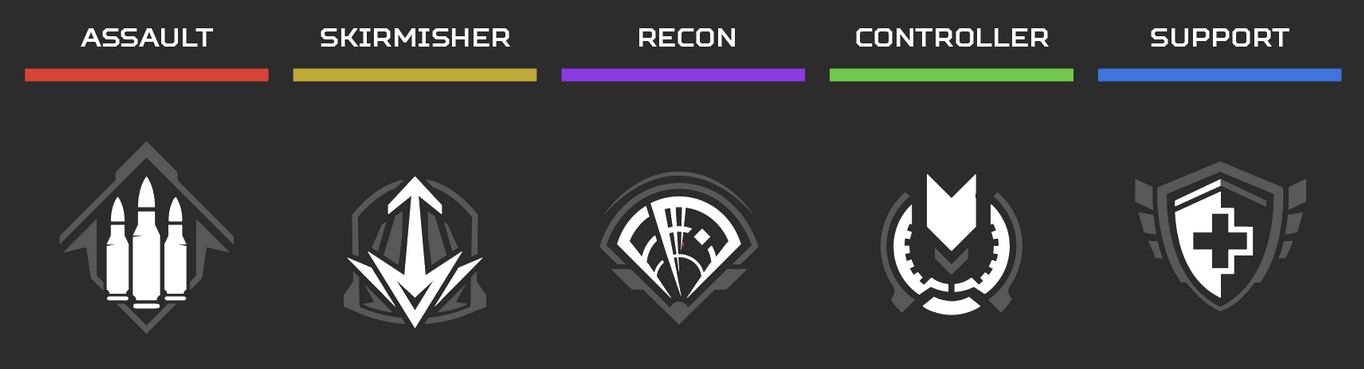
This reorganization will help players identify Legends that play or support the team in a similar manner, and help them understand the new roles easier. There will be 5 Classes:

  • Assault
  • Recon
  • Skirmisher 
  • Controller
  • Support

CLASS PERKS

Every Legend Class also now has an associated gameplay perk that grants the Legends of that class access to new strategic options in the game.

At casual levels of play, these new gameplay benefits will be fun new bonuses to engage with and empower decision-making.

At higher levels of play, a squad make-up now determines what gameplay elements the team will have access to, and what they’re leaving behind.

MORE AMMO/STACK

ACCESS ‘RED’ BINS

REVEAL CARE PACKAGES SURVEY BEACON
(Enemy Locations)
RING CONSOLE

(Next Circle)

CRAFT BANNERS

ACCESS ‘BLUE’ BINS

Read more about how Remastered Legends will work in our developer update here.

TEAM DEATHMATCH, PERMANENT LIMITED-TIME MODE ROTATIONS

At the launch of Revelry, we’ll be debuting Team Deathmatch to the Apex Games –  a no holds barred brawl between two teams of six – which will be available for the first three weeks of the season. This has been our most requested mode, and we’re excited for players to check in out.

In Team Deathmatch players will be able to select their Legend and weapon loadouts, similar to Control, with respawns occurring automatically after death. The first team to score 30 kills wins the round, and the first team to win two rounds wins the match. Loadouts will shuffle in between rounds, and you can always swap between them and your selected legend while waiting to respawn after death. Make sure to keep an eye out for periodic airdrops throughout the map which come loaded with Care Package and gold-kitted weapons.

MIXTAPE PLAYLIST

Following the first three weeks of Team Deathmatch, we’re thrilled to introduce a brand new way to enjoy some of our more highly requested LTMs on a permanent rotation with our Mixtape Playlist. This new mode queue provides players with the opportunity to jump right into frenetic and engaging combat experiences between our quick respawn modes: Control, Team Deathmatch, and Gun Run. These modes give ample opportunity to experiment and practice with weapons and Legends outside of our core BR experience, with little downtime between fights and respawns.

NEW WEAPON: NEMESIS

It’s been a while since we unleashed a new weapon and the wait will be over when Revelry launches with a new energy weapon: The Nemesis, a new energy class assault rifle that fires four rounds per burst. With a ramping burst delay that decreases the time between bursts and simulates a fully automatic weapon, we’re hoping to see this potentially unseat favorite standbys like the R-301 and Flatline.

ANNIVERSARY COLLECTION EVENT

This month is also the 4th Anniversary of Apex Legends™ and we’re celebrating with the Anniversary Collection Event featuring an all-new community content reward track and lots of celebrations happening in the game including login rewards✝ during the first two weeks of the season, with week one featuring Crypto unlocked and one Crypto Thematic pack for all players that login, and week two unlocking Ash plus one Ash Thematic pack for all players that login. Also, every map in the rotation will have special decorations and we’ll have the return of a fan favorite that we’ll reveal closer to the launch.

FIRING RANGE UPDATES

  • Added options to customize your firing range experience
  • Dummies can now strafe left and right! You control how fast they move, whether they should crouch, and their shield level.
  • Dynamic stats appear any time you deal damage, letting you track your performance.
  • Hit indicators help you keep track of spray patterns.
  • Unlimited ammo means no more trips back to the gun racks to reload.
  • This is the first of several rounds of updates to the firing range, so we will keep an eye on how the community uses the new tools.

ORIENTATION MATCHES

New to the Outlands? Try the new Orientation Match system, meant to create an easy introduction where new players can get their bearings and learn the core mechanics of Apex Legends. To participate in Orientation matches you have to be a brand new player or party up with a new player to take out some bots before joining the regular matchmaking queue.

PATCH NOTES

Legendary Shotgun Bolt

  • New shotgun bolt rarity tier added to floor loot and crafters
  • Gold Perk: Automatically reloads rounds while sliding. Activates while equipped or stowed.

Care Package Rotation

  • Hemlok Burst AR enters the Care Package
  • Rampage LMG returns to the floor

Weapon Crafting Rotation

  • Longbow DMR enters the crafter
  • Volt SMG enters the crafter
  • G7 Scout returns to the floor
  • C.A.R. SMG returns to the floor

Gold Weapon Rotation

  • Nemesis, Rampage, PK, Wingman, R99

Anvil Receiver Hop-Up [R-301, Flatline]

  • Removed from floor loot and crafting

Hammerpoint Rounds Hop-Up [Mozambique, P2020]

  • Added to floor loot and crafting
  • Rarity tier increased to Legendary

C.A.R. SMG

  • Reduced base ammo capacity to 19 (was 20)

R-99

  • Increased damage to 12 (was 11)

Assault Rifles

  • Significantly reduced hipfire accuracy

R-301

  • Reduced damage to 13 (was 14)

Hemlock Burst AR [Care Package]

  • Damage increased to 23 (was 20)
  • Headshot Multiplier increased to 1.8 (was 1.75)
  • Improved recoil
  • Integrated Boosted Loader Hop-Up
  • Boosted Loader: Faster reloads at low ammo that overload the magazine with 9 extra rounds

Mastiff

  • Spread pattern adjusted to be tighter
  • Added Tactical Stocks attachment to improve reload speed and handling
  • Increased projectile size at close range

Peacekeeper

  • Added Tactical Stocks attachment to improve reload speed and handling
  • Increased projectile size at close range

EVA-8

  • Increased projectile size at close range

Rampage LMG [Floor]

  • Reverted to non-Care Package version
    • Damage reduced to 26 (was 28 in Care Package)
    • No longer auto-energizes when picking up
  • Energy decays slower when not firing

LEGENDS

Seer

  • Passive – Heartbeat Sensor
    • Audio from Seer’s passive is now more audible to enemy players
    • Activation is now delayed to match raise animation of weapon or unarmed
    • Lock-On indication will now only show on heartbeat cadence of target
  • Tactical – Focus of Attention
    • No longer shows full body scan on scanned targets
  • Ultimate: Exhibit
    • No longer reveals on initiation
    • Duration reduced from 30s to 25s
    • Cooldown increased from 120s to 180s

Bloodhound

  • Passive – Tracker
    • White Ravens
      • Ethereal White Ravens will now occasionally spawn near Bloodhound when no enemies are around.
      • White Ravens can be interacted with or scanned to trigger them to fly towards the nearest enemy player
      • The White Raven will leave a misty trail behind for Bloodhound to follow, and will share this direction with their team on the map.
      • Using a White Raven will recover 25% Tactical / Ultimate charge
      • Scanning a White Raven will fully refund the Tactical Charge
  • Tactical – Eye of the Allfather
    • Reduced full body scan time from 3s to 1s
    • Diamond target on scanned enemy is unchanged
  • Ultimate – Beast of the Hunt
    • No longer recharges or speeds up the cooldown rate of Bloodhound’s Tactical
    • Will launch a White Raven that flies towards the nearest enemy
    • Killing an enemy while in Beast of the Hunt will also trigger a White Raven

Mirage

  • Passive – Now you see me…
    • Mirage and his ally now remain cloaked after a revive for 3s
    • Weapons remain stowed while cloaked
    • Drawing your weapon will remove the cloaking effect early
  • Mirage Clones
    • Bamboozles are now only triggered by bullet fire and melee
    • Enemies who are bamboozled now receive notification on their screen
    • Bamboozle icon marker now tracks the Bamboozled player’s movement 
    • Bamboozle icon marker duration increased from 2.5s to 3.5s  

Pathfinder

  • Passive – Insider Knowledge
    • Pathfinder’s passive benefits are no longer gained by scanning Survey Beacons
    • Pathfinder’s passive benefits (Ultimate charge and 10s Ultimate Cooldown reduction) are now gained by revealing Care Packages with the Skirmisher ability 
  • Ultimate – Zipline Gun
    • Max Range increased by ~60%.
    • Max Speed increased by 66%. 
    • Acceleration and exit speed adjustments.
    • Targeting improvements, including updated visual and audio cues.
    • Can no longer place the end station on OOB zones. 

Wraith

  • Ultimate – Dimensional Rift
    • Max Portal Distance has been doubled  (~76m to 152m)
    • Portal Duration reduced from 60s to 45s
    • Wraith now increases speed over time when creating longer portals

Horizon

  • Tactical – Gravity Lift
    • Increased weapon spread in Gravity Lift
    • Increased vertical speed of Gravity Lift by 10%

Lifeline

  • Passive – Combat Revive
    • Reduced the slow penalty on Lifeline when initiating a revive
  • Ultimate – Care Package
    • Decreased the drop animation speed of Care Package from 14s to 8s
    • Increased the deployment range of Care Package

RANKED – MAP ROTATION

Ranked queue will now rotate through all maps in play, 24 hours per map. The maps for the first split are:

  • World’s Edge
  • Storm Point
  • Broken Moon

LIVEAPI 2.0

Official release of version 2.0 of Live API for PC previewed during 15.1.2. The API is a built-in mechanism for listening to gameplay events and programmatically interacting with Apex Legends. This release includes:

  • Support for WebSockets server connection
  • Support for Protocol Buffers (protobuf) to send and receive data
  • Configuration through both command line and JSON
  • 12 new API requests, including
    • 2 gameplay requests: ChangeCamera and PauseToggle
    • 10 lobby requests specifically for Custom Match

More information, including technical documentation, can be found in the LiveAPI folder of the game installation.

QUALITY OF LIFE

  • Added map rotation previews to the game mode selector in the lobby.
  • Players can now be any team in Gun Run.
  • Increased the odds of becoming Team Nessie in Gun Run.
  • Team Nessie is now viewable for all teams.
  • Added new indicator on HUD unit frames for the Ratings Leader in Control.
  • Consumables now show a progress bar for teammates next to their unit frame on the HUD. Similar to reviving. 
  • Added damage to the scoreboard in Control.
  • Increased the minimum distance between airdropped replicators and other airdrops.
  • Map Features when accessing the Full Map now reflect currently selected Class Perk info. Additionally, the Hot Zone map feature description is removed from the Full Map while the Hot Zone is hidden from the map. 
  • When in Firing Range, players now regain full health and shields when they reselect their legend in the legend select menu.
  • Added ability to ping for an optic even if the optic attachment slot is filled.
  • Slightly increased audio for enemies attaching, riding, and detaching from Ziprails.
  • Adding Credits to Items inspired and designed by Creators.

BUG FIXES

  • Fix for Crypto’s drone reticle not being centered when on 16:10 resolutions.
  • Fix for players not being able to emote if they were dead during the champion sequence.
  • [Control] Fixed an issue where the MRB disappears if the player holding it leaves the match.
  • Various UI bugs and improvements to the private match flow.
  • Various bug fixes to some cosmetic items.
  • Fix for the weapon camera in the Loadouts tab not resetting to the correct position when exiting a weapon from the Charms subtab.
  • Fix for footer buttons in the seasonal quest not being clickable.
  • Fix for the players’ crosshairs being present sometimes during the champion sequence.
  • The hide hints option no longer hides the waving person icon on items your teammates can use.
  • Fixed a bug where if a team was empty in Gun Run the HUD would display incorrect information.
  • [Emotes] fix for emotes camera sometimes passing through walls.
  • Removed exploit that allowed players to remain out of bounds longer than intended.
  • [Seer]Fixed an issue where Seer’s ultimate could be crushed by swinging doors.
  • [Seer]Fixed an issue where Seer’ s ultimate and Crypto’s drones would block large sliding doors.
  • [Seer] Fix for cases where Seer would have issues scanning Crypto.
  • [Seer] Fix for when Seer’s passive heartbeat sensor works through Catalyst’s ult when placed on uneven surfaces.
  • [Seer] Fix for cases here Seer’s tactical can get users stuck if used when they are crafting.
  • [Valkyrie] Fixed bug where her animation warps in the in-flight meal emote.
  • [Newcastle] Fixed bug where the Ultimate is not refunded/is not placed if a user is getting hit with Seer Tactical right when using it.
  • [Crypto] Fixed an issue where Crypto’s drone would be destroyed when he’s knocked but not eliminated.
  • [Crypto] Fix for bug where Crypto’s Drone scanning can block Catalyst from reinforcing doors.
  • [Crypto] Fix for cases where his Ultimate stops from deploying if Crypto gets downed
  • [Catalyst] Fixed bug where their Tactical makes it difficult to interact with ziplines, death boxes, and loot bins.
  • Fixed bug where the player is unable to use melee attacks through Catalyst’s Ultimate.
  • Fixed an issue where players could be stuck after being hit by Seer’s tactical while using a crafting station.
  • Fixed an issue where Seer’s move speed would be higher when in ADS while unarmed with the heartbeat sensor disabled.
  • Fixed an issue where Crypto would not be scanned by Seer’s tactical while he was piloting his drone and the drone was not also hit by the tactical.
  • [Vantage] Reduce the number of accidental tactical activations on controller when pulling out or putting away the ultimate with both bumpers.
  • [Vantage] Increase visibility of Sniper’s mark by adding on-screen prompt, similar to scans.
  • [Vantage] Using tactical in areas blocked by geo, can result in the player getting launched into the air
  • Fixed an issue where when Newcastle’s Ultimate was interrupted it would not correctly refund his Ultimate.
  • Fixed an issue where Newcastle would continue to target allies while phased with his Ultimate.
  • Fixed a rare issue were Newcastle’s tactical could get hung in the air and not deploy
  • Fixed an issue with the Black Hole that allowed it to pull players through walls and around corners incorrectly.
  • Fixed an issue where swapping legends in Firing Range would crash if bleeding out as Revenant.
  • Fixed an issue where swapping legends in Firing Range while in Crypto’s drone would crash.
  • Fixed an issue where Newcastle’s ultimate could fail to deploy on landing.
  • Fixed an issue where a spectator swapping between two players being healed by DOC would crash the spectator.
  • [Lifeline] Fixed ultimate cooldown appearing to need 101% charge.
  • Fixed an issue where the Ultimate is ready prompt could appear while the player is still skydiving.
  • Fixed bug where the previous Season rank is being shown on enemy gladiator cards. 
  • Reduced accidental launches on controller.
  • [DX12] Fixed missing error popup on launch for unsupported hardware.
  • [DX12] Fixed an issue where some emissive textures would not appear in third person.

✝ Each week’s rewards are limited to one redemption per EA Account. Offer has no cash value and may not be substituted, exchanged, or sold for cash, goods, or services. May not be combined with other offers or prepaid card redeemable for the applicable content unless expressly authorized by EA. Void where prohibited, taxed, or restricted by law. 

Offers will be available as follows:

  • Week 1: Offer starts at 10am PT on February 14th and end at 9:59am PT on February 21st 
  • Week 2: Offer starts at 10am PT on February 21st and end at 9:59am PT on February 28th

Once the patch is out next week, we’ll be sure to let our readers know.

Source: EA

Avatar photo

Alex Co

Father, gamer, games media vet, writer of words, killer of noobs.

Home > guides

Hogwarts Legacy Herbology Guide – Where and How to Gather Plants and Ingredients

Herbology is one of the many things you learn during your time at Hogwarts, and it has quite a few practical applications when out in the field. Though you don’t actually get to access the feature fully right away, it’ll become an important part of gameplay as you continue on through the game’s story. Through Herbology, you can create a steady supply of plant material for use as tools or ingredients in potions.

Herbology is pretty straightforward, but there are many ways to gather ingredients. With this Hogwarts Legacy herbology guide, you’ll know how to procure ingredients and grow plants by yourself.

Hogwarts Legacy Herbology Guide

What is Herbology?

Herbology is the study of plants and fungi in Hogwarts Legacy. It is learned in the Greenhouses of Hogwarts, where plants and fungi of all kinds grow in the sunlight. You’ll learn about Herbology as part of Hogwarts Legacy’s main story, so you’ll have to keep on playing through it until you reach the class, which will be taught by Professor Garlick.

The class itself will teach you how to grow your own ingredients. Doing so requires a potting table, where you can plant seeds and have them grow. You’ll also learn that despite incorporating the use of magic, growing plants isn’t instant, and you’ll have to wait for the plants to grow before you can actually harvest them.

How Do I Grow Plants?

To grow your own plants and ingredients, you’ll first need seeds, which can be purchased at The Magic Neep. You can also buy ready-to-use ingredients here in case you’re missing a couple and you don’t have the time to wait for them to grow.

When you first learn about herbology, the only place you’ll be able to grow seeds is in the classroom where you learned Herbology in the first place. This can be a little inconvenient, however, so it’s recommended that you continue playing through the main quests until you unlock the Room of Requirement. Doing so will unlock a large space where you can install potting tables.

While you’ll have access to the smallest potting table from the get-go, you’ll need to unlock the spellcrafts for larger ones by purchasing them in Hogsmeade. The cost of these spellcrafts is pretty steep, so keep that in mind when buying the recipes.

How Long Does It Take to Grow Plants?

Plants can take around 10-15 minutes to grow, depending on the seed you’re growing. Note that this is in real-world time, not in-game time. As such, you’ll likely want to do other things while the plants grow, such as explore the Forbidden Forest or do some side quests. Once enough time has elapsed, simply return to the potting table and collect your fully grown plants.

Growing plants is fairly simple in Hogwarts Legacy, and while it isn’t the fastest method of doing so, it does offer a guaranteed and steady source of your most important ingredients. You can never have too many Wiggenweld Potions!

Click here for more Hogwarts Legacy content, if you’re interested.

Carlos Perez

Home > News

Bobby Kotick: Sony “Trying to Sabotage” Microsoft-Activision Deal

In a change of tone, Activision Blizzard CEO Bobby Kotick has accused Sony of “trying to sabotage” Microsoft’s proposed acquisition of Activision Blizzard, following his claims about the PlayStation company’s recent refusal to talk business with him. Kotick’s comments were shortly followed by the UK Competition and Markets Authority (CMA)’s provisional report yesterday, which found that the deal bears significant anticompetitive risk and recommended major structural remedies.

As the deal continues to face strong opposition in the US and UK, Kotick has been vocalizing his disapproval of what he feels is ill-informed, biased regulatory action and petty undermining from competitors. This week, he claimed that the US Federal Trade Commission (FTC) and UK CMA “do not know” the gaming industry, and that the UK would become “Death Valley” if it blocked the acquisition. After separately criticizing Sony for refusing to take his calls to discuss business, Kotick now lashed out at the former for “trying to sabotage” the deal:

(Activision offers its games to Sony’s PlayStation console and this deal is about to expire.) Suddenly, Sony’s entire leadership team stopped talking to anyone at Microsoft. I think this is all Sony just trying to sabotage the transaction. The whole idea that we are not going to support a PlayStation or that Microsoft would not support the PlayStation, it is absurd.

When asked to comment by the interviewer, Sony had this to say: “We are in contact with Microsoft and have no further comment regarding our private negotiations.”

Yesterday, the CMA published provisional findings from its review of Microsoft’s proposed acquisition of Activision-Blizzard. The UK regulator found that the deal was likely to result in two substantial lessening of competition (SLC) scenarios in the console hardware and cloud gaming markets. Though the CMA remains open to behavioral remedies that ensure other platforms’ equal access to Call of Duty, it has recommended that the franchise or large parts of the Activision Blizzard business be divested for the deal to be allowed to go through.

Source: Financial Times

Avatar photo

Salman Haider Zaidi

That's a nice argument, Senator.

Home > guides

Hogwarts Legacy: Wand Customization Guide

Every student in Hogwarts needs a wand that suits them, and while you begin Hogwarts Legacy with a premade wand, you’ll end up getting another one that’s far more customizable as you continue the main story. You can design your wand in various different ways, making it pretty easy to get one that’s unique.

This Hogwarts Legacy Wand customization guide will help you customize the perfect wand to carry with you throughout the rest of Hogwarts Legacy.

Hogwarts Legacy: Wand Customization Guide

How Do You Customize Your Wand?

At the start of the game, you’ll already have a wand to cast spells with, but it’s not one that you can customize the looks of. To actually unlock a custom wand in Hogwarts Legacy, you’ll need to play through the main quests until you reach a point in the story where you’ll have to visit Ollivanders, the local wand shop in Hogsmeade.

Once there, you’ll talk to Gerbold Ollivander, who helps you pick out a wand. After a couple of tries, he’ll present you with one inside a box, and this will then open up the wand customization menu.

How Does Wand Customization Work?

Wand customization is completely cosmetic. In other words, no matter what type of core, wood, or design you choose, the wand will work just like any other you customize. As such, you’re free to pick whatever designs you fancy. Some elements of the customization menu, such as the length or wood type, don’t actually affect the wand’s visual appearance, and are merely for added flavor.

Wand Style

You are able to choose between eight different wand styles, with ribbed, natural, and other styles as options. Adding even more customization, each wand style has three different variations, offering a total of 24 combinations right from the get-go. Note that the available variations differ between styles, which means that you may not find a style and variation combo you particularly like.

Wood Type

This section of the menu focuses on the details surrounding the wand’s wood. You can choose the wand’s wood type, length, and flexibility. The length ranges from nine and a half inches to fourteen and a half inches, whereas flexibility ranges from “quite bendy to “unyielding.” Keep in mind that all of these options are purely cosmetic, and they don’t actually change the look of your wand either. They’re purely there to add flavor for fans who really want to stick to the details.

Wand Core Options

Finally, you get to choose your wand’s core, which is said to affect how your magic works when casting through it. Like all the other options in wand customization, this is purely cosmetic, though you may not initially think so based on the cores’ descriptions. Dragon Heartstring produces “powerful magic,” for example, whereas Pheonix Feather produces “a great range of magic.” Again, these don’t affect actual combat or gameplay, so pick a core that you prefer the most.

Once you’re done finalizing your wand, that’s it! You’ve got your very own, Hogwarts-approved magic wand. Keep in mind that after you’ve finalized your wand, you can’t actually change it again, so be sure to go through everything once more just to ensure that everything’s to your liking.

Check out our Hogwarts Legacy game hub for more guides and content!

Carlos Perez

Home > News

NHL 23 Update 1.51 Rushes Out for Patch 1.5.1 This Feb. 10

EA has pushed out NHL 23 update 1.51 (PS5 version 1.051), which is for patch 1.5.1, and this brings a short list of fixes to the hockey sim. For the details, head on below for the official NHL 23 Feb. 10 patch notes.

NHL 23 Update 1.51 Patch Notes | NHL 23 Update 1.051 Patch Notes | NHL 23 Update 1.5.1 Patch Notes | NHL 23 Feb. 10 Patch Notes:

Game Modes

Fixed a crash in BAP and Franchise mode screens that was caused by a telemetry reporting event.

*We are aware of the issue in Creation Zone that is causing players to not appear. We are working to resolve this and will have a fix available in the next NHL 23 patch, scheduled to be released in early March. We apologize for any inconvenience this may have caused and appreciate your patience.

There was a bigger patch released at the end of January that included a host of adjustments and fixes for the game’s various modes, which you can read about here.

Source: EA Answers

Avatar photo

Alex Co

Father, gamer, games media vet, writer of words, killer of noobs.

Home > News

The Division 2 Update for Feb. 10 Brings Fixes, Game Update Issues Resolved by Devs

Ubisoft has released The Division 2 update for Feb. 10 today, and this server-side patch bring a host of fixes to the shooter. This is after yesterday’s announcement that the dev team as issues updating the game client due to a backend error. Thankfully, Ubisoft has confirmed that the backend issues have been resolved, and we should hear more about Season 11 soon.

The Division 2 Feb. 10 Patch Notes:

CHANGELOG 

  • Fixed the blank screens and empty menu tabs 
  • Fixed multiple error messages 
  • Fixed the issue that affected World Difficulty and Global Directives 
  • Fixed the inability to make Seasonal in-game purchases 
  • Fixed the issue that affected Control Points reset 
  • Fixed the issue that caused the game to crash when interacting with the Pilot at the BOO in Washington DC  
  • Fixed the issue that caused the game to crash when hovering over the Countdown icon on the World Map  
  • Partially fixed the game crashes that occurred due to opening the map or travelling from New York back to Washington DC 
    • More fixes for the issue are planned for TU17 
  • Fixed other instances associated with the technical issues that caused the game to crash  

 KNOWN ISSUES 

  • Traveling from New York back to DC can still cause the game to crash. Recommended workarounds: 
    • Start a Countdown game 
    • Disable Global Directives 
    • Join another agent/group of agents in Washington DC 
    • Speak to the pilot at Haven 

As for the issues mentioned yesterday by the devs regarding game updates, good news! The isue has been resolved with today’s server-side update!

Source: Ubisoft Forums

Avatar photo

Alex Co

Father, gamer, games media vet, writer of words, killer of noobs.

╳