Home > News

New Overwatch 2 Animated Short Features Kiriko

Blizzard has launched a new Overwatch 2 animated short, and this one features the latest Support here in Kiriko! Same as in past animated shorts, this one’s animated beautifully once again, and even if you’re not a fan of the game, it’s worth watching.

The protector of Kanezaka strikes again. Discover the two sides of Kiriko, the loving daughter and the deadly protector.

Overwatch 2 is out now as a free-to-play game on PlayStation, Xbox, Nintendo Switch and PC. If you didn’t know, the SMS Protect feature which locked out quite a number of players has been taken out today! Stay tuned to our Overwatch 2 review hitting the site soon!

Avatar photo

Alex Co

Father, gamer, games media vet, writer of words, killer of noobs.

Home > News

Gotham Knights Launch Trailer Shows the Knights Fighting Villains and the Court of Owls

With the launch of Gotham Knights just around the corner, Warner Bros Games has shared the Gotham Knights launch trailer showcasing the Knights fending off various mobs and the Court of Owls. The new Gotham Knights trailer has some CGI clips but also features some badass gameplay clips from all of the Bat-Family. Check out the trailer here:

The Knight has fallen over Gotham and a new guard must rise. It’s Batgirl, Nightwing, Red Hood, and Robin’s turn to be the protectors that Gotham needs. It’s up to them to watch over each other and keep Gotham safe. The Knight is theirs.

In other Gotham Knights news, it seems like some people have received the compendium art book a little early, and are posting spoilers of the game online, so you might want to be more careful while browsing online. Gotham Knights smashes out on October 21, 2022, for Xbox Series X|S, PS5, and PC.

Ibrahim Kabir

Home > News

Crash Bandicoot 4: It’s About Time Coming to Steam on Oct. 18, New Announcement Teased for TGA 2022

Activision Blizzard has recently sent a Crash Bandicoot-themed pizza box to press and influencers that reveals Crash Bandicoot 4: It’s About Time will be coming to Steam on October 18. The box also seemingly teases a new announcement for this December’s The Game Awards.

The box, sent from the fictional “Aku Aku’s Steam-in Pizza Shack,” reads “Crash Bandicoot 4 It’s About Time Is Coming To Steam October 18th” in the form of a pizza bill. This confirms the leak from earlier this month which revealed a Steam release for Crash Bandicoot 4 in addition to its existing Battle.net presence.

Notably, the box also says “Hungry for more? Try our new Wumpa Pizza for $12.08!”

crash bandicoot 4 its about time

crash bandicoot 4 its about time

December 8 (12.08) is the date set for this year’s The Game Awards (TGA) event. A Crash Bandicoot game titled “Wumpa League” has been rumored for several years now, with the latest tease coming from Crash Bandicoot dev Toys For Bob itself. Fans might finally get to see the game later this year at TGA 2022.

If you’re wondering if now’s the time to get into the series, check out our review of Crash Bandicoot 4, which is available for PC, PS5, PS4, Xbox One, Xbox Series X|S, and Xbox One.

Source: Canadian Guy Eh via Nibel

Avatar photo

Salman Haider Zaidi

That's a nice argument, Senator.

Home > News

Overwatch 2 Chat Bug Causes Unexpected Purchases With In-Game Currency, Blizzard Won’t Issue Refunds

While Blizzard is still facing issues with Overwatch 2’s launch, it looks like there are other issues outside of the servers that have surfaced too. Players have reported of an Overwatch 2 chat bug, which causes players to accidentally buy items in the in-game store!

Over on Reddit, multiple players have reported to have encountered this issue, which occurs when chatting while you’re checking the hero gallery. Unfortunately, based on Dracyoshi‘s post, it seems Blizzard’s customer support team has said no when it comes to refunds for it. 

On the day that Overwatch 2 launched I was chatting with some friends while browsing the hero gallery when the game unexpectedly began unlocking Junker Queen’s Plutonium skin. I was typing a message in the chat and before I could react and cancel the purchase it already went through and bought the skin for me.

It appears to have been caused by a bug where text typed into the chat is occasionally misinterpreted by the game an input for navigating the menu. And unfortunately unlocking a skin only takes two presses of the spacebar, something that can happen in a split second when you’re pressing it dozens of times per sentence.

The Plutonium skin is only worth 300 legacy credits, so ultimately it’s not a big deal, but I’m rather disappointed that they won’t issue refunds for it. Though not surprised.

Here’s another report posted on the official Overwatch forums by user Kittenbaby:

So I was looking at Sojourne’s skins. Thought the Runner one was pretty. Was typing to someone about it and saying it was available for Legacy Credits. and while I had the chat box opened and was actively typing a message, it took me hitting “spacebar” not only as putting a space in the message I was typing, but also as me hitting the “Unlock” button, and before I realized what had happened, it took a second “spacebar” tap as me hitting the “Yes” button.

I doubt I’ll get my Legacy Credits refunded over this, but I figured I’d post so other people are aware to be careful when viewing skins and typing in chats.

You can check this subreddit thread to see other players experiencing the same bug. Hopefully, this Overwatch 2 chat bug gets sorted out soon.

In other Overwatch 2 news, Blizzard has removed the SMS Protect requirement in order to play Overwatch 2! You can read more about that and other issues the dev team are looking into right here.

Avatar photo

Alex Co

Father, gamer, games media vet, writer of words, killer of noobs.

Home > News

Weird West Update 1.14 Drops for Patch 1.04E Fixes This October 7

Weird West update 1.14 has been released by WolfEye, and is tagged as patch 1.04E! This includes fixes pertaining to a progression block bug, a sidequest issue and more! Read on for the complete Weird West October 7 patch notes.

Weird West Update 1.14 Patch Notes | Weird West Update 1.04E Patch Notes | Weird West October 7 Patch Notes:

  • Fixed bug where some town locations would not go abandoned after wiping their population
  • Fixed blocker bug that can happen in Protector Journey where either Maryann or West Standing Woman refuses to talk to you despite the objective leading you to them
  • Hide the rival distillery sidequest location until the sidequest is active to avoid stumbling out of context on a bunch of raging farmers attacking you on sight
  • Fixed a couple of Russian translation issues with Vendetta dialogs
  • Fixed rare blocking bug with the Crime & Punishment side quest where the Oneirist enrolled for the Ritual would decide to be the quest giver for the Once Upon a Dream Side Quest
  • On PC, force the game to startup Full Screen rather than borderless to avoid resolution issues
  • Fixed Localization issue in Traditional Chinese with the golden shovel and erroneous punctuation in some of the Protector Journey starting dialogs
  • Cleaned up Thriving Place of occurrences where NPCs would walk into fireplaces or damage themselves on pickups lying on the ground which could result in a weird mess with the AI Detection/Awareness system
  • Fixed various bugs with the wrong weapon being the one equipped or assigned to the Quick Swap slot when multiple variations of the same base weapon exist in inventory
  • Increased some of the AI Barks cooldowns to ease a bit the rate at which companions speak

In addition to the changes today, WolfEye has also said that they are investigating the freezing issue some players are experiencing on Steam Deck when players are looking at Abilities helper videos, so keep an eye for that one.

Source: Steam

Avatar photo

Alex Co

Father, gamer, games media vet, writer of words, killer of noobs.

Home > News

Embracer: No Project Represents More Than 5% of Revenue in a Single Year; Not Going to Stop Acquiring Companies Soon

While the Embracer Group is a large company comprised of multiple studios, it doesn’t stick to AAA game releases, and isn’t averse to release smaller, niche titles. It seems the company has a good business plan in place that lets them do just that.

Speaking in the latest issue of EDGE magazine (issue #377), Embracer CEO Lars Wingefors talks about how the company can take risks in terms of releasing games, and explains that not a single project in the company takes up more than five percent of the total revenue in a single year.

Wingesfor: It goes back to our strategy of being diverse in terms of revenues and business risks. Not a single IP or project represents more than five per cent of our revenues in a single year.

In general, you get a good return on investment by increasing the barriers or the ambitions of each game – trying to make it a bit better or more polished, or to expand it, or whatever you’re trying to do. If you just have a handful of games, the business risk of each is too high. But if you have 200 games, you’re able to put that message to your game developers. You know: try to put some more time, effort and money into making the game even better.

In the same chat, when asked if Wingesfor sees a day when they’ll stop acquiring companies, the short answer is no.

Q: So you can’t foresee a point when you’re done with making acquisitions?

Wingesfor: No, not really. If you think about Embracer, the wider we become, the greater the overall ecosystem, the more opportunities and abilities we have, the more diversification we have. So, for us, it just makes sense to add more companies to strengthen the overall ecosystem. I really like to focus on acquisitions where there is strong collaboration or synergy potential within the group that really adds value to the overall group. Unlike other, more private-equity-funded structures, we are not a financial rollup, as such. We have firm long-term thinking about all our companies.

Which company will Embracer acquire next? Once we know, we’ll be sure to let our readers know. Speaking of which, the latest high profile acquisition of Embracer was the buyout of some of Square Enix’s Western studios which included Crystal Dynamics, Eidos Montreal and Square Enix Montreal for $300 million this year.

(Image source: Shacknews)

Avatar photo

Alex Co

Father, gamer, games media vet, writer of words, killer of noobs.

Home > News

Modern Warfare 2 PC Trailer Released, Featuring 4K Graphics and Ultrawide Mode

After yesterday’s official launch trailer, Infinity Ward and Activision have now additionally released the Modern Warfare 2 PC trailer. The trailer showcases footage from Modern Warfare 2 rendered in ultrawide 4K resolution, and displays the powerful variety of graphical settings on the PC version of the game.

Watch the trailer below:

The PC version of Modern Warfare 2 will be available on PC via Battle.net and Steam on October 28 and features 4K graphics, Ultrawide support, RICOCHET Anti-Cheat, and 500+ customization options.

Call of Duty: Modern Warfare 2 goes live October 28 for PS4, PS5, Xbox One, Xbox Series X|S, and PC. Fans can pre-order the game to play the Campaign a week earlier than the release date.

More Modern Warfare 2 Reading:

Avatar photo

Salman Haider Zaidi

That's a nice argument, Senator.

Home > News

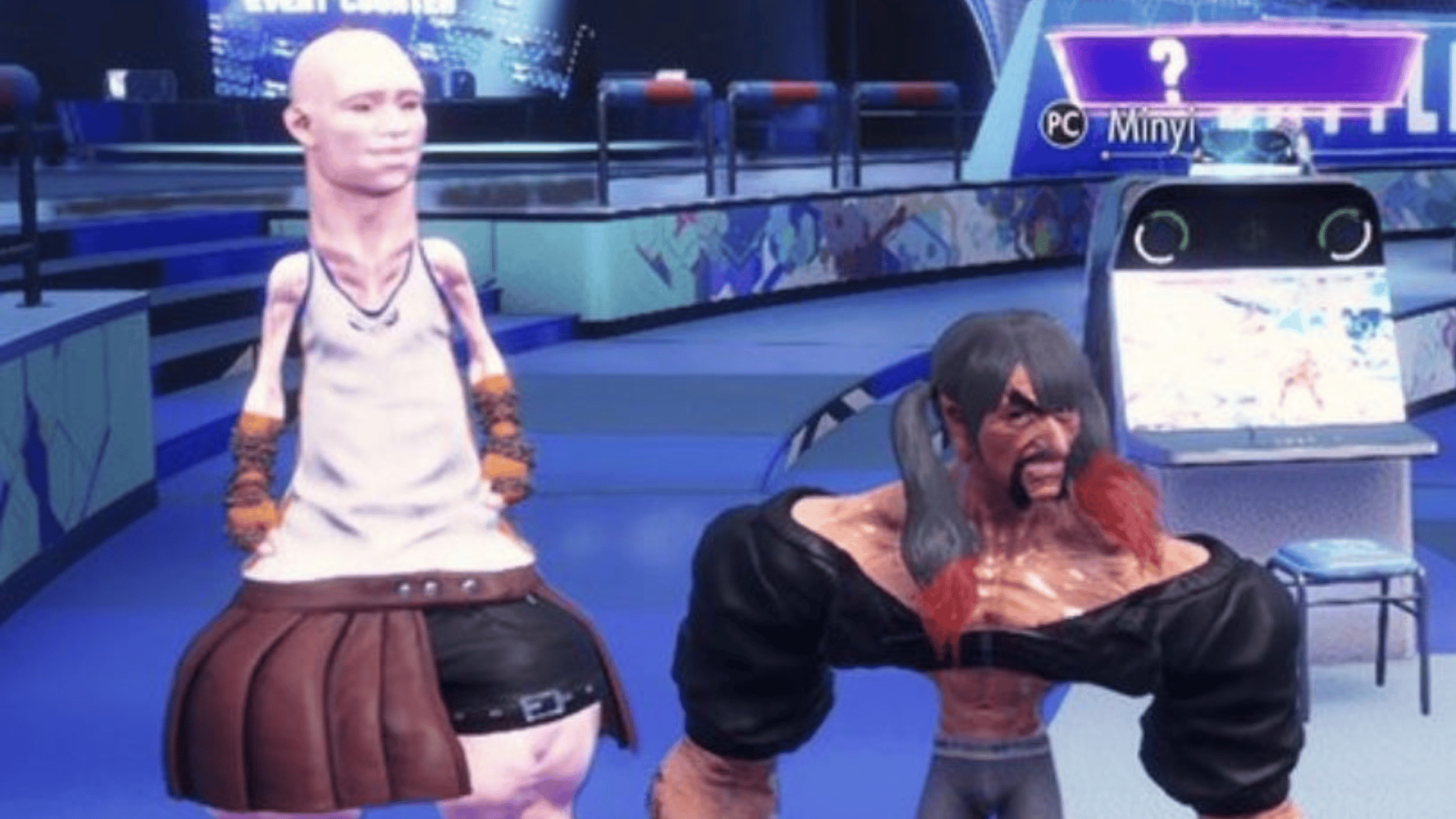
Street Fighter 6 Character Creator Sees Players Making Nightmare-Inducing Creations

The Street Fighter 6 closed beta is now officially underway, and while fans are eager to get into the brawl themselves, there is a new feature this year that has many excited, and that’s the new character creator. If you’re wondering if it’s any good, well, yes, but perhaps a little too good.

Character creators in a video game is nothing new, but it’s when developers go the extra mile and offer a robust amount of customizations that truly catches the eyes of gamers. That’s exactly what Capcom has done with their Street Fighter 6 character creator, allowing players all kinds of different sliders, from height, length, depth, to even muscles definition, and a number of other features. Unsurprisingly, this has lead to some rather interesting, if not terrifying creations. 

https://twitter.com/JohnnyUtahNG/status/1578282866387038208?s=20&t=5KgyMTpv1DpDNMF-C9wiLw

https://twitter.com/twilinebs/status/1578432881143123970

Yeah, those are the kinds of nightmares you’d expect to see out of a MeatCanyon animation. Of course there are some more “normal” looking creations out there, but nonetheless, one can’t help but chuckle at these. We’re sure as the day goes on, we’ll see more and more crazy creations. 

Street Fighter 6 closed beta test is currently available to those who were invited. The beta will run until October 10. At this time, there is no news on whether or not Capcom plans on having an open beta available to everyone, though if that changes, we’ll be sure to keep you updated.  

Avatar photo

James Lara

A gamer at heart, James has been working for MP1st for the last decade to do exactly what he loves, writing about video games and having fun doing it. Growing up in the 90's gaming has been in his DNA since the days of NES. One day he hopes to develop his own game.

Home > News

Mortal Kombat 30th Anniversary Video Released, Showcases Evolution of Series Across Games, Film & Animation

To honor 30 years of Mortal Kombat, Warner Bros. Games and NetherRealm Studios have released a special Mortal Kombat 30th anniversary video. The video showcases moments from the original 1992 title to 2019’s Mortal Kombat 11, and nostalgic scenes from Mortal Kombat live-action movies and animation as well.

Watch the full video below:

In celebration, Klassic Movie Raiden will be playable in Mortal Kombat Mobile from October 7 through 11, along with free login rewards each day.

In addition, the Mortal Kombat Legends: Snow Blind animated film will receive both a Digital and 4K Ultra HD + Blu-ray release, and all Mortal Kombat movies will be available to watch on HBO Max.

As part of the anniversary, Klassic Movie Raiden will arrive in Mortal Kombat Mobile beginning Oct. 7 through Oct. 11, featuring actor Christopher Lambert’s character likeness and voice from the 1995 film. Players can also log in to the mobile game every day from Oct. 7-14 to collect free anniversary gifts and enjoy a host of new in-game content.

Additionally, Warner Bros. Home Entertainment is releasing Mortal Kombat Legends: Snow Blind, the third installment of the animated film series, for Digital on Oct. 9 and 4K Ultra HD™ Combo Pack and Blu-ray™ on Oct. 11. Mortal Kombat (2021 film), Mortal Kombat (1995 film), Mortal Kombat: Legacy (2013 web series), Mortal Kombat Legends: Battle of the Realms (2021 animated film), and Mortal Kombat Legends: Scorpion’s Revenge (2020 animated film) are all available to watch now on HBO Max™, while Mortal Kombat: Defenders of the Realm (1996 animated series) is available now for purchase on digital platforms. Lastly, all-new Mortal Kombat merchandise is now available exclusively at WB Shop.

Players hoping for new NetherRealm Studios games will have to wait a little longer. Studio head and Mortal Kombat co-creator Ed Boon recently confirmed that no new game announcements would be made during the MK30 celebrations.

In the meantime, if you’re looking to get into Mortal Kombat, check out our review of Mortal Kombat 11, the series’ latest and most brutal installment.

Avatar photo

Salman Haider Zaidi

That's a nice argument, Senator.

Home > News

Nickelodeon All-Star Brawl Update 1.17 Adds Rocko and Character Adjustments This October 7

Developer Ludosity has released Nickelodeon All-Star Brawl update 1.17 (PS5 version 1.000.015), and this adds Rocko as a new DLC character, alongside balance changes and more! Read on for the complete Nickelodeon All-Star Brawl October 6 patch notes.

Nickelodeon All-Star Brawl Update 1.17 Patch Notes | Nickelodeon All-Star Brawl Update 1.000.015 Patch Notes | Nickelodeon All-Star Brawl October 6 Patch Notes:

General
  • Rocko joins the battle as a DLC character!
Balance
  • Universal
    • Crowdpush speed reverted
    • Royal Woods Cemetery
    • Blastzones and camera zoom now the same as competitive stages
    • Added to competitive stage rotation
    • Sewers Slam
    • Added to competitive stage rotation
    • Harmonic Convergence
    • Removed from competitive stage rotation

Sandy

  • Up Light
    • Base stun decreased (35 → 31)
    • Stun gain increased (0 → 10)
  • Down Light
    • Base stun increased (30 → 32)
    • Stun gain increased (0 → 9)
  • Aerial Mid Light
    • Stun gain increased (0 → 8)
  • Aerial Up Light
    • Base stun increased (25 → 28)
    • Stun gain increased (0 → 11)
  • Aerial Down Light
    • Base knockback decreased (80 → 40)
    • Base stun decreased (35 → 25)
    • Stun gain increased (0 → 17)
    • Aerial base knockback increased (80 → 130)
    • Aerial knockback gain decreased (105 → 40)
    • Aerial base stun decreased (35 → 21)
    • Aerial stun gain increased (0 → 3)
  • Mid Strong
    • Base stun decreased (35 → 29)
    • Stun gain increased (0 → 21)
  • Up Strong
    • Base stun decreased (30 → 28)
    • Stun gain increased (0 → 17)
  • Down Strong
    • Base stun increased (30 → 31)
    • Stun gain increased (0 → 11)
  • Aerial Mid Strong
    • Base stun decreased (30 → 27)
    • Stun gain increased (0 → 13)
  • Aerial Up Strong
    • Base stun decreased (30 → 27)
    • Stun gain increased (0 → 17)
  • Aerial Down Strong
    • Base stun decreased (35 → 15)
    • Stun gain increased (0 → 11)
  • Mid Special
    • Knockback type changed (Normal → Set)
  • Up Special
    • Base stun decreased (30 → 24)
    • Stun gain increased (0 → 12)
    • Landing lag increased (0 → 20)
  • Down Special
    • Stun gain increased (0 → 14)
    • Whiff endlag increased by 10 frames
    • Now only stalls once per airtime
  • Getup Attack
    • Angle changed (30° → 32°)
    • Base knockback increased (30 → 35)
    • Knockback gain increased (30 → 35)
    • Base stun decreased (30 → 29)
    • Stun gain increased (0 → 6)
  • Ledge Attack
    • Angle changed (45° → 38°)
    • Base knockback decreased (60 → 50)
    • Knockback gain increased (30 → 35)
    • Base stun decreased (35 → 25)
    • Stun gain increased (0 → 9)

Korra

  • Mid Light
    • Second hit base stun increased (25 → 27)
  • Dash Light
    • Hitlag-self decreased (12 → 5)
  • Aerial Mid Light
    • Base stun increased (23 → 25)
  • Aerial Up Light
    • Base stun increased (20 → 23)
    • Stun gain increased (9 → 10)
    • Backhit base stun increased (23 → 25)
    • Backhit stun gain increased (11 → 12)

Leonardo

  • Mid Light
    • Stun gain increased (0 → 6)
    • Tipper stun gain increased (0 → 13)
    • Tipper hitlag increased (4 → 7)
    • Tipper hitlag-self increased (5 → 7)
  • Up Light
    • Base knockback increased (70 → 75)
    • Knockback gain increased (127.5 → 130)
    • Base stun increased (20 → 23)
    • Stun gain increased (0 → 11)
    • Tipper knockback gain increased (127.5 → 135)
    • Tipper base stun increased (25 → 28)
    • Tipper stun gain increased (0 → 14)
    • Tipper hitlag increased (4 → 7)
    • Tipper hitlag-self increased (5 → 7)
  • Down Light
    • Base knockback decreased (70 → 60)
    • Knockback gain decreased (127.5 → 120)
    • Base stun increased (30 → 31)
    • Stun gain increased (0 → 6)
    • Aerial base stun decreased (30 → 27)
    • Aerial stun gain increased (0 → 8)
  • Dash Light
    • Angle changed (10° → 14°)
    • Base knockback decreased (120 → 105)
    • Base stun decreased (40 → 28)
  • Aerial Mid Light
    • Base stun decreased (30 → 26)
    • Stun gain increased (0 → 6)
    • Tipper knockback gain increased (135 → 145)
    • Tipper base stun decreased (30 → 29)
    • Tipper stun gain increased (0 → 8)
    • Tipper hitlag increased (4 → 7)
    • Tipper hitlag-self increased (5 → 7)
  • Aerial Up Light
    • Angle changed (70° → 65°)
    • Base stun increased (20 → 22)
    • Stun gain increased (0 → 11)
  • Aerial Up Light tip
    • Tipper base stun increased (20 → 27)
    • Tipper stun gain increased (0 → 13)
    • Tipper hitlag increased (4 → 7)
    • Tipper hitlag-self increased (5 → 7)
  • Aerial Down Light
    • Endlag decreased by 4 frames
    • Knockback gain decreased (150 → 100)
    • Base stun decreased (30 → 25)
    • Stun gain increased (0 → 14)
    • Aerial base knockback decreased (120 → 110)
    • Aerial knockback gain decreased (112.5 → 40)
    • Aerial base stun decreased (30 → 23)
    • Aerial stun gain increased (0 → 3)
    • Tipper base stun decreased (30 → 26)
    • Tipper stun gain increased (0 → 17)
    • Tipper hitlag increased (4 → 7)
    • Tipper hitlag-self increased (5 → 7)
    • Tipper aerial base stun decreased (30 → 21)
    • Tipper aerial stun gain increased (0 → 2)
    • Tipper aerial hitlag increased (4 → 7)
    • Tipper aerial hitlag-self increased (5 → 7)
  • Mid Strong
    • Angle changed (15° → 22°)
    • Base stun decreased (30 → 26)
    • Stun gain increased (0 → 14)
    • Tipper angle changed (35° → 30°)
    • Tipper knockback gain increased (220 → 265)
    • Tipper base stun decreased (30 → 29)
    • Tipper stun gain increased (0 → 21)
    • Tipper hitlag increased (13 → 15)
    • Tipper hitlag-self increased (12 → 15)
  • Up Strong
    • Base stun decreased (30 → 28)
    • Stun gain increased (0 → 13)
    • Tipper base knockback increased (100 → 125)
    • Tipper base stun increased (30 → 32)
    • Tipper stun gain increased (0 → 16)
    • Tipper hitlag increased (13 → 15)
    • Tipper hitlag-self increased (12 → 15)
  • Down Strong
    • Base stun increased (30 → 33)
    • Stun gain increased (0 → 11)
    • Tipper base knockback increased (110 → 150)
    • Tipper base stun decreased (30 → 24)
    • Tipper stun gain increased (0 → 4)
    • Tipper hitlag increased (13 → 15)
    • Tipper hitlag-self increased (12 → 15)
  • Dash Strong
    • Angle changed (10° → 18°)
    • Base knockback increased (60 → 145)
    • Base stun increased (30 → 33)
    • Hitlag-self decreased (15 → 12)
    • Tipper base knockback increased (110 → 170)
    • Tipper base stun increased (30 → 36)
    • Tipper hitlag increased (13 → 15)
    • Tipper hitlag-self increased (12 → 15)
  • Aerial Mid Strong
    • Angle changed (15° → 20°)
    • Base knockback decreased (90 → 80)
    • Base stun increased (30 → 31)
    • Stun gain increased (0 → 13)
    • Tipper angle changed (35° → 32°)
    • Tipper base knockback increased (110 → 115)
    • Tipper knockback gain increased (220 → 255)
    • Tipper base stun increased (30 → 33)
    • Tipper stun gain increased (0 → 14)
    • Tipper hitlag increased (13 → 15)
    • Tipper hitlag-self increased (12 → 15)
  • Aerial Up Strong
    • Base stun decreased (30 → 27)
    • Stun gain increased (0 → 13)
    • Tipper angle changed (70° → 90°)
    • Tipper base knockback increased (110 → 130)
    • Tipper knockback gain increased (210 → 265)
    • Tipper stun gain increased (0 → 15)
    • Tipper hitlag increased (13 → 15)
    • Tipper hitlag-self increased (12 → 15)
  • Aerial Down Strong
    • Base stun decreased (30 → 15)
    • Stun gain increased (0 → 13)
    • Tipper base knockback increased (110 → 145)
    • Tipper base stun decreased (30 → 19)
    • Tipper stun gain increased (0 → 12)
    • Tipper hitlag increased (13 → 15)
    • Tipper hitlag-self increased (12 → 15)
  • Mid Special
    • Initial hit hitlag increased (4 → 7)
    • Initial hit hitlag-self increased (4 → 7)
    • Mid hit stun gain increased (0 → 9)
    • Mid hit tipper base stun increased (20 → 24)
    • Mid hit tipper stun gain increased (0 → 13)
    • Mid hit tipper hitlag increased (4 → 7)
    • Mid hit tipper hitlag-self increased (5 → 7)
    • Up hit base stun increased (20 → 23)
    • Up hit stun gain increased (0 → 5)
    • Up hit tipper angle changed (70° → 80°)
    • Up hit tipper base stun increased (20 → 26)
    • Up hit tipper stun gain increased (0 → 9)
    • Up hit tipper hitlag increased (4 → 7)
    • Up hit tipper hitlag-self increased (5 → 7)
    • Down hit base stun decreased (20 → 18)
    • Down hit stun gain increased (0 → 6)
    • Down hit tipper base knockback increased (90 → 110)
    • Down hit tipper base stun decreased (20 → 19)
    • Down hit tipper stun gain increased (0 → 7)
    • Down hit tipper hitlag increased (4 → 7)
    • Down hit tipper hitlag-self increased (5 → 7)
    • Back hit angle changed (15° → 24°)
    • Back hit base stun increased (20 → 24)
    • Back hit stun gain increased (0 → 6)
    • Back hit tipper angle changed (25° → 12°)
    • Back hit tipper base knockback increased (80 → 95)
    • Back hit tipper knockback gain increased (200 → 230)
    • Back hit tipper base stun decreased (20 → 18)
    • Back hit tipper stun gain increased (0 → 5)
    • Back hit tipper hitlag increased (4 → 7)
    • Back hit tipper hitlag-self increased (5 → 7)
  • Up Special
    • Landing lag increased (0 → 15)
    • Tipper base knockback increased (80 → 95)
    • Tipper base stun increased (20 → 26)
    • Tipper hitlag increased (4 → 7)
    • Tipper hitlag-self increased (5 → 7)
  • Down Special
    • Base stun decreased (30 → 17)
    • Stun gain increased (0 → 13)
  • Getup Attack
    • Angle changed (30° → 35°)
    • Base knockback increased (30 → 35)
    • Knockback gain decreased (20 → 15)
    • Base stun decreased (30 → 27)
    • Stun gain increased (0 → 5)
  • Ledge Attack
    • Knockback gain increased (20 → 30)
    • Base stun decreased (30 → 25)
    • Stun gain increased (0 → 7)

Michelangelo

  • Mid Light
    • Angle changed (325° → 20°)
    • Base stun increased (20 → 25)
    • Stun gain increased (0 → 9)
    • Can now force jab resets
    • Aerial base stun increased (20 → 22)
    • Aerial stun gain increased (0 → 4)
    • Can now force jab resets
  • Up Light
    • Knockback gain decreased (112.5 → 105)
    • Base stun increased (20 → 24)
    • Stun gain increased (0 → 14)
    • Can no longer force jab resets
  • Down Light
    • FAF window extended by 7 frames
    • Angle changed (25° → 58°)
    • Base knockback decreased (90 → 75)
    • Knockback gain decreased (97.5 → 80)
    • Base stun increased (25 → 37)
    • Stun gain increased (0 → 12)
    • No longer classified as a finishing blow
  • Dash Light
    • Base knockback decreased (120 → 85)
    • Base stun decreased (40 → 26)
  • Aerial Mid Light
    • Knockback gain increased (112.5 → 115)
    • Now creates a directional effect
  • Aerial Down Light
    • Base stun decreased (30 → 23)
    • Stun gain increased (0 → 19)
    • Aerial knockback gain decreased (97.5 → 80)
    • Aerial base stun decreased (30 → 23)
    • Aerial stun gain increased (0 → 3)
    • Now creates a directional effect
  • Mid Strong
    • First hit hitlag increased (5 → 24)
    • First hit hitlag-self increased (5 → 12)
    • Angle changed (70° → 40°)
    • Can no longer be reversed
    • Base stun decreased (30 → 29)
    • Stun gain increased (0 → 18)
  • Up Strong
    • Base stun increased (30 → 31)
    • Stun gain increased (0 → 16)
    • Weakhit base stun decreased (30 → 28)
    • Weakhit stun gain increased (0 → 13)
  • Down Strong
    • Base stun increased (30 → 32)
    • Stun gain increased (0 → 11)
  • Dash Strong
    • Angle changed (15° → 18°)
    • Base knockback increased (100 → 125)
    • Base stun increased (30 → 31)
  • Aerial Mid Strong
    • Base stun decreased (30 → 29)
    • Stun gain increased (0 → 13)
    • Second hit angle changed (120° → 156°)
    • Second hit base stun decreased (30 → 27)
    • Second hit stun gain increased (0 → 19)
  • Aerial Up Strong
    • Base stun decreased (30 → 25)
    • Stun gain increased (0 → 11)
    • Second hit base stun decreased (30 → 27)
    • Second hit stun gain increased (0 → 16)
  • Aerial Down Strong
    • Base stun decreased (30 → 21)
    • Stun gain increased (0 → 15)
  • Getup Attack
    • Angle changed (290° → 65°)
    • Stun gain increased (0 → 5)
  • Ledge Attack
    • Base stun decreased (30 → 29)
    • Stun gain increased (0 → 8)

April O’Neil

  • Mid Light
    • Knockback gain decreased (127.5 → 90)
    • Stun gain increased (0 → 8)
  • Up Light
    • Base knockback increased (60 → 65)
    • Knockback gain increased (112.5 → 115)
    • Base stun decreased (30 → 26)
    • Stun gain increased (0 → 13)
  • Down Light
    • Knockback gain decreased (120 → 80)
    • Base stun decreased (40 → 33)
    • Stun gain increased (0 → 7)
  • Dash Light
    • Angle changed (5° → 17°)
    • Base knockback decreased (160 → 85)
    • Base stun decreased (40 → 22)
  • Aerial Mid Light
    • Base stun increased (20 → 21)
    • Stun gain increased (0 → 9)
  • Aerial Up Light
    • Base stun increased (20 → 24)
    • Stun gain increased (0 → 10)
  • Aerial Down Light
    • Base knockback decreased (50 → 40)
    • Knockback gain decreased (120 → 100)
    • Base stun decreased (30 → 24)
    • Stun gain increased (0 → 16)
    • Aerial base knockback decreased (120 → 115)
    • Aerial knockback gain decreased (90 → 50)
    • Aerial base stun decreased (30 → 21)
    • Aerial stun gain increased (0 → 2)
  • Mid Strong
    • Knockback gain increased (210 → 215)
    • Stun gain increased (0 → 14)
  • Up Strong
    • Base stun decreased (30 → 29)
    • Stun gain increased (0 → 12)
  • Down Strong
    • First hit base stun increased (30 → 31)
    • First hit stun gain increased (0 → 12)
    • Second hit base stun increased (30 → 31)
    • Second hit stun gain increased (0 → 12)
    • Third hit base stun increased (30 → 31)
    • Third hit stun gain increased (0 → 12)
  • Dash Strong
    • Angle changed (20° → 22°)
  • Aerial Mid Strong
    • Knockback gain decreased (200 → 185)
    • Base stun decreased (30 → 27)
    • Stun gain increased (0 → 13)
  • Aerial Up Strong
    • Angle changed (70° → 65°)
    • Knockback gain decreased (220 → 210)
    • Base stun decreased (30 → 27)
    • Stun gain increased (0 → 10)
  • Aerial Down Strong
    • First hit base stun decreased (30 → 28)
    • First hit stun gain increased (0 → 10)
    • Second hit base stun decreased (30 → 28)
    • Second hit stun gain increased (0 → 10)
    • Third hit base stun decreased (30 → 28)
    • Third hit stun gain increased (0 → 10)
  • Mid Special
    • Uncharged hitlag decreased (12 → 5)
    • Uncharged hitlag-self decreased (12 → 5)
    • Charge 1 base stun decreased (30 → 27)
    • Charge 1 stun gain increased (0 → 15)
    • Charge 2 base stun increased (30 → 31)
    • Charge 2 stun gain increased (0 → 18)
    • Charge 2 hitlag increased (12 → 15)
    • Charge 2 hitlag-self increased (12 → 15)
    • Charge 3 base stun increased (30 → 33)
    • Charge 3 stun gain increased (0 → 21)
    • Charge 3 hitlag increased (12 → 20)
    • Charge 3 hitlag-self increased (12 → 20)
  • Getup Attack
    • Base stun decreased (30 → 27)
    • Stun gain increased (0 → 5)
  • Ledge Attack
    • Base knockback decreased (60 → 55)
    • Knockback gain increased (20 → 25)
    • Base stun decreased (30 → 25)
    • Stun gain increased (0 → 11)

Shredder

  • Up Strong
    • Can no longer grab a blocking opponent

Ren & Stimpy

  • Mid Light
    • Angle changed (40° → 32°)
    • Base stun increased (20 → 24)
    • Stun gain increased (0 → 9)
  • Up Light
    • Knockback gain increased (142.5 → 145)
    • Base stun increased (20 → 27)
    • Stun gain increased (0 → 16)
    • Backhit stun gain increased (0 → 6)
    • Backhit aerial base stun decreased (30 → 20)
    • Backhit aerial stun gain increased (0 → 7)
  • Down Light
    • Base knockback decreased (80 → 60)
    • Knockback gain decreased (142.5 → 130)
    • Base stun decreased (40 → 31)
    • Stun gain increased (0 → 12)
  • Down Light air
    • Aerial Knockback gain increased (127.5 → 135)
    • Aerial base stun decreased (40 → 33)
    • Aerial stun gain increased (0 → 10)
    • Backhit base stun decreased (30 → 21)
    • Backhit stun gain increased (0 → 11)
  • Dash Light
    • Angle changed (10° → 12°)
    • Base stun decreased (40 → 27)
  • Aerial Mid Light
    • Knockback gain decreased (142.5 → 130)
    • Base stun increased (20 → 21)
    • Stun gain increased (0 → 6)
  • Aerial Up Light
    • Base knockback decreased (80 → 75)
    • Knockback gain decreased (142.5 → 130)
    • Base stun increased (20 → 23)
    • Stun gain increased (0 → 9)
    • Backhit base stun decreased (30 → 27)
    • Backhit stun gain increased (0 → 5)
    • Backhit aerial base stun decreased (30 → 20)
    • Backhit aerial stun gain increased (0 → 7)
  • Aerial Down Light
    • Knockback gain decreased (142.5 → 140)
    • Stun gain increased (0 → 10)
  • Aerial Down Light air
    • Aerial base knockback decreased (120 → 110)
    • Aerial knockback gain decreased (127.5 → 120)
    • Aerial base stun decreased (30 → 25)
    • Aerial stun gain increased (0 → 7)
    • Backhit base knockback decreased (60 → 50)
    • Backhit knockback gain decreased (150 → 140)
    • Backhit stun gain increased (0 → 9)
  • Mid Strong
    • Base stun decreased (25 → 23)
    • Stun gain increased (0 → 19)
    • Backhit stun gain increased (0 → 15)
  • Up Strong
    • Stun gain increased (0 → 9)
    • Weakhit base stun decreased (30 → 26)
    • Weakhit stun gain increased (0 → 15)
  • Down Strong
    • Base stun decreased (40 → 21)
    • Stun gain increased (0 → 27)
    • Second hit base stun decreased (30 → 29)
    • Second hit stun gain increased (0 → 10)
  • Aerial Mid Strong
    • Base stun decreased (25 → 21)
    • Stun gain increased (0 → 17)
    • Backhit base stun decreased (35 → 32)
    • Backhit stun gain increased (0 → 9)
  • Aerial Up Strong
    • Stun gain increased (0 → 10)
    • Second hit base stun decreased (30 → 25)
    • Second hit stun gain increased (0 → 9)
  • Aerial Down Strong
    • Base stun decreased (30 → 15)
    • Stun gain increased (0 → 12)
    • Landing hit base stun decreased (30 → 21)
    • Landing hit stun gain increased (0 → 9)
  • Down Special
    • Hurtbox changed from invincible to super-armor
    • Base stun decreased (35 → 24)
    • Stun gain increased (0 → 22)
  • Getup Attack
    • Base stun decreased (30 → 28)
    • Stun gain increased (0 → 4)
    • Backhit base stun decreased (30 → 29)
    • Backhit stun gain increased (0 → 5)
  • Ledge Attack
    • Base stun decreased (30 → 26)
    • Stun gain increased (0 → 4)

Powdered Toast Man

  • Mid Light
    • Angle changed (30° → 32°)
    • Base stun decreased (40 → 31)
    • Stun gain increased (0 → 9)
  • Up Light
    • Knockback gain decreased (142.5 → 140)
    • Base stun decreased (30 → 26)
    • Stun gain increased (0 → 12)
  • Down Light
    • Base stun decreased (40 → 34)
    • Stun gain increased (0 → 4)
    • Aerial knockback gain decreased (127.5 → 120)
    • Aerial base stun decreased (40 → 23)
    • Aerial stun gain increased (0 → 9)
  • Dash Light
    • Base knockback decreased (100 → 80)
    • Base stun decreased (40 → 28)
  • Aerial Mid Light
    • RNG angle replaced with fixed 30° angle
    • Knockback gain decreased (142.5 → 142)
    • Base stun increased (20 → 21)
    • Stun gain increased (0 → 6)
  • Aerial Up Light
    • Base stun increased (20 → 24)
    • Stun gain increased (0 → 11)
  • Aerial Down Light
    • Knockback gain decreased (142.5 → 142)
    • Base stun decreased (30 → 25)
    • Stun gain increased (0 → 15)
    • Aerial base stun decreased (30 → 24)
    • Aerial stun gain increased (0 → 5)
  • Mid Strong
    • Angle changed (30° → 25°)
    • Base stun increased (30 → 31)
    • Stun gain increased (0 → 21)
  • Up Strong
    • Base stun increased (30 → 31)
    • Stun gain increased (0 → 15)
  • Down Strong
    • Base stun increased (30 → 33)
    • Stun gain increased (0 → 18)
  • Aerial Mid Strong
    • Angle changed (20° → 30°)
    • Base knockback decreased (220 → 200)
    • Stun gain increased (0 → 20)
  • Aerial Up Strong
    • Base stun decreased (30 → 28)
    • Stun gain increased (0 → 13)
  • Aerial Down Strong
    • Base stun decreased (30 → 15)
    • Stun gain increased (0 → 13)
    • Back hit base stun increased (30 → 31)
    • Back hit stun gain increased (0 → 17)
  • Getup Attack
    • Base stun decreased (30 → 29)
    • Stun gain increased (0 → 5)
  • Ledge Attack
    • Base stun increased (30 → 31)
    • Stun gain increased (0 → 6)

Nigel Thornberry

  • Mid Light
    • Base stun decreased (30 → 27)
    • Stun gain increased (0 → 11)
  • Up Light
    • Base stun decreased (30 → 26)
    • Stun gain increased (0 → 12)
  • Down Light
    • Knockback gain decreased (127.5 → 120)
    • Base stun decreased (40 → 31)
    • Stun gain increased (0 → 11)
    • Aerial knockback gain increased (97.5 → 105)
    • Aerial base stun decreased (40 → 23)
    • Aerial stun gain increased (0 → 9)
  • Dash Light
    • Base knockback decreased (130 → 100)
    • Base stun decreased (35 → 27)
  • Aerial Mid Light
    • Base stun decreased (20 → 19)
    • Stun gain increased (0 → 6)
  • Aerial Up Light
    • Base stun decreased (25 → 21)
    • Stun gain increased (0 → 9)
  • Aerial Down Light
    • Knockback gain decreased (112.5 → 110)
    • Base stun decreased (20 → 16)
    • Stun gain increased (0 → 8)
    • Aerial knockback gain increased (52.5 → 60)
    • Aerial base stun decreased (20 → 19)
    • Aerial stun gain increased (0 → 6)
  • Mid Strong
    • Base stun decreased (30 → 29)
    • Stun gain increased (0 → 19)
  • Up Strong
    • Base stun increased (30 → 31)
    • Stun gain increased (0 → 16)
  • Down Strong
    • Base stun increased (30 → 35)
    • Stun gain increased (0 → 13)
  • Aerial Mid Strong
    • Base stun decreased (30 → 27)
    • Stun gain increased (0 → 18)
  • Aerial Up Strong
    • Base stun decreased (30 → 29)
    • Stun gain increased (0 → 12)
  • Aerial Down Strong
    • Base stun increased (30 → 31)
    • Stun gain increased (0 → 12)
  • Up Special
    • Base stun decreased (30 → 28)
    • Stun gain increased (0 → 14)
    • Falling base stun increased (30 → 31)
    • Falling stun gain increased (0 → 17)
    • Falling aerial base stun decreased (30 → 15)
    • Falling aerial stun gain increased (0 → 10)
  • Down Special
    • Base stun increased (30 → 37)
    • Stun gain increased (0 → 21)
  • Getup Attack
    • Base stun increased (30 → 33)
    • Stun gain increased (0 → 7)
  • Ledge Attack
    • Base stun decreased (30 → 25)
    • Stun gain increased (0 → 2)

Danny Phantom

  • Mid Light
    • Angle changed (20° → 18°)
    • Knockback gain decreased (112.5 → 110)
    • Base stun increased (20 → 22)
    • Stun gain increased (0 → 7)
  • Up Light
    • Knockback gain decreased (97.5 → 95)
    • Base stun increased (30 → 31)
    • Stun gain increased (0 → 15)
  • Down Light
    • Base stun decreased (40 → 33)
    • Stun gain increased (0 → 4)
    • Aerial knockback gain increased (67.5 → 70)
    • Aerial base stun decreased (40 → 21)
    • Aerial stun gain increased (0 → 7)
  • Dash Light
    • Base knockback decreased (110 → 85)
    • Base stun decreased (40 → 26)
  • Aerial Mid Light
    • Stun gain increased (0 → 5)
  • Aerial Up Light
    • Stun gain increased (0 → 10)
  • Mid Strong
    • Stun gain increased (0 → 21)
  • Up Strong
    • Base stun increased (30 → 31)
    • Stun gain increased (0 → 16)
  • Down Strong
    • Base stun decreased (30 → 29)
    • Stun gain increased (0 → 14)
  • Aerial Mid Strong
    • Base stun increased (30 → 31)
    • Stun gain increased (0 → 15)
  • Aerial Up Strong
    • Base stun increased (30 → 34)
    • Stun gain increased (0 → 19)
  • Aerial Down Strong
    • Base stun decreased (30 → 15)
    • Stun gain increased (0 → 9)
  • Mid Special
    • Base stun decreased (20 → 18)
    • Stun gain increased (0 → 5)
  • Up Special
    • Base stun decreased (35 → 29)
    • Stun gain increased (0 → 9)
  • Down Special
    • Base stun increased (30 → 34)
    • Stun gain increased (0 → 19)
  • Getup Attack
    • Angle changed (30° → 32°)
    • Base stun decreased (30 → 29)
    • Stun gain increased (0 → 4)
  • Ledge Attack
    • Angle changed (45° → 40°)
    • Base stun decreased (30 → 28)
    • Stun gain increased (0 → 6)

Reptar

  • Mid Light
    • Angle changed (20° → 14°)
    • Stun gain increased (0 → 9)
  • Up Light
    • Base stun decreased (30 → 27)
    • Stun gain increased (0 → 13)
  • Down Light
    • Angle changed (45° → 282°)
    • Base stun decreased (30 → 26)
    • Stun gain increased (0 → 4)
    • Aerial knockback gain decreased (142.5 → 125)
    • Aerial base stun decreased (30 → 19)
    • Aerial stun gain increased (0 → 7)
    • Can no longer bounce
  • Dash Light
    • Angle changed (5° → 18°)
    • Base knockback decreased (140 → 115)
    • Base stun decreased (40 → 27)
  • Aerial Mid Light
    • Base knockback increased (50 → 55)
    • Knockback gain decreased (172.5 → 165)
    • Stun gain increased (0 → 16)
  • Aerial Up Light
    • Base knockback increased (50 → 55)
    • Knockback gain decreased (172.5 → 140)
    • Base stun increased (20 → 24)
    • Stun gain increased (0 → 16)
  • Aerial Down Light
    • Base knockback increased (30 → 80)
    • Base stun decreased (30 → 28)
    • Stun gain increased (0 → 18)
    • Aerial knockback gain decreased (142.5 → 90)
    • Aerial base stun decreased (30 → 20)
    • Aerial stun gain increased (0 → 4)
  • Mid Strong
    • Base knockback increased (90 → 175)
    • Base stun increased (30 → 31)
    • Stun gain increased (0 → 18)
  • Up Strong
    • Base knockback increased (100 → 150)
    • Base stun increased (30 → 35)
    • Stun gain increased (0 → 17)
  • Down Strong
    • Base knockback increased (120 → 165)
    • Knockback gain increased (280 → 285)
    • Stun gain increased (0 → 12)
    • Can no longer bounce
  • Dash Strong
    • Angle changed (15° → 22°)
    • Base knockback increased (110 → 185)
    • Base stun increased (30 → 37)
  • Aerial Mid Strong
    • Base knockback increased (90 → 155)
    • Base stun decreased (30 → 24)
    • Stun gain increased (0 → 15)
  • Aerial Up Strong
    • Base stun increased (30 → 36)
    • Stun gain increased (0 → 14)
  • Aerial Down Strong
    • Base stun decreased (30 → 12)
    • Stun gain increased (0 → 8)
  • Mid Special
    • Startup decreased by 2 frames
    • Laser stun gain increased (0 → 12)
    • Laser tipper base knockback increased (110 → 155)
    • Laser tipper knockback gain increased (210 → 225)
    • Laser tipper stun gain increased (0 → 13)
  • Up Special
    • Falling base stun decreased (30 → 10)
    • Falling stun gain increased (0 → 4)
  • Down Special
    • Aerial base stun decreased (30 → 24)
    • Aerial stun gain increased (0 → 8)
    • Aerial 2 base stun decreased (30 → 26)
    • Aerial 2 stun gain increased (0 → 9)
    • Aerial 3 stun gain increased (0 → 11)
  • Getup Attack
    • Angle changed (30° → 36°)
    • Base stun decreased (30 → 29)
    • Stun gain increased (0 → 5)
  • Ledge Attack
    • Base knockback increased (60 → 65)
    • Knockback gain increased (20 → 25)
    • Base stun decreased (30 → 25)
    • Stun gain increased (0 → 9)

Helga

  • Mid Light
    • Angle changed (20° → 16°)
    • Base stun increased (20 → 23)
    • Stun gain increased (0 → 9)
  • Up Light
    • Stun gain increased (0 → 16)
  • Down Light
    • Angle changed (290° → 46°)
    • Knockback gain decreased (157.5 → 90)
    • Base stun decreased (40 → 39)
    • Stun gain increased (0 → 7)
  • Dash Light
    • Base knockback decreased (100 → 85)
    • Base stun decreased (40 → 27)
  • Aerial Mid Light
    • Base knockback decreased (80 → 75)
    • Knockback gain decreased (142.5 → 135)
    • Base stun increased (20 → 25)
    • Stun gain increased (0 → 11)
  • Aerial Up Light
    • Knockback gain decreased (157.5 → 150)
    • Base stun increased (20 → 24)
    • Stun gain increased (0 → 15)
  • Aerial Down Light
    • Knockback gain increased (157.5 → 165)
    • Base stun decreased (30 → 27)
    • Stun gain increased (0 → 19)
    • Aerial knockback gain decreased (127.5 → 120)
    • Aerial base stun decreased (30 → 20)
    • Aerial stun gain increased (0 → 2)
  • Mid Strong
    • Base stun increased (30 → 31)
    • Stun gain increased (0 → 21)
  • Up Strong
    • Stun gain increased (0 → 14)
    • Alt hitbox now comes out if strong is held
    • Alt damage increased (16 → 17)
    • Alt angle changed (70° → 55°)
    • Alt base knockback increased (110 → 130)
    • Alt knockback gain increased (260 → 305)
    • Alt base stun increased (30 → 32)
    • Alt stun gain increased (14 → 15)
  • Down Strong
    • Fixed issue preventing inactive hitboxes coming out
    • Base stun decreased (30 → 26)
    • Stun gain increased (0 → 12)
    • Alt hitbox now comes out if strong is held
    • Alt damage increased (15 → 19)
    • Alt angle changed (320° → 300°)
    • Alt base knockback increased (130 → 135)
    • Alt knockback gain increased (260 → 290)
    • Alt base stun decreased (40 → 29)
    • Alt stun gain increased (0 → 17)
  • Dash Strong
    • Angle changed (10° → 14°)
    • Base stun decreased (30 → 29)
  • Aerial Mid Strong
    • Base stun decreased (30 → 27)
    • Stun gain increased (0 → 17)
    • Alt hitbox now comes out if strong is held
    • Alt base stun decreased (40 → 38)
    • Alt stun gain increased (0 → 19)
    • Alt hitlag increased (12 → 20)
    • Alt hitlag-self increased (12 → 20)
  • Aerial Up Strong
    • Base stun increased (30 → 36)
    • Stun gain increased (0 → 9)
  • Aerial Down Strong
    • Base stun decreased (30 → 15)
    • Stun gain increased (0 → 12)
  • Up Special
    • Retains up special fall animation when actionable
    • Base stun decreased (30 → 28)
    • Stun gain increased (0 → 11)
  • Down Special
    • Hurtbox changed from invincible to super-armor
    • Damage now determined based on the attack being countered multiplied by 2.3
    • Base stun decreased (30 → 29)
    • Stun gain increased (0 → 18)
    • Hitlag increased (5 → 10)
    • Hitlag-self increased (5 → 10)
  • Getup Attack
    • Base knockback increased (30 → 35)
    • Base stun decreased (30 → 27)
    • Stun gain increased (0 → 3)
  • Ledge Attack
    • Stun gain increased (0 → 5)

Zim

  • Aerial Light Mid
    • Minimum landing lag decreased (10 → 6)

CatDog

  • Mid Light
    • Base knockback increased (30 → 35)
    • Knockback gain decreased (127.5 → 120)
    • Base stun increased (20 → 25)
    • Stun gain increased (0 → 9)
  • Up Light
    • Base stun increased (30 → 31)
    • Stun gain increased (0 → 15)
  • Down Light
    • Knockback gain increased (127.5 → 130)
    • Base stun decreased (40 → 31)
    • Stun gain increased (0 → 11)
    • Interaction type changed (Grounded → All)
  • Dash Light
    • Base knockback decreased (125 → 85)
    • Base stun decreased (40 → 24)
    • Hitlag-self decreased (8 → 5)
  • Aerial Mid Light
    • Base stun decreased (20 → 19)
    • Stun gain increased (0 → 9)
  • Aerial Up Light
    • Base stun increased (20 → 26)
    • Stun gain increased (0 → 13)
  • Aerial Down Light
    • Base stun decreased (30 → 20)
    • Stun gain increased (0 → 16)
    • Aerial base stun decreased (30 → 21)
    • Aerial stun gain increased (0 → 3)
  • Mid Strong
    • Dog stun gain increased (0 → 22)
    • Cat base stun decreased (30 → 26)
    • Cat stun gain increased (0 → 14)
  • Up Strong
    • Base stun decreased (30 → 28)
    • Stun gain increased (0 → 16)
  • Down Strong
    • Base stun decreased (30 → 24)
    • Stun gain increased (0 → 9)
  • Aerial Mid Strong
    • Base stun decreased (30 → 27)
    • Stun gain increased (0 → 19)
  • Aerial Up Strong
    • Dog base stun increased (30 → 37)
    • Dog stun gain increased (0 → 19)
    • Cat base stun decreased (30 → 29)
    • Cat stun gain increased (0 → 9)
  • Aerial Down Strong
    • Base stun decreased (30 → 15)
    • Stun gain increased (0 → 13)
  • Up Special
    • Falling base stun decreased (30 → 21)
    • Falling stun gain increased (0 → 9)
  • Getup Attack
    • Hitboxes repositioned to hand/elbow/shoulder
    • Base stun decreased (30 → 27)
    • Stun gain increased (0 → 5)
  • Ledge Attack
    • Base stun decreased (30 → 25)
    • Stun gain increased (0 → 11)

Oblina

  • Mid Light
    • Angle changed (15° → 14°)
    • Stun gain increased (0 → 9)
  • Up Light
    • Base stun increased (20 → 24)
    • Stun gain increased (0 → 8)
  • Down Light
    • Base stun increased (30 → 31)
    • Stun gain increased (0 → 4)
    • Aerial base stun decreased (30 → 27)
    • Aerial stun gain increased (0 → 14)
  • Dash Light
    • Base knockback decreased (110 → 90)
    • Base stun decreased (40 → 28)
  • Aerial Mid Light
    • Base stun decreased (30 → 28)
    • Stun gain increased (0 → 11)
  • Aerial Up Light
    • Base stun increased (20 → 21)
    • Stun gain increased (0 → 6)
  • Aerial Down Light
    • Base stun decreased (30 → 25)
    • Stun gain increased (0 → 14)
    • Aerial base stun decreased (30 → 20)
    • Aerial stun gain increased (0 → 2)
  • Mid Strong
    • Stun gain increased (0 → 21)
  • Up Strong
    • Base knockback increased (120 → 130)
    • Knockback gain increased (200 → 210)
    • Stun gain increased (0 → 14)
  • Down Strong
    • Base stun increased (30 → 33)
    • Stun gain increased (0 → 11)
  • Aerial Mid Strong
    • Base stun decreased (30 → 28)
    • Stun gain increased (0 → 19)
  • Aerial Up Strong
    • Base stun decreased (30 → 29)
    • Stun gain increased (0 → 13)
  • Aerial Down Strong
    • Base stun decreased (30 → 24)
    • Stun gain increased (0 → 15)
  • Down Special
    • Can now be jump canceled
    • Base stun increased (30 → 31)
    • Stun gain increased (0 → 8)
    • Aerial base stun decreased (30 → 24)
    • Aerial stun gain increased (0 → 6)
  • Getup Attack
    • Angle changed (30° → 32°)
    • Stun gain increased (0 → 4)
  • Ledge Attack
    • Angle changed (45° → 48°)
    • Base stun decreased (30 → 27)
    • Stun gain increased (0 → 6)

Jenny

  • Down Special
    • Startup decreased by 10 frames

Source: Steam

Avatar photo

Alex Co

Father, gamer, games media vet, writer of words, killer of noobs.

Home > News

New Destiny 2 Trials of Osiris Rewards and Map This Week October 7, 2022

Those seeking for the latest reward in Destiny 2’s weekly PvP mode, MP1st is here to bring the new Destiny 2 Trials of Osiris rewards and map this week October 7, 2022 edition!

  • Related Reading: Destiny 2 Xur Location Today October 7, 2022 (And What Xur Is Selling)

New Destiny 2 Trials of Osiris Rewards This Week October 7, 2022:

Trials of Osiris Map

Endless Vale

Rewards

  • Reputation Rank 4: Upgrade Module (2)
  • Reputation Rank 7: Enhancement Prism (3)
  • Reputation Rank 10: Trials Weapon (Changes for each rank reset)
  • Reputation Rank 13: Upgrade Module (2)
  • Reputation Rank 16: Trials Weapon (Changes for each rank reset)
  • Flawless Reward: The Inquisitor (Adept)

Reputation System, Trials Engrams, and Adept Farming

Win individual rounds within each match to gain Trials reputation. The amount of reputation you gain increases with each round you’ve won on your card. Earn enough reputation, and you’ll be able to claim a Trials Engram from Saint-14! This engram can be focused into any currently available trials loot you have previously obtained, or it can be taken to Master Rahool for a random Trials drop. Your reputation increases after every match completion, based on the number of round-wins on your card, regardless of the result of that match itself (win or lose, 0-5 or 5-4).

Once you have gone Flawless, keep playing! Every win you achieve while at the 7-win level, even if you lose your Flawless, has a chance to drop bonus Trials Engrams, adept weapons, prisms, and even Ascendant Shards. There is no penalty for losing once you’ve made it to the Lighthouse!

When you’re done, you can cash in your 7-win passage for one additional adept drop, granted you have gone Flawless that week. This resets your card so you can start anew.


Passages

Name Perk Cost
Passage of Ferocity Your third match win grants a bonus win. 10000 Glimmer & 15 Legendary Shards
Passage of Mercy Forgives one loss per run. 10000 Glimmer & 15 Legendary Shards
Passage of Wealth Increased Trials Rank points from reaching 3, 5, and 7 match wins on a ticket. 15000 Glimmer & 25 Legendary Shards
Passage of Confidence Grants bonus rewards from Flawless Chest. 20000 Glimmer & 50 Legendary Shards

Thanks, Reddit!

Avatar photo

Alex Co

Father, gamer, games media vet, writer of words, killer of noobs.

Home > News

Destiny 2 Xur Location Today October 7, 2022 (And What Xur Is Selling)

It’s Friday and for Destiny 2 players, this means Xur is back to sell his wares!  If you’re asking what Xur is selling in Destiny 2 this week and where he’s holed up, we’re here to help! The MP1st Destiny 2 Xur location today, October 7, 2022 post is live, and you can check out Xur’s list of items this week in one handy list below.

Destiny 2 Xur Location Today October 7, 2022 (And What Xur Is Selling):

Xûr, Agent of the Nine

A peddler of strange curios, Xûr’s motives are not his own. He bows to his distant masters, the Nine.

Location

Tower, EDZ


Exotic Weapons

Name Type Column 1 Column 2 Column 3 Column 4
Two-Tailed Fox Heavy Rocket Launcher  
Hawkmoon Kinetic Hand Cannon Hammer-Forged Rifling Opening Shot Smooth Grip  
Dead Man’s Tale Kinetic Scout Rifle Extended Barrel Armor-Piercing Rounds Fourth Time’s the Charm Fitted Stock

Note: Fixed perks on weapons are not displayed

Exotic Armor

Name Type MOB RES REC DIS INT STR Total Cost
Wormhusk Crown Hunter Helmet 14 16 3 2 15 14 64 23 Legendary Shards
ACD/0 Feedback Fence Titan Gauntlets 7 8 18 7 16 9 65 23 Legendary Shards
Contraverse Hold Warlock Gauntlets 6 19 8 16 12 2 63 23 Legendary Shards

Exotic Ciphers

Name Description
Xenology Complete Vanguard playlist activities, or win matches in Crucible or Gambit. Extra progress is awarded for more challenging activities and for succeeding with clanmates.

Engrams

Name Description Cost
Exotic Engram An engram with a predestined outcome. Contains a new Exotic if any of the possible rewards remain to be collected. Preview contents for possible rewards. 97 Legendary Shards

Legendary Weapons

Name Type Column 1 Column 2 Column 3 Column 4
True Prophecy Kinetic Hand Cannon Crossfire HCS // Sureshot HCS Tactical Mag // Steady Rounds Grave Robber Demolitionist
Stars in Shadow Energy Pulse Rifle Corkscrew Rifling // Fluted Barrel Appended Mag // Tactical Mag Feeding Frenzy Kill Clip // Snapshot Sights
Seventh Seraph CQC-12 Energy Shotgun Smoothbore // Full Choke Assault Mag // Tactical Mag Slideshot Vorpal Weapon
Enigma’s Draw Kinetic Sidearm Shortspec SAS // Tactic SAS Ricochet Rounds // Light Mag Grave Robber Demolitionist
Punching Out Energy Sidearm Corkscrew Rifling // Extended Barrel High-Caliber Rounds // Flared Magwell Moving Target Elemental Capacitor
Escape Velocity Kinetic Submachine Gun IS 2 Classic // IS 5 Circle Accurized Rounds // Steady Rounds Threat Detector Osmosis
Negative Space Heavy Sword Hungry Edge // Honed Edge Enduring Guard // Swordmaster’s Guard Tireless Blade Disruption Break

Note: Fixed perks on weapons are not displayed

Legendary Armor

Name Type MOB RES REC DIS INT STR Total Cost
Opulent Duelist Gauntlets Titan Gauntlets 10 15 7 6 9 12 59 50 Legendary Shards & 1000 Glimmer
Opulent Duelist Plate Titan Chest Armor 12 9 9 10 6 14 60 50 Legendary Shards & 1000 Glimmer
Opulent Duelist Mark Titan Mark 0 0 0 0 0 0 0 50 Legendary Shards & 1000 Glimmer
Opulent Duelist Helm Titan Helmet 2 16 13 16 7 6 60 50 Legendary Shards & 1000 Glimmer
Opulent Duelist Greaves Titan Leg Armor 24 6 2 9 12 12 65 50 Legendary Shards & 1000 Glimmer
Opulent Scholar Gloves Warlock Gauntlets 7 9 12 11 2 19 60 50 Legendary Shards & 1000 Glimmer
Opulent Scholar Robes Warlock Chest Armor 7 17 7 6 12 12 61 50 Legendary Shards & 1000 Glimmer
Opulent Scholar Bond Warlock Bond 0 0 0 0 0 0 0 50 Legendary Shards & 1000 Glimmer
Opulent Scholar Hood Warlock Helmet 2 15 16 2 16 13 64 50 Legendary Shards & 1000 Glimmer
Opulent Scholar Boots Warlock Leg Armor 2 18 10 2 12 13 57 50 Legendary Shards & 1000 Glimmer
Opulent Stalker Grips Hunter Gauntlets 10 20 2 10 12 7 61 50 Legendary Shards & 1000 Glimmer
Opulent Stalker Vest Hunter Chest Armor 7 6 18 6 24 2 63 50 Legendary Shards & 1000 Glimmer
Opulent Stalker Cloak Hunter Cloak 0 0 0 0 0 0 0 50 Legendary Shards & 1000 Glimmer
Opulent Stalker Mask Hunter Helmet 10 14 6 9 8 14 61 50 Legendary Shards & 1000 Glimmer
Opulent Stalker Strides Hunter Leg Armor 2 16 10 2 12 15 57 50 Legendary Shards & 1000 Glimmer

What’s a Xûr?

Xûr, Agent of the Nine, is a strange vendor who randomly appears in a Public Sector on one of the Worlds. Xûr sells Exotic equipment and only takes Legendary Shards in exchange for them.

TL;DR: He’s the Santa Claus of Destiny and every weekend is Christmas. Sometimes he brings you what you want, sometimes he brings you coal. Mostly it’s coal.

When does Xûr visit?

Xûr visits every Friday at 17:00 UTC and departs at Weekly Reset (Tuesday 17:00 UTC). If you would like to see all the live conversions of Time Zones, please follow this link here.

Thanks, Reddit!

Avatar photo

Alex Co

Father, gamer, games media vet, writer of words, killer of noobs.

Home > News

God of War Ragnarok Has Gone Gold Ahead of November Release

Sony’s Santa Monica Studio has announced that the upcoming God of War Ragnarok title has gone gold.

The studio thanks fans for their support throughout the development of the game.

Read the full announcement below:

For those unaware, a video game is said to have “gone gold” when development has concluded and the title is ready for publication and distribution.

God of War Ragnarok launches November 9 for PS5 and PS4. Fans can pre-order the game as well as a limited-edition themed controller at the PlayStation Store.

In other news, God of War Ragnarok recently received an ESRB “Mature” rating for its inclusion of blood and gore, intense violence, and profanity.

More God of War Ragnarok Reading:

Avatar photo

Salman Haider Zaidi

That's a nice argument, Senator.

Home > News

New “EA App” Desktop Client Released for Windows; Will Officially Replace Origin Soon

Back in 2020, Electronic Arts (EA) announced a new “EA app” desktop client, intended to eventually replace Origin. The new client, home to the EA game store and the EA Play subscription service, entered beta in September 2020. Today, the EA app has officially released for Windows PCs.

The new app is described as EA’s “fastest and lightest PC client to date.” It features a streamlined, modern UI focused on ensuring immediate access to existing content as well as the discovery of new games.

Through the new EA app, players can connect their EA account to their Steam / PlayStation / Xbox accounts as well, and build a truly cross-platform friends list.

Check out these screenshots of the app’s interface:

The transition process from Origin to the EA app will take place through email invites. EA will transfer players’ existing profiles, content and progress to the EA app before sending them the invite.

macOS users will still be using Origin for Mac, but it’s quite likely that EA will bring the new app to macOS systems in the future too.

Interested players can download the client here.

What do you think of the EA app? Let us know in the comments below.

Avatar photo

Salman Haider Zaidi

That's a nice argument, Senator.

Home > News

Hideo Kojima’s Next Game Will Feature Elle Fanning, Teasers Pushed Out

Hideo Kojima confirmed that Elle Fanning will star in his upcoming title. Recently, Kojima had been teasing the involvement of an actor in his upcoming title on the Tokyo Game Show. The developer posted a darkened image of a mystery woman with the message “Who Am I?” covering her face in white letters.

Fast forward to today, by scanning a QR display at PAX Australia, as shared by Lance McDonald on Twitter, directed folks to a new picture uploaded on Kojima Productions’ website. The picture revealed the mystery woman to be Elle Fanning and had the text “A Hideo Kojima Game x Elle Fanning.

Apart from revealing Elle Fanning, a new poster with the message “Where Am I?” was also revealed with another character in a darkened image. Kojima uploaded four photos to his Twitter account with the caption “TGS→「WHO」→ ELLE PAX→「WHERE」→??? ???→「???」→???” suggesting that we will find out more in the next big gaming event (The Game Awards?).

We already know that Kojima is working on Death Stranding 2 when Reedus inadvertently confirmed it, and he also has an unannounced project with Xbox in the works. It’s likely that Fanning will be the lead in one of the two titles, or maybe in an entirely new game. Only time will tell. Stay tuned to MP1st as we will update our readers as developments are made. 

Ibrahim Kabir

Home > News

Session: Skate Sim Update 1.04 Slides Out for Hotfix 1.0.0.34 This October 7

Developer crea-ture Studios has released Session: Skate Sim update 1.04, which is for the game’s hotfix 1.0.0.34 list of fixes. This patch houses a short list, but the dev team did confirm that a bigger December update is in the works. Read on for the Session: Skate Sim October 7 patch notes below.

Session: Skate Sim Update 1.04 Patch Notes | Session: Skate Sim Hotfix 1.0.0.34 Patch Notes | Session: Skate Sim October 7 Patch Notes:

We hope you’ve been enjoying the 1.0 launch of Session: Skate Sim! We’ve enjoyed watching the sick lines people have been uploading, the live streams, and the bails (so, so many bails).

The team has been hard at work on what’s next, with the December update being one of the big focuses (more on that in a future dev blog), but we’re also making some tweaks and adjustments based on feedback from launch.

That starts with a small hotfix patch below and we’ll be following up with some additional tweaks down the line.

Hotfix Changelog
  • Fixed the Achievement on completing Historical Challenges
  • Fixed the FPS drop after bailing a lot of times without reloading
  • Changed the Brandalised items in the Shop to cost no in-game currency
  • Trick Display is now turned ON by default
Speaking of the game, if you haven’t checked out what we thought of it, go read our review right here where we state, “Session: Skate Sim is a challenging simulator worth your time if you’re a hardcore skateboarding fan.”
 
Source: Steam
Avatar photo

Alex Co

Father, gamer, games media vet, writer of words, killer of noobs.

Home > News

PlayStation Store Weekend Offer Sale for Oct. 7 Now Up; Here Are the Games & Prices

While we didn’t have your regular online sale on PSN this week, Sony did launch a new PlayStation Store Weekend Offer sale for October 7! This includes a shorter list of games than your regular PSN sale, and you can check out the full games list and prices below.

PlayStation Store Weekend Offer Sale for Oct. 7 Games and Prices:

PSN Store Weekend Offer Link (NA)

Title Store Link Platform Type Discount Price 1 Price 2
Assassin’s Creed® Origins Deluxe Edition https://store.playstation.com/en-us/product/UP0001-CUSA05855_00-EDITIONDLXACE000 PS4   -75% $17.49 $69.99
Assassin’s Creed® Origins Gold Edition https://store.playstation.com/en-us/product/UP0001-CUSA05855_00-EDITIONGLDACE000 PS4   -75% $24.99 $99.99
Assassin’s Creed® Origins Season Pass https://store.playstation.com/en-us/product/UP0001-CUSA05855_00-ACEMPISEASONPASS PS4 ADD-ON PACK -70% $11.99 $39.99
Assetto Corsa Competizione https://store.playstation.com/en-us/product/UP4040-CUSA17301_00-ACCOMP0000000000 PS4   -66% $13.59 $39.99
Assetto Corsa Competizione https://store.playstation.com/en-us/product/UP4040-PPSA03847_00-ACCOMPPS50000000 PS5
PS4
  -66% $13.59 $39.99
Biomutant PS4 & PS5 https://store.playstation.com/en-us/product/UP4389-CUSA10041_00-BIOMUTANTEU00001 PS4     Game Trial  
Bloodstained: Iga’s Back Pack https://store.playstation.com/en-us/product/UP4040-CUSA07953_00-BLOODSTAINIGABP1   ADD-ON -50% $4.99 $9.99
Bloodstained: Ritual of the Night https://store.playstation.com/en-us/product/UP4040-CUSA07953_00-BLOODSTAINED0000 PS4   -60% $15.99 $39.99
Car Mechanic Simulator 2021 https://store.playstation.com/en-us/product/UP1564-PPSA02400_00-00CARMECHSIM2021 PS5
PS4
  -30% $20.99 $29.99
Constructor https://store.playstation.com/en-us/product/UP2047-CUSA07927_00-CONSTRUCTRPS4USD PS4   -85% $5.99 $39.99
Constructor – Tenant Houses DLC Pack 1 https://store.playstation.com/en-us/product/UP2047-CUSA07927_00-CNTENHSEPS4USD01 PS4 ADD-ON -50% $2.49 $4.99
Constructor Building Pack 2 : Made in America https://store.playstation.com/en-us/product/UP2047-CUSA07927_00-CNBLDMIAPS4USD02 PS4 ADD-ON -50% $2.49 $4.99
Cricket 22 https://store.playstation.com/en-us/product/UP4249-PPSA05369_00-CRICKET220000000 PS5
PS4
  -35% $34.11 $52.49
Cricket 22 https://store.playstation.com/en-us/product/UP4249-CUSA30515_00-CRICKET220000000 PS5
PS4
  -35% $34.11 $52.49
Crown Trick https://store.playstation.com/en-us/product/UP4064-CUSA25245_00-CROWNTRICK000000 PS4   -70% $5.99 $19.99
Crusader Kings III https://store.playstation.com/en-us/product/UP4139-PPSA02307_00-TTL0000000000001 PS5   -20% $39.99 $49.99
Crusader Kings III: Royal Edition https://store.playstation.com/en-us/product/UP4139-PPSA02307_00-CK3ROYAL00000001 PS5 PREMIUM EDITION -20% $59.99 $74.99
Destroy All Humans! – Jumbo Pack https://store.playstation.com/en-us/product/UP4389-PPSA05398_00-DAHJUMBOPACK0000 PS5
PS4
PREMIUM EDITION -20% $63.99 $79.99
Destroy All Humans! 2 – Reprobed https://store.playstation.com/en-us/product/UP4389-PPSA05398_00-DAH2REPRODBEDUS0 PS5   -20% $31.99 $39.99
Destroy All Humans! 2 – Reprobed: Dressed to Skill Edition https://store.playstation.com/en-us/product/UP4389-PPSA05398_00-DAH2DIGITALDELUX PS5 PREMIUM EDITION -20% $43.99 $54.99
Dusk Diver 2 https://store.playstation.com/en-us/product/UP0031-CUSA32283_00-DUSKDIVER2000001 PS4   -20% $39.99 $49.99
Dusk Diver 2 https://store.playstation.com/en-us/product/UP0031-PPSA06564_00-DUSKDIVER2000001 PS5   -20% $39.99 $49.99
Dying Light 2 Stay Human – Deluxe Edition PS4&PS5 https://store.playstation.com/en-us/product/UP3050-PPSA02261_00-DELUXEEDITION0US PS5
PS4
GAME BUNDLE -25% $59.99 $79.99
Epic Chef https://store.playstation.com/en-us/product/UP4064-CUSA27920_00-EPICCHEF00000000 PS4   -60% $9.99 $24.99
Golf With Your Friends https://store.playstation.com/en-us/product/UP4064-CUSA17669_00-GOLFWYFRIENDS000 PS4   -75% $4.99 $19.99
Green Hell https://store.playstation.com/en-us/product/UP6469-CUSA26546_00-2081545448677124 PS4   -30% $17.49 $24.99
Last Day of June https://store.playstation.com/en-us/product/UP4040-CUSA06148_00-OVOSONICO505GCAR PS4   -75% $4.99 $19.99
LEGO® Marvel Collection https://store.playstation.com/en-us/product/UP1018-CUSA08469_00-LEGOMARVELCOL000 PS4   -85% $8.99 $59.99
Let’s Sing 2020 Platinum Edition https://store.playstation.com/en-us/product/UP2047-CUSA19451_00-LS2020USPLAT0000 PS4 GAME BUNDLE -40% $46.79 $77.99
Let’s Sing 2021 – Platinum Edition https://store.playstation.com/en-us/product/UP2047-CUSA19598_00-LS2021PLATUSA000 PS4 GAME BUNDLE -40% $44.99 $74.99
Let’s Sing 2022 Platinum Edition https://store.playstation.com/en-us/product/UP3763-PPSA03674_00-LS2022PS5USPLAT0 PS5
PS4
GAME BUNDLE -40% $53.99 $89.99
Let’s Sing Country – Platinum Edition https://store.playstation.com/en-us/product/UP2047-CUSA15815_00-LSCOUNTRYPLAT000 PS4 GAME BUNDLE -40% $46.79 $77.99
Memories of Mars https://store.playstation.com/en-us/product/UP4040-CUSA15195_00-MEMORIESOFMARS01 PS4   -75% $4.99 $19.99
Monster Jam Steel Titans 2 https://store.playstation.com/en-us/product/UP4389-CUSA19156_00-MONSTERJAM2US000 PS4   -63% $14.79 $39.99
Monster Sanctuary https://store.playstation.com/en-us/product/UP4064-CUSA19134_00-MONSANCTUARY0000 PS4   -65% $6.99 $19.99
MX vs ATV Legends https://store.playstation.com/en-us/product/UP4389-PPSA04734_00-MXVSATV2021PS5US PS5
PS4
  -30% $27.99 $39.99
Open Country https://store.playstation.com/en-us/product/UP4040-CUSA17845_00-OUTDOORADV000001 PS4   -50% $7.49 $14.99
Overruled! https://store.playstation.com/en-us/product/UP4064-CUSA01376_00-OVERRULED0000000 PS4   -85% $2.24 $14.99
Penarium https://store.playstation.com/en-us/product/UP4064-CUSA02465_00-PENARIUMGAMESCEA PS4   -80% $1.99 $9.99
Riders Republic™ Gold Edition PS4 & PS5 https://store.playstation.com/en-us/product/UP0001-PPSA01374_00-MADGOLDED0000000 PS5
PS4
GAME BUNDLE -67% $32.99 $99.99
Riders Republic™ PS4 & PS5 https://store.playstation.com/en-us/product/UP0001-PPSA01374_00-MADSTANDARTED000 PS5
PS4
GAME BUNDLE -67% $19.79 $59.99
Riders Republic™ Year 1 Pass https://store.playstation.com/en-us/product/UP0001-PPSA01374_00-MADYEAR1PASS2021 PS5
PS4
SEASON PASS -50% $19.99 $39.99
Subnautica PS4 & PS5 https://store.playstation.com/en-us/product/UP5245-PPSA02452_00-6063362694848820 PS5
PS4
  -50% $14.99 $29.99
Super Bullet Break https://store.playstation.com/en-us/product/UP4293-CUSA31616_00-SBBRPS4SIEA00000 PS4   -20% $15.99 $19.99
Surviving the Aftermath https://store.playstation.com/en-us/product/UP4139-CUSA15501_00-STA0000000000000 PS4   -30% $20.99 $29.99
Tennis World Tour 2 – Complete Edition https://store.playstation.com/en-us/product/UP4008-PPSA02020_00-TWT2SIEA00000000 PS5   -75% $12.49 $49.99
Terminator: Resistance Enhanced https://store.playstation.com/en-us/product/UP4060-PPSA02474_00-TERMINATORPS5VER PS5   -50% $24.99 $49.99
The Escapists 2 – Game of the Year Edition https://store.playstation.com/en-us/product/UP4064-CUSA06267_00-ESCAPISTS2GOTY00 PS4 GAME BUNDLE -75% $6.74 $26.99
Tom Clancy’s Rainbow Six® Extraction Deluxe Edition PS4 & PS5 https://store.playstation.com/en-us/product/UP0001-PPSA01518_00-DELUXEEDITION000 PS5
PS4
PREMIUM EDITION -50% $24.99 $49.99
UFC® 4 Deluxe Edition https://store.playstation.com/en-us/product/UP0006-CUSA14204_00-DELUXEEDITION000 PS4 GAME BUNDLE -80% $13.99 $69.99

In other PlayStation news, the PS5 console got hacked/jailbroken almost two years after its release! Read up on what this means for regular gamers right here. 

Avatar photo

Alex Co

Father, gamer, games media vet, writer of words, killer of noobs.

Home > News

Gotham Knights Compendium Art Book Has Been Shipped to Some People Early and Are Leaking Spoilers

While Gotham Knights won’t be available to play until October 21, it seems the official Gotham Knights Compendium art book is being shipped a tad early to buyers. Unfortunately, the said item includes story spoilers too, and some people are sharing it online.

Apparently, Some People Have Received Their Art Compendiums Early, Now May Be The Time To Go Dark If You’re Adverse To Anything Major Being Ruined
byu/CarmineDies inGothamKnights

While we here at MP1st know some of the spoilers mentioned in the book, we won’t share it out of respect to WB Games Montreal, and of course, for those people looking forward to playing the game. We’re letting our readers know that please do be careful navigating Reddit, Twitter and other social platforms, as some people just want to ruin the game’s story just for the sake of it.

If you haven’t been keeping tabs on the game, here’s what to expect (via Steam):

Batman is dead. A new expansive, criminal underworld has swept the streets of Gotham City. It is now up to the Batman Family – Batgirl, Nightwing, Red Hood, and Robin – to protect Gotham, bring hope to its citizens, discipline to its cops, and fear to its criminals.
From solving mysteries that connect the darkest chapters in the city’s history to defeating notorious villains in epic confrontations.

Gotham Knights is an open-world, action RPG set in the most dynamic and interactive Gotham City yet. Patrol Gotham’s five distinct boroughs in solo or in co-op and drop in on criminal activity wherever you find it.

Your legacy begins now. Step into the Knight.

Gotham Knights swings out this October 21 on the PS5, Xbox Series X|S and PC.

Avatar photo

Alex Co

Father, gamer, games media vet, writer of words, killer of noobs.

Home > News

No Man’s Sky Update 4.000 Flies Out for Waypoint Update 4.0 This October 7 (Update)

No Man’s Sky update 4.000 is out now on all platforms, and this is for the big Waypoint Update 4.0. While this brings in the new “Relaxed” mode which is suited for people who want to explore, don’t expect any major new activities to be added. Read on for the No Man’s Sky October 7 patch notes.

No Man’s Sky Update 4.000 | NMS Update 4.0 Patch Notes | No Man’s Sky October 7 Patch Notes:

Update: Official patch notes have been released by Hello Games!

INFORMATION PORTAL

  • The Guide, Catalogue and Milestones UI pages have been merged into one unified information portal and given a visual overhaul.
  • The catalogue has been divided into more fine-grained categories, allowing quicker access to information.
  • A dedicated catalogue has been added for gathering stories and information from planetary sites, such as monoliths, plaques, abandoned buildings and more.
  • A dedicated catalogue has been added that records the story of your own journey across the galaxy as you complete missions.
  • Specific catalogue pages have been added to record language information gathered from various aliens met on your journey.
  • Specific catalogue pages have been added to record refiner recipes learned via experimenting with the various sized refiners available.
  • A specific catalogue page has been added to record any cooking recipes learning from experimenting with the Nutrient Processor.
  • Procedurally generated technology is now listed in the catalogue.
  • Guide pages can now be manually scrolled.
  • New Guide entries are now previewed on the main information portal.
  • Key milestones are now previewed on the main information portal.
  • The milestones page has been given a visual overhaul.
  • The factions page has been given a visual overhaul.
  • The medals awarded for faction and milestone progress have been improved.
  • Milestones and medals can now be pinned as a mission, giving guidance on how to progress.
  • A new range of faction medals have been added.
  • The Extreme Survival journey milestone has been reworked so that it counts cumulative time spent in extreme environments, rather than the longest continual time spent in an extreme environment without dying.

NEW DIFFICULTY FRAMEWORK

  • All the core difficulty and other differences between the game modes have been reworked into a new framework that players can adjust as they see fit.
  • All existing game modes have been retained as quick and easy presets, and can be selected as before when starting a new game.
  • Alternatively, players can now choose to create a Custom game where all settings are fully customisable.
  • Expedition and Permadeath games will remain in their own pool for the purposes of matchmaking and base sharing. All other game modes have been unified so that players can explore together, whatever their difficulty preferences.
  • An additional game mode has been added to this list, Relaxed mode. Relaxed is the full Normal mode experience, but with significantly reduced need to manage survival systems and maintain technology and resources.
  • Players wishing to make their existing games more challenging, or take advantage of the new Relaxed mode settings, can customise difficulty options from the pause menu at any time. The vast majority of difficulty settings can be tweaked at any time, in any mode.
  • Some limited restrictions are imposed when wishing to play Permadeath.
  • Customisable difficulty options include:
    • The ability to disable life support and / or hazard protection management.
    • The ability to customise the speed at which life support and hazard protection are depleted.
    • The amount of material yielded when mining and harvested.
    • If sprinting is limited by life support drain and/or stamina.
    • How fast the scanner recharges.
    • How much damage players take from combat or the environment.
    • If technology takes damage when taking damage from combat or the environment.
    • What consequences there are for death, from none to permadeath.
    • How much fuel various pieces of technology use, including in Relaxed mode the ability to have free use of ammo, the mining laser and the terrain editor while still retaining general fueling mechanics.
    • If crafting items is free.
    • If the game is started with most recipes and blueprints already known, or if they must be earned.
    • How much items and upgrades cost to buy or learn.
    • The range of items available in shops.
    • How large item stack sizes can be within the inventory.
    • How much health hostile ships / Sentinels / creatures have.
    • How frequently, if at all, ground combat takes place.
    • How frequently, if at all, space combat takes place.
    • How hostile various planetary creatures are in their behaviour.
    • If the tutorial missions take place or not.
    • If other inventories (such as the ship and freighter) are always in range or not.
    • If specialised warp drive upgrades are required to enter specific systems.
    • If bases and base equipment require power.
    • How fast standing is gained with various factions.
    • If the game starts with all squadron or companion slots pre-unlocked.

SAVING

  • The autosave system has been reworked. Instead of saving when getting out the ship, the game now autosaves silently and automatically during regular play. A full save is still made at all times a save was made before, including getting out of the ship.
  • Players may now rename their saves. The option is found in the main menu once the save has been loaded.
  • The most recent player location is now displayed in the save summary.

VISUALS

  • No Man’s Sky on PC now supports AMD FidelityFX™ Super Resolution 2, a cutting edge open source temporal upscaling solution, providing high image quality and improved framerates.
  • The visual variety of NPCs found aboard freighters has been increased.
  • The smoothness of third person player movement on slopes has been significantly improved.
  • The Fleet Command Room freighter component has been visually overhauled and given new visual effects.
  • New rare asteroid variations have been added to systems across the galaxy.
  • The freighter hangar entrance effects have been significantly improved.
  • The space station docking bay entrance effects have been significantly improved.
  • Atmospheric effects across the entire Space Anomaly have had a visual overhaul.
  • Visual atmospherics throughout the Atlas Station have been significantly improved.
  • The visual effects used when harvesting sodium, oxygen and other small plants have been improved.
  • The cave drip visual effects have been improved.
  • The landing and ground hover effects for the living ship have been improved.
  • The visual effects for plaques and word stones have been significantly improved.

INVENTORY

  • Inventory pages have been given a visual overhaul, including new backgrounds and new item slot styles and backgrounds.
  • Inventories such as the ship, exosuit, freighter, etc, are no longer subdivided into multiple pages. Technology and Cargo inventories are displayed together on one page.
  • General inventories have been removed. Items and technology are now separated into their own inventories. All existing saves have been upgraded to combine their slots accordingly, so that no items or unlocked slots have been lost.
  • The maximum number of slots per inventory has been significantly increased, with 120 item slots and 60 technology slots now available.
  • Inventory sections are now able to scroll, to accommodate these increased sizes.
  • Exocraft now make use of the technology inventory. Exocraft inventories have been generally expanded.
  • Storage Container and Ingredient Storage inventories have been significantly increased, up to 50 slots each.
  • The cost of purchasing new slots has been generally reduced.
  • Players can now choose exactly which slot to unlock when purchasing new slots.
  • Item inventories can now be filtered to highlight specific item types.
  • Players can now adjust stack sizes and manually choose slots when arranging items inside storage or ingredient containers.
  • When transferring items to another inventory via quick transfer, free space is now represented as the number of slots rather than item counts.
  • When transferring items to storage containers via quick transfer, the item will be placed in a container that already contains other items of that type, rather than into the first available slot.
  • Refunded items (such as fuel from refiners or frigate upgrades from cancelled expeditions) can now be refunded into inventory with space, rather than only into specific inventories.
  • Oxygen and Pure Ferrite have had their icons updated.
  • Salvaged Data has had its icon updated.
  • Log Encryption Keys, Factory Override Units and Salvaged Frigate Modules have had their icons updated.
  • Starship Storage Augmentations, Cargo Bulkheads, Multi-Tool Expansion Slots and Exosuit Expansion Units have had their icons updated.
  • Drop-Pod Coordinate Data has been replaced with an Exosuit Upgrade Chart that leads players directly to Drop Pods without having to use the signal booster. The charts can be found while exploring or purchased from a cartographer aboard the space station.

USER INTERFACE AND QUALITY OF LIFE

  • All menu and options screens have received a visual overhaul.
  • The mode select and save select screens have received a visual overhaul.
  • Players may now construct a Trade Rocket upgrade for their Exosuit. This allows the deployment of a personal rocket via the Quick Menu. Items loaded into the rocket and launched will be automatically sold.
  • Players may now package up any installed technology into a deployable item, which can be archived in storage or redeployed to a new location.
  • When crafting complex items, players can now view detailed interactive crafting steps, which will take them step-by-step through the entire tree of requirements and sub-requirements.
  • The number of Communication Station icons displayed is now capped in areas that are dense with many messages.
  • Interaction targeting has been improved, so that nearby objects are highlighted without the need to aim at them precisely.
  • Cursor control in menus has been improved for pad users, making it easier to select small buttons.
  • Crafting products and installing technologies now both use the same button.
  • Repairing interactions, such as clearing out substances from blocked terminals in abandoned buildings, now have more bespoke text and instructions that more closely match that specific interaction.
  • A number of instances where inventory animations would snap rather than flow smoothly have been fixed.
  • Players can now disable first-person head bob effects from the main menu.
  • A number of instances where the cursor was being reset to the centre of the screen during an interaction have been fixed.
  • Item highlighting has improved during missions and pinned instructions, making it more clear which items need to be built, repaired or installed.
  • Pinned technology instructions will now correctly guide players to learn the relevant blueprint if they do not already know it.
  • Item highlighting hints have been extended to the repair screen and craftable item lists.
  • Button prompts are now highlighted when a usable item (such as a chart, geode, or procedural technology package) is ready to use.
  • The Quicksilver Companion Robot will now give advice on how to earn quicksilver.
  • The signal booster now uses a fast-style interaction, making it quicker to find nearby buildings.

MISSIONS

  • The Base Computer Archives mission chain has been reworked to remove timers. The archives are now unlocked by decrypting its various passwords, achieved via learning new pieces of alien language.
  • The rewards for the Base Computer Archive mission chain have been improved.
  • Missions involving the player’s base now respond dynamically to the construction of new bases. When moving to a new system or building a new base, the mission system will attempt to locate the mission at the nearest appropriate base, rather than whichever was closest at the time the mission began.
  • New Creative Mode games start with a short and non-mandatory guidance mission, to help orientate new players.
  • Mission details in the log page can now be manually scrolled.
  • A procedurally generated mission is now activated when encountering a drop pod. This mission will mark the site and allow players to easily find their way back if they need to leave to gather repair materials.
  • The auto-generated crashed freighter digsite mission now marks individual sites so they can be returned to with ease.
  • The Vile Spawn dropped from the vessels spawned at Titan Worm burrows can now be collected.
  • Collecting Vile Spawn may yield the secrets of the worm cult who worship them.
  • Vile Spawn physics have been improved so they no longer roll away at high speeds.
  • Vile Spawn are now highlighted by the Scanner and Analysis Visor.
  • Building waypoint beacons are now shown in the Analysis Visor.
  • Text tips when changing your active mission or when new missions become available have been improved for clarity.
  • The mission restart button that becomes available when mission targets are very distant has been improved for clarity.
  • Mission board rewards have been generally improved, so they are of higher value.
  • Mission board rewards now more strongly correlate to the player’s standing with the commissioning faction, with higher ranks earning better rewards.
  • Fixed an issue that could prevent mission boards from quickly presenting the mission hand-in page on their first interaction, if the player had missions to hand-in from another system.
  • Fixed a number of rare blockers in the Armourer and Overseer mission chains.
  • Fixed a number of instances where mission markers could be lost for core story objectives.
  • Fixed a number of mission issues that could cause the target sweep to fail to locate a building correctly.
  • The mission icons for the Living Ship missions have been improved.
  • Fixed an icon inconsistency in the Armourer missions.
  • Fixed a number of text formatting inconsistencies across base NPC missions generally.
  • Improved the message box that appears when interacting with an NPC terminal that has no specialist working available.

BALANCE

  • The Analysis Visor’s base scanning speed has been significantly increased, making it faster to discover creatures, plants and minerals.
  • Damaged objects encountered in the world (such as cargo crates in the wrecks of freighters) are now far more likely to require a repair that can be resolved in place, rather than necessitating gathering additional materials.
  • The amount of Quicksilver rewarded by standard Nexus missions, as well as special weekend event Nexus missions, has been increased.
  • In addition to nanites and portal rune knowledge, the grave sites of fallen Travellers now offer Memory Fragments, containing valuable technology.
  • Interactions with Travellers now generally give higher quality rewards and items.
  • The list of additional substances that can be gathered from planetary rocks and flora after successfully analysing them has been streamlined, to avoid polluting inventories with small numbers of a wide range of items.
  • The range of items awarded as scrap when salvaging a starship has been decreased, to avoid unnecessarily polluting inventories and to make the salvaging process more streamlined.
  • Deployable technology products of the same type now stack, reducing the inventory slots required while waiting for the right time to use them.
  • The amount of oxygen harvested from plants has been slightly increased.
  • The amount of sodium harvested from plants has been slightly decreased, but sodium plants are now distributed more densely across planets.
  • The sell price of storm crystals has been increased.
  • The sell price of various raw materials gathered on planets has been decreased, to reward the creation of more complex trade items via crafting.
  • The purchase price of key survival materials in space station trade terminals has been increased.
  • Extremely large mineral extractor arrays are now affected by diminishing returns, reducing the effectiveness of each additional unit over the cap.
  • The potency of the Oxygen Recycler has been increased.
  • The amount of time that fuel asteroids stay marked after a space scan has been adjusted.
  • Teleporters can no longer be used to avoid danger while smuggling illegal goods.
  • Creative Mode games now start with a hyperdrive pre-installed.
  • The time that Sentinels will continue to hunt wanted players now scales with general combat difficulty.
  • More challenging game modes and difficulty settings now restrict the availability of key items at trade terminals, so that key survival items must be found or crafted instead of bought.
  • When using higher difficulty settings, the starship is significantly more expensive to summon than it is to launch while piloted, making the decision to summon rather than walk a more complex equation.
  • On higher difficulty settings, technology can be broken when taking damage. The chance scales with shield strength, so that more fully shielded Travellers are largely safe.
  • On all but the harshest settings, the base probability of technology breaking is very low.
  • The damaged technology is relevant to the type of damage received, so that (for example) extreme cold damage is more likely to break thermal hazard protection.

BASE BUILDING

  • Power cables and other wire placement has been improved so that wires snap more easily, reducing fiddliness when building power grids.
  • Power cables and other wires are now more easy to highlight when using delete to remove base building objects.
  • Power cable visual effects have been improved.
  • Fixed a number of visual issues with power cable snap points.
  • Fixed an issue that prevented plug sockets from appearing at the end of power cables.
  • The build menu UI now stays stable while placing power cables and other wires.
  • In edit mode, the build menu now gives information about which part is currently being targeted.
  • Hydroponic planters can now be placed freely without the need to snap to a structure.
  • Fixed a snapping issue with the cuboid room frame.
  • Fixed an issue that prevented players from picking up or editing already placed parts that happened to be near a landed starship.

BUG FIXES

  • Fixed a number of crashes related to memory management.
  • Fixed a rare crash related to frigate expeditions.
  • Fixed a rare issue that could cause mission-critical objectives to become stuck inside volcanoes.
  • Fixed a rare blocker that could occur when saving and reloading immediately after visiting the Atlas station in key story moments.
  • Fixed an issue that caused the starship to judder when opening the inventory with the pulse drive active and the starship camera in third person.
  • Fixed an issue that could prevent teleporters on derelict freighters from working correctly.
  • Fixed a number of network and matchmaking issues.
  • Fixed a number of network synchronisation issues affecting Sentinel drones.
  • Fixed an issue that could cause thousands of sentinels to spawn at a settlement during the Trace of Metal mission.
  • Fixed an issue that could cause missions to incorrectly report their target as being in another system, when their target was in fact the Space Anomaly.
  • NPC navigation systems have been optimised.
  • Fixed an issue that could cause phantom item alerts about new upgrade modules appearing when the inventory was full.
  • Fixed an issue that could cause conventional mission messages and detailed mission message boxes to draw over the top of each other.
  • Fixed an issue that caused ground collision in the starship to be incorrectly reported as Exosuit damage.
  • Fixed an issue that caused the incorrect number of required slots to be listed when attempting to salvage a starship without enough inventory space.
  • Fixed an issue that could cause starship inventories to become corrupted when getting a ship that was in the process of being salvaged.
  • Fixed a rare issue that could prevent living frigates from making contact with the player.
  • Fixed an issue that could cause freighter base NPCs to claim to be the captain of living frigates.
  • Fixed an issue that caused the black market mining laser upgrades to have too few stat bonuses.
  • Fixed an issue that caused the substance collection boost effect of the Optical Drill to affect all item collection, not just mining.
  • Fixed an issue that caused substance collection across the game to be drastically reduced when the Soul Laser is installed in your current Multi-Tool.
  • Fixed an issue affecting the first-person camera that could cause the Exosuit backpack to become invisible in the inventory after getting in the starship.
  • Fixed an issue that caused the Minotaur’s Icarus Fuel System to display an irrelevant fuel bar and not correctly report its upgrade stats when viewed in the inventory.
  • Fixed an issue that could cause the Space Anomaly interior to remain visible and floating around the system after using its teleporter to warp to the space station in your current system.
  • Fixed a number of instances where interactions would fail to correctly give rewards upon their successful completion.

The official patch notes haven’t been released yet, but Hello Games has talked about the patch before. This will bring a new “Relaxed” mode into the game, which will focus on exploration and less on surviving and grinding. There are also an overhauled Survival mode and tolls for custom games. Players can also expect 4.0 to make the tutorial more streamlined in terms of how it’s presented.

You can also check out some of the changes the community has noticed from testing the game:

New Items, Ships and Multitool rewards in 4.0 (context inside, please read)
byu/WinderTP inNoMansSkyTheGame

New technology in Anomaly allows you to summon a rocket for selling things
byu/Hanrahubilarkie inNoMansSkyTheGame

Looks Like Storage Containers got A LOT Bigger.
byu/Jmandude5 inNoMansSkyTheGame

[deleted by user]
by inNoMansSkyTheGame

Custom Game mode options are amazing!
byu/SykoManiax inNoMansSkyTheGame

Waypoint Inventory Changes are a step Backwards, & Tech Slots are Nerfed
by inNoMansSkyTheGame

There seems to be bugs brought on by the patch as well, such as items being lost, and upgrading your “new” exosuit is bugged too,

Same as always, once the official patch notes are out, we’ll update the post, so stay tuned!

Update: The official patch notes have been released by Hello Games! You can read more details about each piece of new content and change right here.

Avatar photo

Alex Co

Father, gamer, games media vet, writer of words, killer of noobs.

Home > News

No Man’s Sky Update 4.02 Drops for Waypoint Patch 4.0 This October 7 (Update)

Hello Games has released No Man’s Sky update 4.02, which is for patch version 4.0! This is the next major update to the game (coinciding with the Nintendo Switch release today), though it won’t bring in any major piece of new content like in previous major patches. Read on for what’s new in the No Man’s Sky version 4.0 patch notes.

No Man’s Sky Update 4.02 Patch Notes | No Man’s Sky Waypoint Patch Notes | No Man’s Sky Update 4.0 Patch Notes:

Size: 13.4GB (Xbox One)

Update: Official patch notes have been released by Hello Games!

INFORMATION PORTAL

  • The Guide, Catalogue and Milestones UI pages have been merged into one unified information portal and given a visual overhaul.
  • The catalogue has been divided into more fine-grained categories, allowing quicker access to information.
  • A dedicated catalogue has been added for gathering stories and information from planetary sites, such as monoliths, plaques, abandoned buildings and more.
  • A dedicated catalogue has been added that records the story of your own journey across the galaxy as you complete missions.
  • Specific catalogue pages have been added to record language information gathered from various aliens met on your journey.
  • Specific catalogue pages have been added to record refiner recipes learned via experimenting with the various sized refiners available.
  • A specific catalogue page has been added to record any cooking recipes learning from experimenting with the Nutrient Processor.
  • Procedurally generated technology is now listed in the catalogue.
  • Guide pages can now be manually scrolled.
  • New Guide entries are now previewed on the main information portal.
  • Key milestones are now previewed on the main information portal.
  • The milestones page has been given a visual overhaul.
  • The factions page has been given a visual overhaul.
  • The medals awarded for faction and milestone progress have been improved.
  • Milestones and medals can now be pinned as a mission, giving guidance on how to progress.
  • A new range of faction medals have been added.
  • The Extreme Survival journey milestone has been reworked so that it counts cumulative time spent in extreme environments, rather than the longest continual time spent in an extreme environment without dying.

NEW DIFFICULTY FRAMEWORK

  • All the core difficulty and other differences between the game modes have been reworked into a new framework that players can adjust as they see fit.
  • All existing game modes have been retained as quick and easy presets, and can be selected as before when starting a new game.
  • Alternatively, players can now choose to create a Custom game where all settings are fully customisable.
  • Expedition and Permadeath games will remain in their own pool for the purposes of matchmaking and base sharing. All other game modes have been unified so that players can explore together, whatever their difficulty preferences.
  • An additional game mode has been added to this list, Relaxed mode. Relaxed is the full Normal mode experience, but with significantly reduced need to manage survival systems and maintain technology and resources.
  • Players wishing to make their existing games more challenging, or take advantage of the new Relaxed mode settings, can customise difficulty options from the pause menu at any time. The vast majority of difficulty settings can be tweaked at any time, in any mode.
  • Some limited restrictions are imposed when wishing to play Permadeath.
  • Customisable difficulty options include:
    • The ability to disable life support and / or hazard protection management.
    • The ability to customise the speed at which life support and hazard protection are depleted.
    • The amount of material yielded when mining and harvested.
    • If sprinting is limited by life support drain and/or stamina.
    • How fast the scanner recharges.
    • How much damage players take from combat or the environment.
    • If technology takes damage when taking damage from combat or the environment.
    • What consequences there are for death, from none to permadeath.
    • How much fuel various pieces of technology use, including in Relaxed mode the ability to have free use of ammo, the mining laser and the terrain editor while still retaining general fueling mechanics.
    • If crafting items is free.
    • If the game is started with most recipes and blueprints already known, or if they must be earned.
    • How much items and upgrades cost to buy or learn.
    • The range of items available in shops.
    • How large item stack sizes can be within the inventory.
    • How much health hostile ships / Sentinels / creatures have.
    • How frequently, if at all, ground combat takes place.
    • How frequently, if at all, space combat takes place.
    • How hostile various planetary creatures are in their behaviour.
    • If the tutorial missions take place or not.
    • If other inventories (such as the ship and freighter) are always in range or not.
    • If specialised warp drive upgrades are required to enter specific systems.
    • If bases and base equipment require power.
    • How fast standing is gained with various factions.
    • If the game starts with all squadron or companion slots pre-unlocked.

SAVING

  • The autosave system has been reworked. Instead of saving when getting out the ship, the game now autosaves silently and automatically during regular play. A full save is still made at all times a save was made before, including getting out of the ship.
  • Players may now rename their saves. The option is found in the main menu once the save has been loaded.
  • The most recent player location is now displayed in the save summary.

VISUALS

  • No Man’s Sky on PC now supports AMD FidelityFX™ Super Resolution 2, a cutting edge open source temporal upscaling solution, providing high image quality and improved framerates.
  • The visual variety of NPCs found aboard freighters has been increased.
  • The smoothness of third person player movement on slopes has been significantly improved.
  • The Fleet Command Room freighter component has been visually overhauled and given new visual effects.
  • New rare asteroid variations have been added to systems across the galaxy.
  • The freighter hangar entrance effects have been significantly improved.
  • The space station docking bay entrance effects have been significantly improved.
  • Atmospheric effects across the entire Space Anomaly have had a visual overhaul.
  • Visual atmospherics throughout the Atlas Station have been significantly improved.
  • The visual effects used when harvesting sodium, oxygen and other small plants have been improved.
  • The cave drip visual effects have been improved.
  • The landing and ground hover effects for the living ship have been improved.
  • The visual effects for plaques and word stones have been significantly improved.

INVENTORY

  • Inventory pages have been given a visual overhaul, including new backgrounds and new item slot styles and backgrounds.
  • Inventories such as the ship, exosuit, freighter, etc, are no longer subdivided into multiple pages. Technology and Cargo inventories are displayed together on one page.
  • General inventories have been removed. Items and technology are now separated into their own inventories. All existing saves have been upgraded to combine their slots accordingly, so that no items or unlocked slots have been lost.
  • The maximum number of slots per inventory has been significantly increased, with 120 item slots and 60 technology slots now available.
  • Inventory sections are now able to scroll, to accommodate these increased sizes.
  • Exocraft now make use of the technology inventory. Exocraft inventories have been generally expanded.
  • Storage Container and Ingredient Storage inventories have been significantly increased, up to 50 slots each.
  • The cost of purchasing new slots has been generally reduced.
  • Players can now choose exactly which slot to unlock when purchasing new slots.
  • Item inventories can now be filtered to highlight specific item types.
  • Players can now adjust stack sizes and manually choose slots when arranging items inside storage or ingredient containers.
  • When transferring items to another inventory via quick transfer, free space is now represented as the number of slots rather than item counts.
  • When transferring items to storage containers via quick transfer, the item will be placed in a container that already contains other items of that type, rather than into the first available slot.
  • Refunded items (such as fuel from refiners or frigate upgrades from cancelled expeditions) can now be refunded into inventory with space, rather than only into specific inventories.
  • Oxygen and Pure Ferrite have had their icons updated.
  • Salvaged Data has had its icon updated.
  • Log Encryption Keys, Factory Override Units and Salvaged Frigate Modules have had their icons updated.
  • Starship Storage Augmentations, Cargo Bulkheads, Multi-Tool Expansion Slots and Exosuit Expansion Units have had their icons updated.
  • Drop-Pod Coordinate Data has been replaced with an Exosuit Upgrade Chart that leads players directly to Drop Pods without having to use the signal booster. The charts can be found while exploring or purchased from a cartographer aboard the space station.

USER INTERFACE AND QUALITY OF LIFE

  • All menu and options screens have received a visual overhaul.
  • The mode select and save select screens have received a visual overhaul.
  • Players may now construct a Trade Rocket upgrade for their Exosuit. This allows the deployment of a personal rocket via the Quick Menu. Items loaded into the rocket and launched will be automatically sold.
  • Players may now package up any installed technology into a deployable item, which can be archived in storage or redeployed to a new location.
  • When crafting complex items, players can now view detailed interactive crafting steps, which will take them step-by-step through the entire tree of requirements and sub-requirements.
  • The number of Communication Station icons displayed is now capped in areas that are dense with many messages.
  • Interaction targeting has been improved, so that nearby objects are highlighted without the need to aim at them precisely.
  • Cursor control in menus has been improved for pad users, making it easier to select small buttons.
  • Crafting products and installing technologies now both use the same button.
  • Repairing interactions, such as clearing out substances from blocked terminals in abandoned buildings, now have more bespoke text and instructions that more closely match that specific interaction.
  • A number of instances where inventory animations would snap rather than flow smoothly have been fixed.
  • Players can now disable first-person head bob effects from the main menu.
  • A number of instances where the cursor was being reset to the centre of the screen during an interaction have been fixed.
  • Item highlighting has improved during missions and pinned instructions, making it more clear which items need to be built, repaired or installed.
  • Pinned technology instructions will now correctly guide players to learn the relevant blueprint if they do not already know it.
  • Item highlighting hints have been extended to the repair screen and craftable item lists.
  • Button prompts are now highlighted when a usable item (such as a chart, geode, or procedural technology package) is ready to use.
  • The Quicksilver Companion Robot will now give advice on how to earn quicksilver.
  • The signal booster now uses a fast-style interaction, making it quicker to find nearby buildings.

MISSIONS

  • The Base Computer Archives mission chain has been reworked to remove timers. The archives are now unlocked by decrypting its various passwords, achieved via learning new pieces of alien language.
  • The rewards for the Base Computer Archive mission chain have been improved.
  • Missions involving the player’s base now respond dynamically to the construction of new bases. When moving to a new system or building a new base, the mission system will attempt to locate the mission at the nearest appropriate base, rather than whichever was closest at the time the mission began.
  • New Creative Mode games start with a short and non-mandatory guidance mission, to help orientate new players.
  • Mission details in the log page can now be manually scrolled.
  • A procedurally generated mission is now activated when encountering a drop pod. This mission will mark the site and allow players to easily find their way back if they need to leave to gather repair materials.
  • The auto-generated crashed freighter digsite mission now marks individual sites so they can be returned to with ease.
  • The Vile Spawn dropped from the vessels spawned at Titan Worm burrows can now be collected.
  • Collecting Vile Spawn may yield the secrets of the worm cult who worship them.
  • Vile Spawn physics have been improved so they no longer roll away at high speeds.
  • Vile Spawn are now highlighted by the Scanner and Analysis Visor.
  • Building waypoint beacons are now shown in the Analysis Visor.
  • Text tips when changing your active mission or when new missions become available have been improved for clarity.
  • The mission restart button that becomes available when mission targets are very distant has been improved for clarity.
  • Mission board rewards have been generally improved, so they are of higher value.
  • Mission board rewards now more strongly correlate to the player’s standing with the commissioning faction, with higher ranks earning better rewards.
  • Fixed an issue that could prevent mission boards from quickly presenting the mission hand-in page on their first interaction, if the player had missions to hand-in from another system.
  • Fixed a number of rare blockers in the Armourer and Overseer mission chains.
  • Fixed a number of instances where mission markers could be lost for core story objectives.
  • Fixed a number of mission issues that could cause the target sweep to fail to locate a building correctly.
  • The mission icons for the Living Ship missions have been improved.
  • Fixed an icon inconsistency in the Armourer missions.
  • Fixed a number of text formatting inconsistencies across base NPC missions generally.
  • Improved the message box that appears when interacting with an NPC terminal that has no specialist working available.

BALANCE

  • The Analysis Visor’s base scanning speed has been significantly increased, making it faster to discover creatures, plants and minerals.
  • Damaged objects encountered in the world (such as cargo crates in the wrecks of freighters) are now far more likely to require a repair that can be resolved in place, rather than necessitating gathering additional materials.
  • The amount of Quicksilver rewarded by standard Nexus missions, as well as special weekend event Nexus missions, has been increased.
  • In addition to nanites and portal rune knowledge, the grave sites of fallen Travellers now offer Memory Fragments, containing valuable technology.
  • Interactions with Travellers now generally give higher quality rewards and items.
  • The list of additional substances that can be gathered from planetary rocks and flora after successfully analysing them has been streamlined, to avoid polluting inventories with small numbers of a wide range of items.
  • The range of items awarded as scrap when salvaging a starship has been decreased, to avoid unnecessarily polluting inventories and to make the salvaging process more streamlined.
  • Deployable technology products of the same type now stack, reducing the inventory slots required while waiting for the right time to use them.
  • The amount of oxygen harvested from plants has been slightly increased.
  • The amount of sodium harvested from plants has been slightly decreased, but sodium plants are now distributed more densely across planets.
  • The sell price of storm crystals has been increased.
  • The sell price of various raw materials gathered on planets has been decreased, to reward the creation of more complex trade items via crafting.
  • The purchase price of key survival materials in space station trade terminals has been increased.
  • Extremely large mineral extractor arrays are now affected by diminishing returns, reducing the effectiveness of each additional unit over the cap.
  • The potency of the Oxygen Recycler has been increased.
  • The amount of time that fuel asteroids stay marked after a space scan has been adjusted.
  • Teleporters can no longer be used to avoid danger while smuggling illegal goods.
  • Creative Mode games now start with a hyperdrive pre-installed.
  • The time that Sentinels will continue to hunt wanted players now scales with general combat difficulty.
  • More challenging game modes and difficulty settings now restrict the availability of key items at trade terminals, so that key survival items must be found or crafted instead of bought.
  • When using higher difficulty settings, the starship is significantly more expensive to summon than it is to launch while piloted, making the decision to summon rather than walk a more complex equation.
  • On higher difficulty settings, technology can be broken when taking damage. The chance scales with shield strength, so that more fully shielded Travellers are largely safe.
  • On all but the harshest settings, the base probability of technology breaking is very low.
  • The damaged technology is relevant to the type of damage received, so that (for example) extreme cold damage is more likely to break thermal hazard protection.

BASE BUILDING

  • Power cables and other wire placement has been improved so that wires snap more easily, reducing fiddliness when building power grids.
  • Power cables and other wires are now more easy to highlight when using delete to remove base building objects.
  • Power cable visual effects have been improved.
  • Fixed a number of visual issues with power cable snap points.
  • Fixed an issue that prevented plug sockets from appearing at the end of power cables.
  • The build menu UI now stays stable while placing power cables and other wires.
  • In edit mode, the build menu now gives information about which part is currently being targeted.
  • Hydroponic planters can now be placed freely without the need to snap to a structure.
  • Fixed a snapping issue with the cuboid room frame.
  • Fixed an issue that prevented players from picking up or editing already placed parts that happened to be near a landed starship.

BUG FIXES

  • Fixed a number of crashes related to memory management.
  • Fixed a rare crash related to frigate expeditions.
  • Fixed a rare issue that could cause mission-critical objectives to become stuck inside volcanoes.
  • Fixed a rare blocker that could occur when saving and reloading immediately after visiting the Atlas station in key story moments.
  • Fixed an issue that caused the starship to judder when opening the inventory with the pulse drive active and the starship camera in third person.
  • Fixed an issue that could prevent teleporters on derelict freighters from working correctly.
  • Fixed a number of network and matchmaking issues.
  • Fixed a number of network synchronisation issues affecting Sentinel drones.
  • Fixed an issue that could cause thousands of sentinels to spawn at a settlement during the Trace of Metal mission.
  • Fixed an issue that could cause missions to incorrectly report their target as being in another system, when their target was in fact the Space Anomaly.
  • NPC navigation systems have been optimised.
  • Fixed an issue that could cause phantom item alerts about new upgrade modules appearing when the inventory was full.
  • Fixed an issue that could cause conventional mission messages and detailed mission message boxes to draw over the top of each other.
  • Fixed an issue that caused ground collision in the starship to be incorrectly reported as Exosuit damage.
  • Fixed an issue that caused the incorrect number of required slots to be listed when attempting to salvage a starship without enough inventory space.
  • Fixed an issue that could cause starship inventories to become corrupted when getting a ship that was in the process of being salvaged.
  • Fixed a rare issue that could prevent living frigates from making contact with the player.
  • Fixed an issue that could cause freighter base NPCs to claim to be the captain of living frigates.
  • Fixed an issue that caused the black market mining laser upgrades to have too few stat bonuses.
  • Fixed an issue that caused the substance collection boost effect of the Optical Drill to affect all item collection, not just mining.
  • Fixed an issue that caused substance collection across the game to be drastically reduced when the Soul Laser is installed in your current Multi-Tool.
  • Fixed an issue affecting the first-person camera that could cause the Exosuit backpack to become invisible in the inventory after getting in the starship.
  • Fixed an issue that caused the Minotaur’s Icarus Fuel System to display an irrelevant fuel bar and not correctly report its upgrade stats when viewed in the inventory.
  • Fixed an issue that could cause the Space Anomaly interior to remain visible and floating around the system after using its teleporter to warp to the space station in your current system.
  • Fixed a number of instances where interactions would fail to correctly give rewards upon their successful completion.

The official patch notes haven’t been released yet, but Hello Games has talked about the patch before. This will bring a new “Relaxed” mode into the game, which will focus on exploration and less on surviving and grinding. There are also an overhauled Survival mode and tolls for custom games. Players can also expect 4.0 to make the tutorial more streamlined in terms of how it’s presented.

You can also check out some of the changes the community has noticed from testing the game:

New Items, Ships and Multitool rewards in 4.0 (context inside, please read)
byu/WinderTP inNoMansSkyTheGame

New technology in Anomaly allows you to summon a rocket for selling things
byu/Hanrahubilarkie inNoMansSkyTheGame

Looks Like Storage Containers got A LOT Bigger.
byu/Jmandude5 inNoMansSkyTheGame

[deleted by user]
by inNoMansSkyTheGame

Custom Game mode options are amazing!
byu/SykoManiax inNoMansSkyTheGame

Waypoint Inventory Changes are a step Backwards, & Tech Slots are Nerfed
by inNoMansSkyTheGame

There seems to be bugs brought on by the patch as well, such as items being lost, and upgrading your “new” exosuit is bugged too,

Same as always, once the official patch notes are out, we’ll update the post, so stay tuned!

Update: The official patch notes have been released by Hello Games! You can read more details about each piece of new content and change right here.

Avatar photo

Alex Co

Father, gamer, games media vet, writer of words, killer of noobs.

╳