Home > Hardware

Turtle Beach Vulcan II TKL Review – King of Mechanical

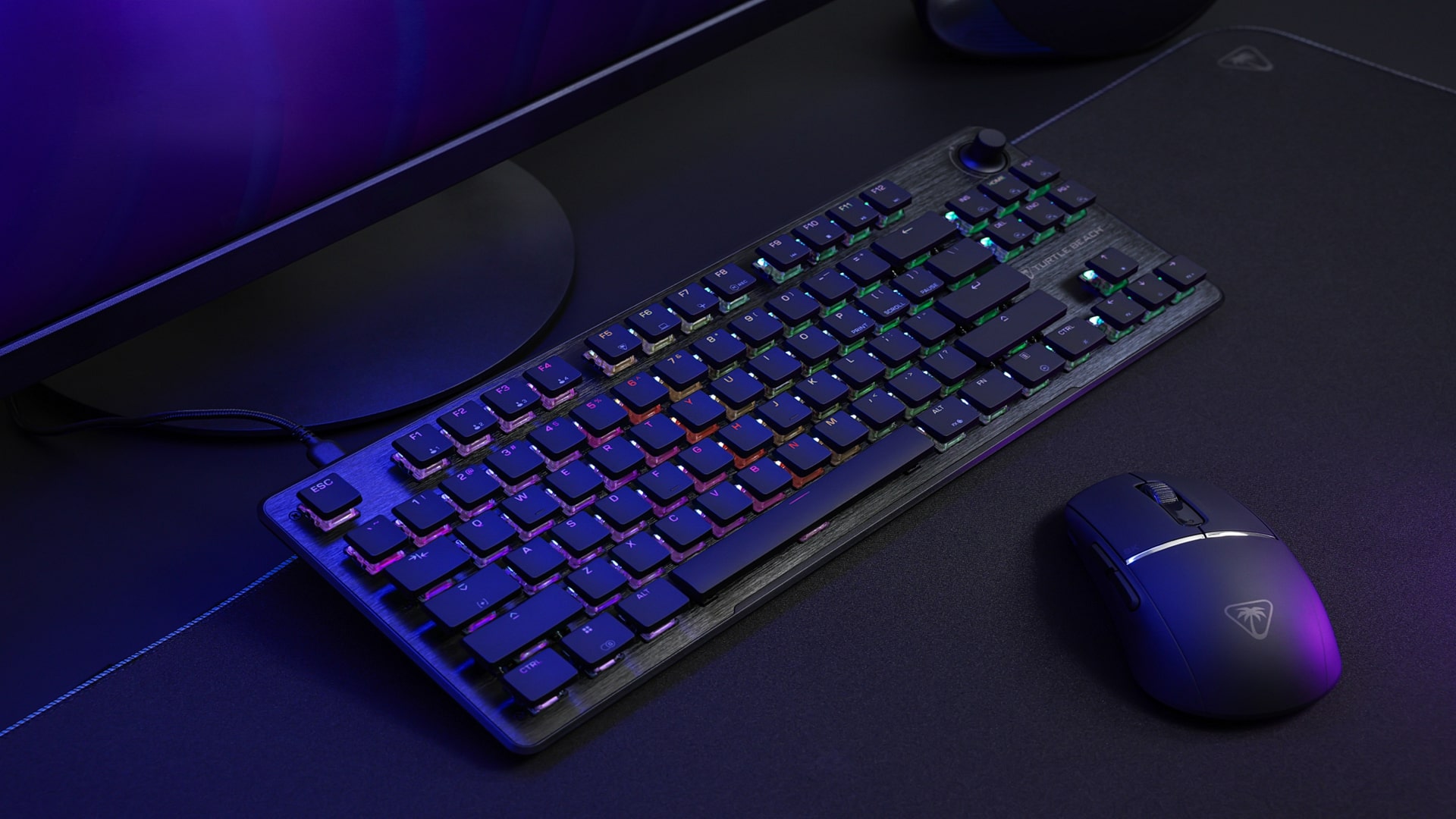
When you first lay eyes on the Turtle Beach Vulcan II TKL, you can tell this thing means business. There is something about its sharp black aluminum frame, the compact layout, and that soft RGB glow. It could be how minimalistic it is and the feel of it. While we reviewed the Hall Effect version of the Vulcan II TKL Pro last year, there’s just something satisfying about the way mechanical keyboards feel. Turtle Beach understands this, which is why they just released a mechanical version of the Vulcan II TKL.

Thanks to Turtle Beach, we’ve been testing and putting the keyboard through its paces over the last few weeks, and after using it through daily work tasks and gaming,  I can say that the Vulcan II TKL is one of the most minimalistic mechanical keyboards I have used in a long while, and I really enjoy it. Like always, can I change your mind on this matter? Let us find out.
Smart Design, Compact Power
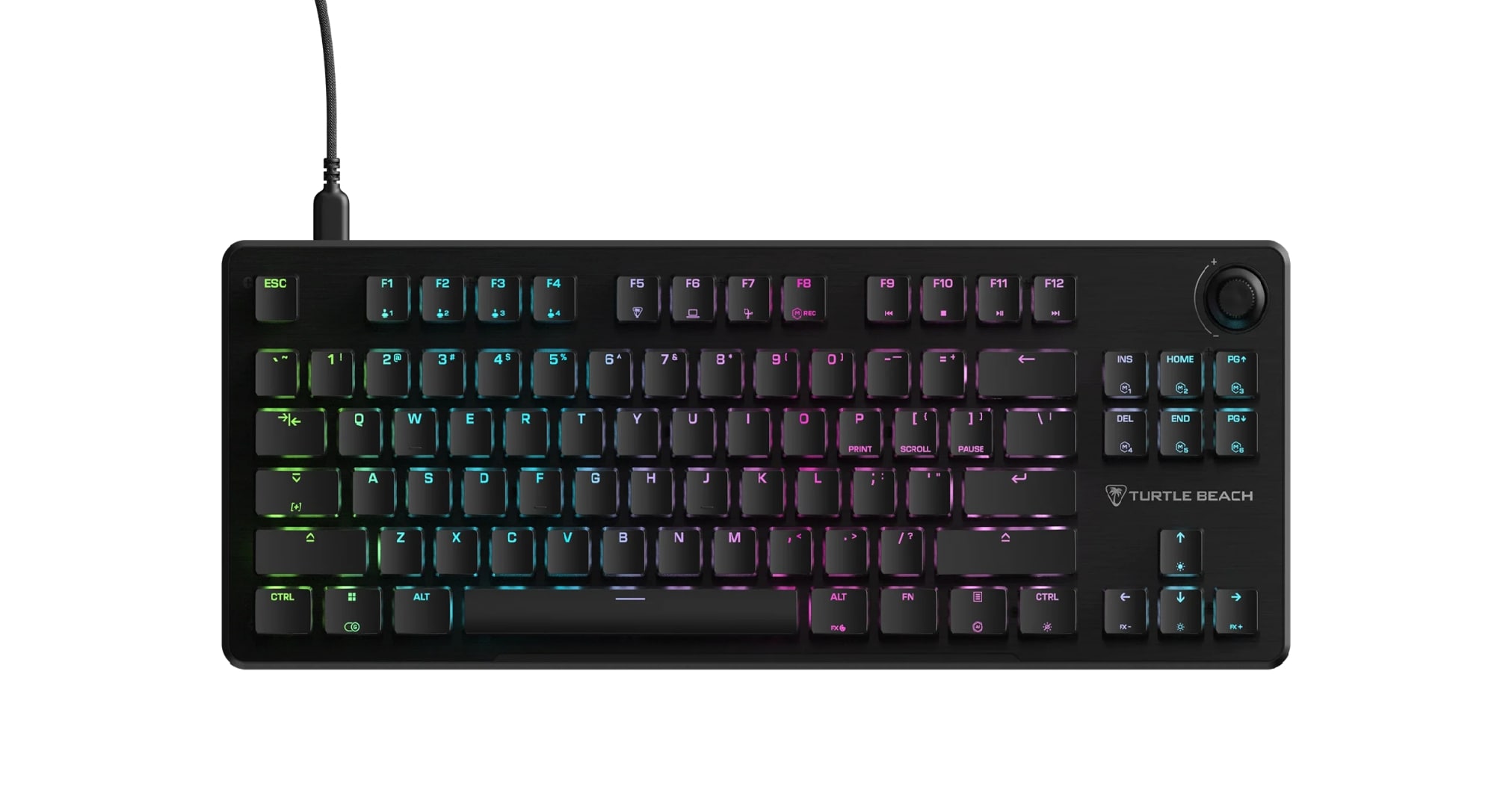
For anyone new to the term, TKL stands for “tenkeyless.” It means the keyboard skips the number pad on the right side, freeing up desk space and giving your mouse hand more room to move. The Vulcan II TKL embraces that concept with confidence. It is compact without feeling cramped, and light without sacrificing stability. The moment I placed it on my desk, I could tell it was designed for people who appreciate both function and style.

The slim black aluminum top plate gives it a premium, modern look while keeping it sturdy. There’s no flex when typing, and the matte finish helps it resist fingerprints (which held up true for a few days I’ve been using, but I do try to keep my hands clean). The keycaps feel silky smooth with just the right texture for grip, and the RGB lighting adds a nice little personality without going overboard. It’s professional enough for a work desk yet stylish enough to sit beside a gaming setup.

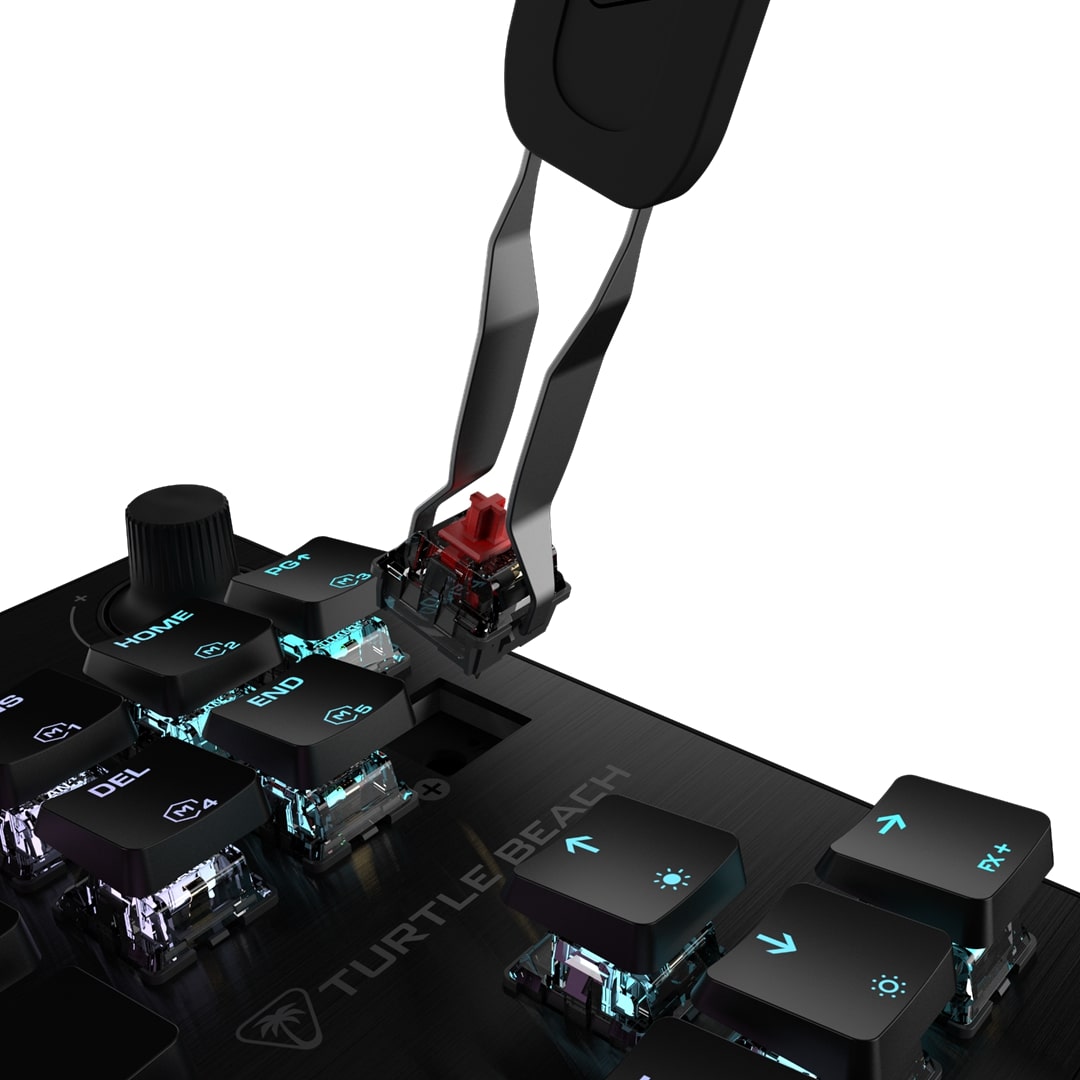
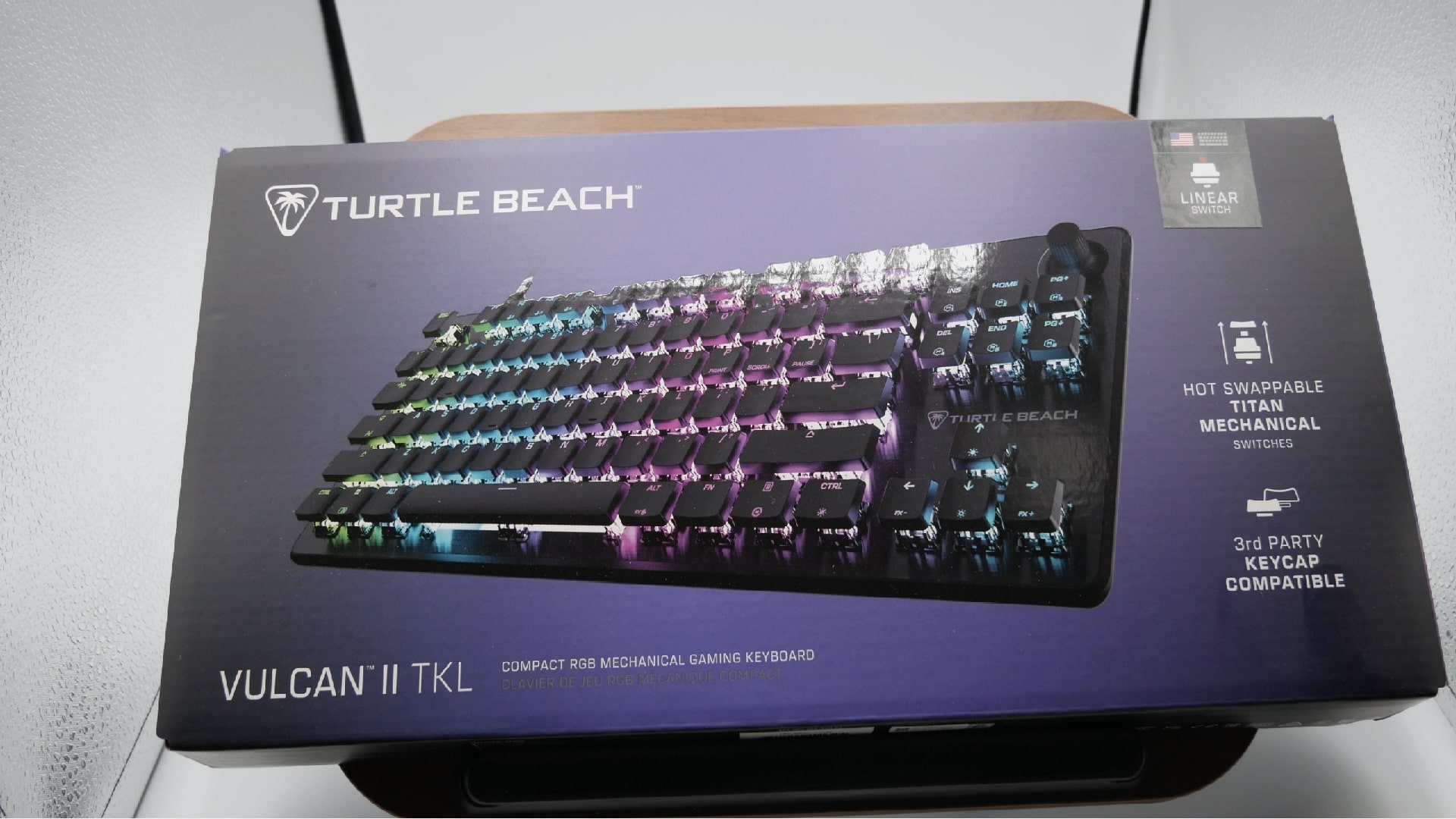
That same thoughtful simplicity carries over to the packaging. Inside the box, Turtle Beach includes everything you actually need: the Vulcan II Mechanical Gaming Keyboard, a braided USB-C to USB-A cable about 1.8 meters long, a combo keycap and switch puller, and a few extra Titan HS Linear switches. The braided cable feels durable and flexible, built to last through countless setups and teardowns. My only small complaint is the USB-C port placement on the keyboard itself. It sits on the top left instead of the center, which slightly throws off my cable routing. It’s minor, but if you’re as neat with your setup as I am, you’ll notice it.

Still, the overall presentation matches the keyboard’s personality, which is minimal, clean, and ready for action right out of the box. It’s clear that Turtle Beach focused on delivering a high-quality experience without the unnecessary fluff that often comes with “gaming” keyboards.
Performance That Feels Natural
Under the hood, the Vulcan II TKL packs impressive specs that translate beautifully into real-world use. It runs on a 32-bit ARM Cortex M3 processor that handles lighting, macros, and input scanning with precision. With a 1,000 Hz polling rate, every keypress is reported to the PC a thousand times per second, giving near-zero input lag.

The Titan HS mechanical switches deserve praise. They are linear, smooth, and actuate at just 1.8 millimeters with a 45-gram force requirement. They deliver fast, responsive input without being overly sensitive. Each switch is rated for fifty million presses, which means this keyboard should easily survive years of intense daily use. Full-key rollover and anti-ghosting ensure every input registers accurately, even when multiple keys are pressed simultaneously.

Typing on the Vulcan II TKL feels instantly satisfying. The switches glide smoothly with a soft, confident bottom-out. There’s no loud clacking, just a subtle sound without being noisy, and it will not annoy those in the vicinity near you. It’s the kind of feedback that makes long typing sessions enjoyable instead of tiring.

The stabilizers under the larger keys are also well-tuned. The spacebar, enter, and shift keys feel stable, not mushy or wobbly. I’ve used many mechanical boards where larger keys sound hollow, but here everything feels tight and consistent. Even after hours of writing and gaming, my fingers never felt fatigued, though I would have liked a soft pad included, like they did for the Vulcan II TKL Pro, to avoid hand cramp or bad posture.

I also appreciate how quiet this keyboard is. While it’s not silent, it’s much softer than the average mechanical keyboard. I could type late into the night without waking my wife, which says a lot. The aluminum top plate keeps vibrations to a minimum and gives the board a reassuring sturdiness. Every press feels good enough to listen, which makes a difference whether I’m in a fast-paced game or deep in writing mode.

The Vulcan II TKL strikes that great balance between technical precision and natural feel. This is especially important for those who do both gaming and work at their desk for long periods. It is the best of both worlds.

Fast, Responsive, and Ready to Game
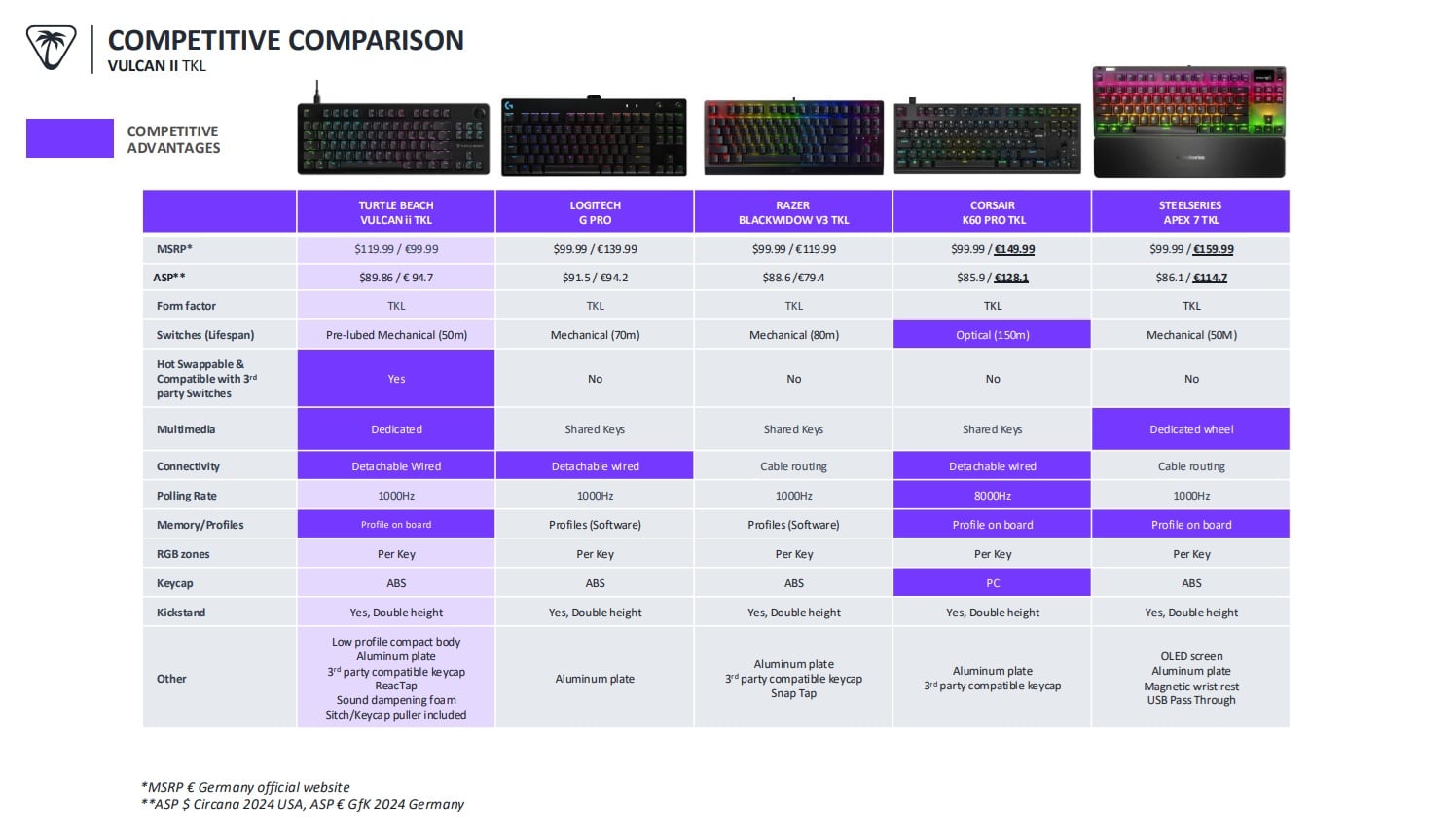
When it comes to gaming, the Vulcan II TKL feels like a natural extension of my hands. The lightweight linear switches and short actuation point make it incredibly fast and precise. In shooters, strafing and weapon switching feel instant. In strategy and MMO titles, macros trigger flawlessly. The smaller form factor also frees up valuable desk space for wide mouse movements, which is perfect for low-sensitivity players.

Turtle Beach includes a dedicated Game Mode, which disables the Windows key and reduces accidental interruptions mid-match. On top of that, the keyboard supports Easy-Shift, allowing you to create layered commands and macros. With Easy-Shift, a single key can perform a secondary action when held, letting you map complex sequences without sacrificing key real estate. I didn’t use this function too much, but I will be exploring and experimenting a bit more in the future. This would probably prove quite useful in fighting games like Street Fighter, or an MMO, and other combo-chaining actions.

The keyboard’s fast polling rate ensures that every input lands the moment you press it, and I never noticed any delay or chatter. Switching between work and gaming felt seamless, with no need to adjust settings; however, you can customize up to five profiles if you choose. The Vulcan II TKL simply performs, no matter the context.

The dedicated media wheel is another welcome feature. Adjusting volume, skipping tracks, or muting quickly without tabbing out of a game feels smooth and satisfying. The wheel’s tactile resistance makes every scroll precise, while the push function gives it versatility. It’s a small touch that adds big usability.
Heart of the Swarm II

To get the most out of the Vulcan II TKL, you’ll want to install Turtle Beach’s Swarm II software. Usually, I’m hesitant when peripherals require additional software, but it is becoming more standard nowadays, and the Swarm II impressed me. It’s lightweight, fast, and visually clean. It recognized my keyboard immediately and prompted a quick firmware update. After that, everything worked flawlessly.

Swarm II lets you control per-key RGB lighting, program macros, and assign custom functions. The interface makes profile switching easy, perfect for users like me who switch between work, gaming, and creative setups. I set one profile for my writing sessions with a calm white glow and another for gaming with deep red accents. The transitions between profiles happen instantly, with no delay.

Although there are some limitations on the application, I’ve noticed a few issues, such as it still prompts me to update, even though it’s already up to date. It is nothing too concerning for most users. You may need to do some research and a bit of time in the application to get the most use out of it.

The onboard memory allows up to five custom profiles to be stored directly on the keyboard. Which I believe, if you were to connect to a different PC, it would remember all the lighting and macro settings; however, I did not test this feature. If this is true, this feature adds real convenience for anyone using multiple systems.

Built to Last, Built to Enjoy
Cleaning and maintaining the Vulcan II TKL is refreshingly simple. The open-frame design and low-profile layout make it easy to wipe down, and the aluminum top plate resists smudges. The keycaps come off effortlessly using the included puller, revealing a surface that doesn’t trap dust or debris. A quick pass with a microfiber cloth or compressed air brings it back to its original shine.

The keyboard also supports hot-swappable switches, which means you can replace them without soldering. The sockets felt a bit snug at first, but once I got the hang of it, the process was smooth. For those who like to experiment with different switch types, this flexibility adds serious value.

Every part of the Vulcan II TKL feels designed for longevity. The aluminum top plate provides structural strength while keeping the keyboard light. The double-height kickstands let you adjust the typing angle easily. The braided USB-C cable is sturdy and long enough to fit any setup.

Then there’s the media wheel, a feature that quickly became indispensable. It has just the right level of resistance and clicks. Combined with customizable per-key lighting, onboard profile storage, and consistent wired performance, the Vulcan II TKL is built not only to last but to make every moment of use enjoyable.

It’s clear that Turtle Beach didn’t just focus on specs but also on the day-to-day experience. From the way it feels to type on to how easy it is to keep clean, every detail adds up to a keyboard that feels reliable, refined, and rewarding to use.

Verdict

Its compact footprint frees up desk space, while its sturdy construction ensures it stays planted during intense sessions. It’s light enough to carry, easy to clean, and consistent enough that I trust it with everything from editing to gaming marathons.

Sure, the USB port placement could be more centered, and hot-swapping switches might take some practice, but those are minor gripes in an otherwise stellar package. The Vulcan II TKL delivers on everything else.

For anyone who values performance and precision wrapped in minimalist style, this keyboard stands out as one of the best options in its class. It’s elegant without being flashy, powerful without being overbearing, and dependable without compromise.

The Turtle Beach Vulcan II TKL offers premium materials, lightning-fast Titan switches, and intuitive customization through Swarm II software, all wrapped in a sleek, professional design that fits any setup. Available for pre-order now at an MSRP of $119.99.

Score: 9.5/10

Pros:

  • Excellent build quality with premium aluminum top plate
  • Smooth and responsive Titan HS linear switches
  • Compact, sleek TKL layout perfect for gaming and productivity
  • Quiet operation suitable for shared spaces
  • Easy-to-use Swarm II software for customization
  • Reliable onboard memory for profiles and lighting
  • Dedicated media wheel with push functionality
  • Easy maintenance and cleaning design

Cons:

  • USB-C port placement slightly awkward on the top-left side
  • Switch replacement can feel tight for first-timers
  • Requires software for full customization

Turtle Beach Vulcan II TKL hardware was provided by the manufacturer. You can read MP1st’s review and scoring policy right here.
Avatar photo

Alexander Lataillade-Nguyen

Alexander Lataillade-Nguyen is a California-based cybersecurity professional and lifelong gamer with a passion for continuous learning. Outside of his work in ethical IT and digital security, he enjoys competitive pinball, miniature painting, and exploring new hobbies and cuisines.

Home > News

Battlefield 6 Known Issues Remaining Even After Day-One Update

While DICE released a day-one update for Battlefield 6 that housed over 200 fixes, that doesn’t mean the game is bug-free. On the contrary, there are still a significant number of bugs and other issues that need to be resolved.

This is something DICE is aware of, and even on release day, have released a list of known issues with Battlefield 6’s version “1.0.1.0” build.

DICE has confirmed that this is not the exhaustive list of all the known issues, but this a general overview of what they’re looking at right now in terms of fixes.

Battlefield 6 Known Issues (Release Day)

Battlefield 6 Review Embargo

Here are the confirmed items DICE is looking into as of Oct. 10, 2025.

PLAYER:

  • Party System: Accepting a multiplayer invite while in Campaign does not transfer you to the lobby or server.
  • Soldiers may bounce off vault-height objects if jumping from too far away.
  • Characters can bounce when landing on certain assets.
  • Profile: All Weapon Mastery Badges appear greyed out in the loadout screen. You will still be able to progress towards these badges.

GADGETS:

  • EOD Bot may get stuck if deployed on top of a Supply Crate.
  • Defibrillators may have inconsistent hit registration after range adjustments.

WEAPONS:

  • Some weapons are missing the intended camera shake when aiming.
  • Crosshair does not scale correctly when playing in 4K resolution.
  • Weapon sway can disconnect after exiting a vehicle.
  • Some weapons cannot reload if reload input is pressed immediately after firing.
  • Charm loops are missing on some weapons.
  • For certain scopes, the lens may visually detach from the scope during ADS reload.

VEHICLES:

  • R-84V2 and AIM-84 Air-to-Air Missiles have been temporarily disabled due to an issue related to Air-to-Air missiles from jets towards other aircraft. These missiles will be re-enabled in an upcoming update.

MAPS & MODES:

  • The combat area may sometimes fail to render on the minimap or deploy screen while playing Escalation.
  • Strikepoint: Halftime screen may show no information.
  • Empire State (Rush): All sectors may appear active from the start of a match.

UI & HUD:

  • HUD may not appear in gameplay when using 16:10 aspect ratio with certain resolutions.
  • The game mode UI at the top of the screen (including team scores) may not update if you join a match mid-round This will remain incorrect for the rest of that round on your client. Rejoining the match resolves the issue.
  • Command Console cannot currently be accessed.
  • “Purchase Failed” error message may appear when pressing the CTA button in Inbox, Front-End Bulletin, or Takeover screens.
  • The “Highly Trained” Dog Tag currently refers to it being an AI Dog Tag, this is due to be renamed to “Bot Dog Tag” and will remain being unable to be equipped.

CHARACTERS

  • Faction and Class patches may be missing on some skins.
  • The Sunstroke skin uses the wrong camo pattern.
  • The Bramble skin has an incorrect texture.
  • Player choice patches may override Faction and Class patches.
  • Patches are not correctly applied on Assault ROAR when using the Get Loud Class Assignment.
  • The Copperpulse skin currently shares the same outfit/pattern as Evergreen.
  • The System Override cosmetic is currently too saturated and will be reduced in vibrancy in a later update.

SINGLE PLAYER:

  • Challenges may not unlock if they were failed in a previous mission during the same playthrough. Relaunch the mission from the main menu and complete the challenge again in that mission to unlock it.
  • Graphical issues may occur if settings are set to Low; Performance Mode will also force settings to Low. Adjust graphics settings to resolve.
  • Screen tearing may occur; enabling V-Sync can resolve this.
  • Teammates can sometimes get stuck; restarting the checkpoint or mission resolves the issue.
  • Characters may become stuck due to collision; restarting the checkpoint or mission resolves this.
  • Reloading a checkpoint can cause issues; restarting the mission resolves this.
  • Playing outside intended areas (edges of the map, ignoring objective markers) can cause AI or mission objectives to stop functioning; restart the checkpoint and follow the mission path to resolve.
  • The game may become unresponsive after being idle for long periods; restart the title to continue playing.
  • On PC, unintentional interactions with apps outside of the game may occur when in Windowed mode; switch to Fullscreen mode to prevent this.
  • The Challenge Mode UI may not display correctly after unpausing; restart the checkpoint or mission to resolve.
  • Controller issues may occur on PC; switch to mouse and keyboard if this happens.
  • Shader stutter may occur at the beginning of the Prologue and some missions on PC.
  • Corrupted weapon firing VFX can appear when running at 120Hz.
  • Mission 07: Nile Guard: Player camera may break and fly through the map after triggering a specific cinematic while in first-person view.
  • On Xbox and PS5, the game may crash when pressing “Continue” in Campaign if no add-ons are installed.

SETTINGS:

  • Graphics settings may default to Low when using the Auto Performance preset on some RTX 5080 cards at 4K or 1080p.
  • Different aspect ratio selections may cause see-through borders or other display issues, depending on resolution.
  • PC Players: If you played on release day on PC your deadzone values may be defaulted at a too high of a value (22%). This may result in scenarios such as your aim moving when no input is taking place. We recommend you change this to the new default of 8%.
  • Consoles: Currently DRS (Dynamic Resolution Scaling) is not working as intended in Performance Mode. After joining a Game Session, the Performance Mode option will need to be toggled off and then back on again to receive the full benefit. This process would need to be repeated each time a new Game Session is joined or after having gone to the Main Menu. We are working on a more permanent solution for a future update.

PORTAL:

  • Unable to host an experience if the server description contains special characters.
  • On PS5, the title may crash if a party leader starts a Portal server while certain content packs (01 and 04) are disabled.
  • Portal: Unable to scroll to the bottom row in the “My Experiences” tab.

PROGRESSION:

  • Player stats may incorrectly count progress from custom Portal game modes.
  • Challenges: “Resupply teammates with the Supply Pouch” is not tracking progress.
  • Challenges:The Progress bar for “Repair Vehicles” does not update when repairs are made.
  • Challenges: “Use Vehicle Supply Crate” does not progress even after completing the action.
  • Challenges: The Weapon Expert Unit Challenge is not tracking correctly. The description says you must “Get a kill with each type of weapon in a match,” but the actual requirement is to get 15 longshot kills in a single match.
  • Assignments: Helicopters are incorrectly counted as Ground Vehicles in the “Land Vehicle Expert” assignment.
  • Assignments: Helicopters are not counted properly in Vehicle Challenge 1.

VFX & VIDEO:

  • Shader stutter may occur in the intro video on the PC splash screen.
  • Accessibility: Photosensitivity concerns may occur when rapidly switching from third-person to first-person weapon perspective while in a vehicle.

No word yet on when the next patch is dropping, but we wouldn’t be surprised if it’s released this coming week. If we get an update, expect it here on MP1st.

Avatar photo

Alex Co

Father, gamer, games media vet, writer of words, killer of noobs.

Home > News

Obsidian Dev Says They Stopped Making Baldur’s Gate-Style RPGs Because Retailers Claimed Players Didn’t Want Them

You may remember that after the golden age of classic role-playing games made with BioWare’s Infinity Engine, such as Baldur’s Gate, Planescape: Torment, and Icewind Dale, their developers started moving on to other things.

But it wasn’t really the developers’ fault; it was the players’. According to game retailers, no one wanted those types of games anymore, and they weren’t selling enough copies. This shift in demand eventually pushed studios to change direction.

Why Developers Abandoned Infinity Engine Games

Baldur’s Gate-Style RPGs

“The reason we stopped making Infinity Engine games was because retailers told us no one wanted to buy them,” explained Josh Sawyer, a legendary RPG designer and current studio design director at Obsidian. At the time, he had worked on Icewind Dale. Sawyer shared this story during his talk at GCAP 2025 in Melbourne, Australia.

“We asked if we could see the research and they basically told us to trust them,” he added, making the audience laugh.

It was a time when physical stores had a lot of control over the video game market, as buying games online was still uncommon. If a retailer decided not to display a game, it would end up selling very few copies. Developers had to follow the retailers’ demands or risk being left out of the market, often leading to thousands of unsold copies that studios had to buy back.

It’s also true that if stores were saying such things, it was likely because those titles really weren’t selling well, and players were choosing other types of games. Retailers had no reason to avoid stocking Infinity Engine games if there had been strong demand for them.

Sawyer also noted that today, with digital distribution, developers have much more freedom to choose the games they want to make. Failures still happen, of course, but at least now it’s possible to publish any game on platforms like Steam.

In other RPG news, Larian Studios almost made Baldur’s Gate 4, reaching a playable state before canceling it due to concerns about long development times.

Avatar photo

Taha

Television kills your vision.

Home > News

Sonic Racing: CrossWorlds Review – Speed of Sound

Sonic the Hedgehog may be known for his running speed, but that doesn’t meant that he isn’t afraid to hop into a racing kart and take on some of his best friends and enemies too. The idea of a Sonic racer started with Sonic & Sega All-Stars Racing and was followed by Sonic & All-Stars Racing Transformed, both of which took characters from not only Sonic games, but the wider Sega universe.

Both of these games were very well received, but the more singular Sonic series, focused on Sonic Team Racing that came years later, was a bit of a letdown. Sega is now trying to see if the formula still works with the much better all-around product, Sonic Racing: CrossWorlds.

On the Road Again

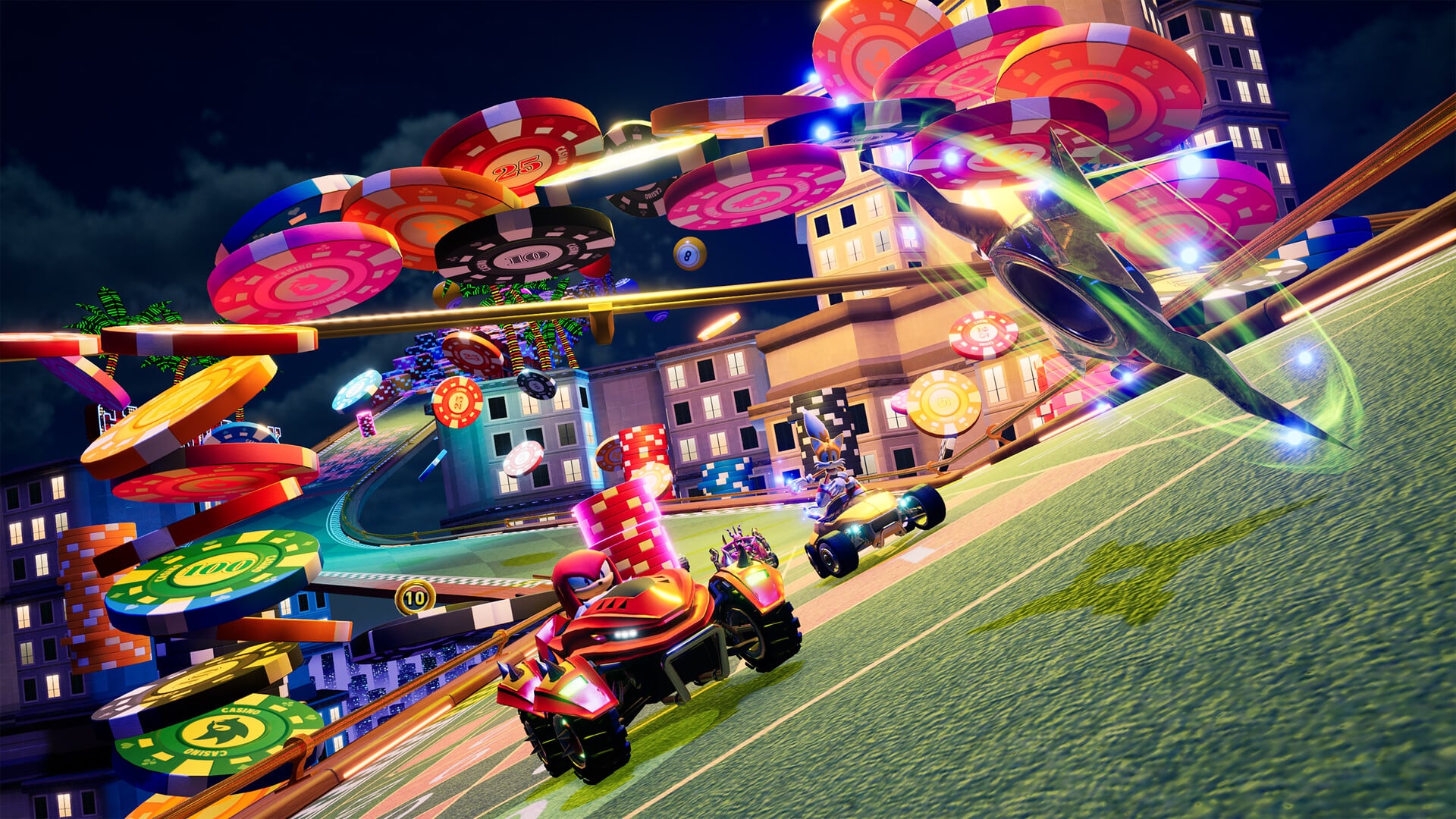
Sonic Racing: CrossWorlds offers four different speed class variants to choose from, along with an additional special mode that should sound familiar. Normal Speed is the base speed that would be consistent with 50cc in Mario Kart. Next is the 100cc equivalent High Speed, 150cc equivalent Sonic Speed, and the fastest of all, 200cc equivalent Super Sonic Speed. As always in a game like this, it’s wild to ever go back to the lower speeds once you jump to the higher classes. You are limited to the first three options to start, though, as you must win all seven Grand Prix at Sonic Speed to unlock Super Sonic Speed. The alternate option is Mirror Sonic Speed, which is unlocked just by winning all seven Grand Prix for the first time in the game, regardless of difficulty.

Before starting a race, you have to select which racer you want to use from the roster of Sonic characters that includes all of the staples like Sonic, Tails, Knuckles, Shadow, Dr. Eggman, Metal Sonic, and plenty more. I appreciated that they even included Sage from the more recent Sonic Frontiers as well. That is not all, though, as there are a few extra versions of Tails, Knuckles, and Amy Rose for getting the Digital Deluxe Edition, and even the Werehog version of Sonic as a pre-order bonus. I was sad to see the Werehog, especially, be locked behind as a pre-order bonus for now, but I’m sure it’ll go up for sale later. There are also a few unlockables in-game, at least, including Super Sonic as a character and an alternate costume for every other base roster racer.

The developers also have a long list of DLC characters announced for the game, with Hatsune Miku and three Minecraft characters already added at this point. Even more are coming from the Persona series, Yakuza series, and Mega Man series, as well as non-gaming franchise characters like SpongeBob and Patrick. The Sonic Racing series really got its start with a crossover-style game, so it’s cool to see plenty of crossover characters being added, even though the main focus was on the Sonic characters in the base game, as it should have been.

Besides picking your racer, choosing your vehicle, or machine as they are called in this game, is very important in the game. The machines are sorted by categories like speed, handling, and such to show which are best at each category, or you can custom-build a machine to tailor to your exact needs. Building a machine involves choosing the front parts, rear parts, and tires, allowing for a lot of mixing and matching. You can also choose the paint and aura colors, add decals, and even set a horn sound. The majority of the custom parts are going to need to be purchased in-game, though, with the in-game currency of Donpa Tickets. I also like that you can choose to use a hoverboard as your machine instead, as a nod to the albeit less than stellar Sonic Riders spin-off series.

Customize Your Advantage

The Gadget Plate is a new mechanic for the series that will unlock even greater use out of your machines than ever before. To start, you have two slots out of six available, where you can equip Gadgets to help you in each race. The Gadgets can take up only one, two, or even three slots in your Gadget Plate, with over 75 different Gadgets to choose from. These greatly vary in what they do, such as Inventory Plus, which lets you hold three items instead of two at a time, Inventory Swap, which lets you choose the item order, and Quick Starter, which gives +10 to all stats during the first lap. Further slots will be unlocked the more races you play in, with you only needing to do around 40 to unlock all six, which shouldn’t take much time at all if you’re playing through all of the Grand Prix races.

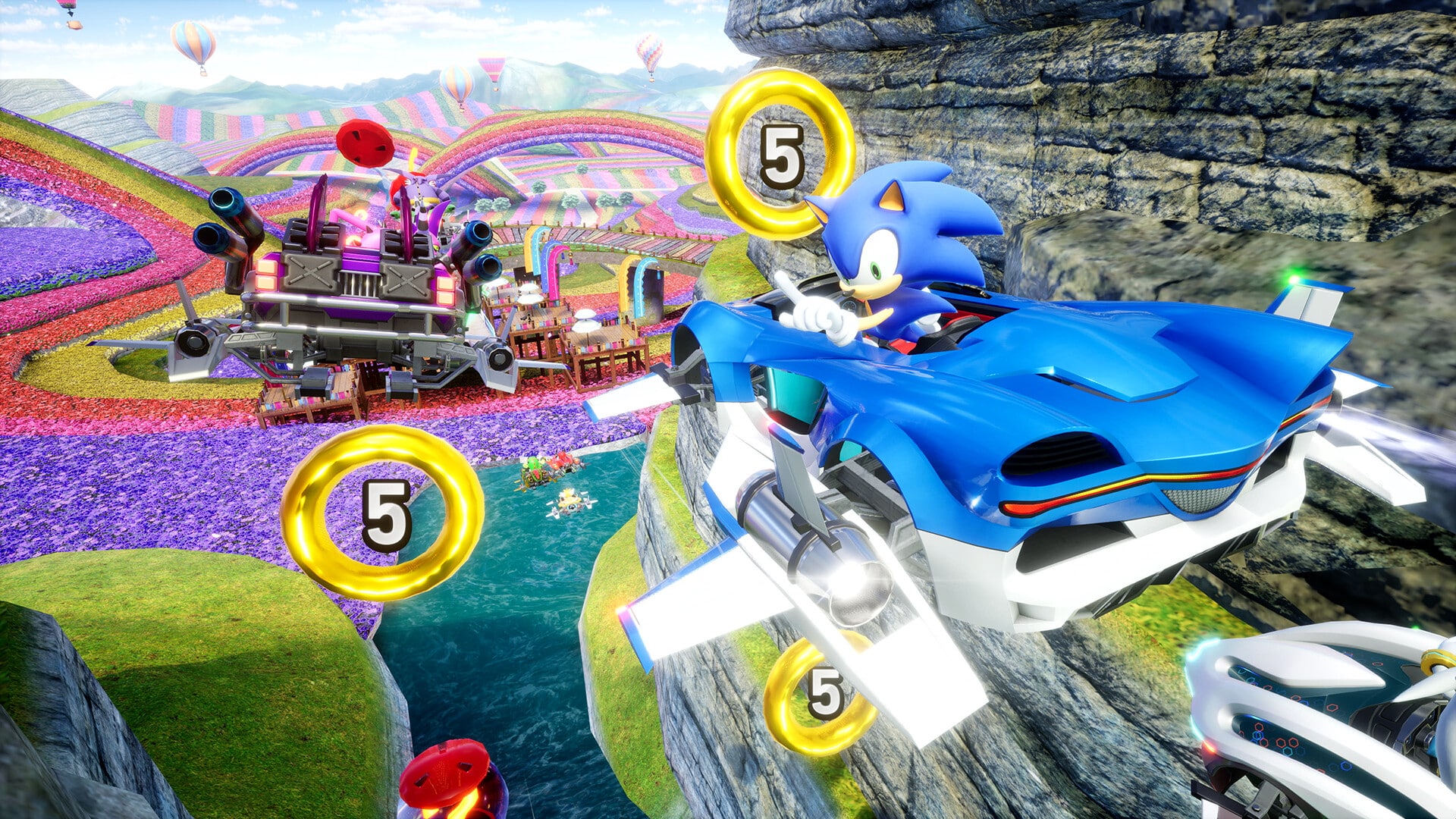
Some of the very useful Gadgets that you can equip involve the various items in the game, which you will collect and use quite often during races. Just like in any kart racer like this, there are item boxes littered across each track that you can run into and get a specific item. There are single-item boxes and double-item boxes, or you can get two singles to stack them, unless you get to three with the aforementioned Inventory Plus Gadget. There are 24 total items in Sonic Racing: CrossWorlds, which are much better than the offerings that were found in Team Sonic Racing. This does not even include the collectible coins found in each track that raise your top speed during any given race.

Each item has a different use in battle, with many of the staple equivalents you come to expect, like the Boost, as well as the weaponized Rocket Punch, Homing Punch, and King Boom Boo that act like a Green Shell, Red Shell, and Blue Shell from Mario Kart, respectively. There are plenty of unique items, though, such as the Slicer that attacks the machines in front of it and cuts it in half while also making them drop an item. A couple of my favorites were the Magnet that draws in machines that drive by it, and the Tornado, which does just as you would imagine. The Shield item was also very cool to get and hold onto for the end of a race when it seems like you are always getting hit with items just when you are about to cross the finish line, as it makes you invulnerable from attacks for a short period of time. I found the item variety in the game to be really impressive, especially since it doesn’t just feel like a clone of other similar racers with the different options available.

Items are not the only way to get an advantage over the competition, as you can use some in-game mechanics to get ahead. You can get a jump on your opponents at the start of each race by timing the start of your engine perfectly. There is a Starting Gauge that fills as you rev your engine, aiming to land in the green area when the timer hits 0. Doing this will give you the fastest boost from the get go, though many of the other racers likely also will pull this off as well.

Drifting is back again, and you can use it to help get a boost within a race by executing it correctly. There is a Drift Charge meter that pops up as soon as you start to drift, with three levels that you can charge up, with each higher level providing a larger boost. There is even a fourth level you can unlock with a specific Gadget as well, to really take advantage of this. You have to be careful when drifting, though, as hitting an obstacle or other racer can mess this up and lose the Drift Charge entirely. Drifting in Sonic Racing: CrossWorlds feels fantastic when doing so, as the mix of the Drift Charge meter and the mechanics surrounding it works great.

The Air Trick Charge is also very useful, which comes into play when your kart goes into the air off of a ramp or something. When in midair, you can press any of the directional buttons to do an Air Trick. This will cause you to spin in midair and get a boost based on how many you were able to pull off in midair. The starting boost, drifting, and boosts when in the air are pretty common with games like Sonic Racing and Mario Kart, but they are still always helpful to use if you want to come in first each and every time.

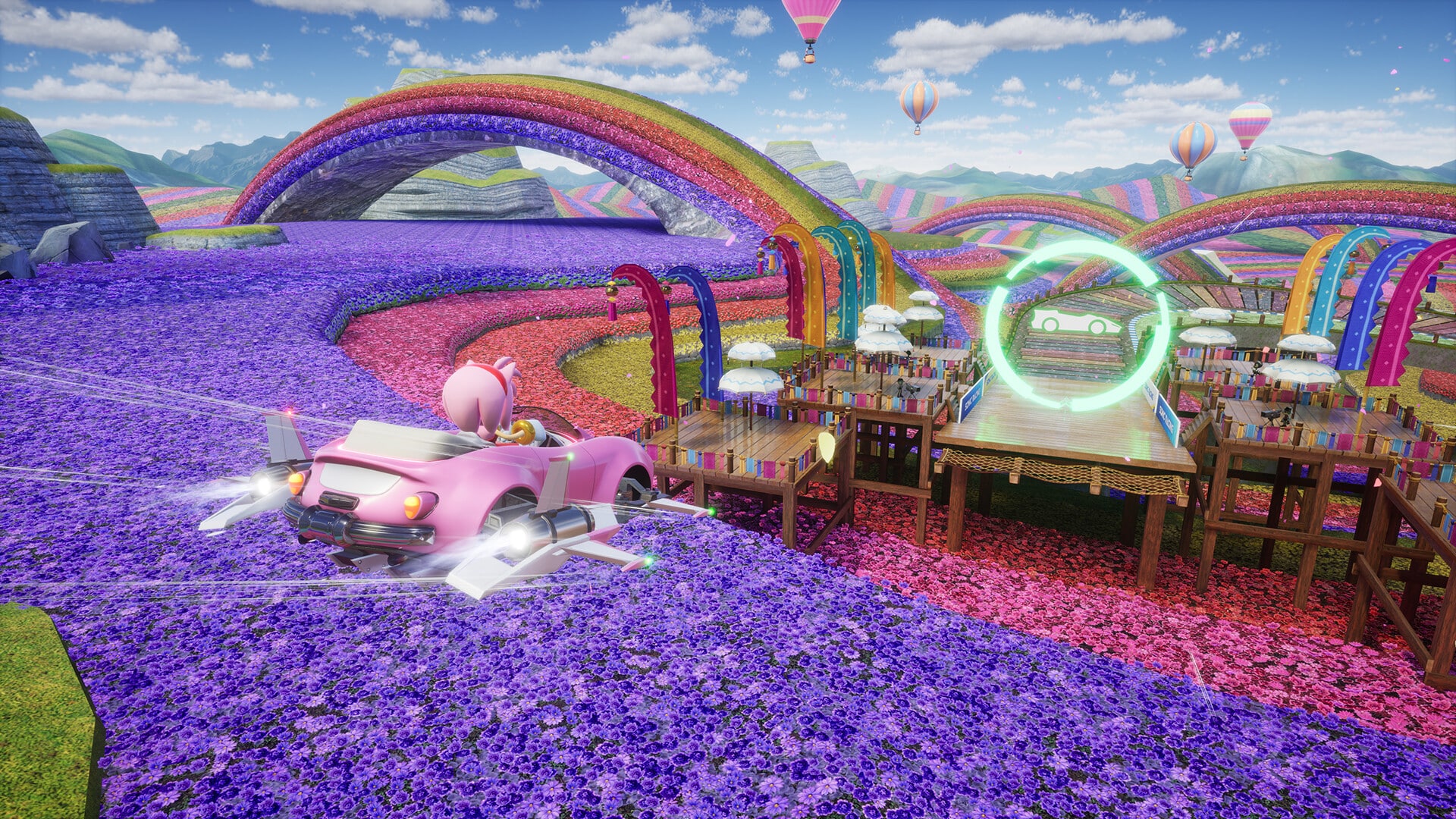
You can definitely see a little inspiration from the Diddy Kong Racing series in Sonic Racing: CrossWorlds in how it implements alternate modes of transport besides just cars for certain sections. Within certain stages, you will enter a ring and switch to a plane or a water vehicle for sections specifically designed for those vehicles. This differs from Diddy Kong Racing, where the plane and hovercraft options could be used in the same races as the regular karts, so these sections are actually tailor-made for them specifically.

When flying as a plane, you can move vertically or horizontally with ease and have some different types of obstacles to avoid while in the air. The water segments have you racing atop the water, with this form of the vehicle even having a special ability. When in water form, releasing a charge activates a special Charge Jump that gives you a speed burst. I really enjoyed how well this game mixed the three styles throughout, with each style seeming very unique to the others when used.

Jump to Another World

The game-changing mechanic that Sonic Racing: CrossWorlds has comes directly from the title of CrossWorlds. While you start each race on the selected track, the person who is in first place at the end of the first lap gets to select one of two CrossWorlds to jump to for the subsequent lap. After playing through lap two, it will then revert back to the original track for the third and final lap. Making this even better is that the worlds you jump to are not just other tracks from the main Grand Prix cups in the game, but rather exclusive CrossWorld tracks that are meant to be played like this or in some other modes like Time Trials.

This is an incredibly innovative idea, unlike anything I’ve ever seen in a racer, and it adds almost unlimited replayability, especially when playing with friends. Even with other racing games like this, the track selection can get a little stale after playing the same tracks repeatedly, but this completely flips the traditional idea of a track on its head by splitting into the different CrossWorlds.

Diving into the individual tracks, the designs are varied and a lot of fun to explore in every race. Some of my personal favorites of the main tracks were Wonder Museum, complete with the dinosaur fossils, the Halloween-themed Pumpkin Mansion that is perfect for this time of year, and Metal Harbor with jets and aircraft carriers galore. The CrossWorld tracks may be even better, with standouts like Kraken Bay, Hidden World, Steampunk City, and Galactic Paradise. You really can’t go wrong with any of these tracks, and having them be intermixed with the CrossWorlds takes them to the next level.

Enter the Grand Prix

The main game mode found in Sonic Racing: CrossWorlds is the Grand Prix, which is made up of seven regular cups and three additional cups, the latter two of which are reliant on DLC in the game. Each Grand Prix cup is made up of three races based on three specific stages, while there is also a fourth and final race that will be made up of three laps, with each lap being taken from the three prior races to combine into one three-lap race.

When you start every Grand Prix, you will also be assigned a Rival that will be your biggest competition in the series of races. These Rivals are ranked by level, with the max being level 10. You will start with a level 3 Rival, but you will be asked from there if you want to increase your level and given the option of an alternate rival with the higher level to keep it going for that Grand Prix. Even though they do pick a Rival for you each time, you can just go right into the menu before the start of the Grand Prix to swap to another one. This is very helpful, as managing to beat out your Rival in a Grand Prix will mark them off on the list of overall Rivals, with the goal being to take down all 23 in the game at some point.

Besides coming in first for each race, one of the goals you need to achieve is to obtain all five Red Star Rings that are found throughout the first and third laps of the stage. If you miss them the first time through on lap one, you can have a better idea of where to look for them on the third lap too. These can be gotten in later playthroughs, too, so you don’t have to worry about always getting them at once, either. The only time these do not come into play is the fourth track of each Grand Prix, where the laps are combined from the prior three tracks.

At the end of each race, you are given race rewards in the form of Donpa Tickets depending on three categories: the rank you came in, the amount of time you spent in first place, and how many of the Red Star Rings you collected during the race. For the fourth track, the last reward will be based on beating your Rival instead of the amount of Red Star Rings collected. Donpa Tickets can then be used to purchase machine parts and decals for your vehicles to add some customization into the mix. These tickets can also be used to retry a round if you did not perform as well as you would have liked, at the expense of 20 Donpa Tickets.

Race Park is where things are turned on their head a bit, as it takes the basic racing setup and mixes them up in different race types. There are six options to choose from, along with the option to create a custom match. These include Triple Team Ring Grab where the goal is for three teams to compete to grab the most rings, Triple Team Tap Boost where running into your allies Ricky Bobby style will give you a speed boost, Double Team Shoot-Out where a 6v6 where the goal is to take out the opposing team with weapons, Double Team Dash Panel where a 6v6 race with lots of dash panels, Quick Match where it’s a typical 12 player race, and Extreme Match where it’s a 12 player race with only the “heavy-hitter” items. Besides the basic Grand Prix, these are the ideal multiplayer modes for up to 4 players locally via splitscreen. If facing off against the CPU in single player, though, you can battle an evil cyber version of Team Sonic, where you can unlock special Gadgets and Machine parts for beating them.

Time Trials are available for each of the tracks in the game, though you are limited to Sonic Speed and eventually Super Sonic Speed once it is unlocked. The goal here is to get an A or higher on each and every track, with 40 total as of this point, with the Minecraft DLC already out. This will be increased as more DLC comes out too, so there are going to be plenty of Time Trials to go after here. Getting A ranks in Time Trials will also unlock additional music tracks that you can listen to at your leisure in the game’s Jukebox.

Online play is fairly limited due to a really weird decision by the developer. Friend Match is always available, where you can create or join a lobby and play against friends. However, the other option rotates based on time, with Festival being the current option as of this review. Prior to the Festival, it was just World Match, which is a typical matchmaking mode for the game. This is the only way to do online matchmaking when a Festival is going on now, so World Match is not available at all. Why World Match is not always an option, and why alternate modes are a secondary option, is baffling to me, but be prepared for more seasonal rotations moving forward.

Besides doing the basic tasks of coming in first in every Grand Prix and such, the game also has some challenges for you to work towards obtaining. Challenges vary by game mode and reward you with additional Donpa Tickets and Titles that you can equip. Titles are the nicknames you can set your profile as, which is something I usually don’t care about, but it’s here for those that do.

Verdict

Far from Sonic’s first foray onto the racetrack, Sonic Racing: CrossWorlds is arguably the best game we’ve seen out of the multiple attempts to date. In fact, I already know I have plenty of game sessions planned with friends in the foreseeable future. Not only does the game nail the core kart racing mechanics that are vital for such a game, but the unique CrossWorlds mechanic is an incredible addition that helps to set it apart from any other racer out there. Despite the botched matchmaking options with online play, Sonic Racing: CrossWorlds really stands tall even against the recent Mario Kart World and could become one of the go-to kart racers in all of gaming for the upcoming years.

Score: 9/10

Pros:

  • Large roster of racers with more from different series to come
  • Core gameplay is top notch
  • CrossWorlds mechanic is a game changer
  • Tracks are varied and well designed
  • Race Park is a blast with friends and solo

Cons:

  • Rotating online mode options is a major mistake

Sonic Racing: CrossWorlds was provided by the publisher. You can read MP1st’s review and scoring policy right here.

Avatar photo

Dean James

Home > Title Updates and Patches

College Football 26 Gets Surprise Update Version 1.012 But It Still Doesn’t Update the Rosters

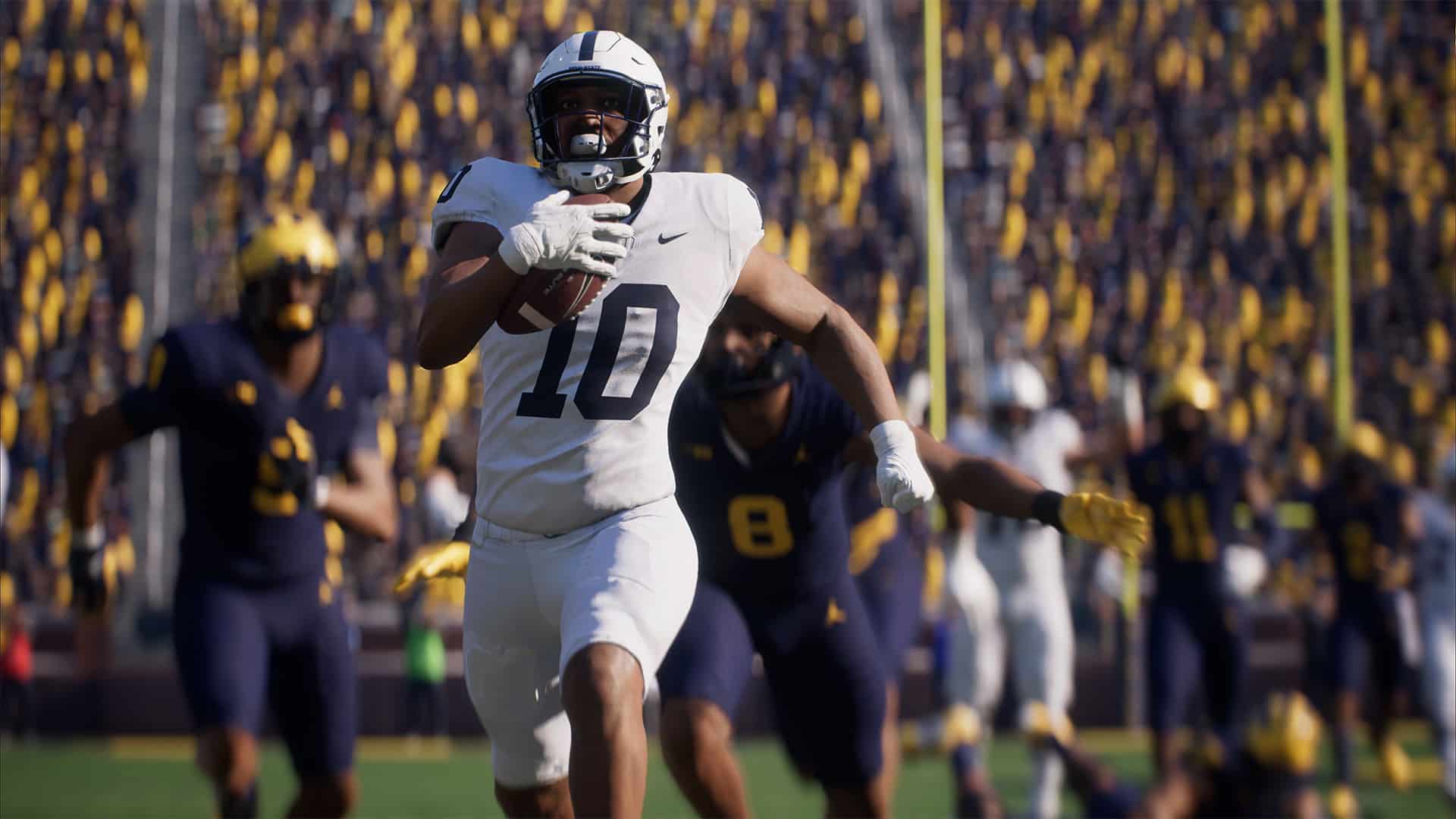
College Football 26 has received a surprise update today, which brings the football sim to version 1.012 (complete version 1.012.000). This is an unannounced update, and following the massive patch released last week that added Head to Head Ranked, don’t expect anything major from this update.

Also, it’s worth noting that this update still has not brought in a roster update. Yes, it’s October, and EA has yet to issue a proper roster update. For those wondering why, your guess is as good as mine.

College Football 26 Surprise Patch Brings It to Version 1.012

College Football 26 New Update 1.009

Unfortunately, EA has not released any acknowledgement of today’s update. Not only did we not get a roster update, but there are still significant bugs plaguing the game.

We’ve compiled some of the user-reported issues that have yet to be resolved:

  • Missing equipment
  • Black moving wall on field
  • Game freezing
  • Trophy Room Not Working
  • Dynasty players style resetting
  • Road To Glory Can’t Transfer to Zero Star Schools
  • Unable To Change Stadium in “Play A Friend” mode

Mind, these are just the gameplay issues, and doesn’t even include the technical problems.

  • Custom Playbooks not showing certain formations and plays
  • Head to Head games not starting
  • Game crashing
  • Various school presentations have bugs and issues

Hopefully, we’ll hear something about this patch from EA, but given it’s been hours since it was released and nary a single mention of it has been made, chances are the fixes implemented are for backend purposes.

If you notice any bugs that got changed (or still prevalent in the game), leave a comment below and let us know.

Avatar photo

Alex Co

Father, gamer, games media vet, writer of words, killer of noobs.

Home > News

Battlefield 6 “Purchase to Play” and “Undefined Error” Issues Surface Preventing Players From Jumping In

While the launch of Battlefield 6 is a day to be happy for, the experience has been marred with connection issues affecting both consoles and PC. This isn’t your typical server situation as well, wherein waiting it out will solve the problem.

Multiple (well, a lot) of gamers who bought Battlefield 6 have gone on social media to announce they are encountering issues even starting the game.

The two most prevalent issues right now? It’s the “Purchase to Play” problem, and another one that affects gamers even if they’re already connected to servers.

Battlefield 6 Installation of Content and Error Issues Plague Game on Launch Day

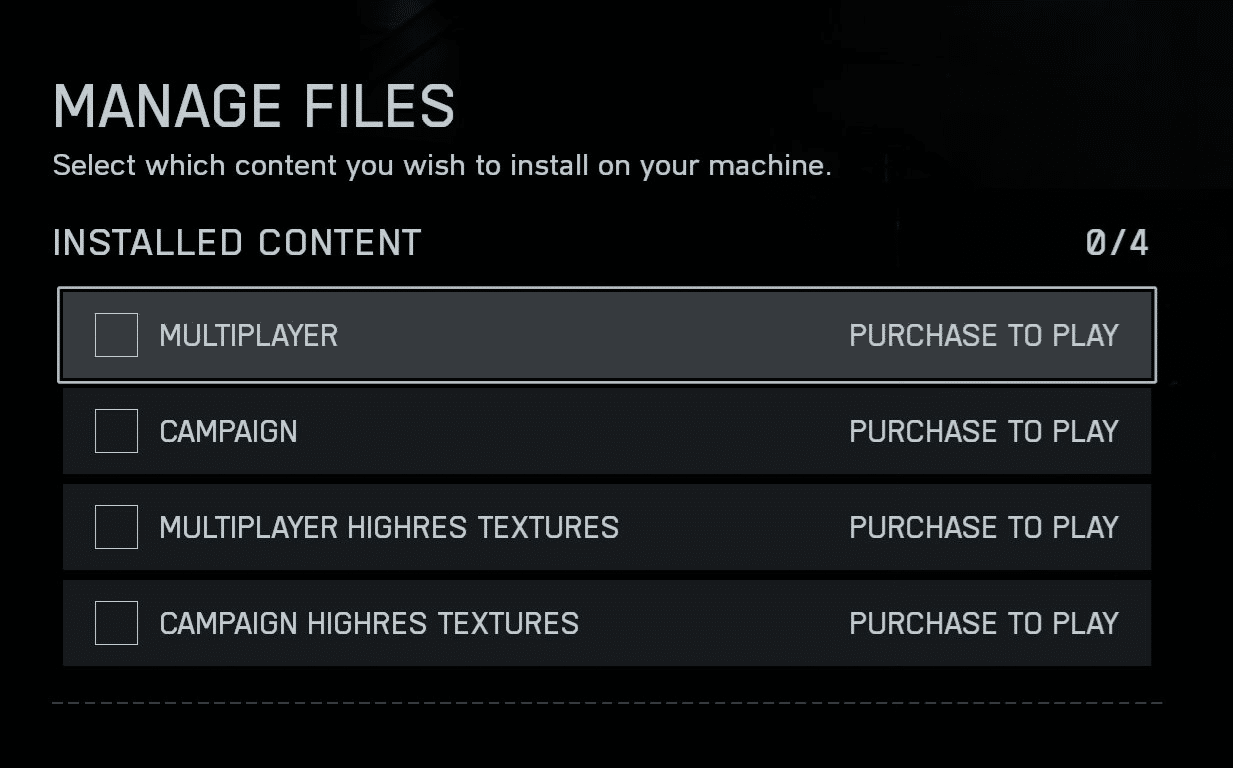
Multiple gamers on social media have posted an image of files that they’re unable to install. People who own the game are then asked to “Purchase to Play” even if they own the product already.

As far as we’re aware, players on Electronic Arts’ own EA App launcher are the ones affected by this.

Thankfully, EA is aware of this and relayed the following message: “We’re aware of an issue preventing players from accessing the game, with some receiving an error stating they need to purchase DLC or similar.”

The devs state that players should stay tuned for further updates as they investigate the issue.

However, even if you aren’t affected by that issue, there is another one that’s been troubling players, and this affects console gamers too.

Gamers are seeing an endless loop issue in queue that leads to an undefined error message:

So far, EA hasn’t acknowledged this issue, and we’re hoping that gets sorted out soon. Once we hear more about it, we’ll let our readers know — especially if a workaround is found.

In other Battlefield 6 news, I suggest checking our best settings guide for consoles and PC to maximize your killing potential. We also have a beginner’s guide for those starting on the franchise fresh.

Avatar photo

Alex Co

Father, gamer, games media vet, writer of words, killer of noobs.

Home > Features

Battlefield 6 Multiplayer Top Tips for Beginners

Can I say it? I’m going to say it. Battlefield 6 is officially out! After years of waiting for a proper Battlefield game, the series is back, and better than ever before. No doubt all you long-time fans are going to feel right at home with this one, as the game is nearly everything we’ve been hoping for it to be. With that said, despite the series going strong for over two decades, many are joining the fight for the very first time.

Luckily, our team of seasoned veterans has put together a list of top tips for Battlefield 6 to help you understand how the game works and make you a better player. 

Battlefield 6 Top Tips 

Play the  F***ing Objective

No one should be surprised by this one, as it’s the biggest thing all Battlefield players have told other players since the very beginning of the franchise. But for all you new players out there, this is probably going to be the biggest tip you’ll want to pay attention to. When you see somebody say “PTFO,” it means “Play the F***ing Objective.” You’re going to see that word thrown around a lot during the in-game chat, so it’s best you know what it means now. 

Now, unlike a majority of shooters out there, Battlefield isn’t solely about racking up kills and having the highest kill/death ratio. Yes, killing enemies is important because for every kill that a player doesn’t revive from, you take a ticket away from that team. Tickets are essentially shared lives, and once a team runs out of them, the match is over. 

But solely going out of your way for kills and trying to lonewolf things isn’t completely beneficial to the team. So you’ll want to play around the objectives and help teammates in any way you possibly can, while also getting kills. It would be more beneficial for the team if you were getting kills while defending an objective, rather than off somewhere randomly on the map. That way, you can defend a point from being captured, which in turn increases the cost of a ticket per death for the more points you have as a team. 

If you are playing Rush or one of the other modes where it progresses as you advance, then tickets are even more important here, as you need to conserve them. So, work with your team when big pushes need to happen, instead of trying to solo an entire team, because you will lose 100% of the time. 

There are also other ways to PTFO, and that’s by leaning into your class specialty. If you’re a medic, make sure you are reviving players, but do it smart and make sure there’s no one around to kill you and the person you revive the moment you pick them up. Engineers, make sure you are repairing vehicles. Aiding vehicles and making sure they are at full health can help turn the tide of war. Assault players should be using spawn beacons, so teams can have better positioning and pushes on an objective. And recons, well, you guys make sure to have all the other classes’ backs, and snipe away at any other snipers and enemies that are coming into an objective. 

There are more ways to play the objective than just killing, so don’t solely rely on that and think that just because you aren’t getting kills, you can’t contribute to the team’s progress. 

Use Destruction to Your Advantage

Don’t be afraid of getting a little explosive in this game. The developers worked hard at ensuring there is a good deal of destruction for players to play with, so use it to your advantage. Not everything can be destroyed, but there is plenty of buildings that can be taken down, walls that can be blown up, amongst other things. 

There’s a great deal of dynamic gameplay here. Blow up walls to create new pathways for teammates. Make your own cover by hiding behind the debris of a fallen structure. Surprise enemies by blowing up the floor from underneath their feet, or flanking them from behind after blowing up a wall. Heck, destroy their cover. The destruction is there for you to play with, so USE IT!

It may not be as destructive as the Bad Company series or a more recent title, The Finals, but with years of feedback behind this new entry, the studios have made sure that there’s enough to keep things interesting.

Stick With Your Squad, Even if They Are Randoms

Battlefield is a series best played with friends, but understandably, not all of us can gather a group of friends every day and night to play—especially those of us who are “Battlefield Oldheads” who have been with the series from the start. They don’t call us Oldheads for nothing, I mean, it’s mostly because of our takes on wanting the series to stay the same, but it’s also because we’re all getting up there in our years. But at the end of the day, everyone has real-world responsibilities to attend to, which means that your friends might not always be there to squad up with you. 

Obviously, if you can get a group of friends together, then do so. You’ll find that not only is the game more enjoyable when you’re having laughs with friends, but synergy within the squad is just so much better, as you can play off each other’s weaknesses and strengths a lot better. 

But if you’re going into this as a lonewolf, then I highly recommend sticking with your squad mates. There is strength in numbers, and that has always been the case with Battlefield. Sticking with your squad not only gives you numbers, but it also helps with objectives, being revived by someone who’s likely paying attention, and having a portal spawn point, just as long as they aren’t in combat. You might not be communicating with them over comms, but a good chunk of players will understand squad play. 

Don’t Skip Revives. If You Are Down, Give Someone the Chance to Get You Back Up

As I already mentioned, when you die, your team loses a ticket. If you’ve played Call of Duty or any other twitch shooters, your instant reaction is going to be to skip the revive phase and go straight into redeployment. I cannot tell you how many times I have been on the battlefield as a medic, everything is perfectly clear for a revive, and that player decides to respawn instead. This isn’t helping anyone. You’re getting back into the action this way, actually hurting the team more than you think. 

I understand if you are in the middle of a firefight, and you see an entire team rolling up over your corpse. Yes, then it makes sense to respawn because no one is going to risk their lives going 1v10 for you. But if you have a bunch of teammates around you, and a medic is clearly coming for you, give them a chance to revive you. Reviving a downed player doesn’t use up a ticket, and it’s just as good as respawning back in. Yes, you might have to wait a little bit, but that waiting you’re doing is going to be the same amount of waiting as you backtracking to where you want to go. Trust the system, let medics do their job and revive you, and you’ll see this is actually a much better way of playing. 

Play Slow, and If You Do Die, Don’t Let It Discourage You

For many, Battlefield 6 is going to be their first Battlefield game ever. There are a lot of rules and how combat flows that make it a very different game than others, and with the market being dominated by more arcade-like shooters, such as Call of Duty, Apex Legends, and even some hero shooters, a lot of you are probably going to try to play like that. Unless you have god-like aiming on PC, you’re going to find that bunny hopping and sliding around matches aren’t going to get you very far. 

For all new players out there, I recommend taking things slowly. Get used to the controls and movement, and you’ll find that this isn’t your everyday twitch shooter. It’s, well, it’s Battlefield, a game that is a middle ground between arcade and realism, without leaning too deep into either. Firefights are quick and frantic, but the means to reach the action has always been more of a slower pace. You aren’t going to get into a gunfight after the first 20 seconds of starting a match, which should, in a lot of ways, set the mood of things. 

Understandably, for many, dying might feel a bit discouraging because it means you might have to work a way to get back to where you died, or get back into the action of things. Don’t let that feeling take over, because it’s going to blind you from just how deep Battlefield really can be. The gunplay is less about twitch reactions and more about positioning, cover, and teamwork. Learn the controls, understand the movement, and take the time to appreciate the immense scale of the maps. It’s a game of patience, where the calm before the storm is just as important as the storm itself.

Use That Mini-Map!

I know Battlefield can get pretty hectic when it comes to all the action and explosions happening, so it’s easy to forget to look at the mini-map. But you should always have map awareness, as it will tell you where enemies are, including vehicles rolling up on you, as well as teammates. Knowing the map layout is one thing, but mastering that mini-map is another thing, one that can help you become a better player. 

Especially if you play solo with no comms whatsoever, having map awareness is going to save your life in this game. 

Use Cover, Spot Enemies, and Supress

Battlefield is all about playing strategically, rather than going it alone and bunny hopping around the field. Knowing your surroundings is a key thing for all good players, and you’ll want to pay attention to any kind of cover on the playing field. Even the tinniest bit of it could turn a firefight around, so make sure you’re using it whenever you can. 

Additionally, make sure you spot enemies, whether they are within shotgun range or far across the map. Spotting enemies will help other players out. You don’t have to kill every enemy you see; if there is another teammate who is closer and better positioned, let them know with that spot. 

Suppressive firing. I don’t care what some may think about this; suppressive firing is a viable form of gameplay that can help your teammates out. Drawing the enemy’s attention towards you, as you safely sit behind cover, could help other teammates in flanking maneuvers and such. Sure, it opens you to their line of sight, but if there’s a chance someone else can take said enemy out because they are behind cover, then it’s not a form of gameplay I am against. 

Know Your Class

I mentioned some of this in the PTFO section, but it’s very important before you even pick a class to know exactly what their role is. You don’t want to play as a support, never reviving someone or placing ammo and health kits, as you only focus on kills. You’d be better off playing as an assault class in that case. But even there, if you aren’t using spawn beacons, then what’s the point? Playing an engineer and ignoring all repairs doesn’t help anyone either. 

Learn the classes before you play the game, then test each of them out and find the role that actually fits your playstyle. This is a team-based game, play like the team needs you. 

Use Training Grounds and Portal Experiences to Practice With Vehicles and Other Things

A lot of you are going to be tempted to hop into a vehicle for the very first time. I can tell you, controlling any of the vehicles in a Battlefield game is no easy task. It’s always been a major complaint from players, and Battlefield 6 appears to be no exception. But I will tell you, people are going to be angry that you decided to hop inside that helicopter or fighter jet and crash it the moment you took control. 

I get it, you’re excited. All of us veterans have been in the same spot as you, and we’ve all crashed our first time. I suppose that’s part of the Battlefield experience. 

But you know what, there’s probably going to be some Portal Experiences available day one that are created by members of the community to help learn these things. There was for Battlefield 2042, and with Portal being more robust here, there should be better training experiences. Maybe not day one, in that case, I highly recommend just starting your own password-protected experience, starting it solo, and playing around with the vehicles. Learn the controls and the feeling of it before you try out the real thing in a match with actual people. You’ll thank me later, or maybe not, and you’ll just crash into a mountainside from the sheer pressure of carrying other players.

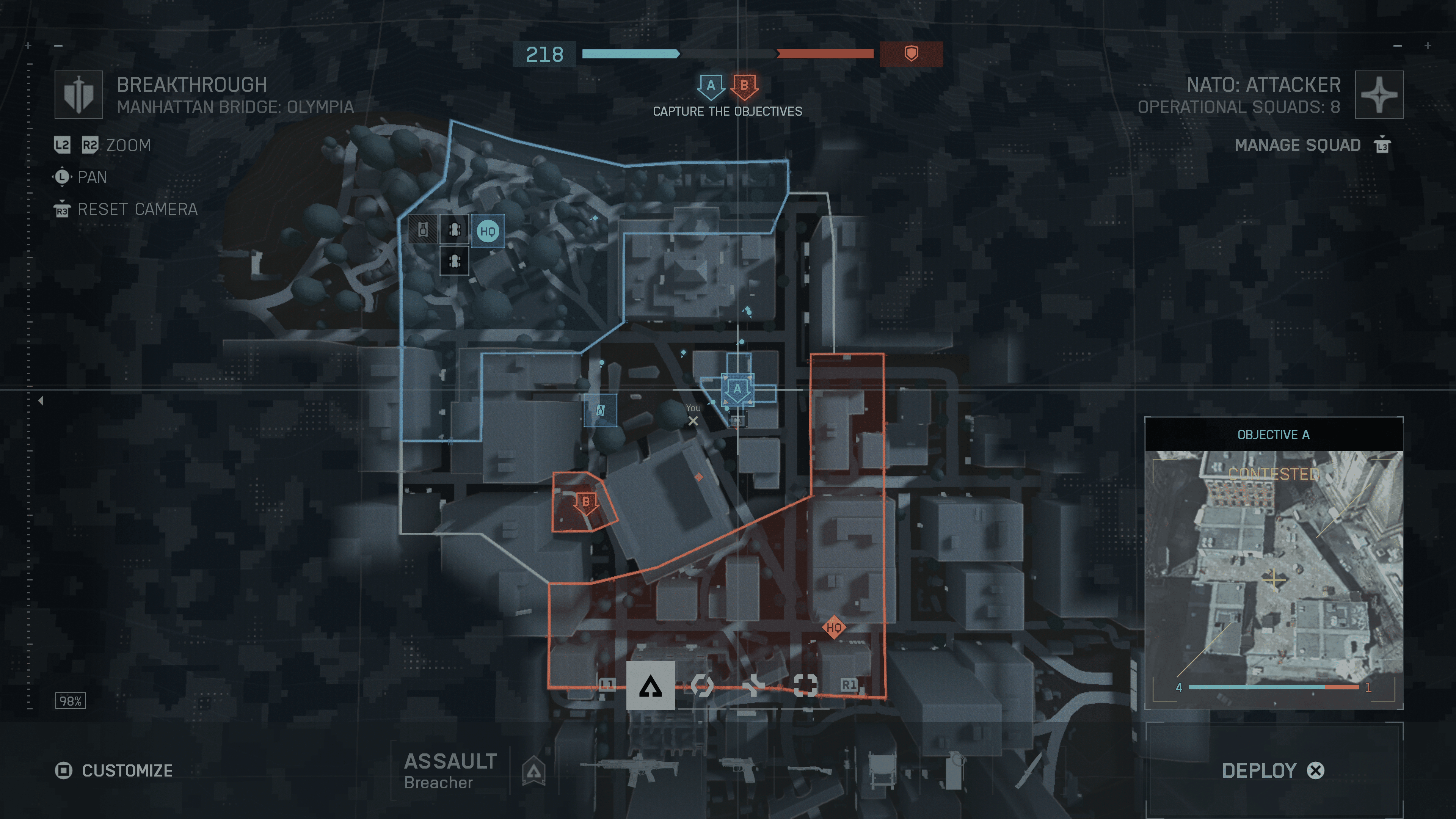
There’s also the Training Grounds, where you can read up on general mechanics, practice in a firing range, and even start up a bot-loaded Breakthrough match. There’s plenty of ways to practice, and I recommend taking full advantage of them. 

Most Importantly, Have Fun and Make Memories

The last tip is, well, have fun. Cliche, I know, but I think something that needs to get across to everyone’s mind is that you don’t have to win to have fun. Battlefield is a lot of things, but for me, it’s always been about making moments. Sometimes I win a match, and other times I lose one after spending 20-30 minutes on it. However, most of the time, I’m having fun regardless of how that match ends. Be it because I’m hanging out with a squad of friends and catching up and having laughs, or because of those “Only in Battlefield” moments that always put a smile on my face. These are the moments you’ll remember long after the match ends, not your kill/death ratio. When I look back at the series as a whole, it’s all about the crazy and insane stunts that I’ve witnessed over the years that flood back. 

There’s a reason why so many are passionate about the Battlefield experience, and it all comes back to moments like witnessing the first rendezook, seeing a megalodon emerging from the sea, as the whole server puts their differences aside. Things like watching an entire skyscraper come crashing down, to even smaller moments where you’re running away from an attack helicopter as it fires upon you. It feels like something you would see in a movie, but for us, we call it an only in Battlefield moment, and we live for those moments. So go out there, cause a little mayhem, but most of all, have fun doing it. 

One Last Tip to Our Fellow Veteran Players: Be Kind

Guys and gals, we’re old now; we’re not as patient as we used to be, and our time is precious, given how little we have left. Alright, I’m NOT that old, but the point stands: a lot of us have little time to play, and a whole lot of responsibility to worry about. Most of us know the franchise like the back of our heads, but there’s a new generation of players who join in with each game. This could be their first online shooter ever, or they might be coming from another game, or it could be their first time experiencing Battlefield. Let’s not try to gatekeep new players. We should encourage them and teach them the ropes, even if many don’t listen to in-game cues or requests. 

I know, it can be frustrating, especially with some of the takes these new players have. But we were all in their shoes at one point, so let’s not be the reason why they don’t like the franchise. I know the Battlefield community can get very toxic at times, especially with change. But we’re all adults here; we should respect each other and avoid making threats. It’s not just directed at other players, as developers who have worked on this game have caught plenty of shade over the last few years. 

We can all voice our disagreement over a choice, but let’s not turn into savages and start tearing into people over them. That kind of feedback gets you nowhere. So be kind, respect other players and developers, and be constructive with the feedback you have to give. With the studio now being more open with their comms, who knows just how far they’ll go to listen to that feedback? We’re all in this together, so let’s make Battlefield 6 a place where both new and old players feel welcome. The community is a huge part of what makes this series special, and it’s up to us to make sure it stays that way.

I suggest checking out our Battlefield 6 best settings guide for consoles and PC, and yes, this also includes controller settings.

That’s all I have left to say; it’s time to get out there and start having some fun.  

Battlefield 6 is now officially available globally, on the PS5, Xbox Series X|S, and PC. 

Avatar photo

James Lara

A gamer at heart, James has been working for MP1st for the last decade to do exactly what he loves, writing about video games and having fun doing it. Growing up in the 90's gaming has been in his DNA since the days of NES. One day he hopes to develop his own game.

Home > Title Updates and Patches

Indiana Jones and the Great Circle Anniversary Update Adds New Game+ and More via Patch 1.009

Indiana Jones and the Great Circle turns one today! To mark the occassion, MachineGames has released the Anniversary Update for the game, that adds new features, content and more all for free.

Console gamers will see today’s patch as Indiana Jones and the Great Circle update 1.009 (complete version 1.009.000), and this adds a new outfit, a swathe of fixes and more.

For the complete patch notes, head on below.

Indiana Jones and the Great Circle Anniversary Update Adds New Content via Patch 1.009

ANNIVERSARY UPDATE HIGHLIGHTS

New Game+

The highly-anticipated New Game+ mode is coming to the game! With the release of Indiana Jones and the Great Circle: The Order of Giants DLC, now is the perfect time to jump back into the game and experience the story all over again.

How It Works: Once you’ve completed the main story, New Game+ will be available right from the main menu. Select a Game Slot containing a completed playthrough of the story and you’ll be taken to the New Game+ set up menu. (Because you’ll be significantly stronger this time around, we recommend bumping your difficulty up. You can adjust this during the New Game+ setup.)

What Carries Over: Jump back into the adventure with all your collected and unlocked Adventure Books, plus any unspent Adventure Points, local currency, and Medicine Bottles from your previous playthrough.

A New Reward: Complete the story in New Game+ and unlock a brand-new ending sequence after the credits!

Cairo Outfit

Looking to cool off in the sweltering heat of Gizeh or the humid temples of Sukhothai? With the Anniversary Update, all players can unlock a free new Indy outfit inspired by his classic, jacket-free Cairo look in “Raiders of the Lost Ark™.” To don this “cooler” look, visit the Outfit tab in the Options menu. This outfit can be worn by Indy whenever he isn’t wearing a disguise, unless the level requires a special outfit, such as in Marshall College or Nepal.

Voice Language Select

The third major addition coming in the Anniversary Update is Voice Language Select. Now, you can mix and match any of the nine available voice languages with any of the fourteen text languages. Prefer to hear the original English performances with subtitles in your native language? Want to try a new combination? The choice is yours.

To change the language settings, go to the Audio tab in the Options menu and scroll down to Language settings. There you can choose your preferred languages for Text and VO. After choosing the new settings, additional files may need to be downloaded in the background. A message will pop up telling you when the files have been downloaded. Your changes will take effect after starting a new level or if you restart from a checkpoint.

Note: In the Steam version of the game, only the Text language option is set in-game. You will need to select the VO language in the game properties in the Steam client.

For the rest of the patch notes that lists the bug fixes applied, head on below.

General Fixes

  • Fixed an issue where enemies might linger in their “stumble” animation if you punched them while they’re breaking out of your grab.
  • Fixed an issue where pushing a grabbed enemy into a tight space could leave the enemy detached from Indy but still in the “grabbed” animation state.
  • Fixed an issue with a specific “finisher” animation where the camera would clip through Indy’s arms.
  • Fixed an issue where you could enter wall squeezes while downed and using the “Lucky Hat” ability that resulted in you standing up and unable to progress properly.
  • Fixed an issue that could cause a control-lock if restarting a checkpoint during the middle of a save.
  • Fixed an issue where using the “push” button to open “disguise doors” could prevent you from being able to walk through the door.
  • Fixed an issue where, if you left a level while holding an inventory item, it would be stuck to your hands when revisiting the level

Missions & Quests

DLC

  • Fixed another issue that might cause pipes to be placed incorrectly during the Gladiator puzzle.
  • Fixed the animation of the blackshirt being dropped from the bridge near the entrance to the Gladiator puzzle.
  • Fixed many minor graphical glitches through the whole story.

Peru

  • Fixed an issue where audio was missing in the Main Menu if you quit the game during the opening cutscene.

Gizeh

  • Fixed an issue where the clothes of certain villager NPCs would not animate when the character moved.

Sukhothai

  • Fixed an issue that might cause the boat engine sounds to never stop when you arrive at the rebel village at night.

Iraq

  • Fixed an issue where skipping the cinematic where Indy frees Gina might result in the Siren sounds to never stop.

UI

  • The price of guides and books now show correctly when inspecting them from one of the vendors.

PC Specific Fixes

  • Fixed an issue where binding the interact/use key to be the same as the “buy” button from vendors, it could prevent you from buying items.
  • Fixed an issue where setting Reflections to the lowest quality made certain objects look completely black.

Localization

  • In Arabic, fixed the alignment of the quick-inventory warning text about restricted zones.

Aside from The Order of Giants DLC, Bethesda has not mentioned whether we’re getting more content for the game. If I had to hazard a guess, we’ll still be getting updates, but no major expansion. While Microsoft hasn’t announced a sequel, it’s almost a lock at this point given how well the game did, and Xbox boss Phil Spencer’s statement about it backs it up too.

Avatar photo

Alex Co

Father, gamer, games media vet, writer of words, killer of noobs.

Home > Features

Battlefield 6 Best Settings for Consoles, PC and Controllers

It’s finally upon us! Battlefield 6 is now live and ready to dominate your multiplayer gaming life for the foreseeable future. If you’re looking to maximize efficiency and the game’s visuals, we have you covered.

MP1st’s Battlefield 6 best settings guide covers controller settings, graphics settings, and more.

Whether you’re a console or PC gamer, this guide will help you in your objective, soldier.

Battlefield 6 Best Console Settings

Best Gameplay Settings

Global

  • Invert All vertical Look – If you want to play with the controls inverted for all vertical actions, you can enable it here. Personally, because most games have invert off, you’re probably going to want to keep it by default.
  • I do recommend modifying the Vertical Look Settings and switching aircraft to Invert, as most games with planes and such do play with this inverted. To me, that feels far more natural.
  • Hold/Toggle Options
    • Infantry Sprint – Toggle – I prefer having this as toggle, rather than hold, since you are going to stop running anyway when you ADS.
    • Double Tap Forward Sprint – Off
    • Infantry Weapon Zoom – Hold
    • Vehicle Weapon Zoom – Hold
    • Steady Scope – Hold
    • Interact and Reload – Prioritize Reload
    • Request Respawn – I would opt for a toggle since it’s faster than holding.
    • Skip revive – Hold, that way you can cancel it in case someone comes up to revive you.
    • Vehicle Boost – Toggle
    • CommoRose – Hold
  •  Capture Area Outline – On lets you see an outline of an area that can be captured. Turning this off removes that, which isn’t good for objective-based modes.

Infantry 

  • Infantry Aim Sensitivity – Adjust how you want, though anything below 30 is going to feel extremely slow, where higher sensitivity will feel more responsive and snappier.
  • Infantry Mouse Aim Sensitivity – Adjust with where it feels right for you.
  • Crouch Toggle Sprint – Stand
  • Vault Over Sprint – On
  • Sprint Door Barge – On
  • Double Tap Crouch for Sprint Slide – Depends on whether you want to double-tap to sprint slide or single-press.
  • Landing Roll – On
  • Mount Breakout – Instant
  • Interact and Reload – Prioritize Reload
  • Invert Demolition Charge – Off if you don’t like inverted controls, on if you do.
  • Inventory Visibility – Show so you can see how much you have of something.

Vehicles

As with any aim sensitivity, adjust to what feels right for you. I prefer snappier, more responsive sensitivity, so I tend to keep my numbers either half (50) or higher on all these options.

  • Helicopter Control Assists – If you are like me and suck at flying these, then having control assist enabled probably isn’t a bad idea.  The Helicopter will automatically hover when no input is applied.
  • Vehicle Aim-Relative Controls – Off, because having the vehicles move based on where the camera is aiming can be very annoying.
  • Decouple Tank Turret Aiming From Turning – Off
  • Decouple Aiming From Turning – Off
  • Vehicle Boost – Toggle

Aim Assist

There is controller aim assist, but don’t worry, it’s not super overpowered like it is, say in Call of Duty. Still, because it exists, I recommend taking advantage of any options that are available.

  • Infantry Aim Assist – Max on the slider.
  • Infantry Aim Assist Slowdown – Max on the slider
  • Infantry Aim Assist Zoom Snap – If you need assistance while zooming, keep this at 100 (max). If not, and you want full control over aim movement while zoomed, then dial this down to 0, or at least below 50.
  • Vehicle Aim Assist – Max on the slider.
  • Vehicle Aim Assist Slowdown – Max on the slider
  • Vehicle Aim Assist Zoom Snap – If you need assistance while zooming, keep this at 100 (max). If not, and you want full control over aim movement while zoomed, then dial this down to 0, or at least below 50.

Best Controller Settings

Battlefield 6 Complete List of Weapons

Edit Button Mapping

First thing to do is go to the Controller tab, click on “Edit Presets” and continue to “Edit Button Mapping.” You’ll want to move the R1 (grenade) to L1, and vice versa. This means that R1 will now be your “Spot” button and Commorose, which is something you’ll use more often than a grenade. You’ll also find it easier to spot for your entire team, since you can now press spot while keeping your ADS (aim down sight).

Controller > Edit Settings (you’ll see the controller image, then press triangle on PS5, Y on Xbox).

Next, go to your Controller, and “Edit Settings, which is the button below the Edit Presets.

Infantry Control Settings

Infantry Aim Sensitivity – You’ll want to increase this from the base value (which is 20), to something much higher. I’m personally using 40-55, but if you’re used to twitchy, faster-paced shooters, you might want to have this at 60 or even more. Test it out in the Firing Range to know what Aim Sensitivity suits you best.

  • Field of View (FOV) – I move it to 90 or 100, and some want it even higher, but I find 100 to be the sweet spot.
  • Uniform Infantry Aiming – On
  • Zero Sensitivity Coefficient – 178 (Keep as default or you can increase it a bit especially if you snipe).
  • Infantry Aim Assist – 100 (Default)
  • Infantry Aim Assist Slowdown – 100 (Default)
  • Infantry Aim Assist Zoom Snap – Lower to 50 or even lower if you want your aim assist to snap more to an enemy.
  • Soldier Aim Input Curve – Standard
  • Soldier Zoom Aim Input Curve – Standard
  • Stick Input Acceleration Presets – Standard
  • Aiming Left/Right Acceleration – 30

Movement

For the most part, you want to keep this to default. If you prefer to toggle your sprint or feel like you want more control on your sliding, feel free to change these. The default setting for the movement works best and doesn’t need to be changed, especially if you’re coming from other first-person shooters.

Zoom

  • Infantry Weapon Zoom – Hold (If you use Toggle on this, what’s wrong with you?)
  • Zoom – L2
  • Steady Scope – L3
  • Vertical Aim Ratio – 56.3
  • Vertical Zoom Ratio – 56.3

Other

Controlling Tuning

Controller Vibration – Off (Your preference, but having it off is less distracting)

Controller Left Stick

  • Center Deadzone – 2 (if you can set it to zero with no stick drift, then do so. You want to keep this as low as possible).
  • Axial Deadzone – 8
  • Max Input Threshold – 80

Controller Right Stick

  • Center Deadzone – 2 (if you can set it to zero with no stick drift, then do so. You want to keep this as low as possible).
  • Axial Deadzone – 8
  • Max Input Threshold – 100

Mouse and Keyboard Settings

Battlefield 6 Weapon Camos

Adjust as needed, but be sure to go under Advanced Settings and ensure that “Mouse Raw Input” is set to “On.” This is going to give you the full input from your mouse, so that you are 100% in control of it while aiming and such.

Base Graphics Settings (across all platforms)

  • Brightness – Adjust this to your preferred level and according to your own setup, as everyone will be different.
  • Sharpness – We kept this at default.
  • Field of View – We recommend a field of view between 90 and 110 degrees. Anything more than that and your view begins to distort, and anything lower and you’re limiting your own view.
  • Vehicle 3rd Person Field of View – Since it’s a third-person view and doesn’t have a gun in the middle of the screen, we recommend cranking this all the way up so you can see everything around you while in a vehicle.
  • Weapon Field of View – Wide – This will make the weapon on screen smaller when not zoomed in, thus giving you more viewable space while playing.
  • World Motion Blur –  0, the game runs at a rock-solid 60fps, and in my opinion, motion blur is not needed to hide performance issues. That, and you don’t want to limit your visibility by blurring it.
  • Weapon Motion Blur – 0, and the same reason as World Motion Blur.
  • Camera Shake Amount – Slide this all the way down. You want to make sure that the camera is as stable and nondistracting as possible.
  • Chromatic Aberration – Off, unless you like color fringing where outlines of red, blue, and green appear around objects. This is honestly distracting and hurts visibility.
  • Vignette – Off, you don’t need the edge of the screen to darken; that’s a loss in visibility, which you are not trying to have.
  • Film Grain – Off. I will say that if you are playing single-player, then this option might not be that bad to have on, but in my opinion, having a grainy screen versus a clear, sharp image is not worth the trade-off.
  • All the HUD Options – There are tons of them, which I honestly recommend keeping on. The one option I do suggest modifying, if it’s not set by default, is the Minimap size. Make sure this is at 100 so you can see the map better in-game.
  •  Icons & Indicators – Most can be left on default, but I do recommend modifying any of the “Zoomed” options and lowering them from their default. The reason is that while objective icons are important, they typically aren’t when you aim down sights when you are trying to target an enemy. Smaller icons while aiming down sights mean better visibility when targeting someone, especially if they run past an objective marker.
    • Crosshair – Modify the color, opacity, and intensity to your liking. Recommend turning “Infantry Crosshair Projection” off as it will keep the crosshair static and always aligned with the center of the screen.
    • Hit Indicator – Recommend setting each type of hit to a different color and ones you’ll remember better. That way, you know what type of hit you got based on the color, rather than the text.
  • Chat 
    • Chat Visibility – Unless you love seeing a big box covering part of the screen with random players typing random stuff, I recommend turning this ‘hide.”

Base Audio Settings (across all platforms)

The default is fine for most people, although there are some settings you may want to adjust.

  • Audio Mix – Entirely up to you, but War Tapes, in my opinion, is the best option due to its more aggressive audio.
  • Enable Voice Chat – If you don’t want to use the in-game chat, disable this.
  • Controller volume –  DualSense controller option – I don’t think this is used during multiplayer, but turn it off just in case, turn it back on for campaign.

System Settings

Setup

  • Cross-play – If you want to play with PC players, keep this on. Otherwise, turning this off will put you into a pool of players on the same platform (no console, only cross-play).

Creator

  • If you’re a content creator, then play around with these; otherwise, if you don’t stream, you shouldn’t have to touch these.

Network

  • Scoreboard Ping – Enabled to view the ping of players with good and bad connections.
  • Network Graph
    • You can turn this on to find out if you are having any network issues in-game. Damage log, event graphs, and performance bars will appear on the screen, giving you a better understanding of what’s going on with your connection to the game.
  • Everything else can be enabled or modified as you like.

Battlefield 6 Best Graphical Settings for PlayStation 5 | PlayStation 5 Pro – Fidelity or Performance Mode?

If you haven’t already, refer to the “Base Graphics Settings (across all platforms)” section above, as that is the same recommendation I have across every platform. This section is specifically focused on the quality and performance mode options available on consoles.

Modes

  • PlayStation 5 Fidelity Mode: Maximum resolution of 1440p and targets 60FPS
  • PlayStation 5 Performance Mode: Maximum resolution of 1280p and targets 80+FPS
  • PlayStation 5 Pro Fidelity Mode: Maximum resolution of 2160p and targets 60FPS
  • PlayStation 5 Pro Performance Mode: Maximum resolution of 1620p and targets 80+FPS

So for PlayStation 5 players, we have the complete set of graphical modes available on every version of the console. Though if you are playing on the PS5 Pro, you do get “native” 4K resolution at 60FPS, where the base PS5 is 1440p.

The question is, which mode is good? Well, I usually opt for performance mode, but since fidelity is 60fps, rather than 30fps like in many other games, I think we should stick with fidelity mode on both the base and Pro model consoles, unless you have a VRR-supported (HDMI 2.1) TV or monitor to use. But even with the smoothness of VRR, the hit on resolution could worsen your visibility. So in this case, I would still recommend sticking with the fidelity mode, especially since performance mode isn’t going to be a locked 120fps. If you don’t have a VRR-supported set, you’re likely going to have screen-tearing and noticeable dips in performance mode.

The higher performance mode can provide reduced input lag with VRR enabled, making the experience feel more responsive. The PS5 Pro will likely benefit more, as it should be able to achieve higher FPS than the base model.

But because the game runs at 60fps across the board, I’m going to recommend fidelity mode here.

Battlefield 6 Best Graphical Settings for Xbox Series X|S Fidelity or Performance Mode?

If you haven’t already, refer to the “Base Graphics Settings (across all platforms)” section above, as that is the same recommendation I have across every platform. This section is specifically focused on the quality and performance mode options available on consoles.

Modes:

  • Xbox Series S: Maximum resolution of 1080p and targets 60FPS
  • Xbox Series X Fidelity Mode: Maximum resolution of 1440p and targets 60FPS
  • Xbox Series X Performance Mode: Maximum resolution of 1280p and targets 80+FPS

Let’s start with Xbox Series S players. Those who own the console will be stuck with playing in a single default mode, as there is no performance or quality mode to choose from. The good news is that the mode is fairly compromised, in that you’re getting 1080p resolution running at 60FPS. It may not be native 4K, but the only console that is “achieving” that anyway is the PS5 Pro, with the other platforms capping out at 1440p (which is also a good resolution). So, Xbox Series S players, you don’t have a say in which mode you get to play on.

For Series X players, we also recommend keeping it on fidelity mode like the PS5 version. Unless you have a VRR-supported TV or monitor to take advantage of the smoother framerate, you may find the experience to be filled with screentearing and inconsistent frames.

Battlefield 6 Best PC Settings

battlefield 6 launch content

Upon starting Battlefield 6, the game will automatically determine the best graphical settings for you based on your hardware. It does a solid job overall, but keep in mind that doesn’t mean your system can’t do more than what it’s set to automatically. But if you’re new to PC gaming, the automatic settings are a good baseline to start with.

Now, for a more detailed tuning of things, I am still testing various options, and across multiple builds to find the most “ideal” settings for each config, so this portion of the guide is still a work-in-progress, and will be updated as I test more configurations.

Going to start out by including the baseline graphical settings that all platforms should change:

  • Brightness – Adjust this to your preferred level and according to your own setup, as everyone will be different.
  • Sharpness – We kept this at default.
  • Field of View – We recommend a field of view between 90 and 110 degrees. Anything more than that and your view begins to distort, and anything lower and you’re limiting your own view.
  • Vehicle 3rd Person Field of View – Since it’s a third-person view and doesn’t have a gun in the middle of the screen, we recommend cranking this all the way up so you can see everything around you while in a vehicle.
  • Weapon Field of View – Wide – This will make the weapon on screen smaller when not zoomed in, thus giving you more viewable space while playing.
  • World Motion Blur –  0, the game runs at a rock-solid 60fps, and in my opinion, motion blur is not needed to hide performance issues. That, and you don’t want to limit your visibility by blurring it.
  • Weapon Motion Blur – 0, and the same reason as World Motion Blur.
  • Camera Shake Amount – Slide this all the way down. You want to make sure that the camera is as stable and nondistracting as possible.
  • Chromatic Aberration – Off, unless you like color fringing where outlines of red, blue, and green appear around objects. This is honestly distracting and hurts visibility.
  • Vignette – Off, you don’t need the edge of the screen to darken; that’s a loss in visibility, which you are not trying to have.
  • Film Grain – Off. I will say that if you are playing single-player, then this option might not be that bad to have on, but in my opinion, having a grainy screen versus a clear, sharp image is not worth the trade-off.
  • All the HUD Options – There are tons of them, which I honestly recommend keeping on. The one option I do suggest modifying, if it’s not set by default, is the Minimap size. Make sure this is at 100 so you can see the map better in-game.
  •  Icons & Indicators – Most can be left on default, but I do recommend modifying any of the “Zoomed” options and lowering them from their default. The reason is that while objective icons are important, they typically aren’t when you aim down sights when you are trying to target an enemy. Smaller icons while aiming down sights mean better visibility when targeting someone, especially if they run past an objective marker.
    • Crosshair – Modify the color, opacity, and intensity to your liking. Recommend turning “Infantry Crosshair Projection” off as it will keep the crosshair static and always aligned with the center of the screen.
    • Hit Indicator – Recommend setting each type of hit to a different color and ones you’ll remember better. That way, you know what type of hit you got based on the color, rather than the text.
  • Chat 
    • Chat Visibility – Unless you love seeing a big box covering part of the screen with random players typing random stuff, I recommend turning this ‘hide.”

Now for some new settings:

PC Players Using a DualSense Controller

If you’re using a DualSense controller on PC, you’ve likely noticed that the adaptive triggers and haptics are active. The odd thing is, Battlefield 6 doesn’t have any options to turn these off. There’s no easy way to turn them off either, because you might want to use them during the campaign, but not so much in multiplayer, and the only options are to use external programs that spoof the controller into another one, like making your PC think you’re using an Xbox controller instead of a DualSense. Steam has some ways to deactivate rumble in its controller settings, as well as change the input type. That’s relaly all you can do for now until they patch in more settings to adjust these features.

Battlefield 6 Graphical Settings – RTX 4090 GPU, AMD 9800X3D CPU

Like I said, I’ll add more configurations as my testing goes on, though obviously I can’t do every kind of setup out there. I’ll try to get settings for PC setups that range from low, middle, and high. So, I am going to start with my settings that I am using, that is giving me a pretty smooth experience. FYI, I do not use framegen, but if you want the extra frames, go for it. My monitor only reads up to 144 fps, so I can’t really see a reason to go beyond that.

So here’s what I have for my graphical settings:

  • Graphic Quality – Custom
  • Texture Quality – Overkill
  • Texture Filtering – Overkill
  • Mesh Quality – Overkill
  • Terrain – High
  • Undergrowth Quality – High
  • Effects Quality – High
  • Volumetric Quality – Ultra
  • Lighting Quality – High
  • Local Light and Shadow Quality – Overkill
  • Sun Shadow Quality – Overkill
  • Shadow Filtering – PCSSReflection Quality – High
  • Screen Space Reflection – High
  • Post Process Quality – Ultra
  • Screen Space AO & GI – SSGI High
  • High Fidelity Objects Amount – Ultra

Display

  • Fullscreen
  • Fullscreen Resolution – You can target either 1440p or 4K, or whatever resolution your monitor supports. I found the game runs perfectly smoothly, even at 4K with this hardware.
  • Refresh Rate – Choose base don your monitor, for me that was 144HZ
  • Verticle Synce – On if you aren’t using frame generation, otherwise it gets turned off automatically if you are.

Advanced Settings

  • Fixed Resolution – 100
  • Frame Rate Limiter – On
  • Frame Rate Limit – 120-144
  • Nvidia Reflex Low Latency – Enabled
  • Upscaling Technique – DLSS (use FSR on AMD)
  • Upscaling Quality – Performance

So far, I’ve played for several hours, and everything has been running smoothly with these settings. The game seems very optimized overall. I have heard that even players who don’t meet the minimum specs can achieve impressive performance by adjusting the graphics to lower settings.

My system also consumes about 8GB of VRAM, out of its 24GB total.

For more on Battlefield 6, make sure to bookmark our game hub, which is flooded with news that gets updated daily. Check out the Season 1 content incoming later this month to get an idea what’s in store.

Avatar photo

James Lara

A gamer at heart, James has been working for MP1st for the last decade to do exactly what he loves, writing about video games and having fun doing it. Growing up in the 90's gaming has been in his DNA since the days of NES. One day he hopes to develop his own game.

Home > Title Updates and Patches

EA Sports FC 26 Update on Oct. 10 Brings Version 1.07 Changes

EA Sports FC 26 update 1.07 is available now for download this October 10, and this brings various gameplay adjustments and bug fixes affecting Ultimate Team, technical improvements and more.

Read on for the complete patch notes straight from EA on what’s new for consoles and PC.

EA Sports FC 26’s Latest Update Applies Fixes via Patch 1.07

Gameplay

Made the following updates:

  • Addressed cases of players not being able to perform Physical Tackles, especially instances that occurred when the player had specific PlayStyles (eg. Bruiser).

  • [Authentic Gameplay Only] Reverted the kick off defensive positioning change made in v1.0.2.

    • Competitive gameplay is unchanged.

  • Addressed instances of Finesse Shots curling opposite of their intended direction.

  • In some cases, a Trivela Shot could have occurred instead of the requested Finesse Shot.

  • Players could have sometimes pulled out of blocking animations too early (eg. a player sticking their leg out to block a shot).

  • Improved the Be A Goalkeeper experience:

    • Increased responsiveness of saves.

    • Addressed instances of the goalkeeper not facing the ball when getting up from a save.

    • Improved timing window for requesting a save.

    • Increased auto positioning assistance when trying to claim a cross.

Ultimate Team

Made the following change:

  • Matches will be played at night when the Stadium Shadow option is set to Off.

Addressed the following issue:

  • Addressed instances of certain Evolutions not displaying following a specific UI flow.

Clubs

Addressed the following issue:

  • Sometimes players received the connection to lobby lost error message when searching for a League Match.

Career Mode

Addressed the following issues:

  • When a player started discussions around contract extensions, the corresponding messages were not displayed in the Central Hub.

  • It was not always possible to interact with transfer offers for players requesting a transfer.

General, Audio, And Visual

Made the following change:

  • Added Game Type information on the pre-match screen in Kick Off.

Addressed the following issues:

  • [PC Only] Resolution changes in full screen mode were not always saving.

  • Addressed various stability issues that could have occurred.

That’s about it. Once EA releases another patch, expect it here on MP1st.

Check out our review of EA Sports FC 26 if you’re curious what we thought of it.

Avatar photo

Alex Co

Father, gamer, games media vet, writer of words, killer of noobs.

Home > Title Updates and Patches

EA Sports FC 26 Update 1.000.006 for Patch v1.0.4 Released

The latest patch for EA Sports FC 26 is now live on all platforms, and this brings the v1.0.4 patch. Expect bug fixes to gameplay, Ultimate Team, and more.

Those on consoles will see the patch drop as EA Sports FC 26 update 1.000.006, and expect a relatively small download. 

For the complete patch notes, read on.

EA Sports FC 26 Update on Oct. 10 Brings Gameplay Adjustments via Patch 1.000.006

Gameplay

Made the following updates:

  • Addressed cases of players not being able to perform Physical Tackles, especially instances that occurred when the player had specific PlayStyles (eg. Bruiser).

  • [Authentic Gameplay Only] Reverted the kick off defensive positioning change made in v1.0.2.

    • Competitive gameplay is unchanged.

  • Addressed instances of Finesse Shots curling opposite of their intended direction.

  • In some cases, a Trivela Shot could have occurred instead of the requested Finesse Shot.

  • Players could have sometimes pulled out of blocking animations too early (eg. a player sticking their leg out to block a shot).

  • Improved the Be A Goalkeeper experience:

    • Increased responsiveness of saves.

    • Addressed instances of the goalkeeper not facing the ball when getting up from a save.

    • Improved timing window for requesting a save.

    • Increased auto positioning assistance when trying to claim a cross.

Ultimate Team

Made the following change:

  • Matches will be played at night when the Stadium Shadow option is set to Off.

Addressed the following issue:

  • Addressed instances of certain Evolutions not displaying following a specific UI flow.

Clubs

Addressed the following issue:

  • Sometimes players received the connection to lobby lost error message when searching for a League Match.

Career Mode

Addressed the following issues:

  • When a player started discussions around contract extensions, the corresponding messages were not displayed in the Central Hub.

  • It was not always possible to interact with transfer offers for players requesting a transfer.

General, Audio, And Visual

Made the following change:

  • Added Game Type information on the pre-match screen in Kick Off.

Addressed the following issues:

  • [PC Only] Resolution changes in full screen mode were not always saving.

  • Addressed various stability issues that could have occurred.

That’s about it. Once EA releases another patch, expect it here on MP1st.

Check out our review of EA Sports FC 26 if you’re curious what we thought of it.

Avatar photo

Alex Co

Father, gamer, games media vet, writer of words, killer of noobs.

Home > Title Updates and Patches

Marvel Rivals Season 4.5 Update Unleashes Daredevil via Patch 1.000.048/1.06

The big mid-season patch for Marvel Rivals is live, and this brings Daredevil into the roster, as well as balance changes and new features.

Console players will see the Season 4.5 patch as Marvel Rivals update 1.000.048, and this should be live now on consoles and PC. For those playing on PS4, this will show up as version 1.06, and thankfully, will feature the same new content as the current-gen versions.

Read on for the complete balance changes, new content and more.

Marvel Rivals Season 4.5 Update Released on Oct. 10 as Version 1.000.048/1.06

New Hero

Justice will be served! Daredevil joins Marvel Rivals!

New Stories

1. New Daredevil Lore – The Long Road Back

New Event – Jade Scrolls of K’un-Lun

Complete Jade Scrolls missions to get the Storm – Judicator XieZhi costume for FREE, and earn Spider-Man – Black & Gold, Psylocke – Fleeting Butterfly and more.

New Systems & New Content

1. Home Background Switch: Change the background to your liking!
2. Volleyball Bash Emote: Now supports interaction between three heroes.

New In Store

1. Daredevil – Devil 2099 Bundle
2. Hulk – Maestro Bundle
3. Daredevil – Devil 2099 Emoji Bundle
4. Daredevil – Fearless Origin
Available from: October 10th, 2025, at 09:00:00 (UTC)

Twitch Drops

As Season 4.5 kicks off, get ready for a new round of Twitch Drops. Simply accumulate the required viewing time to claim your rewards.
This round’s drops include the Mister Fantastic – Will of Galacta costume along with related bundle content.
Drops Period: October 10th, 2025, at 12:00:00 (UTC) to November 7th, 2025, at 09:00:00 (UTC) 

As the Ignite battles heat up, we will launch tournament-specific drops on select live-streaming platforms! Simply accumulate the required viewing time to claim your rewards.
This round’s drops include the tournament commemorative spray and emoji.
Drops Period: October 10th, 2025, at 12:00:00 (UTC) to November 7th, 2025, at 09:00:00 (UTC) 

Factions

Inactive factions will be cleared automatically. Factions where all members haven’t played in matchmaking for two consecutive seasons will be disbanded due to inactivity. However, factions with a historical honor of MRC256 or higher will remain intact. If a faction is disbanded, any member can log into the game during that season and use the “Revive Faction” feature to bring the faction back as the Captain.

Rank Adjustments

Rank Rewards

New Rank Settlement Rewards: Reach Gold for the cool Daredevil – Shenloong’s Creed costume. Earn all-new Nameplate Frames at Diamond and Platinum, plus rock fresh Crests of Honor for Grandmaster, Celestial, Eternity, and the illustrious Top 500.

Fixes and Optimizations

All Platforms

1. The team invitation interface now shows if the invited player is a friend.
2. Resolved an issue where players could still receive messages from those they’ve blocked upon logging into the game.
3. Fixed a bug where logging in from another device might accidentally turn on the microphone that was previously turned off.

Maps and Modes

1. Improved the fog effects in the map K’un-Lun – Heart of Heaven.
2. Enhanced the AFK detection in Doom Match Practice. Now you can chat and enjoy group emotes to your heart’s content without any worries!

Heroes

1. Jeff the Land Shark’s Stall Shutdown: We’ve optimized Jeff’s Ultimate Ability to ensure he interacts smoothly with the terrain. If he gets temporarily stuck in a fall and uses his ultimate, he’ll seamlessly transition into the dive phase after some time, complete with an extra audio cue for his ultimate when landing. Now everyone will be aware when Jeff is about to make a big splash!
2. Doctor Strange’s Cloak Conundrum: Resolved a bug where Cloak of Levitation would sometimes lead to erratic movement patterns in poor network conditions. Now, with the mystic arts fully aligned, Strange glides through the chaos like a true master of the multiverse!

Marvel Rivals Season 4.5 Hero Balance Changes via Patch 1.000.048/1.06

VANGUARD

Angela

The Hand of Heven receives a slight boost to her sustained fighting power.
– After activating Divine Judgement, increase Axes of Ichors Angela’s Bonus Health from 30 per enemy hit to 40 and allies from 15 to 20.

Venom

Venom’s Ultimate Ability becomes even more menacing for his foes.
– Feast of the Abyss (Ultimate Ability) now applies a 30% Healing Reduction to enemies hit, lasting 4 seconds.

DUELIST

Blade

The Daywalker gets a slight boost to his offensive prowess。
– Increase Daywalker Dash secondary attack range from 4.5m to 6.5m.
– Increase the duration of each slash speed attack gained during Bloodline Awakening from 0.7s to 1.
New Effect: Landing all four hits of Whirlwind Slash grants 1 slash speed stack.

Hela

The Goddess of Death gets a slight survivability buff.
– Reduce Astral Flock start-up cast time; after casting, Hela gains 25 Bonus Health.

Human Torch

Johnny sees a slight reduction in damage and mobility.
– Reduce Fire Cluster hit Damage per projectile from 5.5 to 5.
New: Fire Cluster now has a 0.5s delay before ammo begins to replenish.
– During Plasma Body, reduce movement speed from 900 to 850.

Iron Fist

Lin Lie’s threat against high-health enemies slightly increases.
– Lower fixed damage of Yat Jee Chung Kuen from 9 to 8, but increase the percentage damage of the enemy’s Max Health per strike from 2.7% to 3.1%.

Mister Fantastic

Reed Richards gains a bit more crowd-control over mobile heroes.
– After successfully pulling an enemy with Distended Grip, the target is now afflicted with a 1-second immobilize effect.

Phoenix

Jean Grey’s burst potential has been toned down.
– Melee attacks no longer stack Sparks.
– Primary Weapon ammo no longer replenishes during Dark Ascent.
New: Added 1s of cooldown to Dark Ascent.

Psylocke

Sai’s Ultimate Ability now has slightly more float and more sting.
– Reduce self-slow rate during Dance of the Butterfly (Ultimate Ability) from 30% to 15%. Increase each strike’s damage from 150 to 170.

STRATEGIST

Cloak & Dagger

Ty and Tandy’s Ultimate Ability now takes a bit more energy to unleash their Eternal Bond!
– Increase the energy cost of Eternal Bond (Ultimate Ability) from 4300 to 4500.

Jeff the Land Shark

Our beloved Jeff’s survivability takes a slight hit.
– Reduce the crit damage reduction from the Oblivious Cuteness passive 70% to 50%.

Rocket Raccoon

Rocket’s Ultimate Ability utility gets a boost:
– Increase Damage Boost granted by C.Y.A. (Ultimate Ability) from 25% to 40%.

Ultron

The dials on Ultron’s healing and Ultimate Ability uptime are being slightly turned back.
– Reduce Imperative: Patch healing amount from 35 to 30 and healing bonus to the followed ally from 10 to 5.
– Increase the energy cost of Rage of Ultron (Ultimate Ability) from 3400 to 3700.

TEAM-UP ABILITIES

NEW

Bestial Hunt (Daredevil – The Punisher)

– As the Team-Up Anchor, Daredevil gains a maximum health increase of 25 and a 5% boost in damage output.
– The Punisher unlocks a new Justice Sense ability through his Team-Up with Daredevil.

Deep Wrath (Hela – Namor)

– Namor now gains the Tidal Dirge ability through his team-up with Hela.

ADJUSTED OR REMOVED

Arcane Order (Doctor Strange – Scarlet Witch/Magik)

We’re slightly reducing Magik’s threat level on her side of this Team-Up.
– Increase the cooldown of Chain of Cyttorak from 15s to 20s and slow effect at maximum range from 60% to 40%.

Gamma Charge (Hulk – Namor/Black Panther)

– Namor loses the Gamma Monstro ability previously gained from his Team-Up with Hulk.

Ragnarok Rebirth (Hela – Thor)

– The Ragnarok Rebirth Team-Up is being banished to Hel.

Once another patch is released by NetEase, expect it here on MP1st.

Avatar photo

Alex Co

Father, gamer, games media vet, writer of words, killer of noobs.

Home > Title Updates and Patches

Digimon Story: Time Stranger New Update 1.000.004 Adjusts Bonds, Squashes Bugs

Bandai Namco Entertainment has pushed out a new patch for Digimon Story: Time Stranger on all platforms this Oct. 10, and this applies changes to Bonds, and also fixes a few nagging issues.

Players will see this as Digimon Story: Time Stranger update 1.000.004, and this should be a relatively small download.

For the complete patch notes and gameplay changes made, read on below.

Digimon Story: Time Stranger’s New Update on Oct. 10 Brings It to Version 1.000.004

Bond

To enhance the importance of Bond in battles, the following effects have been added and adjusted:

  • Increased the activation rate of Extra Strikes based on Bond beyond previous values.
  • Added a new effect: higher Bond increases CRT Rate.
  • Added a new effect: higher Bond increases Item Drop and Rare Drop Rates.

※ Only the Digimon with the highest Bond among battle members will affect Item Drop Rates.

Fixes

  • Fixed an issue on certain Steam® environments where missing or corrupted system data from the demo caused save data transfer to the full version to malfunction.
  • Fixed a bug in the “Factorial Area” where crane states were not saved correctly, potentially causing progression to be blocked.
  • Fixed an issue where trophies/achievements could not be unlocked under specific conditions.
  • Fixed a bug in the boss battle against “Greymon (Blue)” where progression was blocked unless all in-battle dialogue events were viewed.
  • Fixed a crash that could occur when repeatedly opening and closing the Digivice menu.
  • Fixed a crash that could occur in certain “Outer Dungeon” when performing DigiAttack under specific conditions.
  • Fixed an issue where enemy HP gauges were not displayed during battle under certain conditions.
  • Fixed a bug where Aegiomon’s attachment skill reverted to its previous state under specific conditions.
  • Fixed an issue where Aegiomon’s HP/SP did not recover properly under certain conditions.
  • Fixed a bug in specific areas of “The In-Between Theater,” “Gear Forest,” and “Abyss Surface” where movement was restricted, preventing progression.
  • Fixed an issue in the final boss battle where progression was blocked or unintended behavior occurred if Aegiomon was incapacitated under specific conditions.
  • Fixed a bug where non-guest Aegiomon equipped with items like “Crimson Dragon Data Fragment” appeared as Aegiochusmon only during battle.
  • Various usability improvements and fixes to backgrounds, models, and text.

That’s about it. If the developers release another patch for Digifans, expect it here on MP1st with the correct info and update version. If you haven’t played the game yet, I suggest reading our review to understand why this is a successful revival of the franchise.

Avatar photo

Alex Co

Father, gamer, games media vet, writer of words, killer of noobs.

Home > Title Updates and Patches

Ghost of Yotei Update 1.009 Slices Out for October 9

Sucker Punch Production has released Ghost of Yotei update 1.009, which is the game’s second post-launch update in a week. It’s a relatively small file size,  so it won’t take long to download and install.

Here’s what we know about the update.

Ghost of Yotei Gets Surprise Patch Day After Release as Version 1.008

Size: 1.164 GB

Update #2: Literally almost a full day later, Sucker Punch has released the official patch notes.

Performance and Stability

  • Fixed a rare crash that could happen during the Gambler’s Den mission when bears would appear and start attacking the group of Ronin and allies.

Gameplay

Update: Players (community Discord) have reported that the invisible coin bug has been fixed with this update.

Gift altars are also appearing for players that previously couldn’t see them

Some players have also pointed out that they are no longer crashing with this update.

We are confident this patch DOES NOT add new game plus. PlayStation has a trend of releasing this post-launch for their first party games, but they also announce it ahead of release. We doubt that’ll be shadowdropped out of the blue.

Per BadSupportMain in the comments below: “fixed a glitch where the quest Master of The Shamisen would despawn all npcs and not give you the song if you teleported BEFORE learning the song.”

We’ll continue to monitor as more confirmed fixes roll in.

Original Story:

Sucker Punch has yet to acknowledge any new patch for today, and given how late in the night it is, and that the weekend has started, we may not know what’s in this update until next week. They previously released an update last Saturday, with the notes arriving the following Monday. Fingers crossed, we’ll get the patch notes before the end of Friday, but for now, here’s a list of current known issues that may be fixed with this update.

Current list of known Ghost of Yotei Issues:

  • Coin glitch/bug where the coins disappear at the gambling tables
  • Bear cub bug where the cub doesn’t follow even after playing the song
  • Major (rare) bug in Kitsune quest where the game freezes
  • Map issues
  • Game crashing issues (different instances trigger it)
  • Sometimes calling your horse can cause it to run away from you, rather towards you.

We’ll keep an eye on any reporting from the community and anything we notice ourselves, and will update the story once we have more details about this patch. If you spot anything, please let us know in the comments, and we’ll add it to the story with credit.

Ghost of Yotei is now available exclusively on the PS5.  It currently has a solid 86 average on Metacritic and an 87 average on Open Critic.

Avatar photo

James Lara

A gamer at heart, James has been working for MP1st for the last decade to do exactly what he loves, writing about video games and having fun doing it. Growing up in the 90's gaming has been in his DNA since the days of NES. One day he hopes to develop his own game.

Home > News

Call of Duty’s Shipment Map Already Remade in Battlefield 6, and Even Star Destroyers?!

It’s not even release time, and we’re already getting crazy Portal Experiences for Battlefield 6. I suppose, with its overhauled tools that essentially allow you to create your own map, we shouldn’t be surprised. However, given that the game isn’t even out, it’s pretty impressive how fast some fans are already working. 

All you have to do is look at the work of one user, who has already managed to recreate Call of Duty’s infamous Shipment map. But that’s not all, as it looks like they’re working on an experience themed after Star Wars that features some Star Destroyers.

A Remake of Call of Duty’s Shipment Map Will Be Available in Battlefield 6 at Launch, VIA Portal

Whether you love or hate Call of Duty, there is no denying that it has some of the most iconic maps around. Some that come to mind for many, especially those that love the “meatgrinder” close-quarter maps, are Nuketown, Rust, and Shipment. With every yearly release, there is always a high demand for these maps to return because of how beloved they are. 

And while the Battlefield franchise is an entirely different experience from Call of Duty, with this year’s release, the Battlefield Studios have overhauled the Portal experience to the point that you can make practically anything you want. So unsurprisingly, fans are already recreating maps from other games, with one being from Call of Duty. Created the PR Officer at Deep Worlds (Beautiful Light developers). Here’s a look at Shipment being built for Battlefield 6. 

Metavatar goes on in a later post, confirming that this map should be available on day 1 in Battlefield 6. 

Even if you don’t like the map, it’s still extremely impressive to see, showing just how robust the new tools in Portal truly are. And if Call of Duty isn’t your thing, then how about Star Wars? Yeah, Metavatar has also recreated Star Destroyers, though we aren’t sure just how operational they really are. 

This is just insane. Never thought I would ever see Battlefield release a tool with so much freedom to create, leading to us getting these things. 

It’s going to be a very interesting next few months, as more and more users get used to Portal and learn just how far they can really push things. As a reminder, the upcoming Battle Royale mode is also being built off of Portal, so you know we’re going to get even wilder creations from the community down the road.

Battlefield 6 officially launches tomorrow, October 10, on PS5, Xbox Series X|S, and PC. Be sure to check out our review round-up to see what critics think of the new Battlefield game. As for our review, we’ll have it in the coming weeks once we’ve gotten enough time playing with the community. 

Avatar photo

James Lara

A gamer at heart, James has been working for MP1st for the last decade to do exactly what he loves, writing about video games and having fun doing it. Growing up in the 90's gaming has been in his DNA since the days of NES. One day he hopes to develop his own game.

Home > News

Xbox System Update on October 9 Brings What You Expect From Unannounced Firmware Patches

Microsoft has rolled out a new Xbox update for Xbox One and Xbox Series X|S consoles on October 9, and it’s a minor update, meaning don’t expect anything major in terms of features.

Gamers on Xbox Series X|S and Xbox One should see the download pop up the moment they turn on their console, with it being a small download.

Xbox Update on October 9 Makes Your Console Even More Stable

Microsoft states this new system update will bring the OS version to 10.0.26100.5735. Here’s what the update does:

  • General stability and performance improvements.

Yep, that’s really all there is in this update. Usually, whenever a big new Xbox system update is released, Microsoft will announce all the new features ahead of time. So don’t go on expecting any major surprises, as you’ll know first before the update even drops when that happens.

In related Xbox news, Microsoft recently addressed rumors of exiting the console race, noting that they are actively considering investing in the console market, with a reference to their recent AMD partnership. Another rumor followed shortly, claiming that an alleged AMD engineer stated those plans were “full steam ahead,” with internal discussions having taken place just this past week at the company.

Once another Xbox firmware update is released, we’ll let our readers know. Let’s hope another major one is rolled out before 2025 ends.

Avatar photo

James Lara

A gamer at heart, James has been working for MP1st for the last decade to do exactly what he loves, writing about video games and having fun doing it. Growing up in the 90's gaming has been in his DNA since the days of NES. One day he hopes to develop his own game.

Home > News

Battlefield 6 Has Bonus XP for PlayStation Plus Players

During the Battlefield 6 Open Beta, PlayStation gamers received exclusive rewards, which seemingly confirmed that publisher Electronic Arts has entered a marketing agreement with Sony.

While unannounced, it seems something similar is available in the final version of BF6, and it’s one that might upset gamers on other platforms.

If you’re on PS5 and you have friends who will be playing Battlefield 6, you’ll rank up faster than those on Xbox and PC.

Battlefield 6 PlayStation Plus Bonus XP Confirmed

Loading the game now (via our review key), you can see in the XP boosters section that those on PS5 who party up with other PlayStation gamers with active PlayStation Plus subscriptions will net a 15% XP bonus per match.

Check out the screenshot comparison we took:

Based on the wording, it seems you have to be an active PS Plus subscriber for this boost to kick in. So if you’re on a squad with PC gamers, you won’t benefit from any bonus, even if you’re on PS5 and have an active PS Plus subscription.

I wouldn’t be surprised if this triggers non-PlayStation gamers, as is often the case with these co-marketing deals. At the very least, we should be glad that there’s no content locked away for PlayStation gamers (at least not that we’re aware of).

We’ll monitor this and keep an eye out if EA does something similar on other platforms.

In other Battlefield 6 news, the day-one update changelog has been revealed, featuring over 200 fixes and improvements. If you’re looking for rewards that can be earned by any BF6 player regardless of platform, check out the Twitch Drops that will be available tomorrow, October 10.

Avatar photo

Alex Co

Father, gamer, games media vet, writer of words, killer of noobs.

Home > Features

Absolum Review – A Dark World That Pulls You In

You might have caught MP1st’s preview of Absolum about a month ago, and since then we’ve had the chance to go hands-on with the full version of the game. What started as an intriguing roguelite from Guard Crush, Supamonks, and Dotemu has shaped into something much more refined, polished, and punishing in the best possible way.

Restarting after every run can sometimes feel cruel, but roguelite veterans will feel right at home, and newcomers will find a rewarding, if demanding, experience. After spending dozens of hours diving into Absolum’s dark, dangerous world, here’s how it all held up. Let’s take a look, shall we?

A Strong First Impression

Absolum doesn’t waste time pulling you in. The game opens with a striking cinematic that sets the stage for the grim world you’re about to explore. From the start, you can choose between two heroes: Karl or Galandra. Whichever one you don’t pick tags along as an NPC companion during the prologue. This opening section is more of an onboarding tutorial than a serious challenge, but it introduces core mechanics and lets you experiment with either character’s playstyle (which you can do later for the other character you did not select). It may feel slow at first, but rest assured, things escalate quickly.

Once you leave the prologue behind, Absolum wastes no time reminding you of what genre it belongs to. This is a roguelite, which means death is a teacher, and you’ll adventure alone unless you bring a co-op partner with you. That design choice immediately raises the stakes. Every encounter feels tense, every resource becomes precious, and every decision carries weight. Whether you’re venturing cautiously or taking risks, Absolum makes sure you’re constantly aware of what’s at stake.

The Flow of Combat

The Absolum combat system is straightforward. Fights feel fluid and responsive, with clear feedback on your inputs. Attacks, dashes, and abilities all carry weight, and the lane-based positioning system keeps things from becoming button-mashing chaos.

One unique wrinkle is that both you and your enemies can miss attacks if you’re not aligned in the same lane. At first, this feels frustrating, especially when a powerful ability whiffs entirely, but over time, it becomes a layer of tactical depth. Positioning matters, and staying mindful of where you’re standing in relation to enemies is key to surviving. However, be aware that AOE will be the majority of the lanes.

Charging up mana during fights is another core mechanic. Certain skills require it, and properly timing these abilities can shift the tide of battle. Meanwhile, your dash isn’t just for mobility, it also doubles as a deflect. This dual-purpose design takes practice to master, but once it clicks, it becomes a life-saving tool that adds rhythm to combat encounters. Though executing it is not always smooth, and timing can be a bit off even when you think you press it at the right time, so more practice is good, it can help on some boss fights.

The developers have refined inputs from earlier builds, and the results show. Controls are more refined, combos chain cleanly, and the overall pacing feels smoother than before. On top of that, performance is rock-solid. Across multiple sessions, the game held steady at 55-60 FPS with no noticeable frame drops, even when battles filled the screen with enemies, effects, and destructible objects.

And yes you can even ride into battle on the back of a boar. That little surprise was both hilarious and useful, giving combat an extra layer of chaotic fun. There is a lot of depth to the overall combat and it takes so try different things to help you progress.

Exploration, Rewards, and Choices

Stages in Absolum are built with replayability Every completed area rewards you with rituals, inspiration, or gear that enhance your run. Because health recovery is rare, you’ll find yourself smashing every crate, barrel, and destructible object in sight. It’s worth it sometimes, you’ll find a sliver of healing or a throwable item that can turn a near-death scenario into a narrow victory.

The game also introduces branching paths at certain checkpoints. Some are obvious, while others are hidden and require careful map-checking or keen observation. Choosing your route becomes part of the strategy as you may not know what lies ahead unless you unlock it in the previous run. These decisions keep each run fresh, adding a level of unpredictability that makes exploration rewarding beyond just loot.

Camps offer a small reprieve. Resting restores a portion of your health, not much, but enough to matter. As you progress, these camps can be upgraded, offering a sense of continuity across runs. It’s a smart way of giving players a safety net while still keeping the overall experience challenging.

Then there are special encounters like the “moneybag” mini-enemy. These foes drop large amounts of gold when defeated, but flee quickly if ignored, and sometimes they even steal healing food in the process. They create moments of urgency that break up the rhythm of exploration and force you to adapt on the fly.

Progression Systems With Every Death

One of Absolum’s biggest strengths is how it balances the roguelite loop of failure and progression. Every death sends you back to the starting hub, but not empty-handed. Throughout your runs, you’ll gather shards and crystals that can be traded at the Soul Tree for permanent upgrades like increased health, boosted critical damage, or stronger abilities.

Leveling up also increases your “Radiance Level,” further enhancing your character’s potential. Meanwhile, NPCs you rescue during runs return to the hub, unlocking new vendors, resources, and even additional playable heroes. These long-term rewards make repeated runs feel purposeful, even when you die early. But make sure not to die too soon, before reaching the stage to rescue or find those NPCs.

The hub is also where you’ll find Ederig the Stalwart, who teaches new arcane abilities. These add variety to your toolkit and give you more ways to experiment with different builds. Combined with gear drops and perks earned mid-run, Absolum offers a satisfying sense of customization without drowning players in overly complex systems.

Another welcome feature is the ability to hire mercenaries. Using gold, you can recruit up to four companions to fight alongside you (at least in my playthrough). They provide useful support in tougher encounters, though they never completely overshadow the need for skillful play.

For players struggling with the challenge, an assist option exists but only in solo mode. This adjustment doesn’t trivialize the experience, but it does make the game more accessible for those new to roguelites, and those who would like to enjoy a story-based progression.

The Little Details That Stand Out

What surprised me most wasn’t just the polished combat or the layered progression it was the small touches sprinkled throughout the entire game. Beyond its core systems, Absolum shines in its attention to detail. Enemy factions will sometimes fight each other before turning on you, making the battlefield feel alive. Being able to grab enemies and toss them into others is never less fun, and it adds a layer of improvisation to combat.

The tension between scarcity and reward is finely tuned. Every shard, coin, or healing item feels valuable, and every choice feels impactful, especially when choosing your ritual. That said, I did find myself wishing for a glossary or codex to better explain some of the resources I was collecting. The mystery adds intrigue, but a little more clarity wouldn’t hurt.

Visually, the game is striking. Animations are fluid, the art direction nails its grim fantasy aesthetic, and environments are varied enough to keep each stage interesting. The soundtrack complements this perfectly, adding atmosphere without overpowering the action. Together, they create a world that begs to be explored, even as it repeatedly punishes you.

Verdict

Absolum is a roguelite that understands what makes the genre compelling. It’s challenging without feeling cheap, rewarding without being overwhelming, and polished without losing its rough edges. Guard Crush, Supamonks, and Dotemu have crafted a game that respects players’ time while still asking them to commit, learn, and adapt.

If you’re a fan of roguelites, Absolum offers everything you’d want: tight combat, meaningful progression, and a world that invites you back for “just one more run.” Even if you’re new to the genre, its assist options and steady difficulty curve make it approachable without stripping away its core identity.

Simply put, Absolum is a game worth looking forward to. It comes out on October 9, 2025, for PC (Steam), Nintendo Switch, and PS4/PS5.

Score: 9.5/10

Pros:

  • Fluid and Responsive Combat
  • Replayable Stage Design
  • Varied Combat Options
  • Assist Options for Accessibility
  • Unique Enemy Encounters

Cons:

  • Limited Health Recovery
  • Occasional RNG Frustration
  • Companions Are Underutilized

Absolum Game review code was provided by the publisher. You can read MP1st’s review and scoring policy right here.
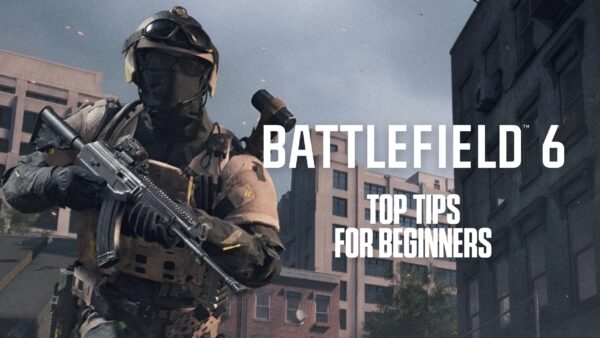
Avatar photo

Alexander Lataillade-Nguyen

Alexander Lataillade-Nguyen is a California-based cybersecurity professional and lifelong gamer with a passion for continuous learning. Outside of his work in ethical IT and digital security, he enjoys competitive pinball, miniature painting, and exploring new hobbies and cuisines.

Home > News

Black Ops 7 “Minimal” SBMM Will Be Default; Lobbies Won’t Disband After Every Match

During the Call of Duty: Black Ops 7 beta, Treyarch did something that surprised a ton of people, and that’s by dialing down SBMM (Skill-Based Matchmaking), which is something Call of Duty fans have been asking for the past couple of years.

The developers started a new “Open Matchmaking” playlist, which seemed to be a positive first step in redeeming Call of Duty’s recent failings.

Today, players can chalk up another win, as the studio confirmed that Open Matchmaking (minimal SBMM) will be the default playlist in Black Ops 7 when it launches in November.

Black Ops 7 Won’t Disband Lobbies, and SBMM Might Not Be an Issue Anymore

In the latest development on the Black Ops 7 beta, Treyarch confirmed, “At launch, Open Matchmaking with minimal skill consideration will be the default for Black Ops 7 Multiplayer. Simply put, imagine the matchmaking experience of Open Moshpit from the Beta, but as the standard in Black Ops 7 on day one.”

The developers added, “Our team feels strongly about providing players with a more varied experience, and the Beta proved to be a great opportunity to test this approach. We’ll be sharing more details as we get closer to launch!”

The other thing confirmed will be persistent lobbies! This means that rivalries can build once again, and you’ll be able to run it back if you lost to a team.

“We’ve heard the community discussion and dialogue around lobby disbanding, and as we mentioned earlier during the Beta, we’re focused on keeping players together from match to match more often. Today, we’re excited to announce we’ll have persistent lobbies at launch for Black Ops 7. We’re committed to improving this experience for players, and will be sharing more details soon,” the developers shared.

The changes are totally unrelated to Battlefield 6, of course. All kidding aside, this is why competition is good, since game companies cannot get complacent.
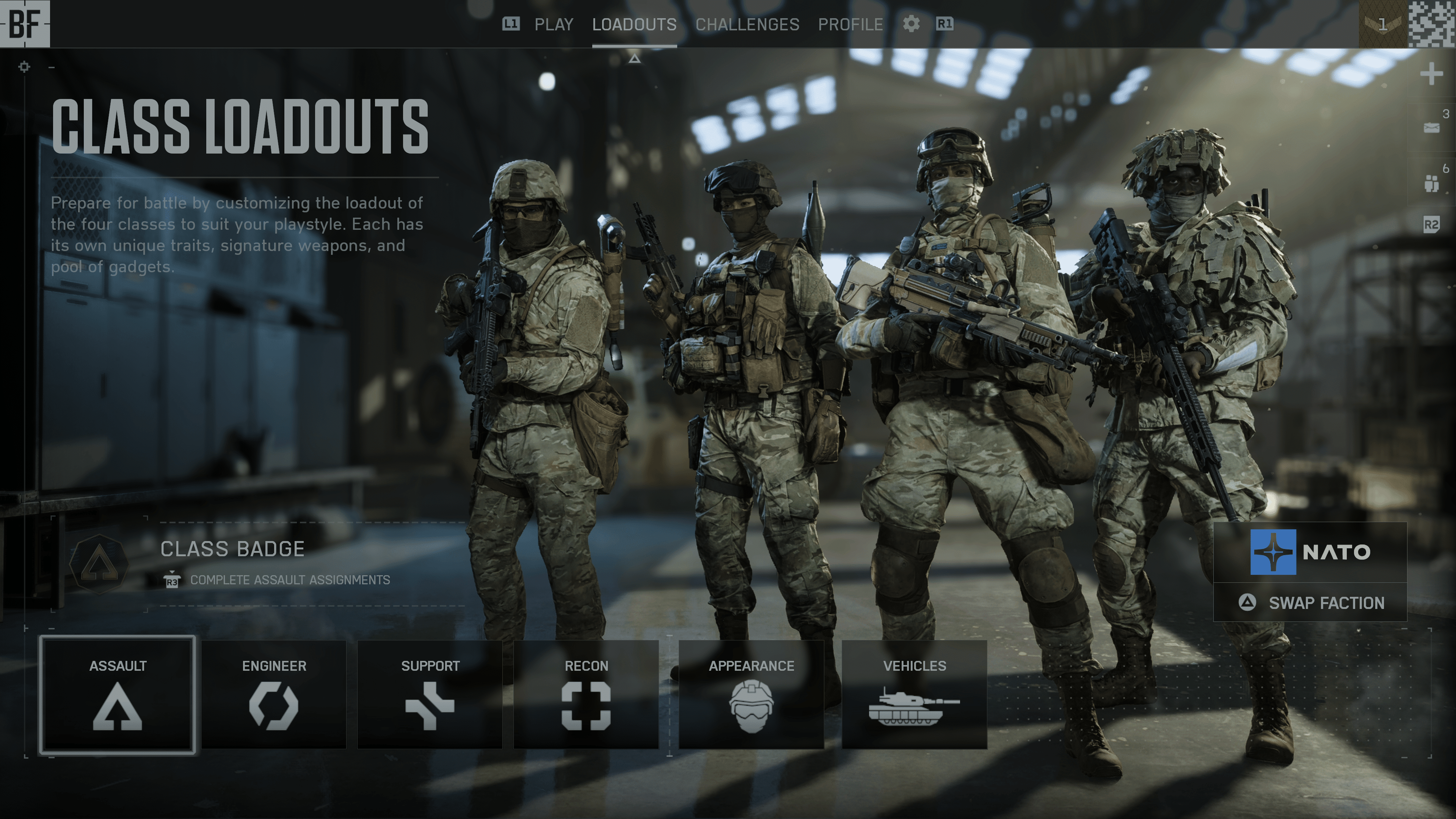
Another high note to take note of in the beta, Activision said over 98% of cheaters were banned, which we’re hoping continues when the game launches on November 14 on the PS4, PS5, Xbox One, Xbox Series X|S and PC.

Avatar photo

Alex Co

Father, gamer, games media vet, writer of words, killer of noobs.

Home > News

Report: Ubisoft Cancels Assassin’s Creed Game Set in Post-American Civil War

An Assassin’s Creed game set during the post-American Civil War period was reportedly canceled, with reasons including the backlash surrounding Assassin’s Creed: Shadows and the current political climate in the United States.

That’s according to sources close to GameFile, who have shed details on this now-canceled project.

Cancelled Assassin’s Creed Game Would Have Starred a Former Black Slave, Fighting for Justice in the South

Assassin's Creed 4: Black Flag remake

A new report has just been published by Gamefile’s Stephen Totilo, who says they’ve interviewed five current and former Ubisoft employees over the cancellation of a new Assassin’s Creed game.

GameFile wrote:

“The new game would have brought the history-spanning series to one of its most modern settings: The American Civil War and, moreso, the Reconstruction period that followed in the 1860s and 1870s.

In this Reconstruction-era Assassin’s Creed, gamers would play as a Black man who had been formerly enslaved in the South and moved west to start a new life. Recruited by the series’ Assassins, he would return to the South to fight for justice in a conflict that would, among other things, see him confront the emergence of the Ku Klux Klan.”

Game cancellation, especially those yet to be announced, is a pretty common thing for our industry to see. However, this wasn’t due to project funding or being dissatisfied by the shape the game was in, but rather due to political reasons. Gamefile listed the following as the reason for the game’s cancellation:

  1. Online backlash that spring to the reveal of Yasuke, a historically-inspired Black samurai, as a protagonist in the company’s then-upcoming Assassin’s Creed Shadows; and
  2. Concern that the political climate in the United States was becoming increasingly tense

With all the controversy and backlash that Assassin’s Creed: Shadows received online, the title went on to be one of the most successful in the franchise, achieving the third-largest launch in the United States, becoming the best-selling game in Europe, and was the second-highest day-one revenue for the series at launch.

Despite that, in the end, it appears that Ubisoft gave in to the pressure, with one developer saying the title was “too political in a country too unstable, to make it short, ” with another saying, “I was terribly disappointed but not surprised by leadership.”

It’s worth noting that the game was only in the concept phase, although it initially received approval from Ubisoft. The game was still years away from release, likely after 2027, given the current development cycles.

In other Assassin’s Creed news, while Ubisoft has yet to confirm its existence, more evidence regarding the Assassin’s Creed IV: Black Flag remake has surfaced, and it seems it’s just a matter of time until it’s formally unveiled.

Avatar photo

James Lara

A gamer at heart, James has been working for MP1st for the last decade to do exactly what he loves, writing about video games and having fun doing it. Growing up in the 90's gaming has been in his DNA since the days of NES. One day he hopes to develop his own game.