Fans of Xbox Studios are understandably excited for the upcoming Xbox and Bethesda Games Showcase on June 12. It is slated to be one of the biggest digital presentations of the summer. But, it has now been revealed that Xbox isn’t done there, as it has announced that it will be followed with a second stream just two days later.
Called Xbox Games Showcase Extended, the stream will take place on June 14 at 10 am PT/1 pm ET/1 am HKT. It is expected to last around 90 minutes, which is a lot of time to fill. However, Xbox has made sure to temper expectations and says that it will focus on sharing some new trailers alongside taking a deeper look at the games shown during the main showcase and interviews with developers. The show will also be broadcasted in various languages so that you can check it out live regardless of where in the world you live.
This is the first time that Xbox has held a second stream to further explore the games shown off in a showcase, so it will be interesting to see what direction it takes. Either way, it is always nice to get more information on upcoming titles, and it looks like a great way for Xbox to show off even more of what they have coming for fans to get excited about.
The Xbox Games Showcase Extended streams on June 14 at 10 am PT/1 pm ET.
The English translation from Square Enix’s latest quarterly financial report on May 13 has come out today, bringing some interesting insights into the happenings of the developer and publisher. It also mentions Square Enix’s interest in NFTs and how it plans to approach them. One very interesting part of the report was concerned with Square Enix’s selling of subsidiaries like Crystal Dynamics, Eidos Montreal, and their IPs to Embracer Group. The deal included some of Square Enix’s biggest western franchises like Tomb Raider and Deus Ex.
However, many of the recent titles of those studios, such as Marvel’s Avengers, Sleeping Dogs, and Marvel’s Guardians of the Galaxy, were unable to meet sales expectations, which may have motivated the sale. Now, Square Enix’s financial report has detailed exactly what they aim to use the $300 million from the sale for and fans will likely be relieved to know that Square Enix has no plans on using it to invest in controversial NFTs or Blockchain technology.
Instead, the report detailed how they plan on using the money to solidify their IP offerings and bolster their core development. This includes creating entirely new IP as well as possibly creating new studios to aid in developing new titles as well as restructuring their publishing structure to help increase its efficiency.
Despite this, the report also mentioned that this does not mean the company is not interested in NFTs or Blockchain developments. In fact, it detailed the investments that Square Enix hopes to make in those domains, but says they plan on seeking new investments in the company to do so. It is great to hear that Square Enix will be investing heavily in developing new IP and supporting its existing portfolio, but hopefully, its investments in NFTs and Blockchain tech won’t have too big of an impact on them moving into the future.
Summer Game Fest rose to fill the void left by the cancellation of E3 in 2020 but continued in 2021 despite E3’s return. This year, Summer Game Fest is in a position very similar to its first year as E3 has once again been canceled. However, Summer Game Fest’s organizer and host Geoff Keighley has said that the program will focus on games that have already been announced, which sounds like there’s not a whole lot of reveals planned.
The news came during a Twitter Spaces session where he tried to manage the expectations of viewers ahead of the stream. During the session, he said that there were plenty of bigger titles alongside indies and even some games from brand new studios. Keighley also said that the show will include exclusives for both the Xbox and Switch. However, it seems likely that Xbox will keep its biggest titles for its own presentation even on June 12.
Later in the session, Keighly told viewers to not expect too many big announcements or shocking announcements. He even went on to say that many of the online rumors and supposed leaks that he has seen are flat out wrong or even “crazy.” However, he also gave some details about what fans could expect to see during the show. He said that the show will feature titles like The Callisto Protocol, Modern Warfare 2, Gotham Knights, and Cuphead. He also said that the show will last around an hour and a half to two hours, so it seems like viewers will still have plenty to look forward to.
Summer Game Fest streams June 9 at 11a PT/2p ET/6p GMT.
The newest update for Godfall has been released by the developer Counterplay Games. With Godfall update 1.10 (PS5 version 5.001.023) comes some new bug fixes across all platforms as well as some balancing tweaks. These include changes to Spirit Realms, Dual Primary Augment drop rates, and more. See the full details in the Godfall June 7 patch notes below.
Here are all the details of the update from the developers themselves:
VALORPLATE SHARDS
The number of midboss defeats required for Power of the Void (Moebius), Lionheart Technique (Silvermane), and Wildfire Strike (Phoenix) has been reduced. Players who already meet or exceed the new requirement following the update will need to defeat one more midboss in order for the objective to register as completed
The total number of unlocked Valorplate Shards required to upgrade individual shards has been reduced; exalting a valorplate (all shards fully upgraded) now requires a total of 12 Valorplate Shards unlocked (down from 48)
Valorplate Shard objectives that required a specific Spirit Realm can now be completed in any Spirit Realm
Valorplate Shard objectives that require completing Dreamstones no longer require any quantity of active Banes for successful completion
Greyhawk’s Way of the Hawk Shard will now proc when you Soulshatter 10% or more of an enemy’s total HP, down from 15%
Armistice’s Soul Breaker Shard will now proc when you Soulshatter 10% or more of an enemy’s total HP, down from 15%
SPIRIT REALMS
Players can now carry a maximum of 6 souls of the same color at once (up from 5), enabling players to fully charge two soul altars in one trip
Basic enemy camps and patrols have been made more difficult and will now respawn more quickly
Increased the drop rate of normal souls from basic enemy camps and patrols
Increased the frequency of midboss invasions; midbosses will now invade the realm sooner and can invade more than once per Spirit Realm loop
Invading mid-bosses will now drop a large number of normal souls
Fully overcharged Soul Altar events will now reward loot equivalent to opening an Epic chest
Soul Altars now accept Souls of any affinity. The initial Soul sets the affinity of the Soul Altar, while subsequent souls will convert to that Soul Altar’s affinity when placed.
GENERAL CHANGES
Dual Primary Augments are more likely to drop with better primary trait combinations such as epic+rare, epic+epic, legendary+epic, or legendary+legendary.
The Difficulty option has been removed from the Spirit Realm tab.
Cursed Legendary Charm Beetle Talisman’s Primary Trait will no longer apply an ailment stack when activated while Inner Focus is active.
The Blessings Codex entry no longer inaccurately states that “A Greater Blessing will replace a basic Blessing of the same type.”
BUG FIXES
Updates with a sword (⚔️) are based on player feedback collected from our various communities and through support tickets.
VALORPLATE RELATED ITEMS
Solved an issue where Moebius’ Power of the Void Shard would apply regardless of the (lack of) damage dealt to an enemy.
Solved an issue where Phoenix’s Breath of Fire Shard would miss targets the player character was in contact with.
Solved an issue where Silverman’s Way of the Lion Shard would miss targets the player character was in contact with.
Solved a multiplayer issue where Valorplate Shard progress would not increment in the Spirit Realm when using matchmaking.
ENEMY & GAME MODE RELATED ITEMS
Solved an issue in the Spirit Realm where the Boon “Spirit Polarity” stacked its bonus every time a player shifted between the Material and Spirit Plane.
Solved an issue where Banes from an incomplete event would persist into the next loop if an End Boss is defeated in the Spirit Realms game mode. ⚔️
Solved an issue where enemies in the Tower of Trials game modes could spawn invisible during room trials.
Solved an issue where EToT would not unlock after completing AToT via matchmaking.
Solved an issue where Invasion Events in the Spirit Realm could take longer to occur than intended. ⚔️
Solved an issue where loot percentage would increase every time a player was revived in the Tower of Trials game mode. ⚔️
Solved an issue where players could not get knocked down after dying once under the effects of certain boons in the Spirit Realm game modes. ⚔️
Solved an issue where progress could be blocked after defeating a Black Tide Officer outside of the triggering objective areas. ⚔️
Solved an issue where Realm Boss banes would reset if players abandon the boss mission. ⚔️
Solved an issue where replacing a Quest Reward could lead to a softlock.
Solved an issue where summoned enemies from the Grieves boss encounter in Spirit Realm may lose aggro once Grieves enters their final phase.
Solved an issue where the “Defeat the Leaders” event in Fire Realm Explore the Realms could cause a progression break.
Solved an issue where the “Shield Abilities no longer knock down enemies” Bane would not prevent Shield Throw’s Spectral Blow from knocking down enemies in the Spirit Realms game mode.
Solved an issue where the Training Simulacrum would bounce up when struck by knockdown effects.
Solved an issue where Zamora’s Void Rain attack’s movement speed was tied to FPS. Past certain FPS thresholds, this could make the attack impossible to outrun and avoid. ⚔️
Solved various issues involving player death while a boss countdown finishes while exploring in the Spirit Realm game mode.
Solved a multiplayer issue where enemies would only spawn from one orb when fighting Lunara in the Spirit Realms game mode.
EQUIPMENT RELATED ITEMS
Solved an issue where Ailment Consumption damage was not applied when using the Explosive Wave shield technique.
Solved an issue where Kosmera Augments could not be upgraded past Rank 3 in the forge.
Solved an issue where the Beetle Talisman (Charm) could apply Ailments while Inner Focus (Dual Blades’ Northern Technique) was active.
Solved an issue where the Dueling Charges from the Trial-Runner Javelin (Cursed Polearm) would not increase Weakpoint damage.
Solved an issue where the primary trait of Vampiric Pennant (banner) would trigger when Ailments dealt damage to enemies, granting a large amount of unintended passive healing.
Solved an issue where unequipping an item or augment and selecting a gear or augment slot could cause a softlock. ⚔️
Solved an issue where using the Copy Loadout feature could prevent the player from using their Shield on that Valorplate after certain circumstances.
Solved a multiplayer issue where Shield and Weapon Technique charges could stop working properly in the Spirit Realms when a downed player is killed by the End Boss countdown.
MENU/UI/HUD RELATED ITEMS
Solved an issue where certain stats were not reflected correctly in the Detailed Stats character screen when purchasing relevant skills. ⚔️
Solved an issue where navigating from the Valorplate Shards menu in the Armory to any other Armory tab would remove the Close Button prompt and its functionality.
Solved an issue where the Detailed Stats sheet and Character Stats sheet would fail to load information.
Solved an issue where the equipped label on gear and augments would only apply to items in active loadouts.
Solved an issue where the equipped Shard indicator could be missing when swapping between Valorplates or loadouts.
Solved an issue where the friends list Search feature would attempt to autosuggest options before the player had finished entering text. ⚔️
Solved an issue where the loadout selection would refresh back to the equipped loadout under certain circumstances instead of the loadout the player was editing.
Solved an issue where the sorting option was missing in the Replace Rewards sub menu of the Quest tab.
Solved an issue where the Weapon Class Filter would not show all weapons of the selected types. ⚔️
Solved various issues where certain Trait Filters would not show all gear with the selected traits. ⚔️
Solved a multiplayer issue where Hosts and Guests would see separate Midboss HUD objectives during Spirit Realm missions.⚔️
MISCELLANEOUS ITEMS
Solved various collision issues with the environment where players could get stuck. ⚔️
Solved various issues involving HDR.
Solved various localization and text issues. ⚔️
Solved various rendering issues. ⚔️
PLATFORM SPECIFIC ITEMS
PC & Xbox – Solved an issue where the active combat music would not loop properly for a defeated player when they reenter a boss arena. ⚔️
PC & Xbox – Solved an issue where the Valorplate Shards menu was inaccessible while shifting Valorplate preview menus when using a gamepad.
PS4 – Solved an issue where Ultimate Edition owners were not granted their bonus cosmetics.
PS4 & Xbox One – Solved an issue where enemies would fail to spawn correctly in the Spirit Realm game mode after certain circumstances. ⚔️
VRR (Variable Refresh Rate) support was added to the PS5 version.
While Bungie has maintenance planned for Destiny 2 tomorrow, multiple Destiny 2 down reports have surfaced this June 6, and it has affected people from signing in and playing the game.
Update: Bungie has announced that the outage has been resolved!
The issue impacting players ability to sign into Destiny 2 has been resolved. Background maintenance is still expected to conclude at 2:00 PM PDT. https://t.co/OGhEBCCcQI
This seems to be happening for all platforms as well. Thankfully, Bungie is aware and has made the following announcement:
We are aware of issues impacting players' ability to sign in to Destiny 2. Until resolved, players may experience disconnects or be unable to sign in. Please stay tuned to @BungieHelp for updates.
We are aware of issues impacting players’ ability to sign in to Destiny 2. Until resolved, players may experience disconnects or be unable to sign in. Please stay tuned to @BungieHelp for updates.
Same as always, we’ll be updating this article with the latest news from Bungie, so make sure to refresh it from time to time. If you can login, share in the comments which plaform you’re on, and from which country.
Don’t forget, server maintenance is planned tomorrow, as well as a new patch.
The last Just Cause title was released all the way back in 2018. Fans of the chaotic open-world series have waited for any news regarding the series’ future ever since, but Square Enix’s most recent financial results briefing, held on May 13 of this year, has some good news for them. In the report, Square Enix announced that a new Just Cause game is currently in development.
Unfortunately, the report doesn’t give any other details on the title. It does seem safe to assume that it will once again be developed by Avalanche Studios, and will likely continue the series’ penchant for destructible environments and intense action with some cool next-gen features. The report also failed to mention any goal for when Square Enix would be ready to reveal more information about the title, but the fact that they acknowledged its existence in the report at all is a decent sign that they may be getting ready to show off more to the public.
The report also made sure to emphasize that the series’ IP will remain with Square Enix, and fans of the series also have the previously announced Just Cause movie to look forward to hopefully in the near future.
Not only is DICE releasing the Season 1 Zero Hour gameplay reveal for Battlefield 2042 tomorrow, but players will also see a new patch drop! Even before that, DICE has released the Battlefield 2042 Season 1 patch notes! This is called Update 1.0 and includes gameplay-related adjustments to weapons, solider animations and more!
Battlefield 2042 Season 1 Patch Notes:
What’s new?
This Update includes hundreds of changes, bug fixes and Quality of Life improvements in preparation for the release of Season 1. Here are some of the highlights that you can expect in this Update:
Multiple improvements to soldier gameplay which will result in overall smoother animations and movement.
Weapons received updated netcode to improve bullet hit registration. We’ve also done a further balance pass which includes increased projectile speeds for DMR’s and LMG’s, and improved accuracy for Shotguns.
Multiple new XP events have been added, such as for killing an enemy who recently wounded or killed a squadmate, or when an enemy vehicle you recently damaged is destroyed by a teammate and the occupants are killed
The number of available in-world vehicles has been increased for Conquest which should make it easier to move across the map
Sundance’s Wingsuit has been adjusted to lower overall flight time, while making it easier to maneuver. To simplify their Specialty, the EMP Field Smart Explosive has been removed
Changelog
General
Voice Chat Channel is now greyed out in the Social Menu when Voice Chat is turned On, but you are unable to switch channels
Online IDs are now displayed in the rewards screen after End of Round when VoIP is enabled
Resolved instances where players could be Squad or Team switched outside of their Party
Quitting an ongoing match no longer automatically puts you back into the matchmaking queue
Resolved Mouse Raw Input Settings sometimes reverting
Resolved instances where switching to Fullscreen would cause the Borderless Window setting to not work on a second monitor
Added missing Voice indicators on Xbox Series X|S when unplugging/plugging in a headset to the controller
Closing the Pause menu no longer briefly shows the hangar lobby background
When disabling Social Communication options via Console, Text-to-speech and Speech-to-text options will now automatically be greyed out in-game
Resolved a flickering microphone indicator when clicking on the VoIP:Party button in the Social screen
Resolved instances where keyboard input was lost and the game window couldn’t be focused after alt+tabbing out of game
Resolved instances where in-game QR codes could not be scanned due to resolution issues
Resolved instances where players couldn’t be revived at the base of ziplines
Fixed an issue that caused Kill Cards to no longer display attachment names and icons after the first kill
Player nametags are no longer visible before the player models itself becomes visible to other players
Takedown kills now trigger an XP event
Claiming a control panel (ex. sliding doors) now triggers an XP event
Killing an enemy who recently wounded or killed a squadmate now triggers an XP event
Providing smoke cover in which teammates are healed or revived now triggers an XP event
Reviving, healing, repairing or resupplying a squadmate now provides more XP
Damaging an enemy vehicle now triggers an XP event
Providing smoke cover for squadmates who kill enemies or covering enemies who are killed now triggers an assist XP event
Getting a triple kill now triggers an XP event
When an enemy vehicle you recently damaged is destroyed by a teammate, and this kills occupants it will now trigger an assist XP event
Killing an enemy with a headshot now triggers an XP event
Always Traversal Sprint has been added as an option under the Controller tab
A Chat Log Visibility option has been added to allow setting the default visibility mode of the chat log (SHOW, WHEN ACTIVE or HIDE). This option is available under Display > Hud General
Battlefield Portal
Resolved instances where users could become stuck in an infinite sliding animation after exiting a moving Quad Bike
Fixed instances where the ESC button failed to bring up the Pause menu
Resolved instances of crashes when joining an in-progress match in Battlefield Portal
Fixed an issue on Valparaiso where vehicles could spawn underground in the lower US HQ
Fixed an issue on Caspian Border where the T-90 at Capture Point E1 would repeatedly respawn
Fixed an issue on Caspian Border where the player spawned Out of Bounds when deploying in a tank at the US HQ
Fixed an issue on El-Alamein and Arica Harbor where it wasn’t possible to vault through certain windows
Resolved instances where AI-driven tanks were getting stuck on cover assets
We’ve fixed further locations across all Classic era maps where players could get stuck
We’ve fixed further instances of floating assets and misaligned rocks/cliffs across all Classic era maps
Fixed an issue that would cause vehicles to sometimes stutter on Arica Harbour while driving at high speeds
AI Soldiers
Made further balance changes to AI difficulty and behavior
Fixed an issue where AI Soldiers only targeted the Recon Drone using the Recoilless M5
Fixed an issue where AI Soldiers were shooting above the target when using the Recoilless M5
Fixed an issue where AI using Barrage Missiles weapons from a vehicle are too accurate versus air vehicles
Fixed an issue where AI teams were sometimes uneven in Solo/Coop
Fixed an issue where AI got stuck in helicopters. AI will now bail out of helicopters when the vehicle gets stuck
Fixed an issue where AI soldiers were crouching too frequently
Added new AI Helicopter behaviors, including helicopter strafe runs
It’s now possible to be in a squad with AI in Solo/Coop
Fixed a mismatch for AI between their bullet traces and hit positions in high-rate shooting
Gadgets
Pathing for thrown grenades has been improved
The EMP Grenade now affects the Insertion Beacon, SG-36 Sentry Gun and APS-36 Shootdown Sentinel
Fixed an issue with the Repair Tool where repair progress would disappear during repair
Resolved instances where the Med-Pen wasn’t available for use
Resolved a bug where a weapon would fire while equipping an IBA Armor Plate
Resolved rare instances where Ammo Crates didn’t provide ammo
Resolved the Prox Sensor floating after the vehicle it was thrown on moves away
The FXM-33 AA Missile’s lock-on timer is now consistent between maps
Smoke Grenade effects can no longer be negated by opening the Collections menu
Using the The SOFLAM Designator now gives Assist XP after a designated vehicle has been destroyed by a friendly
The SOFLAM Designator lock-on now correctly disappear after the vehicle is destroyed
Resolved instances where spotting enemy soldiers with the SOFLAM Designator wasn’t always working as intended
Instances where C5 couldn’t be detonated while in water will longer happen
Maps & Modes
We have reduced the total number of Air Attack vehicles that can be active at any time to 1 per team
This change applies to both Conquest and Breakthrough, and is not active in Battlefield Portal modes, nor on the Classic era or Breakaway maps
The MV-38 Condor and the Mi-240 Super Hind are also not impacted by this change
In Conquest we have increased the number of in-world vehicles you’ll encounter across all maps
We’ve made countless smaller improvements across all maps such as updating lighting, improving audio and visual effects, and removing glitches
Fixed an issue on Breakaway where planes clip through terrain while Out of Bounds
Fixed an issue where a whiteout effect followed by terrain textures appearing low resolution on Breakaway while playing Conquest with 128 players
Fixed an issue on Breakaway where you could stay on the radar dome due to extended collision after using the Grappling Hook
Fixed an issue on Discarded where you could fall under the map after deploying for the first time
Fixed an invisible wall near E3 capture point on Hourglass
Using the Grappling Hook inside an elevator on Hourglass should no longer kill the player
Fixed an issue where projectiles could pass through trucks on Kaleidoscope
Fixed and issue across all maps where the first deploy could cause you to spawn out of bounds
Fixed an issue which allowed players to re-enter the deployment Condor
Proning or jumping while on the A2 platform in Orbital will no longer glitch the player
Resolved instances on Renewal where players couldn’t be revived if killed by an explosive in an elevator
Fixed an issue a Hazard Zone issue on Breakaway where it would be difficult to enter the helicopter for extraction
Fixed an issue where a Tuk Tuk was spawning on Discarded while playing Hazard Zone
Reduced the rate at which repeat Voice Over lines can occur during the last Sector in Breakthrough
Added a UI Widget for Breakthrough that informs defenders of being spotted when the last sector is lost
Hazard Zone Data Drives are now visible in the world by default. This removes the need to use the Data Drive Scanner
Soldier
We’ve improved netcode for bullets hit detection on moving soldiers as well as when changing states or stance. This includes more consistent hit detection against Sundance when they are flying with the wingsuit.
Resolved a broken traversal sprint animation after spamming the jump button
Performing a takedown on another player performing a takedown will no longer result in a broken animation
Resolved an issue that could cause loss of input after traversing a ladder while using crouch and sprint at the same time
Resolved instances of missing character hands while in first person after deploy
Resolved bugged character movements when a player is prone inside a moving elevator
Resolved camera spinning when being downed on a moving LATV
Resolved instances of incorrect damage when falling from high distances
It’s now possible to jump off a ladder by crouching
Resolved glitchy movement in prone while in a crater which also prevented deploying gadgets
The Press Button animation no longer plays twice when pressed
Fixed an issue where movement penalty speed after jump landing didn’t trigger
The left hand no longer twitches while in first person when going from prone ADS, to standing ADS
Resolved a broken hand animation after sprinting into a wall while holding a grenade
Resolved instances of the camera clipping with the ground while inside a tornado
Resolved a stuttering animation when transitioning from petting Ranger back to soldier
Resolved a broken grenade throwing animation while vaulting
Fixed instances where parachutes didn’t deploy as intended
Switching to/from prone when having a grenade cooked no longer causes the grenade to be thrown
The throwing animation no longer loops when keeping the throw button pressed while in water
Resolved instances of being able to clip through objects after climbing a ladder
Resolved some instances where players were unable to ADS
Resolved choppy movements while crawling up slopes while downed
Resolved a misaligned camera when downed and looking at an attacking players
Resolved a misaligned camera after being revived
Resolved glitched ragdoll physics during death animations
Zipline travel is no longer interrupted by vehicles standing directly below it
Improved the melee bash animation and Added facial animation when performing a melee bash
You can no longer melee while throwing a grenade, which could cause visual glitching
Fixed an issue where a “No Ammo” visual message would appear while you still have ammo left
Players should no longer take explosion damage through walls
Resolved an issue where the player’s camera could sometimes clip through the ground or objects while prone
Resolved an issue where players didn’t get sent back to the deploy screen when getting killed when piloting a remotely controlled vehicle such as the EOD Bot
You will no longer sometimes get ejected from vehicles while driving through shallow water
You are now able to ADS directly after deploying a parachute
Being affected by a storm should no longer block ADS or Fire input
Dead or friendly soldiers will no longer sometimes block bullets
Sprinting to the side no longer causes a static first person while in third person it appears as no longer sprinting
It’s now possible to crawl while prone under obstacles which have enough space, such as some vehicles
Optimizations have been made to enable showing higher quality animations on soldiers
Specialists
Angel
Resolved a bug where a stuck Loadout Crate would kill players passing underneath it
The Loadout Crate no longer floats while deployed in smoke
The Armor icon is no longer visible for the Supply Bag
Armor is no longer mentioned in Angels Loadout Crate description
Boris
The SG-36 Sentry Gun now gets destroyed during the Rocket Launch or Explosion events on Orbital
The SG-36 Sentry Gun no longer hovers in the air when the object it was placed on is destroyed
The SG-36 Sentry Gun now gets destroyed when the Colossal Wall event triggers on Discarded
The SG-36 Sentry Gun preview no longer shows as green when placing it in an enemy controlled Sector in Breakthrough
Resolved some instances where the SG-36 Sentry Gun couldn’t be deployed on smooth surfaces
The SG-36 Sentry Gun can no longer be deployed in elevators
Casper
Buttons on the OV-P Recon Drone now correctly display on the first deploy
The OV-P Recon Drone HUD no longer overlaps with the Objective HUD
Dozer
It’s no longer possible to float mid-air while crouching while having the SOB-8 Ballistic Shield deployed
Resolved instances where Dozer’s SOB-8 Ballistic Shield could block direct hits from tank shells
Falck
The S21 Syrette Pistol can now correctly heal players in prone position
The S21 Syrette Pistol can no longer incorrectly heal enemies while in a smoke screen
The “Plus” hit indicator for the S21 Syrette Pistol no longer shows while at full health
Resolved an issue where death would occur when healing yourself or an ally while healing and taking damage from an enemy at the same time
Irish
Deploying Irish’s Gadgets no longer makes them inaccurately show as at 50% cooldown in the inventory
The DCS Deployable Cover can no longer block elevator doors
Mackay
You will no longer get stuck while grappling against the ship’s elevators on Discarded
The Grappling Hook now has the correct animation when attached to a moving vehicle
Resolved an issue where players could get stuck when grappling thin floors from below
Resolved an issue that prevented the Grappling Hook from being used inside bushes
Resolved a broken animation when jumping in water and using the Grappling Hook just before landing
Rao
Rao’s hands no longer flicker when using the Cyber Warfare Suite while prone
Sundance
The Smart Explosives cooldown no longer resets when switching between Explosives
Gliding and entering the MAV vehicle mid air no longer causes death when leaving the vehicle
Resolved instances of the Wingsuit showing visual twitching
Fixed an issue where Sundance did not take fall damage after hitting the ground from high altitudes
Sundance’s EMP Field Smart Explosive has been removed to simplify their Speciality
The Wingsuit has been adjusted so it’s easier to maneuver, while reducing the overall flight time
Reduced initial velocity boost when deploying from low heights
Increased velocity when deploying from greater heights
Adjusted elevation gain when pulling up to prevent getting higher up than the original starting position
Adjusted pitch turn angles to make it easier to pull up easier when going at high speeds
The hitbox while Wingsuiting has been improved
UI/HUD
Gadget Hit and Kill markers are now properly present when damaging
Fixed a bug where soldier health visuals weren’t visible as a passenger in a vehicle
The nearby revivers widget now updates until the player is done being revived
The Nearby Medic Widget has been updated to improve accuracy
Resolved instances where Squad Made Icons didn’t shrink after deploy
Control Points now display in the correct color in the Commorose
Resolved Location and Danger pings not showing in the World Log
Fixed an issue which would cause an extra space to appear next to weapon names within the Kill Feed
Vehicles
Fixed an issue that caused ping locations to be inaccurate when using the chase camera in aircraft
Fixed an issue that was causing excessive jitter when in cockpit view on jet planes
Repositioned the rearview camera alignment for aircraft
Fixed an issue where the camera would clip with aircraft while using ADS on the ground
Fixed an issue which prevented heavy ground vehicle weapon recoil from applying when firing low-impulse guns
Fixed an issue where the lock-on UI would sometimes not appear on enemy vehicles
Fixed an issue that was preventing players from entering the Polaris Sportsman from specific angles
Fixed an issue that was causing the cooldown on the vehicle deploy screen not display accurately
Made improvements to the landing of helicopters, who should not explode as easily when touching the ground at landing speeds
Fixed an issue that was causing the 3rd person ADS camera to break while piloting aircraft
Fixed an issue that would sometimes cause tank turrets and other parts to be invisible after exiting the vehicle.
Tanks would sometimes have the wrong equipment setup in some seats, this no longer happens
Fixed an issue causing strange helicopter behavior when flying in underground-type areas
On rare occasions vehicles would sometimes vanish from the collection screen. This has been fixed
The Crosshair dot for transport vehicles should now be visible
40mm GL Projectiles should now be replenished while holding down fire
Fixed an issue where vehicle tooltips would not display on the first deployment
Exiting a vehicle that is in water should no longer sometimes cause players to fall through the map
Missiles from aircraft would sometimes loop around targets. They now head straight for them with unbridled rage
Fixed a tech hang that would sometimes occur when flying a helicopter upside down and exiting it moments before crashing
Fixed an issue which would sometimes cause the Plus Menu to not be openable while in a passenger seat of a vehicle
Fixed an issue where a weapon could be seen through the driver seat of the 4×4 Utility
Fixed an issue that caused vehicle weapons with near detonation such as the 60mm Flak Weapon Pod to detonate when getting close to certain gadgets
There was a unwanted muzzle explosion on Helicopter TOW Missile and Air-to-Ground Missiles that has been removed
Improved the visuals of the Polaris Sportsman suspension
AH-64GX Apache Warchief
Fixed an issue that would cause the AH-64GX Apache Warchief’s missile pod to be invisible when landing and exiting the vehicle
EBAA Wildcat
The Lock-on crosshair no longer enters a broken state while switching between the primary and secondary weapons in the EBAA Wildcat
Found an extra gear in the engine of the EBAA Wildcat, giving it an easier time driving uphill
Fixed an issue where the EBAA Wildcat’s 40mm Grenade Launcher would have misaligned projectiles
KA-520 Super Hokum
Fixed an issue where the Rocket pods remained on the 3D model of the KA-520 Super Hokum after equipping the 30mm cannon
LATV4 Recon
Fixed an issue where the LATV4 Recon turret does not move when another player is controlling it
Fixed an issue with the LATV4 Recon minigun which would sometimes lose its audio while spinning
Fixed an issue where you could continue to fire the LATV4 Recon minigun while in its overheat state during a lock-on
Fixed an issue which would cause soldiers to clip through the LATV4 Recon’s wheels. No more wheelies.
Fixed an issue which would cause the LATV4 Recon to question the laws of physics and lose gravitational force while exiting the vehicle when it’s upside down
LATV4 Recon Mastery should now always correctly track T1 Mastery progress
Fixed an issue where ping would sometimes not work in driver seats for vehicles with driver weapons
LCAA Hovercraft
You can no longer swim through the LCAA hovercraft
MAV
The headlights on the MAV would sometimes flicker, causing a little disco disco time. We have resolved the MAV lights going disco disco.
The Dot crosshair is no longer visible for passengers in the MAV
You no longer have to repeatedly hit E to exit the MAV
Fixed an issue that caused explosives to not benefit from the rear weakspot damage modifier on the EBAA Wildcat, T28 and the MAV
On Hourglass, the MAV could sometimes get stuck in a hole within sector B on Breakthrough, resulting in players unable to exit. This hole should no longer cause claustrophobic panic
The MAV now appears with the correct categorisation within the world log
The destroyed hulk of the MAV no longer appears as friendly vehicle on the minimap
Fixed an issue that would sometimes prevent you from exiting the MAV while it’s driving backwards
Mi-240 Super Hind
Attempting to exit the Mi-240 Super Hind as a passenger was sometimes problematic. This should now be a much smoother experience
MV38-Condor
Fixed an issue where tooltips would not always display while piloting the MV38-Condor
Weapons
Projectile speeds for all DMR’s and LMG’s has been increased
Shotgun Cone spread has been adjusted to improve consistency of hits
Improved pellet dispersion for Shotguns
All Underbarrel Attachments, excluding the AK-24 and SFAR-M GL, now have reduced reload times from 3.8 -> 3 seconds
Shotgun Ammo for the Masterkey Attachment can now be replenished via Ammo Crates as expected
Bolt Action Rifles now have identical Aim Assist as other weapons, this excludes Snap Settings
Tracer effects for Bolt Action rifles are now thicker to increase their visibility at long range
Fixed an issue where the crosshair would sometimes vanish upon revive
Fixed an issue where the crosshair would sometimes disappear when swapping sights
Fixed an issue where the reload and the ammo count resets while switching magazines in the Plus Menu
Aim Assist is no longer present for Sniper Rifles in hip fire
The Hold Breath breath mechanic for Bolt Action Rifles has its duration extended
Players can now Hold Breath for a total of 10 seconds
Fixed broken animations that could occur after shooting and immediately running with a Sniper Rifle
Attachments in the Plus Menu no longer display a 0 in their icon when depleting the last magazine on that weapon
You can now reload during vaults that don’t require both hands
Fixed an issue that could cause incorrect weapon movements while sprinting and reloading at the same time
Controller Trigger inputs are now more responsive when firing. This means you no longer need to fully release the trigger for a weapon to stop firing, or being able fire again.
Character hands should no longer clip through the M5A3 while using the ADS after the deploy animation
Underslung Shotgun and Grenade Launcher weapon sounds are no longer affected by other attachments on the primary weapons
AK-24
AK-24 Anti-Materiel Rounds now do correct damage at 20m
The Masterkey Underbarrel Attachment on the AK12 no longer incorrectly resets
M5A3
The projectile of the M5A3’s 40mm Incendiary attachment is now correctly visible during the reload animation
NTW-50
NTW-50 High Power Rounds now cause intended damage
Added missing shell ejection effects for the NTW-50
PBX-45
Reload time for the PBX-45 has been decreased from 3.1 -> 2.3 seconds
PKP-BP
Removed the unintended Single Fire mode on the PKP-BP
PP-29
The PP-29 now displays the correct ammo count for Subsonic Rounds
SWS-10
Resolved visual issues on the SWS-10 when using the Farstrike skin
Weapon Attachments
The SFAR Warhawk Compensator now has the correct modifiers
Fixed a spelling error on the Type 4 Heavy Suppressor
Fixed an issue where the Laser Sight and Flashlight could sometimes end up in a broken state after entering vehicles
Fixed Type 4 Heavy Suppressor and PB Heavy Suppressor incorrect modifier values
Fixed an issue where the Ghost Hybrid 1.25-2.5X had the wrong zoom level within the Collection menu
Fixed an issue that would cause the Plus Menu to break when equipping the Masterkey attachment
Fixed an issue where the AC42 Iron Sights could be blurry
Champion Muzzle Brake is now attached properly to the PBX-45
Warhawk Compensator is now properly attached to the MP9 icon on the deploy screen
Underbarrel Attachments no longer affect weapon Deploy / Undeploy times
Fixed an issue where some weapons would display incorrect reloading animations
The bipod on the DSR-1 should now properly visually attach to surfaces
Fixed some weapons displaying wrong ammo counts for specific magazines
Weapon names now appear in the Kill Log and Kill Cards when eliminating players while using an Underbarrel Attachments
Resolved a bug where the melee takedown sound wouldn’t play for the victim
Added unique impact sounds for melee Hatchets and Clubs
Performing a melee attack when switching to weapons/gadgets no longer incorrectly causes the weapon/gadgets art to display
Resolved a visual glitch when performing a takedown with the Survivalist’s Edge
Note that while the Season 1 patch is out tomorrow, that does’t mean players will be able to access the Season 1 content the same day. Chances are, DICE will deploy it at a later date, with the data already downloaded and ready to for the player (same as in other games).
The next patch for Battlefield 2042 is scheduled for “early July” and will be a “smaller” update that brings more fixes into the game.
Ludosity has released Nickelodeon All-Star Brawl update 1.13 (PS5 version 1.000.011), which is the game’s biggest title update yet! Tbis adds full character voice-overs, new items, and gameplay changes! Check out the complete details on the new items and character adjustments in the Nickelodeon All-Star Brawl June 6 patch notes.
Nickelodeon All-Star Brawl’s biggest update yet, featuring full character voice-over and items, is now available for free on PlayStation, Xbox and PC (and coming soon to Nintendo Switch). Experience your favorite Nickelodeon characters battling it out with more fire than ever, with the authentic sounds of SpongeBob (Tom Kenny), Ren & Stimpy (Billy West), Garfield (Frank Welker), Patrick Star (Bill Fagerbakke), Korra (Janet Varney), and the rest of the all-star roster.
This free update also adds a new wrinkle to the gameplay with the addition of usable items that allow you to fight with things like the Krabby Patty, Sokka’s boomerang, Tommy’s ball, a Reptar toy, Log from Blammo and more!
Developer Ludosity has also released the character adjustments:
Those on PlayStation, don’t forget that the game is now free if you’re a member of PS Plus!
Treyarch has deployed the COD: Black Ops Cold War update 1.031 patch on both last-gen and next-gen consoles today! Note that this is an unannounced patch, so we’re not expecting a whole lot from it. Read on for the BOCW next-gen update patch notes.
Black Ops Cold War Update 1.031 Patch Notes | BOCW Update Patch Notes:
Treyarch has not made any official announcements or acknowledged today’s title update just yet, though if we had to hazard a guess, this has more to do with bug fixs alongside adding the new cosmetic items recently added to both COD: Vanguard and Warzone. You can check out the cosmetic items recently released for both Vanguard and Warzone right here.
Another thing we’re expecting to see integrated with the patch is a banner of some sort for Modern Warfare 2, which is par for the course for Activision when it comes to marketing their Call of Duty games. Don’t be surprised to see a new store link or item associated with Modern Warfare 2 pop up in the coming days.
Finally, Treyarch has also confirmed that we’ll be seeing new content for Black Ops Cold War’s multiplayer as well, and we wouldn’t be surprised if the data for that is included here. Here’s a rundown of what was announced earlier this year regarding new content in Black Ops Cold War:
INCOMING BLACK OPS COLD WAR CONTENT
Our first batch of Black Ops Cold War content for 2022 arrived in March with the release of WMD, the Vargo 52 Assault Rifle, and the Ferro Fury Reactive Mastercraft Bundle. We were thrilled to see the outpouring of support for this content, and we’ve got more to come.
In the coming weeks, we’ll be releasing an all-new ranged weapon to take into Multiplayer, Zombies, and Warzone, as well as a familiar face from the Campaign as our newest Operator. In Multiplayer, another classic Black Ops remaster will join the 6v6 rotation when we bring Jungle to the game. This one’s an absolute favorite of ours, and we can’t wait for you to experience it with everything Black Ops Cold War’sMultiplayer has to offer for the first time.
In the not-too-distant future, we’re planning to release a new Melee weapon for use in Multiplayer, Zombies, and Warzone. We’ll also have new Operator Skins, Weapon Blueprints, Finishing Moves, Calling Cards, Charms, Emblems, and other cosmetics arriving in a new series of Store Bundles throughout the months to come. In fact, our old friend Hudson should be getting some new threads any day now…
Once we know more details regarding this patch, or if Treyarch releases an official changelog, we’ll be sure to update the post accorrdingly.
Treyarch has released the Call of Duty: Black Ops Cold War update 1.32, and this is an unannounced title update that’s out on all platfoms. Read on for what’s new down in the Black Ops Cold War June 6 patch notes.
Black Ops Cold War Update 1.32 Patch Notes | Black Ops Cold War June 6 Patch Notes:
Treyarch has not made any official announcements or acknowledged today’s title update just yet, though if we had to hazard a guess, this has more to do with bug fixs alongside adding the new cosmetic items recently added to both COD: Vanguard and Warzone. You can check out the cosmetic items recently released for both Vanguard and Warzone right here.
Another thing we’re expecting to see integrated with the patch is a banner of some sort for Modern Warfare 2, which is par for the course for Activision when it comes to marketing their Call of Duty games. Don’t be surprised to see a new store link or item associated with Modern Warfare 2 pop up in the coming days.
Finally, Treyarch has also confirmed that we’ll be seeing new content for Black Ops Cold War’s multiplayer as well, and we wouldn’t be surprised if the data for that is included here. Here’s a rundown of what was announced earlier this year regarding new content in Black Ops Cold War:
INCOMING BLACK OPS COLD WAR CONTENT
Our first batch of Black Ops Cold War content for 2022 arrived in March with the release of WMD, the Vargo 52 Assault Rifle, and the Ferro Fury Reactive Mastercraft Bundle. We were thrilled to see the outpouring of support for this content, and we’ve got more to come.
In the coming weeks, we’ll be releasing an all-new ranged weapon to take into Multiplayer, Zombies, and Warzone, as well as a familiar face from the Campaign as our newest Operator. In Multiplayer, another classic Black Ops remaster will join the 6v6 rotation when we bring Jungle to the game. This one’s an absolute favorite of ours, and we can’t wait for you to experience it with everything Black Ops Cold War’sMultiplayer has to offer for the first time.
In the not-too-distant future, we’re planning to release a new Melee weapon for use in Multiplayer, Zombies, and Warzone. We’ll also have new Operator Skins, Weapon Blueprints, Finishing Moves, Calling Cards, Charms, Emblems, and other cosmetics arriving in a new series of Store Bundles throughout the months to come. In fact, our old friend Hudson should be getting some new threads any day now…
Once we know more details regarding this patch, or if Treyarch releases an official changelog, we’ll be sure to update the post accorrdingly.
Visual Concepts has released the WWE 2K22 update 1.14 (PS5 version 1.014) patch an all platforms, and this adds FaZe Clan gear into the game (seriously),, as well as a host of gameplay-related improvements. Read on for the full WWE 2K22 June 6 patch notes.
WWE 2K22 Update 1.14 Patch Notes| WWE 2K22 Update 1.014 Patch Notes | WWE 2K22 June 6 Patch Notes:
Added 14 free Faze Clan-branded apparel items to Community Creations
lmprovements to load times for players with a large collection of downloaded custom content
GAMEPLAY
Updated moveset information and categories for existing and new DLC Superstars
•Addressed reported concerns of crashes during table matches
•Addressed reported concerns with table interactions
Updated reversals to a few moves to address reported concerns with reversal windows being too small or not appearing
•Addressed reported concerns where the Superstar is unable to attack during a match
•Addressed reported concerns where the reversals were putting the defender in the wrong position after the reversal
•Addressed reported concerns regarding new DLC animations clipping or misaligned. .
Addressed reported concerns with run-ins/breakouts for new DLC characters
•Addressed reported concerns with managers during entrances
•Addressed reported concerns where the Al was not utilizing Pin Combos for some moves.
ONLINE
•Addressed reported concerns regarding Uploads in Community Creations.
•Addressed reported concerns regarding Downloads in Community Creations,
•Addressed reported concerns regarding searching by Creators in Community Creations.
•Addressed reported concerns regarding the lobby timer with Controlled Partners.
CREATE
•Addressed reported concerns regarding attire for various Superstars
•Addressed reported concerns regarding support for added DLC characters olmproved stability throughout Create Modes
UNIVERSE
•Improved stability when using custom Superstar in Universe
MyGM
•Improved stability in MyGM
Addressed reported concerns regarding crashes during load
SHOWCASE
Addressed a reported concern where the match objective wasn’t completed after a diving attack was successful
While there’s a lot of gameplay improvements and bug fixes included, here are some of the issues confirmed to not have been fixed in this patch (via Reddit user cednym):
DICE promised an “early June” launch for Battlefield 2042 Season 1, and it seems we’re homing in on that, as the we now have an offiiacl name for Season 1, and it’s called “Zero Hour,” and the BF2042 Season 1 reveal is now set for tomorrow, June 7!
The gameplay reveal, which will premiere on the official Battlefield YouTube channel, will start at 8 a.m. PT/11 a.m. ET/11 p.m. HKT/5 p.m. CEST.
In Season 1 Zero Hour, players can expect a new Specialist to be revealed (here’s what the recent datamine shows), alongside a new map, new weapons, the game’s first Battle Pass and more!
The wait won’t be long now, people! Same as before, stay locked here on MP1st for the latest Battlefield news as it happens.
Flyying Wild Hog has slashed out the Trek to Yomi update 1.07 (PS5 version 1.007) which is tagged as Patch 2, and includes changes to the combat system and more! Read on for the Trek to Yomi June 6 patch notes.
Trek to Yomi Update 1.07 Patch Notes | Trek to Yomi Update 1.007 Patch Notes | Trek to Yomi Patch 2 Notes | Trek to Yomi June 6 Patch Notes:
Changelog:
Improvements to the Counter/Parry tutorial part were made:
– Time stops and the tutorial pauses for the moment of the 1st successful Parry
– Time stops and the tutorial pauses again, for the moment of the 1st successful Counter
Counter attacking was tweaked:
– Slow-motion was removed after successful Parry to make counter-attacking easier
– Successful Counter attack can be now performed slightly earlier
Parrying was improved:
– Some of the enemies’ initial attacks were slightly slowed down, to increase the chance of a player’s reaction
– Successful parry window for some enemies has been tweaked – according to their attacks animation
Other changes:
[*] Removed stun from the light overhead combo
[*] Fixed timings of some animations
[*] Player path is now more visible and clear
[*] Player now can use a double counterattack
[*] Ghoul counterattacks were tweaked
[*] Player now rotates automatically while falling down
[*] Fixed issue with NPCs collapsing if certain conditions are met
[*] D-pad icon now turns white when used
[*] Localization improvements
[*] Fixed issue with losing health and stamina upgrades after saving
[*] HP points now instantly disappear after being hit
[*] Fixed a rare bug with losing inputs after performing a specific combo and switching shots during its animation
[*] Adjustments to Sadatame in chapter 5 were made
[*] Fixed a glitch with the turnaround animation while in a tired state
[*] Fixed a glitch with NPC in cages in chapter 4
[*] Adjusted the parry distance
[*] Fixed an issue with puzzles in chapter 5 and chapter 6
[*] Improvements to UI in the inventory menu
[*] Fixed rare bug when players are losing all upgrades while entering chapter 7
[*] Fixed an issue with skipping dialogues with a few NPCs
[*] Fixed a bug with hiding a katana while attacking enemies
[*] Fixed issue with Heavy Brute attacks not affecting the player in certain conditions
[*] Ashigaru Marksman’s shooting speed was adjusted
[*] Fixed issue where the player was unable to rotate or move after using bo-shuriken in a tired state
If you ever wanted to play Metal Gear Solid 2 with a third-person controllable camera (still locked to your character though), you might just be getting your wish soon, as a modder is making a Metal Gear Soldi 2 third-person camera mod similar to how the camera from Metal Gear Solid 3 Subsistence acted.
Being worked on by “former console hacker” Boris Larin, check out the video below of the Metal Gear Solid 2 third-person camera mod in action:
Larin also explains that a normal third-person camera was never present in the game, and this is something he had to reverse engineer:
The code to have a normal 3rd person camera was never present in the game, and in order to implement it, I had to reverse engineer and rewrite many things in the game engine.
Metal Gear Solid 2: Sons of Liberty was released way back in 2001 for the PS2, and was considered (at the time) one of the biggest, and most impressive-looking games of all-time. I definitely remember picking this bad boy up and getting hyped at the intro sequence. Heck, it was so big that back then at E3, it even had “showings” of its trailer for floor attendees!
If you spot any other interesting mod for a game (old or new), send us a tip about it (tips@mp1st.com) and we’ll be sure to credit you!
Epic Games has rolled out the Fortnite update 3.58 data, which is to usher in Chapter 3 Season 3! Players can expect a vibin’ new event, new locales, weapons and more! Read on for the Fortnite June 5 patch notes.
Fortnite Update 3.58 Patch Notes | Fortnite Chapter 3 Season 3 Patch Notes | Fortnite June 5 Patch Notes:
Update: Epic Games has released the official list of new content and more, and we’ve updated the post accordingly.
Check out the gameplay trailer to see what’s coming:
FUN(GI) TIMES
The Reality Tree has blossomed on the Island, forming a new biome in the process! This location called Reality Falls is a lush forest of mushrooms, bouncy mushrooms, and trees of purple. When you’re not browsing its flora, swim beneath its waterfalls, seek loot in its cavern, and spring from its geysers. Throughout the Season, see the effects the Reality Tree has on other parts of the Island…
More ways to have a good time on the Island? Hit the dance floor, have an ocean diversion, and take up a new hobby… like nurturing a Reality Sapling:
BOUNTIFUL HARVEST
Reality Seed Pods are spreading from the Reality Tree. Plant a Reality Seed to grow a Reality Sapling — which grows in the same place match to match! Saplings bear better loot each time you weed them, so keep weeding a sapling until it bears Mythic loot. If you pick up a Reality Seed while you already have a sapling planted, throw the seed to teleport the sapling to where it lands. When your sapling wilts away, plant the seed it left behind!
Have a green thumb? Open the Map page to check on your sapling’s status, including when it’s time to weed it again.
HIGH ROLLIN’
Ballers are back! Roll around and grapple onto surfaces, but don’t just roll as you did before. In the spirit of celebration, get on the (totally safe) Screwballer for a high-flying amusement park ride.
Let the good times roll.
The Baller’s received some updates since its last cycle on the Island. It has boosted Health, it floats on water, and it now runs on Battery charge. When your Baller’s lost all juice, it’s time to board a new one!
WILDLIFE RIDE
Don’t let the high-speed fun stop with Ballers: jump on a wolf or boar to ride on it! You don’t have to dismount to fight — shoot and throw weapons while atop your steed.
PUT ON A SHOW
Display your combat ability with weapons new and returning:
NEW WEAPONS
Two-Shot Shotgun
The Two-Shot Shotgun is a burst pump Shotgun capable of fierce damage. If you land both shots of its burst, you can deliver a devastating punch.
Designated Marksman Rifle (DMR)
A new era for the Island, a new type of weapon! This scoped rifle’s range falls between an Assault Rifle’s and Sniper Rifle’s. Master the DMR to be highly rewarded in battle.
Hammer Assault Rifle
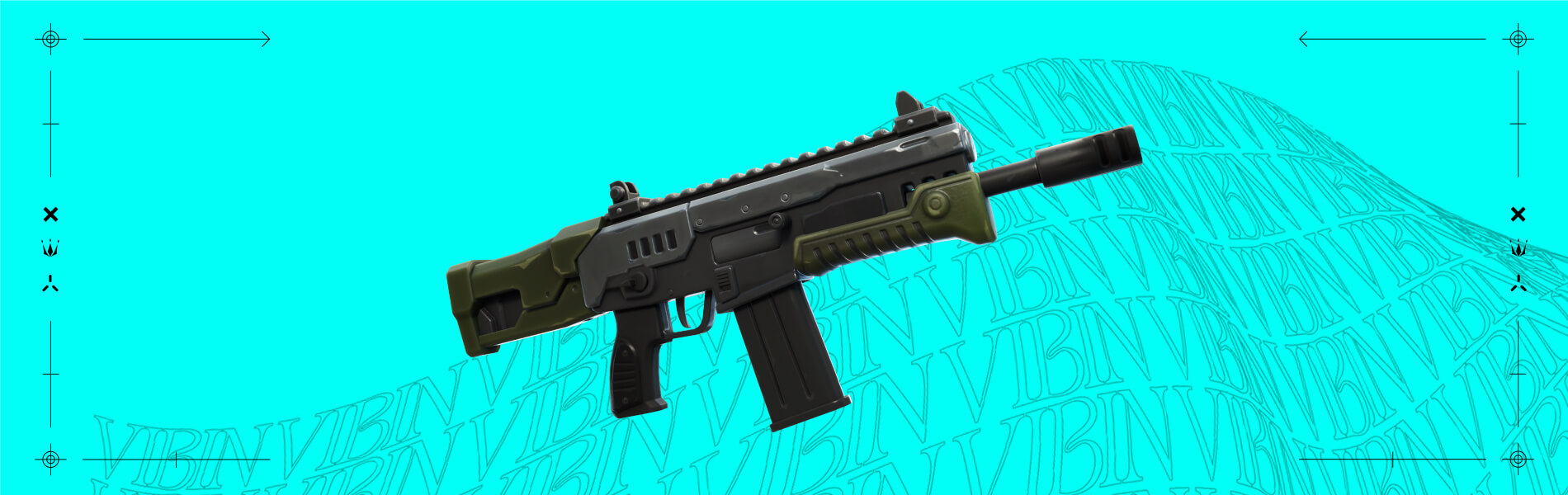
The Hammer Assault Rifle doesn’t just fire fast, but if you tame its unique recoil, you can be a force at many ranges!
THE CHAPTER 3 SEASON 2 RETURNERS
Sidearm Pistol
Revolver
Auto Shotgun
Striker Pump Shotgun
Stinger SMG
Combat SMG
Ranger Assault Rifle
Striker Burst Rifle
Heavy Sniper Rifle
Grenade
Firefly Jar
Harpoon Gun
Shadow Tracker (Exotic weapon)
Marksman Six Shooter (Exotic weapon)
The Dub (Exotic weapon)
Boom Sniper Rifle (Exotic weapon)
Shockwave Grenades (not technically a weapon, but hey)
Speaking of things returning, the Cow Catcher and Repair Tool — Chapter 3 Season 2’s unique utility items — are back in Season 3!
TEMPESTUOUS CONDITION
Just because the Island’s a party doesn’t mean the Storm has let up. In fact, it’s become even more dangerous! If you stay in the Storm too long cumulatively in a match, you’ll develop Storm Sickness, an ailment that accelerates the Storm’s decay of your Health.
But don’t worry: Storm Sickness never comes as a surprise — you’ll receive a warning if you’re close to getting it. And fortunately, the cure for Storm Sickness is simply exiting the Storm. If you re-enter it, however, it’ll immediately affect you again.
CHAPTER 3 SEASON 3 BATTLE PASS
Now’s not the time for dispute on the Island — bring different sides together! With this Season’s Battle Pass purchase, you can unlock Darth Vader himself plus the following characters preceding him:
Evie, unlocked immediately with the Battle Pass
Snap
Adira
Stormfarer
Malik
Sabina
Later on in the Season, you’ll be able to unlock world famous archaeologist Indiana Jones in the Battle Pass!
ASSEMBLE SNAP
There’s assembling different characters, and there’s also assembling Snap! You’ll find this Outfit on Page 1 of the Battle Pass, and when you unlock it, you’ll unlock Snap Quests too. These Quests become available throughout the Season. Upon completing one, it’ll reward a new part for Snap — mix and match different heads, arms, legs, and torsos.
DO THE (UNINTERRUPTED) SLIDE
Sliding’s gotten some improvements! When you slide off a shallow ledge, you’ll now continue sliding instead of returning to a standing position. Also, when you land into a slide at high speed, your momentum will be maintained.
COMPETITIVE NOTES
Reality Seeds, Reality Saplings, wolves, and Ballers are not included in competitive playlists.
Non-wolf wildlife and the Screwballer coaster are still included in competitive playlists.
Fortnite v21.00 List of Fixes:
Here are the issues addressed in v21.00 according to Epic Games (via the official Trello Board):
General:
Traps may sometimes not place immediately
Description
Players may find it difficult to place Traps when pressing the “place” button or key in rapid succession.
Workaround
Pressing and holding the place action will place a Trap after a short delay.
Enemy shots may not appear on the compass on HUD
Description
In some cases enemy shots marks do not appear on the compass on the player’s HUD
Creative:
Vending Machines
Description
We’re aware of an issue that is causing performance issues when using a vending machine while playing a Creative Island
Prop Mover doesn’t send to channel “When Player Hit Transmit On” event is triggered
Description
We’re aware of an issue that is causing the prop mover to not send to channel when first published.
Mobile:
The Android Store Selection option is missing
Description
The Android Store Selection toggle is missing from the Account and Privacy settings when players have the Samsung store selected as default
Unfortunately, Epic Games has not released what’s new for this season just yet, though you can check out what’s new in this season’s Battle Pass right here.
In addition to that, there’s a slew of datamined info which can be seen below.
Midas "died" at the start of C2S3 and we got a shadow version of him in C2S4 (Halloween), now the same thing happened with Slone and C3S4 will happen around Halloween. Do y'all think they'll do it again? 🤔
The Rideable Octopus thing is false, but Ballers will return next season and there will be rideable creatures (possibly Raptors) pic.twitter.com/jhenou1ykN
We're getting a DMR (Designated Marksman Rifle) in S3 👀
"It generally fills the range gap between a service rifle and a dedicated sniper rifle. DMRs, unlike the often bolt-action sniper rifles, are semi-auto as these have higher rates of fire and typically larger magazine" pic.twitter.com/xyjc8Np80n
"This device is a volume where you can place structures and props, then save the collection. If you need multiple groups of items that are all the same, you can copy and paste the device to place that grouping wherever you need it."
Reality Sapling Text: – You've picked up a Reality Seed! Plant it and nurture your sapling for increasing rewards!"
Rideable Animals Text: – Your companion is exhausted. Speed up it’s recovery by feeding it! – It's wild out here. Jump onto an animal's back to tame the beast.
Reality Sapling Text: – You've picked up a Reality Seed! Plant it and nurture your sapling for increasing rewards!"
Rideable Animals Text: – Your companion is exhausted. Speed up it’s recovery by feeding it! – It's wild out here. Jump onto an animal's back to tame the beast.
If you stay in the Storm too long cumulatively in a match, you’ll develop Storm Sickness, an ailment that accelerates the Storm’s decay of your Health. pic.twitter.com/H7HFrTggq2
The "Block v2 – Tilted Towers" Submissions have started!
– "Time to rebuild Tilted, and this time you are the architect. Design your own building to be constructed in the new Tilted Towers POI. Submit your building by June 13."https://t.co/7wu4ko1Wybpic.twitter.com/IiErHnZDhg
NEW FREE EMOTE – "Vibrant Vibin'" (Posted a video earlier)
Can be obtained via Twitch Drops (watching an fn stream for 30 minutes) from today until June 9th. You can find more invormation in the Twitch Drops section! pic.twitter.com/Tn6H5FS0Tg
We’ll have the offiical list of new stuff along with more datamined content as the day goes on, so stay tuned! Don’t forget to update this post from time to time until you see the “Update” in the headline that signifies we are done adding datamined content and such.
Update: We’ve updated the post with the official list of new content, fixes and the datamined info!
PlayStation just held its State of Play presentation for June 2022, revealing a bevy of new games alongside new trailers for previously announced ones. One surprising trailer was the new “Rollerdrome” from the studio behind the hit skateboarding indie earlier this year, OlliOlli World, Roll7.
Set within a dystopian future in the year 2030, Rollderdome sees players participating in a new bloodsport that combines roller-skating with guns. The trailer showed off the game’s sharp visual design and the action players can expect to partake in as they race around the maps and shoot different types of enemies that force you to adapt to their equipment. Even better, the game’s release date was announced as well and PlayStation players only have to wait until August 16 to try it out for themselves.
Here is what Roll7 has to say about the game themselves:
The year is 2030, and you are a competitor in a brutal new bloodsport – Rollerdrome. Combine stylish skate tricks with devastating slow-mo kills, picking your weapons with care to land the killing blow and make it to the end of the round… and maybe, with enough skill and hard work, to the end of the Championship. To survive the cutthroat world of Rollerdrome, you’ll need to know the rules of the sport and the skills required to give you a competitive edge
Skate or die: In Rollerdrome, slowing down or stopping is a sure-fire way to get yourself killed. Chase the adrenaline and keep up the pace at all times – you need to be constantly moving and carving paths through the arena. Focus on dodging enemy attacks and pulling off tricks – both will restock your ammo. You can fire at enemies to reduce their health and stagger them as you go, but don’t be tempted to stop moving!
Moves like stagger: Staggering enemies interrupts their attacks, and in the case of the Riot Guard (who protects himself with a large metal riot shield) will put them in a vulnerable state where they’ll take damage from all weapons.
Reloading: You gain ammo by performing tricks. The more complex the trick, the more ammo you’ll be able to gain. With the PS5 DualSense controller, you’ll be able to feel the lack of resistance in the trigger when you’re out of bullets – use this to your advantage to let you know when your clip is empty, and plan accordingly to keep your chamber full for next time.
Rollerdrome releases on August 16, 2022 for PlayStation 4 and PlayStation 5.
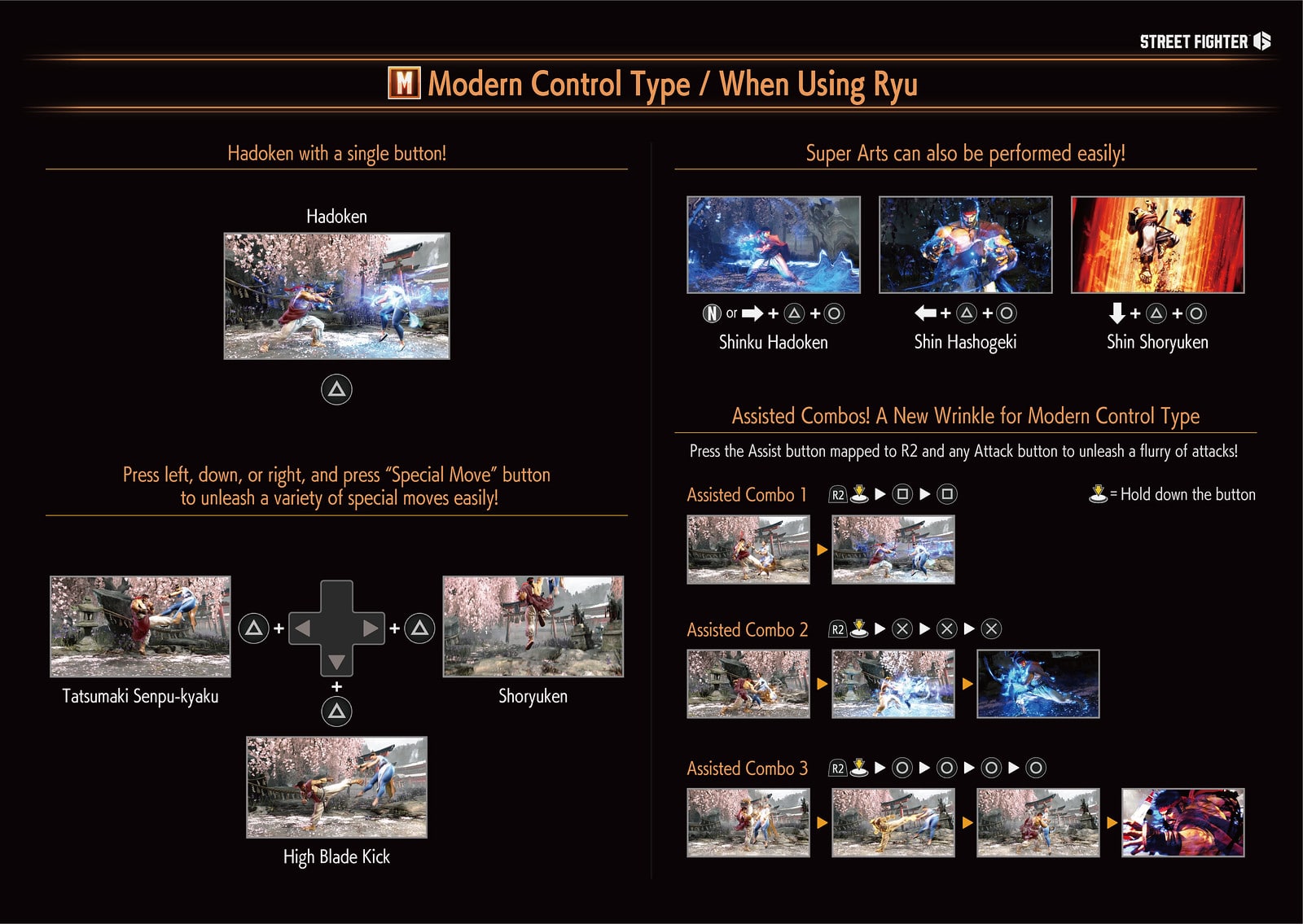
In Street Fighter 6, not only is Capcom set to introduce new levels, characters, moves and more into the franchise, but we’re also getting new control inputs as well! There is the “Classic Control” which long-time franchise should be familiar with, as well as the “Modern Controls,” for those who want to dip their toes in the Street Fighter pool but haven’t been playing the past few years (or this will be their first time).
Thankfully, while the game isn’t out yet, Capcom has given a detailed look at just how modern controls work! Check out the comparison and description below.
Street Fighter 6 Classic and Modern Controls Differences and Explanation:
A Modern Control Type for Everyone
For those who are worried that fighting game inputs are too complicated and just want to unleash your inner fighter, we have a solution in the form of a new control type option. First off, Classic Control Type is what veterans can expect to use for inputs with its six-button layout. New to Street Fighter 6 is the Modern Control Type, which allows for easier inputs where a special move can be performed by combining the “Special Move” button with one directional input. This is perfect for newer players or those who may have found classic command inputs a bit too difficult in the past. With the Modern Control Type, your character will perform some of their flashiest (and best) attacks with just a few button presses. Modern Control Type is optional, but we highly recommend new players give it a try!
SF6 Classic Control Type:
SF6 Modern Control Type:
Aside from the new control method, there’s also a new commentary feature, a Battle Hub and more! Check out the (leaked) roster of characters confirmed coming to the game right here.
For those trying to login to Fortnite but having issues, it’s not you, but Fortnite down reports have surfaced this June 4, and this is all about Chapter 3 Season 3’s launch! Epic Games has triggered downtime on the servers and you can check all the updates below.
Fortnite Down Status and Updates for June 4:
Update (June 5): Epic Games has announced that the maintenance and server outage is now over! Check out the patch notes, list of new content and datamined info right here!
Downtime for Chapter 3 Season 3 has ended. Here’s what’s new!
As we get ready for the Chapter 3 Season 2 end event, please note other playlists will be disabled before ‘Collision’ is available. (1/2)
✅ Except for Battle Royale and Competitive playlists, all other Games In Discover will be disabled at 2:00 PM ET
✅ Competitive playlists will be disabled at 3:00 PM ET
✅ Doors open for the Collision playlist at 3:30 PM ET
(2/2)
As you can see, there is some downtime happening for certain modes, and we should be getting a massive patch to usher in the new content for the new season.
Having said that, there is an event happening, which you can tune in below to keep track of what’s happening:
No, you’re not reading that title wrong at all, we really did manage to recreate Insomniac Games’ Marvel’s Spider-Man 2 reveal trailer with functional haptic feedback. Is your Spidey Sense tingling with curiosity? Here’s how you can experience it.
How It Came to Be
Last month, we published an article that dove a bit into the PS5’s DualSense controller and the way developers were utilizing the haptic feedback to create a more immersive experience. In what essentially started off as an experiment, we published a video showcasing those very haptics in a game that was designed specifically for that, Astro’s Playroom.
I noted that the audio capture wasn’t at all perfect at the time of making that video, and since then, I’ve discovered a better means of capturing haptic feedback that I feel is closer to the raw output of the controller. This has made me want to keep experimenting, looking at some other titles, those mostly being first-party, to see exactly how other studios were making use of it. And while I am currently working on another deep dive, a thought did come across my mind. Would it be possible to play back and force haptics into the DualSense controller? Well, that was an answer that was already answered way back during the PS5’s launch.
Shortly after the console and DualSense controller became available to the public, many were quick to discover that it was entirely possible to send audio to the DualSense and have it played, not through its speakers, but through its haptic motors. By simply connecting the DualSense to a PC via USB and changing the audio properties to output to the DualSense, one could technically play a PC game, movie, and/or music, and get some forced feedback as the audio translates into the controller and outputs using its internal motors. It’s rather neat, but not entirely practical, as feedback takes all audio sources into consideration rather than those triggered by a specific action.
What that means is that the haptic you feel isn’t entirely based on an action. For example, let’s say you’re playing Call of Duty on the PS5. When you shoot, you get some form of feedback out of the controller to emulate the sounds of bullets. If you tried doing this on an unsupported title on PC you might get the same response, but if a scene has music playing, the character and other NPCs speaking, or other sounds outside of shooting, it all gets taken into account. This can translate to the feedback being distorted as it doesn’t know exactly what to focus on so it tries to play it all at once. So this method isn’t at all ideal unless the game in question has DualSense and haptic support from the get-go.
The other thing is, just because you hear it on screen doesn’t mean it’s going to be the same type of sound used in the haptics. For games that I found that truly took advantage of the DualSense, a lot of the on-screen sound differed to the ones heard from the haptics. That should come to no surprise because the intention of the controller isn’t to produce what you hear on screen, but to give you a sense of what that particular action might feel like through the form of haptic feedback.
Take this clips from Marvel’s Spider-Man Miles Morales and Ratchet and Clank Rift Apart that we recorded and compare how different the in-game sound is to what you hear on the controller.
See? Completely different, right?
To make a long story short: at one point during my audio recording (deep dive of that coming at a later date) of both Spider-Man PS4 and Spider-Man Miles Morales, I realized I had enough to reconstruct certain scenes with haptics. I first toyed around with the remaster, adding new haptics, because as it stands, it’s pretty standard compared to the massive leap that Miles Morales has. I was pretty happy with the recreated scenes I did, which you’ll see in another article later this year.
However, because I was in the process of recording the vibrations directly from the DualSense, I was curious to see if those recorded audio cues would playback through the controller and supply the exact feedback originally given from when they were produced on the PS5. And to my surprise, it did, or at least close to the original feedback.
Before You Play The Trailer, You’ll Want to Do These Things
Alright so before we jump into the trailer, there are a couple of things you’ll want to do first. Since this is about the DualSense controller and its haptic feedback, the trailer isn’t really intended to be played directly through headphones or external speakers. Because of that, you’ll need the following:
A DualSense controller
A USB cable to connect the controller to a PC
A Desktop PC or laptop
Changing your audio settings, or using a third party application such as DualSenseX, or another app that makes it easy to enable haptic audio
VLC player if you want to play the trailer with its original audio and haptics at the same time
There are different ways to enable haptic audio for the DualSense on PC. If you are someone who doesn’t want to use a third-party app, you can follow this video guide. However, we found using a third-party application to be more straightforward without messing with our PC settings directly, so in this case we’ll look at setting up with the DualSenseX application, which you can download here.
Once you’ve installed the application, you’ll want to connect your DualSense controller via USB cable. The application should detect it and you should now have access to all the settings. You are going to want to navigate to the settings tab, and then select the controller menu. You should see the option to enable audio haptics, toggle it. You are also going to want to choose a default audio. If youwant to play the trailer with its original audio while experiencing haptics, you will need to choose a different audio that is on its own channel.
If you’re stuck with the default and don’t care about playing the trailer with its original audio, you should be all set to play the trailer now, which is below. Otherwise, you can download both the original trailer and edited trailer if you are interested in playing the trailer with both haptics and original audio. You can download the pack we made here: Marvel’s Spider-Man 2 PS5 Trailers
I’m not too familiar with a lot of video playback applications out there, so we’ll be using VLC. If you don’t have VLC you can download that from here: VLC Player
Open it up, and navigate to tools, then preference. This will open a new window with additional settings. You should be in the interface tab, you’ll want to be sure that the “Allow only one instance” box is unchecked, otherwise you won’t be able to open two videos at once.
Once you have done this, open both videos up, and pause them. Going back to the DualSenseX app, double check what audio you have selected for the output, then go to the video that features the haptic audio. If you right click it and then go to audio, and then audio devices you can select to output the audio to a different source. Make sure this is the one your DualSense controller is set to, and different then what your speakers or headphones are set to.
If you did it right, you should be able to play the trailer modified with haptics playing through the controller instead of your speakers. The original trailer should have audio playing through your speakers or headphones. The tricky part here is positioning the windows so you can hit play at the same time so that they are in sync, otherwise you are all set to experience the trailer with haptic feedback!
Finally, here is the Marvel’s Spider-Man 2 trailer with full haptic feedback. Be sure to keep on watching after the trailer for a full breakdown of where we captured each haptic audio.
Marvel’s Spider-Man 2 Haptic Feedback Trailer
Pretty cool right? Stay tuned for more haptic feedback mix ups here on MP1st!
A gamer at heart, James has been working for MP1st for the last decade to do exactly what he loves, writing about video games and having fun doing it. Growing up in the 90's gaming has been in his DNA since the days of NES. One day he hopes to develop his own game.
Following the Street Fighter 6 roster leak yesterday, it seems more leaks are starting to seep their way out, as Street Fighter 6 leaked gameplay has surfaced, and it features Ken vs. Cammy! Note that this is blurry, off-cam footage, and as such, do not expect much from it.
Street Fighter 6 Leaked Gameplay:
https://www.youtube.com/watch?v=SUMzlXnsFuM
In a move not common in the video game world, Capcom has outright acknowledged and confirmed the leaks! The company even thanked fans for the positive feedback from it, too.
As residents of Metro City, we’ve all seen things we weren’t supposed to see, but we're all in this together. We appreciate all the positive reactions. Thank you for the support!
As residents of Metro City, we’ve all seen things we weren’t supposed to see, but we’re all in this together. We appreciate all the positive reactions. Thank you for the support!
For some of the new gameplay features in Street Fighter 6, check out the info straight from Capcom:
Battle System Built for Creativity
With every new Street Fighter comes mechanics you can master to rise to the top. Introducing, the Drive System, a gauge you’ll need to manage wisely and one that is ripe with creativity. You can utilize the Drive Gauge to perform five different techniques that can easily enhance your offense or defense.
A Drive Impact is a powerful strike that can absorb an opponent’s incoming attack and can lead to a wall splat. Use Drive Parry to repel your opponent’s attack and refill your Drive Gauge. Cancel out of a Drive Parry or normal attack into a Drive Rush to quickly close in on your opponent. Overdrive Arts are similar to EX Moves from past games that power up your Special Moves. Use Drive Reversal to perform a counterattack to get you out of tight situations. One gauge, five techniques, unlimited possibilities. Use your creativity to choose which technique to utilize and when. It’s all in your hands!
Drive System Overview
A Modern Control Type for Everyone
For those who are worried that fighting game inputs are too complicated and just want to unleash your inner fighter, we have a solution in the form of a new control type option. First off, Classic Control Type is what veterans can expect to use for inputs with its six-button layout. New to Street Fighter 6 is the Modern Control Type, which allows for easier inputs where a special move can be performed by combining the “Special Move” button with one directional input. This is perfect for newer players or those who may have found classic command inputs a bit too difficult in the past. With the Modern Control Type, your character will perform some of their flashiest (and best) attacks with just a few button presses. Modern Control Type is optional, but we highly recommend new players give it a try!
Street Fighter 6 is set for release in 2023 for the PS4, PS5, Xbox platforms and PC.